Alexintech's Posts
Nairaland Forum › Alexintech's Profile › Alexintech's Posts
1 2 (of 2 pages)
 Phones › How To Run Android Os On Your Computer by alexintech(op): 4:22pm On Jan 27, 2016 Phones › How To Run Android Os On Your Computer by alexintech(op): 4:22pm On Jan 27, 2016 |
Lately i wrote a post on how you can run android OS on your computer with Remix OS, and the official date for the download link. Now you will be able to download Remix OS and run it on any x86 computer for free. Now all you have to do, is to have: continue to get the download link........www.alexintutor.com/2016/01/how-to-run-android-os-on-your-computer.html |
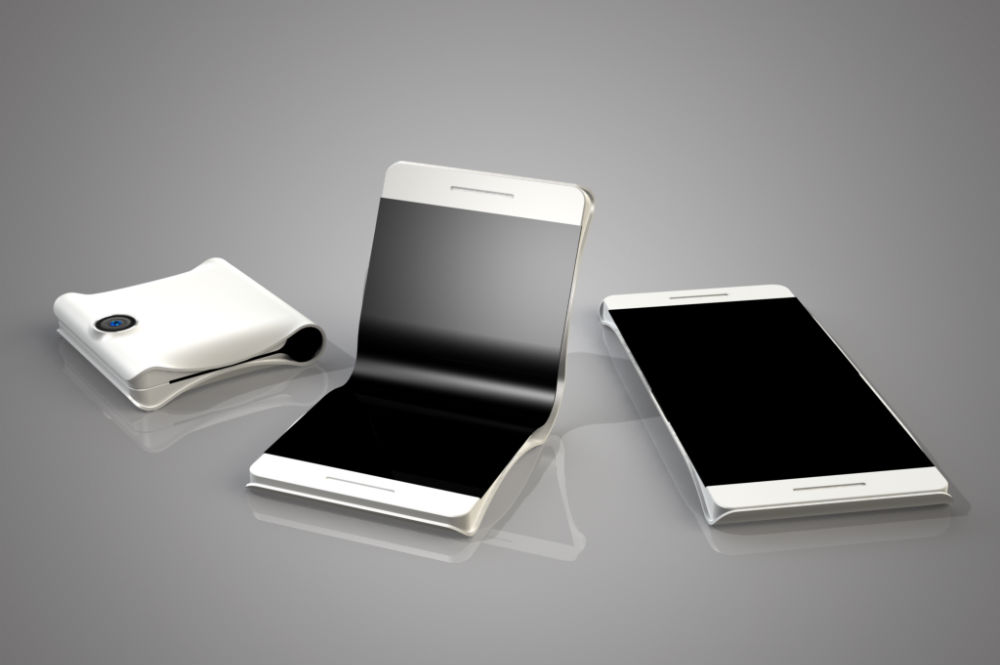
| Webmasters › SAMSUNG TO LAUNCH “FOLDABLE” SMARTPHONE IN 2016 by alexintech(op): 4:09pm On Jan 27, 2016*. Modified: 8:57am On Jan 28, 2016 |
Claimed by the source, Samsung is currently testing two models of the device, one with a Snapdragon 620 processor, and another with the top-tier Snapdragon 820 processor. Other specs could include 3GB of RAM, built-in battery (non-removable), and microSD slot. The idea of a foldable smartphone is not new, as countless design renders and concepts have been published over the years, but it has taken quite some time for display and component technology to catch up to our imagination. It is not yet known if Samsung intends to announce foldable display technology, or the device will merely feature two separate displays, attached by a type of hinge mechanism. Regardless, the idea is neat, but we have yet to see if it translates well to real-world usage. https://www.droid-life.com/wp-content/uploads/2015/09/Foldable-Phone.jpg check it the source www.alexintutor.com/2015/09/samsung-to-launch-foldable-smartphone.html |
| Phones › How To Root And Unroot Xiaomi Mi 4 by alexintech(op): 2:43pm On Jan 27, 2016 |
Xiami mi 4 is one of the best-selling and value for money smartphone currently available in market, it comes with power-packed hardware & amazing software and is currently priced at Rs.17,999 in India for the 16 GB version, while the 32 GB version is priced at Rs.21,999. Xiaomi Mi 4 runs Android 4.4.4 KitKat out of the box (with promised Lollipop update in near future) topped with Xiaomi's custom ROM, MIUI 6. Xiaomi is very open when it comes to Rooting the device, they even offer support and does not void warranty in case you mess up the device when rooting. Also Rooting Xiaomi device is very simple and has a very low chance of messing things up. Today I'm going to teach you, How to Root Xiaomi Mi 4 and How to UnRoot it. Now you continue.......www.alexintutor.com/2016/01/how-to-root-and-unroot-xiaomi-mi-4.html
|
| Phones › Re: Infinix Hot 2 Problems by alexintech(m): 10:30am On Jan 27, 2016 |
Sorry about dat, incase it dose it does not hve a removable battery u can still power it off for 5 sec. And try the above solution. Thanks |
| Phones › Re: Infinix Hot 2 Problems by alexintech(m): 10:25am On Jan 27, 2016 |
If it does not have a removable u can still do that by powering it off and wait for about 5 sec. Then try the solution above it wud still work |
| Phones › Re: Infinix Hot 2 Problems by alexintech(m): 9:59am On Jan 27, 2016*. Modified: 10:39am On Jan 27, 2016 |
You dont have to worry about that all you have to do is power off your device, wait for about 5 sec. Now hold down the volume up key and the power key all together untill it come up, and enters the factory mode, now in this section you use the volume down key to scrow around and use the volum up key to select, so now scrow to wipe cach and select that, if done now selecte reset to factory setting or similar to that if done, then remove your battery and replace it the power ur device nomal. If it works you let me knw in this section you can still visit my site for more www.alexintutor.com |
| Phones › HOW TO CUSTOMIZE ANDROID MARSHMALLOW’S QUICK SETTINGS TRAY by alexintech(op): 1:59pm On Jan 26, 2016*. Modified: 11:34am On Jan 27, 2016 |
Android’s Quick Settings tray isn’t new in Marshmallow, but tucked away in the bowels of Google’s new mobile OS is a hidden feature that lets you customize what appears there. It’s a useful tool if you don’t want certain items you’ll never use taking up space in the Quick Settings tray, or if you want to rearrange the icons so that the shortcuts you use most often are in an easy-to-reach place. It takes a little trickery to get to this feature, but it’s still easy enough to get to. First, you need to enable Android Marshmallow’s System UI Tuner. To do so, first swipe down from the top of the screen to open the notification drawer, then swipe down again to open the Quick Settings tray (or, swipe down with two fingers). Next, press and hold the gear icon in the upper right corner for a few seconds until the gear icon starts spinning. Release your finger, and you’ll be presented with a message telling you that System UI Tuner is up and click to contineu www.alexintutor.com/2015/10/how-to-customize-android-marshmallows.html |


1 2 (of 2 pages)