OnlineMercenary's Posts
Nairaland Forum › OnlineMercenary's Profile › OnlineMercenary's Posts
 Webmasters › Re: Ask Any Question On Blogging, SEO, Web & Social Media - OnlineMercenaries by OnlineMercenary(op): 11:27am On Jul 29, 2016 Webmasters › Re: Ask Any Question On Blogging, SEO, Web & Social Media - OnlineMercenaries by OnlineMercenary(op): 11:27am On Jul 29, 2016 |
teenagetalks:To make your ads show on mobile devices, simply make sure the ads are responsive. |
| Webmasters › Re: Ask Any Question On Blogging, SEO, Web & Social Media - OnlineMercenaries by OnlineMercenary(op): 11:23am On Jul 29, 2016 |
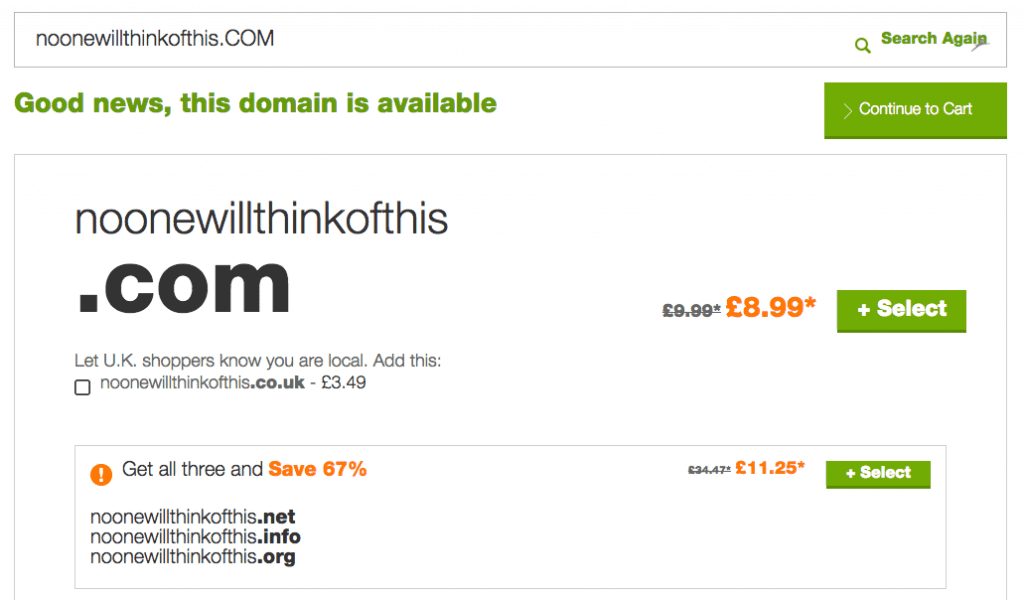
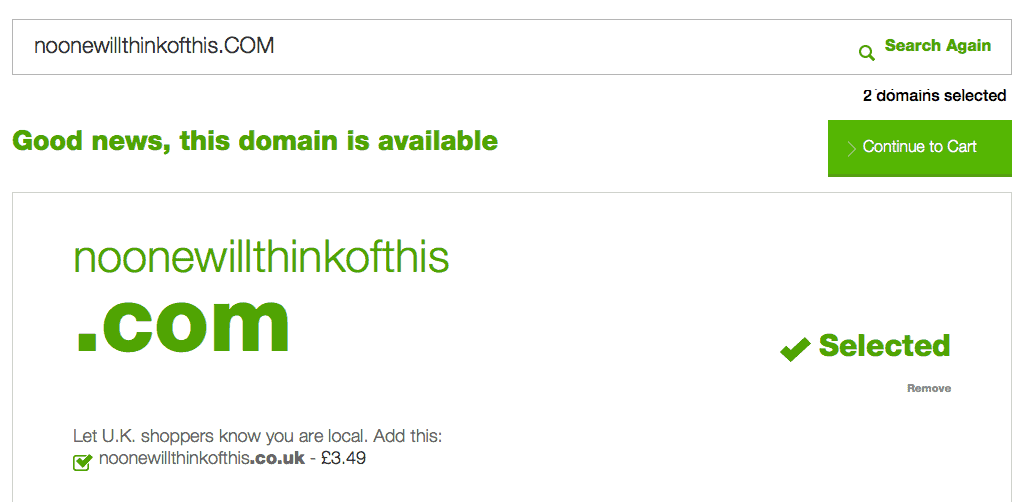
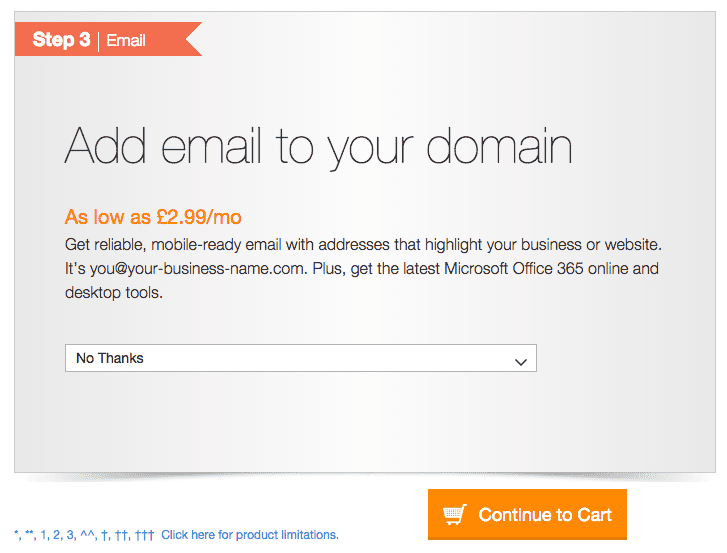
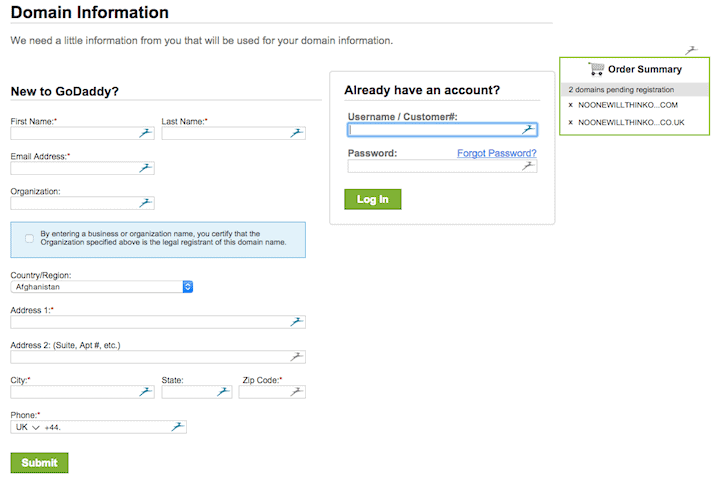
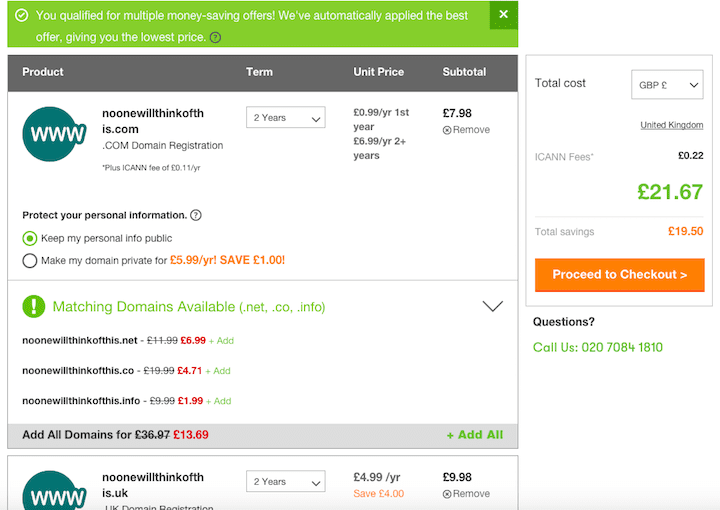
teenagetalks:HOW TO GET A DOMAIN NAME ON GODADDY What is a Domain Name? A domain name is an essential for a website. This is the human-readable address of your site – without one, your website would just be found by a string of numbers representing the computer it’s on. Buying domains with GoDaddy Go to uk.godaddy.com and search for the domain name you want (the middle part). Double-check the spelling. I’ve searched for noonewillthinkofthis. Make sure the domain name you want is actually available, otherwise you cannot buy it! In this case, it is available. GoDaddy asks if you want to get the .com version (the default). It also asks you if you want to buy the .co.uk as well, plus 3 other variants. https://www.abrightclearweb.com/wp-content/uploads/2015/02/select-domains-1024x600.png Select the domain types you want. In this case, I want the .com and the .co.uk. This means clicking on the green button for the .com and checking the checkbox for the .co.uk. If you want the .co.uk, it’s important to add the .co.uk domain name at this stage, as GoDaddy does not give you the option to add this domain name extension later on. Make sure that the page says the correct number of domains are selected i.e. 2 for this example. Then Continue to Cart. https://www.abrightclearweb.com/wp-content/uploads/2015/02/2-domains-selected.png On the next screen, you will be asked if you want domain privacy. This hides your personal information from view from anyone searching for the owner of a domain. You can enable this if you choose, but it costs at least £5.99 every year. I don’t think it’s necessary, and there are some caveats. Ignore the options for hosting and email (scroll down the page) and click the orange Continue to Cart button at the bottom. https://www.abrightclearweb.com/wp-content/uploads/2015/02/Continue-to-cart.png Register to create an account, or log in if you are an existing customer. https://www.abrightclearweb.com/wp-content/uploads/2015/02/Domain-Information.png On the next screen, you will be asked to review your purchase. Scroll down the page and you can enter a discount code if you have one. You can check here. https://www.abrightclearweb.com/wp-content/uploads/2015/02/promo-code.png Scroll back up and check that you have the correct domains. The default is to register them for 2 years, but you can change this number to 1, 3, 5 or 10 – it’s up to you. https://www.abrightclearweb.com/wp-content/uploads/2015/02/domains-ready-to-pay.png When you are happy, proceed to the checkout and pay. Whew! You’re done – for now. You should receive a confirmation email telling you what you’ve bought and giving you your customer number. Keep this and your password safe (or use a password manager). I hope this has helped you learn about registering a domain name with GoDaddy. |
| Webmasters › Re: Wordpress Homepage Blank by OnlineMercenary: 9:50am On Jul 29, 2016 |
ninelives:Here is a checklist. - Try deactivating the theme, switch to default wp theme, it that work, then the problem is with your theme. - Check if there is index.php in your theme files, try uploading it again. - deactivate all plugins to see if this resolves the problem. If this works, re-activate the plugins one by one until you find the problematic plugin(s). Try those. On the off chance that you are still bugge,d ask your questions here >>> https://www.nairaland.com/3207887/ask-question-blogging-seo-web Hope this helps. |
| Webmasters › Re: Ask Any Question On Blogging, SEO, Web & Social Media - OnlineMercenaries by OnlineMercenary(op): 9:39am On Jul 29, 2016 |
Aare2050:Alright sir. |
| Webmasters › Re: Ask Any Question On Blogging, SEO, Web & Social Media - OnlineMercenaries by OnlineMercenary(op): 10:37am On Jul 28, 2016 |
Aare2050:Hello, we shall deal with your request one after the other. 1. how can I add the following to my blog.... A) Log in to your blogger account and click on your blog. 2. can you direct me to someone that can do the domain name and SEO for me at not too cost price?This, we can do for you. Check signature for our contact details. 3. can I blog on romantic stories, base on true life and fictions Ofcourse you can, it's a very good niche that attracts loads of audience. Best way to promote this kind of blog is Facebook. Hope this helps. |
| Webmasters › Re: Ask Any Question On Blogging, SEO, Web & Social Media - OnlineMercenaries by OnlineMercenary(op): 10:31am On Jul 28, 2016 |
MRXELA:Hello, see this checklist. - How old is your blog? - If not more than a month or two, kindly be patient. - Have you submitted your blog to search engine webmasters? - If not, see this guide. - Have you tried getting some backlinks? - First tin first, put your blog url on your Nairaland signature. Hope this helps. |
| Webmasters › Re: Ask Any Question On Blogging, SEO, Web & Social Media - OnlineMercenaries by OnlineMercenary(op): 10:27am On Jul 28, 2016 |
bjstardom:Hello, the bolded is what you should do. Meanwhile, we will advise you make use of a custom domain name, it makes you look serious and real. A domain on 1and1 is something less than #500, a domain on godaddy with coupon code is less than #300. Kindly consider that. Hope this helps. |
| Webmasters › Re: Ask Any Question On Blogging, SEO, Web & Social Media - OnlineMercenaries by OnlineMercenary(op): 10:23am On Jul 28, 2016 |
Jejelomoekonlo:We make use of a premium plagiarism checker, here is it. But you can try [url=https://www.grammarly.com/plagiarism?q=plagiarism&utm_source=google&utm_medium=cpc&utm_campaign=Search&utm_content=56705405886&utm_term=plagiarism%20checker&matchtype=e&placement=&network=g&gclid=Cj0KEQjw2ua8BRDeusOkl5qth4QBEiQA8BpQcA8A8U4wUlIaBQeOObz1ad_N3_y9KxJX672JpfKSJFgaAjJE8P8HAQ]this free one on gramarly[/url]. Also you can make use of copyscape.com Quick one : You can copy a paragraph of the post and put it on google search, it will display other websites with same content. Hope this helps. |
| Webmasters › Re: Ask Any Question On Blogging, SEO, Web & Social Media - OnlineMercenaries by OnlineMercenary(op): 10:41am On Jul 27, 2016 |
HenryDion:Hello, if you are working on a low budget to start with, use namecheap. Else, use Vastgig.net. |
| Webmasters › Re: Ask Any Question On Blogging, SEO, Web & Social Media - OnlineMercenaries by OnlineMercenary(op): 10:41am On Jul 27, 2016 |
Jejelomoekonlo:To get Godaddy coupon codes, Check Here. Meanwhile, your blog has a couple of copied contents so might not be considered unique. Thanks. |
| Webmasters › Re: Ask Any Question On Blogging, SEO, Web & Social Media - OnlineMercenaries by OnlineMercenary(op): 5:29pm On Jul 26, 2016 |
HenryDion:Nice design and originality. Keep it up. For now, try and get a domain, it does cost more than #2500 on average. Thanks. |
| Webmasters › Re: Ask Any Question On Blogging, SEO, Web & Social Media - OnlineMercenaries by OnlineMercenary(op): 5:28pm On Jul 26, 2016 |
Jejelomoekonlo:Hello, Judgng from sight seeing, your website is in good condition, the only thing you require is patience. Wait for google to discover your site very well and as well crawl your content comfortably. Meanwhile, you can checkout this article on How to Get Google to Index Your New Website & Blog Quickly Hope this helps. |
| Webmasters › Re: Ask Any Question On Blogging, SEO, Web & Social Media - OnlineMercenaries by OnlineMercenary(op): 5:05pm On Jul 26, 2016 |
henrimoto:Hello, Judging from your sentence, you made mention of "blog". So I would assume you are most probably using either wordpress or blogger platform. Therefore, the information below will cover both sides. For Wordpress - 95% of wordpress themes these days are mobile responsive automatically, so you wont need to bother. Meanwhile if you are not satisfied with the display, you can make use of wptouch, it's a wordpress plugin that gives your website a totally new responsive look on mobile devices. For Blogger - Option #1: Enable default mobile template Do you know there are already 8 build in mobiles templates available on blogger platform? I’m sure many of you haven’t seen it yet. Simply activating one of them will do the trick. By activating any of them, your site will automatically render the mobile theme for the mobile queries. Actually, when a phone user will surf the site, it will redirect to the stringed url like http://yourdomain.com/?m=1. In fact, you can test a mobile site on the desktop just defining the string ?m=1 in the urls. Here is how you can do it: Navigate to Blogger Dashboard > Template. Click the gear icon for the mobile. Now select “Yes. Show mobile template on mobile devices.” and choose your theme. Click the save button. https://cdn.bloggingspell.com/wp-files/uploads/2014/11/choose-default-mobile-template.jpg Option #2: Make Your Template Responsive Option #3: Create an app for mobile devices Now it's up to you, hope this helps. |
| Webmasters › Re: Ask Any Question On Blogging, SEO, Web & Social Media - OnlineMercenaries by OnlineMercenary(op): 8:56am On Jul 26, 2016 |
We are willing to help, ask questions. |
| Webmasters › Re: Ask Any Question On Blogging, SEO, Web & Social Media - OnlineMercenaries by OnlineMercenary(op): 8:54am On Jul 26, 2016 |
sneakerblogger:Hello, As a tech blogger, you are expected to blog majorly on tech products, reviews and news. To get news without copying from other blogs, stay close to social media pages of tech companies and watch their updates, then derive news from there. This might be stressful but at least it's a step towards uniqueness and independence. If they have websites, you can also visit their websites occasionally. That's how big tech companies get their publications. |
| Webmasters › Re: I Need A Professional Tutor On Web Designing. I Will Pay! by OnlineMercenary: 9:35pm On Jul 25, 2016 |
Donald7610:Kindly understand that learning web design is quite different from learning wordpress as a CMS. And it is always advisable to get a grasp of basic web designing before making use of CMS. Meanwhile, OP, this thread might be useful >>> https://www.nairaland.com/1383359/learn-web-design-live-nairaland Hope this helps. |
| Webmasters › Re: Is It Possible To Pay For A Foreign Domain name In Nigeria by OnlineMercenary: 8:06am On Jul 25, 2016 |
robot1:Normal account, any master card, any bank. |
| Webmasters › Re: Differences Between Http And Https Websites by OnlineMercenary: 9:57pm On Jul 24, 2016 |
Using HTTPS, the computers agree on a "code" between them, and then they scramble the messages using that "code" so that no one in between can read them. This keeps your information safe from hackers. 22 Likes 1 Share |
| Webmasters › Re: Is It Possible To Pay For A Foreign Domain name In Nigeria by OnlineMercenary: 9:53pm On Jul 24, 2016 |
robot1:Quite sure, you can use Paypal. As well, you can use your Mastercard or Visa card. |
| Webmasters › Re: Ask Any Question On Blogging, SEO, Web & Social Media - OnlineMercenaries by OnlineMercenary(op): 9:50pm On Jul 24, 2016 |
alexisgist:Nothing is considered impossible, but without quality content, applying for google adsense is more like throwing something against a wall and watching it come back at you. Best practice, work on your content and make sure they are of high quality before you consider adsense application. Hope this helps. |
| Webmasters › Re: Ask Any Question On Blogging, SEO, Web & Social Media - OnlineMercenaries by OnlineMercenary(op): 9:46pm On Jul 24, 2016 |
codimendez:Hello, the idea is pretty straight. If you do not want the video to consume your disk space then you might need to introduce a third party, which in this case are Youtube, Vimeo or any other video serving platform. |
| Webmasters › Re: How Do I Change My Facebook I.D by OnlineMercenary: 9:44pm On Jul 24, 2016 |
Menh:To request a change to your Page's name: Click About on the left side of your Page. Click Page Info. Hover over the Name section and click Edit. Enter a new Page name and click Continue. Review your request and click Request Change. |
| Webmasters › Re: 1and1.com Domains Users ,come In by OnlineMercenary: 9:34pm On Jul 23, 2016 |
Emmysky:1AND1 is the worst hosting company you can ever think of, there customer support is too poor. Just wait, till they set up your domain. |
| Webmasters › Re: Ask Any Question On Blogging, SEO, Web & Social Media - OnlineMercenaries by OnlineMercenary(op): 9:33pm On Jul 23, 2016 |
Don't feel reluctant, drop your question. |
| Webmasters › Re: How Do I Change My Facebook I.D by OnlineMercenary: 9:31pm On Jul 23, 2016 |
I guess your question is - HOW TO CHANGE YOUR FB USERNAME / URL ? 1.) Sign into your Facebook account. 2.) Go to Facebook username changing page. 3.) Type the username you want for your profile, check if its available. If it’s available click on create. Alternatively you can select any of the usernames that Facebook suggests. Choose an username carefully! 4.) Click on Confirm. Think twice before clicking on this button! You will not be able to change your username later! And do not worry! Even your older profile URL / username will redirect to your new profile URL / username! Now you have your own unique and easy to remember Facebook username. Enjoy the new username! If you have other similar questions, ask here >>> https://www.nairaland.com/3207887/ask-question-blogging-seo-web Hope this helps. |
| Phones › Re: What Song Is Your Current Incoming Call Notification Alert Tone? by OnlineMercenary: 9:20pm On Jul 23, 2016 |
Life is worth living - Justin Beiber |
| Health › Re: Twins Jessica And Jessilove Oduro Buried by OnlineMercenary: 1:42pm On Jul 22, 2016 |
RIP to the dead. |
| Programming › Re: I Need A Good Software Developer by OnlineMercenary: 1:32pm On Jul 22, 2016 |
Impera:Reach us on info[at]onlinemercenaries.com |
| Programming › Re: Nairaland Homepage Concept UI. by OnlineMercenary: 1:32pm On Jul 22, 2016 |
Very nice one on there. |
| Webmasters › Re: Ask Any Question On Blogging, SEO, Web & Social Media - OnlineMercenaries by OnlineMercenary(op): 1:27pm On Jul 22, 2016 |
sneakerblogger:Only possible if you are a well known car blogger, when I say well known, I mean very very well known. Concerning where to get news, stay close to forums and other blogs and most importantly, stay close to car brands' websites. |
| Webmasters › Re: Ask Any Question On Blogging, SEO, Web & Social Media - OnlineMercenaries by OnlineMercenary(op): 1:26pm On Jul 22, 2016 |
sneakerblogger:Getting pageviews depends on you, your consistency, your originality, your publicity and your patience. |