Comparisonhuawei Harmonyos 2.0 Vs Samsung One UI 4.0: Quick Settings Panel - Phones - Nairaland
Nairaland Forum › Science/Technology › Phones › Comparisonhuawei Harmonyos 2.0 Vs Samsung One UI 4.0: Quick Settings Panel (2224 Views)
| Comparisonhuawei Harmonyos 2.0 Vs Samsung One UI 4.0: Quick Settings Panel by HisExcellence(op): 1:46pm On Jan 04, 2022 |
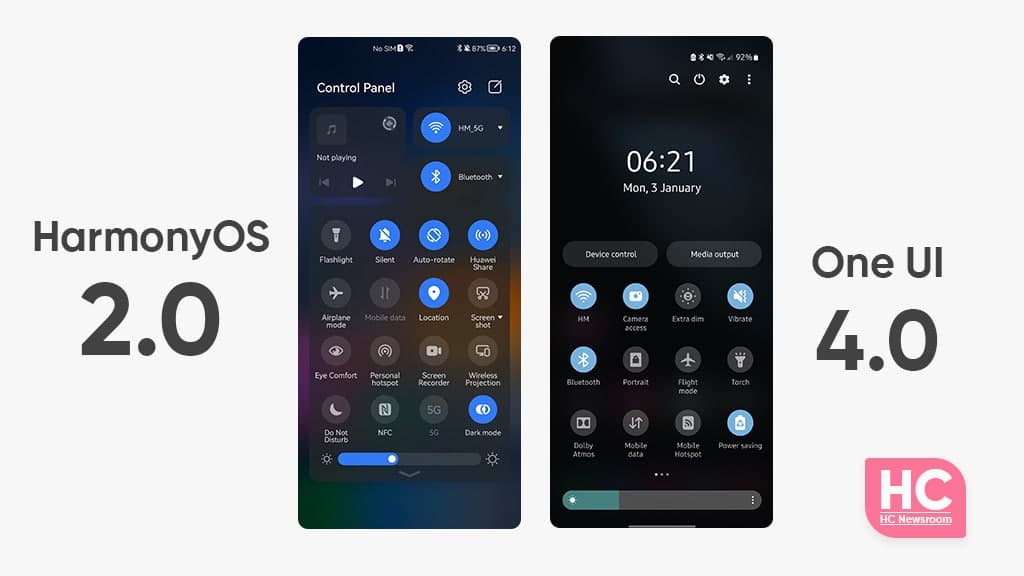
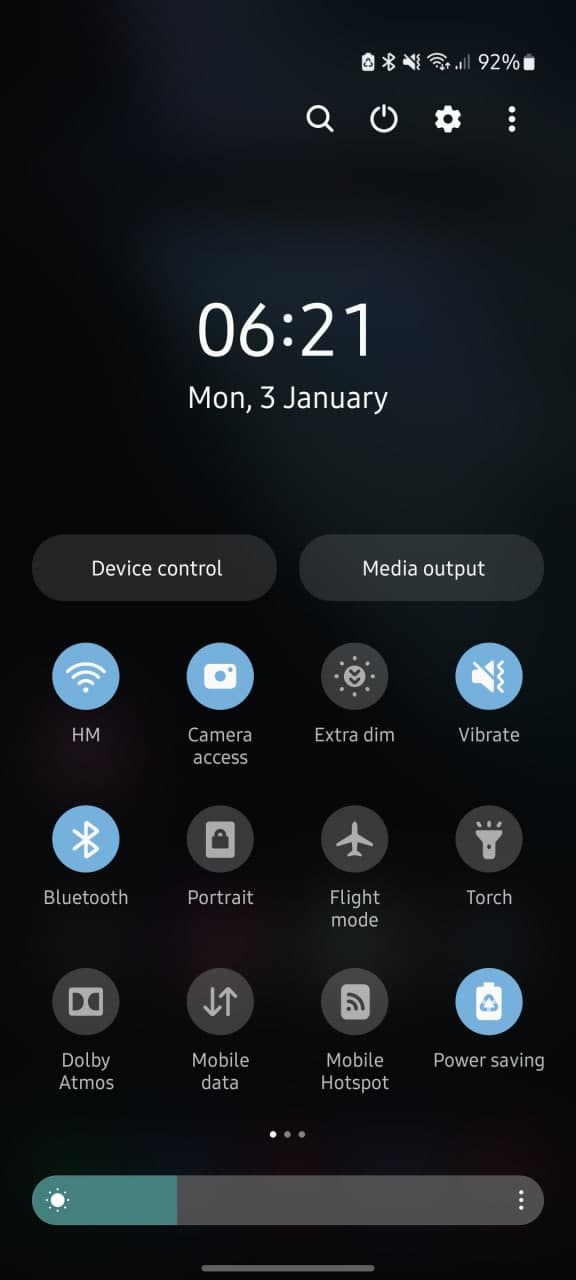
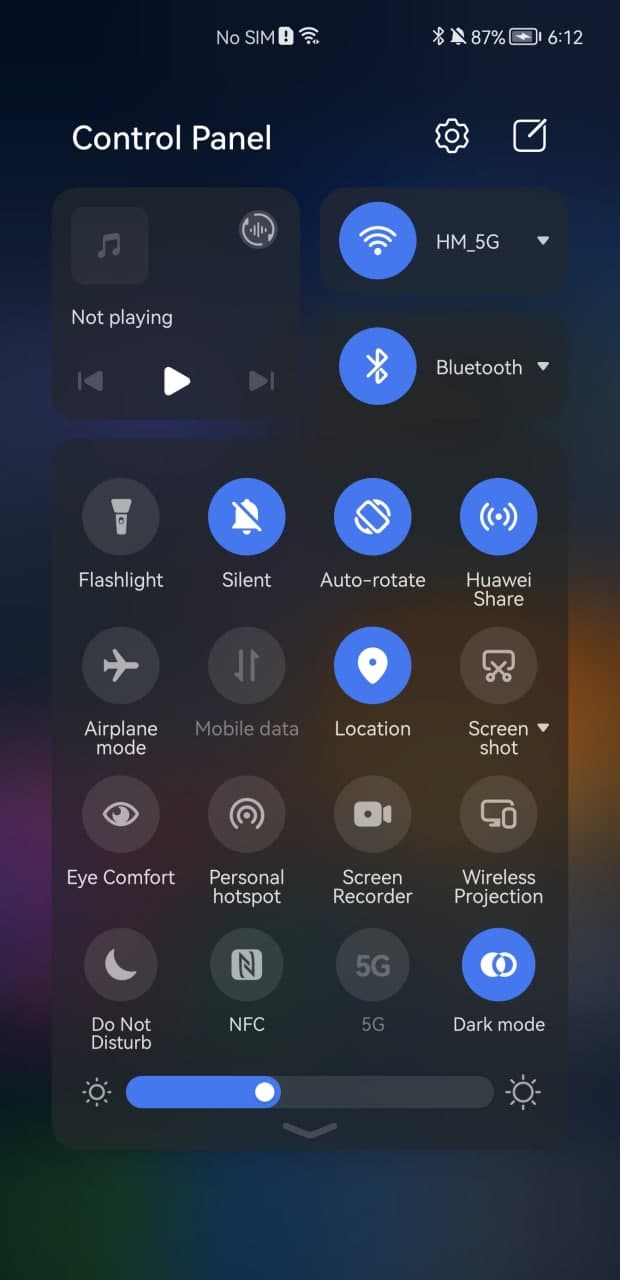
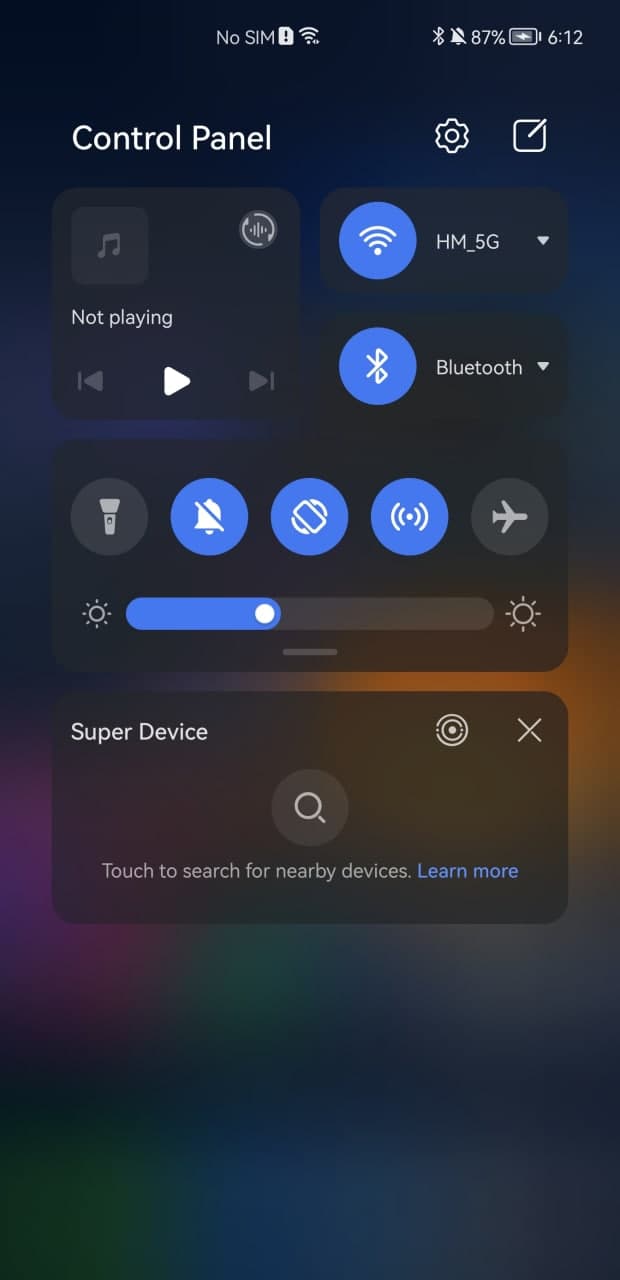
https://www.huaweicentral.com/wp-content/uploads/2022/01/harmonyos-2.0-vs-one-ui-4.0-quick-settings-1.jpg HarmonyOS 2.0 comes with a bunch of new features including the new Control Panel that replaces the old unified quick settings panel. On the other hand, you have the Samsung One UI 4.0 and we’ll be going to compare it with HarmonyOS 2.0 for the quick settings panel in this comparison. Let’s talk a little bit about the One UI 4.0 first, Samsung’s latest software is based on Android 12 and brings a bunch of new enhancements over its predecessor. Therefore, its UI has been revamped and supported by some extra customizations thanks to the latest Android version. However, one thing to note is that One UI 4.0 still has the unified quick settings and notification panel. Now, let’s begin our comparison of HarmonyOS 2.0 vs One UI 4.0 quick settings panel. https://www.huaweicentral.com/wp-content/uploads/2022/01/harmonyos-2.0-vs-one-ui-4.0-quick-settings-1.jpg One UI 4.0: https://www.huaweicentral.com/wp-content/uploads/2022/01/harmonyos-2.0-vs-one-ui-4.0-quick-settings-4.jpg The Quick settings panel of One UI 4.0 enhances the user experience over One UI 3.1. For instance, the quick switch icons now have a more subtle appearance and thanks to the Android 12 operating system, Samsung phones can customize the color of the entire user interface, including icons, based on the home screen wallpaper. Another thing to mention is that the system font is also polished and increases the visibility for areas such as time and date. Talking about the minor changes, the One UI 4.0 has minor tweaks in the slider area, which has become a bit cozy to access. There are also, two large buttons for Device control and media output management. HarmonyOS: https://www.huaweicentral.com/wp-content/uploads/2022/01/harmonyos-2.0-vs-one-ui-4.0-quick-settings-2.jpg HarmonyOS 2.0 has its own vibe that will clearly reflect on its quick settings called Control Panel, you just need to swipe down from the right corner and bring it on. In comparison to One UI 4.0, HarmonyOS has separated the notification center and control panel for easy access to the different features in various interaction-friendly aspects. The HarmonyOS sans font looks good on the user interface and system icons for Settings and layout editor are also there. The use of media and connectivity switches brings ease of access for specific features such as music, WiFi connections, and Bluetooth. On the other side, the quick access switches are brighter and come with a perfect size that won’t miss a tap from your finger. In addition, to Settings, you’ll also see Super Device manager and smart connected device controller widgets below the quick settings. https://www.huaweicentral.com/wp-content/uploads/2022/01/harmonyos-2.0-vs-one-ui-4.0-quick-settings-3.jpg Conclusion: Both of these user interfaces are really good but HarmonyOS 2.0 has the upper hand in some areas of navigation and control over the quick settings. Still, One UI 4.0’s new color palette and virtual power on the switch are really big features that HarmonyOS 2.0 missed. |
| Re: Comparisonhuawei Harmonyos 2.0 Vs Samsung One UI 4.0: Quick Settings Panel by DeAlphaMale(m): 10:46am On Sep 24, 2022 |
When is one UI 4 coming to Nigeria and how to get it on my phone 1 Like |
| Re: Comparisonhuawei Harmonyos 2.0 Vs Samsung One UI 4.0: Quick Settings Panel by Flamethehussler: 12:16pm On Sep 24, 2022 |
Ok |
| Re: Comparisonhuawei Harmonyos 2.0 Vs Samsung One UI 4.0: Quick Settings Panel by aronski(m): 12:05pm On Sep 25, 2022 |
DeAlphaMale:buy s22 series or keep waiting |
| Re: Comparisonhuawei Harmonyos 2.0 Vs Samsung One UI 4.0: Quick Settings Panel by Jeffy1206(m): 5:17am On Sep 26, 2022 |
DeAlphaMale:something that has come and go lollllzzzz keep waiting... I'm waiting for 5.1 now sef  |
| Re: Comparisonhuawei Harmonyos 2.0 Vs Samsung One UI 4.0: Quick Settings Panel by DeAlphaMale(m): 5:15pm On Sep 26, 2022 |
Jeffy1206:Abeg how do I get it on my S10 |
| Re: Comparisonhuawei Harmonyos 2.0 Vs Samsung One UI 4.0: Quick Settings Panel by DeAlphaMale(m): 5:15pm On Sep 26, 2022 |
aronski:I've got an S10 how do I get the update |
| Re: Comparisonhuawei Harmonyos 2.0 Vs Samsung One UI 4.0: Quick Settings Panel by Cancri: 6:05pm On Sep 26, 2022 |
Go to software update |
| Re: Comparisonhuawei Harmonyos 2.0 Vs Samsung One UI 4.0: Quick Settings Panel by Unbiased1: 8:54pm On Sep 26, 2022 |
HisExcellence:Lol. This stuff is just too funny. One UI 4.0 is by far the best and most customisable Android skin in the world. Can't you see how jam-packed and ugly the Harmony OS quick settings look? I will not write too much since you compared only the quick settings of both UIs. |
| Re: Comparisonhuawei Harmonyos 2.0 Vs Samsung One UI 4.0: Quick Settings Panel by Jeffy1206(m): 5:56am On Sep 27, 2022 |
DeAlphaMale:I don't know if the update is coming to s10 but you can check tho |
| Re: Comparisonhuawei Harmonyos 2.0 Vs Samsung One UI 4.0: Quick Settings Panel by DeAlphaMale(m): 7:52pm On Sep 27, 2022 |
Jeffy1206:It's been confirmed that it will get to S10 and some of my friends have gotten the update, but I haven't 1 Like |
| Re: Comparisonhuawei Harmonyos 2.0 Vs Samsung One UI 4.0: Quick Settings Panel by Jeffy1206(m): 8:36pm On Sep 27, 2022 |
DeAlphaMale:if you use exynos, it might delay. |
| Re: Comparisonhuawei Harmonyos 2.0 Vs Samsung One UI 4.0: Quick Settings Panel by DeAlphaMale(m): 7:59am On Sep 30, 2022 |
[quote author=Jeffy1206 post=117064104]if you use exynos, it might delay. I'm not on the exynos version |
| Re: Comparisonhuawei Harmonyos 2.0 Vs Samsung One UI 4.0: Quick Settings Panel by DeAlphaMale(m): 7:59am On Sep 30, 2022 |
Jeffy1206:not using the exynos version |
| Re: Comparisonhuawei Harmonyos 2.0 Vs Samsung One UI 4.0: Quick Settings Panel by d3cod3r(m): 11:37am On Sep 30, 2022 |
DeAlphaMale:If you need it so badly you can always download the latest firmware for your phone and flash. |
| Re: Comparisonhuawei Harmonyos 2.0 Vs Samsung One UI 4.0: Quick Settings Panel by DeAlphaMale(m): 7:43pm On Sep 30, 2022 |
d3cod3r:I'll do it soon |
| Re: Comparisonhuawei Harmonyos 2.0 Vs Samsung One UI 4.0: Quick Settings Panel by jameslojohn(m): 10:09am On Oct 01, 2022 |
Unbiased1:If one UI is the most customizable skin in the world what will you than say about oxygen os and miui and other android skin, one UI no get anything that will make it most customizable skin In android. |


HUAWEI P50 And P50 Pro Launches With Harmonyos 2 • How I Replaced My Phone's Quick Settings (pics) • HarmonyOS: In Your Face.... Android Apologists. • 2 • 3 • 4
Unlimited Sub • Redmi Note 10 Vs Samsung A13 • 80000mah Wp-271 Wekome POWER BANK