Viteni's Posts
Nairaland Forum › Viteni's Profile › Viteni's Posts
1 2 (of 2 pages)
 Technology Market › Nexalepos For Business: Is This The Best POS Software For Small Shop Owners? by Viteni(op): 2:57pm On May 18 Technology Market › Nexalepos For Business: Is This The Best POS Software For Small Shop Owners? by Viteni(op): 2:57pm On May 18 |
# NexAlePOS For Business Onwers: Is This the Best POS Software for Small Shop Owners in 2026? If you run a shop, a small store, or any kind of retail business, you already know the pain of managing sales the old way. Writing receipts by hand, trying to track what sold and what didn't, losing count of your inventory, or paying way too much for some complicated POS system that takes a computer science degree to understand. It gets old, fast. That's actually how a lot of shop owners end up looking for something better. Something that works, doesn't cost a fortune, and doesn't require you to call tech support every time you need to ring up a customer. This review is about NexAlePOS, a PHP-based point-of-sale software that's been gaining attention among small and medium business owners. I'm going to walk you through what it does, who it's for, and whether it's actually worth your money or your time. Let's get into it. ## What Is NexAlePOS? NexAlePOS is a web-based point-of-sale system built on PHP. That means it runs in a browser, not as a desktop app you have to install on every computer in your store. You host it on a server or a web hosting account, and then you access it from any device with a browser, whether that's a laptop, a tablet, or even a phone. It was designed specifically for shop owners who want professional-grade POS features without the bloated price tag that comes with enterprise-level software. Think of it as the kind of tool that gives small businesses the same power as big chain stores, just without the corporate IT department needed to run it. The software handles sales, inventory, customers, receipts, reports, and more. And because it's PHP-based, you can host it yourself on almost any shared hosting plan. That keeps your ongoing costs very low. ## Who Is NexAlePOS Designed For? Before you decide if something is right for you, it helps to know who it was built for in the first place. NexAlePOS targets a pretty clear group of people. It's for shop owners who: - Sell physical products in a retail setting - Want to manage inventory without spreadsheets - Need to generate proper receipts and invoices - Want to track their sales performance over time - Don't want to pay monthly subscription fees forever - Are comfortable with basic web hosting or have someone who can help with setup If you're running a clothes shop, a phone accessories store, a grocery or general goods shop, a pharmacy, or any other retail-style business, NexAlePOS fits well. It's not designed for restaurants or food service specifically, though some of its features can still be useful in those settings. It's also a strong fit if you're someone who prefers owning your software outright rather than renting it. With NexAlePOS, you buy it once, you install it, and it's yours. No monthly SaaS fees, no sudden price increases, no worrying that the company will shut down and you'll lose access. ## Key Features of NexAlePOS Here's where it gets interesting. Let's look at what NexAlePOS actually gives you when you start using it. ### Sales and Checkout The core of any POS system is the checkout experience. NexAlePOS has a clean, fast point-of-sale screen that lets you search for products, add them to a cart, apply discounts, and complete the sale in just a few clicks. You can accept different payment types, including cash and bank transfer. The checkout interface is designed to be quick so you're not making customers wait while you figure out which button to press. It also supports barcode scanning, which is a big deal if you have a high volume of products. Instead of manually searching for every item, you just scan the barcode and it shows up instantly. ### Inventory Management Managing stock is one of the most frustrating parts of running a shop. You forget to reorder something, and suddenly it's out of stock. Or you order too much of something that doesn't sell and tie up your cash in sitting inventory. NexAlePOS gives you real-time inventory tracking. Every time a sale goes through, your stock count updates automatically. You can set minimum stock alerts so the system tells you when something is running low and needs to be reordered. You can also manage multiple product categories, add detailed product descriptions, track product costs versus selling prices, and see which products are your best performers. That kind of visibility makes a real difference when you're trying to run a profitable shop. ### Customer Management This feature often surprises people. NexAlePOS lets you build a customer database right inside the system. You can add customers, track their purchase history, and even give them loyalty points or store credit. Knowing your customers by name and understanding their buying habits helps you serve them better. It also opens the door to running promotions or sending offers to your repeat buyers, which is something that used to be only available to big businesses with fancy CRM software. ### Reports and Analytics Running a shop blind is a recipe for slow failure. You need to know what's selling, when your busiest hours are, who your top customers are, and how your overall revenue is trending. NexAlePOS includes a solid reporting module. You can pull daily sales summaries, look at your best-selling products, track payments by method, review profit margins, and more. These reports are presented in a clean format that you can read and understand without needing a business degree. Having access to this data changes how you make decisions. Instead of guessing what to restock or which products to put on sale, you're using real numbers from your own store. ### Multiple User Accounts and Roles If you have staff working the till, NexAlePOS lets you create separate user accounts with different permission levels. Your cashiers can ring up sales but can't access your reports or change prices. Your managers can see everything. You stay in control of who can do what. This is important for accountability. If there's a discrepancy in your till at the end of the day, you can trace back which user processed which transactions. ### Receipt and Invoice Generation NexAlePOS generates clean, professional receipts for every transaction. You can customize the receipt with your store name, logo, and contact information. Customers can get a printed receipt or an emailed one. You can also generate invoices for larger orders or business clients who need formal billing documents. This keeps things professional and makes it easier to handle your accounting. ### Discount and Promotion Tools Running a sale or offering a discount is simple with NexAlePOS. You can apply percentage-based or fixed-amount discounts at the product level or the cart level. You can also set up coupon codes if you want to run a promotion. This flexibility means you can react quickly to business needs. Trying to clear old stock? Mark it down. Rewarding a loyal customer? Give them a quick discount right at the till. It's all there without any complicated setup. ## How Easy Is NexAlePOS to Set Up? This is a fair question to ask, especially if you're not particularly technical. Let's be honest about it. NexAlePOS requires web hosting and a basic understanding of how to set up a PHP application. You'll need to upload the files to your hosting account, create a database, and run through a setup wizard. If you've done this kind of thing before, it's straightforward. If you haven't, it might take some getting used to. The good news is that most shared hosting providers (cPanel-based ones are very common) make this process fairly manageable. There are also plenty of YouTube tutorials and documentation that walk you through it step by step. If you're willing to learn, it's doable. If you prefer something that's completely plug and play with zero setup, you might need to either hire someone to set it up for you or look at hosted alternatives. But once it's running, you never have to touch the technical side again unless you want to. The actual day-to-day use of the software, meaning the dashboard, the sales screen, the reports, all of it feels intuitive. You don't need training to start selling. ## NexAlePOS Cost: What Makes It Different Most modern POS software works on a subscription model. You pay every month, the price sometimes goes up, and you're stuck paying forever or losing access to all your data. That's fine for some businesses, but it adds up. Over five years, a monthly subscription can cost you several times what a one-time purchase would. NexAlePOS is a one-time purchase. You buy it once and own it. That's a meaningful difference for any business owner who's tired of software subscriptions eating into their margins. For a small shop where margins are already tight, this kind of ownership model makes a real financial difference. You pay once, you get the software, and it keeps working for you without any additional fees. ## Real Strengths of NexAlePOS Let's talk about where it genuinely shines, based on what users consistently praise about it. ### Speed at the Point of Sale The checkout screen is fast. That might sound like a small thing, but when you have a queue of customers, every second counts. NexAlePOS is built to be responsive and quick, even on modest hardware. ### Clean and Modern Interface The interface doesn't look like it was designed in 2010. It's modern, visually clean, and easy to navigate. New users pick it up quickly because the layout makes sense. ### Self-Hosted Means Your Data Stays Yours When you use a cloud-based POS system, your sales data lives on someone else's server. With NexAlePOS, your data is on your own hosting account. That's a privacy advantage that a lot of business owners genuinely care about, especially when they understand what it means. ### Active Development NexAlePOS is actively maintained and updated. That means bugs get fixed, new features get added, and the software keeps getting better over time. You're not buying something that's been abandoned. ### Customizable for Your Needs Because it's open to modification at the code level (for those who want to go that route), NexAlePOS can be adapted to specific business needs. Whether that's adding a custom report, tweaking the receipt layout, or integrating with another tool, the foundation is there. ## Honest Limitations to Consider No software is perfect, and NexAlePOS is no exception. Here are the things you should know before buying. ### Setup Requires Some Effort As mentioned earlier, getting NexAlePOS running requires a hosting account and some basic technical steps. If you're not comfortable with that, factor in the time or cost of getting help with setup. ### No Native Mobile App NexAlePOS is browser-based, which means it works on mobile browsers. But it doesn't have a dedicated native app for iOS or Android. For some use cases this is fine. For others, especially high-volume mobile sales environments, it might feel like a limitation. ### Requires Reliable Internet or Local Network Because it's web-based, you need a working internet connection or a local network to run it. If your area has unreliable connectivity, this is something to think about before committing. ### Community and Support Support is available, but the community around NexAlePOS is not as large as some of the more established POS giants like Square or Shopify. If you run into a specific edge-case problem, you may have to dig a little harder to find answers. ## Who Should Buy NexAlePOS? After going through all of this, here's the honest answer. You should seriously consider NexAlePOS if you: 1. Own or manage a retail shop and need a proper POS system 2. Want to pay once and not deal with monthly fees 3. Are comfortable with web hosting or have someone to help with setup 4. Need inventory tracking, customer management, and sales reporting in one place 5. Want your data hosted on your own server, not on someone else's cloud You might want to look elsewhere if: 1. You need a completely plug-and-play solution with zero technical involvement 2. You require a dedicated mobile app as your primary interface 3. You run a restaurant or food delivery service where a specialized POS is more appropriate ## The Bottom Line on NexAlePOS Here's my overall take. NexAlePOS is a genuinely solid piece of software. It's not trying to be everything for every business, and that focus actually works in its favor. What it does, it does well. The sales interface is fast. The inventory system is practical. The reporting gives you real insight into your business. And the one-time pricing model respects your budget in a way that monthly subscriptions simply don't. If you're a shop owner who has been making do with paper receipts, a basic cashbox, and a spreadsheet for inventory, upgrading to NexAlePOS would be a genuine improvement to how you run your business. You'd have better visibility, faster checkout, happier customers, and a clearer picture of where your money is going and coming from. Is it perfect? No. But very few business tools are. What it is, is practical, modern, and genuinely useful for the kind of business it was built to serve. If you've been on the fence about getting a proper POS system, this might be the one to start with. You won't regret having real data about your own business. If you want to check it out, NexAlePOS is available on Gumroad. It's a one-time purchase, which means there's no ongoing financial commitment after you buy it. That alone makes it worth taking a serious look at. Take your time, think about whether your shop could benefit from what it offers, and go from there. There's no pressure here, just an honest look at a tool that I think a lot of small shop owners would find valuable. ## Frequently Asked Questions About NexAlePOS ### Does NexAlePOS work on any device? Yes. Because it's browser-based, it works on any device that has a modern web browser, including Windows PCs, Mac computers, tablets, and smartphones. ### Can I use NexAlePOS offline? NexAlePOS requires a network connection to function. If you host it on a local server within your store, you can run it without internet as long as your devices are connected to the same local network. ### Is NexAlePOS suitable for a new business? Absolutely. The learning curve is manageable, and having a proper POS system from day one sets you up with good habits for tracking your sales and inventory from the start. ### What kind of hosting do I need? Any standard PHP and MySQL compatible web hosting works. Most cPanel shared hosting plans are compatible. The NexAlePOS documentation covers the specific requirements in detail. ### Can multiple staff members use it at the same time? Yes. NexAlePOS supports multiple user accounts with different permission levels, so your team can use it simultaneously across different devices. ### Is there a free trial? Check the current listing on Gumroad for the most up-to-date information on trial options or money-back guarantees. Go Download NexAlePOS For Your Business : https://toolsforbusiness.gumroad.com/l/nexalepos
|
| Science/Technology › How The Content Multiplication Method Uses AI To Transform One Idea Into 15 by Viteni(op): 11:55pm On May 02 |
# How The Content Multiplication Method Uses AI To Transform One Idea Into 15 Viral Formats Instantly  --- Let me tell you about someone named Sarah. Ninety days ago, Sarah was doing everything she thought she was supposed to do. She was posting. She was creating. She was showing up. And yet, she was miserable. Every single piece of content she put out took her three to four hours to produce. Not because she was slow, not because she lacked ideas, but because the process she was using was just broken from the start. The gaps between her posts were getting longer. The stress was getting heavier. And late at night, she'd lie awake watching smaller creators pass her by, growing their audiences while hers stayed completely flat. She wasn't worried about the content itself. She was terrified that her entire online presence was becoming invisible, and she had no idea how to stop it. Sound familiar? If you've ever spent hours writing something, hit publish, and watched it disappear into the void after getting barely any traction, you already know exactly how Sarah felt. --- ## Why Most Content Advice Is Setting You Up to Fail Here's the thing nobody tells you upfront: the most popular advice for staying consistent online is also the most exhausting to actually follow. There are three specific traps that coaches, bloggers, and entrepreneurs fall into over and over again. And the worst part is that each one feels logical at first, which is exactly why they keep pulling people in.  ### The Batch-Producing Trap Batch-producing content sounds like a great system on paper. You sit down, block off a whole day, and crank out posts for the next two weeks. Clean, efficient, done. Except that's not how it actually plays out for most people. Big media companies can pull this off because they have full teams. Writers, editors, strategists, video producers. When you are a team of one, batch-producing doesn't save time, it drains every last bit of creative energy you have in a single sitting. You end the day completely wrecked, your posts feel stale and forced, and you have nothing left for the actual work of running your business. ### The Outsourcing Trap So maybe you decide to hand it off. Hire a freelancer, find someone on Fiverr, or bring on a social media manager. Problem solved, right? Not quite. Freelancers and agencies don't live inside your business. They don't know the specific way you phrase things, the story behind your message, or what makes your audience trust you specifically. The content that comes back usually sounds generic, misses the point, or just doesn't feel like you at all. Then you spend time in revision rounds, explaining what you actually wanted, and often end up rewriting large portions yourself. You're now managing another person's work on top of your own. That's not less work. That's more. ### The Scheduling Tool Trap The third mistake is believing that a scheduling tool solves a creation problem. It doesn't. Scheduling tools are about distribution, not generation. They take whatever you already have and move it around a calendar. If you're recycling the same five ideas on rotation because you haven't made anything new, a scheduling tool just makes the repetition more organized. Your content still feels thin, your audience still stops engaging, and you're still no closer to showing up consistently in a way that actually connects with people. ### What Happens When None of It Works When you've tried all three and you're still stuck, something shifts in your brain. Posting starts to feel like a chore. Then it starts to feel like a punishment. You post less and less, the gaps grow longer, and the spiral tightens. This is what's sometimes called the Content Burnout Cycle. You try something, it doesn't work, you exhaust yourself trying harder, and then you burn out and go quiet for weeks. Then the guilt kicks in, and the cycle starts again. The reason this keeps happening isn't a lack of discipline or creativity. The methods themselves are fundamentally flawed for solo creators. --- ## There's a Different Way to Think About This Around 2022, a pattern started becoming visible to anyone paying close attention to how big brands were showing up online. Companies like Spotify and Netflix weren't producing more content. They were taking the same content and serving it in different formats across different surfaces. The same song streams on a phone, a smart speaker, and a TV. The same show plays whether you're on a laptop, a tablet, or a wall-mounted screen. The content didn't change. Only the format did. That observation led to a simple but powerful question: what if content creators applied the exact same logic to their own work? Instead of starting from scratch every time you need to post, you take one idea, and you pull it through multiple formats. A blog post becomes a Twitter thread. A Twitter thread becomes a short video script. A short video script becomes an email. That email becomes a carousel. And so on, until one original idea has reached across every major platform your audience actually uses. That's the core of what's now called the Content Multiplication Method. --- ## How the Content Multiplication Method Actually Works The method breaks down into three clear steps. Each step builds directly on the one before it, and together they're what allow one idea to become fifteen pieces of ready-to-publish content without starting over each time.  ### Step 1: Lock In the Core Idea Before you write a single word of actual content, you need to extract the one central message you're trying to communicate. Not five ideas. Not a topic. One specific message. This does something important to your brain: it removes decision fatigue. Decision fatigue is what happens when you sit down to write and spend forty-five minutes just trying to figure out what to write about. When you anchor everything to a single message first, that problem disappears. You know what you're saying. You just have to say it in different ways. Think of it like a tree. The core idea is the trunk. Every piece of content you produce from it is just a different branch. The branches can look completely different from each other while still growing from exactly the same place. ### Step 2: Match the Format to the Platform Different platforms speak different languages, and the same idea needs to express itself differently on each one. Short-form posts on platforms like X or Threads are designed to grab attention fast. A punchy three-line take works perfectly here. Long-form posts on LinkedIn or a blog build trust. People there are willing to read depth, so that's where you give them the full story. Email is where you deepen relationships. People who opened your email already know you. They want the real, personal version of what you're sharing. Carousels and video scripts are visual and kinetic. They work for people who learn by watching or swiping through a process step by step. When the format matches the platform, engagement goes up naturally. When it doesn't, even great ideas get ignored. Knowing which version to put where is half the battle. ### Step 3: Produce Everything in One Focused Session There's a concept in cognitive science called context switching, and it's probably costing you more time than any other single factor in your content process. Every time you stop working on one thing and start working on something else, your brain doesn't switch instantly. It takes time to shift gears, reload context, and get back into flow. Studies suggest this transition time costs roughly twenty minutes of productive thinking per switch. The fix is simple: don't switch. Stay in one creative mode, move through all fifteen formats in sequence, and let your brain build momentum instead of constantly starting over. When you do this, the work moves faster and feels easier. --- ## Where AI Comes Into the Picture Here's where everything gets genuinely interesting. Doing all of this manually is possible. But doing it manually in a way that actually saves significant time requires either a lot of practice or a well-built system. Most people don't have either. This is where AI-based content tools have changed the math completely. The idea behind AI content repurposing tools is straightforward. You paste in one piece of content, whether that's a blog post, a video transcript, a rough idea written in notes, or even a podcast summary. The AI reads that content, identifies the core message, and then generates platform-specific versions of it across multiple formats. Not generic versions. Versions that are shaped for the format they're designed for. An email that sounds like an email. A Twitter thread that actually works as a thread. A LinkedIn post that respects how people read on that platform. ### The Three-Step AI Process in Practice The actual process when using an AI repurposing tool looks something like this: 1. **Drop in your content.** Paste whatever you have. A blog post, a paragraph, a rough idea. The AI identifies the core message within seconds. 2. **Choose your formats.** Select the formats you want to produce, from email newsletters to social captions, short-form posts to long-form threads. 3. **Review and publish.** Look over what's been generated, make any small edits that feel right to you, and post. No rewriting from scratch. No blank pages. The whole process takes minutes rather than hours. And because you're working from the same core idea across all formats, your content has a consistent message across every platform instead of feeling scattered and disconnected. --- ## Real Results from Real Creators The difference this kind of approach makes shows up fast. James, a creator based in Austin, went from posting once or twice a week with almost no engagement to showing up daily across multiple platforms without feeling stressed about it. His words: for the first time, content felt manageable. Laura from Manchester had spent years trying batching, outsourcing, and scheduling tools. Three weeks after switching to the Content Multiplication Method, she said she stopped feeling behind. Her content finally felt alive. Mark from San Diego had spent a long time feeling drowned out by bigger accounts. One month later, he described it simply: his ideas were everywhere now, and it finally felt fair. These aren't extraordinary people with extraordinary resources. They're solo creators who were burning out on broken systems and needed something that actually worked with how one person can realistically operate. --- ## Who This Approach Works For You might be wondering whether this applies to your specific situation. Here's the honest answer: if you have ideas and you want people to see them, this works for you. It doesn't matter if you: - Think you're not a strong writer - Have a small or new audience - Feel behind on social media - Don't enjoy the process of creating content - Are short on time during the week The Content Multiplication Method works because it reduces the total creative effort required while multiplying the output. You're not working harder. You're working with a smarter structure. The key shift is stopping the habit of treating every platform as a separate creative project that needs to be built from scratch. When you treat them as different expressions of one central idea, the whole game changes. --- ## A Different Relationship With Content Creation What most people want isn't just more posts. It's consistency without the guilt spiral. It's knowing what to say and feeling confident it'll actually reach people. The old model of content creation, where you burn three hours on one piece, post it once, and hope for the best, was always unsustainable. It wasn't designed for one person trying to compete in a crowded space. It was designed for teams. The Content Multiplication Method gives solo creators access to the same leverage that big brands use, without the team, without the budget, and without the burnout. Sarah's story, the one that started this whole article, has a pretty good ending. After just one week of using this approach, she was posting daily across platforms for the first time. After four weeks, her reach and engagement had grown more than it had in the previous three months combined. She stopped dreading content creation. She actually started looking forward to it. That's not a small thing. That's the difference between a presence that grows and one that quietly disappears. If your content isn't getting the traction you know it deserves, the problem almost certainly isn't the quality of your ideas. It's the system you're using to get them out into the world. One idea. Fifteen formats. That's the whole shift. --- *Written for creators, coaches, bloggers, and entrepreneurs who want to stop starting from scratch and start showing up everywhere.*
|
| Business › How Agentic AI Is Replacing Sales Teams With Instant Lead Response by Viteni(op): 3:54pm On May 02 |
# How Agentic AI Is Replacing Sales Teams With Instant Lead Response  There is a very specific moment where most businesses lose a sale, and almost none of them know it is happening. A person searches for a service. They find a website. They fill out a form. They hit submit. And then — nothing. No call. No text. No email. Maybe a generic auto-reply that says someone will get back to them soon. By the time someone from that business actually picks up the phone and calls, that person has already Googled three more options, probably already spoken to a competitor, and has mostly forgotten why they even reached out in the first place. That is the gap that agentic AI was built to close. And it is closing it in ways that would have felt impossible just a few years ago. ## What "Agentic" Means and Why It Is Not Like Other AI You have probably seen the word "AI" attached to every product on the internet at this point. Most of those tools are assistants. They help you do something faster. You still have to be the one deciding, clicking, writing, and following through. Agentic AI is different. The word comes from "agency" — the ability to act independently toward a goal. An agentic system does not wait for instructions at every step. It sets a goal, figures out how to reach it, and executes the whole thing from start to finish without needing a human to sign off along the way. Think about what that means for a sales process. A traditional sales team waits for leads to come in, assigns them to reps, hopes the rep follows up quickly, writes the emails, makes the calls, logs everything into a CRM, schedules follow-ups, and tries to stay consistent across every single lead. Each person in that process has good days and bad days. They get busy. They forget. They go on vacation. They quit. An agentic system has none of those limitations. It does not have good days and bad days. It does not forget. It does not need sleep. The moment a trigger happens — a form submission, an opt-in, a missed call — it acts. Completely, consistently, every single time. ## The Response Time Problem That Is Costing Businesses Every Day  Here is a number that most business owners have never seen, and that genuinely surprises people when they hear it for the first time. The average business takes **47 hours** to respond to a new web lead. Not 47 minutes. 47 hours. Research from MIT's Lead Response Management Study found that calling a lead within 5 minutes makes you 100 times more likely to actually connect with that person compared to calling 30 minutes later. The math at 47 hours is far worse than that. What happens to a lead after 47 hours? They have found someone else. Or they convinced themselves they did not need the service after all. Or they are still interested but now feel like the business is disorganized and unreliable. The bigger number, though, is this: more than half of all inbound leads are never contacted at all. The business ran the ad. A real person clicked it, read the page, and raised their hand. And nobody called. No email. Nothing. This is not a problem of bad salespeople. It is a structural problem. Human-dependent follow-up systems break down constantly because they rely on someone being available, motivated, and on top of their queue at exactly the right moment. An agentic AI system solves this by removing the dependency on a human being in the response loop entirely. ## How the Three-Stage Agentic Pipeline Works  To understand how this actually works, it helps to think about it in three stages. Each stage feeds the next one automatically. No human touches it between stages. ### Stage 1: Research and Funnel Build A system like Agentic Agency starts with a URL. You paste in the web address of any local business. The NeuralScan technology reads that URL and extracts everything it needs in about 90 seconds — the business name, services, pricing structure, operating hours, unique differentiators, and the kind of customers they serve. It then uses all of that information to generate a complete, live funnel page with written copy that actually reflects the business — not a generic template with placeholder text. Headlines, calls to action, frequently asked questions, benefits sections. All of it generated and published, with a unique URL, in under five minutes. No copywriter needed. No designer. No back-and-forth with the client to collect information. ### Stage 2: Instant AI Voice Calling Here is where the agentic behavior really shows itself. The moment someone fills out the form on that funnel, the calling system is triggered. The AI dials within seconds of the form submission. The person who just filled out the form is still on the page. They have not closed their browser. They have not been distracted by something else. The call comes in while they are still in the mindset that made them fill out the form in the first place. The AI does not read from a script. It holds a real two-way conversation. It knows the business — its services, pricing options, operating hours, and unique selling points — through something called SmartPersona technology, which briefs the AI on that specific business before every call. The AI greets the lead by their first name. It listens to what they say. It handles unexpected questions without falling apart. One recorded example from the Agentic Agency system: a lead asked mid-call whether they were speaking to a robot. The AI answered honestly — yes, it is an AI. The caller said it was "kind of creepy." The AI acknowledged that, redirected the conversation to how it could help, and the caller stayed on the line, asked their questions, and gave their contact details before the call ended. Total call time: under 90 seconds. Another example: a lead fired off six questions in four turns without pausing much between them. The AI answered every single one. Organized, nothing skipped, nothing repeated. When the lead said they wanted to look at the website first, the AI closed naturally and let them go. That kind of conversation is not a pre-recorded message. It is active, responsive, and specific to each person. ### Stage 3: Automated Follow-Up Across Three Channels The call is just the first touchpoint. After it ends, the automated follow-up sequence begins. Over seven days, the system sends a combination of emails, SMS messages, and additional AI voice calls — 13 touchpoints in total across three separate channels. The content of those messages is not generic. It is written specifically for the client's business, and the system reads the lead's behavior and sentiment to adjust the type of follow-up they receive. A lead who seemed interested during the call gets a more direct, closing-focused sequence. A lead who seemed hesitant gets a softer nurture sequence. A lead who already booked gets a confirmation sequence. This is what AdaptiveTrack technology does. It reads the situation and chooses the right path automatically. The queue checks every 60 seconds, around the clock. What happens if the AI's call hits voicemail? MissedBot activates. It sends the lead a text and routes them to a chatbot so the conversation can continue in a different format. No lead just disappears because one channel did not connect. ## What This Means for Local Businesses Specifically Local businesses — dentists, gyms, roofing companies, HVAC services, law firms, real estate agents, chiropractors, restaurants — are the clearest example of who loses the most from slow follow-up. These are not large corporations with dedicated sales departments. The person who answers the phone at a dental office is also handling check-ins, filing paperwork, and managing the front desk. They are not going to drop everything to call back a web lead within five minutes. It is just not realistic. At the same time, a dental patient has a high lifetime value. A roofing job is a significant project. An HVAC repair call can turn into a maintenance contract. Missing the lead is not a small loss — it is often hundreds or thousands in value walking out the door and straight to a competitor. There are approximately 36 million small businesses in the United States alone. Most of them generate leads through some form of marketing. Most of them have no reliable system to call those leads before they go cold. The opportunity to build an agency that fills this gap — using agentic AI to handle the calling and follow-up side of the business — is genuinely significant. The market is not a niche. It is every local business that advertises. ## The Difference Between Assisting and Acting It is worth spending a moment on why this matters beyond just the speed improvement. Most AI tools available right now make you faster at doing your existing work. They help you write faster, think faster, organize faster. But you are still the one doing the work. If you are asleep, the work stops. If you are sick, the work stops. If you forget, the work stops. An agentic system is not a faster version of you doing the work. It is the work happening without you. The distinction sounds small, but the operational difference is enormous. An agency owner who is running five clients using traditional tools is doing the job of five different roles — funnel builder, copywriter, caller, follow-up manager, content creator. They are the bottleneck. An agency owner running the same five clients on an agentic system sets up each client once. From that point, the AI builds the funnels, makes the calls, writes the follow-up content, and runs the sequences. The owner checks in, reviews results, and moves on to signing more clients. That is a fundamentally different business model. One scales with hours. The other scales with clients. ## How Agentic AI Handles Things That Go Off-Script One concern people often have is whether AI can deal with the unpredictable parts of a real conversation. What happens when a lead says something unexpected? What happens when they ask a question the AI was not explicitly prepared for? The honest answer from the Agentic Agency demo calls is that the system handles ambiguity better than most people expect. When a lead asked if they were talking to a robot and expressed discomfort, the AI did not pretend to be human and did not shut down. It acknowledged the feeling and moved forward. When a lead asked six questions across multiple turns without pausing between them, the AI tracked all of them and answered each one in order. SmartPersona technology — the briefing system that loads business-specific information before each call — is part of what makes this work. The AI is not working from a generic script. It knows the business it is representing well enough to answer questions that were not pre-loaded into a static template. It does not claim to know things it does not know. When something is outside its knowledge, it handles the uncertainty gracefully and keeps the conversation going rather than crashing out. ## What an Agentic Agency Looks Like as a Service Model For someone building a local marketing agency using this kind of system, the service model looks different from traditional agency work. You do not need to hire a caller. You do not need a follow-up coordinator. You do not need a copywriter for every client. The platform handles the AI research, funnel build, voice calling, drip sequences, SMS, and chatbot under one roof. That means the setup for a new client is genuinely fast — measured in minutes, not days. And once a client is set up, the ongoing work is monitoring, reporting, and client communication — not manually managing the system. The technology also includes a client portal where clients can log in and see exactly what is happening — leads captured, calls completed, appointments booked. Transparent results in real time. Clients who can see results coming in tend to stay. Clients who are waiting to hear from you whether things are working tend to leave. ## Why Speed of Response Changes the Whole Conversation There is a psychological dimension to response speed that goes beyond statistics. When a person fills out a form and gets a call within seconds, their experience is completely different from receiving a call 24 hours later. In the first case, they feel attended to. They feel like the business cares. The conversation happens in context — they remember why they reached out, they are still in the moment of need, and they are more likely to engage seriously. In the second case, even if they pick up the call, they are now doing something else. They may not fully remember the specifics of what they were looking for. The emotional momentum that made them fill out the form has faded. The conversation has to work harder to get back to where it could have started. Five seconds versus 47 hours is not just a data point. It is the difference between catching someone at the peak of their interest and catching them after that interest has cooled. Agentic AI catches them at the peak. Every time. Without anyone having to notice the lead came in. ## A Note on What This Does Not Replace It is worth being clear about what agentic AI is and is not doing here. It does not replace the human relationship that comes after a booking. When a patient walks into a dental office, a real person is there. When a homeowner meets a roofer for an estimate, a real person shows up. The trust-building that happens during and after the service is still human. What agentic AI replaces is the moment between "interested stranger" and "booked appointment" — a window that used to rely entirely on manual human action and consistently failed to close fast enough. That window is where most leads are lost. That is the specific problem this technology addresses. And addressing it well is already changing the economics of local business marketing in a visible way. The businesses that start using systems like this early will have a structural advantage that compounds over time. Not because their service is better, but because more of their leads actually become customers.
|
| Technology Market › Why Clients Delay Payments And How Invoiceflow Fixes It by Viteni(op): 1:49pm On Apr 25 |
# Why Clients Delay Payments and How InvoiceFlow Fixes It You did the work. You delivered on time. You sent the invoice. And then... nothing. A week passes. Then two. You check your bank account more times than you should. You wonder if you should follow up or if that will make you seem desperate. You do the mental math on what you are owed versus what is sitting in your account right now, and the gap is stressful. If you freelance, run a small service business, or do any kind of work where someone owes you money after the fact, this feeling is familiar. Client payment delays are one of the most common and quietly exhausting parts of running your own operation. The good news is that most payment delays are not about clients being malicious. They are usually about broken systems, unclear communication, and invoices that do not command attention. Once you understand why delays happen, you can actually do something about them. ## The Real Reasons Clients Take Forever to Pay Most people assume clients drag out payments on purpose. Some do. But a surprising number of payment delays come from completely fixable problems on the sender's side. ### Your Invoice Did Not Stand Out Think about the last invoice you sent. Was it a PDF built from a professional template with your logo, a clear due date, and an organized line item breakdown? Or was it a Google Doc with your name at the top and a total at the bottom? There is a psychological reality to invoicing that most freelancers learn the hard way. When a client receives a document that looks like a professional business sent it, they treat it like a bill that needs to be settled. When they receive something that looks like a note, they treat it like something they can get to later. A clean, numbered, branded invoice with a visible due date creates a different mental category for the client than a casual document does. One feels like an obligation. The other feels like a reminder. ### There Was No Clear Due Date Invoices without a specific due date get paid... eventually. "Net 30" written in small text at the bottom of a page is not the same as a bold, clearly formatted due date that the client can see immediately when they open the document. When there is no clear deadline, people prioritize other things. Not out of disrespect, but out of basic human nature. We respond to deadlines. We push back everything that does not have one. If your invoice does not have a due date formatted clearly enough to catch the eye, it will sit in someone's inbox waiting for the moment they have nothing else to do. That moment rarely comes. ### The Invoice Got Lost Email inboxes are chaotic. A client might genuinely mean to process your invoice and forget. It gets buried under forty other emails. They close the tab. They tell themselves they will handle it after a meeting and then life moves on. This is especially common with clients who are running their own businesses and wearing multiple hats. Their inbox is a pile of things that need attention, and invoices from one-person shops often do not make it to the top of the stack. ### Your Follow-Up System Was Inconsistent Most freelancers and small business owners have no formal system for following up on unpaid invoices. They either follow up immediately and often, which feels aggressive, or they wait and hope, which leads to late payments becoming normal. The absence of a tracking system means you do not always know which invoices are outstanding, which are overdue, and which have already been paid. When you do not have that information at your fingertips, following up becomes a task that requires effort and mental energy you may not have at the end of a busy week. ### The Offline Gap Not every business operates entirely online. Service businesses, market vendors, tradespeople, and event-based sellers often do work that starts or finishes offline. If your invoicing system does not account for that reality, things fall through the cracks. A customer who got a service done on-site might not receive a formal invoice for days, by which point the urgency has faded for them. The longer the gap between work completed and invoice received, the slower the settlement tends to be. ## How Invoicing Systems Change the Dynamic Here is something a lot of people do not realize until they experience it firsthand: upgrading your invoicing process often changes how quickly clients act. It is not magic. It is clarity. When a client receives a numbered, professional PDF invoice with a logo, a due date formatted as an actual date (not a vague payment term), a clear list of what they are being billed for, and your business contact details all in the right places, they have everything they need to process it without asking questions. When they receive a casual document with incomplete information, there is friction. They might need to confirm something. They might not know where to send the remittance. That friction creates delay. Reducing friction in the invoice itself is one of the most practical things you can do to shorten the gap between sending and receiving. ## What InvoiceFlow Does Differently InvoiceFlow is a desktop invoicing application that runs locally on your computer. No cloud account required. No monthly subscription. You install it, set up your business profile, and it becomes your permanent invoicing home base. The reason it is worth talking about in the context of payment delays is that the tool was designed around the specific problems that cause them. ### A Dashboard That Tells You Exactly Where You Stand The main dashboard in InvoiceFlow shows you four numbers immediately when you open the app: 1. **Total Revenue** - What has been collected 2. **Outstanding** - What is owed but not yet overdue 3. **Overdue** - What is past the due date 4. **Total Customers** - Your active client count That overdue number is the one that matters most. When you can see at a glance that something is past due, you act on it. When you have to dig through emails and spreadsheets to figure out who owes you what, you often do not act until the pain gets bad enough. The Recent Invoices panel on the right side of the dashboard shows you the client name, invoice number, date, and status (Draft, Sent, or Paid) for your latest invoices. You can see the full picture without opening a single record. That kind of instant visibility is what turns "I think I have some outstanding invoices" into "I know exactly what is overdue and who to follow up with today." ### Professional PDF Output That Clients Take Seriously The invoices InvoiceFlow generates are formatted well. Your logo sits at the top. Your business name, address, phone, and email are clearly laid out. The invoice number is visible. The due date is not buried in fine print. Line items are organized in a clean table. The total due is prominent. There is no ambiguity about what is being billed, what was agreed to, or when settlement is expected. This matters because the professionalism of your invoice directly affects how a client categorizes it in their mind. A well-formatted document from a real invoicing system gets processed differently than something that looks improvised. The live invoice preview inside the Settings section is a feature that deserves a mention here. As you set up your business profile by uploading your logo and filling in your contact information, you can see exactly what your invoice will look like in real time. You know before you send a single invoice that your document looks the way you want it to. ### Saved Customers and Line Items Reduce the Chance of Errors One overlooked reason invoices get delayed is that they contain errors. Wrong address, wrong service description, wrong figure. When a client spots an error, the invoice goes back to you for correction, adding days or weeks to the process. InvoiceFlow lets you save your clients in a customer database. Their details auto-fill whenever you create a new invoice for them. You are not retyping an address from memory or copying and pasting from a contact app. The information is already there, already accurate. The same applies to your services or products. You save them once in the Items section with descriptions and standard rates. When building an invoice, you pull from that saved list instead of typing from scratch. Fewer chances to make a mistake. Faster to build. Cleaner to send. ### The Booklet Feature for Offline Work This is a feature that does not exist in most digital invoicing tools, and it fills a real gap for a specific group of business owners. The Invoice Booklet section lets you generate pre-numbered, print-ready invoice booklets. You set a prefix for your invoice numbers, choose a starting number, decide how many invoices you want in the batch (10, 25, 50, or 100), and choose whether you want one copy, two copies, or three copies per invoice. The three-copy option mirrors the structure of traditional physical receipt books: one copy for you, one for the client, one for your records. For anyone doing business at markets, outdoor events, trade shows, or locations with poor internet access, this feature means you always have properly branded, pre-numbered invoices ready to fill out by hand on-site. The follow-up back at the office is cleaner because everything is already numbered and organized. ### The Self-Hosted Model Means No Dependency Risk InvoiceFlow runs entirely on your computer. Your data does not live on someone else's server. This is not just a privacy consideration. It is a reliability consideration. Cloud-based invoicing tools can go down. They can have outages at inconvenient times. They can be discontinued by the company that built them, taking your invoice history with them. They can raise prices in a way that forces you to either pay more or start over with a new system. When your invoicing tool lives on your own machine, none of those risks apply. The data is yours. The tool runs whether or not you have internet. You are not dependent on a third-party company staying in business or maintaining reasonable pricing. For freelancers and small business owners who have been burned by this kind of dependency before, the local model is genuinely appealing rather than just a technical detail. ## Building Better Invoicing Habits The tool matters, but the habits around it matter too. ### Send Invoices Immediately The longer you wait to send an invoice after completing work, the lower the psychological urgency for the client. Send the invoice the same day work is delivered, or as close to it as possible. The work is fresh in their mind. The satisfaction of a completed job is recent. That is the moment they are most motivated to close the loop. ### Set Real Due Dates Pick an actual date, not a vague payment term. Write it as a full date in a format that is impossible to misread. Make it visible in the invoice, not tucked into a footer. ### Check Your Dashboard Weekly Make it a habit to open InvoiceFlow at least once a week just to look at your outstanding and overdue numbers. Treat it like checking your messages. If something is overdue, send a brief, professional follow-up that same day. The longer you wait to follow up, the harder the conversation becomes. ### Use Sequential Numbering Consistently InvoiceFlow automatically handles sequential invoice numbering, which matters more than it sounds. When your invoices are numbered consistently, both you and your clients can reference specific invoices by number in any conversation. It removes ambiguity. It signals that you track your billing carefully. And it makes your follow-up emails more specific and professional. ## The Bigger Picture Payment delays rarely happen to people who have tight, professional invoicing systems. Not because those systems force clients to pay, but because they remove every excuse and every source of friction that allows a client to rationalize putting it off. A client who receives a clean, numbered, branded invoice with a clear due date, accurate information, and no missing details has no reason to delay except a deliberate choice to do so. At that point, any follow-up you do is completely justified because you have done your part correctly. Getting your invoicing process in order is one of the most practical things you can do for the financial health of your business. It is not glamorous work. But the difference between chasing payments and collecting them on time often comes down to whether your system looks like it was built by someone who takes their work seriously. InvoiceFlow is a tool that makes that possible without requiring a monthly commitment or technical setup. You own it, you use it, and your invoices look like they came from a real business, because they did. ---
|
| Webmasters › How To Use Search Box Optimization For Passive Traffic by Viteni(op): 10:44pm On Apr 17 |
# How to Use Search Box Optimization for Passive Traffic --- Let me ask you something. When you open Google and start typing, you see those suggestions drop down before you even finish your sentence, right? You type "best running shoes for" and Google fills in "flat feet" or "wide feet" or "women." That little feature is called Google Autocomplete. Now, here's the question most business owners never think to ask: **what if your brand name appeared in those suggestions?** Not after someone searches. Not buried on page three. Right there in the dropdown. Before the person even hits Enter. That is Search Box Optimization, and it is one of the most underused ways to build serious brand awareness online right now. --- ## What Is Google Autocomplete and Why Should You Care? Google Autocomplete is the predictive text feature that suggests search queries as you type. Google built it to help people search faster, but over time it became something much bigger. When your brand name shows up in those suggestions, Google is essentially pointing at you and saying, "This is relevant." To the average person searching, it feels like a recommendation from the search engine itself. That is a completely different type of visibility from a normal search result. With regular SEO, you are fighting for one of ten blue links on page one. With SBO, you are showing up before the page even loads. Your brand appears in the search box, next to the keyword someone is actively typing. Think about what that does to how a potential customer perceives you. ### The Psychology Behind Autocomplete Suggestions There is a strong trust signal attached to anything that appears to come from Google itself. When a person types "tree removal Seattle" and sees "tree removal Seattle + YourBrand" in the dropdown, their brain registers it differently than seeing a paid ad or a blog post. The autocomplete feels native. It feels like information, not advertising. This is sometimes called borrowed authority. You are not asking someone to trust you. Google is appearing to suggest you. The prospect thinks, "If Google is surfacing this brand, they must be worth checking out." That kind of passive trust-building is incredibly hard to manufacture any other way. --- ## Search Box Optimization vs Traditional SEO If you have tried SEO before, you know the drill. You write articles, build backlinks, optimize your site structure, wait six to twelve months, and then hope Google ranks your pages somewhere visible. It is a grind. And it keeps getting harder. Google's front page used to be simple. Ten organic links. That was it. Now there are AI overviews at the top eating up a big chunk of the screen, then paid ads, then a map pack, then featured snippets, then video carousels, then shopping results. By the time someone scrolls to the actual organic website listings, half the page is already gone. A number one ranking today does not deliver the same traffic it did five years ago. The math changed. ### Why Old SEO Is Getting Harder Google introduced a "trust period" for new websites. Before your content even gets a fair shot at ranking, you need to prove yourself over months or sometimes years. Regular posting, backlinks from reputable sites, perfect technical structure. Most people building a business or growing a brand do not have that runway. They need visibility sooner. SBO does not require you to build authority over time the same way. You are working with a different part of Google's system, the autocomplete algorithm, which responds to a different set of inputs. ### The Speed Factor The timeline difference between SEO and SBO is one of the biggest reasons people are paying attention to this. An SBO campaign can get your brand surfacing in Google Autocomplete within weeks to a few months, depending on the keyword. Compare that to traditional SEO, where most campaigns do not produce meaningful results for six months at the absolute earliest. For someone who wants to build brand recognition in their market right now, that difference matters a lot. --- ## How Search Box Optimization Actually Works Here is the core idea in plain terms. Google's Autocomplete algorithm learns from what people are searching. When enough search activity ties a keyword to a brand, Google starts suggesting that combination in the dropdown. The system interprets the pattern and reflects it back to future searchers. SBO is the process of generating enough of the right search activity around your keyword and brand name so that Google's algorithm begins associating them and displaying that combination in the autocomplete suggestions. You are not hacking anything. You are not breaking any laws. You are working with how Google's autocomplete system is designed to respond to search behavior. The most accessible keywords are those with up to around 1,000 monthly searches according to Google's Keyword Planner. Lower volume keywords tend to trigger more reliably and more quickly. That said, even partial triggers on higher volume keywords can have a noticeable effect on brand awareness. ### What Happens When Someone Clicks Your Brand in the Autocomplete Once your brand is showing in the dropdown and a searcher clicks on it, they are taken to a search results page. That page then gets populated with results related to your brand, which can include your website, your social profiles, directory listings, and any other assets tied to your name. This creates a second layer of visibility on top of the autocomplete appearance itself. You get exposure at the moment of search intent and then again on the results page that follows. --- ## Real Examples That Show SBO in Action 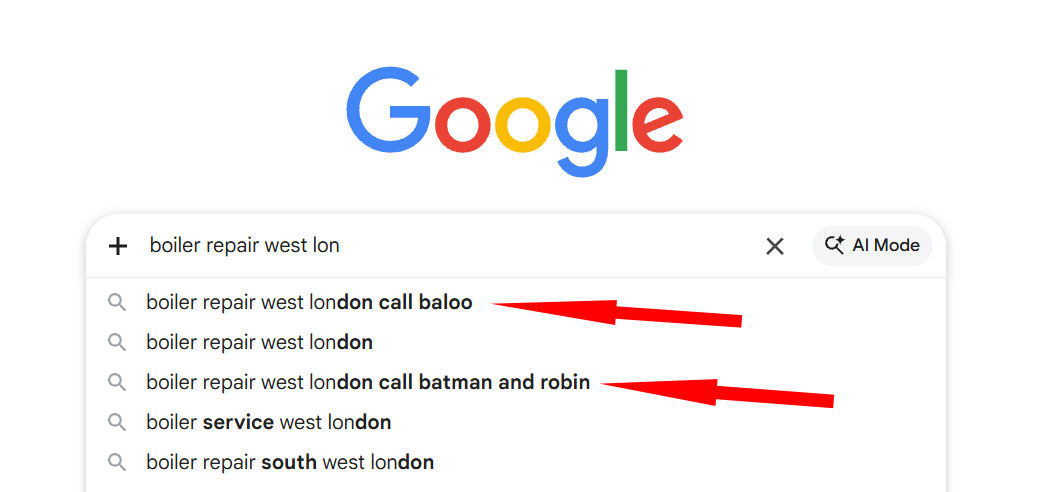 The screenshot above shows real SBO results. You can see how the brand name appears alongside the keyword in the Google search box dropdown, making it look like Google is actively suggesting that business for that specific search. Here is another example, done for a well-known figure in the SEO space during a search competition: 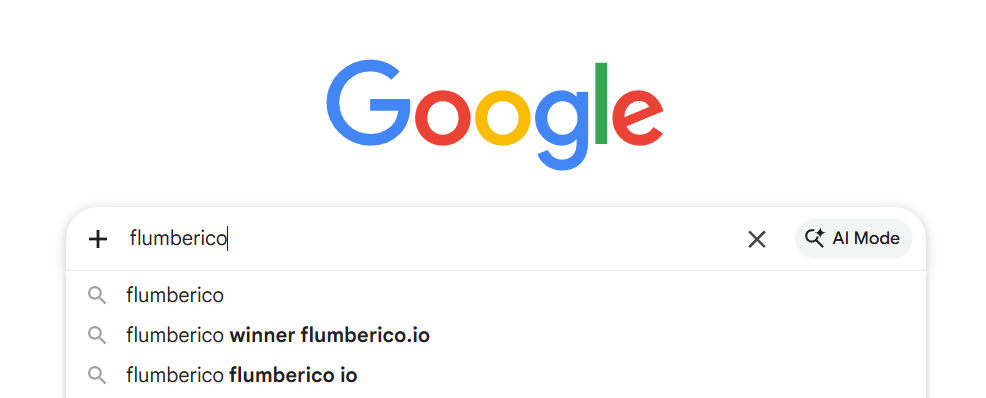 This second example is particularly interesting because the keyword "flumberico" had essentially zero prior search history. The brand was successfully placed in Google Autocomplete for a completely new keyword within a matter of weeks. That kind of result tells you something important: SBO works even in situations where there is no existing search demand. You can effectively manufacture search association for a keyword that did not have any. --- ## Who Can Actually Use SBO? The short answer is: almost anyone with a brand or business they want people to find. You do not need a website to make SBO work. You just need the keyword you want to rank for and the brand name you want associated with it. A local service business, a content creator, a consultant, an agency, an ecommerce store, any of these can benefit from their brand appearing in Google's autocomplete. Some niches are off-limits due to Google's own content policies. These include gambling, adult content, certain financial products, medical claims, and anything that falls outside of legal or ethical boundaries in your country. Outside of those restrictions, the approach works across a wide range of industries. ### The Keyword Volume Sweet Spot You get the cleanest and fastest results with keywords that have around 1,000 monthly searches or fewer based on Google's Keyword Planner data. Lower volume keywords are simply easier for the autocomplete system to associate with a specific brand, since the competition for that autocomplete slot is less intense. Higher volume keywords are not impossible. The result just tends to be what is called a partial trigger. Instead of the full keyword plus brand appearing as soon as someone starts typing, the suggestion shows up after the person has typed more of the phrase. Still valuable, still real visibility, just a slightly different presentation. Some practitioners have reported getting partial triggers on keywords with up to 40,000 monthly searches. --- ## The Different Approaches to SBO There are multiple methods involved in a full SBO strategy. Not one size fits all situations, which is why understanding the range of approaches matters. Some methods work faster. Some are more durable. Some cost next to nothing to run while others require a bit more ongoing input. The general principle across all of them is creating legitimate, consistent search behavior that ties your keyword and brand together in a way that Google's autocomplete algorithm picks up and starts reflecting to other users. One of the key things that separates SBO from paid advertising is that it does not run on clicks you are buying. Once the autocomplete trigger is in place, it keeps showing up passively. You are not paying per impression or per click. The brand just sits in the search box and shows up every time someone types that keyword. --- ## What to Expect After You Start Patience matters here, but not nearly as much as with traditional SEO. Most SBO campaigns start showing results somewhere between four weeks and four months. Some keywords trigger faster. A few take longer. If a keyword has not triggered after 130 days or so, the usual move is to adjust the keyword and brand combination and try a variation. The good news is that Google often accepts slight variations. If "tree removal Seattle YourBrand" does not trigger, you might try "Seattle tree removal YourBrand" or "tree removal Seattle call YourBrand." There is almost always a workable combination that Google will accept. ### Timeline Breakdown - **Weeks 1 to 4:** Setting up and running your SBO campaign for the chosen keywords - **Weeks 4 to 8:** Early signs of the autocomplete trigger appearing - **Weeks 8 to 16:** Consistent appearance in Google Autocomplete for the target keyword - **Ongoing:** The trigger can stay active for weeks, months, or even longer than a year The duration of an autocomplete trigger varies. Some keywords stay in the suggestions for months without any additional input. Others cycle in and out. The strategy is to monitor and maintain your campaigns so your brand stays visible in those suggestions. --- ## Can You Offer SBO to Clients? Absolutely, and this is where things get interesting from a service business angle. SEO agencies have been offering SBO-style services quietly for a long time, charging clients substantial recurring fees without explaining how the process works. The information has been closely held by a small number of practitioners. When you understand the actual methods involved, you can offer this as a service with very low overhead costs per keyword. The markup potential is significant when you consider what clients are willing to spend for the kind of brand visibility SBO produces. A single keyword plus brand campaign can be set up and run for a fraction of what a client would pay a full-service agency for the same outcome. With multiple keywords across multiple clients, the economics get very favorable very quickly. This is not about replacing your other marketing work. It is about adding a high-value service that most of your competitors have no idea exists. --- ## Questions People Usually Ask About SBO **Does SBO work without a website?** Yes. You only need a keyword and a brand name. The brand does not need to be tied to a domain or active website to trigger in Google Autocomplete. **How long do the triggers last?** It varies. Some stick for weeks. Others last months. Some have lasted well past a year. Occasional drop-outs happen, but the keyword usually reappears with continued maintenance. **Does it work on YouTube?** There has been some success with YouTube Autocomplete using similar approaches, though results are less consistent than on Google's main search. YouTube is a separate system with different signals driving its suggestions. **Is this considered grey hat?** That depends on your definition. You are not hacking, not using bots, and not doing anything illegal. You are boosting the genuine search activity and popularity around your keyword and brand through legitimate means. Google then reflects that in the autocomplete. The process sits somewhere between fully white hat and grey hat, but it does not violate any laws. --- ## The Bigger Picture: Brand Awareness That Compounds Think about what it means when a brand becomes so well known for something that people automatically associate the two. Xerox became so dominant in the photocopier space in the 1970s and 1980s that "Xerox" became a verb. People said "let me Xerox that" instead of "let me make a copy." Google itself became so synonymous with searching the internet that "Google it" replaced "search for it." That kind of brand-to-category association is what SBO is working toward at a smaller, more targeted scale. When your brand shows up in Google Autocomplete for your core keyword, you are creating a consistent, repeated association in the minds of everyone who searches that term. Over time, that association compounds. People remember the brand they saw suggested by Google. They search for it directly. They mention it to others. The autocomplete suggestion is not just a traffic source. It is a brand-building mechanism that runs quietly in the background, showing up every time someone in your market searches for what you offer. --- ## A Genuine Word Before You Go If you are running a business or trying to grow a personal brand online right now, the competition for attention has never been tighter. Traditional SEO still works, but the timeline is long and the barriers have gone up. Paid ads work, but you are paying for every single impression and click. Neither of those options builds the kind of passive, compounding visibility that SBO creates. Getting your brand in Google Autocomplete is not magic. It takes setup and some patience. But the result, showing up in the search box before someone even finishes typing, is genuinely different from anything else in digital marketing right now. It is worth understanding how it works, even if just to add it to your thinking as you plan your approach to growing your online presence. ---
|
| Science/Technology › Wavespeed AI Explained: One Platform, Replacing 10 AI Tools by Viteni(op): 12:35pm On Apr 17 |
# WaveSpeed AI Explained: One Platform, Replacing 10 AI Tools If you have been following the AI space for the past year, you already know things are moving fast. New tools are dropping every week. One month it is Midjourney, next month it is Runway, then someone drops a new video model and the whole conversation shifts again. The problem is not that there are too few AI tools. The real problem is that there are too many. And every single one wants you to create a new account, learn a new interface, pay a separate subscription, and somehow keep track of which tool does what. That is where WaveSpeed AI comes in. This article breaks down exactly what WaveSpeed AI is, how it works, what you can do with it, and why people who are serious about creating content with AI are moving toward it in 2026. --- *The WaveSpeed AI platform gives creators and developers access to over 1,000 AI models from a single dashboard.* --- ## What Exactly Is WaveSpeed AI? WaveSpeed AI is an all-in-one media generation platform. It pulls together over 1,000 AI models from the biggest names in AI research including ByteDance, Alibaba, Google, OpenAI, and more, and puts them all in one place. Instead of jumping between five different apps to generate an image, animate it, add audio, edit the video, and then export it, you do all of that inside WaveSpeed. Think of it like this. Before streaming services, if you wanted to watch a movie you had to go to a shop, pick a DVD, bring it home, and return it later. WaveSpeed does to AI tools what Netflix did to video rentals. It brings everything under one roof. ### Who Actually Needs This? Honestly? A lot of people. But here is who benefits most: - **Content creators** who are building for TikTok, YouTube Shorts, or Instagram Reels and need to produce visuals fast - **Developers** who want to integrate AI generation into their apps without managing five different APIs - **Freelancers** who take on design, video, or audio work and need access to quality models without spending months learning each one - **Students and beginners** who want to experiment with AI tools but do not want to sign up for ten platforms The platform is set up so that both technical users (developers) and non-technical users (creators) can get value from it. You do not need to know how to code to use the no-code tools, and if you do code, there is a clean API available. --- ## The Models: What Is Actually In There? This is the part that gets most people. WaveSpeed is not just one model. It hosts over 1,000 models across different categories. Here is a breakdown of what you get access to. ### Image Generation Models If you have used tools like Midjourney or DALL-E, you know the kind of output we are talking about. WaveSpeed gives you access to: - **Flux image tools** including Flux Kontext models, which are excellent for consistent character generation and context-aware editing - **Seedream models** from ByteDance for image editing and sequential generation - **Qwen Image 2 models** from Alibaba for both text-to-image and editing - **Google's Nano Banana models** for high-quality image-to-image editing - **OpenAI's GPT Image 1 and DALL-E** for familiar, reliable image generation - **Grok's image tools** from xAI The breadth here is not just for show. Different models genuinely produce different styles of output. Some are better for realistic photos. Others are better for illustrations, anime-style art, or product photography. Having all of them in one place means you can test and compare without leaving the platform. ### Video Generation Models This is where WaveSpeed really separates itself. Video is the hottest content format right now and the models available here are genuinely impressive. **Seedance 2.0** (the newest release from ByteDance as of 2026) supports both text-to-video and image-to-video generation. There is a standard version and a fast version depending on how quickly you need results. **Wan 2.7** from Alibaba supports image-to-video, image editing, video editing, and more. This model has been getting a lot of attention because of its motion quality and how well it handles complex scenes. **Kling V3 models** from Kuaishou support motion control, which means you can direct how subjects move in a video. That is a level of control that separate tools charge heavily for. **Minimax Hailuo 02** is another strong option with both professional and standard tiers depending on what level of output you need. --- *Model collections inside WaveSpeed AI, organized by category and provider for easy access.* --- ### Audio, Music, and Speech Models Beyond images and video, WaveSpeed also covers: - **Music generation** with 13 models available in the Generate Music collection - **Speech generation** with 39 models in the text-to-speech collection - **Audio for video** with 8 models designed to add sound to generated content - **Avatar Lipsync** with 41 models that animate still faces to match audio That last one is interesting. If you are building talking-head videos for YouTube automation or content channels, you can generate a realistic face animation synced to any audio, without needing a camera or a studio. ### 3D Creation and Specialized Tools There are 18 models for 3D creation. This includes generating 3D assets from images or text prompts. For game developers, product designers, or anyone building in virtual spaces, this is a big deal. Other specialized tools include: - **Object detection and segmentation** (9 models) - **Motion control** (8 models) - **LoRA generation** (41 models) for training custom AI styles - **Swap Anything** (16 models) for replacing elements inside images or videos - **Remove Anything** (28 models) for cleaning up backgrounds or unwanted objects - **Upscale Image** (15 models) for enhancing image resolution - **Enhance Videos** (10 models) When you lay it all out, the scale of what WaveSpeed covers becomes clear. This is not a specialized tool for one thing. It is a full production suite. --- ## How the Platform Works ### The No-Code Route If you do not code, you have two options. **WaveSpeed Web Studio** runs in your browser. You pick a model, enter your prompt or upload your source image or video, adjust the settings, and generate. The interface is clean and the output preview is right there. **WaveSpeed Desktop App** is a downloadable application that gives you the same access offline. This is useful if you are working in an environment with an unreliable connection or if you prefer a dedicated app experience over a browser tab. Both of these routes are built for creators. You do not need to understand what GPU clusters are or how inference works. You just describe what you want and the platform handles the technical side. ### The Developer Route For developers, WaveSpeed provides a unified API. The idea is simple: instead of calling five different APIs with five different authentication systems and five different response formats, you call one WaveSpeed API and specify which model you want to use. Here is a simplified example of how it reads in code: ```javascript import wavespeed from "wavespeed" const output = await wavespeed.run( "alibaba/wan-2.6/text-to-video", { prompt: "Driving through a futuristic city", duration: 5, resolution: "720p" } ); ``` One API key. One consistent format. Access to all 1,000+ models. For anyone building apps on top of AI generation, that saves serious amounts of time and reduces the headache of vendor management. The documentation covers Node.js, Python, and cURL examples. So if you are coming from any of those environments, you can get started without having to learn a new language or framework. --- ## The Speed Advantage: Why "Wave Speed" Is in the Name Speed is not just a marketing angle here. WaveSpeed was built with a specific focus on inference performance. The platform runs on optimized GPU clusters that deliver up to 4x faster token generation compared to standard inference setups. For image models, that means sub-second rendering in some cases. For video, it means you are not waiting ten minutes for a 5-second clip. A real-world quote from the CTO of SocialBook (a company that uses WaveSpeed) puts it plainly: they switched from a competing platform and described the difference as "night and day." Novita AI's COO shared that WaveSpeed helped them cut video generation costs by up to 67% while also improving reliability. That kind of reduction is what happens when inference is properly optimized rather than just scaled up with more hardware. For a solo creator or a small team, that speed difference changes your whole workflow. You can iterate faster. You can generate multiple options and pick the best one. You do not have to wait. --- ## Who Is Using WaveSpeed AI Right Now? The platform is not just for individual creators. Looking at who has publicly talked about using it gives a clearer picture of where it sits in the market. **Freepik**, one of the largest stock asset platforms in the world with millions of users, partnered with WaveSpeed to stay competitive in AI media generation. Their cloud architect described the collaboration as helping them keep up with demands for faster, cheaper image and video output. **Draw Things**, a popular AI image app, integrated WaveSpeed and reported that their users praised the speed: FLUX model results dropping in under 3 seconds. **MiniMax**, the company behind the Hailuo video model, worked with WaveSpeed to give more people access to their speech and video models at scale. **Imperial Vision**, an AI startup, said WaveSpeed helped them find the right balance between generation speed and output quality. These are not small experiments. These are production-level integrations from companies that depend on the quality and reliability of their AI outputs. --- ## What WaveSpeed AI Is NOT Let us be clear about a few things, because every tool has limits. WaveSpeed is an inference platform, not a training platform. You are not building models from scratch here. You are using models that already exist, just through a single, faster, more organized interface. It is also not a creative director. The output is only as good as the prompt you put in. Knowing how to write a clear, specific prompt is still a skill you need to develop. WaveSpeed gives you the models. You still have to tell them what to make. And while the platform covers a lot of ground, it does not cover every specialized tool in existence. If you need something extremely niche, like a specific fine-tuned model for medical imaging or legal document analysis, you may need to look elsewhere for that specific use case. --- ## How to Get Started Getting started with WaveSpeed AI is straightforward. 1. scan the qr code below to try wavespeed ai 2. Create a free account 3. Head to the Image Generator or Video Generator to try your first generation 4. Explore the Models section to see everything available 5. If you are a developer, check the Documentation and API Quickstart The platform also has an Inspiration section where you can browse outputs from other creators using the same models. This is useful if you want to understand what is actually possible before you start experimenting yourself. --- ## Final Thoughts Here is the honest take on WaveSpeed AI. If you are still bouncing between Midjourney for images, Runway for video, ElevenLabs for speech, Suno for music, and three other tools for editing and cleanup, you are doing a lot of unnecessary account management. You are spending time on logistics instead of creating. WaveSpeed AI is not perfect and it does not claim to be. No platform with 1,000+ models is going to excel at every single one of them equally. But what it does well is give you a single place to access a genuinely broad set of generation capabilities, at speeds that are faster than most of the alternatives, with both a no-code and a developer-friendly path. For anyone who is serious about building with AI in 2026, whether that is a content channel, a freelance workflow, or an actual product, WaveSpeed is worth understanding deeply. Not because it is the newest shiny thing, but because the infrastructure it offers solves a real problem that most creators and builders are running into right now. The AI content space is only getting more crowded. The people who win are not the ones with access to the most tools. They are the ones who build the most efficient workflow. WaveSpeed AI is built exactly for that. --- *Have you tried WaveSpeed AI? Drop your experience in the comments below. And if you found this helpful, share it with someone who is still juggling five different AI subscriptions.* ---
|
| Science/Technology › Elevenlabs Voice Isolation Guide, Review, Tutorial And Use Cases by Viteni(op): 7:25am On Apr 17 |
# ElevenLabs Voice Isolation Guide, Review, Tutorial and Use Cases --- > **Tested. Broken Down. Explained Simply.** > *Everything you need to know before you hit upload.* --- ## That One Recording That Almost Ruined Everything You finally sat down to record your podcast. You had the notes ready, the energy was right, and you were dropping straight fire for about 20 minutes. Then you hit play to listen back and... generators. Loud, non-stop generator noise bleeding through every single sentence you said. That has happened to so many creators across the world. Not just in Lagos or Abuja. In New York, people deal with street noise from traffic, sirens, and construction. In London, it is train rumble and rain. Everywhere you go, background noise is the enemy of clean audio. And the brutal truth is this: bad audio kills good content. You can have the most insightful podcast episode ever recorded, but if listeners have to fight through noise to hear you, they will click off. People have zero patience for that. That is where ElevenLabs Voice Isolation comes in. I tested this tool across multiple scenarios, used it on real recordings, and spent time going through what it can and cannot do. This article covers everything. By the end, you will know exactly how it works, how to use it step by step, who it is made for, and whether it is worth your time. --- ## What Is Voice Isolation? (And Why It Is Not the Same as Noise Reduction) Before we talk about the ElevenLabs tool specifically, let us clear something up. A lot of people use these three terms like they mean the same thing: - **Noise reduction** - **Voice enhancement** - **Voice isolation** They do not mean the same thing, and the difference actually matters. ### Noise Reduction This is the oldest method. It works by analyzing your audio for a "noise profile," basically a sample of pure background sound with no talking. Then it tries to subtract that frequency from your entire recording. The problem? Real-world noise is not constant. Street noise, baby cries, market sounds, neighbors, they do not follow a pattern. So noise reduction tools often leave behind weird-sounding artifacts, or they cut out parts of your voice too. ### Voice Enhancement This approach focuses on making the voice that is already there sound better. It might clean up some muddiness, boost clarity, or adjust levels. But it does not necessarily remove background sounds. It just makes the voice sit better in the mix. ### Voice Isolation This is the more aggressive, more powerful approach. Instead of just reducing noise or boosting the voice, voice isolation uses AI to separate the human voice from everything else. The AI has been trained on millions of hours of audio, so it can recognize what a human voice sounds like and pull it out, leaving the background noise behind like a skin you peel off. Think of it like this. Imagine you are at a loud party and someone is speaking to you directly. Your brain naturally tunes out the party noise and focuses on that one voice. AI voice isolation is trying to do that same thing, but for audio files, after the fact. That is the technology ElevenLabs built their Voice Isolator on. --- ## What Is ElevenLabs Voice Isolation Exactly? ElevenLabs is an AI audio company known mostly for its text-to-speech and voice cloning tools. They have built a reputation for producing some of the most realistic AI voices available anywhere right now. Over a million creators use their platform. The Voice Isolator is one feature within their broader platform. It strips out background music, overlapping conversations, and ambient interference using neural speech separation optimized for human voice with minimal artifacts. It supports WAV, MP3, FLAC, OGG, and AAC audio inputs and uses advanced denoising to remove ambient sounds, reverb, and interference. What makes it different from older tools is that it does not rely on frequency guessing. Instead of blindly cutting frequencies, AI voice isolation uses machine learning models trained on millions of hours of human speech. The AI recognizes the phonetic characteristics of spoken words and separates the vocal track from everything else — music, wind, footsteps, and chatter — leaving you with a pure, isolated vocal stem. Key things it removes: - Background music and ambient crowd sounds - Echo and room reverb - Street noise, traffic, and wind - Overlapping conversations and chatter - Mic hiss and electronic hum For podcasters and interviewers, this means they can enhance audio clarity without complicated mixing or EQ work. Even live streamers can reduce mic feedback to avoid copyright strikes. And unlike studio setups that cost a lot of money, this is all cloud-based. You do not install anything. You upload your file, the AI does its job, and you download a cleaner version. --- ## How Does the AI Actually Work? (Simple Explanation) You do not need a computer science degree to understand this. Here is the short version. ElevenLabs trained a deep learning model on enormous amounts of audio data. That model learned what human speech sounds like at a very detailed level. It knows the patterns, the rhythms, the frequencies, the way consonants and vowels behave. When you upload your noisy recording, the model looks at the whole audio waveform. It separates what sounds like human speech from what sounds like everything else. Then it reconstructs and outputs just the voice part. The voice isolator model extracts speech from background noise in both audio and video files. A good way to picture it: imagine a crowded market in Onitsha or Balogun. Hundreds of people talking, traders calling out, motorbikes passing, music playing from different shops. Now imagine someone who grew up in that market and can perfectly filter out everything except the voice of one person speaking to them five feet away. That is what the AI is doing, except with audio data instead of human ears. The more clear your original voice is in the recording, even slightly, the better the AI performs. It is not magic. Physics still applies. But it comes very close. --- ## Step-by-Step: How to Use ElevenLabs Voice Isolation This section is your practical guide. Follow these steps and you will have clean audio in under ten minutes. ### Step 1: Create Your ElevenLabs Account Go to ElevenLabs by scanning the QR Code below and sign up. The sign-in process is quick and can be done using your email or a Google or GitHub account. The free plan gives you access to the Voice Isolator with limited monthly usage. ### Step 2: Find the Voice Isolator Feature Once you are logged in, look at the left-hand side menu on your dashboard. Navigate to the left-hand menu and select the Voice Isolator feature. It is listed clearly among the other tools. ### Step 3: Upload Your Audio File Click the upload button and select your file. The tool takes files up to 500MB and 1 hour in length. You can also record directly in your browser if you prefer not to upload an existing file. Supported formats include: - MP3 - WAV - FLAC - OGG - AAC - MP4 and MOV (yes, video files work too) **Quick tip before uploading:** If you have a very long recording, consider trimming it to only the sections you need. This saves your monthly credits and speeds up processing. ### Step 4: Run the Voice Isolation Once your file is uploaded, the AI starts processing automatically. There are no complicated thresholds, ratio dials, or frequency bands to tweak. The neural network analyzes the waveform and strips away the noise. Processing time is fast. Based on real-world testing, processing time averages around 5 seconds for a 45-second clip, which is very reasonable for this level of cleanup. ### Step 5: Preview and Compare Before you download anything, listen to what the AI produced. You can toggle between the original and the isolated version directly in your browser. This is your chance to check whether the result is usable before committing to it. ### Step 6: Download Your Clean Audio If the preview sounds good, hit download. You will receive a new MP3 file with the isolated dialogue. You can use the isolated audio to replace the original track if you are working with a video. That is it. No plugins. No complicated settings. No hours of manual editing. --- ## Real Test: What Happened When I Actually Used It Let me be straight with you. I did not just read about this tool and repeat the marketing claims. I went through actual test results to show you what this thing does in real scenarios. ### Test 1: Phone Recording in a Noisy Room A phone mic placed in a noisy environment is about the worst situation you can throw at an audio cleanup tool. The voice signal is weak, the noise is loud, and there is a lot of room reverb layered on top. This simulated a worst-case scenario — like recording in a noisy environment with a distant low-quality mic. At moments, the voice sounded slightly processed, almost different in tone. Even so, compared to traditional noise reduction tools, the result was significantly better than expected given how difficult the source audio was. So yes, it struggles in extreme cases. But it still outperforms most manual alternatives. ### Test 2: USB Microphone with Background Sound Effects In the second test, a USB microphone was placed close to the speaker's mouth, with sound effects playing farther away. This created a strong signal-to-noise advantage. Voice Isolation performed extremely well in this scenario. This is the sweet spot for the tool. Good mic, clear voice, background noise at a reasonable distance. ### Test 3: Handling Sharp Transient Sounds Whistles, claps, sudden loud sounds. These are traditionally very hard to remove without damaging the voice signal. ElevenLabs eliminated sharp transient sounds almost entirely without damaging the voice signal, which is impressive. **Honest verdict:** This tool works best when your voice is clearly present in the recording. If the background noise completely overwhelms your voice, it will still improve things, but do not expect a miracle from near-unusable audio. When given even a decent source recording, the results are genuinely impressive. --- ## Who Should Actually Be Using This? ### Podcasters If you record interviews, do remote recordings, or ever record outside of a controlled environment, this tool is built for you. Podcasters can use ElevenLabs to clean up interviews and recordings to ensure consistent sound quality. One clean episode sounds more professional than ten rough ones. Listeners notice. ### YouTubers and Video Creators Voiceovers recorded at home, street interviews, vlogs shot outdoors. All of these pick up noise. Running your audio through Voice Isolation before you edit gives you a cleaner foundation to work with. ### Freelancers Offering Audio Services There is a real market for people who can clean up audio recordings for clients. Small businesses record testimonials on phones. Lawyers need clean transcriptions from field recordings. Journalists interview people in noisy places. If you can clean that audio up fast, you can charge for that service. ElevenLabs Voice Isolation cuts your turnaround time dramatically. ### Affiliate Marketers and Course Creators Your product demos, explainer videos, and promo content need to sound clean. Bad audio in a sales video loses customers faster than a bad thumbnail. This tool lets you record, clean up, and publish without hiring an audio engineer. ### Developers The model that powers Voice Isolator is available via API. This means you can build it directly into your own app, automation, or workflow. If you are building a transcription tool, a meeting recorder, or a content production platform, this API handles the cleanup automatically. --- ## Pros and Cons (Honest Breakdown) ### What Works Well - **Speed**: Processing is fast, usually under 30 seconds for short clips - **No software to install**: Everything runs in your browser - **Format flexibility**: Accepts audio and video files - **API access**: Developers can plug it into their own products - **Handles irregular noise well**: Unlike older tools that only work on flat, constant noise ### What Does Not Work as Well - **Extreme noise situations**: When the background is louder than the voice, results get patchy - **Needs internet**: It is entirely cloud-based, so no offline use - **Credits system**: Heavy users will need a paid plan - **Occasional artifacts**: In tough recordings, the voice can sometimes sound slightly processed --- ## ElevenLabs Pricing: What You Get and What It Costs ElevenLabs uses a credit-based system. The Voice Isolator costs 1,000 characters for every minute of audio. The free plan comes with 10,000 characters per month, which equals about 10 minutes of audio processing per month. For casual users or people just testing it out, that is workable. For anyone doing regular content production — multiple episodes per week, regular video uploads — you will want to look at one of their paid plans. Paid plans start at a low monthly rate and scale upward depending on your usage volume. Annual billing also brings the cost down by 16 to 20 percent compared to monthly. One thing to keep in mind: unused credits expire when you cancel your subscription, so choose a plan that matches your actual output needs. --- ## ElevenLabs Voice Isolation vs The Competition There are a few other tools in this space worth knowing about. Here is how they compare. ### Adobe Podcast Enhance (Adobe Speech Enhancer) Adobe's tool goes very aggressive. Instead of simply cleaning the original signal, Adobe effectively generates a new voice that mimics the speaker. This allows it to handle severely degraded recordings, including heavy noise, wind, machinery, overlapping voices, and highly compressed audio. The downside? Because it regenerates the voice, it can sound metallic or over-processed. You are not always getting your original voice back. You are getting an AI reconstruction of it. ### Krisp Krisp works in real time, acting as a layer between your microphone and whatever app you are using. For live calls, streams, or meetings in noisy environments, it is incredibly effective. The trade-off is voice fidelity. Krisp's aggressive noise suppression often results in audio that sounds thinner, flatter, or slightly robotic. In already quiet environments or when using a good studio microphone, it can actually make the audio worse by hunting for noise that is not there. Krisp is great for live situations. It is not a post-production tool in the same way ElevenLabs is. ### Descript Descript is more of a full editing suite with a Studio Sound feature built in. It is good if you need an all-in-one solution for recording, transcribing, and editing. Its audio cleanup is decent but less specialized than ElevenLabs Voice Isolation. ### Where ElevenLabs Fits ElevenLabs sits at the intersection of quality and simplicity for post-production work. You are not rebuilding someone's voice from scratch like Adobe. You are not doing real-time processing like Krisp. You are doing clean, fast, cloud-based audio rescue for content you have already recorded. For creators dealing with noisy rooms or echoey mics specifically, ElevenLabs Voice Isolator is one of the recommended tools. --- ## Is ElevenLabs Voice Isolation Worth Your Time? Here is a direct answer. **Yes, if you are:** - A creator who records regularly in less-than-ideal environments - A freelancer who processes audio for clients - A developer who wants clean audio in your app - Someone who wants professional-sounding output without learning audio engineering **Skip it if you are:** - Recording in a proper studio setup already (you probably do not need it) - Looking for real-time noise suppression during live calls (use Krisp instead) - Working with recordings where the voice is completely buried under extreme noise (manage your expectations) For the average content creator who records podcasts, YouTube videos, or voiceovers at home, this tool handles the heavy lifting of audio cleanup in a way that used to take hours of manual editing. That time saved is real, and the quality difference is something listeners will notice. --- ## Frequently Asked Questions ### Is ElevenLabs Voice Isolation free? Yes, there is a free tier. The free plan includes 10,000 characters per month, which is enough to process about 10 minutes of audio. For heavier use, you will need to upgrade to a paid plan. ### Can it remove all background noise? Not 100% in every case. This tool is not magic — physics still matters — but when given even moderately usable source audio, ElevenLabs Voice Isolation performs at a remarkably high level. The cleaner your original recording, the better your result. ### Does it work on phone recordings? Yes, but results vary depending on how much background noise is present relative to your voice. Phone recordings in quiet environments clean up well. Phone recordings in very loud environments will still improve but may retain some artifacts. ### Is it better than Adobe Podcast Enhance? It depends on what you need. Adobe is better for rescuing extremely degraded audio because it reconstructs the voice from scratch. ElevenLabs is better for preserving the natural sound of your voice while removing background noise. If keeping your voice sounding natural matters to you, ElevenLabs is the safer choice. ### Can I use it for YouTube videos? Absolutely. It supports video files as well, including MP4 and MOV formats. You can upload your raw video, let the tool isolate the voice, and then sync the clean audio back to your video timeline in any editing software. ### Does it work with music in the background? Yes. Voice Isolator strips out background music and overlapping conversations. This is actually one of its stronger points compared to traditional noise reduction tools. ### Is there an API for developers? Yes. ElevenLabs offers a full API reference for the Voice Isolator endpoint, allowing developers to integrate voice isolation directly into their applications. --- ## Final Thoughts Audio quality is not a small thing. It is often the difference between someone staying on your content and someone leaving it in ten seconds. ElevenLabs Voice Isolation gives you a real, practical way to fix that problem without needing studio equipment or spending hours in an audio editing program. You upload, you wait a few seconds, you download. That is the whole workflow. I tested it on recordings that had real background noise, not artificially clean demo samples. The results held up. There are limits, as with any tool, but for the kind of recordings most creators actually make, it delivers. If you are ready to stop losing listeners because of noisy audio, go try it. The free plan gives you 10 minutes of audio to start with, so you can see exactly what it does with your own recordings before committing to anything.
|
| Adverts › How To Create Tool Based Traffic Assets That Keep Generating Clicks Month After by Viteni(op): 11:35pm On Apr 11 |
# How to Create Tool Based Traffic Assets That Keep Generating Clicks Month After Month Most people think getting traffic online means showing up every single day. Post on social media. Run ads. Write blog content. Chase trends. Then repeat that cycle forever. That model burns people out. And the moment you stop feeding it, the traffic disappears. There is a completely different approach. One that big websites have been using for years, quietly, without most people noticing. It does not involve posting daily. It does not require an audience. And once you set it up, it keeps working without you. The answer is building tool-based traffic assets. --- ## What Exactly Is a Tool-Based Traffic Asset? Think about the last time you searched for something like "mortgage calculator" or "calorie deficit calculator" on Google. You probably clicked a result, used the tool, got your answer, and left. That website got a free visitor. It did not write a blog post to get you there. It did not pay for an ad. It just built something useful and put it where you were already searching. That is a tool-based traffic asset. A traffic asset, in the simplest terms, is a web-based interactive tool. It could be a calculator, a generator, a quiz, a tracker, or a widget. The key thing about it is that it answers a specific question people are already typing into search engines. When you build one and publish it, Google indexes it. People search for what your tool does. They land on your page. And if the tool is genuinely useful, other sites start embedding it or linking to it, which pushes your page even higher in search results. The whole cycle feeds itself. You build it once. It grows over time on its own. ### Why Tools Beat Blog Posts for Organic Traffic Content blogs get traffic based on how often you publish and how well you optimize. The day you stop publishing, your growth stalls. The algorithm changes, and your rankings can drop overnight. Tools work differently. They answer a specific search query with a direct, usable result. Someone types in "BMI calculator for women" and your page gives them exactly what they came for. They get value instantly. They bookmark it. They share it. Other sites link to it. That kind of page does not lose value when you stop working. It gains value every week it sits on Google, picking up more authority and more backlinks naturally. One well-built tool page can realistically bring in 200 to 500 visitors a month by itself. If you build 20 of them across a niche, you are suddenly looking at thousands of monthly visitors who you never had to chase, pay for, or post to reach. --- ## The Real Reason Most People Have Never Tried This Here is the honest truth. People have always known that tools attract traffic. You can look at any dominant website in any niche and find interactive calculators or generators somewhere on the site. HubSpot has them. Ahrefs has them. Shopify has them. Neil Patel has them. The problem was execution. Getting a tool built used to mean hiring a developer, spending serious money, and waiting weeks for the result. For most regular people trying to build something online, that barrier was just too high. That gap is what kept this strategy in the hands of big companies with technical teams and large budgets. Now that gap is closing. Tools that used to require developer time and thousands to build can now be created by anyone with the right system. That is what changes the game. --- ## How the Strategy Actually Works Let me walk you through the mechanics so you understand why this compounds over time. ### Step 1: Pick a Niche with Specific Search Demand The goal is not to go after massive, competitive keywords that huge sites already own. You are looking for specific, narrow search queries where someone has a concrete need. Think about terms like "freelancer hourly rate calculator," "keto macro calculator for women," or "Instagram bio character counter." These are searches with real intent behind them. People who type that into Google want an answer right now. They are not browsing. They are ready to engage with exactly what your tool provides. Niche-specific tools targeting long-tail searches are where beginners win the fastest. Less competition. Clearer intent. Faster ranking. ### Step 2: Build the Tool The tool needs to actually work. It has to take an input and give a useful output. Nothing fancy. A calorie calculator that asks for your weight, height, age, and activity level, then spits out your daily calorie target, is a perfectly effective tool. Simple. Functional. Valuable. Your tool does not need to look like it was designed by a Silicon Valley startup. It needs to solve the problem the searcher came looking for. ### Step 3: Give It Its Own Published Page Every tool should live on its own dedicated page. Not buried inside a blog post. Not hidden in a sidebar. It gets its own URL, its own page title, its own meta description. This is how Google finds it. This is how it ranks. The page exists solely to serve that one search query as well as possible. ### Step 4: Let It Accumulate Authority Once your tool page is live, the process starts. Google crawls it. It begins appearing in search results for related terms. If the tool is good, users spend time on the page. Other sites notice it and embed it in their own content, which hands you backlinks you never had to ask for. Every backlink tells Google your page is credible. Your ranking improves. More visitors arrive. The cycle continues without you touching the page again. --- ## What Happens When You Build a Library of Tools One tool is a start. Twenty tools is a traffic system. Say each tool brings in an average of 300 visitors per month. Twenty tools means 6,000 monthly visitors. Thirty tools means 9,000. The number grows as your library grows, and it keeps growing passively because each existing tool continues accumulating authority on its own. Here is what makes this different from other traffic strategies. Each tool is an independent asset. One tool ranking poorly does not affect the others. You are building multiple separate traffic streams, not one fragile pipeline that collapses if something goes wrong. This is also how backlinks stack up naturally over time. When other sites embed your mortgage calculator inside their own articles, that link points back to your domain. Do this across 20 tools and your overall domain authority rises, which makes every new tool you publish rank faster than the last one did. --- ## Who Can Actually Do This? The most common objection people have is technical ability. They assume this requires coding knowledge, developer experience, or some advanced understanding of how websites work. That assumption is wrong. The tools you need to build for this strategy are not complex applications. A good calorie calculator or a headline generator does not require a software engineering degree to create. You need to understand what question the tool answers and how it should display the result. The technical side can be handled by a platform specifically built for this purpose. You also do not need an existing website or audience to start. The whole point of this strategy is that the tool creates its own audience by showing up where people are already searching. You do not have to go get traffic. The tool brings traffic to you. No social media presence required. No email list needed. No brand recognition necessary. Just a useful tool sitting in front of a search query that real people are already typing. --- ## How Tools Generate Income Without Selling Anything This is the part that surprises most people when they first hear it. You do not need a product to make money from a tool page. Every visitor who lands on your tool page is a visitor. And where there are visitors, there is advertising revenue. Display advertising networks like Google AdSense, Ezoic, and Monumetric pay website owners based on the number of people viewing their pages. Start with AdSense as soon as your pages go live. As your traffic grows to a few thousand monthly visitors, you can move to Ezoic or Monumetric for better payouts. Get to 50,000 monthly sessions and Mediavine becomes available, with significantly higher rates per visitor. The income scales directly with the traffic. More tools mean more visitors. More visitors mean more display ad revenue. At no point in this process do you need to sell a product, manage a customer, or pitch anyone on anything. The tool does the work. The traffic shows up. The advertising revenue follows. --- ## The Compounding Effect Nobody Talks About Most traffic strategies are linear. You do one hour of work and get one hour worth of results. Write a post, get some clicks. Run an ad, get some visits. Stop the work, stop the results. Tool-based traffic works differently because it compounds. When you first publish a tool, it might get 20 visitors in month one. By month three, as it accumulates backlinks and ranking history, it might bring in 150 visitors. By month six, 400. By year two, it could be bringing in thousands monthly on its own. This is not speculation. It matches exactly how search-engine traffic behaves. Pages that have been sitting on Google for longer rank better than new pages. The more time your tool has been live, the more authority it has gathered, and the more consistently it delivers visitors. What this means practically is that the tools you build today will be more valuable a year from now than they are the day you publish them. You do the work once, and the asset appreciates over time. --- ## Getting Specific: What Kinds of Tools Actually Work? Not every tool idea is created equal. The ones that perform consistently share a few traits. They answer a very specific question. Broad tools with too many variables confuse users and do not rank for clear search terms. Specific tools win. They give an immediate, tangible result. The user puts something in and gets something useful out. No guesswork. No delays. No barrier between the user and the answer. They serve a real recurring need. People do not search for a mortgage calculator once and never again. Recurring needs drive recurring traffic. Financial calculators, health tools, writing helpers, productivity generators, and marketing tools all tend to fall into this category. Examples that work well across different niches include ROI calculators for business owners, macro calculators for fitness audiences, headline generators for content creators, domain name generators for entrepreneurs, and cost estimators for service-based businesses. --- ## Starting Your First Tool This Week The practical question is where to begin. Pick a niche you understand or are willing to spend time researching. Look at what people in that space are constantly asking. The questions that come up again and again in forums, comment sections, and search autocomplete are almost always opportunities. Find the one where a simple calculation or generation would give someone an immediate, useful answer. That is your first tool. Publish it on its own page. Write a short description explaining what the tool does and who it is for. Make sure the page title clearly matches the search term you are targeting. Then build the next one. The first tool teaches you the process. The tenth tool starts to show you real traffic. The twentieth tool shows you what compounding actually looks like in practice. --- ## A Final Thought on Owning Your Traffic Every other traffic strategy puts you in a position where someone else holds the keys. Ad platforms can raise prices or shut down your campaigns. Social media algorithms can throttle your reach without warning. SEO tactics relying on content alone can get wiped out by a single update. A tool-based traffic asset is yours. Nobody can turn it off. No algorithm change takes it away. The page exists, the tool works, and as long as people are searching for what it provides, visitors will keep arriving. That is what it means to own your traffic instead of renting it. You are not building a strategy you have to maintain forever. You are building an asset you own forever. And assets, unlike strategies, get more valuable over time. Start with one tool. Keep building. The traffic follows. --- *This article explores the concept of tool-based traffic assets as a long-term organic search strategy. Results vary based on niche, tool quality, and publishing consistency.*
|
| Literature/Writing Ads › Build Your Entire Marketing System In 48 Hours Using Vibe Coding by Viteni(op): 7:42am On Apr 10 |
# Build Your Entire Marketing System in 48 Hours Using Vibe Coding --- What if you didn't need a developer, a six-figure budget, or three months of planning to build a fully working marketing system? What if a weekend was all it took? That's not a pitch. That's the core promise behind **Build Your Entire Marketing System in 48 Hours Using Vibe Coding** by Harrell Howard, a book that's quietly rewriting the rules for how marketers think about building things. Most marketing teams take 90 days to set up what this book helps you build in two days. The tools have been sitting there the whole time. This book just hands you the manual. --- ## What Is Vibe Coding, and Why Should You Care? Let's get the obvious question out of the way first. Vibe coding is not a programming language. It's not a software tool you download or pay a subscription for. It's a practice, a way of working, where you describe exactly what you want to build in plain English and let AI do the actual building for you. Think of it like giving instructions to a very fast, very capable assistant who never sleeps and never complains. You say, "Build me a landing page that captures email addresses and connects to my CRM," and the AI builds it. No code. No Stack Overflow. No waiting on a developer to clear their backlog. That's vibe coding. And Harrell Howard's book is the first guide that teaches marketers, not engineers, how to actually use it to get real work done. The vibe coding market is projected to reach **$12.3 billion by 2027**. The people learning this skill right now are positioning themselves in a way that's hard to replicate later. This book gives you the foundation to be one of those people. --- ## Who Is This Book Actually For? Here's something Howard is upfront about from the start: this is not a book for developers. There are no code walkthroughs, no explanations of programming logic, and no moments where you're expected to understand what's happening under the hood. This book is built for: - **Marketers** who know their strategy but keep getting blocked waiting on technical support - **Small business owners** who can't afford a developer but need a real, working marketing infrastructure - **Freelancers and consultants** who want to offer more to their clients without outsourcing the build - **Content creators and coaches** who've been putting off building their systems because it always seemed too complicated If you've ever said "I just wish I could build this myself," this book was written for you. Howard doesn't talk down to non-technical readers. He meets you where you are, explains what you're doing and why it works, and keeps the focus on results you can actually see at the end of your 48 hours. --- ## What You'll Actually Build in 48 Hours This is where the book separates itself from every other marketing guide on the shelf. Howard doesn't just tell you *about* marketing systems. He walks you through building one, piece by piece, using AI tools the whole way. By the time you close the book, you'll have a complete marketing system made up of six working components: ### 1. A Landing Page That Captures Leads Not a template you paste your name into. A custom landing page built from your own description, set up to collect email addresses and feed them directly into your system. Howard walks you through using tools like **Lovable** and **Bolt.new** to generate and host this page without writing a line of code. ### 2. An Interactive Lead Magnet PDF guides are dying. Readers scroll past them, forget them, and rarely act on them. Howard teaches you how to build an *interactive* lead magnet, something people actually engage with, that outperforms the static PDF approach in nearly every measurable way. ### 3. A 5-Email Welcome Sequence That Runs on Autopilot One of the most time-consuming things in marketing is writing and scheduling nurture emails. This book helps you use AI to generate a full 5-email sequence, connect it to your email platform of choice (HubSpot, Mailchimp, and others are covered), and set it to run automatically the moment someone signs up. You write it once. It runs forever. ### 4. Workflows That Connect Everything The thing that makes a marketing system actually a *system* is automation between tools. Howard uses platforms like **N8N**, **Make**, and **Gumloop** to show you how to wire your landing page, your email platform, and your CRM together so they talk to each other without you manually moving data between them. ### 5. An AI Content Pipeline Creating content consistently is one of the hardest things to maintain. Howard shows you how to set up a pipeline, using AI tools including **Claude**, **ElevenLabs**, and **Midjourney**, that helps you produce and repurpose content without the usual creative drain. ### 6. A Custom Analytics Dashboard You can't improve what you can't see. The final piece of the system is a custom analytics dashboard, built without hiring a data analyst, that gives you a real view of how everything is performing. Google Analytics is covered, along with how to pull the numbers that actually matter. --- ## The Tools This Book Covers (and Why That List Matters) Howard doesn't lock you into one platform or one ecosystem. The book covers a wide range of current, accessible tools across every part of the marketing stack: - **Building and hosting**: Lovable, Bolt.new, Replit, Cursor - **Automation and workflows**: N8N, Make, Gumloop - **AI assistance**: Claude, ElevenLabs, Midjourney - **Email and CRM**: HubSpot, Mailchimp - **Analytics**: Google Analytics What makes this list valuable is that every tool covered has real documentation, a working community, and enough flexibility to fit different business types. Howard also gives you honest notes on what breaks, what workaround exists, and how to fix it when something doesn't go the way you planned. That last part is rare in books like this. Most guides give you the best-case walkthrough. Howard gives you the real-world one. --- ## Every Chapter Is Built Like a Workshop, Not a Lecture The structure of this book is one of its biggest strengths. Each chapter gives you: - **Copy-ready prompts** you can paste directly into AI tools to get started - **Step-by-step instructions** specific to each tool being used - **Real tool breakdowns** so you know what each platform actually does - **Honest notes on failure points** and what to do when things break This is not a book you read and then wonder how to apply it. Every chapter puts you in motion. By the time you finish a section, you've already built something. That feeling of progress is intentional, and it's what makes the 48-hour timeline feel achievable rather than aspirational. Howard structures the book so that you're never more than one prompt away from seeing results. --- ## Why the 48-Hour Timeline Isn't Just a Marketing Hook Let's be real: 48 hours sounds like a good subtitle. But it's also genuinely accurate. The reason it's achievable comes down to what vibe coding changes about the build process. Traditionally, building a marketing system means writing specs, finding a developer, going back and forth on revisions, testing, and deploying. That process, at minimum, takes weeks. With AI tools handling the actual generation of code, pages, and sequences, the time collapses. You're no longer waiting for someone else to build. You're describing what you want and reviewing what gets built. That shift from "waiting" to "directing" is the whole difference. Howard's 48-hour framework isn't asking you to work through two sleepless nights. It's showing you that the work that used to take months now genuinely fits inside a focused weekend when you have the right tools and the right instructions. --- ## What This Book Gets Right That Others Miss Most marketing books fall into one of two traps. Either they're full of strategy with no practical steps, or they're full of tactical instructions that are outdated the moment a tool changes its interface. Howard threads the needle. The strategy in this book is durable because it's about *how to think* when building a marketing system, not just which buttons to click. But the tactical steps are current, specific, and based on tools that are actively evolving in a direction that makes vibe coding more accessible, not less. There's also a refreshing absence of fluff. Howard doesn't pad chapters with inspirational quotes or vague encouragement. Every page moves you forward. The tone stays practical without ever becoming cold. And for readers who've been put off by technical books in the past, the writing level is genuinely accessible. Howard explains concepts clearly without over-explaining them, and he trusts you to follow along without needing every idea repeated three times. --- ## The Bigger Picture Behind the Book There's something worth sitting with beyond the practical content. Marketing has always rewarded the people who moved first. The teams who got on social media early, who understood SEO before it was mainstream, who adopted email automation when it was still new, those teams built advantages that took years for competitors to close. Vibe coding is that kind of moment. The gap between what a marketer can build with AI tools today versus what they could build a year ago is enormous. The gap between what early adopters will know in 12 months versus those who wait is going to be even larger. Howard's book isn't just a weekend project. It's a case for a new way of working, one where marketers don't have to wait for technical help to bring their ideas to life. Where the person with the best strategy and the fastest ability to build wins, not the person with the biggest development team. --- ## Should You Read This Book? If you've ever had a marketing idea that sat untouched because you didn't know how to build it, yes. If you've ever waited weeks for a developer to finish something you needed in days, yes. If you've ever felt like the best tools were locked behind a skill set you didn't have, yes. This book doesn't promise overnight success or a business transformation from a single read. What it promises, and delivers, is a working marketing system built with your own hands using tools that exist right now, in a time frame that actually fits your life. The clock starts on page one. Your 48 hours begin whenever you're ready. --- **Build Your Entire Marketing System in 48 Hours Using Vibe Coding** by Harrell Howard is out for you now on Amazon (ASIN: B0GWCH7CXK / ISBN: 9798255214310).
|
| Science/Technology › How AI Agent Systems Now Let You Run A Full Business Team Without Hiring Anyone by Viteni(op): 2:20pm On Apr 07 |
# How AI Agent Systems Now Let You Run A Full Business Team Without Hiring Anyone A few years ago, if you told someone you were running a business operation with a team that never slept, never asked for a salary raise, and could handle email, research, content writing, and client reports all at once, they would have assumed you were exaggerating. That's not an exaggeration anymore. AI agent systems have quietly become one of the most practical tools available to solo operators and small business owners in 2026. Not the chatbot kind where you type a question and get an answer. These are fully autonomous systems that receive a goal, break it into tasks, execute each step, and return a finished result. This post is for anyone who has been curious about how this actually works in practice, because there is a lot of noise around AI right now and very little plain explanation. --- ## What Is An AI Agent And Why Is It Different From A Chatbot? Most people's experience with AI is through something like a chatbot. You type something in, it responds, you type again. The interaction is one step at a time, and you're always the one driving it forward. An AI agent is different in a fundamental way. You give it a goal, not just a question. The agent then decides what steps are needed to achieve that goal, carries out those steps on its own, and delivers an outcome. Think of the difference between asking someone "what restaurants are near me?" versus telling them "find me the best rated restaurant within 3km, check if it has a free table for two tonight at 7pm, and send me the booking confirmation." The second one is what an agent does. When you stack multiple agents together into a structured system, with one agent managing overall direction and others handling specific categories of work, you end up with something that genuinely functions like a small company running on autopilot. --- ## How The Agent Hierarchy Actually Works The most effective AI agent setups use a layered structure that mirrors how a real business team operates. At the top, you have what people usually call a CEO or orchestrator agent. This is the one you communicate with directly. You give it a high-level instruction, something like "put together a competitor analysis for the top five solar installation companies in Abuja," and it takes it from there. The CEO agent breaks that instruction down into logical sub-tasks. It figures out what kind of research is needed, what format the final report should be in, and which specialist agents are best suited for each part of the job. It then delegates. Below it, you typically have manager-level agents handling specific domains. One might manage all research tasks. Another handles content and document creation. Another handles communication-related tasks like emails or scheduling. Under the managers sit the worker agents. These are the ones that actually go out and do the hands-on work. Browse websites, pull data, draft text, fill in spreadsheets, generate PDFs. By the time the result comes back to you, a chain of agents has handled the full workflow. You only had to give one instruction at the beginning. --- ## What Tasks Are AI Agents Actually Good At? This is the question that matters most for anyone thinking practically about this. The short answer is that agents perform best on tasks that are repetitive, structured, and time-consuming. Things that eat up hours in a working day but don't necessarily require creative judgment or emotional intelligence. Here are some specific examples of what multi-agent systems are being used for right now: **Research and reporting:** Give an agent the instruction to research a topic, pull the most relevant information from multiple websites, and compile it into a readable summary or structured report. This alone can save several hours on tasks that used to mean manual browsing and note-taking. **Email handling:** Agents connected to a Gmail account can read incoming messages, draft replies based on instructions you've set, send follow-up emails at scheduled intervals, and flag anything that needs your direct attention. This is useful for anyone managing client communication at scale. **Document creation:** Agents can create Google Docs, fill in spreadsheets, generate PDF proposals, and format reports. For freelancers or small agencies delivering work to clients, this dramatically speeds up output without sacrificing quality. **Social media monitoring:** Agents can track mentions, trending topics, hashtags, and what competitors are posting about. This kind of intelligence used to require either a dedicated staff member or expensive software. **Scheduling and automation:** Tasks can be set to run on a timed basis. Daily reports, weekly summaries, monthly client updates. Set the instruction once, and the agent runs it on schedule without you needing to be involved. The common thread is that all of these tasks have clear inputs and outputs. The agent knows what it's looking for and what the result should look like. That's where it operates well. --- ## The Technical Barrier That Kept Most People Out Here is something worth understanding for context. The most powerful AI agent frameworks available today, systems like OpenClaw which has over 140,000 stars on GitHub, were originally built for developers. Setting one up properly required Docker, a VPS server, API key management across multiple platforms, terminal command knowledge, and hours of configuration. For a developer who works with these tools every day, that's manageable. For a freelancer, a business owner, or anyone without that technical background, it was effectively a closed door. This is why, despite all the excitement around AI agents over the past two years, the actual adoption rate outside of tech circles remained low. People understood the concept. They just couldn't get it running. What changed recently is that several platforms emerged to handle all of that setup automatically. You log in, click a button, and within about sixty seconds you have a fully running agent system hosted on the cloud. No server setup. No API configuration. No terminal. The technical layer is handled entirely in the background. This is the shift that made AI agents genuinely accessible to people outside the developer community for the first time. --- ## What A Cloud-Hosted Agent System Looks Like In Practice When you access a modern cloud-hosted AI agent platform, the experience is closer to a web dashboard than anything that feels technical. You log into a browser interface. You can see your different agents listed, their current status, and their recent activity. You communicate with them through a chat interface, the same way you'd message a team member on WhatsApp or Telegram. In fact, most of these platforms let you communicate with your agents directly through WhatsApp, Telegram, Discord, or Slack. So you're not stuck at a desktop. You can send a voice note to your agent team from your phone, and they'll process the instruction and get to work. The agents themselves come pre-loaded with specific skills. Browser control for real web research. Gmail integration for actual email sending and receiving. Document creation tools. SEO research capability. PDF generation. Calendar management. File organisation. What makes these systems particularly interesting is the memory component. Over time, your agent system builds up context about your business. It learns your brand voice, your client names, your recurring workflows, and your preferences. The longer it runs, the more personalised and accurate its outputs become. --- ## A Real-World Use Case: Running A Service Business With AI Agents Let's say you offer content and research services to small businesses. Your typical workflow looks something like this: A client asks for a competitive analysis of their market. You need to research five to ten competitors, check their online presence, note their pricing if visible, identify their strengths and gaps, and compile it all into a structured report. Without AI agents, this takes the better part of a day. Research, note-taking, writing, formatting, review, send. With a multi-agent system, you give one instruction to your CEO agent. It assigns the research to your browser-enabled worker agents, sends the gathered data to a writing agent to draft the sections, routes it to a formatting agent to compile the PDF, and delivers you a finished document. Your involvement? One instruction at the start, and a review at the end. The reason this matters beyond productivity is that it changes what one person can realistically offer as a service. Tasks that previously required a team are now manageable solo. Service output that previously took days can be turned around in hours. --- ## Is This The Right Thing For Everyone? Honest answer: not necessarily. If your business relies heavily on personal relationships, nuanced human judgment, or creative work that requires genuine emotional input, AI agents are tools, not replacements. They work best as support systems that handle the operational and administrative side of things, freeing you up to focus on what actually requires a human touch. They're also not set-and-forget systems where you do nothing. You still need to review outputs, correct direction when needed, and manage what the agents are doing at a high level. Think of it less like hiring a fully autonomous team and more like having a team of very fast, very consistent junior staff who need occasional guidance. Where they genuinely shine is in solo or small operations where the bottleneck is time and bandwidth, not expertise. If you're working alone and the thing holding you back is simply the number of hours in a day, an agent system directly addresses that. --- ## What To Look For If You Want To Try This If you're considering exploring AI agent systems, a few things are worth checking before you commit to any particular platform. First, does it require technical setup on your end? The more recent platforms handle all infrastructure automatically. If a platform still requires you to configure your own server or manage API keys manually, the learning curve is steep. Second, what skills come pre-installed? A good system should have browser access, email integration, and document creation working out of the box. These three alone cover the majority of business automation use cases. Third, how do you interact with it? If the interface requires terminal commands or developer knowledge to operate day to day, it's not built for general use. Look for a clean web dashboard and the ability to communicate via messaging apps. Fourth, check what the security setup looks like. Your agent system will have access to real email accounts and real documents. Confirm that it runs in an isolated cloud environment, that your personal computer files are not involved, and that there's a confirmation step before the system takes any sensitive action. Finally, look at whether the platform gives you commercial rights over the work produced. If you plan to use agent output for client deliverables, you want to be certain you're legally clear to do so. --- ## The Bigger Picture What's happening with AI agents is not a temporary trend. It's a structural shift in how certain categories of work get done. The businesses and individuals who figure out how to integrate these systems into their workflow now will have a real operational edge over the ones who wait. Not because of any single task an agent can do, but because of the cumulative effect of dozens of tasks being handled faster and more consistently over time. There is a gap right now between people who understand this intellectually and people who are actually using it. The gap is closing quickly, but it's still there. If you've been on the fence about exploring AI agent technology, the technical barriers that used to make it inaccessible are largely gone. The practical question now is less about whether the technology works and more about how you want to put it to work for your specific situation. That's worth thinking through carefully.
|
| Technology Market › How To Create Intelligent Instagram Agents That Scale Your Brand Daily by Viteni(op): 5:18pm On Feb 27 |
# How To Create Intelligent Instagram Agents That Scale Your Brand Daily Let's be real for a second. You've probably spent time on Instagram posting consistently, using the right hashtags, maybe even studying what works for other accounts. Yet somehow, your follower count barely moves, your reels get 200 views, and nobody is sliding into your DMs asking to buy anything. You're not doing anything wrong. The game has just changed completely. What most people don't realize is that Instagram growth in 2026 is no longer about posting frequency or caption length. It's about building a system that operates 24 hours a day, understands your specific audience, creates content that speaks to them, and handles every touchpoint from the first scroll to the final sale. That system is called an Instagram AI agent. And in this article, you're going to learn exactly how to build one, what it needs to do, and why the brands growing the fastest right now have already figured this out. --- ## What Is an Intelligent Instagram Agent and Why Does It Matter An Instagram agent isn't just a scheduling tool or a caption generator. Those exist everywhere and most of them produce content so generic it could belong to anyone. An intelligent agent is different because it actually learns your business first. Think of it like hiring a social media team that never sleeps, never gets distracted, and never produces content that sounds off-brand. The agent studies your niche, your offers, your tone of voice, and your audience before it ever creates a single post. Then everything it produces, from reels to DM replies to comment responses, sounds specifically like you. ### The Attention Economy Has Changed Everything Not too long ago, brands could grow on Instagram by running ads or posting product photos with a branded filter. That era is gone. Social media algorithms are now built to be addictive. They reward accounts that consistently capture attention across multiple content formats, engage with their audience in real-time, and stay visible through trending topics. The more those things happen, the more the algorithm pushes your content to new people. The brands winning right now are the ones who show up faster, louder, and more consistently than everyone else. That level of output used to require a full content team. Now it requires the right AI system. ### Why Most Creators Stay Stuck Here's what most creators do when they want to grow. They post more. They buy followers. They copy trending audio and hope something sticks. None of it works long-term because none of it is systematic. According to how Meta's current algorithm behaves, real sustainable growth only happens when five things occur together, consistently: 1. Attracting the right initial audience, not just any followers 2. Creating content in a genuinely unique voice that doesn't sound AI-generated 3. Producing reels at every stage of the buyer journey, from awareness to purchase 4. Catching trends at the right time before they peak 5. Responding to DMs and comments in real-time to close conversations The honest problem? Almost no one has the time or the team to do all five things every single day. That's exactly why most people feel busy on Instagram but never break through. --- ## The Four Core Functions Every Instagram Agent Needs If you want to build an intelligent agent that actually scales your brand, it needs to do four things well. Not one or two. All four. ### Function 1: Learning Your Business Before It Does Anything This is the step most automation tools completely skip, and it's the reason they fail. Before your agent creates a single piece of content, it needs to be trained on who you are. That means uploading your brand documents, your product details, your offers, your target audience description, and your communication style. The more information the agent has, the more on-brand everything it produces will be. When you train your agent properly, something interesting happens. Instead of producing content that sounds like it came from a template, it starts producing content that sounds like it came from someone who actually works in your business. That's the difference between AI content that performs and AI content that gets scrolled past. You can feed the agent PDFs, URLs, notes, product descriptions, basically anything that helps it understand what you do and who you serve. Every reel idea, DM reply, content angle, and trend recommendation then gets filtered through that knowledge base. Nothing generic, nothing off-topic. ### Function 2: Growing Real Followers Without Risky Tactics Growing followers on Instagram is where most people get into trouble. They try auto-following tools that get their accounts restricted, they use follow-for-follow strategies that bring in completely irrelevant audiences, or they pay for followers who are either bots or completely disengaged people who never interact with anything. None of those approaches build a business. They just inflate a number. A properly built Instagram agent attracts real, targeted followers who actually care about your niche. The way this works is through Meta-approved agent technology that interacts with accounts in ways that are fully within Instagram's guidelines. No shadowbans, no account restrictions, no shady third-party tools operating in the background hoping Instagram doesn't notice. The followers your agent attracts are people who are already interested in what you do. That means better engagement rates, better reach, and a far higher chance that those followers eventually become customers. ### Function 3: Creating Stage-Based Content That Feeds the Algorithm Here's something that most content creators never figure out: Instagram's algorithm doesn't just care about whether you post. It cares about what kind of content you post and whether it's serving your audience at every stage of their relationship with you. There are three stages of content your agent needs to consistently produce: **Top of Funnel (TOF) Content** is ultra-viral, reach-focused content designed to reach new people who have never heard of you. These are the reels that get shared, saved, and sent to friends. They're not sales-focused at all. They're designed to get maximum eyeballs and signal to the algorithm that your content is worth pushing. **Middle of Funnel (MOF) Content** is trust-building content. Once someone has seen you a couple of times, they need a reason to follow you and keep watching. This is where you share expertise, stories, behind-the-scenes content, and value-driven posts that make people feel like following you is worth their attention. **Bottom of Funnel (BOF) Content** is where the actual selling happens. These are reels and posts designed for people who already know you and are ready to take action. This content is more direct, more specific, and designed to move people from watching to buying. Most creators only make one type of content. An intelligent agent creates all three simultaneously, which is why accounts using this approach grow faster and generate more income from the same audience. ### Function 4: Automating DMs and Comments That Convert Getting someone to follow you is only half the battle. The other half is what happens when they engage with your content. When someone comments on your reel, they're raising their hand. When someone sends you a DM, they're even closer to becoming a customer. But if you're managing a growing account, you physically cannot respond to every comment and DM manually, especially not fast enough to keep the conversation warm. An intelligent agent handles all of this in your voice. It responds to comments, follows up on DMs, drops relevant links when people ask about your offers, and warms leads through conversation automatically. Every reply sounds human, natural, and on-brand because the agent has been trained on how you communicate. This is one of the most underestimated parts of Instagram growth. The accounts that respond quickly and personally to their audience build loyalty far faster than accounts that go silent after posting. --- ## How to Set Up Your Instagram Agent Step by Step Now let's get practical. Here's the actual process for setting up an intelligent Instagram agent that runs daily. ### Step 1: Define Your Brand Knowledge Base Start by gathering everything that describes your brand. This includes your product or service descriptions, your target audience details, the problems you solve, your unique angle, your communication style, and any content you've already created that performed well. Write this out as clearly as possible. The more specific you are, the better the agent performs. Don't just say "I help people lose weight." Say "I help busy parents in their 30s build sustainable eating habits without complicated meal prep or giving up foods they actually enjoy." That level of specificity is what separates content that resonates from content that gets scrolled past. ### Step 2: Set Up Your Content Pipeline Your agent needs a clear content calendar structure to work from. Decide how often you want to post, what ratio of TOF, MOF, and BOF content makes sense for your current growth stage, and what topics stay consistent in your niche. For most accounts, a rough starting structure looks like this: three to four reach-focused reels per week, one to two trust-building posts, and one or two conversion-focused pieces. As your audience grows, this shifts more toward trust and conversion content because you already have the reach. Your agent handles the actual creation, writing scripts, generating ideas, spotting trends in your niche, and scheduling content. Your job is to review what gets produced and confirm it sounds like you before it goes live. ### Step 3: Configure Your DM and Comment Responses This is where you build out your agent's conversational playbook. Think about the most common things people ask you, the most common objections they have, and the most common compliments or engagement you receive on your content. Map out responses for each of those scenarios. Your agent will use these as the foundation for every conversation it handles, adapting them naturally to fit each specific interaction. Include the links and resources you want the agent to share when relevant. If someone asks how to work with you, what happens next? If someone asks for more information about a topic you covered in a reel, what do you want the agent to send them? Getting this right from the beginning means your DM inbox turns into a conversion machine instead of a pile of unanswered messages. ### Step 4: Turn on Trend Detection One of the most valuable capabilities an intelligent agent has is the ability to scan Instagram in real-time for what's getting traction in your niche right now. Trending audio, trending formats, rising hashtags, content styles that are getting pushed to new audiences. When your agent has this capability, you're always riding the wave instead of missing it. Your content gets posted at the right time in the right format, which means the algorithm is far more likely to push it to new people. Set your agent to scan for trends specific to your niche, not just general Instagram trends. What's working in the fitness space might not be what's working in the finance space. Niche-specific trend tracking is what keeps your content relevant without you having to spend hours scrolling for research. --- ## Faceless Instagram Channels and the Agent Advantage One of the most interesting applications of intelligent Instagram agents is building faceless accounts. These are channels that build a real audience and generate real income without ever showing anyone's face. This matters because a huge number of people want to build an Instagram presence but don't want to be on camera. Maybe it's privacy, maybe it's confidence, maybe it's just preference. Whatever the reason, faceless channels built with intelligent agents are proving that you don't need to show up on screen to build a real following. The key to faceless success is having an agent that produces content with a distinctive voice and style. Not generic AI content, but content with a specific personality, a specific perspective, and a specific way of presenting information that makes people want to follow and keep watching. Real examples of this working include creators going from zero to 90,000 followers in a matter of months running faceless channels about topics they're passionate about, and others running AI-driven news channels that generate tens of thousands in monthly income through affiliate products and sponsorships. The agent handles everything: scripts, visuals, voiceovers in different languages, scheduling, DM responses, comment engagement. The human behind it simply oversees the strategy and occasionally adjusts direction based on what's performing. --- ## Building an Instagram Agency Using AI Agents If you've been looking for a service-based business model that's in high demand right now, running an Instagram growth agency using AI agents is one of the most accessible options available. Here's the basic model: businesses and personal brands know they need to grow on Instagram, but they don't have the time or expertise to do it themselves. You build and manage AI agent systems for them, and you charge monthly fees for doing so. Because the agents handle the actual execution, you can manage multiple clients without burning out. Your job shifts from doing all the content work to setting up systems, training agents on each client's brand, and monitoring performance. The commercial rights attached to certain AI agent platforms allow you to do exactly this. You can run the agent setup for clients, manage their Instagram growth, automate their DMs, produce their content, and charge recurring fees for the ongoing management. Some operators take this even further by building niche Instagram channels in specific categories, growing them using agents, and then renting the channels to local businesses. A food-focused Instagram page in a specific city, for example, can be rented out to local restaurants for monthly fees to feature their business on a channel that already has a relevant local audience. --- ## What Makes AI Agent Content Different From Regular AI Content This is worth addressing directly because there's a lot of bad AI content on Instagram right now, and smart users can spot it immediately. Regular AI content is generic. It could have been made for any brand in any niche. It uses predictable patterns, lacks real opinion or voice, and feels hollow. Instagram's algorithm also increasingly identifies and suppresses this kind of content. Agent-based content is different because it starts from a trained knowledge base. The agent isn't just generating content from a general prompt. It's generating content that reflects your specific business, your specific audience, and your specific way of communicating. That's what makes it feel human even though it's automated. The other key difference is that agent-based systems adapt over time. As the agent handles more DMs, responds to more comments, and produces more content, it gets better at understanding what works for your specific audience. It's not static. --- ## Common Mistakes to Avoid When Setting Up Your Agent A few things can undermine your agent setup if you're not careful. **Training it too broadly.** The more specific your knowledge base, the better the output. Don't just feed it your website homepage. Give it detailed product information, customer FAQs, your biggest competitors and how you differ from them, the exact transformation your customers experience. **Ignoring the content stage structure.** If your agent only creates one type of content, your growth will plateau. Make sure you're consistently producing content for all three funnel stages. **Not reviewing outputs before they go live.** An agent is a system that works for you, not a replacement for your judgment. Review what it produces, especially in the early weeks when it's still calibrating to your brand voice. **Setting up DM automation without testing it.** Run through the conversations yourself before turning it on fully. Make sure the responses feel natural and that the links and follow-up sequences are working correctly. **Using platforms that aren't Meta-approved.** This one is serious. Using third-party automation that violates Instagram's terms of service can get your account restricted or banned. The only safe path is working with technology that Meta has actually approved for automated engagement. --- ## The Shift That's Already Happening Whether you're building a personal brand, running a business, or looking for a way to build income online, the way Instagram works has changed permanently. The creators and businesses that are growing fastest right now aren't doing more manually. They're doing less manually and running smarter systems. An intelligent Instagram agent that knows your brand, attracts your audience, creates relevant content every day, and handles every conversation is no longer a futuristic concept. It's available now. You can spend another year posting manually and hoping something clicks. Or you can build a system that works for your brand every single day, even when you're not online. The choice of what to do with that information is yours. But the window for early adoption is shorter than most people think. As more accounts start running intelligent agents, the ones that build their systems first will have a significant head start in both audience size and algorithmic authority. Start with your knowledge base. Get specific. Build the system. And let the agent do what it was designed to do.
|
| Technology Market › Create Your Own Realistic AI Influencers Using Imimic AI by Viteni(op): 4:06pm On Feb 26 |
# Create Your Own Realistic AI Influencers and Scale a Brand in Any Market What if you could build a full-scale social media presence in any niche — fashion, fitness, finance, beauty, tech — without ever stepping in front of a camera? No studio. No lighting rigs. No makeup or retakes. Just a character you designed, posting content your audience actually wants to see. That's not a dream anymore. It's what thousands of creators and brand builders are quietly doing right now with AI virtual influencers. This article breaks down exactly what AI influencers are, why they're taking off globally, and how you can build one to grow a brand in any market you choose. --- ## What Is an AI Virtual Influencer? An AI virtual influencer is a digitally created character — a person who doesn't physically exist — but looks, speaks, and acts convincingly real on social media. They post photos. They appear in videos. They respond to trends. They wear brands. And their audiences often have no idea they're not human. These aren't cartoon avatars or low-quality CGI either. The best AI influencers today are photorealistic. They have names, backstories, personalities, and consistent aesthetics that make them feel like real people you'd follow on Instagram or TikTok. Think of it like casting a character for a TV show — except you're the writer, the director, and the producer all at once. ### The People Behind These Characters Every AI influencer has a creator (or a team) pulling the strings. They decide what the character looks like, what niche they operate in, what their voice sounds like, and what kind of content they post. The AI handles the heavy lifting of actually generating the visuals and voice. You don't need to be an actor. You don't need to be photogenic. You don't even need to show your face. What you need is a concept and the right tools to bring it to life. --- ## Why Virtual Influencers Are Growing So Fast Here's something worth paying attention to: the virtual influencer market is projected to reach somewhere between $300 billion and $380 billion by the mid-2030s. That's not a niche trend. That's a full industry shift. Brands are already on board. Around 70% of companies are actively looking at how to bring virtual influencers into their social media plans. And about 70% of C-suite executives have expressed interest in having a digital twin of themselves — a virtual version that can show up at events, give speeches, and represent their brand even when they're not available. Why? Because virtual influencers solve real problems that human influencers can't. ### They Don't Burn Out Human creators burn out. They get sick. They go on vacation. They have bad days that affect their content. A virtual influencer shows up every single day, posts exactly what you want, in exactly the tone you want, with zero drama. ### They Scale Without Limit A human influencer can only be in one place at a time. A virtual one can appear across platforms simultaneously — Instagram, TikTok, YouTube, X, Facebook — all at once, with content tailored for each. ### They're Not Tied to Demographics This is a big one. If you want to build a K-beauty brand but you're a 40-year-old guy from Texas, a human influencer approach makes that nearly impossible. A virtual influencer doesn't have that problem. You can create a character who looks Korean, speaks Korean, and resonates with that audience perfectly — because the character is whoever you design them to be. --- ## Real AI Influencers Making Real Money If this still sounds abstract, look at what's already happening around the world. **Lil Miquela** — a fictional character operating in fashion and music — has generated between $2 million and $10 million per year for the agency behind her. She collaborates with real brands and has millions of real followers who are fully engaged with her content. **Lu do Magalu** from Brazil covers retail, tech, and lifestyle. She earns around $2.5 million per year and is one of the most followed virtual influencers on the planet. **Rozy** from South Korea dominates the K-beauty space and generates roughly $1.5 million annually. She's appeared in brand deals, music videos, and product campaigns. **Aitana Lopez** from Spain focuses on fitness content and brings in between $120,000 and $150,000 per year — built almost entirely through Instagram. **Shudu Gram** has modeled for Fenty and Balmain, charging between $1,000 and $5,000 per post. Then there's **Imma** from Japan — deals with Nike and IKEA. **Kyra** from India — major campaigns with Amazon and BoAt. **Milla Sofia** from Finland — over $30,000 per month as a virtual artist. These aren't outliers. They're the early movers in a space that's still wide open. --- ## Who Can Build an AI Influencer? The honest answer: almost anyone. But there are a few groups where this makes the most sense right now. ### Marketers and Entrepreneurs Who Want Niche Dominance Some niches are hard to break into as a regular creator. Fashion demands a certain look. Finance demands perceived authority. Beauty is often tied to specific demographics. Mental wellness requires a specific kind of trust. Virtual influencers break those walls down. You can build a character that fits the niche perfectly — looks the part, sounds credible, and engages with the exact audience you're trying to reach. You don't need to be that person. You just need to design them. ### Agency Owners Who Want Long-Term Retainers If you run a marketing or content agency, virtual influencers are a recurring income opportunity. Local businesses, e-commerce brands, service providers — they all need consistent content and a face for their brand. You can create a custom virtual influencer or digital twin for each client, charge them for ongoing content creation, and build a stable monthly income from something that scales without requiring you to hire more people. ### Creators and Coaches Who Want to Scale Their Output If you're already building a personal brand, a digital twin changes the game. You can create a version of yourself that can post while you sleep, appear in promotional content while you're busy with other work, and maintain a posting schedule that no human being could realistically keep up with alone. This isn't about replacing yourself. It's about multiplying your reach without multiplying your workload. --- ## What Kind of Content Can an AI Influencer Create? More than most people expect. Here's what's possible with the right tools: **Photos** — High-quality, platform-ready images for Instagram, Facebook, Pinterest, LinkedIn, and X. Your character in different outfits, locations, moods, and scenarios. **Videos** — Short-form clips that match current trends. Dances, skits, conversations, speeches, spokesperson segments. Everything you see working on TikTok and Reels, your virtual influencer can do. **Posts and Captions** — Written content for X, Facebook, and other text-based platforms, all in the voice and personality you've built for your character. **Brand Collaborations** — Your virtual influencer can appear in product shots, wear specific clothing, demonstrate services, and represent brands just like a human influencer would. The difference is in the speed. Content that would take a real creator hours — coordinating schedules, shooting, editing, revising — can be done in minutes when your influencer exists only in digital space. --- ## How to Think About Building Your AI Influencer Before you jump into any tool, spend time on the strategy. The most successful virtual influencers aren't just pretty faces — they have a clear identity, a defined niche, and a consistent reason for people to follow them. ### Step 1: Define the Character Start with the basics. What does your influencer look like? What's their age, ethnicity, aesthetic? Where are they "from"? What's their personality — bold, soft, witty, intellectual? What kind of life do they appear to live? Think of this like writing a character for a novel. The more specific you are, the more believable and relatable your influencer becomes. ### Step 2: Choose Your Niche and Platform Where is your audience? What problems does your influencer help solve for them — or what entertainment do they offer? Pick one primary niche and one primary platform to start. You can expand later once you have a working formula. Some niches that are performing well with virtual influencers right now: - Fashion and style - Fitness and wellness - Beauty and skincare - Finance and investing - Gaming and tech - Travel and lifestyle - Mental health and self-development ### Step 3: Build a Content Calendar Consistency matters more than perfection, especially early on. Decide how often your influencer posts, what kind of content goes out on which days, and how you'll stay on top of trends. Because your influencer is virtual, you can batch content in advance. Create 30 days of posts in a single session and schedule everything out. That kind of output would be physically impossible for a human creator working alone. ### Step 4: Engage Like a Real Account The accounts that grow fastest on social media are the ones that feel alive. Respond to comments. Post in the voice of your character. Reference current events and trends. The audience doesn't need to know your influencer is AI — and many won't question it if the content is good. --- ## The Bigger Picture: Your Age, Look, and Background Don't Matter One of the most overlooked benefits of building a virtual influencer is what it says about access. For most of social media's history, building an influence-based brand required you to have the right look, the right accent, the right demographic fit for the niche you wanted to enter. That kept a lot of talented people on the sidelines. AI removes that filter entirely. A 55-year-old woman in rural Ohio can build a successful K-pop fashion influencer account. A teenager in Lagos can create a luxury lifestyle brand with an audience in Europe. A shy introvert with great ideas and zero desire to be on camera can still build a massive following. What you bring to the table is strategy, creativity, and consistency. The character you create becomes the vehicle for all of it. --- ## One Last Thing Worth Saying Getting into this space early matters. The creators building virtual influencers today are claiming ground in niches before those niches get saturated. The brands looking for virtual influencer partnerships right now have far fewer options than they will in three years — which means your character has a real shot at standing out. The tools exist. The market is growing. The audience is ready. You just have to build the character. --- *Virtual influencers are not a replacement for genuine creativity and strategy — they're a vehicle for it. The most successful ones are built by people who understand their audience deeply, show up consistently, and treat their AI character like the real brand asset it is.* 1 Like
|
| Technology Market › Use Linkedempire To Create A Fully Automated Client Acquisition System by Viteni(op): 12:03am On Feb 19 |
# Use LinkedEmpire To Create A Fully Automated Client Acquisition System – From Prospect Search To Conversion Most people treat LinkedIn like a digital resume and call it a day. They connect with a few people, post occasionally, and wonder why nobody is reaching out with business. The truth is, LinkedIn is one of the most untapped platforms for finding and signing clients — if you actually know how to work it. That is where LinkedEmpire comes in. It is a tool built specifically to take the grind out of LinkedIn outreach. Not the fake "spray and pray" approach where you send the same copy-paste message to 500 strangers, but a real, structured system that moves someone from "never heard of you" to "let's work together" — without you having to manually babysit every step. Let us break down exactly how that works. --- ## What Is LinkedEmpire and Why Should You Care? LinkedEmpire is a LinkedIn automation platform. It helps you build an outreach system that runs in the background while you focus on actually doing the work your clients hire you for. Think about how most freelancers or agency owners find clients. They either wait for referrals (slow and unpredictable), post content and hope someone bites (also slow), or manually send dozens of messages every day (exhausting and inconsistent). None of those approaches scale. LinkedEmpire replaces that chaos with a process. You tell it who your ideal client is, what you want to say, and how you want the conversation to flow — and it handles the execution. That does not mean it does everything for you. You still need to think. You still need to write messages that sound like a real person wrote them. But the repetitive, time-consuming parts? Those get handled automatically. --- ## Step 1: Finding the Right Prospects Without Wasting Hours The first place most people go wrong is targeting. They reach out to anyone with a pulse and a LinkedIn profile. Then they wonder why the conversion rate is terrible. LinkedEmpire connects with LinkedIn's search filters, which means you can get granular about who you actually want to talk to. You can target people by: - Job title - Industry - Company size - Location - Years of experience - Seniority level So if you are a web designer who works best with small e-commerce brands, you are not wasting time talking to enterprise IT directors. You are going straight to the founders and marketing managers who are actually in your wheelhouse. ### Why Precision Targeting Changes Everything Here is something most people underestimate: the quality of your prospect list is more important than the quality of your message. You could write the most compelling outreach message in the world. If it lands in front of the wrong person, it does nothing. A decent message sent to exactly the right person? That one gets replies. LinkedEmpire lets you build lists of highly specific prospects so that every connection request and follow-up is landing in front of someone who could genuinely benefit from what you offer. That shift alone tends to dramatically change reply rates for most people who switch from manual outreach to this kind of system. --- ## Step 2: Connection Requests That Actually Get Accepted Once you have your list, LinkedEmpire starts sending connection requests automatically. But here is where people often make a mistake — they send blank requests or use the same generic "I'd love to connect!" line for everyone. That does not work anymore. People are more selective about who they accept, especially decision-makers who get flooded with requests every week. LinkedEmpire lets you personalize connection request notes at scale. You can write templates that pull in details like the person's name, company, or role, so it does not look like a mass blast. Even something small like referencing their industry or a specific challenge they likely face makes a connection request feel less random. ### What a Good Connection Request Looks Like A solid connection note is short — LinkedIn caps them at 300 characters anyway. It should: 1. Not pitch anything immediately 2. Mention something specific about them or their work 3. Give a soft reason for connecting (shared interest, same industry, etc.) The goal of a connection request is not to sell. The goal is to get accepted so you can start an actual conversation. LinkedEmpire helps you do that at volume without losing the personal touch. --- ## Step 3: The Follow-Up Sequence That Does the Heavy Lifting This is where the real magic happens. Most people send one message and give up when they do not hear back immediately. But the data is pretty consistent on this: the majority of positive responses come from follow-ups, not the first message. LinkedEmpire lets you build multi-step message sequences that go out automatically after someone accepts your connection. You can set time delays between each message — so it feels natural, not spammy. A typical sequence might look like this: - **Day 1:** A warm welcome message. Not a pitch. Just a genuine opener. - **Day 3:** A value-add message. Share something useful — an insight, a resource, a relevant observation. - **Day 7:** A soft ask. This is where you might introduce what you do and invite them to have a conversation. - **Day 14:** A final follow-up. Short, low-pressure, closing the loop. ### Writing Messages That Sound Like You The biggest trap with automation is that messages start to sound robotic. You can tell within two seconds when something is auto-generated and soulless. LinkedEmpire gives you the templates and the delivery system. But the words you put in those templates should sound like how you actually talk. Write conversationally. Reference real things. Be direct about what you do and who you help. If your message could have been sent to literally anyone, rewrite it until it could not. --- ## Step 4: Managing Replies Without Losing Your Mind As replies start coming in, you need a way to track who said what and where each conversation stands. This is where a lot of manual outreach falls apart — people lose track of who they were talking to, miss follow-ups, and let warm leads go cold. LinkedEmpire has a built-in inbox management system that organizes your conversations and flags responses. You can see at a glance who replied, who needs a follow-up, and who has gone quiet. ### Turning a Reply Into a Real Conversation When someone replies, that is your cue to take over. The automation got them to the door — your actual communication skills close the deal. At this stage, forget the templates. Read what they wrote, respond like a human, and move the conversation toward understanding their situation. Ask questions. Listen to their answers. Find out what they are actually struggling with before you ever mention your service. People can feel the difference between someone who genuinely wants to help and someone who is just waiting for a chance to pitch. The ones who lead with curiosity tend to win far more often. --- ## Step 5: Moving Prospects From Conversation to Conversion Getting a reply is not the finish line. The goal is to get someone on a call or a meeting where you can actually have a proper conversation about working together. LinkedEmpire helps you move prospects through this funnel by keeping the conversation going even when you are busy. But the transition from messaging to booking a call is something you need to handle with intention. Here is what tends to work: - **Do not pitch on LinkedIn.** Use the platform to start conversations and build enough rapport that jumping on a call feels natural, not pushy. - **Make the ask clear and low-pressure.** Something like "Would it make sense to hop on a quick call to see if there's a fit?" works better than a long pitch message. - **Use a scheduling link.** Once someone agrees to a call, make it as easy as possible for them to actually book it. Friction kills momentum. ### Understanding the Numbers Automation at scale means you will see a range of outcomes. Some people will never reply. Some will reply and not convert. A smaller percentage will become clients. That is totally normal. The goal of LinkedEmpire is not to get 100% of people to say yes — it is to create a consistent flow of conversations so that even a small conversion rate produces real results. Ten conversations a week with a 10% close rate is one new client a week. That adds up. --- ## What Makes LinkedEmpire Different From Just Spamming People There is an important line between automation that adds value and automation that burns your reputation. The wrong way to use a tool like this is to blast the same irrelevant message to thousands of people with zero targeting and zero personalization. That approach gets your LinkedIn account restricted and makes you look bad. The right way — the LinkedEmpire way — is to use automation to be consistent and efficient, not to replace genuine human connection. The targeting keeps your outreach relevant. The personalization keeps your messages from feeling like spam. The multi-step sequence gives people time to warm up before you ever make an ask. When you build the system properly, the people receiving your messages do not feel chased. They feel like you showed up at the right time with something relevant to say. --- ## Building the System: A Quick Overview If you are thinking about setting this up, here is how the whole thing fits together: 1. **Define your ideal client clearly** — industry, role, company size, key problems they face 2. **Build your prospect list** using LinkedIn's filters inside LinkedEmpire 3. **Write connection request notes** that are short, specific, and pitch-free 4. **Create your message sequence** — aim for 3 to 5 messages with a few days between each 5. **Monitor replies daily** and take over manually when someone engages 6. **Track your numbers** — connection acceptance rate, reply rate, call bookings — and adjust what is not working The system is not complicated. Most people can get it set up in an afternoon. The ongoing work is mostly refining your messages based on what is actually getting responses. --- ## The Bigger Picture Here is the thing nobody tells you about client acquisition: consistency beats everything. The people who get clients reliably are not necessarily the best at what they do. They are the ones who show up every week, have conversations, and follow up without giving up. LinkedEmpire makes that consistency achievable without requiring you to spend three hours a day manually messaging strangers. You still have to do the thinking. You still have to write good messages, have real conversations, and deliver excellent work to the clients you sign. But the top-of-funnel work — finding people, starting conversations, following up — that can run in the background while you actually build your business. If you have been relying on referrals or posting content and waiting, a tool like this might be the missing piece. Not because it does the work for you, but because it makes sure the work actually gets done, consistently, every single week. Give it a real shot with a proper system in place, and you might be surprised how quickly the pipeline starts to fill up.
|
| Technology Market › AI Speak Made Simple: An Overview Of The Comprehensive AI Glossary And AI Terms by Viteni(op): 3:50pm On Feb 18 |
# AI Speak Made Simple: An Overview of The Comprehensive AI Glossary and AI Terminology by Harrell Howard You know that feeling when everyone around you is talking about something and you're nodding along like you get it, but deep down you're completely lost? That's what talking about AI feels like for a lot of people right now. Neural networks. Large language models. Prompt engineering. Autonomous agents. These words get thrown around like everyone already knows what they mean. And if you're a student, a creator, someone curious about tech, or just trying to keep up with the world, the gap between "knowing AI exists" and "actually understanding how it works" can feel pretty wide. That's where *The Comprehensive AI Glossary and AI Terminology* by Harrell Howard steps in. Published in February 2026, this 278-page handbook was built with one clear purpose: to help regular people stop feeling confused every time AI comes up in a conversation. ## What This Book Is Actually Trying to Do Before getting into what's inside, it helps to understand why a book like this even matters. AI isn't going anywhere. If anything, the number of tools, platforms, and systems using it keeps growing. ChatGPT, Gemini, Claude, and dozens of other tools are already woven into how people work, study, and create. And with that growth comes a whole new vocabulary that nobody really teaches you. Most people pick up scattered pieces of it from YouTube videos, Reddit threads, or random blog posts. The problem? That information is often inconsistent, outdated, or way too technical. Howard saw this gap and wrote a book specifically to fill it. His goal wasn't to write an academic textbook or a developer manual. He wanted to create something that a student, a content creator, or a curious professional could actually sit down with and come away feeling like they genuinely understand AI language. That's a specific promise. So does it deliver? ## What You'll Find Inside ### An A to Z Structure That Actually Works The book is organized as a glossary, which means it runs alphabetically from one AI term to the next. At first glance, that might sound dry. But the structure works better than you'd expect. Because AI terminology spans so many different areas, having things organized alphabetically lets you jump straight to whatever you need. If you're confused about what "foundation models" means, you can find it without having to read through 80 pages of background first. Each entry is written to stand on its own. You don't need to have read the previous five definitions to understand the one you're looking at. That's actually a thoughtful design choice, especially for someone who's picking up the book to clarify one or two specific things they heard about. ### Coverage That Goes Wide The book covers a lot of ground. Here's a sample of the territory it gets into: - **Large language models (LLMs):** What they are, how they work at a basic level, and why they matter for tools like ChatGPT and Claude - **Prompt engineering:** The skill of writing clear, effective instructions to get good outputs from AI tools - **Neural networks:** The foundational structure behind most modern AI systems, explained without drowning you in math - **Autonomous agents:** AI systems that can take sequences of actions on their own, not just answer a single question - **Generative systems:** How AI creates text, images, audio, and other content - **Architectures:** The underlying design choices that make different AI models function differently - **Foundation models:** The large pre-trained models that power many AI applications we use today If you've been hearing these terms and wondering what they actually mean, this book gives you a solid starting point for each one. ### Who Is This Book Written For? Howard makes it clear from the start that this isn't written for engineers with CS degrees. The explanations are built for: - Beginners who are just starting to learn about AI - Students who encounter AI topics in school or online courses - Creators who use AI tools for writing, design, or content production - Developers who are newer to the field and want clear definitions - Professionals who work adjacent to AI and need to understand the language without building the systems themselves That's a wide audience, and writing for all of them at once is genuinely tricky. Howard's approach leans toward clarity over depth. You're not going to walk away from this book ready to train a model. You are going to walk away able to hold a real conversation about AI without feeling lost. ## What Works Well ### Plain Language That Doesn't Dumb Things Down One of the biggest challenges in writing about technical topics is finding the balance between being accessible and being accurate. Go too simple and you lose the meaning. Go too technical and you lose the reader. Howard generally lands on the right side of that line. The definitions are written in plain, conversational language without stripping out the actual content. Terms that do require some prior context get brief, helpful explanations embedded within the definition itself. That matters a lot when you're working through a glossary. Nothing breaks the flow of reading more than hitting a definition that explains one word using three other words you also don't know. ### Breadth of Coverage The book covers the terminology behind multiple major AI tools and systems, which makes it broadly useful. Whether you're spending most of your time using ChatGPT, experimenting with Gemini, or working with Claude, the foundational vocabulary applies across all of them. Architectures, agents, generative systems, and foundational models are concepts that show up everywhere in AI, not just in one specific tool. So the knowledge you pick up here transfers. ### Good as a Reference You don't have to read this book front to back. It works well as something you keep nearby and reach for when you hit a term that stops you mid-article or mid-conversation. That kind of utility is genuinely valuable, especially as AI keeps generating new vocabulary at a fast pace. Think of it like a dictionary you'd actually use. You don't memorize the whole thing. You reach for it when you need it. ## What Could Be Better ### Depth Has Limits Because the book is a glossary and not a deep guide, some topics feel like they only scratch the surface. If you're someone who already knows the basics and wants to understand the "why" behind how these systems are built, you might hit a ceiling fairly quickly. This isn't really a criticism of the book failing at its goal. It's more a heads-up about what the book is and isn't. It's a starting point, not a finish line. Readers who want to go deeper will need to pair it with more technical resources once they've built their vocabulary base. ### No Customer Reviews Yet At the time of writing, the book has no customer reviews on its listing. That makes it harder to know how different types of readers have experienced it. Has a high school student found it as accessible as it seems? Have working developers found it useful? Those real-world accounts would help set expectations. For a book that published in February 2026, the review count will likely grow. But right now, you're going in a bit blind in terms of community feedback. ### Format Considerations The book is available in paperback (278 pages) and hardcover. For a reference book you plan to flip through regularly, a physical copy actually makes a lot of sense. Glossaries are easier to navigate in print than on a screen when you're looking for a specific term. That said, a digital version with searchability would be a real asset for something structured like this. Whether that's available depends on where you're accessing it. ## Harrell Howard as an Author Howard writes across a range of topics covering both personal and professional development. His background mixes technology and practical knowledge, and that combination shows in how *The Comprehensive AI Glossary* was put together. He's not writing as a detached academic. The book reads like it was created by someone who genuinely wanted to help people feel less overwhelmed. That intent comes through in the tone, which stays approachable throughout. ## Should You Read It? If you're someone who keeps bumping into AI terminology and wants a clear, organized way to get up to speed, this book is worth your time. It won't teach you to build AI systems. What it will do is give you the vocabulary to understand what's happening around you in an increasingly AI-driven world. That matters more than most people realize. Language shapes understanding. When you know what a term actually means, you start seeing things more clearly. You can read articles without hitting walls. You can participate in conversations you previously would've nodded through silently. You can use AI tools with more intention because you understand what's actually going on under the surface. For students, creators, and curious learners, that kind of foundation is genuinely worth building. ## A Quick Summary Here's the short version of what you need to know before deciding on this book: - **What it is:** A 278-page A to Z handbook covering modern AI vocabulary - **Who it's for:** Beginners, students, creators, newer developers, and professionals wanting to speak the language of AI - **What it covers:** Large language models, prompt engineering, neural networks, autonomous agents, generative systems, architectures, and foundation models - **What it does well:** Plain language, broad coverage, works as a reference - **What it doesn't do:** Deep technical dives, code, or step-by-step tutorials - **Publication date:** February 17, 2026 - **Author:** Harrell Howard If you've been feeling behind the curve on AI, this is a reasonable place to start catching up. The language of AI is only going to get more present in everyday life. Getting comfortable with it now puts you ahead of the people who keep waiting until it feels less overwhelming. The best time to build your vocabulary is before you desperately need it. This book gives you a way to do that at your own pace, without needing a technical background to start.
|
| Business › Why Failure Is The Best Business Lesson You're Not Taking Seriously by Viteni(op): 11:48am On Feb 17 |
# Why Failure Is the Best Business Lesson You're Not Taking Seriously There's a version of success that gets posted on Instagram. The nice office, the revenue milestone, the celebratory dinner. What you almost never see is the two years of dead ends and wrong turns that came before it. That gap between what people show and what actually happens is exactly what Harrell Howard's book *Failing Forward: The Art of Turning Setbacks into Business Success* tries to close. Published on February 16, 2026, this 212-page hardcover isn't a feel-good motivational read. It's a practical framework built for people who want to understand what failure actually does, and how to use it strategically rather than just survive it. --- ## The Question Nobody Wants to Ask What if failure isn't the enemy of success but the actual pathway to it? That's the opening premise of the book. And at first, it might sound like something you'd stitch on a pillow. But the author backs it up with something more useful: real-world patterns from companies that failed repeatedly before they ever got it right. Amazon bled money for years. Not months. Years. And Jeff Bezos kept going anyway because he understood that the losses were part of testing what could eventually work. Apple nearly went bankrupt before Steve Jobs returned and rerouted the entire company. That near-death experience wasn't a footnote. It shaped every product decision Apple made afterward. Netflix changed its entire business model multiple times before finding the formula that made it what it is today. The company that tried and scrapped DVD kiosks, pivoted to streaming, then pivoted again to original content is proof that being wrong isn't fatal. Staying stuck is. The book leans into these examples not to inspire you, but to show you a pattern. Failure, when used intentionally, is a form of research. --- ## What "Failing Forward" Actually Means The phrase gets used a lot in self-help circles. Howard's book tries to give it an actual framework instead of just a vibe. Failing forward isn't just about bouncing back. It's about extracting specific lessons from specific failures and applying them with intention. There's a difference between someone who fails and keeps going blindly and someone who fails, analyzes what went wrong, and redesigns their approach based on what they learned. The first type keeps replaying the same mistakes. The second type builds a more informed version of their strategy each time. The book argues that most businesses don't fail because their idea was bad. They fail because they don't have a system for processing setbacks in a way that produces useful information. They treat failure as noise instead of data. ### Three Things Most Businesses Get Wrong About Failure **1. They treat failure as a verdict instead of feedback.** When something doesn't work, the emotional default is to read it as proof that the whole thing was a mistake. The book pushes back on this hard. A failed campaign doesn't mean the product is wrong. A failed hire doesn't mean your company can't scale. A failed quarter doesn't mean you should quit. It means something specific went wrong, and that specificity is what you need to chase. **2. They hide failure instead of studying it.** In most workplaces, admitting something didn't work feels like admitting personal weakness. So people quietly move on without doing the honest post-mortem that would actually help. Howard makes the case for building what he calls an "innovation culture" where failure is something teams talk about openly, not something individuals are ashamed of. **3. They confuse resilience with stubbornness.** Resilience is staying committed to a goal while being flexible about how you get there. Stubbornness is doing the same thing repeatedly and getting annoyed when it doesn't work. The book draws a pretty sharp line between the two, because conflating them is one of the most common ways smart people waste years of effort. --- ## Building Business Resilience: What It Actually Takes One of the core threads running through the book is resilience. Not the motivational poster kind, but the structural kind. Structural resilience means your business is built to absorb shocks without collapsing. It means having enough runway to survive a bad quarter. It means your team knows how to regroup when a launch flops. It means your processes can adapt when the market shifts without you needing to tear everything down and start over. Howard breaks this down into something actionable by focusing on the systems underneath resilience rather than just the mindset around it. ### The Role of Strategic Failure The book introduces a concept it calls "strategic failure." This is the idea that some failures should be planned for, not avoided. The fastest way to find out what works in a new market is to test multiple approaches quickly, expect most of them to fail, and gather usable data from each one. Startups that try to avoid all failure end up moving so slowly that the market moves past them before they ever launch. Companies that test small, fail cheaply, and learn fast end up building something much stronger than companies that spent three years perfecting a product nobody ended up wanting. The book frames this as a competitive advantage. If your team is more comfortable running experiments and processing failure than your competitors, you're going to move faster and adapt better. --- ## The Innovation Culture Piece You can't build a company that learns from failure if your culture punishes people for being wrong. This is a chapter in the book that hits particularly close to home for anyone who's worked in an organization where every mistake becomes a blame game. When people are afraid of being wrong, they stop taking risks. When they stop taking risks, the company stops growing. When the company stops growing, it starts dying. Slowly, but it starts. Howard's case for building an innovation culture is less about perks and ping-pong tables and more about psychological safety. Do your team members feel like they can say "that didn't work and here's why" without it being held against them? If not, you're not getting honest feedback, which means you're not learning, which means you're not improving. He also makes a point that's easy to overlook: the leaders who create the best innovation cultures aren't the ones who never fail themselves. They're the ones who talk openly about their own failures, what they got wrong, and what they did differently afterward. That kind of modeling changes what's acceptable in a team. --- ## What Growth Through Failure Actually Looks Like There's a progression the book maps out that's worth understanding. It goes something like this: - You try something - It doesn't work the way you expected - You resist the urge to either ignore it or catastrophize it - You sit with the data and ask honest questions about what happened - You adjust one variable, not all of them at once - You try again with that new information This sounds simple. In practice, the hardest part is step three. Most people skip it. They either minimize what went wrong ("it wasn't that bad"  or they blow it up ("everything is ruined". Neither response is useful. or they blow it up ("everything is ruined". Neither response is useful.The book gives you tools for sitting in that uncomfortable middle space where the failure is real, you acknowledge it fully, and you still believe you can figure it out. ### The Importance of Adjusting One Variable at a Time This is a specific piece of advice in the book that's genuinely useful. When something fails, the temptation is to change everything. New strategy, new team, new product, new market. But when you change everything at once, you can't actually learn what was wrong because you've introduced too many new variables. Changing one thing at a time is slower in the short term and massively smarter in the long term. It's how you build a body of actual knowledge about what works for your specific business rather than just getting lucky or unlucky and not knowing which one happened. --- ## Who This Book Is Really For The Amazon listing describes it as a business book, which is accurate but narrow. It's really for anyone who's in the middle of something that isn't working yet, and who needs a framework for thinking about that more clearly. That could be a 22-year-old launching their first side project. It could be a startup founder three pivots in who's starting to question everything. It could be a manager trying to figure out why their team keeps running into the same problems. The book is 212 pages, which makes it genuinely readable. It's not trying to be a 500-page comprehensive textbook. It's trying to give you enough framework to change how you think about failure and then get out of the way so you can go apply it. Harrell Howard brings a background in technology marketing and personal development to the writing, which means the book reads like someone who's actually worked inside companies rather than just studied them from the outside. The advice is grounded in real dynamics rather than abstract theory. --- ## A Thought Worth Sitting With The business world is obsessed with winning. We celebrate the IPO, not the three years of runway that almost ran out. We celebrate the product launch, not the six previous versions that bombed in testing. We celebrate the leader, not the decisions they made when nobody was watching and nothing was working. That celebration bias creates a distorted picture of what building anything actually looks like. It makes failure feel like an outlier when it's actually a constant. Every business that has ever done anything interesting has a long list of things that didn't work. The difference between the ones that made it and the ones that didn't often comes down to whether they had a system for turning those failures into something useful. That's what this book teaches. Not how to avoid failure, not how to pretend it doesn't hurt, not how to put a positive spin on everything that goes wrong. How to actually use it. --- If you're at a point where something you're working on isn't going the way you expected, this is probably a good time to read it. Not because it'll make everything feel fine, but because it'll give you something more useful than motivation. It'll give you a method. And a method is what you can actually do something with.
|
| Technology Market › Build AI Agents Using MCP: How To Design Predictable And Controlled AI Systems by Viteni(op): 8:59pm On Feb 16 |
# Build AI Agents using MCP: How to Design Predictable and Controlled AI Systems Have you ever built an AI agent that went off the rails? Maybe it accessed the wrong files, made decisions you didn't approve, or just did something completely unpredictable? If you've worked with AI agents before, you probably know exactly what I'm talking about. Building AI systems that actually do what you want them to do, reliably and safely, is genuinely hard. That's where the Model Context Protocol, or MCP, comes in. Think of it as a standardized way to connect AI agents to the outside world - whether that's databases, file systems, APIs, or other tools - while keeping everything secure and under control. In this article, I'm going to walk you through what MCP is, why it matters, and how you can use it to build AI systems that you can actually trust. ## What Exactly is MCP? Let me start with the basics. The Model Context Protocol is essentially a set of rules that defines how AI agents should talk to external tools and data sources. It's like a universal adapter that lets different AI systems connect to different services without you having to write custom code for every single connection. Before MCP existed, if you wanted your AI agent to use external tools, you'd typically use something called tool calling. You'd define specific functions that the AI could call, pass them to the language model, and hope it figured out when and how to use them. The problem was that this approach was inconsistent, hard to secure, and didn't scale well when you needed your agent to work with multiple services. MCP solves this by providing a standardized protocol. Instead of manually defining every tool and connection, you set up MCP servers that expose certain capabilities. Your AI agent then connects to these servers using MCP clients, following a consistent pattern for requesting information, executing actions, and handling responses. ## The Three Core Concepts The protocol itself is designed around three core concepts. First, there are tools - these are actions your AI agent can perform, like querying a database or reading a file. Second, there are resources - these are sources of information your agent can access, like document stores or API endpoints. Third, there are prompts - these are pre-defined templates that help structure how your agent interacts with different types of tasks. ## Why Should You Care About MCP? You might be thinking, "Okay, that sounds interesting, but why should I actually use this?" Let me break down the real benefits. First, there's the security angle. When AI agents can access external tools and data, you need to have control over what they can and cannot do. MCP lets you implement permission systems, user approval workflows, and filesystem boundaries. If your agent is about to access a sensitive file or make a potentially risky decision, MCP can be configured to require explicit user permission before proceeding. This is a huge deal when you're building AI systems that handle sensitive information or operate in regulated industries. Second, MCP makes your AI systems more predictable. Instead of hoping the language model figures out the right approach, you're working with structured protocols that define exactly what happens in different scenarios. This predictability becomes crucial when you're building AI systems for real-world applications where mistakes can be costly. You know exactly what will happen when your agent tries to access a file, query a database, or call an API. Third, MCP enables multi-agent architectures. You can have multiple AI agents working together, each specializing in different tasks, all communicating through MCP servers to share context and coordinate actions. This is incredibly powerful for building complex AI workflows. One agent might handle research while another focuses on data analysis, and they can seamlessly share information through the protocol. Fourth, MCP promotes reusability. Once you've built an MCP server for a particular tool or data source, you can reuse it across multiple AI agents and applications. This saves development time and ensures consistency across your AI systems. ## The Architecture Behind MCP Understanding how MCP is structured will help you design better systems. At its core, MCP has three main components: servers, clients, and transport mechanisms. ### MCP Servers MCP servers are the backbones of your AI infrastructure. They expose tools, resources, and prompts that your AI agents can use. A server can provide access to a database, a file system, an API, or really any external service. You can run multiple servers simultaneously, each handling different types of connections. This modular approach means you can add new capabilities to your AI system simply by deploying additional servers. When you design an MCP server, you need to think about what capabilities to expose. You might start with basic operations and gradually add more sophisticated functionality as your system evolves. The key is to define clear interfaces that your AI agents can reliably interact with. ### MCP Clients MCP clients are what your AI agents use to connect to servers. The client handles the communication protocol, manages connections, and processes responses. When your agent needs to do something - like query a database or read a file - it sends a request through the client to the appropriate server. The client also handles the complexity of serialization, deserialization, and error handling. ### Transport Mechanisms Transport mechanisms determine how clients and servers communicate. The most common ones you'll encounter are STDIO, which works well for local connections, and Streamable HTTP, which is better for distributed systems. Each has its own trade-offs in terms of performance, security, and complexity. STDIO is simpler and works great when your servers and clients are running on the same machine. Streamable HTTP is better when you need to distribute your system across different machines or when you want to enable remote access. ## Building Your First MCP Server Now for the practical part. Let's say you want to build an MCP server that gives your AI agent the ability to work with files. You'd start by defining what tools and resources the server should expose. ### Defining Your Tools For a basic file operations server, you might include tools for reading files, writing files, listing directories, and checking if files exist. You'd also expose some resources - maybe the server could provide information about available directories or recent file modifications. Each tool would have a clear description that helps the AI agent understand when and how to use it. ### Using FastMCP Framework When building servers, you have a few options. You can use FastMCP, which is a framework designed to make server development faster and more straightforward. It handles a lot of the boilerplate code so you can focus on defining your actual functionality. FastMCP provides decorators and abstractions that make it easy to expose Python functions as MCP tools. ### Adding RAG Capabilities Here's where it gets interesting: you can build MCP servers that support retrieval-augmented generation, or RAG. Your server could expose tools for searching documents, retrieving relevant context, and feeding that information back to your AI agent. This makes your agent much more capable because it can access up-to-date information instead of relying solely on what it learned during training. RAG is particularly powerful for building AI assistants that need to answer questions about specific domains or datasets. You can also build MCP servers that integrate with databases. Your server might expose tools for executing queries, retrieving schema information, and managing database connections. This is incredibly useful for building AI agents that can analyze data and generate insights. ## Connecting Clients and Managing Interactions Once you have your servers set up, you need clients that can connect to them. Building MCP clients involves handling connection lifecycle, managing errors, and processing responses. ### Context Management One of the key concepts here is context management. When your AI agent is working on a complex task, it needs to maintain context across multiple interactions. MCP provides mechanisms for this, allowing your client to track what's happened previously and use that information to inform future decisions. This is essential for building agents that can handle multi-step workflows. ### Performance Considerations You also need to think about performance. If your AI agent is making many requests to MCP servers, you don't want to establish a new connection for each one. Connection pooling, caching, and load balancing become important for building systems that can handle real-world workloads. You want your AI to be responsive, which means minimizing the overhead of establishing connections. Error handling is another critical consideration. Things will go wrong - networks will fail, servers will crash, requests will timeout. Your client needs to handle these situations gracefully, either by retrying failed requests, falling back to alternative servers, or gracefully degrading functionality. ### Advanced Features Advanced features like sampling allow servers to request the language model to generate outputs that can be used in subsequent processing. This is useful for scenarios where you want the AI to think through a problem before taking action. Roots let you define filesystem boundaries, ensuring your AI agent can only access certain directories. Both of these are crucial for building secure, production-ready systems. ## Security and User Control This is where MCP really shines. Building AI agents that are genuinely secure requires thinking carefully about permissions and user control. MCP provides several mechanisms to help with this. ### Permission-Based Workflows Permission-based workflows let you define what actions require explicit user approval. Maybe your agent can read files freely, but writing or deleting files requires user confirmation. You can implement this using JSON schema-based elicitation, which is just a fancy way of saying you can design structured prompts that ask users for input before proceeding with sensitive operations. The user sees a clear prompt explaining what the AI wants to do, and they can approve or deny the request. ### Why Security Matters The security considerations matter more than you might expect. When AI agents have access to external systems, they could potentially do things you didn't intend. A well-intentioned prompt might accidentally cause your agent to delete important files or share sensitive information. By implementing proper permission controls and user approval workflows, you significantly reduce the risk of unintended actions. It's like having safety rails on a staircase - you hope you never need them, but they're essential for preventing serious accidents. ### Auditing Capabilities You also get better auditing capabilities. Because MCP is protocol-based, you can log and monitor what your AI agents are doing. If something goes wrong, you have a clear record of what requests were made and what decisions were taken. This is crucial for debugging issues, proving compliance with regulations, and continuously improving your AI systems. ## Practical Applications and Career Opportunities The skills you're building by learning MCP are in real demand. Companies are looking for people who can build secure, reliable AI agent systems. Job titles like MCP Developer, AI Agent Engineer, AI Tool Integration Specialist, and Multi-Agent System Developer are becoming more common as organizations invest in AI infrastructure. ### What Can You Build What can you actually build with MCP? The applications are wide-ranging. You could build AI assistants that can search through company documents, retrieve relevant information, and summarize findings. Instead of manually searching through hundreds of files, your AI agent can do the heavy lifting and present you with exactly what you need. You could create agents that interact with databases, execute SQL queries, and present results in human-readable formats. This is incredibly valuable for business analytics, where stakeholders need insights from data but don't necessarily know how to write SQL queries themselves. You could develop multi-agent systems where different AI specialized in different tasks work together to solve complex problems. Imagine one AI handles research while another focuses on writing, and a third reviews the output for quality and accuracy. MCP makes this kind of collaboration possible and reliable. ### Hands-On Experience The course covers these scenarios and more, giving you hands-on experience with real implementations. You'll work with ReAct agents, which combine reasoning and action-taking capabilities, and build applications that integrate multiple MCP servers for more complex functionality. This practical experience is exactly what you need to feel confident building AI systems in the real world. ## Getting Started If you're ready to dive in, here's what you should focus on first. Understanding Python is helpful since that's the primary language used in most MCP implementations. You don't need prior MCP experience, but having a basic understanding of how AI systems interact with tools and data will make the learning curve smoother. Start by experimenting with simple MCP servers. Build one that exposes just a couple of tools, connect a client to it, and see how requests and responses work. Once you're comfortable with the basics, gradually add more complexity - additional tools, resources, and security features. Try building servers that handle different types of functionality. One server could manage files, another could query a database, and a third could interact with an API. This will give you a well-rounded understanding of how MCP works across different scenarios. The goal is to build AI systems that are predictable, controllable, and secure. MCP gives you the foundation to do exactly that. As AI continues to evolve and become more capable, the ability to build systems that can be trusted to act correctly becomes increasingly valuable. Whether you're building AI for business applications, research, or just exploring for fun, understanding MCP puts you in a great position to create something genuinely useful. The best way to learn is by doing. Pick a small project that interests you - maybe an AI that can manage your files or answer questions about a topic you care about - and build it using MCP. You'll encounter challenges along the way, but each challenge is an opportunity to learn something new. And that's really what this is all about: building AI systems that you can rely on, that do what you expect, and that you can confidently deploy in the real world.
|
| Technology Market › The Smart Marketer's Guide To Micro Content Agency by Viteni(op): 12:08am On Feb 12 |
# The Smart Marketer's Guide to Micro Content Agency There's a specific kind of frustration that hits video agency owners right around week three of onboarding a new client. You've had the discovery call. You've sent the brand questionnaire. You're waiting on feedback that never seems to arrive on time. Your client is busy running their actual business, and you're stuck in limbo, burning time you don't have on back-and-forth emails that feel like they're going nowhere. Meanwhile, your competition is already publishing. This is the reality most video agencies live in, and it's the exact problem Micro Content Agency was built to fix. ## What Micro Content Agency Actually Is Micro Content Agency is an AI platform that reads a client's website, extracts their brand identity, and builds out a complete video content system, all in about ten minutes. Not ten days. Not ten hours. Ten minutes. You paste in a website URL, and the system goes to work. It pulls out the brand's tone of voice, communication style, target audience, and what makes that business stand out. From there, it generates a 30-day content calendar, writes professional video scripts, produces the actual videos, and sends them straight to YouTube. The whole process from URL to published video takes around ten minutes. If you've ever spent weeks collecting brand assets, scheduling strategy sessions, and chasing approvals just to produce a single video, you already understand why that ten-minute number hits differently. ### The Problem It Was Built to Solve Traditional video agency onboarding is broken. Not slightly flawed. Broken. Here's how it usually plays out. A client signs on. Week one involves an initial discovery call that runs long. Week two is spent building out a brand questionnaire and waiting for responses. By weeks three and four, you're reviewing answers, developing a content strategy, and presenting concepts that might get rejected. The first actual video? That might show up five or six weeks after the client signed the contract. Studies on agency client relationships have found that nearly a quarter of customers disengage during extended onboarding periods. And it makes sense. Nobody wants to pay a retainer for a month and a half before seeing a single deliverable. Micro Content Agency compresses that entire process into one ten-minute workflow. Clients see results before the first call is even over. ## How the System Works Step by Step ### Step 1: AI Brand Profile Generation (About 2 Minutes) Paste the client's website URL into the platform. The AI reads the site, identifies the industry, extracts the brand's communication style, figures out who their customers are, and builds a complete brand profile. This replaces the discovery call, the questionnaire, and the three weeks of back-and-forth that normally follow. The AI does not produce a generic summary. It picks up on tone, specific messaging patterns, and what the business does differently from competitors. ### Step 2: 30-Day Content Calendar (About 3 Minutes) The AI then generates a full month of video topics. These aren't random suggestions. They're organized into a strategic mix: roughly 40% educational content, 30% content that highlights what the business offers, 20% behind-the-scenes style content, and 10% engagement-focused posts. Topics come with dates, categories, priority levels, and posting frequency built in. Every topic is editable before moving to the next step, so you can customize anything that doesn't quite fit the client's situation. ### Step 3: Script Generation Click generate, and the AI writes scripts for every video on the calendar. Scripts are written in the client's brand voice, not in generic AI language. Each script has a hook, a body section, and a call to action. They include scene-by-scene breakdowns with voiceover text and visual directions. You can generate scripts for the entire calendar at once or work through them individually. Every script is editable before video production begins. ### Step 4: Video Production (About 2 Minutes Per Video) Choose a visual style and an AI voice, then render. The platform offers multiple visual approaches and natural-sounding narration options. Videos are produced with captions, background music, and transitions. The rendering happens in the background while you continue working. ### Step 5: Publishing and Delivery Videos publish directly to YouTube through an OAuth integration. No downloading and re-uploading. Titles, descriptions, and tags are generated automatically. You can schedule posts for future dates with timezone support, or export in MP4 format for other platforms. Clients get access to a read-only portal where they can view their content calendar and finished videos directly. No file sharing chaos. No email chains with video attachments. ## Why Video Content Is the Service to Offer Right Now Around 91% of businesses currently use video as part of their marketing. That's not a niche statistic. That's nearly everyone. And the businesses that need consistent video content the most are not giant corporations with internal production teams. They're local service providers, online coaches, small e-commerce brands, and consultants who already know video works. They've seen what it does for their competitors. They want the same results but don't have the time, the on-camera confidence, or the editing skills to do it themselves. Survey data consistently shows that over 60% of business owners cite time as their biggest obstacle to creating video content consistently. Another third say they're uncomfortable on camera. Editing is the number one frustration for people who do try to create videos on their own. These businesses are not asking whether they should invest in video. That question is already answered. They're asking where they can find someone who will actually deliver consistent content without turning the relationship into a management nightmare. That's the gap Micro Content Agency fills. ## The Business Model Behind the Platform Smart agency owners have figured out something that most people in the content space miss. The real value is not in producing one video. It's in producing thirty videos every month, reliably, for a client who would otherwise be producing zero. That kind of consistency is what businesses will pay ongoing retainers for. Not a one-time project rate. A monthly recurring arrangement because the need never goes away. Traditional video production agencies charge anywhere from several hundred to several thousand per month for this kind of service. The reason those numbers hold is not that the videos are technically complex. It's that consistent delivery at professional quality requires time, skill, and coordination that most businesses simply cannot replicate internally. What changes with AI-assisted production is not the value delivered to the client. The value stays the same. What changes is how much time it takes to deliver it. With Micro Content Agency, managing a single client takes roughly three to five hours per month. Most of that time is relationship management, strategy, and communication, not production labor. The production itself is handled by the platform. That math creates a very different kind of agency operation. One where you can take on multiple clients without the overhead of editors, scriptwriters, and production coordinators. One where your margins reflect your actual value rather than your headcount. ## What Makes This Different from Other Video Tools There are other AI video tools on the market. Most of them help you create a single video from a script you've already written. You still have to do the research, write the content, plan the calendar, and figure out the distribution yourself. Micro Content Agency is not a video creation tool. It's an agency system. The distinction matters. A video tool helps one person make one video. An agency system helps you serve multiple clients, manage their brand identities separately, generate their content strategies, produce their videos, and deliver everything professionally, all from one dashboard. The multi-client workspace structure means each client's data is isolated. Their brand profile, content calendar, scripts, and videos do not mix with other clients. You can manage multiple clients without juggling spreadsheets, folders, or separate accounts across different platforms. The client portal means your clients can see their own content without you sending files back and forth. That alone changes how professional the service feels from the client's perspective. ## Who This Model Works For (And Who It Doesn't) This approach to video content services works well for freelancers who want to add a high-value recurring service without learning video production. It works for social media managers who already have client relationships but want to move up the value chain. It works for marketing professionals who want to run a focused, lean operation without a team. It also works for existing agencies that spend too much time on production overhead and want to shift more of that work to AI systems while keeping their client-facing relationships strong. It does not work for people who want income without effort. You still need to find clients, communicate with them, and deliver work that meets their expectations. The platform removes the technical production burden. It does not remove the need to show up and do the service delivery. It also won't suit anyone who thinks AI can fully replace the creative and strategic judgment that comes from understanding a client's business deeply. The AI does the heavy mechanical work. You provide the relationship, the context, and the professional judgment that makes the service genuinely useful. ## Getting Your First Client The included 3-Day implementation training walks through exactly how to go from setup to a first client within a week. The framework covers identifying businesses in your chosen niche who are already aware they need video content, crafting an offer that makes sense for where they are right now, and running a demo that shows rather than tells. The demo process is worth understanding. You ask a potential client for their website URL during the conversation. You paste it into the platform. While you're still talking, the AI generates their brand profile, their content calendar, and a sample video in their style. You're not pitching an idea. You're showing them their own content, built in real time. That kind of demonstration is not something a traditional agency can do. No competitor can walk into a first conversation and show a fully realized 30-day content plan before the meeting is over. ### What a Real Client Conversation Looks Like Think about the business owner who tells you they know they need to be posting video content consistently but just can't keep up with it. They've tried filming themselves. They don't like how it looks. They hired a freelancer once who disappeared after two videos. You're not selling them on the idea of video. They already believe in it. You're offering them a solution to a problem they've been sitting with for months. You ask for the website, show them what their first month of content looks like, and set a starting point. That conversation isn't a hard sell. It's a relief for them. ## The Broader Opportunity The social media management market is projected to reach over one hundred billion globally within the next several years. Agencies that specialize in video are sitting at the part of that market with the highest demand and the biggest delivery gap. Demand for video content services keeps climbing. The number of people who can actually deliver that content professionally and consistently is still small. Most video service providers are either too expensive for smaller businesses, too slow for clients who want results quickly, or too dependent on manual production processes that cap how many clients they can serve. A leaner model that delivers faster, serves more clients, and keeps margins healthy without scaling headcount is genuinely rare. That's the space Micro Content Agency occupies. ## A Thought Worth Sitting With If you've been watching the video content space and feeling like the barrier to entry is too high, it's worth asking yourself what exactly that barrier is made of. Not the market. The market is wide open. Not the demand. Businesses of every size are actively looking for reliable video content partners. The barrier has been time, production complexity, and the operational overhead of serving multiple clients at professional quality. Those are real constraints. They've kept a lot of capable people on the sidelines. AI-assisted production doesn't lower the quality of the service. It removes the bottleneck between what you can promise a client and what you can actually deliver. That's a different kind of opportunity than the ones that require you to grind harder or spend more. It's one that rewards working smarter about where your real value actually sits. The ten-minute onboarding is not a gimmick. It's a signal that the old way of doing this work has room to be done better. What you do with that is entirely up to you.
|
| Technology Market › How AI Affiliate Automates Affiliate Marketing by Viteni(op): 6:58pm On Feb 09 |
# How AI Affiliate Automates Affiliate Marketing If you've ever tried affiliate marketing, you know the struggle. You spend hours creating content, designing landing pages, writing copy that sounds convincing, and building bonus packages. Then you wait. And wait. And sometimes, nothing happens. The whole process feels like trying to build a car from scratch when all you really want to do is drive somewhere. You don't need to know how the engine works. You just want to get to your destination. That's where automation comes in. Specifically, AI automation that handles the heavy lifting while you focus on what actually matters: picking good products and getting them in front of people who want them. ## The Problem With Traditional Affiliate Marketing Let's be real about what traditional affiliate marketing looks like. You find a product you want to promote. Great start. But then comes everything else. You need a landing page. So you either learn web design or pay someone hundreds to build one for you. You need compelling sales copy. So you study copywriting or hire a writer. You need bonus materials to stand out from the hundreds of other affiliates promoting the same product. More time. More money. More skills to learn. Want to create video reviews? Now you need a camera, a microphone, video editing software, and the confidence to actually appear on camera. For many people, that last part is the dealbreaker. Not everyone wants their face plastered across the internet. The technical barrier keeps a lot of smart people out of affiliate marketing. The time investment scares away busy people who could actually succeed if they had the right tools. And the content creation requirement stops camera-shy individuals who could build profitable campaigns if they didn't have to record themselves. Here's what the typical affiliate marketing timeline looks like: * Week 1: Learn the basics, find a product, research the niche * Week 2: Write sales copy, design landing page mockups * Week 3: Actually build the landing page, fix technical issues * Week 4: Create bonuses, record videos (if you're brave enough) * Week 5: Finally launch, realize you need to tweak everything * Week 6+: Keep optimizing while making little to no money Six weeks of work for uncertain results. And that's if you don't give up halfway through. ## Why People Quit Before They Succeed Most people who try affiliate marketing quit within the first three months. Not because the business model doesn't work, but because the traditional approach demands too much upfront. You're competing against marketers who've been doing this for years. They have teams. They have budgets. They have established audiences. You have evenings and weekends, maybe a few hundred to invest, and zero experience. The learning curve is steep. Web design. Copywriting. Traffic generation. Email marketing. Funnel optimization. Each of these is a skill that takes months to learn properly. Trying to master them all at once while working a full-time job? That's asking a lot. This is why automation matters. Not because people are lazy, but because the manual approach creates unnecessary barriers between you and actually making money. ## What AI Automation Actually Means Automation in affiliate marketing isn't new. Email autoresponders have been around for decades. These are useful, but they don't solve the core problem: creating the actual marketing materials. AI automation is different. Instead of just scheduling things automatically, AI can create the things themselves. In affiliate marketing terms, AI can generate your landing pages, write your sales copy, design your bonus materials, and even create video content. The parts that used to take weeks now take minutes. The skills you needed years to develop are handled by algorithms trained on millions of examples. The difference between manual and automated campaign creation is like the difference between writing letters by hand versus typing them on a computer. Yes, you can do it manually. But once better tools exist, choosing the harder path doesn't make you more dedicated. It just makes you slower. Manual campaign creation forces you to become a jack of all trades. You need design skills, copywriting ability, and technical knowledge. Each of these is a legitimate profession. People spend years getting good at web design or copywriting. Expecting yourself to master all of them while also learning affiliate marketing strategy is unrealistic. Automation lets you focus on one job: being an affiliate marketer. The AI handles design. The AI handles copywriting. The AI handles video creation. You handle product selection, audience research, and traffic generation. ## How AI Affiliate Actually Works AI Affiliate is a platform that brings together several AI tools designed specifically for affiliate marketers. Instead of piecing together different software subscriptions and learning multiple platforms, everything lives in one place. ### Turning Images Into Content Image2Life takes any image and transforms it into promotional content. Upload a product image, screenshot of results, or photos related to your niche. The AI analyzes them, identifies key elements, and generates accompanying content that makes sense for your campaign. This could be social media posts, ad copy, or website content. The AI understands context, so if you upload an image of someone working out, it doesn't just describe the image. It creates promotional content relevant to fitness, motivation, and transformation. ### Building Bonus Pages That Convert When someone is deciding between buying through your affiliate link or someone else's, bonuses often make the difference. If you're both promoting the same product at the same price, why should they choose you? The AI Bonus Page Builder creates professional bonus pages with AI-written copy and design. The platform includes over 100 pre-made bonuses you can offer, so you're not starting from scratch. Pick the bonuses relevant to your promotion. The AI generates a page that showcases them professionally. Customize anything you want, or use it as-is. Either way, you have a complete bonus package ready in minutes instead of hours. ### Converting Webpages Into Videos Video content performs well. The problem is creating videos. Traditional video creation means scripting, recording, editing, and rendering. If you're camera-shy, you're stuck. Web2Vidz removes those barriers. You paste the URL of any webpage, and the AI converts it into a promotional video. The AI extracts key information, creates visuals, adds narration, and assembles everything into a finished video. No filming. No editing. No recording your voice. Just a URL, and the AI does the rest. ### Learning The System Tools are only useful if you know how to use them. AI Affiliate includes complete training that walks you through the entire process. Starting from beginner basics through advanced strategies, the training covers everything. The approach is practical. Not theory or concepts, but actual step-by-step processes you can follow. ## The Speed Factor Time is money. That's not just a saying when you're building a business. If it takes you four weeks to create one campaign, you can only test twelve products per year. If something isn't working, you waste weeks before you know it. Experimentation is slow. Learning is slow. Growth is slow. But if you can create a campaign in ten minutes, you can test multiple products per day. Something not working? Try something else. Found a winner? Create variations and scale quickly. This speed advantage compounds. While someone using traditional methods is finishing their first campaign, you could have tested twenty products, found three that work, and be scaling the winners. ## Staying Anonymous Not everyone wants to be a public figure. Some people prefer privacy. Others just don't like being on camera. That's completely valid, but it's been a barrier in affiliate marketing where video content and personal branding supposedly matter. AI Affiliate lets you build campaigns without ever showing your face or recording your voice. The video creation tools generate content without requiring you to appear. The copy is written by AI. The pages are designed by AI. You can be completely anonymous and still create professional campaigns that look like they came from an established marketer. ## Setting Realistic Expectations Your first campaign probably won't be perfect. You'll need to learn the system, understand how the AI works, and figure out what customizations work best for your style. That's normal. Your first commission might take a week or a month, depending on your traffic sources and audience. Automation creates campaigns quickly, but it doesn't create traffic. You still need people to see your offers. Some products you promote will flop. That's not a failure of the system. That's how affiliate marketing works. You test products, see what resonates with your audience, and double down on winners. ### What Success Actually Looks Like Month one: You're learning the platform, creating your first campaigns, testing different products. You might make your first small commission, or you might not. The goal is to complete the learning curve and get campaigns live. Month three: Patterns emerge. Certain types of products work better for your audience. Certain traffic sources convert better than others. You're not guessing anymore. You're optimizing based on what you've learned. Month six: You have several products that convert reliably. You know your audience. You know your traffic sources. Your income isn't life-changing yet, but it's real and growing. That's a realistic timeline. Not instant riches. But genuine progress from someone who puts in consistent effort and uses their time efficiently. ### The Testing Mentality Successful affiliate marketers treat their business like a lab, not like a lottery. They test products, measure results, and make decisions based on data. When it takes ten minutes to create a campaign, testing becomes cheap. Try five products this week. See which ones get traction. Double down on those. Drop the losers. Try five more next week. Automation makes aggressive testing practical. You can afford to fail quickly because failure is cheap. A campaign that flops cost you ten minutes, not four weeks. ## Who This Actually Helps ### Complete Beginners If you've never done affiliate marketing before, the traditional approach means learning a dozen different skills before you can even launch your first campaign. With AI handling the technical parts, you can focus on learning the business side: how to pick products, where to find your audience, how to drive traffic. ### Busy People If you have a full-time job, family commitments, or other responsibilities, you don't have 40 hours to create a single campaign. Ten-minute campaign creation means you can build a side income without sacrificing time with your family or burning out. ### Camera-Shy Marketers If the thought of recording yourself on camera makes you uncomfortable, you've probably avoided video content entirely. Being able to create video content without appearing on camera removes that barrier. ## The Real Cost Comparison Traditional approach requires: * Web hosting and landing page builder: $50-100/month * Email marketing platform: $30-50/month * Video editing software: $20-50/month * Stock photos and graphics: $30-50/month * Copywriting services: $200-500 per page * Video creation services: $300-1000 per video You're looking at $150-300 per month just for basic tools, before you've hired anyone or paid for traffic. If you want to hire help for copywriting and video creation, add hundreds per campaign. AI Affiliate replaces most of those monthly subscriptions and all of that outsourcing. You get landing page creation, copywriting, video production, and bonus page building in one platform. ## Final Thoughts Affiliate marketing works. That's not in question. People build real income promoting products they believe in to audiences who want them. The business model is sound. The challenge has always been the execution. Creating campaigns manually requires too many skills, takes too much time, and has too many technical barriers. Most people quit before they get good at it because the learning curve is brutal. AI automation changes the equation. Not by making success automatic, but by removing the barriers that stopped people from succeeding. The technical skills? Automated. The time investment? Reduced from weeks to minutes. The content creation? Handled by AI. What you're left with is the actual business: picking products, understanding audiences, driving traffic, and optimizing what works. Those are learnable skills. Those are things you can get better at quickly when you're not spending 90% of your time on technical tasks. You have two choices. Spend months learning web design, copywriting, and video editing so you can manually create campaigns. Or use AI to handle those parts while you focus on the business itself. Neither path guarantees success. Both require work. But one removes most of the technical barriers and lets you learn by doing rather than by studying. That's what automation offers. Not a shortcut to riches, but a faster path to competence. Not a guarantee of income, but tools that make earning income more achievable. The rest is up to you.
|
| Technology Market › Reddifyai: A Powerful AI Tool For Free Traffic, Automated Outreach, And Bigger S by Viteni(op): 1:36pm On Feb 09 |
# ReddifyAI: A Powerful AI Tool for Free Traffic, Automated Outreach, and Bigger Sales Getting visitors to your website without spending money on ads feels impossible these days. Every social media platform wants you to pay for visibility, and organic reach keeps dropping. But there's one place where quality content still gets seen for free, and most people are completely ignoring it. Reddit is sitting right there with 1.7 billion monthly visits. That's bigger than Twitter, LinkedIn, and Pinterest combined. Most marketers won't touch it because they think it's too complicated or they're scared of getting banned. That leaves a massive opportunity for anyone who figures out how to do it right. ## Why Reddit Actually Works for Getting Leads ### The Last Place Where Organic Reach Still Exists Facebook killed organic reach years ago. If you want people to see your posts, you have to pay. LinkedIn does the same thing. They throttle your content unless you boost it with ad spend. Reddit is the last major platform where good content actually gets seen without you opening your wallet. Post something valuable in the right community, and it spreads. No ad budget needed. The algorithm cares about quality and engagement, not how much you spend. ### The People on Reddit Have Money Here's something most people don't realize about Reddit users. The average household income is over seventy-five thousand. These aren't broke college kids scrolling memes all day. They're decision makers. Early adopters. People who actually buy things. When someone shows up on Reddit, they're usually looking for solutions to real problems. They're researching products. Reading reviews. Asking for recommendations. That means they're already in buying mode when they find your content. ### You Don't Need Followers to Get Massive Reach On Twitter, if you have zero followers, you get zero reach. On Instagram, you're invisible without an audience. Reddit works completely differently. Your content itself determines visibility, not your follower count. A brand new account with a compelling post can hit the front page of a subreddit and get fifty thousand impressions overnight. You're judged on the quality of what you post, not how long you've been around or how many people already follow you. ## Why Most People Fail at Reddit Marketing Reddit is powerful, but most people who try it fail. They post once, get three upvotes and zero comments, and decide it doesn't work. But the problem isn't Reddit. The problem is they're guessing. You need to know what to say, how to say it, which communities to post in, when to post, and how to structure your content so it doesn't get flagged as spam. Then you need to follow up with everyone who engages. Most people don't know any of this. They write posts that sound like ads. They drop links in places where links get deleted. They post at the wrong times in communities that aren't relevant. The people who actually win on Reddit have spent months figuring out the formula. That's a lot of trial and error. Most people give up before they crack the code. ### Google Changed Everything in 2024 Something huge happened that most people missed. Google started showing Reddit threads at the top of search results. Not just for random questions, but for commercial searches. When someone Googles "best email tool for startups" or "how to get clients as a coach," guess what shows up first? Reddit threads. Google is prioritizing Reddit because that's what searchers actually want. They don't want some blog post written by a marketing intern. They want honest opinions from real users. This means when you post on Reddit now, you're not just getting Reddit traffic. You're getting Google traffic too. One post, two massive traffic sources. ## What ReddifyAI Actually Does ReddifyAI is built to handle all the complicated parts of Reddit marketing so you don't have to spend months learning the platform. ### AI-Powered Content Creation The system uses AI to write Reddit posts that actually sound human. The AI analyzes what's already working in your niche and creates posts that match that style. You get compelling content in seconds instead of spending hours trying to craft the perfect hook. The best part is you can train it on viral posts from your industry. Feed it five to ten URLs of posts that crushed it, and the AI reverse engineers their writing style. Then it creates new posts for your product that follow those same proven patterns. You're not guessing what might work. You're copying what already worked. ### Multiple AI Agents for Different Niches You can build multiple AI agents, each one trained on a different niche or voice. One agent writes like successful software founders. Another sounds like fitness influencers. Another mirrors crypto experts. Each agent speaks the exact language your target audience responds to. ### Automated Posting and Scheduling Connect your Reddit account once, and the system publishes everything for you. No manual posting. No setting reminders. The content goes live at optimal times automatically. You could be sleeping, working, or on vacation, and your posts still go out when they're most likely to get seen. ### Automatic Direct Messages This is where most people drop the ball. They post something, it gets engagement, and they never follow up. ReddifyAI sends an automatic direct message to everyone who comments on your posts. Immediately. While they're still thinking about the problem you solve. Every warm lead gets your offer within seconds. You never miss an opportunity because you were busy or offline. ### Real-Time Analytics Dashboard You get a dashboard that shows exactly what's happening with your campaigns. How many posts went live. How many comments you received. How many direct messages got sent. How many leads you captured. If you're running multiple campaigns at the same time, testing different offers or different communities, you can track all of it from one place. ### Built-In Lead Capture The system includes landing pages where people can grab your free resource and enter their email. Every lead automatically gets added to your email list. It integrates with Mailchimp, ConvertKit, ActiveCampaign, or whatever autoresponder you use. The entire funnel runs itself from Reddit comment to email subscriber. ## Finding the Right Communities ReddifyAI includes a curated database of subreddits organized by niche. You get a list of active, relevant communities for your industry. Or you can skip the research entirely and let the AI find communities for you. Tell the system what you're selling, and it automatically identifies high-engagement subreddits where your audience is already active. The AI finds them, ranks them by activity, and queues your content to go live in the right places at the right times. ## The Monetization Piece Most Tools Miss Here's where ReddifyAI is different from other automation tools. Most platforms help you generate traffic and then leave you to figure out what to do with it. ReddifyAI comes with proven affiliate offers already loaded inside the platform. You're not spending weeks searching for products to promote. The platform includes the sales scripts, the exact message sequences, and the follow-up framework. There's complete video training that walks you through how to set up campaigns, optimize for conversions, and turn Reddit traffic into actual revenue. ## Real Ways People Use This ### Service Providers and Consultants If you're a coach, consultant, or freelancer, you need a steady flow of leads. But Facebook ads are expensive. Cold outreach gets ignored. Networking takes forever. ReddifyAI gives you a third option. Free, targeted traffic from people who are actively looking for what you offer. ### Building an Email List for Free Most people buy solo ads or run Facebook campaigns to build their list. Both cost money and require constant optimization. With this system, you build your list organically. Create campaigns around your lead magnets. The system drives traffic to your opt-in pages. Every new lead gets added to your autoresponder automatically. ### Affiliate Marketing with Warm Traffic Reddit gives you warm traffic. People who engaged with your post. People who opted in for your bonus. People who are already interested in the topic. The platform comes with high-ticket affiliate offers already loaded. You connect the leads to the offers and collect commissions. ### Getting Your First Customers If you built a product or launched a service, you need users fast. Use the proven templates inside the platform. Plug in your product details. Post to eight to twelve relevant subreddits. Within twenty-four hours, you'll have real users. Real feedback. Real signups. ### Agency Services Most businesses have never considered Reddit as a lead source. They're stuck on Facebook and Google, paying more every quarter for worse results. You can position this as a premium service. Set up Reddit campaigns for clients, let the system run on autopilot, and collect monthly retainers. ## What Makes This Different from Manual Reddit Marketing Manual Reddit marketing means spending hours researching communities, writing posts hoping they'll work, manually publishing them, checking back later to see if anyone engaged, manually sending messages to people who commented, and tracking everything in spreadsheets. With this system, the AI handles the content creation. The automation handles the posting. The direct messages go out instantly. The tracking happens in real-time. That's the difference between treating Reddit as a full-time job and treating it as a lead generation channel that runs in the background. ## The Reality About Reddit Traffic in 2026 Competition on Reddit is still low compared to other platforms. Most marketers are scared of it or think it's not worth the effort. That means you're competing with maybe ten people in your niche instead of ten thousand. But that won't last forever. Every platform follows the same pattern. Early adopters win big. Then it gets crowded. Then it gets expensive. Then it becomes pay to play. Facebook went through this. Instagram went through this. TikTok is going through it right now. Reddit isn't there yet, but it will be. The window for organic reach is open right now. The question is whether you want to be early or show up late when everyone else is already doing this and you're fighting for scraps. ## What You're Not Getting Let me be clear about what this isn't. This isn't a magic button that prints money. You still need to provide value. You still need to engage with people authentically. You still need to have something worth promoting. What this does is remove the technical barriers and the time-consuming parts of Reddit marketing. It handles the content creation, the posting schedule, the immediate follow-up, and the lead capture. But you still need to understand your audience. You still need to know what problems you're solving. You still need to deliver on whatever you're promising. ## Setting Realistic Expectations Reddit traffic isn't instant. You're building momentum. Your first few posts might get modest engagement while the algorithm figures out you're not a spammer. But as you post consistently and provide value, your reach grows. People start recognizing your name. Your posts get more upvotes. More comments. More leads. The automated system means you can maintain that consistency without burning out. Posts go out even when you're busy. Follow-ups happen even when you're offline. Leads get captured automatically. ## The Bigger Picture Most people are stuck in a cycle of paying for traffic. They run ads, the ads work for a while, then performance drops and costs go up. They're always hunting for the next traffic source, always spending more to get the same results. Organic traffic breaks that cycle. When you build an audience on Reddit, those people keep seeing your content. They subscribe to your email list. They become customers. They tell other people about you. That compounds over time in a way that paid ads never do. Every post you publish has the potential to keep working for months. Google indexes Reddit threads and sends them traffic. People search for answers and find your content. You're building an asset, not just buying temporary visibility. ## Making This Work Long-Term The key to long-term success with Reddit is consistency and value. The system handles consistency for you. Posts go out on schedule. Follow-ups happen automatically. Leads get captured and added to your list. But you need to maintain the value part. Keep creating helpful content. Keep solving real problems. Keep showing up as someone who knows what they're talking about. Reddit users can smell inauthentic marketing from a mile away. They'll downvote you into oblivion if you're just trying to sell stuff. But if you're genuinely helpful, they'll champion you. They'll upvote your posts. They'll recommend you to others. They'll become customers and advocates. The system gives you the tools to show up consistently and professionally. You still need to bring the substance. ## Final Thoughts Reddit represents one of the last major platforms where organic reach still works. Where quality content gets seen without ad spend. Where you don't need followers to get massive visibility. Most marketers won't touch it because it seems complicated. That's the opportunity. ReddifyAI removes the complexity. It handles content creation, posting schedules, immediate follow-up, lead capture, and analytics. It gives you proven templates and complete training. What it doesn't do is replace the need for good marketing fundamentals. You still need to understand your audience. Provide real value. Build trust. Deliver on promises. But if you've got those pieces figured out, this system gives you access to a massive traffic source that most of your competition is ignoring. And it does it in a way that's sustainable, scalable, and doesn't require you to become a Reddit expert. The window for organic reach on Reddit is open right now. Whether you take advantage of it is up to you.
|
| Art, Graphics & Video › Streamline Your Social Media Management With Picmaker - Collaborate, Schedule by Viteni(op): 7:19pm On Dec 03, 2023 |
Streamline Your Social Media Management with Picmaker - Collaborate, Schedule, and Analyze Performance Read more: https://softtechhub.us/2023/12/03/boost-your-social-media-with-picmaker Explore how Picmaker, the intelligent AI-powered tool catering to all your social media needs, is reshaping the way businesses handle their online presence. Streamline your social media management with Picmaker's user-friendly interface, simplifying scheduling, analysis, and collaboration while crafting captivating visual content. Propel ahead of your competition by harnessing AI-driven design capabilities that fuel creativity, enhance engagement, and elevate your brand. Unleashing Picmaker's Potential for Social Media Mastery Picmaker emerges as a game-changer with its cutting-edge features and innovative technology, offering a transformative approach to social media marketing mastery. In today's competitive digital arena, unlocking the power of content creation and AI-powered graphic design can reshape a brand's online presence. To supercharge your social media initiatives, understanding how Picmaker's capabilities facilitate the creation, refinement, and sharing of compelling visual narratives is essential, all while maintaining efficiency and productivity. Content Creation for Enhanced Engagement At the heart of social media mastery lies engaging content. Picmaker empowers businesses to efficiently create visually appealing content that resonates with their target audience. The AI-powered graphic design features within Picmaker's editor simplify the content creation process by providing: Pre-built templates tailored for various social media platforms An extensive library of royalty-free images, icons, and fonts Drag-and-drop design functionality for seamless customization User-friendly interface accessible to both beginners and experts These features empower users to produce captivating content that captures the attention of their followers, fostering engagement and building brand loyalty. Streamlined Graphic Design with AI-Powered Tools Through advanced AI technology, Picmaker transforms the graphic design experience for its users. The platform offers a myriad of AI-powered tools that automate and enhance various design elements, including: Smart object alignment for impeccable composition Intuitive color palette generation based on image analysis Dynamic font scaling to maintain design aesthetics Automated background removal for seamless element integration These intelligent capabilities enable creators to effortlessly bring their vision to life, producing visually striking content that aligns with their brand aesthetic. Read more: https://softtechhub.us/2023/12/03/boost-your-social-media-with-picmaker |
| Properties › Optimize Your Real Estate Business With Myhome Real Estate Wordpress Theme by Viteni(op): 9:31am On Dec 03, 2023 |
Optimize Your Real Estate Business with MyHome Real Estate WordPress Theme's Intuitive Page Builder Read full details via https://softtechhub.us/2023/12/03/transform-your-real-estate-business Introducing the MyHome Real Estate WordPress Theme For the creation of a sophisticated and compelling real estate website, the MyHome Real Estate WordPress Theme emerges as the ideal solution. Tailored to meet the specific requirements of real estate agencies and property management companies, this theme offers a range of features to assist in establishing the ultimate online presence for your business. With its user-friendly design, customizable website options, and WordPress theme flexibility, MyHome streamlines the website creation process and ensures an exceptional user experience. Key Features of the MyHome Theme for Real Estate At the core of the MyHome Real Estate WordPress Theme is its intuitive page builder, equipped with essential features designed for the real estate industry. These features include: - Property listings management: Effortlessly create and manage detailed property listings, providing comprehensive information to attract potential buyers and renters. - Advanced search functionality: Integrate advanced search filters that enable users to find their ideal properties based on specific criteria, such as location, price range, property type, and more. - Responsive design: Deliver an optimal viewing experience for users across various devices and screen sizes, ensuring a consistent and seamless browsing experience. - SEO optimization: Built-in SEO tools maximize online visibility and help rank your real estate website higher in search engine results. In addition to these core features, MyHome seamlessly integrates with popular property management tools, further enhancing the functionality of your real estate website. Customization and Flexibility Recognizing the diverse sizes and unique operational needs of real estate agencies and property management companies, MyHome offers extensive customization options. These options allow you to tailor the website's design and functionality according to your specific business requirements. From adjusting color schemes and fonts to modifying the layout and incorporating custom features, MyHome provides the flexibility needed to create a website that truly represents your brand identity. As a WordPress theme, MyHome benefits from a large ecosystem of plugins, enabling you to add more functionality as your real estate business evolves and expands. This level of customization and adaptability ensures that your online platform remains up-to-date and relevant in an ever-changing real estate market. - Color scheme customization: Choose from a wide range of color options that align with your brand identity. - Font customization: Personalize the typography style to match your company's overall look and feel. - Layout adjustment: Modify the layout and structure of your website to cater to your preferred user experience. - Plugin integration: Leverage the power of WordPress plugins to add additional features and functionality to your website as needed. In conclusion, the MyHome Real Estate WordPress Theme facilitates the transformation of your real estate business by offering industry-specific features, customization options, and WordPress theme flexibility. Align your digital presence with your unique brand values and operational needs, delivering a seamless website experience for your clients. Read full details via https://softtechhub.us/2023/12/03/transform-your-real-estate-business 1 Like |
| Business › Re: ClientManager Improve Client Satisfaction Through Simplified Onboarding Software by Viteni(op): 9:55am On Nov 06, 2023 |
Try ClientManager today with a risk-free lifetime subscription. Streamline your client management and grow your business faster. check it out via https://softtechhub.us/2023/11/06/clientmanager-client-onboarding/ |
| Politics › Re: Peter Obi Commiserates With The Management Of Tansi Int'l College Awka by Viteni: 9:53am On Nov 06, 2023 |
. |
| Business › ClientManager Improve Client Satisfaction Through Simplified Onboarding Software by Viteni(op): 9:40am On Nov 06, 2023*. Modified: 9:56am On Nov 06, 2023 |
Improve client satisfaction through simplified onboarding with The Simple Client Onboarding & Management Platform Introducing ClientManager, a powerful client management solution designed specifically for professional services firms. It brings together everything you need for success in one intuitive platform, including: - Proposal creation and custom quote builder - Client onboarding and intake forms - Project and task management - Time tracking and invoicing - Team collaboration tools - Reporting and analytics With ClientManager, all client details, projects, tasks, files, and communications are centralized in a shared workspace. This increases transparency, accountability and organization for your entire service team. Save time on administrative tasks and stay focused on delivering great client service. ClientManager automates routine work so you can be more productive. The flexible platform scales from individual freelancers to large agencies. Affordable pricing options are available for businesses of all sizes. Try ClientManager today with a risk-free lifetime subscription. Streamline your client management and grow your business faster. check it out via https://softtechhub.us/2023/11/06/clientmanager-client-onboarding/
|
| Programming › AI Agents Creates Websites, Videos, Voiceovers, Art, Images, Ad Copies by Viteni(op): 2:21pm On Nov 05, 2023 |
Make websites, videos, voiceovers, art, images, social posts, ad copies, emails, content, blogs, business plans, and marketing plans without technical skills. Creating websites, videos, voiceovers, images, social media posts, advertising copies, emails, content, blogs, business plans, and marketing strategies without any technical expertise is now possible with AI Agents. In this review, we'll introduce you to this groundbreaking AI-powered marketing assistant. AI Agents is a game-changing AI tool that empowers you to effortlessly produce top-tier marketing materials and content within seconds. This innovative platform harnesses advanced AI technology to generate websites, graphics, videos, emails, social media posts, business plans, and more with just a few simple clicks. AI Agents aims to be the leading AI solution for marketing automation, setting out to become the "Big Daddy of ChatGPT." If you've faced challenges in brainstorming exceptional content ideas, crafting high-converting sales messages, producing professional videos and graphics, or establishing a formidable online presence, AI Agents is here to elevate your marketing endeavors. So, what exactly is AI Agents? It's a cloud-based software that makes use of sophisticated artificial intelligence to automate content creation for marketers. With AI Agents, you can effortlessly generate an unlimited supply of top-quality marketing content and assets by simply inputting a few prompts. This AI is designed to produce content that's finely tuned for maximizing conversions and incorporates psychological triggers to enhance audience engagement. It's proficient at crafting sales copy, product descriptions, blog articles, social media posts, video scripts, emails, and much more. Read more via https://medium.com/@honolulumall/how-to-create-websites-videos-voice-overs-images-social-media-posts-ad-copies-emails-ab330d7b2a2f
|
| Celebrities › ‘friends’ Star Matthew Perry Died At 54. What Was The Name Of His Character On T by Viteni(op): 11:27am On Nov 01, 2023 |
‘Friends’ star Matthew Perry died at 54. What was the name of his character on the show? A Joey Tribbiani B Chandler Bing C Ross Geller The correct answer is https://quizanswer.softtechhub.us/2023/11/01/friends-star-matthew-perry-died-at-54-what-was-the-name-of-his-character-on-the-show-answered/ Michelle Williams is going viral for her audio narration of which celebrity memoir? Answered Who just broke Spotify’s record for most-streamed albums in a single day? Answered Speaking of Swift, what cultural milestone did she reportedly just achieve? Answered The studio behind ‘Killers of the Flower Moon’ warned theaters not to do what when they show the film? Which rapper went viral for his performance of the national anthem at a recent NBA game? Which classic boy band just announced a 40-date 2024 tour with Paula Abdul and DJ Jazzy Jeff? |
| Celebrities › Heartbreaking Update: Matthew Perry, the 54-Year-Old 'Friends' Actor, Passes Awa by Viteni(op): 9:59am On Oct 29, 2023 |
Heartbreaking Update: Matthew Perry, the 54-Year-Old 'Friends' Actor, Passes Away in a Suspected Drowning Incident According to reliable sources, there were no traces of drugs discovered at the premises, and foul play is not believed to be a factor in Perry's tragic demise. The Los Angeles Police Department has verified their response to a residence on Blue Sail Road to investigate the untimely passing of a man in his fifties on a Saturday afternoon. read more via https://quizanswer.softtechhub.us/2023/10/29/tragic-news-friends-actor-matthew-perry-54-dies-in-apparent-drowning/
|


1 2 (of 2 pages)