Whitecolourful's Posts
Nairaland Forum › Whitecolourful's Profile › Whitecolourful's Posts
1 (of 1 pages)
 Science/Technology › How To Make A Ringtone For Your Iphone5s by whitecolourful(op): 7:38am On May 17, 2013 Science/Technology › How To Make A Ringtone For Your Iphone5s by whitecolourful(op): 7:38am On May 17, 2013 |
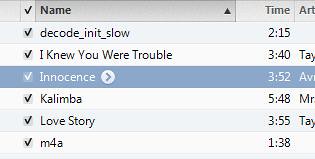
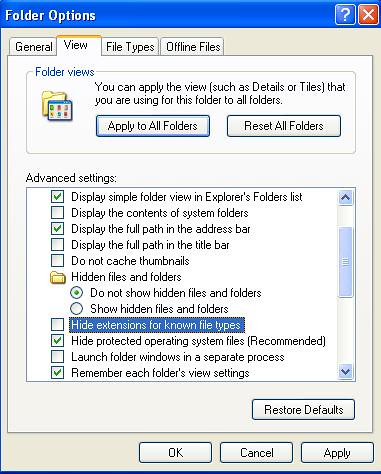
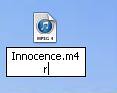
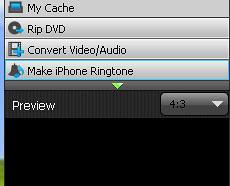
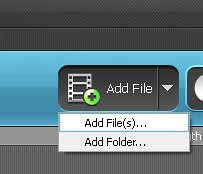
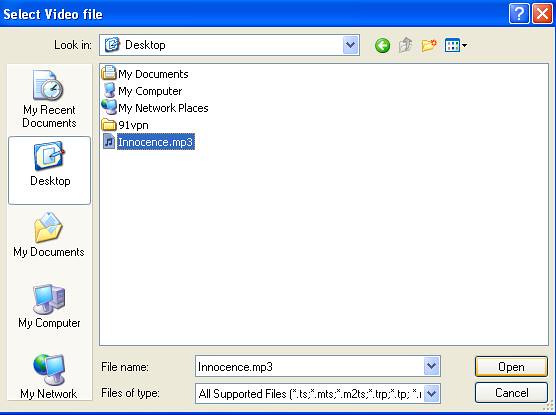
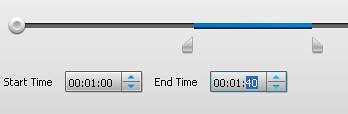
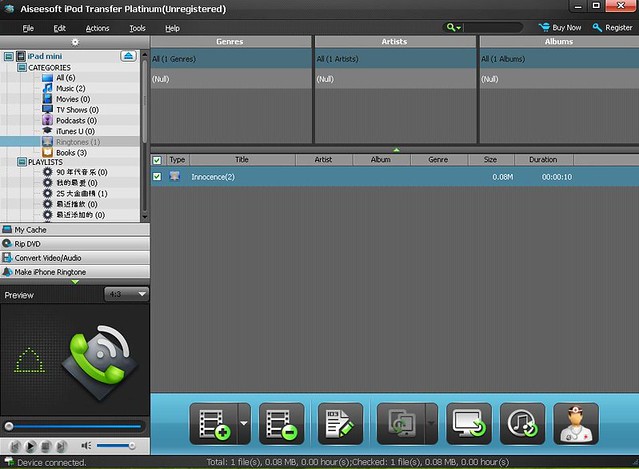
How to make a ringtone for iphone 5  How to make a ringtone for iphone 5. Do you know how to make your own ringtone so that it can play in a phone call? Come to this, you’ll know how easy it is For many iphone fans, it always puzzled them about how to make a ringtone of his own-styled by using iTunes. To solve this problem I wrote this article just wishing to help you guys. 1. Open itunes and change to songs interface. https://farm8.staticflickr.com/7282/8744156316_194a6534c6_m.jpg 2. Right click the song you want to change into ringtone. For example “Innocence” https://farm8.staticflickr.com/7294/8744156516_d8388fc80e.jpg 3. Choose “get info” option 4. Set up the length you want to clip the songs into by entering the start time and end time as follow in the pop-up box https://farm8.staticflickr.com/7294/8744156386_09576f0cd1_z.jpg 5. Click “OK” 6. Right click the song again and this time choose “click aac version” in the menu 7. Seconds later you’ll see the .m4r formatted song appear in the list as follow This song lasts for 40 seconds https://farm8.staticflickr.com/7292/8743038399_c5a197638f.jpg 8. Right click the new ringtone and copy it to another place you’ll see its format as .m4a https://farm8.staticflickr.com/7291/8743038163_4e27509c94_m.jpg We’ll have to convert the m4a file to .m4r file so that iphone can play it as ringtone. 9. Open” my computer”>”tools”> “folder option”>”view”>undo the option”hide extensions for known file types” https://farm8.staticflickr.com/7285/8743038353_0b12a95e98.jpg 10 Rename the file by “.m4r” https://farm8.staticflickr.com/7285/8743037979_c644a12df4_m.jpg 11.Click “yes” when the warning appears https://farm8.staticflickr.com/7283/8743038169_926be997d5.jpg 12. The .m4r made of certain length designed by your own will come into being. https://farm8.staticflickr.com/7284/8743038369_7dbd332a2d_t.jpg Then you get a .m4r music file that can play on iphone 5. And you’ll have to sync your itunes with your itunes again. While you are syncing, you may delete files in your iphones5s by syncing them. However, there may be another simpler way to for you to convert your favorite songs directly into .m4r format directly to your iphone5. Here we have ipod transfer for you to do transfer ringtones with a faster speed and higher quality. 1. Open[url= http://www.ipad-video-converter.us/ipad-transfer/]ipod transfer[/url] 2. Connect your iphone 5s to your computer which already installed ipod transfer 3. Select “make iphone ringtone” on the left side of ipod transfer window after the device section displays itself https://farm8.staticflickr.com/7284/8743038237_db275b76f5_m.jpg 4. Add your favorite song by clicking “add file” icon on the upper side of the interface https://farm8.staticflickr.com/7294/8744156654_0e891ddedb_m.jpg 5. Choose your song s in the pop-up box and click “ok” to direct your songs into the software. https://farm8.staticflickr.com/7281/8744156272_b417518622_z.jpg 6. You’ll see a mp3 in the list below https://farm8.staticflickr.com/7288/8744156478_03f09071d5.jpg 7. Then set up the start time and end time by entering data in the blank below https://farm8.staticflickr.com/7293/8744156200_36138796bc.jpg 8. Next just click the button “add to device” below the interface like this https://farm8.staticflickr.com/7291/8743038403_ab4c3ca39e_t.jpg 9. Minutes later you’ll see such images and it means you’ve succeeded in transferring ringtone into your iphone 5s https://farm8.staticflickr.com/7288/8743038337_28ecf6b70c_z.jpg 10. Check up the location of your ringtone in iphone 5 like this. https://farm8.staticflickr.com/7286/8743038531_62d06b35c4_z.jpg Thus your iphone 5 ringtone has come into being. What’s more, this software can be used to delete the ringtones and music or photos one by one from your iphone 5 directly, without worrying about syncing with itunes. This software will also enable you to add special effects to the songs by clicking “fade in” or “fade out” while you’re setting up the start time and end time and you can adjust the volume of output ringtones. https://farm8.staticflickr.com/7290/8743038327_3b5fb3e366_b.jpg This software can also be used to convert target videos into different video formats directly into iphones. And it can rip your DVD into iphone5s too. These functions are what the iTunes don’t possess. |











1 (of 1 pages)