 Webmasters › Re: (detailed) Get Unlimited USA Bank Accounts (verify Paypal In No Time) by Aawazeeri: 6:28am On Aug 22, 2017 Webmasters › Re: (detailed) Get Unlimited USA Bank Accounts (verify Paypal In No Time) by Aawazeeri: 6:28am On Aug 22, 2017 |
millionhack:
Things You Need:-
* A Valid Social Security Number (SSN) - Doesn't matter if its not yours,we just need a Valid SSN.You can also use this 559-44-XXXX ,Replace 'X' with random numbers.
* Lot of Netspend accounts - Not really a big deal creating NetSpend account.Create as Many accounts depending upon how many bank accounts you need.Remember you need to enter valid US address white creating Netspend account.Here are some valid address list Some of them maybe already taken,If so change the street address a little bit or change two numbers.
* Small investment required - You will see below.
Step 1
Firstly, we are going to create our main bank account. Go to this link and
Step 2
Join usaa
Step 3
Fill in some legit looking info [doesn’t have to be yours]
Step 4
After you click next, choose no for both then hit next again
Step 5
Put in a Valid US Address then hit next [use some address from the list i gave above]
Step 6
Create your own online id,password and pin. [Please save your information on a notepad or something] Note- Put online ID in capital letters
Step 7
Read their online agreement and click I agree [Don’t have to read it lol]
Step 8
Create your own security questions and answers [ Please save this important information]
Step 9
Verify your info and hit submit.
Step 10
Go to products and Services
Step 11
Scroll down the page and click “Savings”
Step 12
Click “Open an account”
Step 13
Click “Get started”
Step 14
Choose “Savings” option.
Step 15
Choose yes for physical address option and click next
Step 16
Choose “Do not deliver my documents at usaa.com” then press next
Step 17
Click the transfer funds option and click use another account
Click “Savings” as account type, click yes for signature authority ,enter your netspend account and routing number, choose a nickname and click next
Step 18
After clicking next, click submit
Step 19
Put in $27 and click next
Step 20
Tick 3 box above, choose yes below and click submit
Step 21
View your info and click submit
Step 22
Bingo! Now go to “my accounts”
Step 23
Click your account you just made
Step 24
Now look at your sexy new account and routing number. Add your info to your paypal account and automatically get verified.
How To Get PayPal Verified Now?
1. Go to PayPal.com
2. Login
3. Hit the “Get Verified” link
4. Choose “Add Bank”
5. Add in details-
Bank Name- usaa bank
Account type- Savings
Account number-
Routing number-
6. Then click next.
7. Click “Confirm Instantly”
8. Fill in your details and hit confirm instantly
9. Congratulations! You have now Verified PayPal...ENJOY !!!!
It took 50 minutes for me to write this tutorial and It takes 5 seconds for you to say "Thanks or Rep" No link above |
|
|
|
| Webmasters › Re: Bluehosting Server Payment Using GTB Bank. by Aawazeeri: 9:52am On May 22, 2017 |
freethesheeple:
I was trying to register a domain on bluehost.com which is free,i did every Necessary thing and filled up the information and account details,after submitting my Card Number,the cvv2 code,theinformation that came back after clicking submit is this: Credit Card problem: Exceeds Approval Amount Limit. Be careful, you have 2 tries left.
WHAT DOES IT MEAN ? ?
MY BANK IS GTB AND IS LINKED FOR ONLINE BANKING.
I HAVE A WORKING TOKEN. Use PayPal account for fast payment, u can inbox me for verified usa PayPal account (09071182845) |
| Webmasters › How To Convert Airtime To Cash Instantly by Aawazeeri(op): 10:12am On May 18, 2017 |
Do you run any business and receive payment via airtime of any kind ? Have you ever accumulated a lot of airtime on your SIM? Have you ever thought of converting them to usable cash instantly ? If yes. Then you have gotten a better solution to your problem. HOW DOES CONVERSION OF AIRTIME TO INSTANT CASH WORK? In the past we observed there were some business people that collected airtime as a payment method for their business and found it very difficult converting to usable cash after accumulating a lot on their SIM. You can easily convert Airtime to Cash in four simple steps. http://www.droidgurus.net/2017/05/How-to-Convert-Airtime-To-Cash-Instantly.html?m=1 |
| Webmasters › Re: 100% Verified Paypal For US And UK.. by Aawazeeri: 5:12pm On May 17, 2017 |
Nurulnaas:
How much Contact me if you need one with your name and email (09071182845) |
| Business › Re: ➜ ➜ ➜Currency/E-currency Market Deals➜ ➜ ➜ by Aawazeeri: 6:43am On May 16, 2017 |
[quote author=legendary11 post=54747723][/quote]Whatsapp me 09071182845 |
| Webmasters › Re: Are There No Affordable Premium Template Of Quality? by Aawazeeri: 2:12pm On May 13, 2017 |
|
| Webmasters › Re: Are There No Affordable Premium Template Of Quality? by Aawazeeri: 5:03am On May 13, 2017 |
Responsive premium template and SEO Friendly Available |
| Webmasters › Re: Are There No Affordable Premium Template Of Quality? by Aawazeeri: 9:31pm On May 12, 2017 |
Eze2000:
Hi,
I'm in urgent need of a premium blogger template. There are quite a few online but given the current naira to dollar exchange rate, it's just too expensive for me right now. I need something good and suiting for my blog to pass Absence requirements.
I have been going through this section and all I can find is about WordPress premium template for as low as 2k, Why not blogger?
I've downloaded Sora Seo Premium Template, its got all the right features but does not sit right one mobile. Below is a link of it to my test blog which is the same niche as my main blog..
http://gregking3..com.ng/
Can someone please avail me of a premium template with these features that sit well on mobile?
You will notice that on oprea browser this template needs to be taped twice. On other browsers, the tags, related posts and random post sections at bottom half become small and centered....This is bad.
What something that sits full on mobile screen like normal blog Check this u may need it www.droidgurus.com |
| Webmasters › Re: How Do I Renew My Domain And Host Since All Naira Debit Card Are Not Allowed by Aawazeeri: 9:27pm On May 12, 2017 |
Contact me if you need one 
|
| Webmasters › Re: How Do I Renew My Domain And Host Since All Naira Debit Card Are Not Allowed by Aawazeeri: 9:26pm On May 12, 2017 |
ourkobo:
please webmasters,
I've been trying to pay and upgrade my host to a higher package,
but due to the CBN restrictions, I've not been able to do so, and time is not on my side.
even PayPal (connected to my bank) isn't paying too
please how do I do this,
help Use USA PayPal |
| Webmasters › Re: BLOG & WEBSITE OWNERS: DROP 'UR LINKS HERE FOR REVIEW & TRAFFIC by Aawazeeri: 11:23am On Nov 14, 2015 |
[url=droidgurus.com]DROIDGURUS.COM[/url] |
| Science/Technology › TWRP 2.8.7.0 Material Design For TECNO H6 by Aawazeeri(op): 8:48am On Oct 29, 2015 |
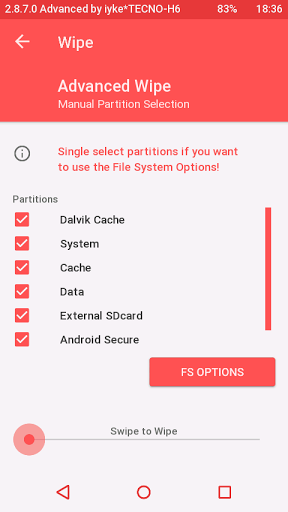
••USB-OTG working(both backup and install/flash) ••Nvram backup ••boot.img backup ••recovery.img backup ••Uboot backup ••Emmc repair ••recovery.img & boot.img install/flash ••more features now working. **Most features working... **TWRP features working perfectly.... Disclaimer We(TEAMDROIDGURUS) are not responsible if you brick your phone at the process of flashing the recovery *****HOW TO INSTALL**** 1.Mobile Uncle 2.Flashify 3.Rename recovery file to "recovery.img" without " "quote Install With Mobile UncleTools*** Download Mobile Uncle 1)Turn Off Internet Connection 2)Place Your Downloaded Recovery on Sdcard Directory 3)Open the app 4)Select Recovery update 5)Select Your Recovery 6)Then Flash It 7)Then Reboot Into Recovery. Install With Flashify*** Download Flashify 1)Place Your Downloaded Recovery on Sdcard Directory 2)Open the app 3)Click Recovery image 4)Click Choose a file 5)Select Flashify File manager 6)Select the Recovery to flash Congratulation You Flashed TWRP Recovery to your device. Download Here

|
|
|
|
|
| Phones › Re: Download Latest 2go Version 5.0 by Aawazeeri: 9:36am On Oct 26, 2015 |

|
|
|
|
|
|
|
|
|


