ArewaTech1's Posts
Nairaland Forum › ArewaTech1's Profile › ArewaTech1's Posts
1 2 3 4 5 6 7 8 ... 21 22 23 24 25 (of 25 pages)
 Phones › Re: Clear App Cache Or Clear App Data: What’s The Difference? by ArewaTech1(op): 2:06am On Sep 18, 2016 Phones › Re: Clear App Cache Or Clear App Data: What’s The Difference? by ArewaTech1(op): 2:06am On Sep 18, 2016 |
[size=14pt]What is clearing app data?[/size] Clearing app data is a more severe (for want of better word) step. While the cache can be cleared with little risk to app settings, preferences and save states, clearing the app data will delete/remove these. Clearing data resets an app to its default state: it makes your app act like when you first downloaded and installed it. For example, say you make changes to the settings of your favorite fitness app. You change the length of exercises and sound settings. Clearing the cache will not affect these saved settings. Clearing stored data, may – and in all likelihood – will. [img]http://arewatech.ml/wp-content/uploads/2016/09/ArewaTech-Android-clear-app-cache.png[/img] |
| Phones › Re: Clear App Cache Or Clear App Data: What’s The Difference? by ArewaTech1(op): 2:06am On Sep 18, 2016 |
[size=14pt]What is clearing the app cache?[/size] The cache is a temporary storage area of a device which retains certain kinds of data. The aim of this is to speed up how quickly and smoothly your device operates and reduces how much data is processed and consumed. After restarting your phone, have you ever noticed how slow your camera app is to first open, when each subsequent attempt is quicker? The increase in speed after the initial launch of an app is thanks to this cached data. Similarly, you might find that websites load faster on a second visit. Once again, this is because files such as images have been previously stored in the cache. There is often no need to manually manage cached data: Android is very capable of this on its own. However, if an app starts to misbehave or stop working, then you may wish to manually take this step. When you clear an apps cached data, you remove the temporary files placed there, and you’d be surprised how often this acts as an effective solution. Also note, however, that it doesn’t guarantee better performance, and the app may even be temporarily slower the next time it’s used. |
| Phones › Clear App Cache Or Clear App Data: What’s The Difference? by ArewaTech1(op): 2:06am On Sep 18, 2016 |
[size=14pt]Source:[/size] http://arewatech.ml/clear-app-cache-clear-app-data-whats-difference/Anybody who has ever encountered an app or software problem on Android may have been given the advice “clear the app cache” or “clear the app data”. These two solutions are often thought of as miracle cures for Android but what is the difference between these seemingly similar operations? Let me explain. [img]http://arewatech.ml/wp-content/uploads/2016/09/ArewaTech-Android-clear-app-cache.png[/img] |
| Phones › Re: Is Nairaland Not Working In Freebasics Anymore??? by ArewaTech1(op): 1:53am On Sep 18, 2016 |
LittleJAMES:MTN is quite good, if you can get four simcards |
| Phones › Re: Is Nairaland Not Working In Freebasics Anymore??? by ArewaTech1(op): 1:46am On Sep 17, 2016 |
2kaybiel:Thats what I'm talking about. you can read through NL but won't be able to login. [size=18pt]ALMOST USELESS[/size] 1 Like |
| Phones › Is Nairaland Not Working In Freebasics Anymore??? by ArewaTech1(op): 8:01pm On Sep 16, 2016 |
Hello nairalanders, does anyone of you notice that one can't login to his NL account in free basics. |
| Phones › Re: Update To Nova Launcher Beta Adds Pixel Launcher(nexus Launcher) Look by ArewaTech1(op): 4:51am On Sep 16, 2016 |
DOWNLOAD LINKS Note: May take a few hours to appear on your Google Play SO JUST USE THE BELOW LINK [size=15pt]Nova Launcher 5.0-beta1.apk[/size] http://arewatech.ml/nova-launcher-looks-pixel-launcher |
| Phones › Re: Update To Nova Launcher Beta Adds Pixel Launcher(nexus Launcher) Look by ArewaTech1(op): 4:49am On Sep 16, 2016 |
To get the beta version, join Nova Launcher’s G+ community, and then opt in for the Nova Launcher testing program. Once you have done this, you will be able to download Nova Launcher Beta from the Google Play Store, but be warned, as with all apps, beta versions are not quite ready for primetime consumption and may occasionally have issues with stability. With that said, if you’d like to try it out, visit the link below – |
| Phones › Re: Update To Nova Launcher Beta Adds Pixel Launcher(nexus Launcher) Look by ArewaTech1(op): 4:47am On Sep 16, 2016 |
To achieve the look of the Pixel launcher, first, you’ll need Nova Launcher Beta. After installing it, change the following list of settings, which was put together by Kevin Barry, the creator of Nova Launcher. First off, go into the “Apps and widget drawers” and turn on “Swipe to open”, then turn “Card Background” off and set the background color to white with no transparency. Next, in “Desktop” change “Page Indicator” to “Line” and turn on “Swipe to drawer indicator”. To get the Pixel style Google search bar, while still in “Desktop,” pick the search bar from the submenu called “Search bar style”. In “Dock,” set the background to be rectangular and white, with some transparency (this can be altered to achieve the desired effect), and finally, in “Folders,” set the folder background to “N Preview”. If you’ve completed the steps, congratulations, you now have a Pixel style launcher. [img]http://arewatech.ml/wp-content/uploads/2016/09/arewatech-nova-launcher-beta.png[/img] |
| Phones › Update To Nova Launcher Beta Adds Pixel Launcher(nexus Launcher) Look by ArewaTech1(op): 4:47am On Sep 16, 2016 |
Pixel Launcher, formerly known as the Nexus Launcher, is the application launcher that is largely expected to be pre-installed as the default on Google’s upcoming Pixel smartphones.Now, the beta version of the app has been updated with Pixel-style options built in, so users can achieve the same effects without any complex modifications. It does require a few settings to be changed within Nova Launcher, but you should be able to achieve the effect without much effort, and without the need to install any additional apps. Here’s the full list of new features in the 5.0 beta, according to Kevin Barry: Swipe to open drawer (a la Pixel Launcher) New Pixel Launcher style searchbar New search view, with tabs for Frequent, Recent ad New/Updated apps New “Timeout” screen lock method New double-tap-swipe gestures Integrated searchbar into drawer (card and immersive) Option for dock backgrounds to draw under navbar Nougat fixes and optimizations Improve interactions with KLWP
|
| Phones › Re: Android Apps You Have To Download In September 2016 by ArewaTech1(op): 3:58am On Sep 16, 2016 |
| Phones › Re: Android Apps You Have To Download In September 2016 by ArewaTech1(op): 1:49am On Sep 15, 2016 |
Hermit Let Hermit save you battery life by taking resource-intensive apps like Facebook and replacing them with a wrapper for the mobile website. All these Lite Apps will still appear in your app drawer, and they can send you notifications, they just won’t eat your battery and take up loads of storage space. Any app that has a mobile website – including Facebook, Twitter, WhatsApp, any news service – can be used through Hermit. There’s also a useful library of popular and suggested Lite Apps to get you started. [img]http://arewatech.ml/wp-content/uploads/2016/09/arewatech-hermit-0299.jpg[/img] 2 Likes |
| Phones › Re: Android Apps You Have To Download In September 2016 by ArewaTech1(op): 1:49am On Sep 15, 2016 |
Join Since Pushbullet introduced its paid service and removed features from the free version, many people have been on the lookout for a worthy cross-platform file-sharing alternative. Thankfully, that day has come. Join offers far more features than Pushbullet, and it does it all with a one-time payment, rather than a yearly subscription, a la Pushbullet. The app only recently went live across all platforms – Android, Windows 10, web, Chrome – and there are still small bugs and UI improvements to be made, but this is an app worth getting on board with right now. [img]http://arewatech.ml/wp-content/uploads/2016/09/arewatech-file-sharing-1291.jpg[/img] |
| Phones › Re: Android Apps You Have To Download In September 2016 by ArewaTech1(op): 1:46am On Sep 15, 2016 |
f.lux Joining the slowly swelling ranks of screen-dimming apps on Android, f.lux started its life on Linux and Windows years ago. It has been available on jailbroken iPhone for a few years, too, and now it’s finally making its way to Android. Currently in beta and only available on rooted devices, f.lux is a superb choice if you want to avoid straining your eyes at night. [img]http://arewatech.ml/wp-content/uploads/2016/09/arewatech-best-android-apps-165.jpg[/img] |
| Phones › Re: Android Apps You Have To Download In September 2016 by ArewaTech1(op): 1:46am On Sep 15, 2016 |
Eat This Much Eat This Much is a new food scheduling app to help you plan your daily meals. Input your diet goals, weekly budget and what kinds of food you like, and Eat This Much will take care of your meal plans. It requires some manual setting up, but once that’s done, you can rely on Eat This Much to provide you with the recipes and tips that help you achieve your aims. Both free and premium versions are currently available. [img]http://arewatech.ml/wp-content/uploads/2016/09/arewatech-new-android-apps-0304.jpg[/img] |
| Phones › Re: Android Apps You Have To Download In September 2016 by ArewaTech1(op): 1:45am On Sep 15, 2016 |
Cinematics Cinematics is a movie database app which combines current cinema listings, cast and crew info as well as review scores from IMDb and Rotten Tomatoes, to deliver a useful resource for cinema buffs. It’s not the most comprehensive app, but it’s very easy and if you’re overwhelmed by the information found on something like IMDb, it could be for you. [img]http://arewatech.ml/wp-content/uploads/2016/09/arewatech-imdb.jpg[/img] |
| Phones › Re: Android Apps You Have To Download In September 2016 by ArewaTech1(op): 1:45am On Sep 15, 2016 |
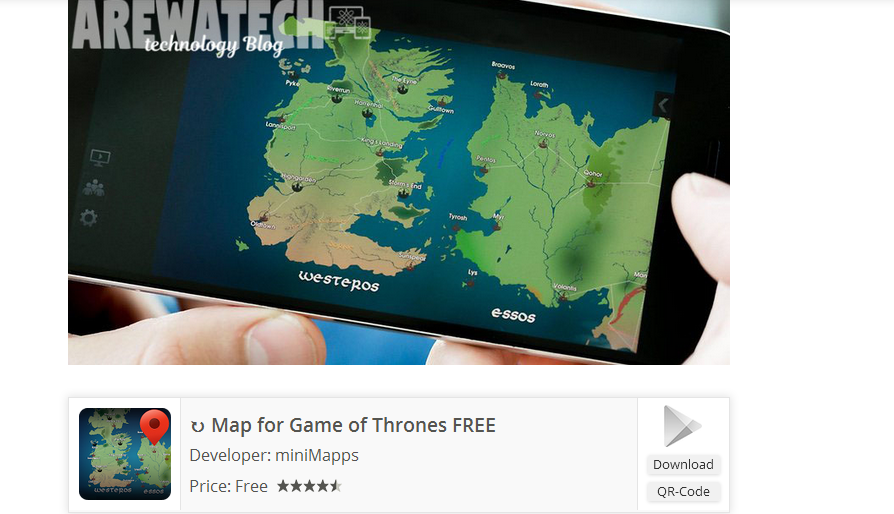
Map for Game of Thrones What’s your favorite maps app? Google Maps? Here Maps? Waze, perhaps? Well, I’m about to introduce you to your new favorite: the map of Westeros. Thanks to this app we can better understand the geography of the seven kingdoms. Want to know where the Iron Islands really are in relation to Banefort? Now you can find out. The only downside is that it doesn’t include local traffic updates. Expect some hold ups in the northern regions soon, though. Download Game of Thrones Maps here [img]http://arewatech.ml/wp-content/uploads/2016/09/arewatech-game-of-thrones-map.jpg[/img] |
| Phones › Re: Android Apps You Have To Download In September 2016 by ArewaTech1(op): 1:44am On Sep 15, 2016 |
Giphy When you message with GIFs you really get to explore communication. Using GIFs forces you to pay attention to the subtleties of animation, to the power of short-form storytelling. It enhances the simple art of messaging. Also, some people just like to see cats doing backflips. Until now, Giphy was only available as an extension of Messenger, but in May it was released as a standalone app, providing more GIF goodness for everyone. The Giphy app – which works similar to the web version – allows you to search and discover GIFs to suit your every need and share them via Twitter, Facebook, Messenger, email: whatever platform you wish. Download it for free here. [img]http://arewatech.ml/wp-content/uploads/2016/09/arewatech-giphy-hero.jpg[/img] |
| Phones › Re: Android Apps You Have To Download In September 2016 by ArewaTech1(op): 1:44am On Sep 15, 2016 |
quickReply quickReply allows you to respond to messages without entering an app. This feature is becoming more prevalent – WhatsApp provides it and Android N will even allow you to reply straight from your lock screen – but if you can’t wait for the functionality to come to other apps, install quickReply in the meantime. It works with many popular messaging apps (though SMS functionality is yet to be properly integrated), so if you use Skype, Telegram, Kik etc, quickReply will allow you to respond to messages without stopping what you’re currently doing. Messages can be responded to via the notification shade but, sadly, replying from the lock screen isn’t supported. [img]http://arewatech.ml/wp-content/uploads/2016/09/arewatech-new-android-apps1.jpg[/img] |
| Phones › Re: Android Apps You Have To Download In September 2016 by ArewaTech1(op): 1:42am On Sep 15, 2016 |
Spaces – Small group sharing Spaces is a new social networking/messaging app from Google. You may not have heard of it, or may have tried to ignore it because it’s a social app made by Google, but I think it’s worth checking out. Rather than creating a large network with hundreds of friends and followers, Spaces is concerned with keeping it small scale. It’s a social platform where you can post links, pictures, YouTube videos and more to conversations with your friends. It works the same as many other messaging apps except it houses a fresh, Material Design look and a slightly different format: Spaces is designed specifically for group conversations. [img]http://arewatech.ml/wp-content/uploads/2016/09/arewatech-new-android-apps.jpg[/img] |
| Phones › Re: Android Apps You Have To Download In September 2016 by ArewaTech1(op): 1:41am On Sep 15, 2016 |
Verne: The Himalayas Google continues to help us discover the landscapes of the world with Verne: The Himalayas. This is the latest app from the experimental Google Creative Labs team and it invites you to explore the world’s highest mountain range. You take control of Yeti named Verne to traverse the Himalayas and discover historical facts about the location. It makes use of Google Maps’ 3D imagery to map the area and it’s both an enjoyable and educational experience. Just be warned that the controls are a little tricky at first. [img]http://arewatech.ml/wp-content/uploads/2016/09/ArewaTech-1-app.jpg[/img] |
| Phones › Re: Android Apps You Have To Download In September 2016 by ArewaTech1(op): 1:41am On Sep 15, 2016 |
BlackBerry Hub It is no longer necessary to buy a BlackBerry phone to enjoy BlackBerry Hub. This app provides a single interface to view all your messaging and social network accounts, as well as offering calendar information and a password manager. It’s an elegant solution backed by an intelligent user interface: you can get caught up with all your goings-on in a flash. It’s not compatible with all messaging apps – Telegram and Facebook Messenger are notable omissions – and, somewhat disappointingly, it can only be installed on Android devices running Marshmallow for now. What’s more, the free trial version is only available for 30 days and after that you’ll be forced to choose between the free, restricted, ad-supported version or a monthly subscription. [img]http://arewatech.ml/wp-content/uploads/2016/09/Arewatech-blackberry-hub-app.jpg[/img] Stay on top of all your messages with BlackBery Hub 1 Like |
| Phones › Re: Android Apps You Have To Download In September 2016 by ArewaTech1(op): 1:40am On Sep 15, 2016 |
Prisma Prisma is one of the most impressive photo-editing apps we’ve ever come across. It’s not concerned with offering a comprehensive set of editing features – this is not a tool for “serious” photo fixing – instead, it focuses simply on filters. And what beautiful filters they are. Rather than applying different color palettes, Prisma alters the entire quality of the image, transforming your photos into many instantly recognizable styles like Pop Art or Cubism. It clearly makes use of a very smart algorithm, but because Prisma does its processing in the cloud, applying different filters does take a few seconds. If you want to check out several designs, you have to be a little patient while the image uploads and the effect is applied. It’s also quite buggy for the moment but this will no doubt be fixed soon. Small prices to pay for this incredible free app. [img]http://arewatech.ml/wp-content/uploads/2016/09/Arewatech-prisma-app.jpg[/img] 1 Like |
| Phones › Re: Android Apps You Have To Download In September 2016 by ArewaTech1(op): 1:39am On Sep 15, 2016 |
Circle SideBar Circle SideBar is a shortcuts toolbar which you swipe in from the side of your phone. This shortcuts bar allows you to assign a selection of apps for quick access and you can customize the appearance of it (the space it takes up on the screen, the colors etc) to make it fit your needs and preferences. The free version is feature packed but you can also download the paid version to gain access to a few extras. If you want an intuitive shortcuts app, this is it. [img]http://arewatech.ml/wp-content/uploads/2016/09/arewatech-circle-sidebar.jpg[/img] Launch apps from the left or right of your screen. © ArewaTech |
| Phones › Re: Android Apps You Have To Download In September 2016 by ArewaTech1(op): 1:38am On Sep 15, 2016 |
Sprightly Sprightly isn’t a new app, but it has slid under my radar until a recent update. This is one of the Microsoft Garage apps, an enterprise dedicated to experimental projects that otherwise wouldn’t see the light of day. Sprightly is a free business tool aimed at simplifying the process of creating simple design projects such as E-Cards, fliers, posters, catalogs and more. Recently updated with some new collage templates and filters, this is an excellent app that requires no experience with other design tools: just select the type of project you want to work on and Sprightly will guide you through the steps to create a professional end result. [img]http://arewatech.ml/wp-content/uploads/2016/09/areatech-sprightly-app.jpg[/img] |
| Phones › Re: Android Apps You Have To Download In September 2016 by ArewaTech1(op): 1:37am On Sep 15, 2016 |
Google Duo Duo is easily one of the coolest apps released in the last month. Developed by Google, this free video-calling app was officially launched mid-August and it has one trick that makes it immediately exciting. When you make a call, Duo will begin video capture and display this on the receivers screen before they have even answered. It’s a subtle addition to video calling that makes the process feel a little nicer. That said Duo doesn’t offer much else in the way of innovation, it’s a typical, easy Google app that just works and there’s no good reason not to give it a try. [img]http://arewatech.ml/wp-content/uploads/2016/09/GoogleDuo.jpg[/img] See your caller before you’ve even answered. / © ArewaTech 1 Like |
| Phones › Android Apps You Have To Download In September 2016 by ArewaTech1(op): 1:36am On Sep 15, 2016 |
In the latest edition of our new Android apps of the month feature, we’ve got a must-try video-calling app from Google, a smart business tool from Microsoft, and an intuitive shortcuts app. Check out all our picks for the new apps you must install in September 2016 below and head further down for previous months’ additions. http://arewatech.ml/android-apps-download-september-2016/ |
| Phones › Android Users: This Is All You Need To Know About The Iphone 7 by ArewaTech1(op): 1:19am On Sep 08, 2016 |
Today marks one of the biggest dates in the mobile technology calendar: Apple presented the latest edition of its most important and profitable product, the iPhone 7, along with of course the larger iPhone 7 Plus and Apple Watch Series 2. This is not only an event for Apple fans, though. As Android’s main competitor, the changes to the iPhone and iOS platform sheds light on Android’s future, too. [b]Mods up to you |
| Phones › Why Are Recharge Cards Now Selling #110 by ArewaTech1(op): 12:48am On Sep 06, 2016 |
why are recharge cards now selling #110 |
| Phones › Samsung Stop The Sales Of Galaxy Note 7 by ArewaTech1(op): 1:51am On Sep 03, 2016 |
source: http://arewatech.ml/samsung-stop-sales-galaxy-note-7/ Samsung is investigating the Note 7 for quality control issues after several devices were reported to have exploded while charging, a problem seemingly related to the device’s battery. Sales of the Galaxy Note 7 have now been halted. [b]source: http://arewatech.ml/samsung-stop-sales-galaxy-note-7/ (Moderators: dragnet, honsule, puskin) |