HiOSGuru's Posts
Nairaland Forum › HiOSGuru's Profile › HiOSGuru's Posts
1 2 (of 2 pages)
 Phones › Simple Trick To Recall All Important Codes On Your Smart Phone by HiOSGuru(op): 12:27am On Mar 05, 2021 Phones › Simple Trick To Recall All Important Codes On Your Smart Phone by HiOSGuru(op): 12:27am On Mar 05, 2021 |
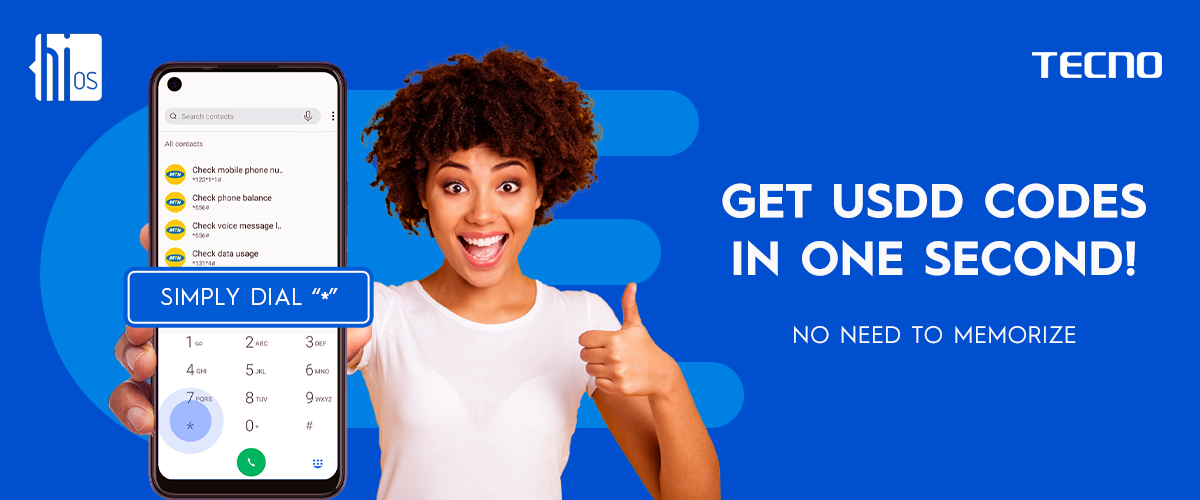
You just got a new SIM card and you are yet to memorize the mobile number. You go out to an important function and you meet this great person you have always wanted to meet for a long time. You guys get along pretty well and when it was time to part, he requests your number. Herein lies the problem, you don’t know the number of your device. Worse still, you don’t know the code to recall the “My number” feature. You say, well, let me google it, but you found out there is no internet connection on your device at the location. You are devastated. The man is in a hurry so he leaves without you being able to recall your mobile number. https://imgs.tecno.com/us/data/attachment/forum/202103/04/031133h0y3bw0bbdbiyqk0.png We might have found ourselves in similar situations and it's not always pleasant even to remember. But it's not our fault we can’t remember a particular code, there are so many things our mind has to process. We mostly remember things we use frequently. Imagine you don’t have to suffer such fate anymore… all you need to do is press the button and all the shortcodes you require pops up… smart idea, right? But no need to imagine, this feature is already available on TECNO smartphones. It is called the Instant USSD. With the press of just one key, all the USSD codes show up. So, no need to memorize any code, just say the magic word. The key that does all this magic is the * key on your dialer. So all you need to do is open your dialer, press the * key, and all shortcode pop up! As simple as ABC! Have you tried this feature before? Open your dialer now and give it a shot |
| Phones › TECNO Hios Micro Intelligence: A Tool For A Smooth Mobile Experience by HiOSGuru(op): 11:39pm On Feb 25, 2021 |
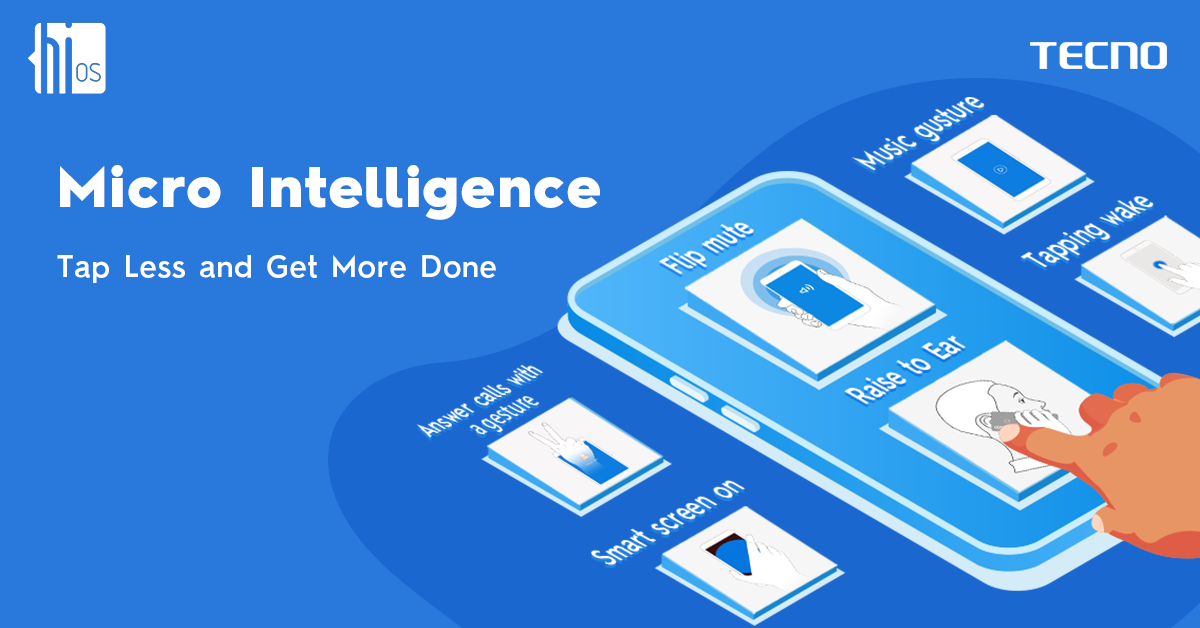
Navigating our smartphones is an art we perfect every day as we continually use our mobile phones. We gradually begin to know where and where certain apps on our devices are with less effort every day. This is because our brain learns to memorize the location of things from the last time we used them. https://imgs.tecno.com/us/data/attachment/forum/202102/25/080816cpvd90el46u4m67p.png Some of the features and apps on our devices fall into the “commonly used” category, while others fall into “rarely used”. This does not in any way mean that the rarely used ones are not important, that would be a wrong assumption. For example, you can’t say because you rarely use the calculator, it is not useful or necessary. This is because the day you would need a calculator, nothing else would matter except the calculator. Designating signs and gestures to launch our commonly used or rarely used apps or features seems to be a pretty good idea. This is because it would save a lot of time and brain energy used. With the help of AI technology, TECNO HiOS Mobile Operating System implemented this intelligence in a micro way on TECNO smartphones to assist smart device users to easily navigate, and access their phones easily by just drawing specific signs to open specific apps without pressing the power button to wake up the phone from idle mode or when the screen light is off. On TECNO devices like the Camon 16 or POVA, users can easily launch different tools or apps from their locked phones without waking up or pressing the power button. There are functions like double-tapping the black screen to wake up the phone, drawing a Double U (W) to launch WhatsApp, picking up the phone and screen light lights up, drag to different sides of the screen to play, next and pause music, Flip phone to mute incoming calls, grab a screenshot of the phone by simply sliding down with 3 fingers, wave your hands over front camera to answer or reject calls, etc. Micro intelligence is a very intuitive feature that gives a warm and quick user experience that makes usage easy and smooth. To access these amazing features, go to your phone settings – Smart assistant – micro intelligence and activate any gesture of your choice. 1 Like |
| Phones › Re: Tecno Hios Shines Bright As It Wins Android User Interface Of The Year by HiOSGuru(op): 11:27pm On Jan 28, 2021 |
IamDavid:You're welcome. |
| Phones › Re: Tecno Hios Shines Bright As It Wins Android User Interface Of The Year by HiOSGuru(op): 12:49pm On Jan 26, 2021 |
IamDavid:Long press the buttom of your home screen and a hidden menu will pop up. Click on Menu and then Other settings. Toggle off everything. |
| Phones › Re: Tecno Hios Shines Bright As It Wins Android User Interface Of The Year by HiOSGuru(op): 9:57am On Jan 26, 2021 |
IamDavid:Most UI comes preloaded with ads, it's part of the agreement signed with Google. However, on HiOS 7, you can deactivate all the ads if you know where to look. |
| Phones › Re: How To Use Your TECNO Phone To Detect Fake Drugs by HiOSGuru(op): 9:52am On Jan 26, 2021 |
Akanimoh113:You can check out the specs of TECNO POP 2 Power here: https://www.droidafrica.net/tecno-pop-2-power-specs-review-features-and-price-4000mah-and-more/ It's a 3G phone. |
| Phones › How To Use Your TECNO Phone To Detect Fake Drugs by HiOSGuru(op): 1:54am On Jan 22, 2021 |
A well spent life has a sure secret of healthy intakes; authenticated substances. A secret that we all need to know if we really want to enjoy a well spent life. Hello Nairalanders, We are living in a world where so many talents, knowledge and prowess are displayed on daily basis. A world where desperate people can take desperate measures to curb desperate needs. These needs are in their multitude, from ways to live, to grow, to possess and to achieve. We cannot in the vastness of this daily hustle do without our well-being. Our health. Accordingly, knowledge on the other side allows people to identify an unhealthy state and manufacture vaccines and drugs to cure these problems. You will agree with us that, there are more than 100 different drugs available for just one type of sickness. Among this drugs, how can we tell which one is original? Which one is authentic? How can we identify the good ones from the bad ones? Must we follow NAFDAC or FDA to verify the authenticity of the medicines we take in all the time? No need to worry yourself trying to get this answers because, If you're using the latest TECNO smartphones with its latest HiOS operating system, then you can be rest assured that the answers to these questions is already with you.This is why. TECNO recently introdunced the HiOS 7.0 operating system. In it, a feature was introduced called the SMART SCANNER. SmartScanner does a lot of things, from recharge, to translate and the most important one we are discussing right now is to AUTHENTICATE. THE SMARTSCANNER DRUG CHECKER While a lot of desperate people are out there trying to produce fake drugs for desperate people, your TECNO phone can ensure you do not fall victim. On HiOS Smart Scanner Drug Checker, you can verify the authenticity of any drug you purchase from the pharmaceutical store or the road side drug seller. Almost all recent and authentic products have barcode or Anti- counterfeit scratch code on the pack. So you’ll simply have to scan the barcode or the scratch code and you’ll be directed to a very quick-load webpage where you will get a confirmation if the drug is original or not. To access this Smartscanner Drug Checker, https://imgs.tecno.com/us/data/attachment/forum/202009/26/120918bko7gez5urdufkof.jpg Go-to your Application Menu, Scroll to the S alpha list and select Smart scanner. At the button Menu List, Touch Drug Check. Just allow the system do the rest job. Therefore, do not take yours, or friend or family’s health for granted Make sure you authenticate any drugs prescribed or purchased before consumption. Have you used this feature or would you love to try it? |
| Phones › Android Tips; Securing Your Files The Right Way by HiOSGuru(op): 1:38am On Jan 22, 2021 |
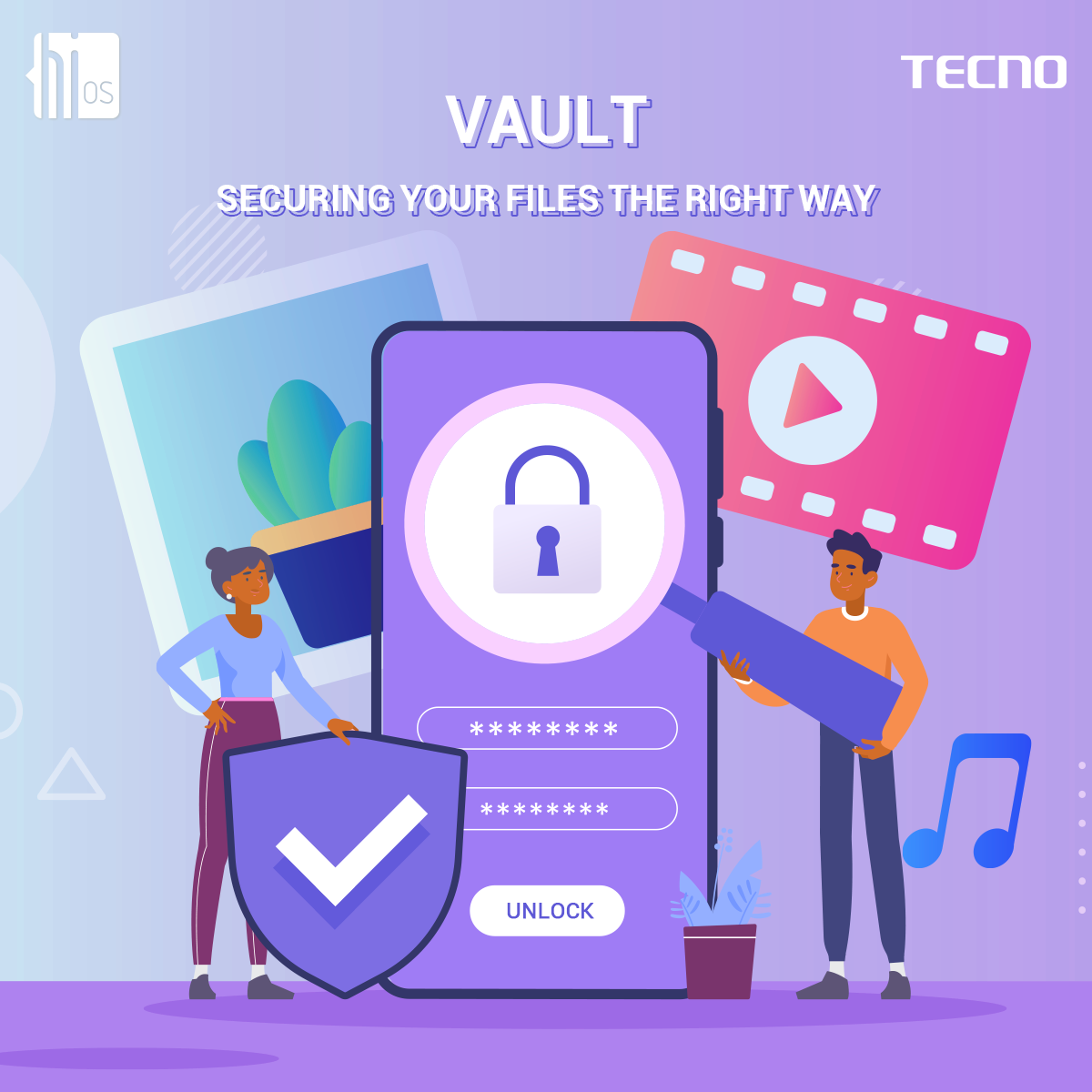
Ever just dropped your phone for a minute, and before you get back, your nosy friend or partner is all over your pone snooping and viewing things they are not supposed to see? Yes right, it could be pretty annoying. Or have you giving your phone to a friend to check out a picture or video and before you know it, they are viewing your whole gallery and going to place “for your eyes only”? Well, If you are using a TECNO smartphone like the TECNO Camon 16 or TECNO POVA, then you are one of the lucky ones because the HiOS operating system on those devices was designed to keep your files safe from those prying eyes. New security features were recently introduced on these devices to help protect private files of from being hijacked or getting into the hands of the wrong people. https://imgs.tecno.com/us/data/attachment/forum/202101/20/072714z2211yzscsxt77jg.png HiOS Vault At one time or the other, you have had your privacy violated by your friend when they go through your videos, pictures or even documents without first asking you. It can be pretty annoying and unpleasant, but unfortunately, there is no way to get them to unsee it. But now, there is a way from preventing that from happening in the first place. The vault provides a passcode protection for your device, thereby preventing unauthorized access. In the HiOS Vault, you can hide videos, pictures and even documents. To access the vault, open your AI gallery on your TECNO phone, swipe left twice or click on the third icon at the base of the screen and select on Vault. You set it up by simply creating a security code and security question (just in case you forgot the code). Add media files by clicking on the “+” sign at the bottom right. Anything you store there becomes hidden from the public view. Now you can record those embarrassing and goofy videos or have highly classified documents on your device without any fear of anyone able to access them with the new HiOS vault |
| Phones › Re: Tecno Hios Shines Bright As It Wins Android User Interface Of The Year by HiOSGuru(op): 1:13am On Jan 22, 2021 |
mattbass:You might want to check out the organizers and see if they aren't credible. |
| Phones › Re: Tecno Hios Shines Bright As It Wins Android User Interface Of The Year by HiOSGuru(op): 1:12am On Jan 22, 2021 |
masterfactor:I'm certain you haven't tried the recent versions of the OS |
| Phones › Tecno Hios Shines Bright As It Wins Android User Interface Of The Year by HiOSGuru(op): 9:18am On Jan 20, 2021 |
HiOS or let's call it it's mothers' name, TECNO Operating System with so much improvement from its 1st version now to the 7.0 has once again radiated it's glow at an evening dinner airing the celebration, recognition, and award-giving session to major players and extinguish achievers in the Information and Communication Technology Industry of Nigeria (ICTIN). HiOS, not exaggerating, with the most recent stunning and outstanding beauty of both art and designs, evidentially won the award as the ANDROID USER INTERFACE OF THE YEAR. https://imgs.tecno.com/us/data/attachment/forum/202011/30/132413i1nopgvkreqp9991.jpeg The event was organized by the Beacon of Information and Communications Technology (BOICT) thus, marked the climax of the Nigerian Communications Week 2020. https://imgs.tecno.com/us/data/attachment/forum/202011/30/132417u7phzzmpkckcuipv.jpeg You will agree with us that HiOS put very much effort and consideration into its UI design to ensure usability, readability, and consistency, hence the award. https://imgs.tecno.com/us/data/attachment/forum/202011/30/132422vtthgjjng5jtzwhp.jpeg What a great way to celebrate an effort. The journey is still before us and we have many more to deliver. https://imgs.tecno.com/us/data/attachment/forum/202011/30/132424mp8agnal8lxclz33.jpeg |
| Science/Technology › How To Compress Photos Without Losing Quality On Tecno Smartphone by HiOSGuru(op): 1:21am On Nov 20, 2020 |
Tecno introduced a lot of new features in the latest HiOS 7 operating system and they all can be found on the Camon 16 and Spark 6 series. The features include an impressive smart scanner, customizable video caller, Hi health, Auto ear pickup, and many more. With HiOS 7, you can customize your own video ringtone, Whatsapp stickers, and gesture to turn on flashlight. Android 10 based HiOS 6 was the last OS version for Tecno devices. With the latest HiOS 7, the company has taken things to another level. [img]http://cdn1.scooper.news/newsbackend/pgc/gallery/20201119/c11c5a1b5ca08d10691930d6c5d77755.jpg[/img] One of its key features is the Photo Compressor. While HiOS users may already be familiar with the Smart Photo Cleaner feature which lets you delete blurry, similar or dark photos automatically, HiOS 7 has simply made things far more interesting. Now, instead of deleting your pictures because it's eating up your storage space, you can just automatically compress it to a smaller file size, all without losing the quality. Impressive right? Keep All Your Memories in Less Space Here's an interesting fact: according to a study by Lee and Sung (2016), smartphone users take approximately 93 million selfies each day. As a matter of fact, some people take selfies at least 8 - 9 times per day! Imagine the amount of space all of these selfies occupy. Mind-blowing! Now think about it, when you take selfies sometimes you always have to delete some of them in order to conserve space. After all, what's more depressing than getting the "storage space low, free some memory" message when you're trying to download your favourite movie or games? Sometimes, you may even find it hard to pick the particular pose you like after a selfie session. Now you don't have to worry about all of these because HiOS 7 provides you with a simple and convenient solution with Photo Compressor! Why Use HiOS 7 Photo Compressor? Photo Compressor does not touch the actual dimensions of the image. Instead, it reduces the file size of a JPG, BMP, SVG or other image files. This is helpful when you plan to either upload your images online or send it via e-mail. Even sending files via WhatsApp, there are file size restrictions that might prevent you from sending larger images. With HiOS Photo Compressor, you can reduce the image’s file size by a lot so that you can easily upload or send wherever you like. No Need for Thirds Party Apps Photo compression is easily done, and with HiOS 7 Photo Compressor, you can do it right from the AI Gallery app of your Tecno phone without having to download any other thirdpart apps. One other thing, HiOS 7 Photo compressor does not require internet connection to work nor is there a limit to the photo size it can compress! How to use HiOS Photo Compressor Reducing the file size of your picture is easy. This is how you can do it: 1. Open AI Gallery app on your Tecno smartphone 2. Click on "Tools" in the buttom right corner. 3. Tap on "Compress Photos" 4. Photo Compressor will automatically detect all the oversized images on your phone and you can select all the photos you wish to compress 5. After selecting the photos you wish to reduce, click on "COMPRESS". That’s it! Leave the rest to HiOS 7 Photo Compressor! |
| Phones › Re: Why Millions Of Users Love Data Switcher on TECNO Phantom9 by HiOSGuru(op): 3:39pm On Aug 19, 2019 |
mikeycharles:And the rest? |
| Phones › Re: Why Millions Of Users Love Data Switcher on TECNO Phantom9 by HiOSGuru(op): 10:46am On Jul 29, 2019 |
drjprince:It allows for a lot of customisation, plus it runs on an AI powered engine that uses machine learning to allow you more freedom and reduces number of steps to get things done. In essence, you don't have to be a phone nerd, to get the maximum out of this phone. |
| Phones › Re: Why Millions Of Users Love Data Switcher on TECNO Phantom9 by HiOSGuru(op): 10:44am On Jul 29, 2019 |
eki2000:THe Phantom 9 is actually well priced when you compare with the specs and features. It's N77k. |
| Phones › Re: Why Millions Of Users Love Data Switcher on TECNO Phantom9 by HiOSGuru(op): 10:42am On Jul 29, 2019 |
Gwandana:Check here: https://www.nairaland.com/5270819/hios-tecno-operating-system-discussion/1#80015592 |
| Phones › Re: Why Millions Of Users Love Data Switcher on TECNO Phantom9 by HiOSGuru(op): 10:41am On Jul 29, 2019 |
sureinfo:You're right. The Data Switcher feature comes with the latest version of the TECNO OS, HiOS 5.0 which powers both the Phantom 9 and Spark 3. |
| Phones › Re: Why Millions Of Users Love Data Switcher on TECNO Phantom9 by HiOSGuru(op): 10:39am On Jul 29, 2019 |
drjprince:Data Switcher Bike Mode AI Camera Recharge King Fingerprint Password reset Smart Panel Intelligent voice broadcast Gesture AI Read Mode Bike Mode Smart Photo Cleaner COver SIlence Lift to wake Increasing Incoming Ringtone Notch Area Self adaptation Game Boost Floating Youtube Splitscreen etc etc. |
| Phones › Re: Why Millions Of Users Love Data Switcher on TECNO Phantom9 by HiOSGuru(op): 10:35am On Jul 29, 2019 |
drjprince:Useless how? This particular post talks about one great features of Tecno phoines, the data switcher which allows you to change data sim in just one click. That's a very good way to save time and energy gooogling "How to change the sim I'm using for data connection" if you ask me. |
| Phones › How To Customise Your TECNO Phone With The Smart Panel by HiOSGuru(op): 5:53pm On Jul 19, 2019 |
Every feature that comes with a software update along with its own cycle of anticipation, skepticism, and acceptance. Most of them solve a bunch of problems and produces a few others. But the Smart Panel, which comes with the newly released HiOS 5.0 operating system for TECNO smartphones, is in a class of its own by delivering all the good stuff and none of the bad. How? Because TECNO listened to its customers by putting all your favorite and frequently-used features and localization services in one, easy to reach place. At the same time, the Smart Panel is tailor made to feature all menus and apps that you like to use the most. And it's smart, by the Einstein AI Engine that powers the HiOS5.0, delivering a quick way to get things done with your apps with just few taps. The Smart Panel empowers you to reach your favorite apps or feature all within a few seconds. What's more, the Smart Panel can be accessed on any screen! The Smart Panel let you get to your apps and menus faster from any screen. You can start from the apps and features already available in your Smart Panel the first time you power your phone, or you can easily add your favorite apps. https://www.droidafrica.net/wp-content/uploads/2019/04/en-10-m.png Let's assume you want to take a selfie, rather than having to dig through the app drawer to reach the camera, all you have to do is to swipe your screen, regardless of which app you currently have open to access your camera and voila! in 2 steps, you are taking the perfect selfie. You can now capture all the action as it is happening, just point your phone and shoot ion 2 clicks. Beautiful right? In addition, you can chat, play your favorite games or even visit your favorite websites through the Smart Panel. Do you have some favorite apps you use often? Here is how to reach them fast by using the Smart Panel: The Smart Panel comes preloaded on your HiOS 5.0 powered by TECNO smartphones and can be launched from any screen. Simply swipe left to reveal your favorite apps and features. To add your favorite apps or features to the Smart Panel - swipe to reveal the Smart Panel then click on “add” to add your favorite tools and apps. Smart Panel opens up incredible possibilities to automate things you do regularly on your TECNO smartphones. |
| Phones › Why Millions Of Users Love Data Switcher on TECNO Phantom9 by HiOSGuru(op): 5:13pm On Jul 19, 2019*. Modified: 5:33pm On Jul 19, 2019 |
https://thedispatch.blob.core.windows.net/thedispatchimages/2019/07/d9-5d2eb9377a0c9-768x614.jpg Today's mobile devices mostly come with multiple SIMs, and for most people who use their smartphones to access the internet (who doesn't?), the quality of internet connection (and calls) varies from one service provider to the other and depends entirely on the SIM that is currently in use. It is no longer a secret that some service providers are better than others whether in terms of their call rates or in terms of the overall service they provide. If you are like me and use multiple SIMs, then you probably have need to switch between your SIM cards at different periods in time. Whether it is to switch to the SIM that has call credit in it or the one you prefer to connect to the internet with. But is it possible to automatically switch SIM cards without having to dig through tons of settings? Is there a feature which you can help with switching SIM Cards easily without you having to do a lot of tapping and clicking? Enter the Data Switcher Just like the name implies, the Data Switcher helps you to avoid digging through tons of settings to switch to your preferred SIM in use. It reduces all the steps to switch your SIM to just one click. Are you looking for that one feature which allows you to have a control over your multiple SIMS simultaneously? If yes, the Data Switcher is exactly what you need! The feature which can be found on Tecno smartphones such as Phantom 9 based on the HiOS 5.0 operating systems is easy to use and saves you the trouble of switching between SIM cards in tons of steps. It is easily accessible via the notification panel therefore fitting in a perfectly easy-to-reach place on any screen, without being too intrusive. Now if you're one of those persons that makes use of dual sims on their smart phones, of course everybody does, and you're fond of switching between both sims all the time for data connection. Now you should know the stress it takes to go all the way into your phone's settings, and going into Network and Connections, all for sake of switching from Sim 1 to the Second Sim, all for the sake of Data connection. Like who does that in 2019? But with the Data Switcher, those stress is a thing of the past, because all those steps have been brought together and made into a single step, and that single step, can be attained with just a simple swipe to open your notifications toggle icons. https://www.droidafrica.net/wp-content/uploads/2019/04/en-11-m.png How it works on TECNO Phantom9? With the Data Switcher, you can simply switch data between SIM 1 and SIM 2 without going to network settings. Simply swipe down on your screen to access the notification menu. Right there you will see the option for switching data between Sim 1 and Sim 2. Now that's pretty cool right. Just toggle the data switcher to switch to your desired SIM. Easy right? That’s all it takes. In a maximum of two steps, you have easily switched the SIM card you want to use for call or data connections without digging up the feature in settings. Ever since the time it became possible to use multiple SIM cards in one phone, users have been faced with the dilemma of how to easily switch between their SIM cards either to call or for internet connection with less pain and in less time. The uniqueness of the Data Switcher is the simplicity it brings to one of the most tiring processes smartphones users have to go through while operating their devices. Many people use multiple lines depending on who is giving more data at a particular time. In case you need to switch, it doesn’t have to be painful anymore with the Data Switcher. |
| Phones › Re: HiOS (Tecno Operating System) Discussion Thread by HiOSGuru(op): 11:04am On Jul 08, 2019 |
The fonts are back! Go to your Hi themes or update your HiOS/Discovery folder and you'll get your fonts back
|
| Phones › Re: HiOS (Tecno Operating System) Discussion Thread by HiOSGuru(op): 9:53am On Jul 08, 2019 |
[quote author=layinka25 post=80045108][/quote]Please go to any carlcare near you, this will be fixed. For free. |
| Phones › Re: HiOS (Tecno Operating System) Discussion Thread by HiOSGuru(op): 10:50am On Jul 01, 2019 |
layinka25:Can you please share your build number so that it can be investigated? To get the Build Number, go to your settings > System > About Phone |
| Phones › Re: HiOS (Tecno Operating System) Discussion Thread by HiOSGuru(op): 10:45am On Jul 01, 2019 |
bravesoul247:You are welcome. |
| Phones › Re: HiOS (Tecno Operating System) Discussion Thread by HiOSGuru(op): 10:44am On Jul 01, 2019 |
bravesoul247:What kind of improvement will you like to see?  |
| Phones › Re: HiOS (Tecno Operating System) Discussion Thread by HiOSGuru(op): 2:07pm On Jun 30, 2019 |
layinka25:The Hi-font is currently being improved upon and will be pushed to phones once work is finished. The Bike Mode is on your Quick Menu tile. Simply swipe down on your screen and you'll find the Bike Mode there. |
| Phones › Re: HiOS (Tecno Operating System) Discussion Thread by HiOSGuru(op): 2:01pm On Jun 30, 2019 |
ken6488:HiOS is a customised version of Android interface. It's right there in the post. |
| Phones › Re: HiOS (Tecno Operating System) Discussion Thread by HiOSGuru(op): 9:03am On Jun 29, 2019 |
Trust2001:HiOS is an operating system not a launcher. |
| Phones › Re: HiOS (Tecno Operating System) Discussion Thread by HiOSGuru(op): 9:02am On Jun 29, 2019 |
OLUWABIG:Do you have experience using HiOS? What exactly was wrong? 1 Like |
| Phones › Re: HiOS (Tecno Operating System) Discussion Thread by HiOSGuru(op): 9:01am On Jun 29, 2019 |
PhenomenalMorgan:HiOS actually have all these features you mentioned and more. |


 your guess is good as mine








1 2 (of 2 pages)