Modemjane's Posts
Nairaland Forum › Modemjane's Profile › Modemjane's Posts
1 (of 1 pages)
 Celebrities › Re: Rare Blackberry Bold 9700 Blue And White Smartphone Brand New & Boxed :37,900 by modemjane(m): 9:27am On Dec 13, 2011 Celebrities › Re: Rare Blackberry Bold 9700 Blue And White Smartphone Brand New & Boxed :37,900 by modemjane(m): 9:27am On Dec 13, 2011 |
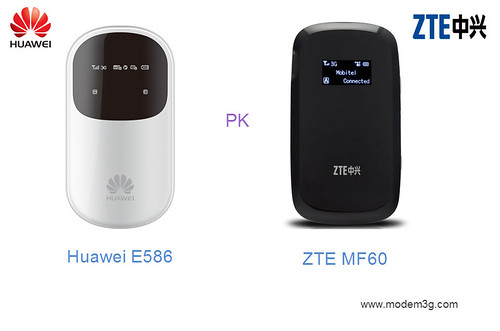
Finally, huawei released its fastest Mobile Hotspot at 21mbps download speed under HSPA+ technology in August, 2011. As the upgraded version of [url=http://www.modem3g.com/e583c-hotspot-p-57.html?utm_source=forum&utm_medium=jane&utm_campaign=Huawei%2BE583C]Huawei E583C[/url] Wi-Fi mobile pocket, [url=http://www.modem3g.com/huawei-e586-wiereless-modem-router.html?utm_source=forum&utm_medium=jane&utm_campaign=Huawei%2BE586%2BMiFi%2BHotspot]Huawei E586 MiFi Hotspot[/url] has attracted many eyes from beginning of this year. But some comments said it’s the first mobile WiFi device that could support up to 21Mbps download speed. Actually, as I know, ZTE MF60 3G mobile Hotspot has been in the market for at least one month earlier. ZTE MF60 adapt the same technology and could also reach peak rate at 21Mbps. Obviously, Huawei E586 and ZTE MF60 WiFi Hotspot are competitor to each other. As a consumer needing a high speed 21Mbps Wi-Fi pocket, you may feel puzzled which one to choose? Let’s have a look what’s the difference. Following the classical design of Huawei E5, HUAWIE E586 Wi-Fi hotspot is in black or silvery color. ZTE MF60 looks also cool, light and like a shell. But the color may vary for different operators. They both have OLED screen, on which displays data such as battery life, data consumption, connection speed, connection quantity, signal strength and browsing time. Actually, in practical experience, there is no much difference of the two models. Besides they both could support up to 21Mbps download speed, they could also reach up to 5.76Mbps upload speed. And to meet requirements form different market, the Huawei E586 has three branch types, E586s-1, E586s-2, E586s-3, within Huawei. The differences lie in their supported bands: E586s-1: HSPA+/HSPA/UMTS 2100MHz, EDGE/GPRS/GSM 1900/1800/900/850 Mhz E586s-2: HSPA+/HSPA/UMTS 2100/900MHz, EDGE/GPRS/GSM 1900/1800/900/850 Mhz E586s-3: HSPA+/HSPA/UMTS 2100/1900/850MHz, EDGE/GPRS/GSM 1900/1800/900/850 Mhz https://farm7.static.flickr.com/6154/6196782371_b80c52df1b.jpg Although no official statement. we believe ZTE MF60 also has two or three configurations for different markets. From the above the specifications, we can’t determine which one is better to choose. As the Wi-Fi Hotspot, ZTE MF60 could support up to 8 users to get internet access at same time. But Huawei E586 could only support 5 Wi-Fi-enable terminals. By USB cable, they could work as USB modem and then one more user could get internet support. From this point, ZTE MF60 MiFi Router seems better than HUAWEI E586. And what’s more interesting is that [url=http://www.modem3g.com/zte-mf60-mobile-hotspot.html?utm_source=forum&utm_medium=jane&utm_campaign=ZTE%2BMF60%2Bis%2Bmuch%2Bcheaper]ZTE MF60 is much cheaper[/url] than Huawei E586, possibly because Huawei E5 has gained great reputation in global market based on its good quality and worldwide followers, just like Apple. If you like the brand more, Huawei E586 should be your first consideration. But who will be the final winner, we think market and time will tell. |
| Technology Market › Re: Cheap Blackberry Phones (new Or Used) For Sale: I Deliver To Anywhere In Nigeria by modemjane(m): 3:53pm On Dec 09, 2011 |
Finally, huawei released its fastest Mobile Hotspot at 21mbps download speed under HSPA+ technology in August, 2011. As the upgraded version of [url=http://www.modem3g.com/e583c-hotspot-p-57.html?utm_source=forum&utm_medium=jane&utm_campaign=Huawei%2BE583C]Huawei E583C[/url] Wi-Fi mobile pocket, [url=http://www.modem3g.com/huawei-e586-wiereless-modem-router.html?utm_source=forum&utm_medium=jane&utm_campaign=Huawei%2BE586%2BMiFi%2BHotspot]Huawei E586 MiFi Hotspot[/url] has attracted many eyes from beginning of this year. But some comments said it’s the first mobile WiFi device that could support up to 21Mbps download speed. Actually, as I know, ZTE MF60 3G mobile Hotspot has been in the market for at least one month earlier. ZTE MF60 adapt the same technology and could also reach peak rate at 21Mbps. Obviously, Huawei E586 and ZTE MF60 WiFi Hotspot are competitor to each other. As a consumer needing a high speed 21Mbps Wi-Fi pocket, you may feel puzzled which one to choose? Let’s have a look what’s the difference. Following the classical design of Huawei E5, HUAWIE E586 Wi-Fi hotspot is in black or silvery color. ZTE MF60 looks also cool, light and like a shell. But the color may vary for different operators. They both have OLED screen, on which displays data such as battery life, data consumption, connection speed, connection quantity, signal strength and browsing time. Actually, in practical experience, there is no much difference of the two models. Besides they both could support up to 21Mbps download speed, they could also reach up to 5.76Mbps upload speed. And to meet requirements form different market, the Huawei E586 has three branch types, E586s-1, E586s-2, E586s-3, within Huawei. The differences lie in their supported bands: E586s-1: HSPA+/HSPA/UMTS 2100MHz, EDGE/GPRS/GSM 1900/1800/900/850 Mhz E586s-2: HSPA+/HSPA/UMTS 2100/900MHz, EDGE/GPRS/GSM 1900/1800/900/850 Mhz E586s-3: HSPA+/HSPA/UMTS 2100/1900/850MHz, EDGE/GPRS/GSM 1900/1800/900/850 Mhz https://farm7.static.flickr.com/6154/6196782371_b80c52df1b.jpg Although no official statement. we believe ZTE MF60 also has two or three configurations for different markets. From the above the specifications, we can’t determine which one is better to choose. As the Wi-Fi Hotspot, ZTE MF60 could support up to 8 users to get internet access at same time. But Huawei E586 could only support 5 Wi-Fi-enable terminals. By USB cable, they could work as USB modem and then one more user could get internet support. From this point, ZTE MF60 MiFi Router seems better than HUAWEI E586. And what’s more interesting is that [url=http://www.modem3g.com/zte-mf60-mobile-hotspot.html?utm_source=forum&utm_medium=jane&utm_campaign=ZTE%2BMF60%2Bis%2Bmuch%2Bcheaper]ZTE MF60 is much cheaper[/url] than Huawei E586, possibly because Huawei E5 has gained great reputation in global market based on its good quality and worldwide followers, just like Apple. If you like the brand more, Huawei E586 should be your first consideration. But who will be the final winner, we think market and time will tell. |
| Technology Market › Re: Cheap Blackberry Phones (new Or Used) For Sale: I Deliver To Anywhere In Nigeria by modemjane(m): 5:20pm On Dec 08, 2011 |
Finally, huawei released its fastest Mobile Hotspot at 21mbps download speed under HSPA+ technology in August, 2011. As the upgraded version of [url=http://www.modem3g.com/e583c-hotspot-p-57.html?utm_source=forum&utm_medium=jane&utm_campaign=Huawei%2BE583C]Huawei E583C[/url] Wi-Fi mobile pocket, [url=http://www.modem3g.com/huawei-e586-wiereless-modem-router.html?utm_source=forum&utm_medium=jane&utm_campaign=Huawei%2BE586%2BMiFi%2BHotspot]Huawei E586 MiFi Hotspot[/url] has attracted many eyes from beginning of this year. But some comments said it’s the first mobile WiFi device that could support up to 21Mbps download speed. Actually, as I know, ZTE MF60 3G mobile Hotspot has been in the market for at least one month earlier. ZTE MF60 adapt the same technology and could also reach peak rate at 21Mbps. Obviously, Huawei E586 and ZTE MF60 WiFi Hotspot are competitor to each other. As a consumer needing a high speed 21Mbps Wi-Fi pocket, you may feel puzzled which one to choose? Let’s have a look what’s the difference. Following the classical design of Huawei E5, HUAWIE E586 Wi-Fi hotspot is in black or silvery color. ZTE MF60 looks also cool, light and like a shell. But the color may vary for different operators. They both have OLED screen, on which displays data such as battery life, data consumption, connection speed, connection quantity, signal strength and browsing time. Actually, in practical experience, there is no much difference of the two models. Besides they both could support up to 21Mbps download speed, they could also reach up to 5.76Mbps upload speed. And to meet requirements form different market, the Huawei E586 has three branch types, E586s-1, E586s-2, E586s-3, within Huawei. The differences lie in their supported bands: E586s-1: HSPA+/HSPA/UMTS 2100MHz, EDGE/GPRS/GSM 1900/1800/900/850 Mhz E586s-2: HSPA+/HSPA/UMTS 2100/900MHz, EDGE/GPRS/GSM 1900/1800/900/850 Mhz E586s-3: HSPA+/HSPA/UMTS 2100/1900/850MHz, EDGE/GPRS/GSM 1900/1800/900/850 Mhz https://farm7.static.flickr.com/6154/6196782371_b80c52df1b.jpg Although no official statement. we believe ZTE MF60 also has two or three configurations for different markets. From the above the specifications, we can’t determine which one is better to choose. As the Wi-Fi Hotspot, ZTE MF60 could support up to 8 users to get internet access at same time. But Huawei E586 could only support 5 Wi-Fi-enable terminals. By USB cable, they could work as USB modem and then one more user could get internet support. From this point, ZTE MF60 MiFi Router seems better than HUAWEI E586. And what’s more interesting is that [url=http://www.modem3g.com/zte-mf60-mobile-hotspot.html?utm_source=forum&utm_medium=jane&utm_campaign=ZTE%2BMF60%2Bis%2Bmuch%2Bcheaper]ZTE MF60 is much cheaper[/url] than Huawei E586, possibly because Huawei E5 has gained great reputation in global market based on its good quality and worldwide followers, just like Apple. If you like the brand more, Huawei E586 should be your first consideration. But who will be the final winner, we think market and time will tell. |
| Technology Market › D Brings To People Not Only At Daily Life But Also At Various Entertainment by modemjane(op): 2:34am On Dec 05, 2011 |
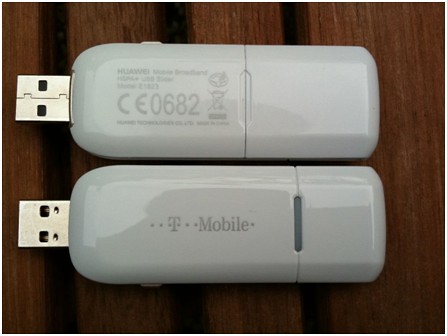
Huawei E182 (ungebrandete Standard Version) [url=http://www.modem3g.com/e1820-p-65.html?utm_source=forum&utm_medium=jane&utm_campaign=Huawei%2BE1820]Huawei E1820[/url] (supports only the 2100MHz UMTS frequency, all else equal) [url=http://www.modem3g.com/huawei-e1823-modem-p-74.html?utm_source=forum&utm_medium=jane&utm_campaign=Huawei%2BE1823]Huawei E1823 [/url] (with T-Mobile branding provided Huawei E182, and probably new hardware revision) Huawei E1823 USB Dongle lived in a small plastic box comes with a USB extension cable and some leaflets and a digital manual on the stick. Externally, the stick is not spectacular, but is not a "cap" is present; the USB connection is extended via a slider mechanism. This is a good solution, because the cap is often lost in such drives and the USB connector is exposed. Otherwise worth mentioning: The connector for an external antenna on the side of the stick. https://farm7.static.flickr.com/6177/6171122243_b200f355ec.jpg The installation of the driver software runs automatically when you plug in the usual way from the sticks, there are no problems. Huawei E1823 USB Stick on the "T-Mobile Internet Manager" for Windows and Mac OS X included and installed when needed, and we are using for this test, but the original Huawei Connection Software for Windows. In order to test the speed of Huawei E1823, we have tried the stick in Bonn HSPA + network of T-Mobile. Here the data rate were for the most part well above the previously unattainable at 7.2 Mbit / s, real feeling with HSPA + downloads beyond the 14.4 Mbit / s but it was not - the networks will probably just be upgraded first. Specifically: the download of a good server, I had an average of about 1MB / s which is about 8Mbit / s. The O2 and Vodafone network showed extremely high ping value, HSPA + in both networks but had not yet activated. But I will in particular the HSPA + network of T-Mobile in Bonn in the next few days to test further and complement this test if necessary. The reception performance of the [url=http://www.modem3g.com/huawei-e1823-modem-p-74.html?utm_source=forum&utm_medium=jane&utm_campaign=Huawei E1823 mobile broadband]Huawei E1823 mobile broadband [/url] is very good in the UMTS network, the GSM network Neat but not outstanding. For stationary use in poor regions such as supplied in the country should think anyway, to buy an external antenna. Conclusion: Should we buy now are already an HSPA + stick, or is not such a high-speed stick the extra cost worth it? In my opinion, the investment is worth, all network operators rely on HSPA +. |
| Webmasters › Re: Which Is The Fastest Internet Connection In Nigeria by modemjane(m): 9:10am On Dec 02, 2011 |
Huawei E182 (ungebrandete Standard Version) [url=http://www.modem3g.com/e1820-p-65.html?utm_source=forum&utm_medium=jane&utm_campaign=Huawei%2BE1820]Huawei E1820[/url](supports only the 2100MHz UMTS frequency, all else equal) [url=http://www.modem3g.com/huawei-e1823-modem-p-74.html?utm_source=forum&utm_medium=jane&utm_campaign=Huawei%2BE1823]Huawei E1823 [/url] (with T-Mobile branding provided Huawei E182, and probably new hardware revision) Huawei E1823 USB Dongle lived in a small plastic box comes with a USB extension cable and some leaflets and a digital manual on the stick. Externally, the stick is not spectacular, but is not a "cap" is present; the USB connection is extended via a slider mechanism. This is a good solution, because the cap is often lost in such drives and the USB connector is exposed. Otherwise worth mentioning: The connector for an external antenna on the side of the stick. https://farm7.static.flickr.com/6177/6171122243_b200f355ec.jpg The installation of the driver software runs automatically when you plug in the usual way from the sticks, there are no problems. Huawei E1823 USB Stick on the "T-Mobile Internet Manager" for Windows and Mac OS X included and installed when needed, and we are using for this test, but the original Huawei Connection Software for Windows. In order to test the speed of Huawei E1823, we have tried the stick in Bonn HSPA + network of T-Mobile. Here the data rate were for the most part well above the previously unattainable at 7.2 Mbit / s, real feeling with HSPA + downloads beyond the 14.4 Mbit / s but it was not - the networks will probably just be upgraded first. Specifically: the download of a good server, I had an average of about 1MB / s which is about 8Mbit / s. The O2 and Vodafone network showed extremely high ping value, HSPA + in both networks but had not yet activated. But I will in particular the HSPA + network of T-Mobile in Bonn in the next few days to test further and complement this test if necessary. The reception performance of the [url=http://www.modem3g.com/huawei-e1823-modem-p-74.html?utm_source=forum&utm_medium=jane&utm_campaign=Huawei%2BE1823 mobile%2Bbroadband]Huawei E1823 mobile broadband[/url] is very good in the UMTS network, the GSM network Neat but not outstanding. For stationary use in poor regions such as supplied in the country should think anyway, to buy an external antenna. Conclusion: Should we buy now are already an HSPA + stick, or is not such a high-speed stick the extra cost worth it? In my opinion, the investment is worth, all network operators rely on HSPA +. |
| Technology Market › Re: Starcomms Izap Sleek Modem For Sale by modemjane(m): 2:44pm On Nov 12, 2011 |
<p>Technology is improving day by day, let鈥檚 take the Modem for example, from the beginning , some people may forget that the first mobile modem came to the world was GPRS modem which was with very very slow speed compared with the speed provided nowadays, then EDGE Modem was created, 3G, 3.5G, 3.75G and until now 4G USB modems are following the steps. The fastest speed is 100Mbps which is fast enough. But due to the 4G technology is not so popular and mature in some countries in the world especially in developing countries, the mainstream is still focusing between 7.2Mbps & 42Mbps speed. Here we鈥檇 like to share[url=http://www.modem3g.com/huawei-e372-usb-stick.html?utm_source=forum&utm_medium=jane&utm_campaign=Huawei%2BE372%2BHSPA%2B%2BModem]Huawei E372 HSPA+ Modem[/url]which is 42Mbps speed modem with all of you . E372 is a featured Modem produced by huawei who is well known in the world by its super powerful influence. And as the top 3 manufacturer in telecom & network equipment provider, huawei is preferable in customer鈥檚 mind, and E372 carries the new technology HSPA+ which could provide twice speed which could be up to 42Mbps. And[url=http://www.modem3g.com/huawei-e372-usb-stick.html?utm_source=forum&utm_medium=jane&utm_campaign=%20E372%20]E372[/url]Modem could work globally due to its quad-band. This feature benefits the business men who needs internet any time & travels a lot. Below is the full detail of Huawei E372 Modem https://www.modem3g.com/media/catalog/product/cache/1/image/9df78eab33525d08d6e5fb8d27136e95/h/u/huawei_e372_1.jpg Unlocked [url=http://www.modem3g.com/huawei-e372-usb-stick.html?utm_source=forum&utm_medium=jane&utm_campaign=Huawei%2BE372%2B]Huawei E372[/url] USB Stick Huawei Mobile Internet Key E372 3G Modem energizes your march in the Internet world with twice speed of the normal standard up to 42Mbps. Supported by the dual carrier HSPA+ network platform, it assures your connection to the web steady and rapidly. Modernistic body design matches your business life style as while. Key Features: * Downlink peak data rate up to 42Mbps in dual carrier; Uplink up to 5.76Mbps * Business suit exquisite and modernistic style body gives out strong visual impact * Optional external antenna connector to extend coverage Specification[b]锛歔/b] * Chip platform: MDM 8220 * Form: USB Stick * Operating frequency(3G): DC-HSPA+/HSPA+/UMTS 2100/1900/900/850MHz * Operating frequency(2G): EDGE/GPRS/GSM 850/900/1800/1900MHz * Speed: Downlink: DC-HSPA+ Dual carrier 42Mbps; Uplink: 5.76Mbps * Interface: USB 2.0 high speed * Dimensions: 90mm x 28mm x 15 mm* Weight: <40g * Receive Diversity: DC-HSPA+/HSPA+/UMTS 2100/1900/900/850MHz * Micro SD card slot: Support锛坲p to 32GB锛? * External Antenna interface: Support * Equalizer: Support * Huawei E372 USB Modem supports Windows XP/Windows Vista/Windows 7, MAC and Linux operating systems If you want one unlocked fast USB Modem with a famous brand, Huawei E372 Modem is a good choice, go to get one at www.modem3g.com <p>Enjoy fast speed, enjoy your life!</p> |



1 (of 1 pages)