Paularo's Posts
Nairaland Forum › Paularo's Profile › Paularo's Posts
 Video Games And Gadgets For Sale › Re: ... by paularo: 11:05am On Feb 11, 2016 Video Games And Gadgets For Sale › Re: ... by paularo: 11:05am On Feb 11, 2016 |
still available? |
| Video Games And Gadgets For Sale › Re: PS4 500GB (75- 80k) by paularo: 11:05am On Feb 11, 2016 |
McMayor:how much? |
| Computer Market › Re: Dell Xps 15 Studio Gaming Laptop For Sale + All Latest Pc Games by paularo(op): 10:53am On Feb 11, 2016 |
No more selling.. |
| Video Games And Gadgets For Sale › Re: 4 Months Used Ps4, 2 Pads, 5 Games 100k by paularo: 10:53am On Feb 11, 2016 |
i have sent you a whatsapp message |
| Video Games And Gadgets For Sale › Re: 4 Months Used Ps4, 2 Pads, 5 Games 100k by paularo: 9:58am On Feb 11, 2016 |
i am interested. Why is he selling? |
| Gaming › Re: FIFA 16 Demo Now Available For Download For Free by paularo(op): 5:15pm On Jan 13, 2016 |
sigmundfreud:No hotspot. You can't share MTN BBLITED tweak |
| Computer Market › Re: Dell Xps 15 Studio Gaming Laptop For Sale + All Latest Pc Games by paularo(op): 5:13pm On Jan 13, 2016 |
110k |
| Webmasters › How To Receive Online Money From Companies Globally With Payoneer by paularo(op): 9:45am On Jan 12, 2016 |
https://www.nairatips.com/wp-content/uploads/2015/12/payonnerLogo.jpg Today is a good day to discuss about money but more importantly receiving money, which is something everybody likes to do. Just as we love spending money, receiving money is better because it gives us the guarantee to spend money later because we have received money. We are talking about receiving money online i.e online money. Sadly enough, most of us have never received money online before, well it maybe because of the following reasons; Your country has been blacklisted from receiving money because of the actions of past criminals and crimes we didn't commit. We have no means of receiving money online because we have no accounts set-up for that purpose. I'm sure we all have Facebook accounts and other social media accounts but we don't have an account which primary purpose is to receive money online. We may have online payment accounts like PayPal, Payza, Perfect money and all the rest but it's likely that in those accounts, we only have the payment option available to us, we don't have the receive option, all because of the country that we reside. For Example: I am Nigerian, I have a Nigerian PayPal account, i was so happy when PayPal came to Nigeria in 2014. I opened the PayPal account, linked my Credit Card issued by my Local bank to it everything was good but there was a problem, i could only make payments with my PayPal account, i can't receive money which means i can only go to stores like eBay, Target, Best Buy and purchase items - i can only be a buyer. I can't be a seller because when i put my items up for sale on stores like eBay, how would i receive my money? This question goes along way to the one of the greatest problems of e-commerce. We can only spend, We can't receive! payonnerLogo Introducing Payoneer Payoneer is an online financial services business that provides online money transfer from any company in the world right to your local bank account and they also engage in e-commerce service payments. Best part of all, Payoneer is free of charge, they offer free services which are too good to pass by. Free Account Creation You get a free US Bank account with routing number and all You can get a Debit MasterCard from Payoneer for free that works on your local ATM machines You get a free $25 referral bonus ...and many more payoneer https://www.nairatips.com/wp-content/uploads/2015/12/payoneer.png Why Should I Use Payoneer? Account Registration is Free - You register an account for free After registration, you would be a given a real US address for free which would act as your online bank account where all your received funds would be stored. Money to paid to your account fast and easy without you signing documents. You receive money instantly from friends, companies, websites, businesses or other e-commerce sites You withdraw the money at ease at your local ATM Machine. How Do I Receive Money From Companies With Payoneer? Go to the Payoneer Website and Register an Account. It's Free! To Register an account with Payoneer, Click on this LINK Verify your account Request for a Debit MasterCard. It's also free! The Debit MasterCard takes less than 30 days to get delivered to your doorstep anywhere in the world. Activate your Debit MasterCard After activation of the card, You use the card to redraw or check your balance in your local ATM machines. Register at Payoneer today! To receive $25 free. I have been using Payoneer for more than 5 years now and all my transactions has been to receive money, i have not paid in anything. It's a nice change of pace from the usual norm of you having to pay, pay for everything. This time around, it is your turn to receive money from your friends, companies, websites, businesses, even Payoneer its pays you for your e-commerce service to them. Try Payoneer Today! Source: www.nairatips.com |
| Gaming › Re: FIFA 16 Demo Now Available For Download For Free by paularo(op): 3:27pm On Nov 06, 2015 |
ohh, sorry I didn't know. |
| Computer Market › Dell Xps 15 Studio Gaming Laptop For Sale + All Latest Pc Games by paularo(op): 3:15pm On Nov 06, 2015 |
Buy your DELL XPS STUDIO 15 GAMING LAPTOP SPECS; Intel Core i7 Processor @2.20Ghz Processor Speed 750GB Hard Disk Drive, upgrade able to 1TB or 2TB. 16GB RAM Genuine Windows 8.1 OS Nvidia Geforce 525M with 1GB Dedicated Graphics - Running Old Heavy Games like Call of Duty Advanced Warfare, FIFA 15, GTA V, NBA 2K15 and the likes at Medium Setting. But for new games like NBA 2K16, Black Ops 3 it runs at Low Setting without any Lag. 9 cell Battery - Lasts for 4 hours + JBL Speakers - Sounds louder than a Woofer! BackLite Keyboard 2x USB 3.0 1x USB 2.0 Ethernet, HDMI, SD Card Reader slots
|
| Gaming › Re: FIFA 16 Demo Now Available For Download For Free by paularo(op): 9:31pm On Sep 13, 2015 |
sigmundfreud:Just 3.6Gb. Small download size. |
| Gaming › Re: FIFA 16 Demo Now Available For Download For Free by paularo(op): 9:30pm On Sep 13, 2015 |
hakinze00:You welcome, It's my job. |
| Gaming › Re: PS4 Games Exchange by paularo: 9:32pm On Sep 08, 2015 |
who has ps4 for sale? |
| Gaming › FIFA 16 Demo Now Available For Download For Free by paularo(op): 9:07pm On Sep 08, 2015 |
The long anticipated FIFA 16 as finally been released, well not the full game but the demo version. The full version is coming out on September, 24. EA Sport promised FIFA 16 Demo release on Sept. 8th which is today and they delivered! https://www.nairatips.com/wp-content/uploads/2015/09/FIFA-16-Demo-1024x576.jpg FIFA 16 Demo was released today and it's available on the following gaming platforms - PC, Xbox 360, Xbox One, PS3 and PS4. FIFA 16 Demo is free to download, that means all you need to have is an Internet Connection to download the DEMO and enjoy some of the new and awesome improvement EA Sports have made. **Teams FC Barcelona Real Madrid Chelsea FC Manchester City Borussia Dortmund Paris Saint-German River Plate Borussia Mönchengladbach Seattle Sounders **Women's Team United States National Team Germany National Team Where Do I Download FIFA 16 Demo From? To download FIFA 16 Demo. Visit https://www.easports.com/uk/fifa/demo Select your Platform and Download. FIFA 16 Demo is more 3.5 GB in size ***NOTE: Women National Teams can only play against Women National Teams. Source: www.nairatips.com |
| Computers › Re: Any Difference Between Notebook, Netbook, Ultrabook, Probook And Laptop? by paularo: 4:55pm On Aug 29, 2015 |
with 130k, you can get a very good system also with a nice graphics card to quench your gaming desires. |
| Computers › Re: Is My Laptop Graphics Card Upgradeable? by paularo(op): 4:53pm On Aug 29, 2015 |
SIRANT:ok, NairaTips is on it! |
| Computers › Reasons For Upgrading Your Laptop by paularo(op): 9:59am On Aug 28, 2015 |
https://www.nairatips.com/wp-content/uploads/2015/08/upgrade_1-300x200.jpg There are some signs which you should look out for to know if it's time to upgrade your laptop. Sometimes, your laptop itself gives you signs that's it time to either give it an upgrade or totally change it. Reasons Why I Need To Upgrade My Laptop Long Laptop Boot Up Time: This is the overall time from when you turn on your laptop to when it reaches optimal performance. If your laptop takes more than 5 minutes to boot up, you need to upgrade your laptop. Softwares are slow to open and it hangs during operation Some Games can't play on your laptop, others lag i.e they are not as fast as it should be. Lesser screen graphics Bad screen resolution Overall System Performance is Low Takes a long time to transfer files i.e slow speed when you copy files Your Laptop overheats when running a heavy software like Adobe Photoshop, Corel Draw etc or when playing games Insufficient Hard Disk Drive space i.e you have a small Hard Disk Drive (HDD) Poor battery life SOURCE: www.nairatips.com |
| Computers › Re: Does My Laptop Have A Graphics Card? by paularo(op): 9:52am On Aug 28, 2015 |
Source: www.nairatips.com |
| Computers › Re: Is My Laptop Graphics Card Upgradeable? by paularo(op): 9:51am On Aug 28, 2015 |
marleygab:Exactly! Only a handful of laptops supports graphics upgrade and those laptops are expensive. Not even in Nigeria unless you buy and ship from ebay or amazon |
| Computers › Does My Laptop Have A Graphics Card? by paularo(op): 9:49am On Aug 28, 2015 |
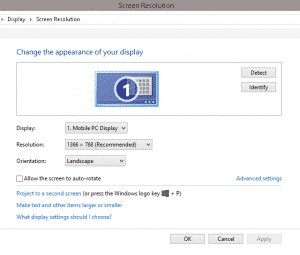
https://www.nairatips.com/wp-content/uploads/2015/08/screen1-300x255.png I will not be surprised if you don't know if your laptop has a graphics card or not. Well is only a short quick tutorial to enable you identify if your laptop has a graphics card or not. First of all, Go to your Desktop either by pressing Windows Key+D or any other longer method you want to use. Right Click on your Desktop Screen Click on Screen Resolution Click on Advanced Settings Mine is Intel HD Graphics 3000 and it has Dedicated Video Memory of 32MB, that's pretty low, What you see there should be difference, If you see either Nvidia or AMD Radeon, Congrats you have a graphics card. That's one job done! You still have to identify what type of graphic card you have, its capabilities, weaknesses and dedicated video memory and you can get all that information in the picture above. |
| Computers › Is My Laptop Graphics Card Upgradeable? by paularo(op): 9:30am On Aug 28, 2015 |
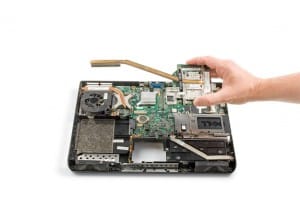
https://www.nairatips.com/wp-content/uploads/2015/08/148909-09FLapUp_Graphics5_x1-300x199.jpg Graphics card are a very important part of a laptop in the 21st century, but it wasn't as important or even important at all during the 19th century because there wasn't a lot of PC Gaming then but now things have changed. PC Games are now coming with a force so powerful its equal to the Gaming Consoles. Games are made now that are on or are of better quality than some console games. We now have PC games of 65GB (GTA V) and among the top titles(NBA, FIFA, PES, Batman, , any quality blockbuster PC game being developed right now would be well above 15GB, that's significant seeing that we came from DOOM, Super Mario, Half-Life and the likes. Let me guess you bought a new laptop, when you bought it the laptop was awesome, it ran all your softwares and games very well or at optimal performance then several months later, you tried to run a new software of game on your very good laptop and it didn't run as you hoped. The software or game slowed down your system, run at a slow pace and overall made your system overheat. It's around this time you need to start looking for another laptop which is more powerful than your previous one because your needs have changed they are now more advanced than before, so you need a powerful system to enable you stay updated with new trends and technology. Sadly, not every laptop out there can upgrade their graphics card, only a few laptops are manufactured with that option, most laptops can't upgrade their graphics, at least that i know of. So, you might be stuck with a laptop that has little graphics or no graphics card at all, it isn't the end of the world, you need to buy another laptop, Simple as that. Before you even think about upgrading your laptop graphics card, you need to have a laptop that allow graphics card upgrade, only a handful of laptop now have this feature like MSi, SAGER/CLEVO, Alienware etc. If you don't have any of these systems, you can't upgrade your laptop graphics with this method. SOURCE: www.nairatips.com |
| Phones › Re: Benefits Of Buying An Androidone Device by paularo(op): 6:04pm On Aug 26, 2015 |
Collinz2:that's correct but it would perform better than most 20k phones. or phones at that price |
| Phones › Re: How To Change Date And Time Faster On Your Android Phone by paularo(op): 5:02pm On Aug 26, 2015 |
donholy28:i don't know. I didn't think twice about using it. Time changer worked for me |
| Phones › Re: Google Brings Androidone To Nigeria by paularo(op): 4:59pm On Aug 26, 2015 |
Sabrwahaqqo:i think more are available now on Jumia |
| Phones › Re: How To Change Date And Time Faster On Your Android Phone by paularo(op): 4:54pm On Aug 26, 2015 |
donholy28:i don't know the version. It didn't work on the game i wanted to change date not time. That's why Time changer was better for me |
| Phones › Re: What Is Android Root by paularo(op): 4:52pm On Aug 26, 2015 |
| Phones › Re: What Is Android Root by paularo(op): 4:50pm On Aug 26, 2015 |
What is Rooting? Rooting is simply the act of gaining access to your android’s device root user account and there are so many ways to do this, which would be discussed on another article. But for now, i leave you with the knowledge of What Android Root is… |
| Phones › Re: What Is Android Root by paularo(op): 4:50pm On Aug 26, 2015 |
Source NairaTips |
| Phones › What Is Android Root by paularo(op): 4:50pm On Aug 26, 2015 |
I’m sure many of us already know about Android Root, How to root and you even rooted a few android devices yourself, Yay! Good for you. This article is for those that want to know more about Android Root before they root their phones, they want assurance and guarantee maybe because of how scared they are, they think ‘if i root my phone, i may damage it’. lol. Very funny. When you root your phone you become the root user and since Android itself is based on Linux and just like in all other linux based operating systems you become the Administrator, just like in Windows. This means when you become a root user by rooting your phone, you now have total control over your Android device and all it’s exploits. Normally Android devices don’t come rooted, unless it’s a custom Rom which has been pre-rooted already, Want to know more about Custom ROMs? Read What is a Custom ROM. Every Android device comes with a “root user” account but there’s no built in way to access the root user, No official way. This brings us to “Rooting“. |
| Phones › Re: How To Change Date And Time Faster On Your Android Phone by paularo(op): 4:48pm On Aug 26, 2015 |
donholy28:i tried that, it didn't work for me, that's why i used Time Changer |
| Phones › Re: Google Brings Androidone To Nigeria by paularo(op): 4:47pm On Aug 26, 2015 |
Sabrwahaqqo:Yes. it was even sold out 48 hours after launch |
| Phones › Re: Benefits Of Buying An Androidone Device by paularo(op): 4:46pm On Aug 26, 2015 |
ishadfurnitures:who is introvert? |