Nze4al's Posts
Nairaland Forum › Nze4al's Profile › Nze4al's Posts
 Phones › Re: How To Record Your Screencasts On Android And Ios For Making Youtube Videos by nze4al(op): 10:36am On Feb 13, 2016 Phones › Re: How To Record Your Screencasts On Android And Ios For Making Youtube Videos by nze4al(op): 10:36am On Feb 13, 2016 |
More
|
| Phones › How To Record Your Screencasts On Android And Ios For Making Youtube Videos by nze4al(op): 10:35am On Feb 13, 2016 |
For those of us who has always wanted to record their game play, demo an app for the wider world to see or upload to youtube, email a tutorial to friends, mom and dad through the wonder of video, it’s fortunate that recording your screencasts is no longer the exclusive preserve of devs and serious coders. Whatever platform your smartphone (or tablet) runs, you can record on-screen activity without too much trouble. HERE IS HOW TO Android Platform Recording screencasts on Android has been made much easier with the release of the YouTube Gaming app (compatible with devices running Android 4.1 and above). Obviously it’s designed primarily to record your gaming exploits, but you can use it to log pretty much anything you’re doing on your device, no computer connection required. Once you’ve installed the app, launch it and tap Go Live in the corner (depending on your device and its orientation the option may be hidden behind your avatar): You won’t suddenly find yourself in front of an audience of millions but you will be able to record on-screen activity. Tap Next then choose your format and make sure Record is selected before tapping Next again twice. The subsequent screen lets you choose an app to record—this will start the recording but you don’t have to stay inside this app if you don’t want to. Tap Start Now to begin and you’re off: Down at the bottom of the screen is a console that lets you turn the microphone input on and off, and choose whether or not to include a live stream of your beautiful face as well (tag and drag to reposition this console). Select the stop button when you’ve finished. You’re then given the option to trim your video and upload it to YouTube (where you can set it as private) but if you’d rather not transfer it to the web then you don’t have to—just back out of the screen and you’ll find your video saved in your device’s gallery, where you can edit and do whatever you want with it. The YouTube Gaming app records everything on your screen, including notifications, so you might want to switch these off before you get started. It also includes the recording console. If you don’t like this approach, there are plenty of alternatives you can check out: Try OneShot (free), Rec. (free with in-app purchases) or AZ Screen Recorder (free with in-app purchases) if you’re after something different. * IOS / APPLE * – Coming soon! More @ https://techmzy./2016/02/11/how-to-record-your-simple-screencasts-on-android-and-ios-for-youtube-videos-2016/
|
| Phones › How To Survive & Secure Your Information/data When Your Smartphone Goes Missing by nze4al(op): 10:20am On Feb 13, 2016 |
Smartphone been stolen? Don’t panic, help is at hand. Your mobile might be a treasure trove of apps, games and music, but in the wrong hands it’s also a mine of sensitive information with enough riches to fulfil a fraudster’s every wish. Despite this, a surprising number of us do little to protect our devices in the event of loss or theft. Fortunately, there are simple steps we can take to limit any financial inconvenience, and increase the likelihood of being reunited with our precious handset and its valuable data. 1. Use a screen lock It might sound blindingly obvious, but a staggering number of us don’t set up a screen lock. It’s not as though we’re short of security options either, with devices offering one or more 4-digit PINs, Touch ID-like biometrics, shape-swiping, and even face and retina-recognition. These aren’t technically fool-proof, but any security is better than none and will help defeat, slow down or deter many a casual phone thief. 2. Set up a SIM PIN Even if you’re protected with a screen lock, fraudsters can eject the SIM from your smartphone and pop it into one of their own. Without a SIM PIN, bad guys can rack up substantial bills, taking a cut from calling premium rate numbers. When enabled, a PIN is required every time your SIM is ejected and reinserted. A SIM PIN is simple to set up, the trickiest step is figuring out the default PIN for your network. MTN default pin is 1234, For other networks you can phone up customer service to find out their default PIN. 3. Report to your network provider If the worst happens and your phone does go missing, report it to your mobile network immediately. They have all your details, and can temporary lock or track the sim for you. That’s one of the reasons/importance of sim registration. 4. Register your device Register your phone with the phone marker, and make sure that all the receipt you used while buying your phone are kept save. 5. Customise your lock screen Let’s say you’ve left your phone on a bus. Fortunately for you, Honest John picks it up and is hell-bent on returning it to its rightful owner. However, as you’ve set up lock-screen security, poor John has no way of contacting you. Oh the irony. The good news is that some handsets – notably those running Android and BlackBerry – allow you to customise your lock screen to include an owner information message, mobile number and address if you like. This will help the honest John to contact you. Apple has yet to bake this facility directly into iOS, but, as somebody once said, there’s an app for that. In fact there are several, including If Found Lock Screen and ICE (In Case of Emergency). Of course, if your phone runs out of battery, onscreen prompts are useless, so a low-tech alternative is simply to pop a sticker with an email address on the back of the phone or inside the case. 6. Use find-your-phone apps For a while, Apple’s Find My iPhone app was one step ahead of Google and helped to reunite many an iPhone and iPhone owner. These days, Android Device Manager does much the same for the Google side of the smartphone divide, and you can now simply type ‘Find my Phone’ into a nearby Google Omnibox (subject to you being signed-in to the same Google account on your phone and browser). Besides helping to locate your phone, these apps will let you sound an alarm, leave an on-screen message, and even perform a remote wipe. Again, keep in mind that find-your-phone apps are only as good as your phone’s battery life, and the savvy phone thief won’t think twice about removing the SIM and powering it down to help keep it incognito. 7. Always back up your data Just because your phone may end up on some underground auction site like olx or second hand phone dealer’s, it doesn’t mean your data has to go with it. iOS users will be familiar with iCloud as a means of syncing and backing up their data, and although Apple could do with being more generous with its pricing structure, it is a seamless mechanism that just works. Android Backup Service helps to sync application data and settings to your Google account. To configure this, simply go to Settings > Accounts > Backup and Reset and then ensure ‘Back up my data’ is checked. Please share this important information with your friends and family. More @ https://techmzy./2016/02/13/tips-how-to-survive-and-secure-your-informationdata-when-your-smartphone-goes-missing/
|
| Webmasters › Re: 10 Top Secrets To Become A Successful Blogger by nze4al(m): 10:22pm On Feb 07, 2016 |
Here is mine www.techmzy.
|
| Webmasters › Re: 10 Things You Must Know And Have Before Creating A Blog by nze4al(m): 10:50pm On Feb 06, 2016 |
I blog @ www.techmzy. |
| Phones › Whatsapp Group Chat Just Got Better/Worst With The Increased 256 Contacts Limit by nze4al(op): 12:15pm On Feb 06, 2016 |
With the latest update, You can now add 256 of your friends to WhatsApp group chat! The messaging firm has just announced that it’s increasing the Group Chat limit from 100 to 256. This means when you set up a “New Group”, 256 of your friends can join in the banter – just think of all those notifications going off all day and night. The update is being rolled out from today with some users already able to enjoy these new super-sized groups. When your app has received the update you’ll get a prompt telling you that 256 people can now join your chats This latest update comes just days after WhatsApp confirmed that it now has one billion active users. Announcing the news on his Facebook page, boss Mark Zuckerberg said: “One billion people now use WhatsApp. Congrats to Jan, Brian and everyone who helped reach this milestone!” Facebook paid a whopping $19billion (£11.5 million) for WhatsApp and promised to make it the world’s biggest messaging platform – something they now appear to have achieved. More @ https://techmzy./2016/02/05/whatsapp-group-chat-just-got-better-with-the-increased-256-contacts-limit/
|
| Phones › How To Play The Secret And Hidden Game On Your Facebook Messenger by nze4al(op): 12:05pm On Feb 06, 2016 |
Apart from chatting with your friends on the Facebook Messenger, do you know you can do some other great things like playing game on the app? Fans of Facebook Messenger might be surprised to know there’s a neat little game hidden inside the app. The classic game of chess has been sneaked into the Facebook messaging service and can only be accessed with a secret code. If you fancy a game, then you can challenge your mates by sending the simple message “@fbchess play”. As soon the message is sent a basic chess board will pop-up on the screen and you can begin playing straight away. PLAY: A simple message will start the game with friends However, playing the brain-testing game isn’t quite as simple as finding it. Gamers are able to play by typing in a specific Algebraic Notation – for example, @fbchess e4 or @fbchess Pe4 will move a pawn to e4 on the board. B is used for bishop, R moves the rook, Q for queen, K for king, and, because K is already used for King, the letter N moves your knight. It’s pretty frustrating to start, but learning the codes soon speeds things up. If you’re finding things confusing full instructions on how to play can viewed by typing “@fbchess help” into the messaging app The free game can be played on both mobile and web platforms and users can continue to chat without interrupting the match. This isn’t the first time games have been hidden inside the web. Google snuck an addictive dinosaur running game into its hugely popular Chrome browser. When there’s no internet available your Chrome browser will show the image below. However, a simple tap on the space bar turns this dull looking page into something a lot more fun. Google Chrome becomes an addictive dinosaur-themed endless running game. Just hop the little monster over the obstacles to get the highest score you can. Another neat game involves typing the words “Atari Breakout” into Google image search. This instantly turns your browser into the popular retro game complete with 70s sound effects. So why not try it out and tell me what you think below. More @ https://techmzy./2016/02/06/how-to-play-the-secrethidden-game-on-your-facebook-messenger/
|
| Education › 13 Science “facts” You Thought Were True, But Are Actually Wrong! by nze4al(op): 11:43am On Feb 06, 2016 |
It’s time to put an end to the most alluring science myths, misconceptions, and inaccuracies passed down through the ages. Here are most of the corrected shocking science “facts” that are bizarrely wrong about food, animals, biology, alcohol, and health. MYTH: Humans got HIV because someone had sex with a monkey. HIV probably didn’t jump to humans through human-monkey sex. It probably jumped to humans through hunting of monkeys for bushmeat food, which led to blood-to-blood contact. Source: Cold Spring Harbor Perspectives In Medicine MYTH: Humans evolved from chimpanzees. Chimps and humans share uncanny similarities, not the least of which is our DNA — about 98.8% is identical. However, evolution works by incremental genetic changes adding up through many, many generations. Chimps and humans did share a common ancestor between 6 and 8 million years ago but a lot has changed since then. Modern chimps evolved into a separate (though close) branch of the ape family tree. Sources: Smithsonian National Museum of Natural History, American Museum of Natural History MYTH: Water conducts electricity. Pure or distilled water doesn’t conduct electricity well at all. The reason we can get shocked when standing in electrified water is because water we come across will be contaminated by minerals, dirt, and other things that will conduct electricity. Source: USGS MYTH: The hymen is a sheet of tissue that blocks a women’s vagina. Wrong. Guys, the hymen is a thin membrane that only partially blocks the vaginal opening — if a woman is born with one at all. Also, plenty of activities other than sex can stretch or damage the hymen, including exercise or inserting a tampon. Sources: Columbia University, College Humor MYTH: People only use 10% of their brain. This myth has been debunked over and over again, but it just won’t die. Just because you’re not doing math equations and juggling while you write a sonnet doesn’t mean you aren’t using all the parts of your brain at once. You can use your entire brain, and you do — the brain is 3% of the body’s mass but uses 20% of its energy. Source: Scientific American MYTH: Your microwave can give you cancer and disrupt your pacemaker. Microwave radiation won’t cause cancer, it just heats food up. Only a few types of radiation cause cancer, and these depend on the dose. Radiation from the sun can cause skin cancer, for example, but just enough helps your body make Vitamin D, too. Microwaves also won’t disrupt a pacemaker. However, things like anti-theft systems, metal detectors, powerful refrigerator magnets, mobile phones, and even headphones can mess with the heartbeat-keeping devices. Sources: Cancer Research UK, American Heart Association MYTH: Shaving makes your hair grow back thicker. Shaving your hair doesn’t make it thicker, it just makes it feel coarser for a time. That’s because the ends of the hairs are sharp and stubbly instead of smooth. Source: Mayo Clinic MYTH: Everyone should drink eight glasses of water a day. Hydration is very important, but the idea that eight glasses of water is essential is a strange one. In healthy people, researchers have not found any connection between fluid intake and kidney disease, heart disease, sodium levels, or skin quality. But water is a calorie-free alternative to other beverages (especially sugary ones like soda or sports drinks), and people who drink water instead of those beverages consume fewer calories overall. A good rule is to drink when you’re thirsty — you don’t need to count the glasses. Source: FiveThirtyEight, Nutrition Reviews MYTH: Eating before drinking keeps you sober. Eating before drinking does help your body absorb alcohol, but it only delays the alcohol entering your bloodstream, it doesn’t restrict it. Your body absorbs the alcohol more slowly after a big meal, so eating before drinking can help limit the severity of your hangover. Eating a lot after drinking, however, won’t do much to help your hangover. MYTH: Brown sugar is healthier than white sugar. Sugar that’s the color of dirt doesn’t make it more “natural” or healthier than its white counterpart. The color comes from a common residual sticky syrup, called molasses. Brown sugar retains some of that molasses. In fact, brown sugar is mostly white sugar with some molasses — so refining it further would give you white table sugar. While molasses contains some vitamins and minerals like potassium and magnesium, there is not enough in your standard brown sugar packet that should make you reach for it if you’re trying to eat healthier. As far as your body is concerned, white and brown sugar are one-in-the-same. MYTH: Sitting too close to the TV is bad for your eyes. The most this will do is give you a headache from eye fatigue. This rumor probably started with old TVs, which produced some X-rays, but newer ones don’t. MYTH: Sugar causes diabetes. Eating sugar in moderation won’t give you diabetes. The American Diabetes Association, while it recommends that people avoid soda and sports drinks, is quick to point out that diabetes is a complex disease, and there’s not enough evidence to say that eating sugar is the direct cause. However, both weight gain and consuming sugary drinks are associated with a heightened risk, and (large) portion size seems to be most crucial when it comes to sugar and diabetes. Sources: Business Insider, Tech Insider, American Diabetes Association, PLoS ONE MYTH: Being stressed will give you high blood pressure. Stress doesn’t play a large role in chronic high blood pressure. Acute stress can temporarily increase blood pressure, but overall it’s not a main cause of hypertension. Things like genetics, smoking, and a bad diet are much bigger factors. Source: British Medical Journal More @ https://techmzy./2016/02/05/13-science-facts-you-thought-were-true-but-are-actually-wrong/ 11 Likes 2 Shares
|
| Car Talk › Here Is Covini C6W The World’s First And Only 6-wheeled Supercar by nze4al(op): 11:02am On Feb 06, 2016 |
Covini’s C6W is the world’s first and only 2-seat, 2-door supercar with 6 wheels, complete with a removable roof section. Inspiration for the car was taken from the 1976 Tyrrell P34, which had two pairs of smaller front wheels, a principle applied to the C6W. The project was started in 1974 but abandoned shortly after, and left dormant into the 1980s due to the lack of availability of low-profile tires at the time. In 2003 the project was revived and in 2004 the C6W was shown in prototype form. Powering this unique vehicle is a 4.2L V8 engine that generates 420-horsepower and 346 lb-ft of torque, good for a top speed of 185mph. “The four front wheels are mainly inspired by safety concerns. Two front wheels at each corner means a front tire blowout will not cause the vehicle to lose control because the other wheel can carry the weight of the vehicle and provide control while the driver brings it to a stop. Then there’s the additional stopping power afforded by four front disc brakes, and four tire footprints to transmit the force – although the individual area of each tire footprint is smaller than that of a traditional tire, the total area is greater,” according to Diseno-Art. More @ https://techmzy./2016/02/06/here-is-covini-c6w-the-worlds-first-and-only-6-wheeled-supercar/
|
| Jokes Etc › Re: Guy Falls Asleep At Work And Co-workers Photoshoped &upload Picture To Internet by nze4al(op): 10:57am On Feb 06, 2016 |
More
|
| Jokes Etc › Guy Falls Asleep At Work And Co-workers Photoshoped &upload Picture To Internet by nze4al(op): 10:54am On Feb 06, 2016 |
Lols I can’t stop laughing some people are wicked o! Falling asleep at work while on the clock is bad enough, but having co-workers around when it happens, is far worse. The entire office decided to snap a group picture together while this person was in dream land. Shortly after, the image was posted into a Reddit “Photoshop Battle” thread, and a plethora of digitally altered images ensued, ranging from a simple face swap to full-on cartoon placements. Continue reading to see them all. More @ https://techmzy./2016/02/06/guy-falls-asleep-at-work-and-co-workers-upload-picture-to-internet-photoshopped-images-ensue%f0%9f%98%81%f0%9f%98%82/
|
| Webmasters › Re: What The Most Visited And Popular Websites Today Use To Look Like by nze4al(op): 6:12pm On Feb 01, 2016 |
And finally our very own almighty nairaland Nairaland: Then (2005) Nairaland: Now (2016) More @ https://techmzy./2016/02/01/what-the-most-visited-and-popular-websites-today-use-to-look-like/
|
| Webmasters › Re: What The Most Visited And Popular Websites Today Use To Look Like by nze4al(op): 6:09pm On Feb 01, 2016 |
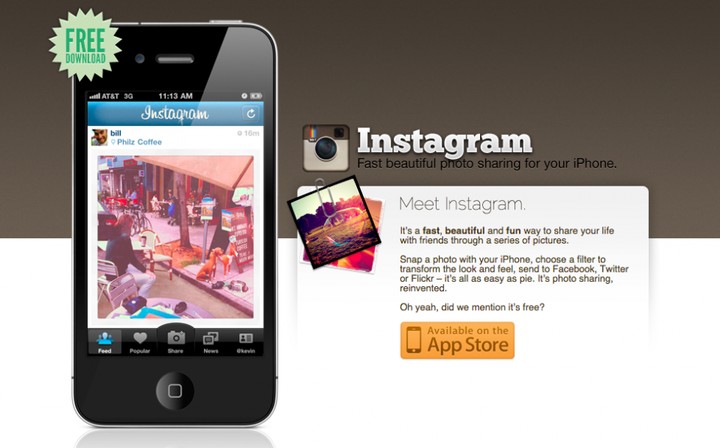
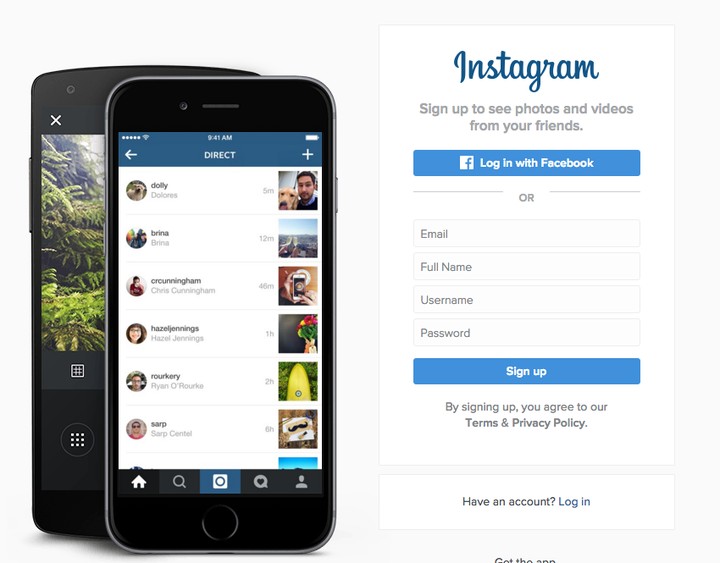
Instagram: Then (2011) Instagram: Now
|
| Webmasters › Re: What The Most Visited And Popular Websites Today Use To Look Like by nze4al(op): 6:08pm On Feb 01, 2016 |
Amazon: Then (1995) Amazon: Now
|
| Webmasters › Re: What The Most Visited And Popular Websites Today Use To Look Like by nze4al(op): 6:07pm On Feb 01, 2016 |
Facebook: Then (2004) Facebook: Now
|
| Webmasters › Re: What The Most Visited And Popular Websites Today Use To Look Like by nze4al(op): 6:05pm On Feb 01, 2016 |
Flickr: Then (2004) Flickr: Now
|
| Webmasters › Re: What The Most Visited And Popular Websites Today Use To Look Like by nze4al(op): 6:04pm On Feb 01, 2016 |
Yahoo!: Then (1994) Yahoo!: Now
|
| Webmasters › Re: What The Most Visited And Popular Websites Today Use To Look Like by nze4al(op): 6:03pm On Feb 01, 2016 |
Twitter: Then (2006) Twitter: Now
|
| Webmasters › Re: What The Most Visited And Popular Websites Today Use To Look Like by nze4al(op): 6:02pm On Feb 01, 2016 |
YouTube: Then (2005) YouTube: Now
|
| Webmasters › Re: What The Most Visited And Popular Websites Today Use To Look Like by nze4al(op): 6:00pm On Feb 01, 2016 |
MySpace: Then (2003) MySpace: Now
|
| Webmasters › Re: What The Most Visited And Popular Websites Today Use To Look Like by nze4al(op): 5:59pm On Feb 01, 2016 |
LinkedIn: Then (2003) LinkedIn: Now
|
| Webmasters › Re: What The Most Visited And Popular Websites Today Use To Look Like by nze4al(op): 5:58pm On Feb 01, 2016 |
eBay: Then (1995) eBay: Now
|
| Webmasters › Re: What The Most Visited And Popular Websites Today Use To Look Like by nze4al(op): 5:54pm On Feb 01, 2016 |
Tumblr: Then (2007): Tumblr: Now
|
| Webmasters › Re: What The Most Visited And Popular Websites Today Use To Look Like by nze4al(op): 5:52pm On Feb 01, 2016 |
Google: Then (1998) Google: Now
|
| Webmasters › What The Most Visited And Popular Websites Today Use To Look Like by nze4al(op): 5:50pm On Feb 01, 2016 |
How ugly the earliest versions of some of the most visited websites today was, like Facebook, Google, and Buzzfeed etc. Here’s what the sites looked like then, and what they look like now. Web design has come a long way — oh, and the ads have gotten a lot more in-your-face. Source: https://techmzy./2016/02/01/what-the-most-visited-and-popular-websites-today-use-to-look-like/ Wikipedia: Then (2001) Wikipedia: Now Pinterest: Then (2010) Pinterest: Now
|
| Phones › Re: Photos: Here’s What The HDR Photo Setting Really Does And Why You Should Use It by nze4al(op): 6:11pm On Jan 31, 2016 |
More
|
| Phones › Photos: Here’s What The HDR Photo Setting Really Does And Why You Should Use It by nze4al(op): 6:07pm On Jan 31, 2016 |
Ever wondered what the HDR settings does on your smartphone camera? You might have noticed the three letters “HDR” on your smartphone’s camera app /camera settings when you’re lining up a picture, and you might wonder whether to keep it on or off. It’s generally better to keep it on, and here’s why: HDR stands for “High Dynamic Range,” and it helps make your pictures look better by making your smartphone take three pictures instead of just one. Each of the three pictures are taken with different levels of brightness (exposure). Your smartphone’s camera app then essentially mixes parts from the three pictures to create a single picture with the best balance of dark and light. You won’t see the three pictures with varying exposures in your phone’s photo gallery, but one will be taken with high exposure. Below are some of pictures I took with on the left HDR off while on the right HDR on: NoteNote: It doesn’t work with every situation If your phone has an auto-HDR feature, you might not need to worry about the following situations. But it’s good to know as the auto-HDR features in many smartphone aren’t perfect. HDR works best for dimly-lit environments without using flash (often indoors), close-up shots, most landscapes, and most portraits. But if you want to keep stark contrasts like a silhouette against a bright window, or vivid colors, you’re better off turning HDR off. It’s also not ideal if you or your subject is moving because your phone is taking three pictures instead of one, and you end up with some blurring. More @ https://techmzy./2016/01/31/heres-what-the-hdr-photo-setting-really-does-and-why-you-should-use-it/
|
| Phones › Re: Why You Should Stop Using The Facebook App And Use The Mobile Site by nze4al(op): 12:43pm On Jan 31, 2016 |
Kingy10:U can just click on create/ sign up new account
|
| Phones › Re: You Can Now Update Your MTN SIM Registration Via Your BVN Number! by nze4al(op): 8:54pm On Jan 30, 2016 |
Mod or seun pls front page |
| Phones › Re: You Can Now Update Your MTN SIM Registration Via Your BVN Number! by nze4al(op): 8:13pm On Jan 30, 2016 |
myfantasies:It's real, u can call 180 (customer care) to confirm. |
| Phones › Review: This Lenovo Yoga Tab 3 Pro Can Replace Your Television by nze4al(op): 7:03pm On Jan 30, 2016 |
Most tablets are similarly suitable for handling most computing needs, like watching Netflix, web browsing and playing casual games. Adding a fingerprint scanner or improving screen resolution won’t make liking posts on Facebook any easier or more dynamic. But the new Lenovo Yoga Tab 3 Pro could be a reason to upgrade. This 10-incher won’t just replace your existing tablet, but it could also take your television’s job, too. That’s because it has a neat trick: Lenovo’s new tablet packs a 50-lumen projector able to beam its display up to 70 inches on walls, ceilings, or nearly anywhere else you point it. Breaking the mold of the thin, glass slate, the Yoga doesn’t just have better internal specs. It also adds new features to the exterior, helping this Android 5.1 tablet stand out from the increasingly commodified pack. From a hardware perspective, the Yoga checks nearly every mark. Its 10-inch QHD IPS display is bright and sharp. Its 32 gigabytes of storage is average, but it also has a microSD slot that can accommodate up to 128 gigabytes more space. The Yoga’s Intel Atom processor and two gigabytes of RAM won’t win any awards, but its beefy 10,200mAh battery is, short of the iPad Pro, the longest-lasting power cell in a cutting edge tablet. The Yoga is able to house such a large charge because it bucks the trend of ever-thinning tablets in favor of a new form factor that’s a refreshing change of pace. The tablet’s wedge shape makes holding the 1.47-pound device a pleasant experience, unlike the delicate flagship tablets from other makers that seem impossible to get a grip on. But that’s just the business end of things. At home, the Yoga is well suited for projecting streaming video in a darkened living room. Keep in mind, streaming video isn’t going to look great to begin with, and if you have bumpy walls, nail holes, or wallpaper, the image is going to be imperfect, too. But if you’ve got a small apartment, a dorm room, or just want to live minimally, the Yoga is a great way to add a big screen without having to rearrange your life around a television set. Meanwhile, the Yoga’s price — starting at $475 — makes it a screaming deal, because not only do you get a top-of-the-line tablet, but you can also buy it in place of a big-screen TV. More @ https://techmzy./2016/01/29/review-this-lenovo-yoga-tab-3-pro-can-replace-your-television/ 1 Like
|
| Science/Technology › Re: The Look Of The Entire Universe In One Picture -awesome! by nze4al(op): 6:51pm On Jan 30, 2016 |
vicraven:Lols...can you imagine 1 Like |