Ogongogames's Posts
Nairaland Forum › Ogongogames's Profile › Ogongogames's Posts
 Technology Market › Re: Digital PC Games For Sale (Instant Download!) by ogongogames(op): 11:02am On Mar 15, 2018 Technology Market › Re: Digital PC Games For Sale (Instant Download!) by ogongogames(op): 11:02am On Mar 15, 2018 |
GabrielYulaw:My pleasure. To answer your question these games are all available specifically for download. *Just to note, 90% of the games listed are within N1500-N2500. |
| Technology Market › Re: Digital PC Games For Sale (Instant Download!) by ogongogames(op): 10:47am On Mar 15, 2018 |
GabrielYulaw:Sorry for the delay, below are a list of War games from 5-12 years in my library: Medieval II: Total War Kingdoms Arma: Cold War Assault Arma 2: Operation Arrowhead Sid Meier's Civilization III Hearts of Iron III Order of War Return to Castle Wolfenstein Europa Universalis III Supreme Commander: Forged Alliance Blitzkrieg 2 Anthology Napoleon: Total War Company of Heroes 2: Master Collection Call of Duty: World at War Call of Duty: Warchest (3 games included) |
| Gaming › Re: HELP: Gaming Enquires by ogongogames(m): 2:26pm On Mar 14, 2018 |
ogongogames:All sorted out now. Huge shout out to Nairaland user kazukiito for the help, thus confirming the codes work perfectly in Nigeria as well. If anyone is interested in purchasing Steam downloads. PM me. Cheers! |
| Technology Market › Re: Digital PC Games For Sale (Instant Download!) by ogongogames(op): 12:58am On Mar 13, 2018 |
GabrielYulaw:You know what, if you are interested in "F1 2012", let's forget about payment for now. The most important thing is for the game to be successfully installed on your system. |
| Technology Market › Re: Digital PC Games For Sale (Instant Download!) by ogongogames(op): 12:50am On Mar 13, 2018 |
GabrielYulaw:Hi there. To download the any game, you need to install and register an account with STEAM (approx 15 mins): http://store.steampowered.com/ I posted a video earlier in the thread on how you use STEAM, it is relatively straightforward. First of all, we would need to make sure you have this and it is working before you purchase the game. I will assist you in this process if you would like to proceed. Size? the memory required for F1 2012 is 4GB, hope this answers your question? Whilst I usually deal with PayPal for transactons, I think to make things easier, a bank transfer to my Nigerian account would be adequate. Yes, I have a lot of war games actually, especially for what you require (5-12 years). I will compile a list and post it here later for you. Cheers! |
| Technology Market › Re: Digital PC Games For Sale (Instant Download!) by ogongogames(op): 3:35pm On Mar 12, 2018 |
Games still available for sale + plenty others in Library! |
| Gaming › Re: Updates And News by ogongogames(m): 7:56pm On Mar 10, 2018 |
hakinze00:Cool, it's quite helpful for me as I sell video games so wanted to understand the ranking system better. Cheers! |
| Gaming › Re: Updates And News by ogongogames(m): 6:26pm On Mar 10, 2018 |
hakinze00:2 quick questions if I may, Are these best sellers in terms of volume (all platforms together) or for example is the FIFA 18 for PS4, GTA V for PC etc....also is this list released every Monday? Thanks |
| Gaming › Re: Music In Entertainment (the Insert Songs) by ogongogames(m): 10:37pm On Mar 09, 2018 |
SkyCityBay1:Found it!! These two tracks in particular. https://www.youtube.com/watch?v=UMZJbAIe3Fs https://www.youtube.com/watch?v=sLW6EdJ1SBY Will check out Sonic colours. |
| Technology Market › Re: Digital PC Games For Sale (Instant Download!) by ogongogames(op): 1:33pm On Mar 09, 2018 |
ogongogames:Another update guys. Only 4 copies left for sale!! These are selling fast, particularly through my eBay. |
| Gaming › Re: Nigerian Gaming Website by ogongogames(m): 10:23am On Mar 09, 2018 |
I really hope this lifts off. I was actually part of a team nearly 5 years now, that started a movement similar. I did a few reviews on games created by African developers. We did a few competitions etc. In fact I think we had a pretty decent fan base. The issue was execution. If you ever need my thoughts (where I feel, it went wrong for us). I am happy to share. Wishing you the best of luck! |
| Gaming › Re: Music In Entertainment (the Insert Songs) by ogongogames(m): 10:34pm On Mar 08, 2018 |
SkyCityBay1:The song(s) where from "Sonic Adventure" on SEGA Dreamcast. Great game by the way. Trying to see if I can find any of the soundtracks on youtube. |
| Gaming › Re: What Pc Do You Game On Nairaland? by ogongogames(m): 9:10pm On Mar 07, 2018 |
kimco:No worries, it was just to do with gaming genres but you've also stated Platformer's as of interest. |
| Technology Market › Re: Digital PC Games For Sale (Instant Download!) by ogongogames(op): 12:50pm On Mar 07, 2018 |
I would like to know that the games I have listed are not all within my collection. For those of you interested in games within a very specific price range and genre. For example N3000-N6000 adventure games. PM me so that, I can send you a list that corresponds with your needs. Thanks ogongogames |
| Gaming › Re: Cyberbunk Gaming Youtube Channel by ogongogames(m): 11:14am On Mar 07, 2018 |
Cyberbunk, some decent videos! I am assuming that most of these games have been played in the PC platform? I think it would be helpful in the description, if platform the game was played on in each video was stated. |
| Gaming › Re: Music In Entertainment (the Insert Songs) by ogongogames(m): 10:56am On Mar 07, 2018 |
SkyCityBay1:This is video is quite underrated! I think with regards to video games, Sonic and Pokemon stick out to me. On Anime, it has to be the one and only Dragon ball Z (Ocean Dub). This was the dub that aired back in the late 90's-early 2000's. |
| Gaming › Re: Game Expert Come In by ogongogames(m): 10:45am On Mar 07, 2018 |
onecornerboy:Your best bet are games in the Arcade genre. You can also probably still play a lot of the early installments of the mainstream titles. From the top of my head, games like Call of Duty 2, Star Wars Republic Commando, GTA etc for smooth running. Google GD Hardware Scanner and download it. Once downloaded, you can select from a drop-list most games and it will then analyse their performance to your PC spec. |
| Gaming › Re: What Pc Do You Game On Nairaland? by ogongogames(m): 12:40am On Mar 07, 2018 |
kimco:Hahaha...I get you. So more fighting/action. If I come across such types, I will bump the thread. |
| Gaming › Re: What Pc Do You Game On Nairaland? by ogongogames(m): 12:13am On Mar 07, 2018 |
kimco:I think with indie games, there are more misses than hits. I noticed you prefer Horror genres? I am a seller of digital games so I come across quite lot. Have you heard of "Outlast". It is an indie psychological horror by Red Barrels, it has pretty decent reviews by many. https://www.youtube.com/watch?v=2GPf3MdVOKI |
| Gaming › Re: I Need Your Help Fellow PC Gamers by ogongogames(m): 12:08am On Mar 07, 2018 |
Thobilobah:Sorry if I wasn't clear, you need to download the GD Hardware Scanner. That will compare any game with your system. |
| Gaming › Re: What Pc Do You Game On Nairaland? by ogongogames(m): 10:25pm On Mar 06, 2018 |
kimco:You seem to have played most of the mainstream titles, have you tried possibly looking into Indie games? Just a thought... |
| Video Games And Gadgets For Sale › Call Of Duty: Warchest (Can play on LOW PC Specs!!, Steam Key) by ogongogames(op): 4:55pm On Mar 06, 2018 |
A Steam account is required for download. The Call of Duty: War Chest is a collection of Call of Duty games for the PC, including Call of Duty: Game of the Year Edition, Call of Duty: United Offensive, and Call of Duty 2. https://media.ign.com/games/image/object/901/901958/COD-Warchest_PC_USboxart_160w.jpg Minimum Requirements Processor: P IV 1.4GHz Memory: 512MB RAM Graphics: 64MB Game going for sale at N11,500 (negotiable). Customer support will provided for installation process, if need be. Only part payment required to receive game key. Full payment will be requested only when game has been successfully downloaded. Do not hesitate, if you have any queries! ogongogames |
| Video Games And Gadgets For Sale › FIFA 18 (PC, Origin Key) by ogongogames(op): 4:26pm On Mar 06, 2018 |
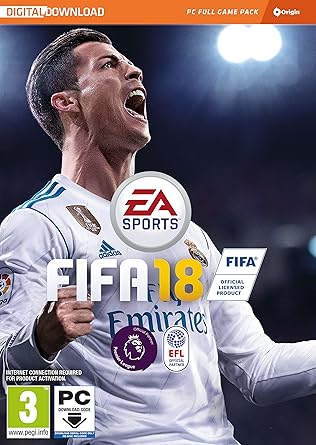
https://images-na.ssl-images-amazon.com/images/I/91xtxVeMLHL._SY445_.jpg Original FIFA 18 digital copies available for sale at N15,000 (negotiable) each. EA Game System Requirements Intel Processor Core i3-6300T 3.3GHz AMD Processor Athlon X4 870K Nvidia Graphics Card GeForce GTX 670 AMD Graphics Card Radeon R9 270X RAM (Memory) 8GB Install size 50GB If still not sure whether your PC meets spec requirements, download GD hardware scanner from link below. http://www.game-debate.com/can-I-run/?EA Customer support will provided for installation process, if need be. Only part payment required to receive game key. Full payment will be requested only when game has been successfully downloaded. Do not hesitate if you have any queries! ogongogames |
| Technology Market › Re: Digital PC Games For Sale (Instant Download!) by ogongogames(op): 4:02pm On Mar 06, 2018 |
Getting a few enquiries on how payment works. I generally will only ask for a part payment in order for you to receive the game key (you will receive the key via e-mail within 24 hours). I will NOT request for full payment until the game has been successfully downloaded and working on your PC. I would like to note, customer support is provided over installation process, if need be. *Update-only a select few copies of FIFA 18 left. |
| Gaming › Re: PC GAMES : Old And New, Discussions ,analysis And Suggestions. by ogongogames(m): 3:12pm On Mar 06, 2018 |
What's "Road Redemption" all about? |
| Sports › Re: Ainsley Maitland-Niles' Mother Is Homeless But He Lives In £700,000 Mansion by ogongogames(m): 12:33pm On Mar 06, 2018 |
But why would she openly share this story with tabloid newspapers? How will this rectify the ongoing issues with her son, surely this will make things worse? |
| Technology Market › Re: Digital PC Games For Sale (Instant Download!) by ogongogames(op): 11:01am On Mar 06, 2018*. Modified: 3:49pm On Mar 06, 2018 |
Good day folks, For those of you with low PC specs, I have ORIGINAL copies of "F1 2012" on steam at a major discount, currently going at ONLY N750! It's retail price on Steam is £14.99 (N7500) this means a 90% discount. Offer ends in 7 days! https://cdn.akamai.steamstatic.com/steam/apps/208500/header.jpg?t=1447355490 Below is some gameplay action. https://www.youtube.com/watch?v=JQ18bOHju54 |
| Technology Market › Re: Digital PC Games For Sale (Instant Download!) by ogongogames(op): 11:48pm On Mar 05, 2018 |
Mortal Kombat X also readily available for sale (Steam) at N5000 (negotiable), retail price from official Steam Store is £15.99 (N8000). http://store.steampowered.com/app/307780/Mortal_Kombat_X/ https://gamingmonk.com/uploads/game/cover_pic/header_mortal_kombatx.jpg |
| Technology Market › Re: Digital PC Games For Sale (Instant Download!) by ogongogames(op): 11:47pm On Mar 05, 2018 |
*ALERT Limited ORIGINAL copies of FIFA 18 are now available for sale (Origin platform). PM if interested. https://images-na.ssl-images-amazon.com/images/I/91xtxVeMLHL._SY445_.jpg |
| Gaming › Re: Tips To Improve PC Gaming Performance by ogongogames(op): 4:32pm On Mar 05, 2018 |
6. Overclocking A very popular method to get 5-10 extra FPS without many expenses. Overclocking basically pushes your graphics card or processor to work just a little bit harder. This sounds dangerous, and it CAN BE! As long as you don’t go overboard, you should be fine though. It’s not that difficult, but I suggest you check out these full articles about overclocking your graphics card and processor, so you don’t end up killing your PC. 7. Adjust in-game settings This tip is the most obvious one, but also probably the most effective so I just have to include it. Tweaking your in-game graphics settings until you get a smooth experience is a must. Lowering screen resolution, shadow quality, texture quality, view distance, etc.. will all increase the game performance immensely, so do it. https://www.lowspecgaming.com/wp-content/uploads/2013/12/Hearthstone_Screenshot_12.29.2013.12.04.54.jpg 8. Defrag your hard drive This will help your entire PC’s performance, it’s a maintenance task required by your hard drives. So how can you do it? Windows XP: open My Computer and right-click on the C: drive. Select Properties, then click on the Tools tab and select Defragment Now Windows 7: open up the Start menu and type “defrag.” In windows 7, defragmentation should go automatically, but it’s always best to check if everything is running as intended. Windows 8: don’t worry about it, it happens automatically (Windows 8 isn’t all bad, guys!) https://www.lowspecgaming.com/wp-content/uploads/2013/12/defrag.jpg 9. Patch your game Sometimes it actually isn’t you, it’s him. Patching a game might resolve performance issues of the game itself, but also the way it interacts with your PC. It happens that patches come out that optimize the game with your super duper gaming rig, so be sure to check out the official game website and see if there’s nothing you can download. 10. Remember: bottlenecks Tip 10 isn’t really something you can actually do, but rather something you have to keep in mind while tweaking your PC (and 10 tips always sound nicer than 9, right?). It’s bottlenecks, and what I mean by that is, your PC is only as strong as it’s weakest part. If you have a top-notch processor and 16 GB of RAM, but your graphics card is an INTEL 2000, you should try and optimize the latter (by overclocking it for example). It might also be better to play games that require more speed, rather than a great GPU (eg. Starcraft 2, World of Warcraft, CIV 5, Battlefield 3, GTA 4, Flight Simulators, Bad Company 2. Don’t ask me why, just accept it). Conclusion There are many things you can do to squeeze every last bit of gaming performance out of your PC until it’s as dry as the eczema on my forehead. Not all tips will help everyone in the same way, but they are all free and relatively easy, so nothing is stopping you from trying! So take these tips to heart, and start tweaking! http://www.lowspecgaming.com/freeperformanceboost5to10/ |
| Gaming › Tips To Improve PC Gaming Performance by ogongogames(op): 4:24pm On Mar 05, 2018 |
Thought this article may be useful to many.... If you’re playing on an outdated PC your dad found in the back of his garage, no worries. Right here you will find 10 free, quick & easy tips to improve your gaming performance. So sit back, and open up your brain tank because here comes some premium 97 knowledge. Improve PC performance 1. Set battery to high performance This first tip to improve PC performance will only applies to the laptop users among us. It sounds evident to do so, but some people forget (like I have, playing TF2 on 15 FPS on my 6 months old rig). So click on that battery icon on the bottom left, and when it shows options between “Energy Saving” and “Lenovo Dynamic Graphics”, I’d suggest you click the latter. Also, be sure to hit “More Power Options”, you never know if there is a hidden gaming option in there. https://www.lowspecgaming.com/wp-content/uploads/2013/12/battery.jpg 2. Improve your GPU PC performance by installing a Game Booster What is a Game Booster you might ask? Wikipedia might say that it’s a software, designed to speed up your PC for faster, smoother, more responsive game performance. It does this by shutting down any obsolete programs running in the background, making your PC focus all its attention and power to the game you are playing. You can download a great Game Booster for free from Razer! 3. Clean up your PC I recommend that you run this free little program called Ccleaner from the friendly people of Piriform every month. It fastens your PC by cleaning all areas of your computer, like your internet temporary files, history (always useful, hehe), cookies, etc. It also cleans old or unused registries which might hinder your performance. If all this sounded like jibberish to you, just download the program, run it, and watch as 5-10 GB of crap gets flushed down the toilet that your PC has been holding back for years. He’ll thank you for it. https://www.lowspecgaming.com/wp-content/uploads/2013/12/Ccleanerpic1.jpg 4. Updating your drivers Drivers are computer programs that let Windows and your other applications interact with a hardware device. Basically, your hardware speaks Chinese, your software American, so to let them interact, you need a driver, who speaks both! Magic. If you want your driver to stay up to date to the latest language changes (this metaphor is running dry, but bear with me), you need to upgrade them once and a while. For gaming, the most important ones are your graphics card and processor drivers. You should always download them from the manufacturer himself! So here are some handy dandy links to NVIDIA, ATI/AMDÂ and Intel. If you’re not sure what hardware you are running, you can check it when you open Ccleaner, on the top. https://www.lowspecgaming.com/wp-content/uploads/2013/12/Ccleanerpic3.jpg 5. Set graphics card to high performance Look in your graphic card settings, somewhere in the 3D-settings most likely, and switch it from “High Quality” to “High Performance”. https://www.lowspecgaming.com/wp-content/uploads/2013/12/driverpic.jpg http://www.lowspecgaming.com/improve-pc-performance/ |
| Technology Market › Re: Digital PC Games For Sale (Instant Download!) by ogongogames(op): 1:30pm On Mar 05, 2018 |
To all those that are not sure whether their PC system can handle a certain game of their liking. I suggest you download the GD Hardware Scanner from the link the below (about 3 minutes to download). It can tell you whether your PC spec can run certain games by simply entering the title. I have also added a video tutorial. http://www.game-debate.com/can-I-run/?EA https://www.youtube.com/watch?v=AspEorH6GFM&vl=en |