Techeligible's Posts
Nairaland Forum › Techeligible's Profile › Techeligible's Posts
1 2 (of 2 pages)
 Phones › Re: Help! Huawei Ascend G6 U10 3G "Internal Storage Damaged" by techeligible(m): 3:13pm On Oct 28, 2017 Phones › Re: Help! Huawei Ascend G6 U10 3G "Internal Storage Damaged" by techeligible(m): 3:13pm On Oct 28, 2017 |
i guess its technical fault, and its not software issue that you are trying to fix via reset factory etc. look for experienced person to repair it or better claim on warranty if you have. because this type of issue can be claimed i guess 1 Like |
| Phones › Re: How Do I Stop My Phone Screen From Rotating by techeligible(m): 3:17pm On Oct 21, 2017 |
Sunkyphil:yeah you are right, there is no update like that |
| Phones › Re: Custom ROM For Tecno N3: Ginger-bean by techeligible(m): 3:15pm On Oct 21, 2017 |
ah yeah, sorry for that, people are not serious in your issue, they should search for you better solution 1 Like |
| Phones › Re: Custom ROM For Tecno N3: Ginger-bean by techeligible(m): 3:14pm On Oct 21, 2017 |
Greate, thanks for sharing men  1 Like |
| Phones › Re: How Do I Stop My Phone Screen From Rotating by techeligible(m): 11:46am On Oct 17, 2017 |
Sunkyphil:that's great |
| Phones › Re: How Do I Stop My Phone Screen From Rotating by techeligible(m): 11:45am On Oct 17, 2017 |
khalhokage:hahahhahaha so you gave him a wet joke |
| Phones › Re: The Xiaomi Thread. by techeligible(m): 11:34am On Oct 17, 2017 |
Protein0:hey thanks for sharing latest updates |
| Phones › Re: The Xiaomi Thread. by techeligible(m): 11:33am On Oct 17, 2017 |
jesse8048:Where from you ordered your redmi note4  ? and from which site ? ? and from which site ? |
| Phones › Re: The Xiaomi Thread. by techeligible(m): 11:32am On Oct 17, 2017 |
adamix:You should look for latest xiaomi device i guess |
| Phones › Re: How Do I Stop My Phone Screen From Rotating by techeligible(m): 7:41pm On Oct 12, 2017 |
| Phones › Re: How Do I Stop My Phone Screen From Rotating by techeligible(m): 7:40pm On Oct 12, 2017 |
ah! why like that ?? which model you are using ? check you may have updates in your device by going to settings, about phones, software info, if you any update there, then tap on that to update your device. Because if you have adnroid 6.0 or 7.0 like that you may be having auto bugs capture feature, and the relevant device developer team send updates to fix bugs. You can also Update firmware, if you are unable to resolve this issue still. |
| Phones › Remove Huawei G8 Frp Lock Without Any Pc Or Laptop by techeligible(op): 5:44pm On Sep 30, 2017 |
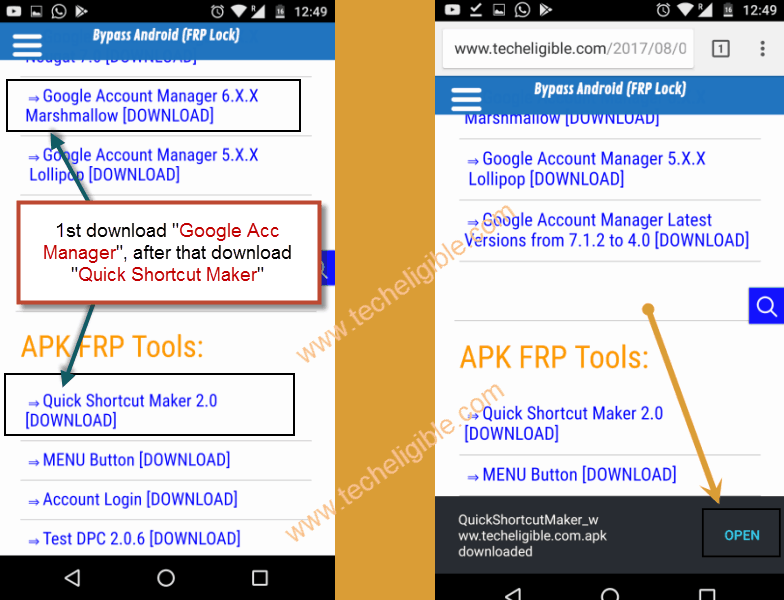
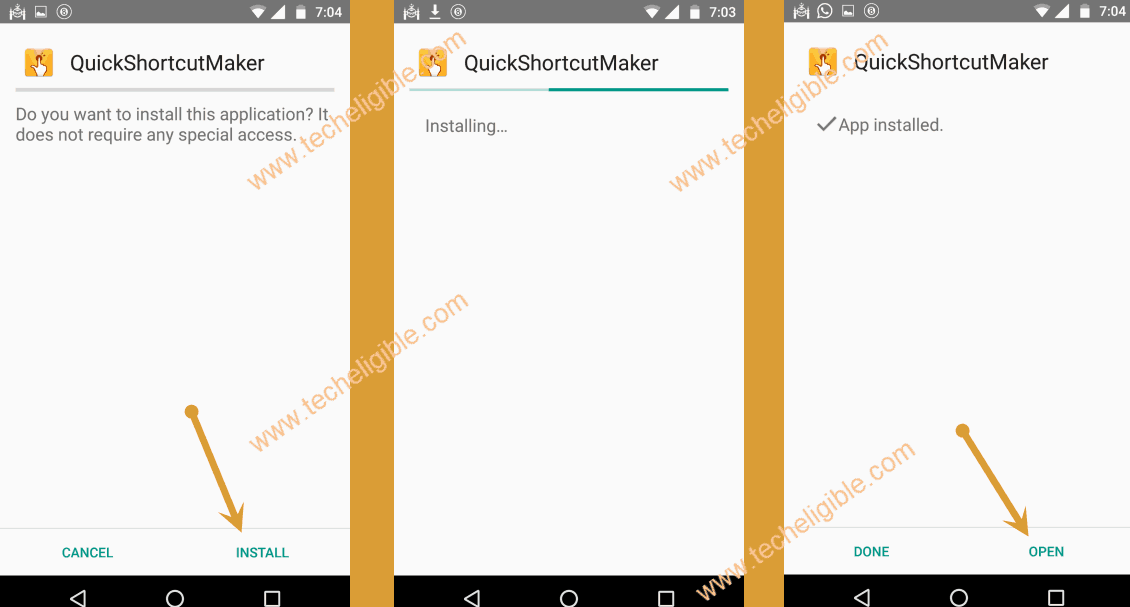
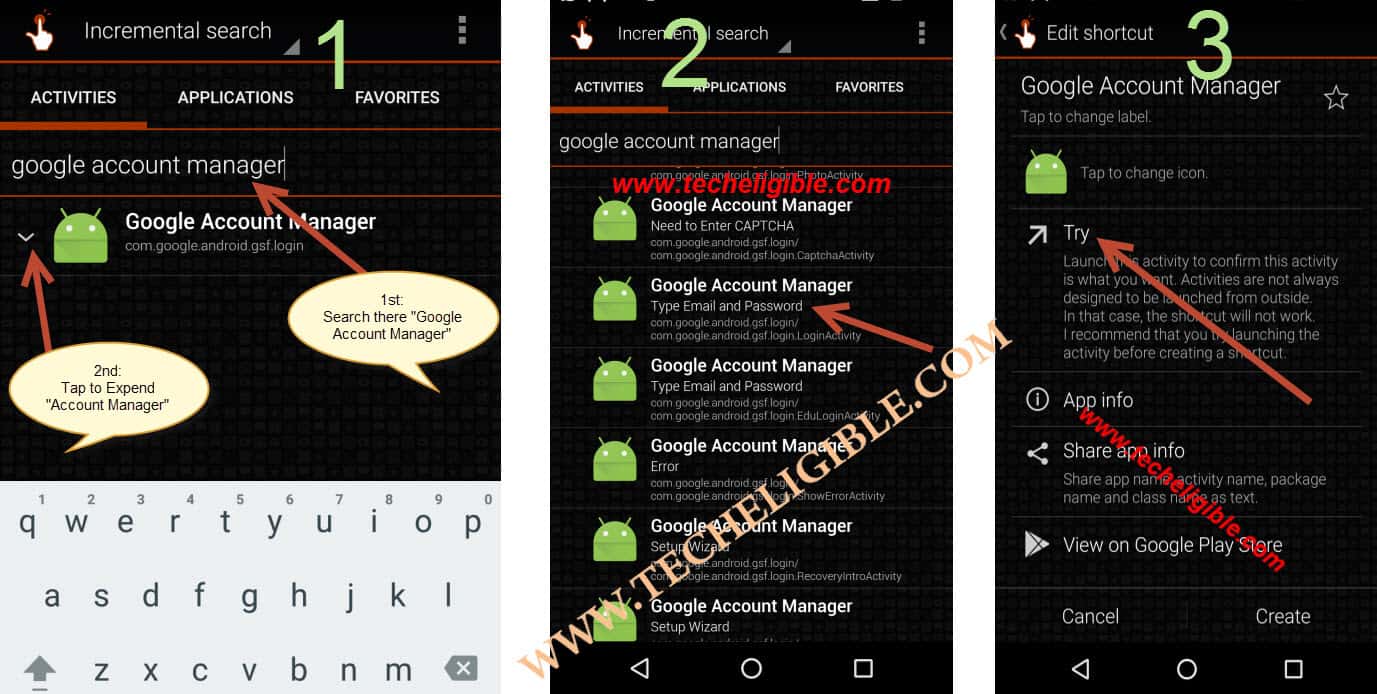
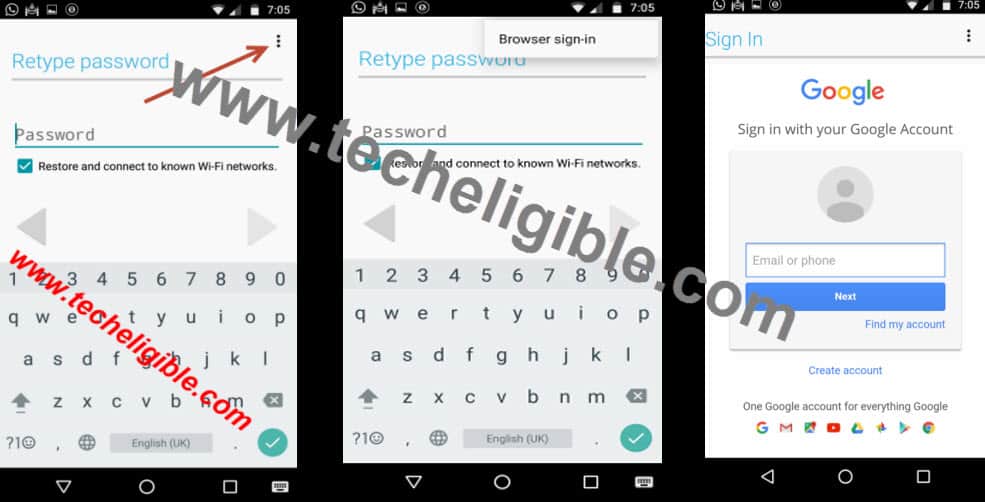
This method is successfully applied on HUAWEI G8 (RIO-L01), Android Version 6.0.1, Security Patch Level October 2016. You can try with your any HUAWEI G8 model as well, and do comment below. Step 1: Select Language, Connect to WIFI Connection, tap on "ADD NETWORK", type there (Techeligible), then long press on those words so that (CUT, COPY, Share, ASSIST). Step 2: Now tap on "ASSIST", and open google chrome, now search there (Bypass FRP Applications and files techeligible). and tap on relevant result to open it Download 2 APK FILES TO Successfully remove FRP LOCK:[size=14pt][/size] -Download from there "Google Account Manager" according to your huawei g8 android version. -Download also "Quick Shortcut Maker". https://www.techeligible.com/wp-content/uploads/2017/09/DOWNLAOD-GOOGLE-ACCOUNT-MANAGER.png Note: Thesse both above apk files you can easily download from below link http://www.techeligible.com/2017/08/03/download-frp-tools/[/color] -Install these both apk files, 1st install google account manager, after that install "Quick Shortcut Maker", at last tap on "OPEN" from quickshort cut maker to open it https://www.techeligible.com/wp-content/uploads/2017/09/DOWNLOAD-QUICK-SHORT-CUT-MAKER.png https://www.techeligible.com/wp-content/uploads/2017/09/INSTALL-QUICK-SHORTCUT-MAKER.png [size=14pt][color=#990000]Now ADD LATEST GMAIL ACCOUNT:[/size] TYPE there "Google Account Manager", expand it, and select any one google account manager, the one with "type email and password", then tap on "TRY", then tap on top right corner on "3 dots", and tap on "browser sign-in". https://www.techeligible.com/wp-content/uploads/2017/09/Y1.jpg https://www.techeligible.com/wp-content/uploads/2017/09/tt1.jpg -Now add latest gmail account, and restart your smartphone. now complete initial setup, after that we will enable developer options. - Go to "Settings" > About Phone > Tap 5-6 times on "Build Number". https://www.techeligible.com/wp-content/uploads/2017/09/enable-developer-options.jpg [size=14pt] Soft Reset Huawei G8:[/size] ♦ Tap on "Back Key" to go back to "Settings". ♦ Now tap on "Advance Settings", then tap on "Backup & Reset". ♦ Then tap on "Factory Data Reset" > "Reset Phone" > "Reset Phone". You can visit also for further: http://www.techeligible.com/2017/09/28/bypass-frp-protection-huawei-g8/ |
| Food › Re: Best Chicken Recipe, How To Properly Marinate And Boil Your Chicken For Rice by techeligible(m): 5:23pm On Sep 30, 2017 |
thanks for the best chicken dish yummmmmy  |
| Agriculture › Re: Golden Mellon Farming In Nigeria by techeligible(m): 5:57pm On Jul 08, 2017 |
wow, its amazing, but i like cattle farming 2 Likes |
| Phones › How To Bypass SAMSUNG Galaxy J5 And J500F Google Account With Sidesync Method by techeligible(op): 5:56pm On Jul 08, 2017 |
To Successfully Remove Galaxy J5 FRP or J500F, You need below things: -Laptop/Computer -USB Cable (to connect mobile to your desktop) -Donwload and Install “Sidesync Software” on your Desktop -Wifi Connection Let’s start to Remove Galaxy J5 FRP Lock: Step 1: Switch on your device to remove galaxy J5 FRP, and select your desire language, and then connect WIFI to your mobile, once it connected, click to NEXT > again click NEXT> Click to Agree, now wait for several minutes, after that you will see there “Verify Your Account”. If you don’t know your google account, it is very easy to bypass from here, you need to download sIdsync software on your PC from listed below link, and install this software in your PC. [url]Download Sidesync Software for you PC[/url] http://www.samsung.com/global/download/Sidesyncwin/ -Set desire language, connect your device to wifi connection. -Download and install “Sidesync Software” in your computer, connect your mobile to computer via USB Cable. -Open “Google Chrome” in your mobile, search there link “https:///5jHqb6“, and download this file. -Go to back, from “sidesync” installation page, tap to “Search” on top right corner, and search there “ES FILE EXPLORER” -Use Samsung account to accomplish downloading of “ES FILE EXPLORER”, open “DOWNLOAD” folder from es file explorer. -Now open “Downloaded file” which downloaded before, tap to “settings” from installation block pop up, and enable “UNKNOWN SOURCES”. -Install and open app, which we downloaded with name “bypass google account”, and tap on “BACKUP AND RESET”. -Tap on “Factory data reset > Reset Device > Erase Everything”. Thanks for visiting us, if you found this post helpful for you, don’t forget to comment below. For in deep details you can visit the link here: http://www.techeligible.com/2017/07/07/remove-galaxy-j5-frp-j500f/ 1 Like |
| Phones › Re: Infinix Note 3 Or Note 4....which One Should I Buy ? Suggestions Pls. by techeligible(m): 5:50pm On Jul 08, 2017 |
Note 4, you should buy, the latest phone in its series, even then if you have confusion to buy which one, better to do comparison on your own, look for reviews on gsmarena as well  1 Like |
| Phones › Re: Samsung Galaxy On Max-latest Phone From Samsung by techeligible(m): 5:47pm On Jul 08, 2017 |
Yeah samsung galaxy series has been outstanding so far, except the Galaxy S7 edge, because there was battery issue |
| Phones › Re: How About This New Samsung Galaxy J2 Phone Specifications by techeligible(m): 3:51pm On Apr 12, 2017 |
farrukhnawaz:yeah samsung galaxy j3 is very good mobile, and now j5 and j7 has been introduced, so J3 is old now |



1 2 (of 2 pages)