Bigga5's Posts
Nairaland Forum › Bigga5's Profile › Bigga5's Posts
 Business › List Of Access Bank Sort Code And Branches In Nigeria by Bigga5(op): 4:01pm On Jan 01, 2019*. Modified: 8:15am On Apr 22, 2019 Business › List Of Access Bank Sort Code And Branches In Nigeria by Bigga5(op): 4:01pm On Jan 01, 2019*. Modified: 8:15am On Apr 22, 2019 |
This article contains a List of Access Bank Sort Code and branches in Nigeria. The sort code is a number which is usually identifies both the bank and the branch where an account is held, the sort code identifies the bank. The sort code is usually used when transferring funds from one account in one bank branch to another branch of the bank or another bank. The branches have been divided into headings that clearly indicate the various states in Nigeria that Access bank is present. With information in this article, locating an Access bank branch close to you will not be a problem. You can find your state as a subheading and scroll through the available sort codes and branches to you. Access Bank Branches and Sort Codes in ABIA State S/N - Sort Code - Branch Name Branch Address 1 004-100209 - ABA BRANCH - 69 Azikiwe road ABA 2 004-100720 - UMUAHIA BRANCH plot 6 trading residential area Umuahia ABIA It's kinda difficult to post this article here. So if you need the full Sort Codes arranged in order, then you have to click on this link https://www.gobuzzblog.com/access-bank-sort-codes-and-branches-in-nigeria-with-addresses/ |
| Nairaland General › How To Hide Whatsapp Chat/conversations by Bigga5(op): 11:09pm On Dec 21, 2018*. Modified: 8:15am On Apr 22, 2019 |
Most conversations people make these days, both secret and non-secret conversations are mostly made through smartphones using online instant messaging apps such as Whatsapp, Telegram, Instagram, etc. Knowing that many people these days sends messages and interact with others mostly on WhatsApp instead of face-to-face interactions, the need to secure our chats from friends, without making us sound awkward is very important. Having to lock your WhatsApp app with an app locker will send signals that you have many things to hide. But being able to hide WhatsApp chat won’t signify anything at all. So, in this article, will be guiding you on how to hide Whatsapp messages without being suspected to be keeping secrets. How To Hide a WhatsApp Chat/Conversation 1. Launch Whatsapp on your device 2. Select the chat you want to hide 3. Hold the chat, until the green tick icon shows on the side 4. Click on the box icon with arrow pointing down. This icon is located on the top left corner, beside the mute button. Hiding on Whatsapp is all about archiving your chats. This way friends who regularly view your Whatsapp won’t find such chats. To view archived chat, simply scroll down until you see achieved chats. Click on the chat and un-archive the chat to view the hidden chat. To hide conversations on Whatsapp is straightforward and easy as you have seen it above, just follow the guide and you wouldn’t need to be locking your Whatsapp app any longer. Hope you do find this guide helpful. Feel free to Share this article with your friends, I would really appreciate. Source: https://www.gobuzzblog.com/how-to-hide-whatsapp-chat-conversations/ |
| Webmasters › How Much Do You Charge For Sponsored Post by Bigga5(op): 7:36am On Dec 13, 2018 |
Hello, I want to ask this question: How Much Do You Take To Sponsor A Post In Your Site? I know that there are some factors that would be taken into consideration before you decide on the amount you will charge per sponsored post such as; Monthly page views, DA, Alexa rank, Email/Social Media Subscribers. With all these being put into consideration, how much do you charge per sponsored post, taken you are the one writing the article or they will write it. I'm actually asking cuz I have been receiving some mails from people wanting to sponsor a post on my site but I'm kinda confused on the price so as not to chase them away. |
| Webmasters › Re: This Dude Threatens To Create A Negative Backlink To My Site by Bigga5(op): 1:43pm On Dec 05, 2018 |
Ngasky:Thanks man. I respect you. |
| Webmasters › Re: This Dude Threatens To Create A Negative Backlink To My Site by Bigga5(op): 10:28am On Dec 05, 2018 |
Ngasky:But don't you think he can still push on with his threat? If he copy my site url and start sharing it on different porn sites thereby creating backlinks to my site, won't google penalize me for that? |
| Webmasters › Re: This Dude Threatens To Create A Negative Backlink To My Site by Bigga5(op): 9:25am On Dec 05, 2018 |
Cyberleets:Report the account where? |
| Webmasters › Re: This Dude Threatens To Create A Negative Backlink To My Site by Bigga5(op): 9:25am On Dec 05, 2018 |
Cyberleets:Report the account where? On fiverr? |
| Webmasters › Re: This Dude Threatens To Create A Negative Backlink To My Site by Bigga5(op): 9:22am On Dec 05, 2018 |
Ngasky:Alright man. Thanks for that. |
| Webmasters › Re: This Dude Threatens To Create A Negative Backlink To My Site by Bigga5(op): 9:21am On Dec 05, 2018 |
Ngasky:I'm the only one set my server settings and I haven't given anyone access to my hosting or website apart from the hosting technical support which I gave access to my server settings to rectify a problem I have some time ago. Do you think they could have any connection to this? |
| Webmasters › This Dude Threatens To Create A Negative Backlink To My Site by Bigga5(op): 7:55am On Dec 05, 2018 |
Hello to all Oga in the house, Abeg, help me with this wahala o. Someone sent me a mail threatening to create a negative backlink to my site and remove my site from google. This dude said that I should buy his fiverr gig or else he would create a porn backlink to my site. What do you suggest I do. Should I take him serious or I should assume he's just exaggerating.
|
| Nairaland General › You Can Now Unsend Messages On Facebook Messenger by Bigga5(op): 11:52pm On Nov 23, 2018*. Modified: 12:47pm On Apr 28, 2019 |
https://www.gobuzzblog.com/wp-content/uploads/2018/11/Facebook-Messenger-unsend.jpg Facebook Messenger had rolled out a new feature which could allow its users to unsend messages. At the moment, the new feature is available only for users in Colombia, Poland, Bolivia, and Lithuania; it’s expected to be rolled out to other parts of the world soon. You can use the new feature to remove a message from recipients’ inboxes within 10 minutes of sending it. After that time limit, you can still delete the message from your window, but it will remain in the recipients’ inboxes. But even after deleting a message, Facebook will retain it a little longer to check if it has been marked for abuse. As Facebook’s head of Messenger Stan Chudnowsky noted in his interview with TechCrunch : "We need to make sure we don’t open up any new venues for bullying. we need to make sure people aren’t sending you bad messages and then removing them because if you report them and the messages aren’t there we can’t do anything" However, the new feature is different from the one used to delete Zuckerberg’s old messages seven months ago. Then, the messages deleted were not restricted by a time limit of 10 minutes, and a “tombstone”- a note indicating that a message was deleted – was also not left behind. So that still remains a showcase of privilege that the masses can’t enjoy. Source: https://www.gobuzzblog.com/you-can-now-unsend-messages-on-facebook-messenger/ Follow On Twitter @Gobuzzblog |
| Science/Technology › Airtel Latest Trick: How To Get Airtel 12GB For N900 by Bigga5(op): 10:47pm On Sep 25, 2018*. Modified: 12:48pm On Apr 28, 2019 |
https://www.gobuzzblog.com/wp-content/uploads/2018/09/20180925_004753.jpg Some may be wondering how possible it is to get 12GB for N900 or even less on Airte. It’s real, lots of people are already enjoying this wonderful gift. But today, I will show you this wonderful trick you can use to get up to 12GB or even more with just a little hundreds of Naira. Some people who are already enjoying this trick might not be happy with me for revealing this trick to others, but I just have to do it for those that cares. This is actually for those that can have more than one SIM card or are ready to purchase more than one SIM card. This trick works best on 4G network. So if you have Airtel 4G in your location and the speed is incredibly fast, then you can simply try this trick and you will surf the net till you get tired. How To Get Airtel 12GB for N900 or Less Airtel NG is currently dishing out free 4GB data if you are upgrading your sim or you are a new subscriber. A new sim will cost you between N200 – N300, depending on your location. This means that you can get 4GB for N200 – N300, 8GB for N400 – N600 or 12GB for N600 – N900. This is how you get your 12GB for just N900 or less, like I said earlier, 1 sim goes for N200 -N300 and you get a whopping data of 4GB, every sim you buy you get 4GB. Now, assuming each SIM costs: N200, you get 12GB with just N600 N300, you get 12GB with just N900 You only need to buy and register another sim once you exhaust your current free 4GB. That’s just it. Source: https://www.gobuzzblog.com/airtel-latest-trick-how-to-get-airtel-12gb-for-n900/ |
| Phones › 10 Amazing Features Of Android 9 Pie by Bigga5(op): 10:24pm On Aug 23, 2018*. Modified: 3:01pm On Apr 30, 2019 |
https://www.gobuzzblog.com/wp-content/uploads/2018/08/Android-9-Pie-Features-203x150.jpg Google has officially unveiled the newest of its Android operating system which is called Pie (Android P also known as Android 9) and you can get it right now if you’ve got a Pixel phone. The company released the first preview of Android 9 for developers back in March, with support for notches and multiple cameras (so apps could work better with them), improved notifications, some design tweaks, AI-powered adaptive brightness and under-the-hood enhancements. Now, the stable version of the Android 9 Pie is officially available and we shall be highlighting 10 interesting features of the OS and supported devices. Below are some of the new features added to the Android 9 Pie operating system: 1. AI-powered Adaptative Battery With every gadget, every smartphone, and every OS ever released, users still never seem to get the best out of their battery, even with battery saving measures OEMs have installed on their devices. Battery longevity is one thing Google aims to extend on every Android smartphone with the Android 9 Pie. The Android 9 will use ‘AI Powers’ to identify frequently used apps and apps you barely use and in turn limit battery usage of the less frequently apps; all done smartly and by itself. In addition to Adaptive Battery, the Settings menu now come with recommendations on battery draining apps to restrict, so you can have more control over your battery and more battery juice. 2. AI-powered Adaptative Brightness Again, using AI, the Android 9 Pie allows your phone study how you set your screen’s brightness in different environmental lighting conditions and automatically does adjusts your screen brightness for you over time according to your preference. 3. New Navigation buttons & Gesture control Although totally optional, the regular three-keys on-screen navigation keys (home, return, and app switch) that were used in previous OS have been replaced with a pill-shaped home button with smart gesture control at the centre and a return key at the left hand left-hand With the new pill shappill-shapedton, you can: Swipe up to open app drawer Swipe left or right to switch between apps. 4. Redefined Media Control You know how the volume adjustment panel used to appear along the top of the screen? Well, we won’t be seeing that on the Android 9 as Google has made significant changes. The volume slider will appear on the right side if the display in the Android P alongside an icon at the top which allows users easily turn off all notifications, put their devices on vibrate, or keep notifications on. The gear icon at the bottom of the slider opens up the sound settings where you can make adjustments to alarms volume, ringer, call, media etc. 5. Image Preview in Message Notification On the interactions front, you’ll find a revamped Quick Settings menu, support for navigating across the OS using gestures, the ability to grab a screenshot from the power menu, and smart suggestions for replying to messages in notifications. 6. App Actions App actions is another interesting new feature that comes with the Android 9 Pie which also uses artificial intelligence (AI) to learn what apps user make use of on their devices at different times of the day and make suggestions off it later on. When you open the app drawer, right below the favourite/most used apps that are lined up below the search bar are the ‘App action cards’. The Android Pie makes your phone learn what apps you use at different times of the day and will show different App Actions in the app drawer. App Actions contextually predicts what you’ll want to do next with your phone (like firing up your favorite playlist when you plug in your headphones). 7. Dashboard The Android 9 Pie comes with something called ‘Dashboard’ which gives you hindsight around how often your device is used, how much time you spend on your phone, how much time you spend in apps, number of notifications you get and more. 8. Bluetooth connection and volume The Android 9 Pie supports multiple Bluetooth connections with up to five devices and allows seamless switch between the connected devices. In addition, Android 9 will store the last volume you set for each of your Bluetooth devices and adopt the volume level when next you connect it to your phone. “No more blasting music too loudly when you reconnect to your car or headphones”, Google says. 9. Smart Do Not Disturb The Do Not Disturb mode has been completely redefined on the Android Pie. Turning over your phone will now automatically turn on the Do Not Disturb mode but you can get calls from selected contacts. A new Do Not Disturb function that suppresses visual interruptions like notifications, and the Wind Down feature, which turns on Do Not Disturb and fades your screen to grayscale around the time you go to bed. If you’re on a Pixel, you can try it right now by signing up for the beta using your email address associated with Google Play. 10. Virtual Notch Display notches have been the thing of the year on the smartphone world and now, Google officially adds support for these screen cutout so developers can build apps that responds well to these cutouts on hardware without glitches. The above feature are 10 of the best features we found particularly new and interesting. Source: https://www.gobuzzblog.com/10-amazing-features-of-android-9-pie/ |
| Phones › Sony To Launch The First Smartphone With 48-megapixel Sensor by Bigga5(op): 1:13pm On Aug 09, 2018*. Modified: 12:33pm On May 02, 2019 |
https://www.gobuzzblog.com/wp-content/uploads/2018/07/Camera-203x150.jpg Sony has revealed its latest CMOS image sensor for smartphones. In a press release, Sony said the increased pixel count will enable high-quality photos even when devices are using digital zoom. The IMX586 smartphone will feature a 48 megapixels, each of them only 0.8 μm in size, piled onto a 1/2-type unit. Smartphones with a new sensor and it is expected to be launched in early September 2018. The IMX586 implements the Quad Bayer 2×2 pixel array. This means on most occasions it will bin four pixels together outputting the equivalent of 12MP sensor with large 1.6 μm pixels for bright low-noise photos and videos when shooting at night. During the day or in a well-lit environment, the grid will return to its usual signal processing, reaching 48 MP photos in real time. This I think is the successor of the 40MP sensor inside the Huawei P20 Pro, which also packs a Quad Bayer arrangement. The first phone with 48 MP camera is likely to be the Xperia XZ3, expected at IFA 2018, although some rumors suggested it might have the same setup as the Xperia XZ2 Premium. Each sensor is expected to cost about $27 each. We will be expecting this for only flagship devices for now. The high cost of high quality sensors and imaging technology is why budget smartphones have poor cameras. Ultimately, the IMX586 will trickle down to mid-range phones and maybe even budget phones one day. The IMX586 will be in market by September 2018 and then by 2019, we should be expecting tons of 48-megapixel cameraphones hitting the retail stores around the world. https://www.gobuzzblog.com/sony-to-launch-the-first-smartphone-with-48-megapixel-sensor/ |
| Webmasters › Re: Visit And Review Gobuzz Forum by Bigga5(op): 10:54am On Aug 02, 2018 |
No one wants to say anything  |
| Webmasters › Visit And Review Gobuzz Forum by Bigga5(op): 6:31pm On Aug 01, 2018*. Modified: 8:50pm On Mar 30, 2020 |
I have been very busy for few weeks now struggling on how to build a forum for my blog (gobuzz blog). But today, I'm glad to inform you that I have finally come up with a nice, responsible and unique forum to power my blog site. Guests can also reply to a thread without registration and login. And I think it's something you guys will admire and enjoy. Kindly visit Gobuzz Forum at www.forum.gobuzzblog.com Review the forum, tell me what you think about it (both color combinations), suggestions on things needed to be done. Criticism also allowed  |
| Nairaland General › How To Pay Dstv Subscripti Bills With Kongapay App Using Your Phone by Bigga5(op): 5:22pm On Aug 01, 2018 |
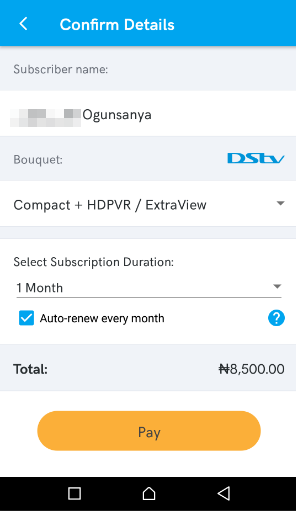
You can use KongaPay app to pay dstv subscription on phone anytime without having to find my debit card, token, account number, etc to complete the transaction. Before you can pay dstv subscriptions online in Nigeria with KongaPay app, you will need to download KongaPay app, and sign up for KongaPay account. If you haven't registered yet in KongaPay, simply create one by heading over to their website and rregister your account. During registration, you will be required to provide details of your bank account,ATM card and the phone number that is linked to your bank account. Once your KongaPay account is successfully verified, you can proceed to start making dstv payments on phone with KongaPay app If you have registered already in the KongaPay app. Here is how to use the app to pay dstv bills online in Nigeria: Login to KongPay app with your registered phone number and KongaPay pin. Tap on “Services" Tap on “TV Subscriptions”. Select “DsTV” as your subscription type. Enter your DsTv smartcard number. Tap on the “continue” button. You will be redirected to a page where you will see the subscriber name and options to complete your transaction. Select the dstv bouquet you want to pay for, the number of months you want to pay for and if the dstv subscription should be auto-renewed every month with KongaPay. Once you are done, tap the “Pay” button’ https://www.ogbongeblog.com/wp-content/uploads/2018/07/kongapay-dstv-payment-auto-renewal-nigeria.png The price of the dstv subscription will be debited from the bank account which you linked to your KongaPay account during registration. Please post your comment below... Source: www.forum.gobuzz.com.ng/general/how-to-pay-dstv-subscription-bills-with-kongapay-app-using-your-phone |
| Business › Re: Firstbank Chinese Business Forum Deepens Intercontinental Partnerships by Bigga5(m): 11:38am On Jul 24, 2018 |
It's good to hear that.. First bank of NG should hold them tight cuz once a disagreement arises between them, China no go hear 'give us a second chance'. |
| Politics › Re: Twitter Is On Fire This Morning Over Police’s Invitation Of Saraki by Bigga5(m): 11:33am On Jul 24, 2018 |
Nawa for Naija o. Why didn't he (Saraki) obeyed the IG? Did he forgot that respect is a reciprocal? I don't just understand what's going on in this our country... We will soon hear that Mr President was arrested by the Vigilante.... |
| Phones › Re: Tecno Camon I Twin Launched With 6-inch 18:9 Display And Dual Rear Camera by Bigga5(m): 11:24am On Jul 24, 2018 |
Tecno, always striving to provide quality products to their customers.
BTW! It's seems like this is becoming too much...
They ain't giving any space at all. |
| Phones › Re: Which Is The Most Frequently Used App On Your Phone? by Bigga5(m): 11:17am On Jul 24, 2018 |
Here is a list of my frequently used apps in order of preference:
1. Opera mini
2.ES file explorer
3. Wps office (note editor)
4. Firefox Others are then on intervals. |
| Phones › How To Increase The Speed And Performance Of Your Android Device - Gobuzz Blog by Bigga5(op): 10:20am On Jul 17, 2018*. Modified: 2:50pm On Mar 15, 2019 |
Android devices sometimes, especially on low budget (cheap ones) could be so frustrating when it comes to performance and speed. This is a major Android problem every android users face once in a while which can be frustrating most especially if the speed of the phone is too slow. This issue of slow performance is usually caused by some factors which includes: Small storage devices (especially RAM storage), too many installed apps, many apps running in background, over heating, etc. These factors usually makes your smartphone to start hanging which in turn, slows down the performance and speed of your device. However, Gobuzz is here to show you some tips on how to solve some of those android problems. How To Increase The Performance And Speed Of Your Android Device . 1. Clear cache and data of your apps regularly Whenever you open an app in your phone, every activity done in the app will be stored in that app’s cache which makes it to recognize you and resume from the last activity the next time you open the app. For instance, when you are playing game with your phone and later quite the game, next time you launch the game, it will resume from the last mission or stage where it was the last time you played the game. What makes it to resume from there was because of the cache it had stored in your phone. These cached data will be stored in your phone memory which leads to decreasing the memory for apps and thereby making the phone to hang. The possible solution for this is to clear the cache of unwanted/unimportant apps. To do that: Go to setting >> Storage >> Click on cached data and click on OK to clear catches. 2. Move Installed Apps to External Memory If you are using a lot of apps on your device, you need to move few of them to the external memory. Moving apps to the external memory will empty the storage space of your phone thereby increasing performance of the smartphone. You can install applications directly in the external memory or better still, set the external memory storage as default memory. Go to setting >> storage >> Tap on the SD card Storage 3. Save Files in the External Memory Internal memory (primary memory) contributes a lot to the performance and speed of a smartphones. Try as much as possible to always keep your phone internal memory free. Buy an external memory for your device (8GB or 16GB will be enough).. 4. Store Large Files In Cloud Storage. If you want to store large files such as Movies, large songs, and many more for future use, it is recommended you use cloud storage. Leave the files you needed daily on your phone and upload the remaining to cloud storage like dropbox or google drive. 5. Avoid Overheating When your smartphone overheat, it will definitely hang and once it hangs, it becomes too slow in speed and performance. One of the ways you can avoid overheating are highlighted below: Turn off or Exit apps running in background. Turn off all network connections (data connection, Wi-Fi, when not in use. Remove it from 4G and set it to 3G or 2G only. Network is the number one reason why your smartphone overheat. Only turn on your 4G if you have something important to do online. Reduce the phone brightness (simply swipe down your phone notification and reduce brightness). Keep it in a cool place. Smartphone perform well under cool environment. Note: Not in a freezer, because it can damage your smartphone. Smartphones that are slow in performance and speed are really annoying, but I believe that if you apply the above mentioned techniques, it would go a long way in increasing the overall speed of your android device. Kindly share with me below what other ways you know that can increase the performance and speed of an android device. Source: https://www.gobuzz.com.ng/how-to-increase-the-overall-speed-and-performance-of-your-android-device/ |
| Webmasters › Re: Finally : Narialand Functional Clone Script ( Original Script/ Bug Free) by Bigga5(m): 7:21am On Jul 17, 2018 |
raymytech2:If you still need this, pm let's discuss. For demo, check my signature. |
| Phones › Blackberry Ghost To Be Launched With A 4,000 Mah Battery by Bigga5(op): 3:03pm On Jul 11, 2018 |
https://i0.wp.com/www.gobuzz.com.ng/wp-content/uploads/2018/07/blackberry-Ghost.jpg?fit=592%2C498&ssl=1 You merely see large batteries like this in flagship-level devices. Batteries like this size are mostly found in mid-ranger devices. Apparently, this move simply means that Blackberry is releasing a flagship with priority on battery life. This looks like crazy, but it’s real. A flagship-level devices with a 4,000 mAh battery. As Tweeted by Evan Blass (@evleaks) There’s no doubt that devices released by BlackBerry’s TCL in the past year and a half still boasts of good battery life. The KEYOne had an above average size battery, but BlackBerry’s choice to use a mid-range Snapdragon 625 the KEYOne made it a great battery endurance performer. Even the BlackBerry Motion had a huge 4,000 mAh battery. This makes a lot of sense for BlackBerry to continue to take great battery life as a major selling point of its business-oriented smartphones. There’s no enough information about this Blackberry Ghost. We’ll be expecting more updates from the BlackBerry Ghost. Stay tuned for any updates from them. https://www.gobuzz.com.ng/blackberry-ghost-to-be-launched-with-a-4000-mah-battery/ |
| Phones › Re: How Too Earn Free Credit And Use It To Buy Airtime, Data... by Bigga5(m): 9:26am On Jul 11, 2018 |
I just created account in Bestdata. Bestdata Id: 1021 Twitter: @Gobuzzblog Fb: Kingsley |