Emmyw's Posts
Nairaland Forum › Emmyw's Profile › Emmyw's Posts
1 2 3 4 5 6 7 8 ... 42 43 44 45 46 47 48 49 50 (of 121 pages)
 Politics › Re: Stop Adding To Our Problems, Give Us A Little Respect - Soldier Warns Nigerians by emmyw(m): 4:56pm On Aug 09, 2017 |
DaBillionnaire:You Are A Foolish Person, Did They Tell You That I Can't Differentiate Between Threat And Treat? What's Even Your Level? You Are Very Stupid For Quoting Me. Empty Brain Like You Forming Nonsense For Me, Meet Me Face To Face And Talk Rubbish. |
| Politics › Re: Stop Adding To Our Problems, Give Us A Little Respect - Soldier Warns Nigerians by emmyw(m): 3:05pm On Aug 09, 2017*. Modified: 5:09pm On Aug 09, 2017 |
Respect? Mctchewww. And They Treat Ordinary People Like Goats 20 Likes
|
| Christianity Etc › Re: Enugu Pastor Arrested For Defrauding Church Members Of 500Million (Photo) by emmyw(m): 11:35am On Aug 08, 2017 |
Hmmmm 1 Like |
| Health › Re: Toothless Man Gets Perfect Set Of Teeth by emmyw(m): 12:35pm On Aug 07, 2017 |
Hmmmm |
| Fashion › Re: Ladies, Would You Rock This Hairstyle? by emmyw(m): 11:36pm On Aug 05, 2017 |
Boyooosa:
|
| Fashion › Re: Ladies, Would You Rock This Hairstyle? by emmyw(m): 8:56pm On Aug 05, 2017 |
hmmmm, Rock What?? That Nonsense? 8 Likes
|
| Nairaland General › Re: Ugandan Man Watches Woman Drown Because No One To Help Him Hold His Phones by emmyw(m): 12:49pm On Aug 05, 2017 |
I Now Know That Common Sense Is Not Common 5 Likes
|
| Food › Re: This Nigerian Man Has Masters Degree In Eating (Photos, Video) by emmyw(op): 8:43am On Aug 05, 2017 |
But Where Is Lalasticlala? Maybe I Should Include Snake |
| Food › Re: This Nigerian Man Has Masters Degree In Eating (Photos, Video) by emmyw(op): 8:41am On Aug 05, 2017 |
DanseMacabre:The Guy Is a Glutton 4 Likes
|
| Food › Re: This Nigerian Man Has Masters Degree In Eating (Photos, Video) by emmyw(op): 8:39am On Aug 05, 2017 |
ApostleJSuleman:Really  64 Likes
|
| Food › Re: This Nigerian Man Has Masters Degree In Eating (Photos, Video) by emmyw(op): 4:52am On Aug 05, 2017 |
CC: Lalasticlala Come And See o  1 Like 1 Share |
| Food › This Nigerian Man Has Masters Degree In Eating (Photos, Video) by emmyw(op): 4:46am On Aug 05, 2017 |
Unbelievable: Nigerian Man Has Masters Degree In Eating (Photo,Video), I Am Still Shocked oooo Watch Video Below https://www.youtube.com/watch?v=VbDBKj9Uhek Lalasticlala , Come And Carry Your Brother o Source: http://www.heroslodge.com/595/unbelievable-nigerian-man-has-masters-degree-in-eating 6 Likes 3 Shares
|
| Business › Re: The Currency Exchange Rates For Today, August 1, 2017 by emmyw(m): 3:32pm On Aug 01, 2017 |
Mtcheew |
| Webmasters › Re: How To Set Up Rules And Redirects In .htaccess [http:// To Https://] by emmyw(op): 8:31am On Aug 01, 2017 |
CC: Lalasticlala |
| Webmasters › How To Set Up Rules And Redirects In .htaccess [http:// To Https://] by emmyw(op): 8:30am On Aug 01, 2017 |
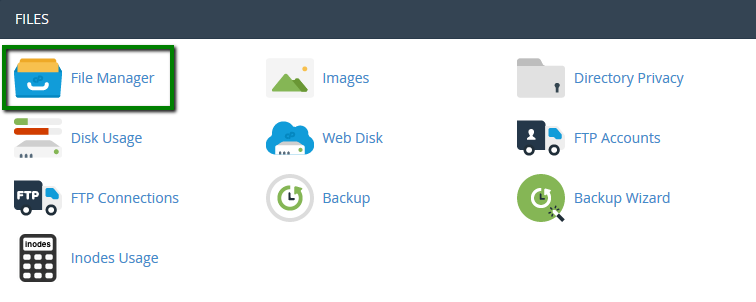
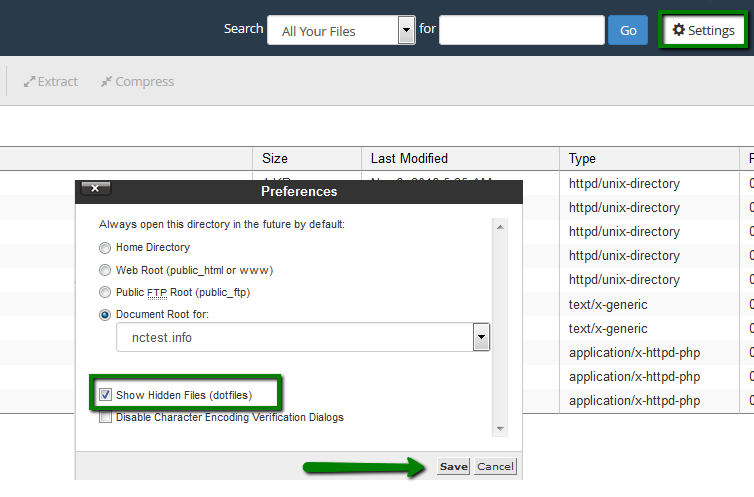
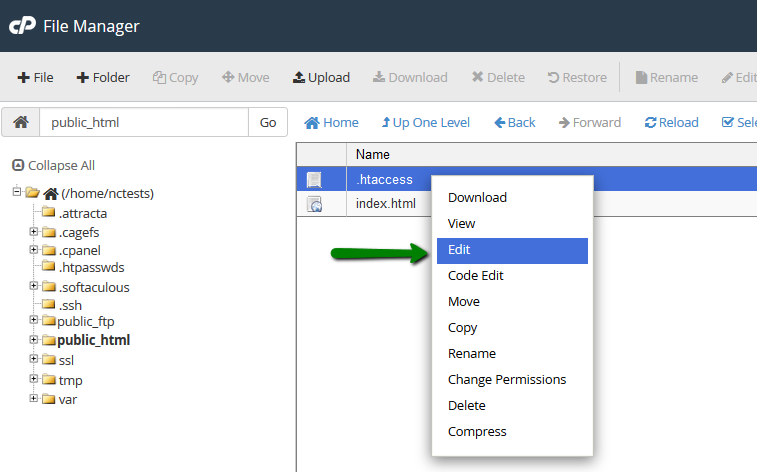
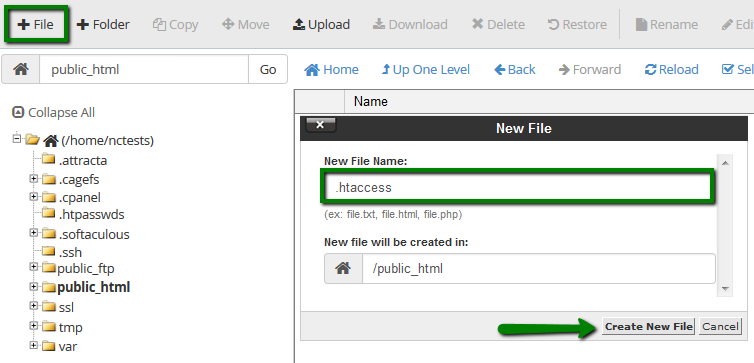
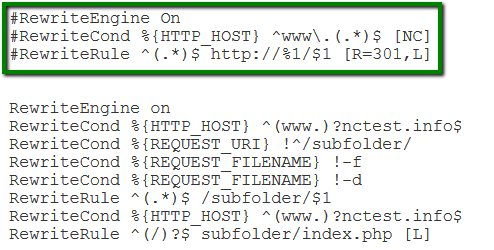
.htaccess is a directory-level configuration file supported by the Apache web server. It is used to alter web server configuration (enable or disable additional features) for the specific account without changing global server settings. The .htaccess file takes effect over the entire directory it is placed in, including all files and subdirectories. The changes made in this file will be implemented immediately and no server restart is required. List of commonly used .htaccess rules: Authorization/authentication Blocking Custom Error Pages Mod_Rewrite (redirect rules) Domain root directory change Disabling existing .htaccess rules To access the main .htaccess file of your hosting account, follow the steps below: 1. Log into your cPanel. 2. Navigate to the section Files > File Manager: https://namecheap.simplekb.com//SiteContents/2-7C22D5236A4543EB827F3BD8936E153E/media/pl_file_manager_13.png 3. If you wish to edit .htaccess file for your main domain, navigate to public_html folder. If you need to make some changes to the addon domain, move to public_html/youraddondomain.com folder. Once there, make sure that Show Hidden files (dotfiles) option is enabled in Settings menu: https://namecheap.simplekb.com//SiteContents/2-7C22D5236A4543EB827F3BD8936E153E/media/pl_file_manager_22.png 4. Locate .htaccess file, right-click > Edit: https://namecheap.simplekb.com//SiteContents/2-7C22D5236A4543EB827F3BD8936E153E/media/pl_file_manager_26.png 5. If there is no .htaccess file located in your File manager, feel free to create a new one using File option: https://namecheap.simplekb.com//SiteContents/2-7C22D5236A4543EB827F3BD8936E153E/media/pl_file_manager_27.png You are ready to add your own configuration rules and save them. The common usage rules of an .htaccess file are listed below: Authorization/authentication – specifies security restrictions for a directory/subdirectory. You can password-protect a directory, or several of them, and any time a visitor tries to access it, username and password will be required. To set up such protection, you need to: 1. Create the directory you want to protect in /home/cpanel_user/.htpasswds/ folder. e.g., for public_html/test the path will be .htpasswds/public_html/test/ 2. Create a passwd file in this directory and add hashed access details using this online generator. 3. Add the following directives to .htaccess: AuthType Basic Blocking – blocks users by IP address or domain. It is very useful to block unwanted visitors or to allow accessing certain sections of the website by its owner, administration area, for example. To set up certain blocking rules, create an .htaccess file with the following text: to block users with an X.X.X.X IP address, allow access to everybody else order allow,deny allow from all deny from X.X.X.X to block all the visitors except for the specific admin IP for example or yourself order deny,allow deny from all allow from X.X.X.X Custom Error Pages – allows creating custom error pages for a site. This option is very useful as it allows you to show website visitors an error message matching your website theme if a URL on your website does not work. This helps to avoid the default '404 File Not Found' error for example and allows you to display a customly designed error with the guiding directions back into your website content, rather than leaving puzzled. To set up a custom error document, create an .htaccess file with the following text below: ErrorDocument 404 /404.html Whenever a 404 (File Not Found) error appears, this line tells the Apache Web server to load an 404.html file located in the directory root of the domain you set the error page for. NOTE: To set up a document for other errors (403, 500, etc.), just replace 404 with the corresponding error code and /404.html with the path to the error file. Mod_Rewrite – specifies how web pages and URLs are displayed to the visitors. We would like to draw your attention to the usage of Mod_Rewrite rules in .htaccess file. By default, Mod_Rewrite maps a URL to a filesystem path. However, it can also be used to redirect one URL to another URL. Before creating a redirect, you should choose the redirection type which would be more preferable for you: Permanent redirect has a status code of 301, and unlike the temporary one, it is cached in the browser memory. It implies that the page has been moved and requests all search engines and user agent coming to the page to update the URL in their database. This is the most common type of redirect. Temporary redirect means that the page is sending status code 302 to the browser. Code 302 tells the browser not to cache this redirect into its saved data. It will redirect the visitor or search engine, but the search engine will continue to index to the original page. This is the recommended type of redirect, unless you are absolutely sure that you will never change it in the future. The list of the most common and useful redirects, which can be set through the .htaccess file, can be found below (the domains specified in the examples should be replaced with your own ones): Permanent redirect from example.com to domain.com RewriteEngine On Temporary redirect from example.com to domain.com RewriteEngine On NOTE: Below are the examples of permanent redirects. Temporary one can be defined by replacing [R=301,L] with [R=302,L] in the end of the code (where necessary). Redirect from example.com/subfolder to domain.com RewriteEngine On Redirect from HTTP to HTTPS for a certain domain, example.com: RewriteEngine On or RewriteCond %{SERVER_PORT} 80 RewriteCond %{HTTP_HOST} ^example\.com$ [OR] RewriteCond %{HTTP_HOST} ^www\.example\.com$ RewriteRule ^(.*)$ https://www.example.com/$1 [R,L] Redirect from non-WWW to WWW for any domain .htaccess takes effect on: RewriteEngine On RewriteCond %{HTTP_HOST} !^www\. RewriteRule ^(.*)$ http://www.%{HTTP_HOST}/$1 [R=301,L] for a certain domain, example.com: RewriteEngine On RewriteCond %{HTTP_HOST} ^example\.com$ [NC] RewriteRule ^(.*)$ http://www.example.com/$1 [R=301,L] Redirect from WWW to non-WWW for any domain .htaccess takes effect on: RewriteEngine On RewriteCond %{HTTP_HOST} ^www\.(.*)$ [NC] RewriteRule ^(.*)$ http://%1/$1 [R=301,L] for a certain domain, example.com: RewriteEngine On RewriteCond %{HTTP_HOST} ^www\.example\.com [NC] RewriteRule (.*) http://example.com/$1 [R=301,L] Changes the directory root for the main domain to public_html/subfolder RewriteEngine on NOTE: The .htaccess file should be located in the directory root of the domain you wish to configure certain rules for. Disabling existing .htaccess rules If you need to disable some of the existing rules, for example, for testing purposes, you can simply comment them out. In order to do so, add the pound sign # at the beginning of each line of the rule: https://namecheap.simplekb.com//SiteContents/2-7C22D5236A4543EB827F3BD8936E153E/media/cp_htaccess_3.png That's it! For More Tutorial, Click Here To See More 1 Like |
| Politics › Re: "President Buhari Is Sick, Fayose Is A Mad Man" – Oshiomhole by emmyw(m): 2:22pm On Jul 30, 2017 |
I Wonder Who Asked This One. Blind Leaders, Old Men That Are Supposed To Resting By Now! 1 Like 2 Shares
|
| Webmasters › Re: Dear Nairalanders, Please Beware Of This New Scammer On Nairaland (mrfantastica) by emmyw(op): 2:20pm On Jul 30, 2017 |
MrFantastica Comes Online To Check If The Matter Is Burried, What's Going On Behind You Will Strike Like A Thunder Before You Realize It, No Matter How Long It May Take, I Will Make You Vomit All Your Crimes. I Promise You That |
| Sports › Re: Photo Of A Female Medical Official Attending To A Male Footballer Goes Viral by emmyw(m): 7:05am On Jul 30, 2017 |
hmmm |
| Foreign Affairs › Re: I Will Not Step Down Nor Die - 93-year-old Zimbabwean President, Mugabe Boast by emmyw(m): 7:35pm On Jul 29, 2017 |
Mugabe My Man 9 Likes 2 Shares
|
| Crime › Re: Dear Nairalanders, Please Beware Of This New Scammer On Nairaland (mrfantastica) by emmyw(op): 4:28pm On Jul 28, 2017 |
fergieboy:I Guess I Am Not The Type, Because Here Is His Bus Stop! He Will Hear From Me Soon. |
| Nairaland General › Re: K by emmyw(m): 4:24pm On Jul 28, 2017 |
adeola1097:I Am In Ibadan, Add Me On What's App 0814 22 78188 Let's Negotiate And Do The Business |
| Nairaland General › Re: K by emmyw(m): 4:08pm On Jul 28, 2017 |
adeola1097:Where Is Your Location. |
| Nairaland General › Re: K by emmyw(m): 1:26pm On Jul 28, 2017 |
adeola1097:How many Followers? and How Much? |
| Webmasters › Nigeria Adsense Account For Sale, Very Affordable (ibadan) by emmyw(op): 11:42am On Jul 28, 2017 |
Naija Adsense Account For Sale | Very Affordable, You Want To Buy A Non- Hosted Naija Adsense Account, Contact Me Now@ 0814 2278 188 ,Interested Buyer Should Call or WhatsApp Me. I Base In Ibadan If You Want Face To Face Business, or You Can Invite Third Party! |
| Nairaland General › Re: K by emmyw(m): 9:26am On Jul 28, 2017 |
adeola1097 You Sent Me Mail |
| Webmasters › Re: Dear Nairalanders, Please Beware Of This New Scammer On Nairaland (mrfantastica) by emmyw(op): 7:54am On Jul 28, 2017 |
Lol  Seriously, i wonder what some people gain from scamming others, i have transact business with some nairalanders, and they are good. MrRichy: 1 Like |
| Business › Re: Nigeria Naira Appreciates To N364 Per Dollar In Parallel Market by emmyw(m): 7:50am On Jul 28, 2017 |
We just keep hearing the same thing daily, naira appreciates to N364, tomorrow, naira depreciates to N367 1 Like |
| Crime › Re: Dear Nairalanders, Please Beware Of This New Scammer On Nairaland (mrfantastica) by emmyw(op): 7:49am On Jul 28, 2017 |
Thanks, i will soon go to the bank, i will update you later halfcurrent: |
| Webmasters › Re: Is It Ok To Have A Multi Niche Blog? by emmyw(m): 7:48am On Jul 28, 2017 |
bizprat:Seriously do something about your blog design, even your navigation is zero. |


1 2 3 4 5 6 7 8 ... 42 43 44 45 46 47 48 49 50 (of 121 pages)