
Internet Over Bluetooth - Phones - Nairaland
Nairaland Forum / Science/Technology / Phones / Internet Over Bluetooth (16830 Views)
Tecno M3 Bluetooth Headset / Effects Of Bluetooth On Human Body / MTN GPRS on PC Using Phone Modem or Bluetooth? (2) (3) (4)
| Internet Over Bluetooth by diakim(m): 1:50pm On May 24, 2005 |
In a previous post I mentioned browsing the internet free on your cellphone via bluetooth, making use of your internet-connected PC as a gateway. Now when I say browsing the internet free, I mean your mobile operator is not going to charge you for the browsing over bluetooth. Also, even though your mobile operator does not support GPRS, you can still browse the internet over bluetooth. Conditions: 1. Your phone must support GPRS. 2. Your PC or laptop must be directly connected to the internet or connected to the internet of your workplace through your office's LAN. 3. Your phone must have a good XHTML/HTML browser (You can download the trial version of Opera at http://www.opera.com) GPRS, standing for General Packet Radio Service, is the "new, improved" way of passing data over a mobile phone network, which includes browsing the internet. The steps to do this are outlined below: On Your PC 1. Install a bluetooth adapter and all its drivers 2. Pair computer with phone, authorize the connection and remember your computer's name that you use to pair the phone with. I called my computer FDA and my phone diakim. If you can't pair your computer with the phone, then this exercise is probably not for you. 3. Install pc suite. This software can be found in the CD that came with your phone, or download one from the manufacturer's website. On Your Phone 4. go to settings->connection->access points 5. options->new access point->use default settings Connection Name: (whatever you like, e.g. diakim-BT) Data Bearer: GPRS Access Point Name: your computer's name, the same name that shows up when you pair the bluetooth with the phone, e.g. FDA User Name: none Prompt Password: no Password: none (leave alone) Authentication: secure Gateway IP add: 0.0.0.0 6. Now go back and you should see the access point you just set up. 7. Bo back to connection settings->GPRS GPRS Connection : When needed 8. Access Point: your computer's name,the same name that shows up when you pair the bluetooth with the phone, e.g. FDA 9. Turn on bluetooth and connect your phone with PC suite 10. If you've done all of these step properly you can now use the internet on your phone via bluetooth connection. Limitation: You can only browse if you are close to your PC, I.e. within the bluetooth signal range, within a range of not more than 50m. So whats the heck? Why not browse comfortably on your PC? Don't ask me, we do certain things just for the kicks. With this, I can browse on my phone while in another part of the building or in the toilet. Don't Expect your browsing speed to be as fast as that of your PC. NOTE: I tried this on my Nokia N-Gage and it worked like a charm. It should work on a different phone because the concepts are the same. [I]I am using UBT-B1 Wireless USB Bluetooth Adapter - 100 Meters, Class 1.[/I] 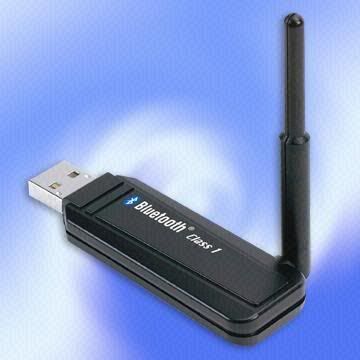 [I]Originally published on http://diakim2..com[/I] |
| Re: Internet Over Bluetooth by legry(m): 2:18pm On May 24, 2005 |
wait a minute is this with any sim card even if its not provisioned and what if your lap top already has an inbuilt blue tooth device even after pairing, what next? |
| Re: Internet Over Bluetooth by Farriel(m): 3:28pm On May 24, 2005 |
I tried this, cos I've got a bluetooth adapter before now. I use a Nokia 3650. I did everything you specified, but in the end, the download rate of the phone sucked, I didn't enjoy it. Tell me Diakim, at how many KBPS do you think your N-gage browsed at? And, is there anything else I could do on the phone, to fasten downloads? |
| Re: Internet Over Bluetooth by Allenpowered(m): 3:39pm On May 24, 2005 |
this opens up a new world of knowledge for me.i can just try it for fun. but it does not sound really , except maybe i'm sharing a pc/laptop with someone or i have to move away from the system...thanks for the education |
| Re: Internet Over Bluetooth by diakim(m): 3:52pm On May 24, 2005 |
Legry: You can do this with any SIM card (MTN, Glo, VMobile, MTEL). If your laptop already has an in-built bluetooth adapter, then better. Just proceed to pair the device with your laptop and follow the steps. |
| Re: Internet Over Bluetooth by diakim(m): 3:59pm On May 24, 2005 |
Farriel: Good to know that you 've already tried it. I can't remember now my N-Gage download speed, as it is already crashed. But you can do this to improve on the download speed: Set the 'Display Image' of your phone's browser to No or Off If you also have the option, set the HTML to No or plain text. This should improve your download speed. |
| Re: Internet Over Bluetooth by blackweaver(m): 4:32pm On May 24, 2005 |
i'm going to deviate a little off the subject, i was thinking some time ago that it would be nice if they enabled some sort of intercom communication on phones that support bluetooth i realise that at 10m range it isn't really worth it but if a version that had up to 100m range was developed, you could talk to ur next door neighbour without going to his house and for free; what do u pple think of it? |
| Re: Internet Over Bluetooth by demmy(m): 4:57pm On May 24, 2005 |
blackweaver: Yes that is one of the many usages of bluetooth technology, as walkie-talkie but don't expect telcoms to provide that one. Individuals will have to experiment on their own. Some hobbyists have already to tried to increase the range of their bluetooth. |
| Re: Internet Over Bluetooth by diakim(m): 5:26pm On May 24, 2005 |
blackweaver: If you and your next door neighbour paired your bluetooth devices, you can actually communicate as far as both of you are within the bluetooth coverage range, though this is going to be a voiceless communication. This is how you will do it: If your phone has a text editor or Notes, open it and type a message or anything you desire to send across. Then Select Option, Send Via BT (Bluetooth), Select your neighbour's phone among the list of your Discovered Devices and off you go. Your neighbour will receive the the Notes as a text message with an attachment. He/She opens the attachment to read the Notes. That's how it works. I have been using it and it comes really handy when I am in a crowded place with a friend. |
| Re: Internet Over Bluetooth by mamba(m): 8:00pm On May 24, 2005 |
I browse the web on my p910i via third party applications such as webviewer, opera and netfront via my home pc internet connection. The speed is about 8kbps which is quite good. |
| Re: Internet Over Bluetooth by delarontus(f): 2:23pm On May 25, 2005 |
Bravo diakim! For technology newbies like me this is interesting. |
| Re: Internet Over Bluetooth by DC(m): 1:02am On Sep 23, 2005 |
Which is better over bluetooth or Wifi. If the handset has both. Can this be standardised in Nijerr...  Say within internet cafes... How much will they charge for access; free or one off connection. I am interested in setting up something like this for cafes any ideas... Say within internet cafes... How much will they charge for access; free or one off connection. I am interested in setting up something like this for cafes any ideas...  |
| Re: Internet Over Bluetooth by Z4M4eva(f): 1:57pm On Jan 06, 2006 |
Kool...I've got that stuff! |
| Re: Internet Over Bluetooth by gbengaijot(m): 12:48am On Jan 11, 2006 |
Have u guys heard about ZigBee technology?. its far gaining ground over bluetooth as it has a 70 meters range. U can search more information on it at www.google.com |
| Re: Internet Over Bluetooth by babagana(m): 1:44pm On Jan 18, 2006 |
Diakim: I wonder if the service providers charge you for connecting via BT, cos I believe that since it is their SIM you use it cannot be free. Then if so how much do they charge per sec. or min.? I have been using this for some days now and the speeds is fantastic before I came accross your topic. In fact this is what I am usin right now but cannot know if the billing is normal until the end of the month cos my billing system is different I do not recharge. |
| Re: Internet Over Bluetooth by bangbang(m): 3:10pm On Mar 18, 2006 |
hello diakim i've read your instructions on how to connect the BT phone over the pc internet, but do you know the settings for windows xp and SE w550i? |
| Re: Internet Over Bluetooth by darkjackal(m): 3:36pm On Aug 03, 2006 |
Diakim: thanks for ur help, bravo  |
| Re: Internet Over Bluetooth by mashy: 4:06am On Jul 29, 2007 |
Hey please help, how do i do this on the Motorola v3? You really are smart to think of doing this! |
| Re: Internet Over Bluetooth by pa1pa1: 4:42pm On Aug 16, 2007 |
dude, just 1 thing, I dont have a dongle or other bluetooth device to enable my PC to have bluetooth, but what i was wondering was that can we simply use a data cable (i have n73) to achieve the same, if so, what exactly will i have to do ?? ty in advance |
| Re: Internet Over Bluetooth by hayprof(m): 4:20am On Aug 17, 2007 |
Sure u can use a data cable.. I wuld say its better |
| Re: Internet Over Bluetooth by nazzyon(m): 10:52pm On Aug 17, 2007 |
Get the DAP to speed up your dowload http://www.speedbit.com/ You can also get some speed up apps like Video Accelerator Note: It will only improve a bit. The best is still getting a fast internet service e.g EDGE, 3G and others Nazzy OUT |
| Re: Internet Over Bluetooth by em19em6: 6:53pm On Oct 28, 2019 |
Naija |
| Re: Internet Over Bluetooth by gloriaunobi(f): 8:19pm On Oct 28, 2019 |
How old is this post please? |
(1) (Reply)
God Of War Ghost Of Sparta Rope Jumping Solved. / Twitter Increases Tweet Characters Limit For Users To Express Their Selves More / Airtel Users On Android Have You Been Blocked?
(Go Up)
| Sections: politics (1) business autos (1) jobs (1) career education (1) romance computers phones travel sports fashion health religion celebs tv-movies music-radio literature webmasters programming techmarket Links: (1) (2) (3) (4) (5) (6) (7) (8) (9) (10) Nairaland - Copyright © 2005 - 2024 Oluwaseun Osewa. All rights reserved. See How To Advertise. 53 |