Anatech's Posts
Nairaland Forum › Anatech's Profile › Anatech's Posts
 Health › Re: 12-Year-Old Boy Barks Like A Dog After A Dog Bite (Pics, Video) by Anatech(m): 2:33pm On Jul 13, 2017 Health › Re: 12-Year-Old Boy Barks Like A Dog After A Dog Bite (Pics, Video) by Anatech(m): 2:33pm On Jul 13, 2017 |
KahlDrogo:The best comment so far, please don't be gullible 1 Like |
| Business › How To Know Your Target Audience by Anatech(op): 8:08pm On Jun 19, 2017 |
If you don’t know your target audience is, then there’s a big difference between the people you should be reaching versus your current audience. That’s what creating a Buyer Persona (BP) is for. I have seen the term used many times in different places but I realize that not everyone has heard about it or really knows what it means. So here’s the original description: Buyer Persona are research-based modeled representations of who buyers are, what they are trying to accomplish, what goals drive their behavior, how they think, how they buy, why they make buying decisions and when they decide to buy. If your goal is to inspire prospective customers to call you and say,”I want this, how can I get it?” Then you need to do research via these 3 things: Sales interviews Customer interviews External research The results you get help you get the right content to the right people at the right time. We all want to build relationships that result in sales. Here are 8 components you should know from your research: Day in life Problems Orientation Obstacles Objectives Questions Preferences Engagement scenarios Conduct your interviews as a conversation and not an interrogation. Here are the 6 of the 8 Components to create a Buyer Persona with depth. Day in the life – this allows you to step in your persona’s shoes. Describe them in first-person terms like “I am struggling” as opposed to 3rd person e.g “Shade is a hard worker”. Problems – Be very specific about what problems your persona faces. E.g lack of an automated system adds days to delivery of products. Orientation – what is their professional demeanor? Look for things like “She has been in her career for 9 years and mentors her team” This tells you she is a leader who knows what she’s doing. Talk about how your solution will elevate her team’s skills. Obstacles – state your persona’s relevant obstacles: things that get in the way at each stage, at each step, that keeps your persona from moving forward. . Objective – Make the persona’s objective specific. E.g “to increase speed in delivery” is better than “to grow revenue” When you get specific, you make it easy to create content/service/products for your audience.Questions – You need to figure out what questions your persona would ask at every step along the way. Imagine your persona saying this to you: “Given my situation, why should I care? How do I eliminate X to achieve Y? What can I do now that I couldn’t do before?” Does your solution answer those questions?Preferences – What are their content preferences? Channels: what channels do they prefer?Social Media: how do they use social media?What type of content do they consume more? Short/long articles, videos What communities are they a part of? Engagement scenarios – Under what circumstances do they interact? Knowing who your target audience is will help you determine what kind of content your should be putting out, how you should present it, what time and where. Otherwise, you’ll just be going through the same cycle of not knowing why your page isn’t growing or why your product/service isn’t selling. You might have spent hours, days or weeks working on a great product/service that you know would solve a need but without the knowledge of who you should be reaching and selling to, you won’t get any results. Know who your audience is and what makes them tick. That’s the only way you can connect with them. Do you know your Target Audience? As always, I would love to hear your thoughts on this. https://www.anatech.com.ng/know-target-audience/
|
| Education › Re: National Open University Of Nigeria (NOUN) Students by Anatech(m): 2:17pm On May 06, 2017 |
Can I transfer from Another University (Ajayi Crowther) to Noun? What is the procedure? |
| Phone/Internet Market › Re: Used Tecno W2 For Sale by Anatech(op): 12:36am On Apr 09, 2017 |
pochoo:15k |
| Phone/Internet Market › Re: Used Tecno W2 For Sale by Anatech(op): 1:59pm On Mar 31, 2017 |
Bump |
| Phone/Internet Market › Re: Used Tecno W2 For Sale by Anatech(op): 12:58am On Mar 31, 2017 |
stonemind:Hello, to avoid being banned, I cannot state the amount here, please call or send a message to the above phone number to get the price Thanks |
| Phone/Internet Market › Used Tecno W2 For Sale by Anatech(op): 10:38pm On Mar 30, 2017 |
Specs are as follows: 3 Months 4.5-inch Touch Display, 480 x 854 pixels (217ppi) 1.3GHz quad-core Processor with 1GB RAM Android 6.0 (Marshmallow) 8GB Storage with support for memory card up to 32GB 2MP Rear Camera and 0.3MP Front Camera Dual-SIM, Micro-SIM 2500 mAh Removable Battery Reason for selling: Just got a new Phone Location: Lagos Call/Whatsapp: 08167032257
|
| Phones › Re: The Xiaomi Thread. by Anatech(m): 10:57pm On Mar 21, 2017 |
rookidmart:Is this a reliable seller on Aliexpress? Can I be safe buying from him? https://m.aliexpress.com/item/32766391242.html#autostay Thank you all for your support, I really appreciate you all |
| Phones › Re: The Xiaomi Thread. by Anatech(m): 11:29am On Mar 21, 2017 |
Good morning all, I want to purchase a Xiaomi Redmi 4A, can someone recommend a reliable seller on Aliexpress Thanks for your prompt response |
| Phones › Re: Free Blackberry Unlocking Codes (NOT BLACKBERRY 10 DEVICES) by Anatech(m): 1:17pm On Oct 08, 2016 |
femi4 Boss please help me with a Blackberry unlock code, thanks in advance Blackberry 9720 IMEI: 351758066628254 PRD: -55047-031 |
| Business › Investment Opportunity In Oil And Gas by Anatech(op): 8:55am On Sep 14, 2016*. Modified: 9:55am On Sep 14, 2016 |
Post Deleted |
| Phones › Re: Phone Engineers On Nairaland Willing To Assist You - Part II by Anatech(m): 2:18am On Jul 13, 2016 |
The mouth piece of my Samsung J7 stopped working (people cannot hear me when I speak), please where can I find a replacement. Thank you for your swift response |
| Webmasters › Re: Nairalanders, Here's All You Need To Know About Wordpress by Anatech(op): 1:21pm On Jun 14, 2016 |
Find out the benefits and how to get started here: http://www.anatech.com.ng/about-wordpress/ |
| Webmasters › Nairalanders, Here's All You Need To Know About Wordpress by Anatech(op): 1:20pm On Jun 14, 2016 |
This post will inform you on all you need to know about WordPress, a platform that powers 22.5% of all websites on the internet. https://www.anatech.com.ng/wp-content/uploads/2016/06/About-Wordpress-Anatech-e1465872030998.png About WordPress According to WordPress Official Website, "WordPress started in 2003 with a single bit of code to enhance the typography of everyday writing and with fewer users than you can count on your fingers and toes. Since then it has grown to be the largest self-hosted blogging tool in the world, used on millions of sites and seen by tens of millions of people every day". Most people believe WordPress is used for Blogging only, unknown to many WordPress has evolved into a versatile content management system (CMS). While you can still use WordPress to create a simple blog, now it also allows you to create a fully functional website, online store and mobile application. Who uses WordPress? Many Famous Blogs, Companies and Celebrities use WordPress, here are a list of the most popular Companies who use WordPress to power their Websites Mashable TechCrunch The New York Times’ blogs CNN’s on-air personality You will be amazed at the number of companies who use WordPress, here is a full list: WordPress site showcase |
| Webmasters › How To Speed Up Your Wordpress Website by Anatech(op): 10:53am On May 03, 2016 |
How To Speed Up WordPress As a side note, these are not ordered by importance or any criteria, I’ve just gathered everything I’ve learned about speeding up page loads on WordPress and compiled them here. I guarantee that using even a few of these will drastically speed up your site. 1. Choose a good host While starting out, a shared host might seem like a bargain (“Unlimited page views, wowie zowie!”), it comes at another price: incredibly slow site speed and frequent down time during high traffic periods. If you plan on doing awesome stuff (aka the kind of stuff that creates high traffic periods), you’re killing yourself by running your WordPress site on shared hosting. The stress of your site going down after getting a big feature is enough to create a few early gray hairs: don’t be a victim, invest in proper hosting. The only WordPress host I continually recommend is below… (drum roll please…) WP Engine My sites are always blazingly fast, never have downtime when I get huge features, and the backend is stupidly simple. Last but not least, support is top notch, which is a must when it comes to hosting… take it from a guy who’s learned that the hard way! Head on over to the WP Engine homepage and check out their offerings, you’ll be happy you did. 2. Start with a solid framework/theme You might be surprised to here this, but the Twenty Ten/Twenty Eleven “framework” (aka the default WP themes) are quite speedy frameworks to use. That’s because they keep it the “guts” simple, and light frameworks are always the way to go to have a speedy site. From my experience, the fastest loading premium framework is definitely the Thesis Theme Framework (aff). Whatever you might say about it’s SEO abilities (I prefer to use plugins and my own edits), it is definitely a solid framework for quick page loads, I’ve always had this experience as have many others. 3. Use an effective caching plugin WordPress plugins are obviously quite useful, but some of the best fall under the caching category, as they drastically improve page loads time, and best of all, all of them on WP.org are free and easy to use. By far my favorite, bar none, is W3 Total Cache, I wouldn’t recommend or use any other caching plugin, it has all of the features you need and is extremely easy to install and use. Simply install and activate, and what your page load faster as elements are cached. 4. Use a content delivery network (CDN) All of your favorite big blogs are making use of this, and if you are into online marketing using WordPress you won’t be surprised to hear that some of your favorite blogs like Copyblogger are making use of CDN’s. Essentially, a CDN, or content delivery network, takes all your static files you’ve got on your site (CSS, Javascript and images etc) and lets visitors download them as fast as possible by serving the files on servers as close to them as possible. I personally use the Max CDN Content Delivery Network on my WordPress sites, as I’ve found that they have the most reasonable prices and their dashboard is very simple to use (and comes with video tutorials for setting it up, takes only a few minutes). There is a plugin called Free-CDN that promises to do the same, although I haven’t tested it. 5. Optimize images (automatically) Yahoo! has an image optimizer called Smush.it that will drastically reduce the file size of an image, while not reducing quality. However, if you are like me, doing this to every image would be beyond a pain, and incredibly time consuming. Fortunately, there is an amazing, free plugin called WP-SmushIt which will do this process to all of your images automatically, as you are uploading them. No reason not to install this one. 6. Optimize your homepage to load quickly This isn’t one thing but really a few easy things that you can do to ensure that your homepage loads quickly, which probably is the most important part of your site because people will be landing there the most often. Things that you can do include: Show excerpts instead of full posts Reduce the number of posts on the page (I like showing between 5-7) Remove unnecessary sharing widgets from the home page (include them only in posts) Remove inactive plugins and widgets that you don’t need Keep in minimal! Readers are here for content, not 8,000 widgets on the homepage Overall, a clean and focused homepage design will help your page not only look good, but load quicker as well. Read more: http://www.anatech.com.ng/speed-up-your-wordpress-site/ |
| Fashion › Re: How To Advertise Your Store On Instagram by Anatech(op): 7:59am On Apr 29, 2016 |
............................ |
| Webmasters › Why You Need A Responsive Website by Anatech(op): 10:11am On Apr 28, 2016 |
https://www.anatech.com.ng/wp-content/uploads/2014/08/Reasons-for-Responsive-Website.jpg Here are Statistics that enforce the Reasons for Responsive Website. According to compete 94% of consumers use online resources to research products and services before making a purchase. Comscore also argues that 80% of consumers use a smartphone to shop and research products  "People who search for a business’ site begin reading content and viewing videos from their desktop computers at work – and then look for the same business on their smartphones during lunch [with a responsive website] – are able to continue their research into products and services uninterrupted," explains Jody Resnick, CEO of Trighton Interactive. What is a “responsive web design”? According to Joshua Steimle (www.forbes.com) a Responsive Web Design is one that adjusts gracefully to fit on desktop, tablet, and smartphone browsers. Anna Orlova (2014) also stated that A responsive website is one that remains completely agnostic to whatever device a person is using to access it – smartphone, tablet or computer – and that renders data perfectly no matter what size screen. In other words, it adjusts or “responds” automatically to fit any desktop, tablet or smartphone browser. It adjusts itself depending on the size and dimension of the device you are using to view, you do not need to zoom or shrink the screen to view text or images properly, the image below shows an example of a Responsive Web Design Besides been infinitely more pleasant for customers to use, responsive websites: simplify Internet marketing & SEO; rank higher in search engines; Anna Orlova (2014) also stated five reasons why a Responsive Website is needed Why you do need a responsive website? Reason 1. It won’t frustrate your customers on smartphones / tablets First of all, let’s take a look at what percentage of your site visitors uses mobile devices. To do this, you need to use a tool such as Google Analytics. When using Google Analytics (another tool’s procedure may be different) you need to select the past 6-12 months and then go to Audience > Mobile > Overview. Do you see a small pie chart button on the lower right? Click on it and there it is: the percentage of mobile/tablet visitors – which is probably the same number that left your site for a competitor’s mobile-ready one, due to a frustrating user experience. Recent market research has shown that these figures are predicted to grow, as more experienced users’ expectations rise and their tolerance of unresponsive websites diminishes. According to the latest Statista figures, the number of mobile phone users will be steadily increasing: https://blog.azoft.com/wp-content/uploads/2014/04/five-reasons-business-needs-responsive-website-statista1.jpg NPD DisplaySearch predicts that tablet shipments in 2016 will surpass 350 million units, putting them ahead of notebook shipments for the first time ever: https://blog.azoft.com/wp-content/uploads/2014/04/five-reasons-business-needs-responsive-website-tablets.png Considering these figures, it’s obviously important to provide a mobile-friendly experience to your customers, otherwise they will quickly flee your website and go to your competitor’s if it’s easier to use from a smart device. Reason 2. It simplifies Internet marketing & SEO Companies running responsive sites can take advantage of a unified approach to content management, e.g., they have only one site to keep updated. This allows their marketing team to avoid tiresome, error-prone development and content management for multiple sites. And it’s the same situation in regards to strategy deployment and analytics: a responsive website guarantees there is only one strategy to develop and deploy, and just one single set of analytics to examine. Reason 3. It shows higher in search engine rankings  Responsive websites come up higher in search results and thus are naturally easier for potential customers to find than traditional or mobile-only sites. The Google team itself recommends responsive web design since a single URL for both desktop and mobile sites apparently makes it easier for Google to discover content and assign the proper indexing algorithms to it. Read more: http://www.anatech.com.ng/reasons-for-responsive-website/ |
| Business › Why You Need A Responsive Website by Anatech(op): 9:47am On Apr 28, 2016 |
https://www.anatech.com.ng/wp-content/uploads/2014/08/Reasons-for-Responsive-Website.jpg Here are Statistics that enforce the Reasons for Responsive Website. According to compete 94% of consumers use online resources to research products and services before making a purchase. Comscore also argues that 80% of consumers use a smartphone to shop and research products "People who search for a business’ site begin reading content and viewing videos from their desktop computers at work – and then look for the same business on their smartphones during lunch [with a responsive website] – are able to continue their research into products and services uninterrupted," explains Jody Resnick, CEO of Trighton Interactive. What is a “responsive web design”? According to Joshua Steimle (www.forbes.com) a Responsive Web Design is one that adjusts gracefully to fit on desktop, tablet, and smartphone browsers. Anna Orlova (2014) also stated that A responsive website is one that remains completely agnostic to whatever device a person is using to access it – smartphone, tablet or computer – and that renders data perfectly no matter what size screen. In other words, it adjusts or “responds” automatically to fit any desktop, tablet or smartphone browser. It adjusts itself depending on the size and dimension of the device you are using to view, you do not need to zoom or shrink the screen to view text or images properly, the image below shows an example of a Responsive Web Design Besides been infinitely more pleasant for customers to use, responsive websites: simplify Internet marketing & SEO; rank higher in search engines; Anna Orlova (2014) also stated five reasons why a Responsive Website is needed Why you do need a responsive website? Reason 1. It won’t frustrate your customers on smartphones / tablets First of all, let’s take a look at what percentage of your site visitors uses mobile devices. To do this, you need to use a tool such as Google Analytics. When using Google Analytics (another tool’s procedure may be different) you need to select the past 6-12 months and then go to Audience > Mobile > Overview. Do you see a small pie chart button on the lower right? Click on it and there it is: the percentage of mobile/tablet visitors – which is probably the same number that left your site for a competitor’s mobile-ready one, due to a frustrating user experience. Recent market research has shown that these figures are predicted to grow, as more experienced users’ expectations rise and their tolerance of unresponsive websites diminishes. According to the latest Statista figures, the number of mobile phone users will be steadily increasing: https://blog.azoft.com/wp-content/uploads/2014/04/five-reasons-business-needs-responsive-website-statista1.jpg NPD DisplaySearch predicts that tablet shipments in 2016 will surpass 350 million units, putting them ahead of notebook shipments for the first time ever: https://blog.azoft.com/wp-content/uploads/2014/04/five-reasons-business-needs-responsive-website-tablets.png Considering these figures, it’s obviously important to provide a mobile-friendly experience to your customers, otherwise they will quickly flee your website and go to your competitor’s if it’s easier to use from a smart device. Reason 2. It simplifies Internet marketing & SEO Companies running responsive sites can take advantage of a unified approach to content management, e.g., they have only one site to keep updated. This allows their marketing team to avoid tiresome, error-prone development and content management for multiple sites. And it’s the same situation in regards to strategy deployment and analytics: a responsive website guarantees there is only one strategy to develop and deploy, and just one single set of analytics to examine. Reason 3. It shows higher in search engine rankings Responsive websites come up higher in search results and thus are naturally easier for potential customers to find than traditional or mobile-only sites. The Google team itself recommends responsive web design since a single URL for both desktop and mobile sites apparently makes it easier for Google to discover content and assign the proper indexing algorithms to it. Read more: http://www.anatech.com.ng/reasons-for-responsive-website/ |
| Fashion › Re: How To Advertise Your Store On Instagram by Anatech(op): 5:57pm On Apr 27, 2016 |
.................................. |
| Business › Re: Tips On Choosing The Perfect Domain Name For Your Business by Anatech(op): 12:32pm On Apr 26, 2016 |
........................ |
| Fashion › Re: How To Advertise Your Store On Instagram by Anatech(op): 12:32pm On Apr 26, 2016 |
Ennyhorlar:You are right, that technique is called a shout-out, there are two types of shout-outs, paid and free, thanks for your comments |
| Fashion › Re: How To Advertise Your Store On Instagram by Anatech(op): 3:18pm On Apr 25, 2016 |
........................... |
| Fashion › Re: How To Advertise Your Store On Instagram by Anatech(op): 9:34am On Apr 25, 2016 |
ubjunior10:Thanks |
| Fashion › How To Advertise Your Store On Instagram by Anatech(op): 5:29am On Apr 25, 2016 |
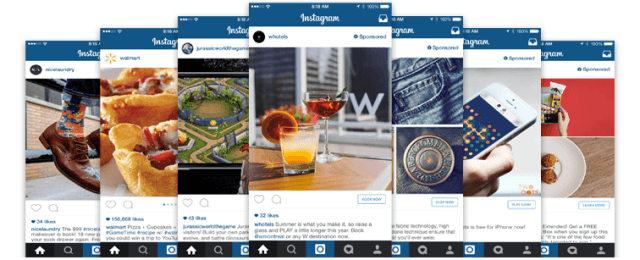
https://www.anatech.com.ng/wp-content/uploads/2016/04/Instagram-Advertising-Objectives.png Instagram Advertising Objectives This post will show you the different Instagram Advertising Objectives, how they are used and when to use them. Please note that your advertising objective is what you want people to do when they see your ads. For example, you can create ads to get people to watch your videos which is different from creating ads to encourage people to visit your website. What is Instagram Advertising? Instagram advertising is a platform that allows businesses to place custom ads or content targeting a specific audience. Instagram ads can appear in your target audience’s Feed. Your Instagram Advertising Objectives should match your advertising goal. Before choosing an objective, you should ask yourself what you want to accomplish with your ad and what would be your ideal outcome. Once you’ve answered those questions, match your answers against each advertising objective to figure out which one might work best for you. Find here-under the different Instagram Advertising Objectives and what can they do for you when advertising on Instagram? Post Engagement Clicks to Website Website Conversions Mobile App Installs Mobile App Engagement Video Views Post Engagement: If your goal is to increase engagement on your post and get people seeing, liking, commenting on and following, then you might want to choose this objective. Send people to your website: When you choose Send people to your website, you can set a custom destination URL. For instance, you could send people to your website's homepage, online store, contact page or any page you want people to see. By default, your ad will be optimized to reach people who are likely to click on your ad. If you need to get your website started go here: http://www.anatech.com.ng/ecommerce-website-design/ Increase conversions on your website: When you choose Increase conversions on your website, you'll need to add a piece of code to the HTML on your website. You should add the code to a website page you want to track conversions on. For instance, if you want to track how many people saw your ad and then actually went and purchased the product you were advertising or filled the lead generation form, you should add the code to the target page of your website. By default, your ad will be optimized to reach people in your audience who are likely to convert. Read More: http://www.anatech.com.ng/instagram-advertising-objectives/ 1 Like |
| Business › Re: Find Out How To Advertise Your Business On Facebook | ANATECH by Anatech(op): 10:46pm On Apr 24, 2016 |
................................. |
| Business › Re: Find Out How To Advertise Your Business On Facebook | ANATECH by Anatech(op): 10:33pm On Apr 23, 2016 |
.................................. |
| Business › Re: Find Out How To Advertise Your Business On Facebook | ANATECH by Anatech(op): 2:41pm On Apr 22, 2016 |
............................................ |
| Business › Re: Find Out How To Advertise Your Business On Facebook | ANATECH by Anatech(op): 1:05am On Apr 22, 2016 |
..................................................... |
| Business › Re: Find Out How To Advertise Your Business On Facebook | ANATECH by Anatech(op): 4:12pm On Apr 21, 2016 |
................................. |
| Business › Re: Find Out How To Advertise Your Business On Facebook | ANATECH by Anatech(op): 12:50pm On Apr 21, 2016 |
................................................. |
| Business › Re: Find Out How To Advertise Your Business On Facebook | ANATECH by Anatech(op): 7:28am On Apr 21, 2016 |
....................................................... |