|
 Phones › Re: See Speed: Glo 3G In Abuja (screenshots) by Gsmbasics: 12:50pm On Mar 18, 2017 Phones › Re: See Speed: Glo 3G In Abuja (screenshots) by Gsmbasics: 12:50pm On Mar 18, 2017 |
JandyJ:
Is it fast on glo 0.0k tweakware cheat? I haven't tried it. |
| Phones › Re: See Speed: Glo 3G In Abuja (screenshots) by Gsmbasics: 12:49pm On Mar 18, 2017 |
|
| Phones › Re: See Speed: Glo 3G In Abuja (screenshots) by Gsmbasics: 11:09am On Mar 18, 2017 |
my own Glo 4g speed in Abuja 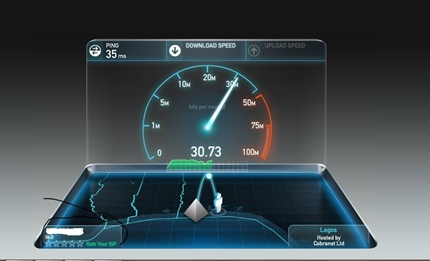
|
| Phones › How To Get Rid Of Pre-installed Bloatware From Android Phones by Gsmbasics(op): 7:18am On Mar 18, 2017 |
A nuisance with Android Phones and Tablets is the existence of various Apps that is set up by default by the phone producer. Some of these Apps, you might never use them. The existence of these Apps might block the system and consume free space.
Some of these Applications can be uninstalled. Some phone manufacturers have them pre-installed in the system that you have to root the system to uninstall these Apps. Rooting Android can be dangerous as this will leave the phone vulnerable to malware attack as well as invalidate the service warranty.
A better option is to utilize free Bloatware elimination Apps such as App Disable Bloatware. These Apps do not require root access to eliminate this Bloatware. They can help you get rid of the Bloatware App. If not able to eliminate, these Apps can help you conceal it from the system.
Once the App is set up, it will show you HideAble Apps and already concealed Apps. Under the HideAble Apps, select the App and after that click Disable. If you want to utilize the same App later on, you can find it under Hidden App then Enable.
There are other comparable Apps such as NoBloat Free, Bloatware Freezer Free and Pro versions, Bloatware Eliminator etc which can likewise be utilized for the very same purpose. http://gsmbasics.com.ng/631/how-to-get-rid-of-pre-installed-bloatware-from-android-phones.html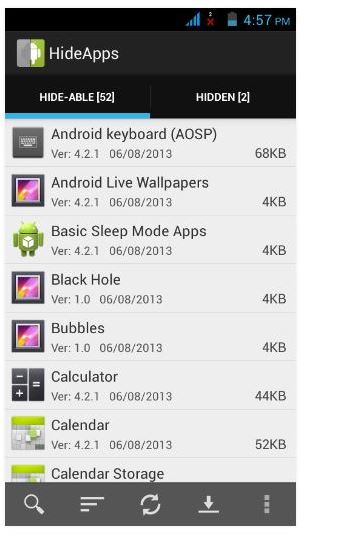
|
| Phones › 6 Symptoms Of Android OS Infection by Gsmbasics(op): 7:11am On Mar 14, 2017 |
Android is fast becoming hacker's paradise. Given that it is one of the most popular and most utilized mobile OS, malicious developers and hackers are discovering new methods to exploit loopholes inside the OS.
According to recent research studies done by Kaspersky, malware programs created for exploiting Android has actually increased six times than the previous year. If you suspect, your Android phone might be infected, here are some signs to search for if your android device is infected.
Here are six signs of Android infection.
1. Pop-ups and unsolicited ads
If your Android device is regularly showing pop-ups, you might have set up an adware inside your system. Adware infections are the simplest to fix too. Simply go to the list of Apps installed. Eliminate the App which is accountable for showing the Ads.
2. Increased data use
If a harmful program gets in your Android, it might aim to connect to a data source for showing Advertisements or sending data. This indicates they consume bandwidth more than it is used generally. So if you discover your bandwidth use is unusually high, do search for a malicious app which might be consuming this bandwidth.
3. Unsolicited applications
When you purchase an Android gadget, it normally comes with some Apps installed by default. These might be the extremely necessary Apps that you need for operating your phone There might be some extra Apps from your Android phone maker. Apart from that, if you notice any App that is set up without your knowledge, you have to be careful. One easy thing to do is to browse the web and check the credibility for that App. Apps that are recently developed and coming from lower recognized developers might have badly coded Apps which can be used for malicious purpose.
4. Apps need access to other functions on your phone.
It is common for Applications to demand access to your address book, email lists and so on. It can be justified for certain Apps where it is needed for its smooth performance. But not all Apps require access to these details. So, if you notice an App asking for personal information which is not related to its job function, you have to suspect the App. Remove it after making an appropriate examination.
5. Unusual online activity after utilizing mobile for transactions
If you notice any unusual activity reported in your online activity, there is a possibility your phone is hacked and the hackers might have delicate information. Change the password of your account. If the online activity appears to have originated from your Android, you might have harmful files inside. Eliminate unwanted and suspicious looking file.
6. Apps lock specific features in the phone unless payment is made
An authentic app developer would never ever hold you to ransom by disabling specific features unless you pay for the App. Eliminate these Apps as they do not deserve to be in your Android phone.
Lastly, to fix all these issues download Mobile Optimizer & Cleaner
Mobile Optimizer & Cleaner can assist you to enhance Android phone performance, clear apps you don't want and back up crucial ones, maximize your phone's and sd card storage, boost memory and improve phone speed.
If your Android phone is running sluggish you can quickly speed up your phone with Mobile Optimizer & Cleaner. http://gsmbasics.com.ng/630/6-symptoms-of-android-infection.html |
| Phones › Removable Vs Non-removable Battery Phones; Which One To Choose? by Gsmbasics(op): 6:56am On Mar 14, 2017 |
It has often been a complication while choosing a smartphone. The confusion intensifies whenever we are simply asked to choose between a mobile device with a removable battery and a mobile phone with non-removable battery.
Formerly very few Smartphones had a removable battery, but nowadays phones like Infinix Tecno InnJoo that has non-removable batteries are growing in number. This has resulted in a big issue in the head of the customer's.
The smartphones with non-detachable batteries do offer very high-end performance, whereas the smartphones with a detachable battery can possibly be changed when weakened. Although, it provides high functionality but we just can not neglect the reality how easily the device could be rebooted with a non-detachable battery when it hanged.
Let us imagine your device mistakenly slips into water. And then you won't be able to open its components and allow it get dried up. Or perhaps when your smartphone battery runs out, you can't just insert your extra battery and continue with your task. A couple of your actions are definitely restricted when it involves mobile phones with non-removable batteries.
On the other hand, when a phone with a detachable battery drops into water, you would simply take out the battery, dry out all the parts and if it works then great otherwise you could utilize other things. I still keep that in mind for quite some time, any issue relating to your mobile phone can be fixed by taking out the battery and placing it once again. So do you prefer a removable battery or a non-removable battery? let us know which one you prefer. http://gsmbasics.com.ng/513/removable-vs-non-removable-battery-which-one-to-choose.html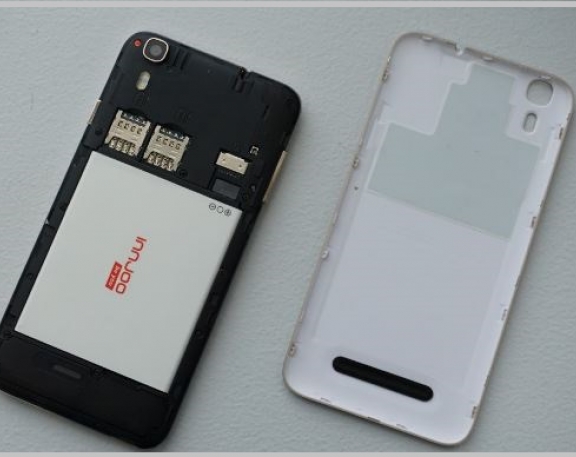
|
| Phones › What You Should Know About Facebook Live by Gsmbasics(op): 9:20am On Mar 11, 2017 |
Facebook Live makes it easy for you to share your experiences and point of views in real time, with the users who matter to you.
whether you're someone who would like to broadcast to family and friends, or a somebody who wants to connect with fans all over the world.
Live videos on Facebook are real and also exciting, and we're seeing people tuning in and engaging easily with broadcasters in the moment. As a matter of fact, we've seen that generally, people watch a live video a lot more than three times longer when it is live as compared to when it is not live.
To share live video feed, just tap "What's on your mind?" at the top of News Feed and then select the Live Video symbol. You can compose a quick description and pick the audience before going live.
In the course of your broadcast, you'll notice the number of live viewers, the names of people who are tuning in and reply to a real-time flow of comments. When you finish your broadcast, it will be saved on your Timeline like every other video, which you can then delete or perhaps keep for your friends to watch later on. http://gsmbasics.com.ng/717/what-you-should-know-about-facebook-live.html |
| Phones › Li-ion Battery Inventor Is Working On New, Battery Technology For Smartphones by Gsmbasics(op): 7:32am On Mar 09, 2017 |
John B. Goodenough, which seems like a completely fake name but is completely real, was among the researchers recognised for the creation of the lithium-ion battery.
He's one name in a long list of researchers as well as inventors that go back to 1973, but he's regularly credited for the work.
The guy's 94 now, and he's still focusing on battery tech. Goodenough, an engineering professor with the University of Texas at Austin, and his team have developed a completely solid-state battery cell. It's safer than what we have now, charges faster and also last longer.
Here's what Goodenough said to science journal Energy & Environmental Science concerning the new technology and how it could be used with, for example, cars.
" Cost, safety, measure, energy density, rates of charge as well as discharge and also cycle life are important for battery-driven cars as being more widely adopted. We think our discovery solves a lot of the problems that are fundamental in today's batteries ...".
We need to have better batteries.
If we really want to change up how we depend on current energy production, we definitely need better batteries. For our cars and our smartphones to last longer while at the same time staying safe, it seems like Goodenough's team is onto something.
The solid-state features of the batteries make them great at severe low and high temperatures, another possible win for the industry.
What about global impact? According to Goodenough, these things are made from sodium drawn out from sea water. We have lots of that, don't we? http://gsmbasics.com.ng/716/li-ion-battery-inventor-is-working-on-new-better-battery-technology-for-smartphones.html
|
| Phones › Re: Nokia 3310 Supremo Putin Version Made Of Gold Plus Titanium Launches At ₦773,500 by Gsmbasics(op): 6:49am On Mar 07, 2017 |
kelvine:
Instead of Nokia to use this 3310 hype to buy back the heart of people they are busy making phones with unrealistic price.
It was pride that led to the downfall of Nokia.
Even iPhone the most desirable phone is not this expensive. It's not Nokia's fault, its Caviar that started this madness. they are well known for creating gold iPhones and other luxury items. They just do it knowing some people won't mind buying it |
| Phones › Some Safety Measures Before Rooting Android by Gsmbasics(op): 6:44am On Mar 07, 2017 |
Rooting is sometimes necessary if you know the huge opportunities your phone is open to against the restrictions set by phone manufacturers.
Rooting really helps you to get rid of the restrictions put forward by phone manufacturers and give more flexibility to make modifications as you wish.
But rooting has its own risk. As soon as you root an android phone, the manufacturer no longer supports your phone whether or not it is inside guarantee or warranty time frame. Here are some safety measures to take before rooting Android mobile phone.
1. Backup data
One of the most important of all process is to back up data. Rooting your Android comes along with its own risk. There is always a chance of rooting being not successful despite when it is done by a professional. Just in case if it failed, you might lose out all the data and it might even make your phone unusable. So ensure you understand the risk, have a backup and after that continue with the rooting process.
2. Maintain enough charge in your battery
When you do a rooting, it undergoes a number of processes that includes making changes to firmware and software. This procedure takes a lot of resources and that means a lot of power is drained from your battery. Just in case, if the battery is drained completely during updating firmware, you may find yourself in a situation where you can't start the process from the start or continue where it stopped. It means the phone is completely gone.
Ensure you start a rooting procedure when you have 100% battery charge to prevent the risk.
3. Find out about your Android
Before rooting, be sure you know the Android which is installed on your phone. Simply head to Settings -> About Device -> Software info -> Android version. Find out the Android version. Just in case, if the rooting didn't work, you should know the Android os that was already on your phone to restore it back.
4. Turn off security software
It is highly recommended to disable all security software such as Firewall, Antivirus as well as malware tools. Any time you try to do a rooting process, it will need to make changes to the Android Operating System. The security software's might attempt to block these modifications thinking the adjustments are made by malware. Given that these software's might disrupt the rooting process and even render it useless, it is recommended to turn off or better remove it from your phone before the rooting process.
5. Restore Firmware to defaults
If you are confident to carry on with rooting, it is highly recommended to restore your firmware to default. By doing this, you have a high chance of success when rooting.
6. Understand the rooting process
Even though you are new to the rooting procedure, it is strongly recommended that you understand the process fully before giving it a try practically. Look up relevant books or it is highly recommended to check out related video clips which show the rooting process thoroughly. If you are fortunate, you may even see the whole rooting procedure done on the same model as your phone.
Learn which is the most effective process to root your phone and ways to do it before making the updates.
7. Learn how you can enter recovery mode
Android Stock recovery is a troubleshooting mode in which you can eliminate everything and set up from beginning. This is very important if something bad happens during the process of rooting.
The method to go into Android stock recovery mode is easy. Press the Power button + Volume Up + Home button at the same time.
Hope you see this useful. http://gsmbasics.com.ng/715/some-safety-measures-before-rooting-android.html |
| Phones › Nokia 3310 Supremo Putin Version Made Of Gold Plus Titanium Launches At ₦773,500 by Gsmbasics(op): 8:31pm On Mar 06, 2017 |
A new Nokia 3310 Supremo Putin model exists and it's built of titanium and gold, in celebration of the Russian Federation and its leader.
Putin-themed version has appeared, looking affordable only by comparison. The Nokia 3310 Supremo Putin is priced at an eye-watering $1,700 (₦773,500)
Nokia 3310 Supremo Putin Edition
The Supremo Putin version of the latest Nokia 3310 doesn't boast more powerful specifications and features than the normal version of the device, but it does come with a case made from gold and titanium, complete with a golden portrait of Russian leader Vladimir Putin on its back. However, beneath the portrait, there's also the Russian national anthem engraved in gold.
The Nokia 3310 Supremo Putin emerges from Russian manufacturer Caviar, which specialises in luxurious smartphones. Caviar was also responsible for the Huawei P9 Friendship Edition smart device, which cost roughly $2,700,(₦1,228,500) as well as a variety of luxurious iPhone 7 versions.
Nokia 3310 (2017) Specifications
The original Nokia 3310 from 2000 was a major hit, popular worldwide for its rugged build and durability, its amazing battery life and its famous game, Snake. Of course, at that time it was still a big deal to have a cell phone just because it was mobile.
Nowadays we have mobile phones that handle much more than just telephone call and text, but feature devices still have their attraction and the new Nokia 3310 comes along with a touch of fond memories and a slight modification to modern times.
Apart from the special look and build materials, the Nokia 3310 Supremo Putin comes with the exact same specs as the standard Nokia 3310 (2017) revealed at the Mobile World Congress 2017. It's still a feature cell phone with very modest specs, but this time around it features 2.5 G connectivity for internet surfing and operates an updated S30+ operating system, along with an updated version of the highly famous game Snake.
That's a far cry from the $1,700 (₦773,500) price tag of the Nokia 3310 Supreme Putin edition, although fandom and luxurious materials don't come affordable. Interested consumers can buy the titanium as well as gold version with Putin's portrait from Caviar stores right away. http://gsmbasics.com.ng/714/nokia-3310-supremo-putin-version-made-of-gold-plus-titanium-launches-at-773-500.html
|
| Phones › Nokia 3310 Vs New Nokia 3310: What's The Change 17 Years After? by Gsmbasics(op): 8:05am On Mar 04, 2017 |
Nokia has released the Nokia 3310 at Mobile World Congress 2017. Hold on, what?
Indeed, that's right, the Nokia 3310 has returned from the dead, 17 years after. The famous phone that was originally released in 2000 has now been renewed.
As Nokia not too long ago launched Nokia 3, Nokia 5 and Nokia 6 Android smart devices, the only device that people are speaking of is this vintage wonder, the Nokia 3310.
But how does the new 3310 compare with the old?
Nokia 3310 versus 3310: Design and build
2000: 113 x 48 x 22mm, 133g
2017: 115.6 x 51 x 12.8 mm, 79.6 g.
Slim is definitely in as the 3310 has slimmed down. Nearly half the weight and thickness, but a little bit taller and wider.
But it's not only about the weight: the improved Nokia 3310 isn't the chunky monkey that the original old version got.
The Nokia 3310 is still plastic, but it's now sleek in red and yellow, or matt in blue or grey. The original was generally blue but often seen in that grey colour as well.
The 2017 Nokia 3310 comes with a removable back cover, so you can remove it, to have access to the battery.
Nokia 3310 vs 3310: Display screen.
2000: 1.5-inch, 84 x 48 pixels, 65ppi, monochrome LCD.
2017: 2.4-inch, 240 x 320 pixels, 167ppi, colour LCD.
The old Nokia 3310 had a glorious 1.5-inch display screen that was monochrome. It was virtually enough to read text messages, make out the digits you tapped in order to play Snake. It was flat, providing great contrast, easy and to the point.
The new Nokia 3310 has a big (by comparison) display screen at 2.4-inches, extending over the top half of the device and curving away to the top. It's also now brilliantly coloured, so the experience is fairly different.
The latest Nokia 3310 is more like feature phones of the mid-2000s, instead of the pure monochrome glory of the old one.
Nokia 3310 vs 3310: Connection.
2000: Dual band GSM 900/1800MHz.
2017: Dual band GSM 900/1800MHz, Micro-USB, Bluetooth, 3.5 mm jack, microSD, FM radio.
In 2000 there were few connectivities. On the base of the device was the DC input to charge the phone, however, there was no Bluetooth, absolutely no Wi-Fi, no nothing.
Luckily, the new Nokia 3310 has shifted with the times a bit more. There's Bluetooth to link to a headset or even your car, there's Micro-USB for charging - so no need for that big charger.
The option for microSD to increase the storage space, 3.5 mm headphone socket to play music or the FM radio.
None of the two cell phones offers 3G though, this is purely 2G all the way, so it's a mobile phone for talking and texting.
Nokia 3310 versus 3310: Camera.
2000: Why would you want a camera on a phone?
2017: 2-megapixel with LED flash.
In 2000 the thought of having a camera on a phone was slightly unusual. Why would you want one? There were no social media networks, the selfie didn't exist and also you 'd never have been able to publish it anyway.
In 2017, most mobile phones are judged by their cameras. It's the main feature for many, taking the place of the cheap compact camera division with socials media killing the idea of printing photos and making up albums.
The latest 3310 has a 2MP camera, but we believe the experience is not going to worth it. Stay on your smartphone.
Nokia 3310 vs 3310: Battery.
2000: 900mAh removable battery, 55 hrs standby, 2.5 hrs talk time.
2017: 1200mAh removable battery, 31 days standby time, 22 hrs talk time.
The important thing that the old original 3310 was welled known for is battery life. In those days, obviously, you weren't playing 3D games, snapping Instagram selfies, as well as playing mp3 music.
You just got the regular text message from a friend or placed a few phone call to arrange a beer parlour get-together. But the battery didn't last for life, it just lasted days.
The brand-new Nokia 3310 battery will almost last forever. With 31 days of standby, you'll hardly drain this battery.
This is a cell phone you can probably disappear with for a full week and not need to think about the charger.
Nokia 3310 vs 3310: Cost.
2000: N28,000.
2017: N15,000.
Mobile phones used to be a lot more costly. The Nokia 3310 was just one of the more affordable at N28,000 at that time and SIM cards for 25,000 and for many it was the first cellphone they had, bringing freedom of communication far away from Nitel landlines.
In 2017 you get a lot of smartphone for N28,000 You can get a full-featured entry-level smart device for that money, so it's not a surprise that the new 3310 is just N15,000.
The old Nokia 3310 is not offered anywhere in Nigeria if you know any shop still selling the old 3310 please let us know. The new design will be highly available by April in Nigeria. http://gsmbasics.com.ng/709/nokia-3310-vs-nokia-3310-whats-the-change-17-years-after.html |
| Travel › Re: Airport Workers Mishandle Travelers' Bags (Video) by Gsmbasics: 5:06pm On Mar 03, 2017 |
people are angry now adays, imagine having a breakable plate or even laptop in a bag. these evil people will just destroy it and make you think it's your own doing. |
| Politics › Re: We Will Not Allow Buhari To Be Disgraced – Dogara by Gsmbasics: 11:18pm On Feb 21, 2017 |
. |
| Phones › Nokia 3310, The Famous Rugged Feature Phone Is Coming Back! by Gsmbasics(op): 11:12am On Feb 17, 2017 |
The Nokia 3310, one of the most popular phones of all time for many, is finally planning to return with a new edition.
It was called one of the most reliable, it was also called undestroyable, and even if it doesn't pair up anywhere close to the current-day flagships, the Nokia 3310 is a rock solid device.
The 3310 was released in 2000, almost 17 years back from now. The production was stopped at that time, But, the reports about the return of the Nokia 3310 is simply too exciting. It is stated to be unveiled at the Mobile World Congress 2017 that is set to be held in Barcelona.
Base on the rumours, it won't be completely the same one but a new version, obviously, as a memorial to the legendary phone. It might have just a lot more than what it had in the old times but Nokia won't give it a lot of power so you will still see a feature handset.
HMD Global Oy, the firm that has the rights to use Nokia's brand name, has a great plan for the phone introduction this year. After the launch of Nokia 6 in January, the firm is now said to follow up with four more smart devices and this tribute to Nokia 3310.
The Nokia 3310 was a success for the company, with the number of sales hitting up to 126 million, but the mobile phone industry moved on to become smarter but Nokia couldn't adapt to it, ending up with the Microsoft acquisition and down the road being sold off to HMD Global Oy. http://gsmbasics.com.ng/694/nokia-3310-the-famous-rugged-feature-phone-is-coming-back.html |
| Phones › UC Browser Can Hold Its Ground And Take On Bigger, Frequently Used Browsers by Gsmbasics(op): 9:39am On Jan 23, 2017*. Modified: 10:51am On Jan 23, 2017 |
Chrome is considered "the" cell phone browser to use of all platforms, however, that wouldn't make it the only one. An up and coming web browser called UC Browser is giving Google's Chrome a run for its money.
Chinese e-commerce firm Alibaba Group is in charge of the UC Browser. The firm is a parent organization to the world's largest Internet business-to-business trading networks for small businesses. The firm created a browser for desktops as well as Android operating systems.
UC Browser was unveiled in 2004, emerging as the first J2ME application. It has support for all kinds of platforms such as Android os, Blackberry, iOS, Java ME, Symbian and also Windows Device. Of all these operating systems, Android os has the biggest consumer UC share-- 300 million downloads and install, away from 500 million Google Android Operating System users.
The reason why You Should Checkout The UC Browser?
The UC internet browser is a mobile web browser that occupies little space on your smart device (16MB) and also your Windows PC (50.9 MB). With extra storage space, users can download the things they like. In addition to that, browsing the Web can be done really fast. It's also offered in different languages including but not restricted to:
Arabic
Bangla
English
French
Indonesian
Spanish
The UC Web browser uses data compression setting and cloud acceleration. The internet browser's servers are truly proxies that can compress website page data. It's also functional to environments of the exact same networks and also can download files in different file formats.
When you choose to use web applications, the web browser featuring HTML5 as well as cloud syncing, just like Google Chrome and even Microsoft's Edge. It provides a cloud storage space referred to as UDisk that will provide people with extra storage space. UC Web browser will without a doubt take on the bigger, more well-known web browsers like Google Chrome as well as Mozilla Firefox.
It's very easy to download and install the UC Web browser on your Android Device. Just head to the Play Store in order to download the free copy. Key in UC Browser and search for the application. Click install and the downloading will start. http://gsmbasics.com.ng/685/uc-browser-can-hold-its-ground-and-take-on-bigger-frequently-used-browsers.html |
| Phones › 5 Whatsapp Features You Most Likely Did Not Know About by Gsmbasics(op): 1:01am On Jan 23, 2017 |
In case you are a new or perhaps a seasoned WhatsApp consumer certainly there are features that you might possibly not see coming.
These are unknown features that you will find helpful. Below is a list that you can relate to.
Formatting Message Text-- If in case you haven't observed, you can instantly format your message content by utilising some emphasis on it for instance, bold, strikethrough, as well as italicised.
Getting Message Information-- You can now verify if your text message was truly read or perhaps delivered to the receiver. Swiping to the left of the text should do the trick using iOS phones. On the other hand, a simple long-press of a specific text and clicking on the info symbol ⓘ listed below the display screen can address this issue for Android people.
Muting a Chat-- This feature is basically helpful when you are going to a meeting or heading to the cinemas. The mute function of WhatsApp will set your application to silent mode. It would help you deal with a chat group or perhaps a nosey friend not seeing how busy you are.
Hiding Last Seen Status-- You can have 3 choices to allow Everyone, No-one or perhaps all users from your contact list to view the Last Seen time of a specific message that you have earlier read. Just go to Settings > Account > Privacy > Last Seen.
Turning off Read Receipts-- It is possible to turn off read receipts from WhatsApp, preventing other people from seeing that you have actually read the text message. You can possibly do this by heading to Settings > Account > Privacy, after that, you will have to uncheck the box beside Read Receipts.
You can regularly enable or disable other messaging capabilities from WhatsApp to your very own advantage. http://gsmbasics.com.ng/686/whatsapp-features-you-most-likely-did-not-know-about.html |
| Phones › Htc U Play Vs. Htc U Ultra-- Great Specifications As Well As Features Comparison by Gsmbasics(op): 7:35pm On Jan 19, 2017 |
HTC is preparing to launch its U Play as well as U Ultra phones in February and March 2017. Without delay, we will review them and give you an idea on which one of them you will like to buy once they arrive at the retail stores. This is a new class of devices that will feature a special design.
Designs
The HTC U Play measures 146 × 72.9 x8mm and also weighs 145 g. However, the HTC U Ultra measures 162.4 × 79.8 x8mm and also weighs 170 g. Both devices have a luscious design that HTC has identified as liquid surface. It's a premium appearance and consumers will like the colour as well as depth of the back.
Displays
The HTC U Play features a super AMOLED display screen of 5.2-inch that provides a resolution of 1920 × 1080 pixels at 428 ppi.
The HTC U Ultra has a bigger super LCD5 display screen of 5.7-inch that provides a much higher resolution of 2560 × 1440 pixels at 513 ppi.
Processor chips, Graphics Cards & RAM
The HTC U Play includes a MediaTek MT6755 Helio P10 chipset, a quad-core Cortex A53 PROCESSOR clocked at 2.0 GHz as well as a quad-core Cortex A53 PROCESSOR clocked at 1.1 GHz, a Mali-T860MP2 graphics card and also 3GB or 4GB of RAM.
The HTC U Ultra comes with a Qualcomm MSM8996 Snapdragon 821 chipset, a dual-core Kryo PROCESSOR clocked at 2.15 GHz as well as a dual-core Kryo PROCESSOR clocked at 1.6 GHz, an Adreno 530 graphics card and also 4GB of RAM.
Storages
The HTC U Play will be launched in two inbuilt storage versions of 32GB as well as 64GB, while the HTC U Ultra is available in two inbuilt storage models of 64GB as well as 128GB. You can increase the storage on both of these phones up to 256GB making use of a microSD memory card.
Cameras
The HTC U Play feature a primary cam of 16MP that comes with dual-LED flash, OIS, geo-tagging, touch focus, Auto-HDR, panorama along with a secondary cam of 16MP.
The HTC U Ultra comes with a primary camera of 12MP that includes OIS, laser & phase detection autofocus, dual-LED flash, auto-HDR and also a secondary cam of 16MP.
Batteries
The HTC U Play is run by a non-removable battery of 2500 mAh, and that is a little bit weaker compared to the 3000 mAh non-removable battery that the HTC U Ultra has. http://gsmbasics.com.ng/680/htc-u-play-vs-htc-u-ultra-great-specifications-as-well-as-features-comparison.html |
| Phones › The Best Way To Get Latest Whatsapp On Your Nokia Asha Phone by Gsmbasics(op): 7:05pm On Jan 19, 2017 |
Facebook acquired WhatsApp for $22 billion, and everyone thought Mark Zuckerberg was out of his mind. However, the minute the leading social media website took over, there were a few cool adjustment made.
And, since then, it's only gotten more new features including the long-awaited, hopefully-anticipated Voice Phone call.
What Is Voice Calling?
The WhatsApp Voice Calling function lets people make as well as receive voice calls via anywhere in the world through other WhatsApp end users. Currently, the feature is only accessible for Android os, Blackberry 10, iOS as well as Windows Mobile phone software. In other words, Nokia Asha phone customers are out of luck.
Can WhatsApp Be Operated On Nokia Asha Phones?
Yes, you can still make use of WhatsApp on your Nokia Asha phones that come with the Symbian 40 firmware. As a matter of fact, the developers launched another variation for it just recently-- WhatsApp 2.13.26-- which came along with some performance enhancement and also bug fixes. It didn't come with any new features like emojis, which are found on the other operating systems.
The great aspect of this jar file is that there was really no increment in size file; just adjustments to over 830 files.
How you can Download and install WhatsApp 2.13.26 Into Your Nokia Asha Phone
Before you can install the latest version, you have to uninstall the existing one. When you do that, browse through your phone's web browser and enter whatsapp.com/s40. Once you're there, you'll have to download and also install the new file. After installation, enter your phone number to get the verification code so that you can sign into the WhatsApp profile you have created. http://gsmbasics.com.ng/681/the-best-way-to-get-latest-whatsapp-on-your-nokia-asha-phone.html |
| Events › Re: Happy New Year by Gsmbasics: 12:10am On Jan 01, 2017 |
Happy New Year from gsmbasics.com.ng 
|
| Phones › Re: Check Out The Reason For Clearing Cache As Well As Data On Android? by Gsmbasics(op): 10:26am On Dec 31, 2016 |
tuscani:
bro it did not work. then it's from the phone(homtom) then. |
| Phones › Check Out Top 10 Most Searched Phones In Nigeria (2016) According To You by Gsmbasics(op): 9:17am On Dec 31, 2016*. Modified: 11:27am On Dec 31, 2016 |
As we all know 2016 ends today, we've compiled our top 10 most searched phone on Gsmbasics.com.ng. Indeed, the list changes each month as phones are added and removed, that makes things interesting.
So we felt that it 'd be a great idea to look back and check out what you, our users, believed were the best smartphones of the year.
In this article, you'll see a rundown of the top ten most searched phone of 2016, and most compared mobile phones according to our users.
Top 10 most searched phones in Nigeria (2016)
1. Samsung Galaxy J7 Prime
2. Tecno Phantom 6 Plus
3. Huawei Nova Plus
4. Gionee M6
5. Infinix Hot 4 pro
6. Infinix Zero 4
7. Infinix Note 3
8. Samsung galaxy j5 Prime
9. Tecno Camon C9
10. Tecno Phantom 6
----------Top 10 most compared phones in Nigeria (2016)-----------
1. Tecno Phantom 6 Plus VS Samsung Galaxy S7
2. Huawei mate 8 VS Tecno Phantom 6 Plus
3. Infinix Hot S VS Infinix Hot 4 Pro
4. Infinix Note 3 VS Tecno Camon C9
5. Infinix Hot 3 VS Tecno L8 Plus
6. Infinix Hot S VS InnJoo Halo Plus
7. Infinix Note 3 VS Tecno Phantom 5
8. Tecno Camon C9 VS Infinix Hot 4 Pro
9. Samsung Galaxy J7 Prime VS Tecno Phantom 6 Plus
10. Iphone 6s VS iPhone 6s Plus
As you can see from the list in this article, one Android smart device really stands out over the rest, hitting the top one. That smartphone, obviously, is the Samsung Galaxy J7 Prime. So which device would've been first for you? let us know.
Thank you all for your support and for choosing gsmbasics.com.ng as your online phones review needs.
Special thanks you to seun, puskin, honsule, dragnet, Mynd44 and OAM4J we're grateful for everything.
May the new year bring joy and peace to you all.
Happy New Year! http://gsmbasics.com.ng/650/top-10-most-searched-phones-in-nigeria-2016-according-to-you.html |
| Phones › Re: Check Out The Reason For Clearing Cache As Well As Data On Android? by Gsmbasics(op): 6:47am On Dec 31, 2016 |
tuscani:
yes bros. I am using homtom. Yes I think it is something around call settings. But I can't get around it. It was not like this wen I bought it 2months ago.please the contact dialer thing, how do I rectify that just download Truecaller from GooglePlay store. try to make use of it. and see if it works. |
| Phones › Re: Check Out The Reason For Clearing Cache As Well As Data On Android? by Gsmbasics(op): 7:35pm On Dec 30, 2016 |
tuscani:
Hello gurus in the house , please I have been having difficulties making international calls from my phone.I can make local call. But when I put my sim on another phone, I am able to make international calls .please wat do I do. i don't know the kind of phone you're using, but from what you wrote I believe the problem is from your call settings( obviously). you should check around there. Or check if the contact dialer is not changing the international code as you dial the number. |
| Phones › Re: Check Out The Reason For Clearing Cache As Well As Data On Android? by Gsmbasics(op): 9:56am On Dec 30, 2016 |
ikukuhero:
Wow... I almost clicked on " clear data" on my WhatApp but chose to come back here to read comments or possibly ask the effect of such and then I saw your comment. Sorry dear It's not like it will erase your WhatsApp chats, all it does is to reset the app to make you input your cell phone number again. Besides, I don't see any reason to clear WhatsApp data though. |
| Sports › Re: Serena Williams Is Engaged To Alexis Ohanian, Reddit Co-Founder. Gets Backlash by Gsmbasics: 8:49am On Dec 30, 2016 |
dinachi:
Why are you all getting angry with her? She is very smart. At least in a few years or months from now, she will become a billionaire when she dumps his sorry azz and takes half of what the idiot have laboured for all his life. Thats the most annoying thing about western marriages. |
| Phones › Re: Check Out The Reason For Clearing Cache As Well As Data On Android? by Gsmbasics(op): 8:40am On Dec 30, 2016 |
newheart2:
Pls help out, GPS in my phone always ask for permission to show my location, and no matter how I off it, its keep coming up at the upper left side of the screen. Images below 1st. Go to settings > under Personal > click on Location, then turn it off from there, you will see other options there on how to manage your GPS. 2nd option. Check if you've downloaded (Android Device Manager) that app forces GPS location ON at all time. Try to turn it OFF from there and I believe it will be fine. |
| Phones › Re: Check Out The Reason For Clearing Cache As Well As Data On Android? by Gsmbasics(op): 8:16am On Dec 30, 2016 |
chronique:
I guess I didn't read completely... Lol. lol, Don't worry I believe it won't tamper with your chat history or contact. the only thing it will ask you is to sign in with your phone number again. but your contact and chat history still remains. |
| Phones › Re: Check Out The Reason For Clearing Cache As Well As Data On Android? by Gsmbasics(op): 8:12am On Dec 30, 2016 |
gurunlocker:
Lol.... follow the bullshit up there at your own risk, you can clear cache, but clear data at your own risk. There's a reason for clearing DATA. if an app is malfunctioning you can clear DATA to take it to its default state. It's like clearing Yahoo! app DATA obviously it's going to sign you out first. Then you have to sign in from beginning again just like WhatsApp, you have to input your cell phone number again |
| Phones › Re: Check Out The Reason For Clearing Cache As Well As Data On Android? by Gsmbasics(op): 8:06am On Dec 30, 2016 |
Oliviaarims:
I can't seem to find that feature in my Camon C9. Been searching for it in futility for so long now. I'm talking about clearing data under apps. Go to settings > click on Apps > scroll down to the particular app that you want to clear its data > wait for it to calculate finish, then tap clear Data. Don't clear Whatsapp Data cos it will ask you to input your phone number like you just downloaded it. |
| Phones › Re: Check Out The Reason For Clearing Cache As Well As Data On Android? by Gsmbasics(op): 8:01am On Dec 30, 2016 |
chronique:
Oga, you have caused problems for me o. I went to clear data on WhatsApp and I lost everything. Whatsapp is asking me to register all over again. Sometimes, it's not good to listen to you people. No, sometimes it's good to read thoroughly. Beside why will you want to clear WhatsApp data? I don't understand. It's written clearly that the whole idea of clearing data is to take the app to its earlier state. |


