 Phones › Re: Check Out The Reason For Clearing Cache As Well As Data On Android? by Gsmbasics(op): 7:36am On Dec 30, 2016 Phones › Re: Check Out The Reason For Clearing Cache As Well As Data On Android? by Gsmbasics(op): 7:36am On Dec 30, 2016 |
duullie88:
Like a game... won't clear cache affect ur progress Nice question, If you clear CACHE it won't affect the level you are playing on your game. but if you clear DATA it will not only clear your progress, it will reset the game to the way it was when you first downloaded it. the whole idea of clearing DATA is to make the app go back to its default state. |
| Phones › Check Out The Reason For Clearing Cache As Well As Data On Android? by Gsmbasics(op): 6:53am On Dec 30, 2016 |
If you've by chance checked your Android application drawer, you've observed that every application has two tasks: Clear Cache and also Clear Data. But do users know the difference? And more important, do users know when they're helpful?
Clearing Application Cache
As you use an Android application, you may have to regularly pull data off the internet-- pictures, for instance. Rather than pulling it each time you make use of the app, the picture gets saved in a cache. It's much faster to get access to it next time, and also you save money on data plan.
But in some cases, the cache can differ from what the data should truly be, which can result in outdated info. Other times, the cache holds up with a lot of data, which can decrease app functionality. When this occurs, it can help to get rid of the cache.
Open up Settings.
Go to Apps.
click on the app you intend to clear.
Click on Clear Cache.
Removing App Data
As you make use of Android applications, some settings and data get saved between sessions. For instance, sign into an app clicking "Remember me" will save your information to data. Data also saves things such as account settings, app preferences, and so on.
Various applications, like Youtube, might store offline video data, while some other, such as Maps, may save offline map data. This can use up a LOT more storing space that you were looking for, which is a good idea to clear app data periodically. Basically, getting rid of app data "resets" an application back to the way it would be when it was initially installed.
Go to Settings.
Go to Apps.
click on the app you intend to clear.
Click on Clear Data. http://gsmbasics.com.ng/648/whats-the-idea-of-clearing-cache-as-well-as-data-on-android.html |
| Phones › Whatsapp Download Still Offered On Nokia Asha 200, 215, 305 And 501 by Gsmbasics(op): 7:34pm On Dec 29, 2016 |
Nokia Asha phones are not as trendy as they used to be, however, this doesn't mean that there won't be users who are still making use of them every day. Today we will highlight some Nokia Asha phones and how you can download and use WhatsApp on them.
WhatsApp is an app that enables you to send text messages, images, videos and your location completely free. We need to agree that MMS options are perishing due to apps like this one, but the mobile network providers are now offering bundles that include WhatsApp internet data plans so as to entice customers.
WhatsApp for Nokia Asha 501
Due to the latest software update that has been launched for Nokia Asha 501, the WhatsApp application comes pre-installed on it. To install the most recent update for this phone, go to its Settings- > Phone update and install the new update on it. When the installation is done, the Nokia Asha 501 will restart and you will see that the WhatsApp is installed on your phone.
WhatsApp: How you can Install It On Your Nokia Asha Phone
Base on the Nokia Asha model that you have, you will have to download and install a specific.jar or.jad file from the official WhatsApp web page. Once installment is complete, you will need to use your cellphone number to get yourself confirmed and finally log into your WhatsApp profile.
WhatsApp: Supported Nokia Asha Devices
Nokia Asha 200
Nokia Asha 202
Nokia Asha 205
Nokia Asha 210
Nokia Asha 230
Nokia Asha 305
Nokia Asha 300
Nokia Asha 305
Nokia Asha 306
Nokia Asha 308
Nokia Asha 311
Nokia Asha 501
Nokia Asha 501
Nokia Asha 502
Nokia Asha 503. http://gsmbasics.com.ng/647/whatsapp-download-still-offered-on-nokia-asha-200-215-305-and-501.html |
| Phones › Re: Whatsapp Amazing New Features For Recalling Your Messages by Gsmbasics(op): 11:12am On Dec 28, 2016 |
dahunsy:
Coughs***clears throat#....can nude pix be recalled? lool, why will you want to send that? |
| Phones › Whatsapp Amazing New Features For Recalling Your Messages by Gsmbasics(op): 7:10am On Dec 28, 2016 |
WhatsApp Messenger is still ringing bells these Christmas season. Recently, it can be remembered that the application launched the video calling capability for all users in November. This helped to make a buzz around the globe, as it has been made use of by 55.6% of the world population.
This upgrade was offered over several phones, including those operating in iOS, Windows, and also Android. On the other hand, it will need users to update the application to get this new feature.
Bad news for a number of devices that will not get support from WhatsApp. These will involve phones operating Android 2.1 and 2.2, Windows Phone 7, as well as iPhone 3GS and those operating iOS 6. Also, those iPhones that haven't been up-dated to the iOS 10 version will not be supported.
Though, a bit of an extension is offered to users of Blackberry devices for example Blackberry OS as well as Blackberry 10. Although, WhatsApp currently supports those making use of Nokia S40 and Nokia S60 Symbian, but only before June 30 of 2017.
Latest Report
A new feature is coming to WhatsApp just before 2016 will end. WhatsApp will make it possible for people to take back sent messages, as they can modify it and post it once again to the receiver. It might have taken the idea from the best feature launched on Gmail, which is taking back sent emails.
This may be the new update coming from WhatsApp that could give people control over their text messages. http://gsmbasics.com.ng/645/whatsapp-amazing-new-features-for-recalling-your-messages.html |
| Phones › Gionee M2017 Officially Launched With 7,000 Mah Battery by Gsmbasics(op): 7:47pm On Dec 27, 2016 |
Gionee M2017 is a rumored smart device that provides very high-end specifications. Its main features are 7000 mAh battery, 6GB RAM, Dual back 13MP as well as 12MP camera and 5.7 inch Quad HD Display screen.
Gionee M2017 Smart device was released on 26 December 2016, features a 5.7-inch qHD IPS LCD Multi-touch display screen with a resolution of 2560 x 1440 pixels with a pixel density of 511 pixels per inch. The display screen is not safeguarded by a Scratch Resistant display.
The device is powered by a 1.96 GHz Octa-core MediaTek CPU and it features 6 GB of RAM. What this implies is the processor has Octa cores in the CPU and 6 GB of RAM makes sure the device operates smoothly with several apps open at the same time. The Gionee M2017 also has a graphics processor and 128 GB of built-in storage space and does not provide expandable storage.
The Gionee M2017 operates Android 6.0 Operating System and is run by a 7000 mAh battery. Its Dual SIM Mobile phone and connection choices on the Gionee M2017 consist of, GPS, HotSpot, Wi-fi, Bluetooth.
The primary cam on the Gionee M2017 is a 13 & 12 MP shooter along with Auto Focus, Video clip Recording. The smart device also comes with a Front Facing Cam worthy of capturing 8 MP selfies. http://gsmbasics.com.ng/643/gionee-m2017-officially-launched-with-7-000-mah-battery.html
|
| Phones › Re: Check-out My Glo 4G Speed Using My Unlock Spectranet Mifi Device by Gsmbasics(op): 7:43pm On Dec 27, 2016 |
AsianTotal:
How much did you used in unlocking your spectranet mifi? I really need to unlock mine fast. N2,500 |
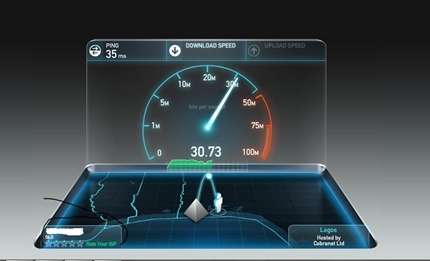
| Phones › Check-out My Glo 4G Speed Using My Unlock Spectranet Mifi Device by Gsmbasics(op): 8:44am On Dec 26, 2016 |
Check out my Glo network speed using my Spectranet MiFi( unlock). I've been using Spectranet for like 3 years now and their network is ok. However, last week I saw somewhere on Nairaland that it's possible to unlock spectranet MiFi to browse any network.
I decided to go to computer village to unlock mine, One boy saw me holding the MiFi and ask if I want to unlock it I said yes. In less than 2 min boooom done!
I bought a Glo 4G sim ( N500) registered it, then I subscribed to Glo monthly plan 10GB - N2,500. And here is my Glo 4G speed.
You can also download this app to see if there's 4G coverage in your area. Download Here http://gsmbasics.com.ng/642/check-out-my-glo-4g-speed-using-my-unlock-spectranet-mifi-device.html
|
| Phones › Samsung Galaxy S8 May Likely Feature A "Beast Mode" by Gsmbasics(op): 7:30am On Dec 25, 2016 |
Samsung's upcoming flagship smart device may have something referred to as a "beast mode". The South Korean OEM not long ago filed for a trademark on the name "Beast Mode".
While it is confusing what this mode will do, reviewers, have often used the caption "beast" for strong smart devices. It is then realistic to assume that the Galaxy S8 will have a unique mode for gaming, VR, or perhaps VR gaming. Because Samsung added unique capabilities for gamers on the Galaxy S7 and Galaxy S7 Edge also confirms the assumption.
Given the latest Note 7 disaster, Samsung should be withdrawing all the stops. The Galaxy S8 is expected to operate on the Snapdragon 835 chipset, in addition to a minimum of 4GB of RAM. That being said, we could fairly expect Samsung to launch the Exynos-powered version in Nigeria. At the same time, the Snapdragon 835 as well as Exynos SoCs, are made on the 10nm process, which in theory allows lower power usage and greater performance.
At the same time, the Snapdragon 835 as well as Exynos SoCs, are made on the 10nm process, which in theory allows lower power usage and greater performance.
However, there have also been stories that there will be 8GB of RAM in the Galaxy S8. Samsung has been known making such options before, but 8GB RAM will certainly be too much for now.
The Galaxy S8 is likely to get introduced early next year. Samsung has reportedly raised its strategies for the phone, considering the Note 7 failure.
Very early release or not, we'll have to sit tight for specific information on the Galaxy S8. http://gsmbasics.com.ng/641/samsung-galaxy-s8-may-likely-feature-a-quot-beast-mode-quot.html |
| Phones › Google Finally Makes Gboard For Android OS Official by Gsmbasics(op): 9:57am On Dec 17, 2016 |
Google on Friday made Gboard for Android official, at last bringing all the features iPhone users have experienced for several months to its own operating system.
The search giant's promotional video is practically similar to the one launched earlier this year when Gboard for iOS was revealed.
" Sick of switching applications whenever you want to search the web ..." And so on and so forth.
The whole concept of Gboard is search is integrated right into the keyboard, enabling you to get quick information, YouTube video clips and GIFs without needing to carry out the swing of bouncing between apps. It's useful and makes life that far better. And it runs inside all your favourite apps, such as Hangouts, Allo, WhatsApp and a lot more.
Here's what's added
* GIF search, accessible in supporting applications
* Multilingual writing: Systematically switch between your enabled languages when typing
* Running autocorrect: Autocorrect last two words according to context
* Predictive search: Search tips built on what you type
* Default number line (activate in Keyboard Settings).
* 36 new foreign languages.
You should notice the upgrade rolling out for the Google Keyboard today. http://gsmbasics.com.ng/640/google-finally-makes-gboard-for-android-os-official.html
|
| Phones › Re: Instagram Now Allows You Save Posts On Android As Well As Apple Iphone by Gsmbasics(op): 4:52pm On Dec 16, 2016 |
xaliujokes:
are you serious about this ? or you just need cheap traffic it's available, it's not for traffic. |
| Phones › Instagram Now Allows You Save Posts On Android As Well As Apple Iphone by Gsmbasics(op): 4:46pm On Dec 15, 2016 |
Have you ever see a post that you really like on Instagram that you wish you could easily go back to over and over? Now you can.
Instagram now allows you save posts, basically bookmarking them for easy access later. Starting today, you'll see a bookmark icon listed below posts, in the same spot that you see the like, comment, and share buttons now. Tap that button and it'll show up in the new Saved area of your profile tab.
The new Saved section of your profile is nonpublic to you, so nobody else will view the posts that you've bookmarked.
Saved posts are readily available today on Android and iOS as part of Instagram version 10.2. The feature appears like a nice way to quickly go back to posts that have a recipe you might like to try, a restaurant to go to, or anything else. So if you're an Instagram user, watch out for it. http://gsmbasics.com.ng/638/instagram-now-allows-you-save-posts-on-android-as-well-as-apple-iphone.htmlhttps://gsmbasics.com.ng/media/large/96f71d54f0-instagram.jpg |
| Phones › Google's Gboard Eventually Makes Its Way To Android by Gsmbasics(op): 11:45pm On Dec 13, 2016 |
Earlier this year, Google released a standalone keyboard app for iOS phones called Gboard. The idea is that it brings Google's search capability into the keyboard itself, therefore making things easier for people to search for things without having to leave the application that they are in already.
Surprisingly Google appeared to have only released it for iOS phones and not Android, however, that has since changed. Base on reports, it has been indicated that in the 6.0 update to Google Keyboard for Android, Google has modified its name to Gboard and has practically brought over all the same features for Android phones.
https://gsmbasics.com.ng/media/large/8ff4295edb-gboard-new.jpg
This includes things like the G button (which can possibly be disabled if you prefer not to have it there) that gives users quick easy access to search. There is also a pop-out toolbar that goes to themes, settings, one-handed mode, and a lot more. There is a devoted number row, support for as much as three active languages, the option to search for emoji, a dedicated GIF button, and Gesture typing has since been renamed to Glide typing.
The up-date isn't directly accessible from the Google Play Store right now of writing, so if you would like to get it you'll need to download it via APK Mirror. Otherwise, you can hold on as it will probably be officially available very soon. http://gsmbasics.com.ng/637/googles-gboard-eventually-makes-its-way-to-android.html |
| Phones › Whatsapp Will Stop Working On Your Phone Soon by Gsmbasics(op): 10:45am On Dec 06, 2016 |
As we come near the end of the year, one billion active WhatsApp users should better check that they will have the ability to run the messaging application on their iPhone, Android, and Windows Phone systems.
In a blog post earlier this year, WhatsApp revealed that, by the end of 2016, the messenger app will not be supported on the following platforms:
* Nokia S40
* Nokia Symbian S60
* Windows Phone 7
* BlackBerry OS and BlackBerry 10
* Android 2.1 and Android 2.2
* iPhone 3GS/iOS 6
WhatsApp Messenger announced the platforms would be dropped as:
they do not provide the type of capabilities we need to increase our app's functions in the future.
So what can you do to stop this from taking place?
If you are one of those still using these affected mobile phones, we advise upgrading to a more recent Android, iPhone, or Windows Phone prior to completion of 2016 to continue making use of WhatsApp.
You can either upgrade or buy a new mobile phone.
So, for all those people still utilizing old 'vintage' Nokia phones: you may want to buy either Tecno or Infinix phone.
Alternatively, see if Nitel or fax are coming back again. http://gsmbasics.com.ng/634/whatsapp-will-stop-working-on-your-phone-soon.html |
| Phones › Re: Poll: Will The Release Of Whatsapp Video Calls Challenge Skype, Viber & Others? by Gsmbasics(op): 11:49pm On Nov 29, 2016 |
Facebook Messenger |
| Phones › Re: Poll: Will The Release Of Whatsapp Video Calls Challenge Skype, Viber & Others? by Gsmbasics(op): 11:49pm On Nov 29, 2016 |
Whatsapp |
| Phones › Re: Poll: Will The Release Of Whatsapp Video Calls Challenge Skype, Viber & Others? by Gsmbasics(op): 11:48pm On Nov 29, 2016 |
Imo |
| Phones › Re: Poll: Will The Release Of Whatsapp Video Calls Challenge Skype, Viber & Others? by Gsmbasics(op): 11:48pm On Nov 29, 2016 |
Viber |
| Phones › Re: Poll: Will The Release Of Whatsapp Video Calls Challenge Skype, Viber & Others? by Gsmbasics(op): 11:47pm On Nov 29, 2016 |
Google Duo |
| Phones › Re: Poll: Will The Release Of Whatsapp Video Calls Challenge Skype, Viber & Others? by Gsmbasics(op): 11:45pm On Nov 29, 2016 |
Skype |
| Phones › Poll: Will The Release Of Whatsapp Video Calls Challenge Skype, Viber & Others? by Gsmbasics(op): 11:43pm On Nov 29, 2016*. Modified: 12:04am On Nov 30, 2016 |
WhatsApp has - eventually - presented a video calling for over a billion users of its mobile app.
While that's good news for a lot of users, how could this affect other messaging services that as well provide video? Sure, each company has their variations but how many users would like to keep several video calling messengers installed permanently?
WhatsApp has indeed been late in adding video calling, with competing messenger services like Skype, Google Duo, Viber and Facebook Messenger all providing the solution already. You might even consider Snapchat becoming a rival to this classification too. The huge question is does the arrival of video calling on WhatsApp indicate you'll now stop making use of these other services?
What's your present preferred app for video calling? http://gsmbasics.com.ng/633/will-the-release-of-whatsapp-video-calls-challenge-skype-viber-and-others.html |
| Phones › Six Tips To Get Your Phone Battery To Charge Much Faster by Gsmbasics(op): 8:26pm On Nov 25, 2016 |
Under heavy use, mobile phone batteries can only last a day or 2 that makes it essential to charge it frequently. In this modern-day times where you have little time, it helps a lot to conserve some time
Here are some ideas to get your phone battery recharge much faster.
1. Always use the best battery charger
Though this might be difficult, avoid charging your phone using any charger. There are a lot of low-grade adapter options offered in the market. They might not supply sufficient charge to the battery or pass excessive charge which can cause battery damage and malfunction.
The charger supplied by the producer is the best one for your mobile phone model. Always charge your phone with the right charger.
2. Charge straight from electrical port on wall
If you want to charge mobile phone battery quick, charge it from the electric outlet on the wall. Charging battery using USB is going to take a very long time.
3. Disable all networks
Connecting to networks and starting communication is going to take battery power. So, disconnect your mobile phone from all networks if it is not a problem. Putting your smart device in Airplane mode is the quickest method to disconnect from all networks.
4. Disable all unwanted functions
Every smartphone function is going to take battery life. A few of the most significant drawer of power are WiFi, 3G/4G, NFC, GPS and so on. Disabling these features can assist speed up charging your mobile device. Also, switch off the vibration mode.
5. Do not use the gadget while charging
Displays take in more power than other activity inside your mobile device Keeping the display screen low can conserve battery life. Do not play games or play music particularly using portable speakers.
6. Switch off the gadget
This is the fastest way to charge a mobile phone or any mobile device. Turn off the gadget and after that charge. Because the gadget is turned off, absolutely nothing is going to drain the battery. It might be difficult not to use the gadget for some few hours, but its worth the wait to get the phone charged fast. http://gsmbasics.com.ng/632/six-tips-to-get-your-phone-battery-to-charge-much-faster.html |
| Phones › 6 Symptoms Of Android Infection by Gsmbasics(op): 7:16am On Nov 25, 2016 |
Android is fast becoming hacker's paradise. Given that it is one of the most popular and most utilized mobile OS, malicious developers and hackers are discovering new methods to exploit loopholes inside the OS.
According to recent research studies done by Kaspersky, malware programs created for exploiting Android has actually increased six times than the previous year. If you suspect, your Android phone might be infected, here are some signs to search for if your android device is infected.
[size=15pt]Here are six signs of Android infection.[/size]
1. Pop-ups and unsolicited ads
If your Android device is regularly showing pop-ups, you might have set up an adware inside your system. Adware infections are the simplest to fix too. Simply go to the list of Apps installed. Eliminate the App which is accountable for showing the Ads.
2. Increased data use
If a harmful program gets in your Android, it might aim to connect to a data source for showing Advertisements or sending data. This indicates they consume bandwidth more than it is used generally. So if you discover your bandwidth use is unusually high, do search for a malicious app which might be consuming this bandwidth.
3. Unsolicited applications
When you purchase an Android gadget, it normally comes with some Apps installed by default. These might be the extremely necessary Apps that you need for operating your phone There might be some extra Apps from your Android phone maker. Apart from that, if you notice any App that is set up without your knowledge, you have to be careful. One easy thing to do is to browse the web and check the credibility for that App. Apps that are recently developed and coming from lower recognized developers might have badly coded Apps which can be used for malicious purpose.
4. Apps need access to other functions on your phone.
It is common for Applications to demand access to your address book, email lists and so on. It can be justified for certain Apps where it is needed for its smooth performance. But not all Apps require access to these details. So, if you notice an App asking for personal information which is not related to its job function, you have to suspect the App. Remove it after making an appropriate examination.
5. Unusual online activity after utilizing mobile for transactions
If you notice any unusual activity reported in your online activity, there is a possibility your phone is hacked and the hackers might have delicate information. Change the password of your account. If the online activity appears to have originated from your Android, you might have harmful files inside. Eliminate unwanted and suspicious looking file.
6. Apps lock specific features in the phone unless payment is made
An authentic app developer would never ever hold you to ransom by disabling specific features unless you pay for the App. Eliminate these Apps as they do not deserve to be in your Android phone.
Lastly, to fix all these issues download Mobile Optimizer & Cleaner
Mobile Optimizer & Cleaner can assist you to enhance Android phone performance, clear apps you don't want and back up crucial ones, maximize your phone's and sd card storage, boost memory and improve phone speed.
If your Android phone is running sluggish you can quickly speed up your phone with Mobile Optimizer & Cleaner http://gsmbasics.com.ng/630/6-symptoms-of-android-infection.html |
| Romance › If You Still Can't Get A Girlfriend Then See this by Gsmbasics(op): 9:33am On Nov 22, 2016*. Modified: 8:29pm On Nov 22, 2016 |
. 
|
| Phones › China States That Iphone Sales Will Be Cut If Trump Enforces A Trade War by Gsmbasics(op): 9:48am On Nov 21, 2016 |
https://gsmbasics.com.ng/media/large/2aef606bab-us-vs-china-iphone.jpg
President-elect Donald Trump had some issues about China when he was on the campaign trail. He promised some stringent actions against China to balance the trade, in his view, between the two countries.
Now that he has won the elections and will be taking control of the top task in a few months, China is letting him understand that it will go to any length to safeguard its interests. The nation's state-run paper has actually stated that the government will hit back if Trump enforces a trade war on China.
An editorial released in the state-run Global Times said that it would be "ignorant" for Trump to carry out his campaign promise of stating China a currency manipulator and enforcing a 45 percent tariff on Chinese exports to the United States.
" China will take a tit-for-tat method then," the editorial cautions, saying that "A batch of Boeing orders will be changed by Airbus. United States auto and iPhone sales in China will suffer a setback, and United States soybean and maize imports will be stopped. China can also restrict the number of Chinese students studying in the United States."
The paper goes on to state that if the president-elect "wrecks" trade in between the United States and China, a number of companies in the United States will suffer. "Lastly the new president will be condemned for his recklessness, lack of knowledge and incompetence and bear all the repercussions," it predicts.
Chinese media has actually reported that Chinese President Xi Jinping spoke to the president-elect recently, expressing that "cooperation is the only right option for China and the United States." The two leaders have agreed to interact carefully and meet "at an early date," according to reports in Chinese media. http://gsmbasics.com.ng/629/china-states-that-iphone-sales-will-be-cut-if-trump-enforces-a-trade-war.html |
| Phones › Re: 8 Reasons Why People Root Their Android Smart Phones by Gsmbasics(op): 11:35am On Nov 18, 2016 |
Olasco93:
Now I've understood better why people rooting their devices.
Thanks OP You're welcome |
| Phones › 8 Reasons Why People Root Their Android Smart Phones by Gsmbasics(op): 8:15am On Nov 18, 2016 |
A lot of Android phones comes with limitations. These limitations prevent users from installing new Applications or upgrade to most current Android version. In order to get the complete privileged control, you have to root your Android Phone.
[size=15pt]Here are some reasons to Root Android Phone.[/size]
1. Get rid of Bloatware
Bloatware is pre-installed applications that come with the phone. Although a few of these Apps are important, you might find some which is of no use and needlessly consume precious memory. To get rid of these Apps, you have to root to eliminate Bloatware.
2. Extend battery life
By rooting your Android phone, you can access functions which enable users to alter the settings, change the power that goes to CPU and minimize it to save battery life.
3. Customize your phone
A non-rooted phone has limitations and bring minimal options when it comes to altering wallpaper, ringtones, keyboard sounds and so on. As soon as you root your Android device, there is no limitation to the modifications that can be done on your phone.
4. Install new Applications
By rooting your Android device, you are permitted to install new Applications against limitations to installing specific apps on a non-rooted phone.
5. Overclock
Much like a PC can be overclocked, you can overclock your mobile phone. By default, phone manufacturers do not encourage overclocking to prevent users from burning down their own gadget. If you are a techie who likes to overclock your mobile phone, you have to root your smart device.
6. Change the phone using a customized ROM
A rooted phone enables flashing the ROM. This enables installing the current Android version as well as enhance performance of the device. This is one of the primary reasons users opted to root their mobile phone.
7. Increase Android memory
By getting rid of unwanted Apps and by setting up performance enhancing Apps, you can maximize valuable memory needed for the smooth performance of your phone. You can even utilize Apps like MiniTool Partition to make Android use the external disk space as internal space which enables better performance as well as enables installing more Apps.
8. Block Ads
The downside of non-rooted phone is that the phone is personalized for their brand. This implies you will see wallpapers, apps, games which reveals the trademark name or its affiliate's brand all over. Rooting your smart device enable installing Apps that allow blocking these advertisements as well as eliminate Apps that show ads. http://gsmbasics.com.ng/623/why-root-android-smart-phone.html |
| Phones › Re: Facebook Is Releasing Public Chat Rooms For Messenger Soon by Gsmbasics(op): 7:42am On Nov 18, 2016 |
|
| Phones › Facebook Is Releasing Public Chat Rooms For Messenger Soon by Gsmbasics(op): 7:41am On Nov 18, 2016*. Modified: 8:17am On Nov 18, 2016 |
It is clear that Facebook wants us to stay glued to its Messenger app. This is why the firm has practically terminated any in-app chatting through the Facebook app, hence forcing users to download the Messenger app at the same time. Now it appears that we could be taking a look at a new feature for Facebook Messenger called "Rooms".
It has been reported that in certain markets, Facebook has actually introduced a new feature inside the Messenger app called Spaces, which appears to facilitate public chat. This was first reported two months ago that explained it as rooms are for public chats about people and interests. Each Room has a link that can be shared so anybody on Messenger can join the chats.
So how can we differentiate Rooms from group chats? For beginners, it is public, which means that chats you have in rooms may relate to specific subjects, or that it could be with users you may or might not know before. At least that's in accordance with a recent report where Facebook Messenger's product supervisor, Drew Moxon, told them it was developed to enable individuals to chat with other people who share comparable interests.
It sounds practically like Facebook is developing an online forum of sorts within Messenger, which isn't precisely new. Nevertheless provided how many users Facebook has and can take advantage of, we guess it might result in some lovely group discussions. For now, the new feature is being tested out in Australia and Canada, but most likely it will eventually make its way to other markets like Nigeria. http://gsmbasics.com.ng/625/facebook-is-releasing-public-chat-rooms-for-messenger-soon.html |
| Car Talk › Re: Name Of Your First Car And Your Experience With It? by Gsmbasics: 3:26pm On Nov 07, 2016*. Modified: 6:01pm On Nov 07, 2016 |
Mine was back in SS3, some mechanics close to my school sold a 1991 Honda accord to me.I didn't know the car was trouble, I drove it to a supermarket on my way home to buy some drinks to use and celebrate with my friends and siblings. just for me to come out of the supermarket the car was on fire with lot of people trying to put the fire off. then 5 policemen were asking "Who get this car? I say who get this car" obviously I was so scared that I couldn't say it's mine, and I don't even have a drivers license. I just quietly took okada home regretting why I just wasted my N35,000. |
| Phones › The Best Ways To Save Battery On Android Phones by Gsmbasics(op): 1:15am On Nov 07, 2016 |
Android phones are getting smarter, faster, bigger brighter screens. However, it comes at the expense of draining your battery. Up till now for a phone user, it is still hard to go on without charging for more than a day or more.
Recently, some improvements were made in battery technology to hold more charge for longer duration and faster charging. But it will still take some time for these batteries to be offered on a commercial scale. Till then, here are some actions or steps that you can follow to extend battery life on your Android phone.
1) Shut down unwanted applications
Android is a multitasking OS, which allows users to run several applications at the same time. Considering that these applications can run in the background without interrupting the presently opened application, many users tend not to worry about closing an application prior to opening a new one. This can cause scenarios where several apps are running in the background at any time. These specific applications require processing power which drains phone battery.
To conserve battery, close the applications you're not using. Go to phone settings. look for the open Apps under Battery, Go through the list and close the app that you're not using that's run in the background. You can also go to Apps area and Force Stop the application that is not in use.
2) Get rid of Unwanted Apps
With a lot of free Apps offered in Google Play Store, I know at times we install applications just to see how it works. Over a time period, you may have downloaded lot of Apps that you don't use any longer.
Get rid of these unused Apps. It not just prevent these Apps from running in the background, but likewise free up RAM and card space.
3) Switch off 3G/4G, Wi-Fi and Bluetooth
3G/4G, Wi-Fi and Bluetooth are one of the things that drain power from your battery. It is hard to turn off 3G/4G and Wi-Fi when you depend upon getting notified about social media messages. Bluetooth can be turned off if not in use or not moving any files.
Switch off 3G/4G and Wi-Fi when you do not need to be alerted or when you go to sleep. You can even check your messages just at specific periods and turning it off for rest of time. Avoid making use of Bluetooth as much as possible. If it is for file transfer, try a wired transfer through USB cable.
4) Lower Brightness
Brightness of display screen is another significant for increased battery drain. You may reduce it by just minimizing the brightness. Instead of choosing the 'auto' alternative for screen brightness, manually use the slider to change the brightness which is comfortable to you. Minimizing brightness goes a long way in enhancing battery life.
5) Switch off GPS
GPS can quickly drain your battery fast. Switch off the GPS service, unless you need to use your Android as GPS.
6) Switch off Notifications
Apart from alerts from your e-mail or chat App, there might be other Apps in your phone which continuously send out notifications such as advertisements or renewal notices. If these Apps can send out notifications, it implies they are running in the background and obviously draining battery power. Find which Application is sending out these notices. Then go to the App details and uncheck the 'Show Notification' box.
7) Power Saving Mode
Some phone makers may include power saving mode in their gadget, similar to the power options in Windows. Check if your Android have the features. This option immediately lowers screen brightness and just enable the necessary background process and basic functions to run.
 Get an extra Battery which can be externally charged Get an extra Battery which can be externally charged
This is for those who are heavy Android users who want to have it continuously running for professional use. The most convenient way is to keep an extra battery which can be switched when the other runs out of charge. It is good that these batteries can be charged externally. Go for a top quality external battery pack. http://gsmbasics.com.ng/622/the-best-ways-to-save-battery-on-android-phones.html |
| Phones › 8 Things To Know Before You Purchase A Mobile Phone Or Tablet by Gsmbasics(op): 1:07am On Nov 07, 2016 |
Mobile phone and tablet market are significantly becoming popular all around the world. Advances in innovation such as processing power, smart applications, net connection, more memory area and increased battery power are moving smart device and tablet market to new heights than ever.
With a lot of choices offered, it is becoming more of a tough task to purchase the ideal mobile phone that suits you. This post highlights 8 crucial features that you have to consider when purchasing a mobile phone or tablet.
Size of the Display Screen
Visual experience plays a crucial role in identifying the quality of an item. This makes screen size a significant feature to search for when purchasing either mobile phone or a tablet. An ideal screen to some extent can overshadow the flaws in a design. Screen is also the single most costly and crucial hardware part in a mobile phone and tablets.
Density and Weight
Density and weight are another essential factors to be considered when purchasing a mobile phone or tablet. Density is more of a visual concern than anything else. Thinner gadgets do not constantly result in a quality product. So it depends on you to choose if you wish to compromise quality over visual value. Some mobile phones and tablets come in a metal case, which provides a quality look to the gadget. So do check it out in a shop or online, instead of getting disappointed after buying the phone.
Operating System utilized by Mobile phone or Tablet
OS that is utilized on a Smart device or tablet is yet another significant feature to be thought about before you buy. When it comes to Operating System that we use on our PC, we have the options to either choose Apple's Macintosh, Microsoft Windows OS. Windows OS is the winner here because it is really easy to use and got a big option of supporting applications and software to go with the OS. Likewise, mobile phones and tablets also
Mobile phones and tablets also operates on OS and the options are Android OS, iOS, Microsoft Phone 7, Blackberry OS, Symbian and so on. iOS is used in Apple devices and tablets. Android OS is popular and used in a wide variety of models. Although Windows phone is not as popular as Android, it is user-friendly.
Storage space offered in a Smart device or Tablet
Most smart device and tablet makers nowadays are providing 16 GB storage capability which is enough space for saving photos, mp3s, and videos. However, some users prefer to add extra memory to increase the storage space. Phones like Apple don't have a memory slot, but other tablets and smart device includes memory slots to add extra memory.
Connection Specs
All tablets and mobile phones are portable gadgets which require wireless for interaction. they use Wi-Fi connection to let you wirelessly connect to home and public networks. Some models provide 3G, 4G connection which assists in having an internet connection enabled SIM. These variations are usually costly than the regular models and in order to allow 3G OR 4G connection, you have to buy the sim from your network. But the costs are coming down and it is inexpensive these days to have a 3G or 4G on your mobile phone or tablet.
Apps Compatibility
One of the essential features of a mobile phone or tablet is the presence of Apps. It is similar to using software on your PC. Compatibility of apps is crucial to be considered when you buy a mobile phone or tablet. For instance, Apple App store have 300,000 totally free and premium apps readily available. Meanwhile Android also have 500,000 free and premium apps present. Other mobile OS likewise have apps available, but, not as much compared to iOS and Android. The more apps offered, more options for you to find and download the best apps for your needs.
Camera Options
Almost all mobile phones and all tablets feature an inbuilt cam. Camera by default is a significant feature that many consumers check by default when purchasing mobile phones. It is a really useful feature, particularly when you want to record memories. It's nice to see the recent advancements in mobile cam innovation. Even cams with 8MP are readily available with some tablet models. If you are not much of a camera user, you can choose models without camera or cam with less MP to save some cash.
Television and Video options
It is an increasing trend recently to record top quality videos using mobile phones or tablets and share it across various platforms. To see the real quality of the recorded video, one will certainly want to try it on a larger screen linking to display screens or tv. So the next time, you choose to buy a mobile phone or tablets, you might want to see if it carries choices for linking to these gadgets. http://gsmbasics.com.ng/621/8-things-to-know-before-you-purchase-a-mobile-phone-or-tablet.html |


