Selion's Posts
Nairaland Forum › Selion's Profile › Selion's Posts
1 (of 1 pages)
 Phones › How To Backup Broken & Locked Iphone/ipad by selion(op): 10:57am On Sep 29, 2016 Phones › How To Backup Broken & Locked Iphone/ipad by selion(op): 10:57am On Sep 29, 2016 |
https://www.youtube.com/watch?v=EiZf-I1qGrc When your iPhone/iPad is cracked or shattered by accident and left locked, it becomes important to get data off the broken device such as photos, videos, contacts, messages, etc. Here, this video tutorial will show you several methods to backup iPhone/iPad with broken and passcode-locked screen. read more free tricks: How to Backup & Recover Data from Broken/Locked iPhone or iPad Step guide: #1 Check some of important data in iCloud.com like videos, pictures, contacts, notes, reminders when iPhone is broken and lokced #2 Recover data from broken/locked iPhone/iPad with iPhoneRecovery software if the iTunes detects your device on computer. Otherwise you'd better get your gadget repaired first. #3 Chances are that you’ve previously made a backup for iPhone/iPad with iTunes, then it would be easy to get back your files. |
| Phones › Re: How To Recover Data From Dead/broken Iphone 6/5S/5/4S by selion(m): 8:06am On Jul 11, 2016 |
If your iPhone is passcode locked and you haven't already synced and "trusted" the PC then you'll need the phone to have fully functioning image and touch to recover any data from broken/locked iPhone. Learn more: Easy ways to Backup & Recover Data from Broken/Locked iPhone or iPad |
| Phones › Re: How To Recover Deleted Videos From Iphone 6 by selion(m): 10:24am On May 09, 2016 |
 Free Ways to Recover Deleted Videos From Iphone 6: Free Ways to Recover Deleted Videos From Iphone 6:If your device is running on iOS 8 or newer, then you can firstly check the[b] Recently Deleted Album[/b] in the default Photos app to see the deleted videos are there. (Please note that this feature is only available from iOS 8.x or iOS 9.x) If there is no videos in the album, it mean you've deleted videos from your device permanently. In this case, you can try some freeware to recover deleted videos from iPhone or iPad for free. Youtube Guide: https://www.youtube.com/watch?v=xf4luPKJEoM There are so many iPhone video recovery tools available in the market. If you don’t want to spend any money on it, Free iPhone Recovery is recommended to you. It is specially designed to recover deleted videos from iPhone, iPad and extract videos from iTunes backup. https://www.iphonerecovery.com/wp-content/uploads/2015/12/recover-deleted-videos-from-iphone.png Step 1. Run free iPhone Video Recovery, check “Camera Roll”, “Photo Stream” and “App Videos”, then head to the next. Step 2. Connect your iPhone or iPad to computer. (If you lost your device, directly go to next and select the iTunes backup, or log in your iCloud account.) Step 3. Star to scan your device or backup, then preview & recover the deleted videos from iPhone or iPad. If you had your iPhone jailbroken, you can also try PhotoRec which might be difficult to use for you. |
| Science/Technology › Re: How To Recover Deleted Videos From Iphone by selion(m): 10:22am On May 09, 2016 |
| Free Ways to Recover Deleted Videos From Iphone Or Ipad: If your device is running on iOS 8 or newer, then you can firstly check the[b] Recently Deleted Album[/b] in the default Photos app to see the deleted videos are there. (Please note that this feature is only available from iOS 8.x or iOS 9.x) If there is no videos in the album, it mean you've deleted videos from your device permanently. In this case, you can try some freeware to recover deleted videos from iPhone or iPad for free. Youtube Guide: https://www.youtube.com/watch?v=xf4luPKJEoM There are so many iPhone video recovery tools available in the market. If you don’t want to spend any money on it, Free iPhone Recovery is recommended to you. It is specially designed to recover deleted videos from iPhone, iPad and extract videos from iTunes backup. https://www.iphonerecovery.com/wp-content/uploads/2015/12/recover-deleted-videos-from-iphone.png Step 1. Run free iPhone Video Recovery, check “Camera Roll”, “Photo Stream” and “App Videos”, then head to the next. Step 2. Connect your iPhone or iPad to computer. (If you lost your device, directly go to next and select the iTunes backup, or log in your iCloud account.) Step 3. Star to scan your device or backup, then preview & recover the deleted videos from iPhone or iPad. If you had your iPhone jailbroken, you can also try PhotoRec which might be difficult to use for you. |
| Phones › How To Recover Deleted Videos From Iphone Or Ipad For Free by selion(op): 10:17am On May 09, 2016 |
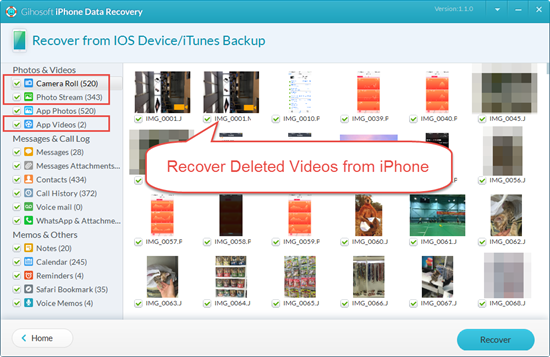
If you accidentally delete some of your important videos on the iPhone or the iPad, follow these steps to recover them for free. If your device is running on iOS 8 or newer, then you can firstly check the[b] Recently Deleted Album[/b] in the default Photos app to see the deleted videos are there. (Please note that this feature is only available from iOS 8.x or iOS 9.x) If there is no videos in the album, it mean you've deleted videos from your device permanently. In this case, you can try some freeware to recover deleted videos from iPhone or iPad for free. Youtube Guide: https://www.youtube.com/watch?v=xf4luPKJEoM There are so many iPhone video recovery tools available in the market. If you don’t want to spend any money on it, Free iPhone Recovery is recommended to you. It is specially designed to recover deleted videos from iPhone, iPad and extract videos from iTunes backup. https://www.iphonerecovery.com/wp-content/uploads/2015/12/recover-deleted-videos-from-iphone.png Step 1. Run free iPhone Video Recovery, check “Camera Roll”, “Photo Stream” and “App Videos”, then head to the next. Step 2. Connect your iPhone or iPad to computer. (If you lost your device, directly go to next and select the iTunes backup, or log in your iCloud account.) Step 3. Star to scan your device or backup, then preview & recover the deleted videos from iPhone or iPad. If you had your iPhone jailbroken, you can also try PhotoRec which might be difficult to use for you. |
| Phones › Re: How To Recover Deleted/lost Video From Iphone 6 Plus/6/5s/5/4s/4 by selion(m): 10:07am On May 09, 2016 |
If your device is running on iOS 8 or newer, then you can firstly check the Recently Deleted Album in the default Photos app to see the deleted videos are there. (Please note that this feature is only available from iOS 8.x or iOS 9.x) If there is no videos in the album, it mean you've deleted videos from your device permanently. In this case, you can try some freeware to recover deleted videos from iPhone or iPad for free Video demo: https://www.youtube.com/watch?v=xf4luPKJEoM |
| Science/Technology › Re: How To Recover Deleted Iphone Contacts From Icloud by selion(m): 10:47am On Mar 09, 2016 |
In fact, you can firstly restore contacts from iCloud if you have synced with it before. Just sign in iCloud to check if the deleted contacts are there.  OR Recover contacts from iPhone with Free iPhone Recovery - If there is no contact list in iCloud, that is to say, you have not synced contacts with iCloud before, then you can try free iPhoneRecovery to recover lost contacts from iPhone 6s or iTunes backup file. OR Recover contacts from iPhone with Free iPhone Recovery - If there is no contact list in iCloud, that is to say, you have not synced contacts with iCloud before, then you can try free iPhoneRecovery to recover lost contacts from iPhone 6s or iTunes backup file.Video Guide: How to Recover and Restore Contacts on iPhone for Free https://www.youtube.com/watch?v=lQ4WAu5yFfs Step 1: Launch the tool and check the "Contacts" type. Go next. Step 2: Connect your iPhone to computer. It will detect your iPhone with the matched iTunes backup file if you have one. Step 3: Click on “Next” to scan your iPhone/iTunes backup. After that, you can recover and export lost contacts to PC as a single (.html) file. [img]http://4.bp..com/-M_jbQ-9uYfo/VqH-_DrzXtI/AAAAAAAAAFo/zRZpNZ_hFu0/s400/2016-01-22_18-00-43.png[/img] |
| Science/Technology › Re: How To Recover Lost Or Deleted Iphone Contacts by selion(m): 10:45am On Mar 09, 2016 |
 Video Guide: How to Recover and Restore Contacts on iPhone for Free Video Guide: How to Recover and Restore Contacts on iPhone for Freehttps://www.youtube.com/watch?v=lQ4WAu5yFfs Step 1: Launch the program iPhoneRcovery and check the "Contacts" type. Go next. Step 2: Connect your iPhone to computer. It will detect your iPhone with the matched iTunes backup file if you have one. Step 3: Click on “Next” to scan your iPhone/iTunes backup. After that, you can recover and export lost contacts to PC as a single (.html) file. [img]http://4.bp..com/-M_jbQ-9uYfo/VqH-_DrzXtI/AAAAAAAAAFo/zRZpNZ_hFu0/s400/2016-01-22_18-00-43.png[/img] |
| Programming › Re: The Useful Guide To Recover Lost Contacts From Iphone With Ifonemate Software by selion(m): 10:41am On Mar 09, 2016 |
| Video Guide: How to Recover and Restore Contacts on iPhone for Free https://www.youtube.com/watch?v=lQ4WAu5yFfs Step 1: Launch the tool and check the "Contacts" type. Go next. Step 2: Connect your iPhone to computer. It will detect your iPhone with the matched iTunes backup file if you have one. Step 3: Click on “Next” to scan your iPhone/iTunes backup. After that, you can recover and export lost contacts to PC as a single (.html) file. [img]http://4.bp..com/-M_jbQ-9uYfo/VqH-_DrzXtI/AAAAAAAAAFo/zRZpNZ_hFu0/s400/2016-01-22_18-00-43.png[/img] |
| Nairaland General › Re: How To Recover Disappeared Contacts On Iphone 6S by selion(m): 10:32am On Mar 09, 2016 |
In fact, you can firstly restore contacts from iCloud if you have synced with it before. Just sign in iCloud to check if the deleted contacts are there. OR Recover contacts from iPhone with Free iPhone Recovery - If there is no contact list in iCloud, that is to say, you have not synced contacts with iCloud before, then you can try free iPhoneRecovery to recover lost contacts from iPhone 6s or iTunes backup file.Video Guide: How to Recover and Restore Contacts on iPhone for Free https://www.youtube.com/watch?v=lQ4WAu5yFfs Step 1: Launch the tool and check the "Contacts" type. Go next. Step 2: Connect your iPhone to computer. It will detect your iPhone with the matched iTunes backup file if you have one. Step 3: Click on “Next” to scan your iPhone/iTunes backup. After that, you can recover and export lost contacts to PC as a single (.html) file. [img]http://4.bp..com/-M_jbQ-9uYfo/VqH-_DrzXtI/AAAAAAAAAFo/zRZpNZ_hFu0/s400/2016-01-22_18-00-43.png[/img] |
| Tech Jobs › Re: How To Recover Deleted Iphone Contacts Simply And Safely With Ifonemate by selion(m): 10:03am On Mar 09, 2016 |
In fact, you can also restore contacts from iCloud if you have synced with it before. Just sign in iCloud to check if the deleted contacts are there. Recover contacts from iPhone with Free iPhone Recovery - If there is no contact list in iCloud, that is to say, you have not synced contacts with iCloud before, then you can try free iPhoneRecovery to recover lost contacts from iPhone or iTunes backup file.Video Guide: How to Recover and Restore Contacts on iPhone for Free https://www.youtube.com/watch?v=lQ4WAu5yFfs Step 1: Launch the tool and check the "Contacts" type. Go next. Step 2: Connect your iPhone to computer. It will detect your iPhone with the matched iTunes backup file if you have one. Step 3: Click on “Next” to scan your iPhone/iTunes backup. After that, you can recover and export lost contacts to PC as a single (.html) file. [img]http://4.bp..com/-M_jbQ-9uYfo/VqH-_DrzXtI/AAAAAAAAAFo/zRZpNZ_hFu0/s400/2016-01-22_18-00-43.png[/img] |
| Phones › Re: How To Recover Lost Iphone Contacts After Sync by selion(m): 8:24am On Mar 09, 2016 |
In fact, you can also restore contacts from iCloud if you have synced with it before. Just sign in iCloud to check if the deleted contacts are there. Recover contacts from iPhone with Free iPhone Recovery - If there is no contact list in iCloud, that is to say, you have not synced contacts with iCloud before, then you can try free iPhoneRecovery to recover lost contacts from iPhone or iTunes backup file.Video Guide: How to Recover and Restore Contacts on iPhone for Free https://www.youtube.com/watch?v=lQ4WAu5yFfs Step 1: Launch the tool and check the "Contacts" type. Go next. Step 2: Connect your iPhone to computer. It will detect your iPhone with the matched iTunes backup file if you have one. Step 3: Click on “Next” to scan your iPhone/iTunes backup. After that, you can recover and export lost contacts to PC as a single (.html) file. [img]http://4.bp..com/-M_jbQ-9uYfo/VqH-_DrzXtI/AAAAAAAAAFo/zRZpNZ_hFu0/s400/2016-01-22_18-00-43.png[/img] |
| Science/Technology › Re: How To Restore Contacts From Iphone by selion(m): 8:03am On Mar 09, 2016 |
Just sign in iCloud to check if the deleted contacts are there. Recover contacts from iPhone with Free iPhone Recovery - If there is no contact list in iCloud, that is to say, you have not synced contacts with iCloud before, then you can try free iPhoneRecovery to recover contacts from iPhone or iTunes backup file.Video Guide: How to Recover and Restore Contacts on iPhone for Free https://www.youtube.com/watch?v=lQ4WAu5yFfs Step 1: Launch the tool and check the “Contacts” type. Go next. Step 2: Connect your iPhone to computer. It will detect your iPhone with the matched iTunes backup file if you have one. Step 3: Click on “Next” to scan your iPhone/iTunes backup. After that, you can recover and export lost contacts to PC as a single (.html) file. [img]http://4.bp..com/-M_jbQ-9uYfo/VqH-_DrzXtI/AAAAAAAAAFo/zRZpNZ_hFu0/s400/2016-01-22_18-00-43.png[/img] |
| Science/Technology › Re: How To Transfer Voice Memos From Iphone To Mac by selion(m): 7:29am On Mar 08, 2016 |
Actually, iTunes should sync Voice Memos no matter how many recordings are stored on your iPhone. Just follow the steps to copy them to Windows PC or a Mac. 1. Connect iPhone to PC or Mac either through USB or Wi-Fi. 2. Open iTunes and click on the iPhone icon. 3. Check the option “Sync Music” > “Include voice memos” in the “Music” tab. 4. Press “Apply” (or Sync) in the bottom right corner. More easy ways in details: How to Recover & Transfer Voice Memos from iPhone to Computer |
| Phones › Re: How Can I Do To Restore Lost Iphone Contacts After Update To Ios 9? by selion(m): 10:50am On Feb 22, 2016*. Modified: 10:36am On Mar 09, 2016 |
Hi! In this case, you have three methods I googled to recover your iPhone data after iOS 9.1, iOS 9.2 9.3 update. 1. Use iCloud backup to restore lost data 2. Restore everything from iTunes backup 3. Recover Lost iPhone Data with freeware iPhoneRecovery Video guide: https://www.youtube.com/watch?v=lQ4WAu5yFfs More details: How to Recover iPhone Contacts and Data after iOS 9.3 Update Hope it will help you a lot! |
| Phones › Re: It's Easy To Restore Deleted Call History by selion(m): 8:28am On Feb 22, 2016 |
If you are lucky to have recently backed up iPhone data including the iPhone call History, you can restore your iPhone from iTunes backup file which will replace all the data on iPhone with the old data in iTunes. If you don't have backup of iPhone call History, you can try free iPhone Data Recovery Here is a page about How to Recover Call History on iPhone for Free |
| Phones › Re: How To Recover Lost SMS Messags From Iphone 6/5S/5C/5/4S/4 by selion(m): 1:33am On Jan 14, 2016 |
| Best Free Ways to Retrieve Deleted Text Messages on iPhone Mistakenly deleting Text Messages from iPhone often happens in our daily life. It is quite difficult but possible to recover deleted SMS messages on iPhone. If you have backuped iPhone data on iTunes or iCloud, you can restore from that. Otherwise, you will need to use third apps to retrieve deleted Text Messages on iPhone. Here are some useful and free ways to recover deleted Text Messages on iPhone 6s/6/5s/5c/5/4s/4. Retrieve deleted Text Messages with Free iPhone Recovery (Preferred Way) There is a preferred way to recover deleted SMS directly from iPhone with free software which won't erase or overwrite device, no matter you don't have a backup file before deletion. Here, Free iPhone Recovery is recommended to you. Just download it and have a try! Video Guide: https://www.youtube.com/watch?v=C2Y_6zv1RrQ Step by step guide: 1. Launch the tool and select Messages, then go next. 2. Connect your iPhone to computer, then go next. Image 3. Scan and retrieve deleted SMS from iPhone and from iTunes backup if you have one on the PC. 4. Preview and click on Recover bottom to export SMS messages. More free tips: How to Recover Deleted Text Messages on iPhone Free Source: How to Retrieve Deleted Text Messages on iPhone for Free |
| Phones › Re: It's Easy To Restore Deleted Iphone Text Messages by selion(m): 11:11am On Jan 13, 2016 |
| Easy & Free Ways to Retrieve Deleted Text Messages on iPhone Mistakenly deleting Text Messages from iPhone often happens in our daily life. It is quite difficult but possible to recover deleted SMS messages on iPhone. If you have backuped iPhone data on iTunes or iCloud, you can restore from that. Otherwise, you will need to use third apps to retrieve deleted Text Messages on iPhone. Here are some useful and free ways to recover deleted Text Messages on iPhone 6s/6/5s/5c/5/4s/4. Retrieve deleted Text Messages with Free iPhone Recovery (Preferred Way) There is a preferred way to recover deleted SMS directly from iPhone with free software which won't erase or overwrite device, no matter you don't have a backup file before deletion. Here, Free iPhone Recovery is recommended to you. Just download it and have a try! Video Guide: https://www.youtube.com/watch?v=C2Y_6zv1RrQ Step by step guide: 1. Launch the tool and select Messages, then go next. 2. Connect your iPhone to computer, then go next. Image 3. Scan and retrieve deleted SMS from iPhone and from iTunes backup if you have one on the PC. 4. Preview and click on Recover bottom to export SMS messages. More free tips: How to Recover Deleted Text Messages on iPhone Free Source: How to Retrieve Deleted Text Messages on iPhone for Free |
| Phones › Re: How To Recover Iphone Lost Text Messages by selion(m): 11:08am On Jan 13, 2016 |
| Free Ways to Retrieve Deleted Text Messages on iPhone Mistakenly deleting Text Messages from iPhone often happens in our daily life. It is quite difficult but possible to recover deleted SMS messages on iPhone. If you have backuped iPhone data on iTunes or iCloud, you can restore from that. Otherwise, you will need to use third apps to retrieve deleted Text Messages on iPhone. Here are some useful and free ways to recover deleted Text Messages on iPhone 6s/6/5s/5c/5/4s/4. Retrieve deleted Text Messages with Free iPhone Recovery (Preferred Way) There is a preferred way to recover deleted SMS directly from iPhone with free software which won't erase or overwrite device, no matter you don't have a backup file before deletion. Here, Free iPhone Recovery is recommended to you. Just download it and have a try! Video Guide: https://www.youtube.com/watch?v=C2Y_6zv1RrQ Step by step guide: 1. Launch the tool and select Messages, then go next. 2. Connect your iPhone to computer, then go next. Image 3. Scan and retrieve deleted SMS from iPhone and from iTunes backup if you have one on the PC. 4. Preview and click on Recover bottom to export SMS messages. More free tips: How to Recover Deleted Text Messages on iPhone Free Source: How to Retrieve Deleted Text Messages on iPhone for Free |
| Programming › Re: How To Retrieve Deleted Text Messages On Iphone Directly With Ifonemate by selion(m): 11:03am On Jan 13, 2016 |
| Best Free Ways to Retrieve Deleted Text Messages on iPhone Mistakenly deleting Text Messages from iPhone often happens in our daily life. It is quite difficult but possible to recover deleted SMS messages on iPhone. If you have backuped iPhone data on iTunes or iCloud, you can restore from that. Otherwise, you will need to use third apps to retrieve deleted Text Messages on iPhone. Here are some useful and free ways to recover deleted Text Messages on iPhone 6s/6/5s/5c/5/4s/4. Retrieve deleted Text Messages with Free iPhone Recovery (Preferred Way) There is a preferred way to recover deleted SMS directly from iPhone with free software which won't erase or overwrite device, no matter you don't have a backup file before deletion. Here, Free iPhone Recovery is recommended to you. Just download it and have a try! Video Guide: https://www.youtube.com/watch?v=C2Y_6zv1RrQ Step by step guide: 1. Launch the tool and select Messages, then go next. 2. Connect your iPhone to computer, then go next. Image 3. Scan and retrieve deleted SMS from iPhone and from iTunes backup if you have one on the PC. 4. Preview and click on Recover bottom to export SMS messages. More free tips: How to Recover Deleted Text Messages on iPhone Free Source: How to Retrieve Deleted Text Messages on iPhone for Free |
| Phones › Re: The Best Way To Recover Text Messages From Iphone 6 After Update To Ios 9 by selion(m): 11:00am On Jan 13, 2016 |
| Free Ways to Retrieve Deleted Text Messages on iPhone After Update to iOS 9/9.1/9.2/9.3 Mistakenly deleting Text Messages from iPhone often happens in our daily life, for example, Texts got deleted or lost after updating to iOS 9/9.1/9.2/9.3. It is quite difficult but possible to recover deleted SMS messages on iPhone. If you have backuped iPhone data on iTunes or iCloud, you can restore from that. Otherwise, you will need to use third apps to retrieve deleted Text Messages on iPhone. Here are some useful and free ways to recover deleted Text Messages on iPhone 6s/6/5s/5c/5/4s/4. Recover deleted Text Messages with Free iPhone Recovery (Preferred Way) There is a preferred way to recover deleted SMS directly from iPhone with free software which won't erase or overwrite device, no matter you don't have a backup file before deletion. Here, Free iPhone Recovery is recommended to you. Just download it and have a try! Video Guide: https://www.youtube.com/watch?v=C2Y_6zv1RrQ Step by step guide: 1. Launch the tool and select Messages, then go next. 2. Connect your iPhone to computer, then go next. Image 3. Scan and retrieve deleted SMS from iPhone and from iTunes backup if you have one on the PC. 4. Preview and click on Recover bottom to export SMS messages. More free tips: How to Recover Deleted Text Messages on iPhone Free Source: How to Retrieve Deleted Text Messages on iPhone for Free |
| Phones › Re: Iphone6/6s Text Messages Recovery: How To Restore Lost Messages On Iphone6/6s? by selion(m): 10:57am On Jan 13, 2016 |
| Free Ways to Restore Deleted Text Messages on iPhone 6 Mistakenly deleting Text Messages from iPhone often happens in our daily life, for example. It is quite difficult but possible to recover deleted SMS messages on iPhone. If you have backuped iPhone data on iTunes or iCloud, you can restore from that. Otherwise, you will need to use third apps to retrieve deleted Text Messages on iPhone. Here are some useful and free ways to recover deleted Text Messages on iPhone 6s/6/5s/5c/5/4s/4. Retrieve deleted Text Messages with Free iPhone Recovery (Preferred Way) There is a preferred way to recover deleted SMS directly from iPhone with free software which won't erase or overwrite device, no matter you don't have a backup file before deletion. Here, Free iPhone Recovery is recommended to you. Just download it and have a try! Video Guide: https://www.youtube.com/watch?v=C2Y_6zv1RrQ Step by step guide: 1. Launch the tool and select Messages, then go next. 2. Connect your iPhone to computer, then go next. Image 3. Scan and retrieve deleted SMS from iPhone and from iTunes backup if you have one on the PC. 4. Preview and click on Recover bottom to export SMS messages. More free tips: How to Recover Deleted Text Messages on iPhone Free Source: How to Retrieve Deleted Text Messages on iPhone for Free |
| Phones › Re: How To Restore Iphone 6 Deleted Text Messages Directly? by selion(m): 10:54am On Jan 13, 2016 |
| Free Ways to Retrieve Deleted Text Messages on iPhone 6 Mistakenly deleting Text Messages from iPhone often happens in our daily life, for example, Texts got deleted or lost after Jailbreaking iPhone. It is quite difficult but possible to recover deleted SMS messages on iPhone. If you have backuped iPhone data on iTunes or iCloud, you can restore from that. Otherwise, you will need to use third apps to retrieve deleted Text Messages on iPhone. Here are some useful and free ways to recover deleted Text Messages on iPhone 6s/6/5s/5c/5/4s/4. Retrieve deleted Text Messages with Free iPhone Recovery (Preferred Way) There is a preferred way to recover deleted SMS directly from iPhone with free software which won't erase or overwrite device, no matter you don't have a backup file before deletion. Here, Free iPhone Recovery is recommended to you. Just download it and have a try! Video Guide: https://www.youtube.com/watch?v=C2Y_6zv1RrQ Step by step guide: 1. Launch the tool and select Messages, then go next. 2. Connect your iPhone to computer, then go next. 3. Scan and retrieve deleted SMS from iPhone and from iTunes backup if you have one on the PC. 4. Preview and click on Recover bottom to export SMS messages. More free tips: How to Recover Deleted Text Messages on iPhone Free Source: How to Retrieve Deleted Text Messages on iPhone for Free |
| Phones › Re: Recover Text Messages From Iphone With The Iphone SMS Recovery by selion(m): 10:35am On Jan 13, 2016 |
| Free Ways to Retrieve Deleted Text Messages on iPhone Mistakenly deleting Text Messages from iPhone often happens in our daily life, for example, Texts got deleted or lost after Jailbreaking iPhone. It is quite difficult but possible to recover deleted SMS messages on iPhone. If you have backuped iPhone data on iTunes or iCloud, you can restore from that. Otherwise, you will need to use third apps to retrieve deleted Text Messages on iPhone. Here are some useful and free ways to recover deleted Text Messages on iPhone 6s/6/5s/5c/5/4s/4. Retrieve deleted Text Messages with Free iPhone Recovery (Preferred Way) There is a preferred way to recover deleted SMS directly from iPhone with free software which won't erase or overwrite device, no matter you don't have a backup file before deletion. Here, Free iPhone Recovery is recommended to you. Just download it and have a try! Video Guide: https://www.youtube.com/watch?v=C2Y_6zv1RrQ Step by step guide: 1. Launch the tool and select Messages, then go next. 2. Connect your iPhone to computer, then go next. Image 3. Scan and retrieve deleted SMS from iPhone and from iTunes backup if you have one on the PC. 4. Preview and click on Recover bottom to export SMS messages. More free tips: How to Recover Deleted Text Messages on iPhone Free Source: How to Retrieve Deleted Text Messages on iPhone for Free |
| Phones › Re: How To Recover Text Messages After Jailbreak Iphone 6 by selion(m): 10:29am On Jan 13, 2016*. Modified: 10:50am On Jan 13, 2016 |
| Free Ways to Retrieve Deleted Text Messages on iPhone 6s after Jailbreaking iPhone 6s/ iPhone 6 Mistakenly deleting Text Messages from iPhone often happens in our daily life, for example, Texts got deleted or lost after Jailbreaking iPhone. It is quite difficult but possible to recover deleted SMS messages on iPhone. If you have backuped iPhone data on iTunes or iCloud, you can restore from that. Otherwise, you will need to use third apps to retrieve deleted Text Messages on iPhone. Here are some useful and free ways to recover deleted Text Messages on iPhone 6s/6/5s/5c/5/4s/4. Retrieve deleted Text Messages with Free iPhone Recovery (Preferred Way) There is a preferred way to recover deleted SMS directly from iPhone with free software which won't erase or overwrite device, no matter you don't have a backup file before deletion. Here, Free iPhone Recovery is recommended to you. Just download it and have a try! Video Guide: https://www.youtube.com/watch?v=C2Y_6zv1RrQ Step by step guide: 1. Launch the tool and select Messages, then go next. 2. Connect your iPhone to computer, then go next. Image 3. Scan and retrieve deleted SMS from iPhone and from iTunes backup if you have one on the PC. 4. Preview and click on Recover bottom to export SMS messages. More free tips: How to Recover Deleted Text Messages on iPhone Free Source: How to Retrieve Deleted Text Messages on iPhone for Free |
| Phones › Re: How To Recover Iphone SMS After Factory Settings Restore by selion(m): 10:26am On Jan 13, 2016 |
| Free Ways to Retrieve Deleted Text Messages on iPhone 6s after Factory Settings Restore Mistakenly deleting Text Messages from iPhone often happens in our daily life. It is quite difficult but possible to recover deleted SMS messages on iPhone. If you have backuped iPhone data on iTunes or iCloud, you can restore from that. Otherwise, you will need to use third apps to retrieve deleted Text Messages on iPhone. Here are some useful and free ways to recover deleted Text Messages on iPhone 6s/6/5s/5c/5/4s/4. Retrieve deleted Text Messages with Free iPhone Recovery (Preferred Way) There is a preferred way to recover deleted SMS directly from iPhone with free software which won't erase or overwrite device, no matter you don't have a backup file before deletion. Here, Free iPhone Recovery is recommended to you. Just download it and have a try! Video Guide: https://www.youtube.com/watch?v=C2Y_6zv1RrQ Step by step guide: 1. Launch the tool and select Messages, then go next. 2. Connect your iPhone to computer, then go next. Image 3. Scan and retrieve deleted SMS from iPhone and from iTunes backup if you have one on the PC. 4. Preview and click on Recover bottom to export SMS messages. More free tips: How to Recover Deleted Text Messages on iPhone Free Source: How to Retrieve Deleted Text Messages on iPhone for Free |
| Phones › Re: How To Restore Sms Messages From Iphone 6 Directly? by selion(m): 10:23am On Jan 13, 2016 |
| Free Ways to Retrieve Deleted Text Messages on iPhone 6s Mistakenly deleting Text Messages from iPhone often happens in our daily life. It is quite difficult but possible to recover deleted SMS messages on iPhone. If you have backuped iPhone data on iTunes or iCloud, you can restore from that. Otherwise, you will need to use third apps to retrieve deleted Text Messages on iPhone. Here are some useful and free ways to recover deleted Text Messages on iPhone 6s/6/5s/5c/5/4s/4. Retrieve deleted Text Messages with Free iPhone Recovery (Preferred Way) There is a preferred way to recover deleted SMS directly from iPhone with free software which won't erase or overwrite device, no matter you don't have a backup file before deletion. Here, Free iPhone Recovery is recommended to you. Just download it and have a try! Video Guide: https://www.youtube.com/watch?v=C2Y_6zv1RrQ Step by step guide: 1. Launch the tool and select Messages, then go next. 2. Connect your iPhone to computer, then go next. Image 3. Scan and retrieve deleted SMS from iPhone and from iTunes backup if you have one on the PC. 4. Preview and click on Recover bottom to export SMS messages. More free tips: How to Recover Deleted Text Messages on iPhone Free Source: How to Retrieve Deleted Text Messages on iPhone for Free |



1 (of 1 pages)