Henryobinna's Posts
Nairaland Forum › Henryobinna's Profile › Henryobinna's Posts
1 2 3 4 5 6 7 8 ... 83 84 85 86 87 88 89 90 91 (of 147 pages)
 Gaming › Assassins Creed Identity Mod Apk Download by henryobinna(op): 2:40pm On May 21, 2016 |
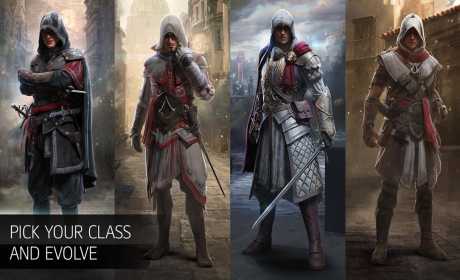
Finally, the most anticipated action RPG android game has arrived with mod apk and great graphics as usual. The Assassins Creed Identity Mod Apk comes with all free human movements to give you the true feel of Role Playing Game on your android. https://image.revdl.com/2016/assassin-s-creed-identity-1.jpg https://image.revdl.com/2016/assassin-s-creed-identity-3.jpg Top Reviews Of Assassins Creed Identity Mod Apk • “the graphics look spectacular” cnet.com • “a proper bonafide Assassin’s Creed game” pocketgamer • “gorgeous graphics” phonearena.com Features Of Assassins Creed Identity Mod Apk - mod apk. - Assassins Creed Identity Mod Apk is online play. - Ability to customize your assassin - Evolve your assassin from novice to a master assassin - Freedom of movement for your assassin. - various control method with support for simple tap-to-move, dual virtual stick controls or with a gamepad. - requires android 4.1+ Download Assassin's Creed Identity Apk from the source, there are two download files. source http://www.legitstuffs.com/2016/05/assassins-creed-identity-mod-apk-download.html |
| Webmasters › Re: Blog Your Way To Success by henryobinna(m): 4:58pm On May 17, 2016 |
as the OP already said you don't need to be an expert to start blogging but you DEFINITELY need an expert to set up your blog for you. to get a professional blog set up for you quickly and get instant traffic check this thread https://www.nairaland.com/3078854/get-affordable-professional-blog-free |
| Phones › Top Amazing Benefits Rooting Your Android by henryobinna(op): 5:42am On May 16, 2016 |
This is not one of the usual sermons on rooting that you're already used to. While rooting is a nice thing to do once you get a new Android phone, it's not worth it if you don't have a definite reason to root your device or if you're not tech-savvy enough. The purpose of this post is to address the rooting without purpose thing. The question you'd want to ask is 'why do i need to root my android device?' if you googled that and go with any result other than this, you'd probably be told 'customization', that's what every 'root fanboy' would say. Customization is quite a broad word especially in this concept. In this post Amazing Benefits To Root Your Android, I'll show you why you should root and what you're customizing after rooting. 1. Flash A Custom ROM https://cdn.makeuseof.com/wp-content/uploads/2016/03/miui.png A custom ROM is a modified Android OS version, flashing a custom ROM is one of the top benefits/reasons why people root their android devices because it is arguably the easiest way to customize your Android as the ROM is already a modified and customize form of the stock Android OS. The top benefit of flashing a ROM is to get a newer and updated version of Android if you device didn't receive an update. For example, less than 3% of Android users actually got the Android 6.0 Marshmallow update, how then would the remaining users be able to get Marshmallow on their devices? there are two options only; root your device and flash a custom or Get Marshmallow Features On Older Older Devices. If you're using a top Android phone brand getting a custom ROM for your device is easier, just go to the XDA Developers Forum and for your device, else google the "name and model of your phone" + custom rom. 2. Enabling One-Hand Mode https://cdn.makeuseof.com/wp-content/uploads/2016/03/one-handed-mode.jpg I wrote a post on How To Enable One-Hand Typing check it out. If you're not just comfortable with enabling one hand mode just for typing, you might want need to root your device to be able to enable one-hand mode in the whole of your device. What is one-hand mode and why do you need it? Of recent among all flagships you hardly see any device with a display of 5.0" and below, rather you'd get a dozen 5.5" and above and the trend doesn't seem like it's coming to an end anytime soon. Personally, I don't like too large screen for phones(many of you also don't) and that's when enabling one-hand mode on your Android comes in handy. This tweak with the help of some apps shrinks the screen of your phone to one corner reachable by your thumb. The apps that helps you enable one-hand mode include One Hand Mode Enabler and One Hand Mode Xposed Mod(this requires Xposed Framework). 3. Gesture Controls https://cdn.makeuseof.com/wp-content/uploads/2016/03/gmd.jpg While, gesture control is not what most users really need, it makes your device cool. If you're cool and want your Android device cool as well, you might need the GMD GestureControl App. The GMD GestureControl App has a combination of pre-defined single and multi-finger gestures to do things like go back or open the app drawer. While, the app comes with pre-defined gesture controls you can still draw yours to suite you. 4. Thumb Friendly Control https://cdn.makeuseof.com/wp-content/uploads/2016/03/lmt.jpg A bit similar to the One-Hand Mode, but I think this is better since it doesn't shrink your screen and renders some part of your screen useless. What does the thumb friendly controls do? The thumb friendly controls through the help of LMT Launcher places a control panel shaped into a pie under your thumb. This pie-shaped control panel contains standard buttons to make navigating your Android device easier and hassle free. The buttons on this control panel can be reconfigured to do various things. 5. Tweak And Enhance Performance https://cdn.makeuseof.com/wp-content/uploads/2016/03/temperature.jpg Once, rooted you can tweak the hardware performance of your Android device. There are various ways to customize/tweak and enhance the hardware performance of your Android device. These includes flashing a custom kernel or installing third-party apps that'll enable you to enhance the performance of your Android device hardware like increase CPU clock speed. You could install any of these Kernel Adiutor or Device Control. There's also an app to tweak your device' display temperature the Cf.Lumen this feature also helps in saving battery life. To enhance and improve the quality of sound coming from your device speaker consider flashing Dolby Atmos Ported from Lenovo Android smartphones. 6. Customize The Navigation And Status Bars https://cdn.makeuseof.com/wp-content/uploads/2016/03/buttons.jpg There are quite a good number of customization you can apply to your Android device Navigation and Status bars, with GravityBox for Xposed you can redesign, reposition, hide and also change the colors of icons or any other stuff found at those bars. You can also install a useful app SoftKeyZ. You can also change the color of the navigation bar at the bottom of the screen, and with the app SoftKeyZ it’s even possible to change the navigation buttons themselves. 7. Change Boot Animation https://cdn.makeuseof.com/wp-content/uploads/2016/03/animations.jpg Changing the boot animation was once one of the top amazing benefits/reasons to root your Android especially during the earlier times but now it's not much fanciable to many, it's still a fun and nice thing to do in customizing your Android device after rooting. Before, changing your device' boot animation used to be relatively hard since it required you to go to the root folder which you may at the end mess things. Changing Android boot animation has become easy with the help of an app Boot Animations. 8. Try Out Other Emoji https://i.imgur.com/LRul3oO.png I wrote a post on How To Get New Android N check it out, same way I brought you the new Android N Human Like emoji is one of the amazing benefits of rooting. You can flash a emoji from other OS like iOS and also emoji from other Android device manufacturers. That's it on the amazing benefit of rooting your android. I couldn't post all the numerous download links inorder not to get banned, check out the source for the links. have any questions? don't hesitate to ask. source http://www.legitstuffs.com/2016/05/top-amazing-benefits-of-rooting-your-android-phone.html |
| Webmasters › Re: A Beginners Guide To Blogging - How To Start A Blog by henryobinna(m): 6:59am On May 15, 2016 |
why making fp now? better late than never. Are you an aspiring blogger, you have a great blog idea but don't have the technical know how to start? check out this thread and you'll be glad you did https://www.nairaland.com/3078854/get-affordable-professional-blog-free |
| Webmasters › Re: CAN YOU REBRAND OUR BLOG...? name your fee by henryobinna(m): 3:11pm On May 14, 2016 |
for cheap but professional blog with awesome perks check this thread https://www.nairaland.com/3078854/get-affordable-professional-blog-free |
| Webmasters › Re: BEST DEAL EVER!!! Professional Business Website/blog Design by henryobinna(m): 3:08pm On May 14, 2016 |
for cheap and professional blog check out this thread https://www.nairaland.com/3078854/get-affordable-professional-blog-free |
| Webmasters › Re: **save Time And Set Up Your Website In Less Than 30mins: Click And Get Material by henryobinna(m): 3:07pm On May 14, 2016 |
check out this thread foe cheap blog sites and free perks https://www.nairaland.com/3078854/get-affordable-professional-blog-free |
| Business › Re: How Chris Folayan Built Mall-For-Africa From His Bedroom by henryobinna(m): 6:45am On May 12, 2016 |
its nice to here of this but I don't know much about Mall For Africa. good luck to him 1 Like 1 Share |
| Webmasters › Re: 4 Things People Do Online That Freaks Me Out! by henryobinna(m): 6:37am On May 12, 2016 |
Crystalom3:hahaha, the One about download and redirecting(no 2 and no 3) is not there fault. most times those are caused by obtrusive advertising, pop under advertising. there might actually be an original download there but the moment you click on anywhere on your screen the click event triggers the ad codes. everybody hates broken download links |
| Phones › Re: Whatsapp Introduces A Desktop App For Windows And Mac by henryobinna(m): 10:30am On May 11, 2016 |
nice, but I don't think its necessary since it functions same way as the WhatsApp web, it would have better if it doesn't require your device to be on and connected. |
| Webmasters › Re: For A Fresher, What Can He Do To Earn A Blog? by henryobinna(m): 11:15pm On May 10, 2016 |
do you intend to kick start your blogging career? check out this thread for coaching, designing and guaranteed traffic https://www.nairaland.com/3078854/get-affordable-professional-blog-free |
| Webmasters › Re: Change.org Petition: Let Nigerians Receive Funds With Paypal by henryobinna(m): 4:47pm On May 10, 2016 |
honestly, I don't blame for not allowing Nigerians receive payments with their PayPal accounts and that's why I'm not signing any petition. you know why? there are too many fraudsters, criminals and all in Nigeria. the rate at which everybody wants to become a 'G guy' is annoying. I won't want to use my service to aid someone to defraud my country men/ brothers, that's exactly what PayPal is avoiding. y'all signing the petition should go advice your brothers/friends/associates to desist from getting involved in any and all forms of Internet scams especially targeting whites because this has painted all of us criminals. till then, I hope PayPal don't allow sh#t to happen cos most celebrate these 'G guys' thank you |
| Gaming › Re: Top Striker football - game launch by henryobinna(m): 7:00am On May 10, 2016 |
when done, if the game is nice you can submit to me for a free review on Legitstuffs.com but hope it won't be like that football game on SEGA from back in the day, cos that's what I'm seeing. anyway, goodluck 1 Like |
| Webmasters › Re: Pls How Can I Add Multiple Images On My Blog by henryobinna(m): 6:49am On May 10, 2016 |
if you're an aspiring blogger and want to start blogging with speed and guaranteed traffic, check out this thread https://www.nairaland.com/3078854/get-affordable-professional-blog-free |
| Webmasters › Re: 4 Factors That Can Kill Your Blogging Career - NCT by henryobinna(m): 7:16am On May 09, 2016 |
olafum1:check out this post https://www.nairaland.com/3078854/get-affordable-professional-blog-free, to start your blogging career with lots of free perks |
| Phones › How To Remove/uninstall Preinstalled Apps On Any Android Device by henryobinna(op): 5:53am On May 04, 2016 |
I know many of us are faced with the problem of finding it hard to uninstall virtually useless apps preinstalled in our phones by our networks/carriers and the device manufacturers this is because they make these apps appear as system apps. At the end of this short post you'll be able to uninstall any unwanted preinstalled apps on your android device. Requirements To Remove/Uninstall Pre-Installed Apps - root -android 2.1+ -an app System App Remover(ROOT) https://www.apps2apk.com/wp-content/uploads/2015/08/System-App-remover-Pro-v3.5.1009-Apk-2.jpg To be able to remove preinstalled apps on any android device your devices needs to be rooted and have the System App Remover apk installed. With the system app remover(root) app installed you'll be able to uninstall any preinstalled android app without the fear of uninstalling the important ones/system apps that are required, this is because system app remover(root) does a safe filtering to know what apps needs to be removed and not. https://crackedsoftwares.net/wp-content/uploads/2015/12/system_app_remover-970x546.jpg source http://www.legitstuffs.com/2016/05/how-remove-uninstall-preinstalled-system-apps-android.html |
| Gaming › Re: Finally, How To Unlock Fifa 14 Apk Offline Kickoff by henryobinna(op): 1:16pm On May 02, 2016 |
Baddestguyp:that was 'few years ago' right now unlocking fifa 14 has become a very thing to do that's why I even wrote on it. I won't have written it if the method you stated still works. and by the way, pre-unlocked fifa 14 apk don't work again. |
| Gaming › Re: Finally, How To Unlock Fifa 14 Apk Offline Kickoff by henryobinna(op): 9:36am On May 02, 2016 |
ricky8996:you're welcomed |
| Computers › Re: The Affordable $79 Android Mini Laptop PC That'll Change Computing by henryobinna(op): 8:35am On May 02, 2016 |
oblo:they're not similar, ad please don't use this thread to advertise what you want to sell. |
| Gaming › Re: Finally, How To Unlock Fifa 14 Apk Offline Kickoff by henryobinna(op): 4:57am On May 02, 2016 |
ricky8996:yes, if unlocked |
| Computers › Re: The Affordable $79 Android Mini Laptop PC That'll Change Computing by henryobinna(op): 2:21pm On May 01, 2016 |
menxer:it's not yet in the market but the company responsible for the Remix OS Jide Technology confirmed it'll be out. 1 Like |
| Computers › The Affordable $79 Android Mini Laptop PC That'll Change Computing by henryobinna(op): 2:00pm On May 01, 2016 |
The Affordable $79 Android Mini Laptop PC That'll Change Computing. https://techcabal.com/wp-content/uploads/2016/04/Screen-Shot-2016-04-26-at-11.37.44-AM.png Allwinner’s laptop sports an 11.6-inch display with a resolution of 1366×768, runs on a 64-bit, four core, ARM Cortex-A53 processor, has 1GB of RAM, and stores data on an 8GB SSD. All for $79 for the base model. They’ve also got a $99 model with a 14.1-inch screen, and a laptop-tablethybrid with an 11.6-inch touchscreen.As time goes on we'd be expecting more affordable inexpensive mobile laptop pcs probably running android with the help of Jide Technology's Remix OS. Source http://www.legitstuffs.com/2016/05/cheap-affordable-79-android-mini-laptop-running-remix-os.html |
| Webmasters › Get Your Affordable And Professional Blog With Free SEO And Guaranteed Traffic by henryobinna(op): 8:45pm On Apr 30, 2016*. Modified: 9:44am On Dec 30, 2018 |
Do you want to start earning online legitimately with a blog ? I bring you the easiest, most affordable and quickest way to get yourself an online estate and start earning like other professionals. With this I get to help you go online with your professionally designed blog. Here's what you get. -A custom designed blog -SEO optimised -custom .com domain -guaranteed 500-1000 page views from day one -Responsive design to drive more traffic from.google mobile search -some other resources to aid you and improve your traffic. All of these at a price of 15k, while I understand that not everyone is able to afford that amount, you may decide to forfeit some perks that come with the service but be rest assured you'll be getting nothing less than 500-1000 page views of daily traffic(from day one ) which is the back bone of every site . By forfeiting some perks the service becomes cheaper Interested ? call or text me on whatsapp using |
| Phones › Re: What You Need To Know About: Gprs, Edge, 3g, Hsdpa, Hspa+ And 4g (LTE). by henryobinna(m): 1:39pm On Apr 25, 2016 |
the fact that HSDPA+ supports a download speed of upto 168mb per seconds does not mean you'll get exactly that speed or even half of it. the reason you get lower speed or think your network is ripping of is because you forget to note that there's device limitation, most 3G/H/H+ modems out there have a maximum speed of 7.2mb per seconds, that being said, even if your network offers 1G per seconds with that modem of 7.2mb per seconds you'll never get past 7.2mb(actually, you won't even get the 7.2mb) same situation with mobile and smart phones too. and another effect is over load of users, too many users accessing the internet through a facility that's not enough. there are so many co considerations check before concluding about the speed of your ISP. |
| Gaming › Finally, How To Unlock Fifa 14 Apk Offline Kickoff by henryobinna(op): 6:54am On Apr 25, 2016*. Modified: 6:16am On Jul 11, 2017 |
In this post I'll be showing fellow fifa 14 apk players how to unlock the offline modes of the fifa 14 android game without any hassle and high rate of success. https://www.revdl.com/wp-content/uploads/2015/02/FIFA-14.jpg I know many of you have been looking for this so I'll go straight to the point. Requirements To Unlock FIFA 14 Apk Offline Play/Kick Off - Rooted android device-Lucky Patcher Apk(latest version would bepreferable) download Lucky Patche apkHERE -busy box installed(you don't necessarily need this as its lucky patcher that requestsfor it, so you can leave it out). -Fifa 14 Apk installed with data in appropriate folders .-And your patience(download links available at bottom of post).Before I proceed, the essence of unlocking is not to deliberately evade paying the unlock fee but because its now very hard to pay(even if you want) so unlocking the fifa 14 apk offline play/kick off is the best solution. How To Unlock Fifa 14 Apk Offline Play/Kick Off Free Make sure your fifa 14 apk and obb folder is appropriately installed. Download and install Lucky Patcher. After installing Lucky patcher launch it and tap on fifa 14 there's a list below it, tap on 'open menu of patches' then tap on ' Support patch for InApp And LVL emulation' A pop up comes with check boxes, just tap on ' apply' at the bottom waitr for it to finish then tap on 'launch' after the game has been launched, skip the first match you're giving to make things faster. At the main menu of fifa 14 tap on the 'play' tab and swipe to the locked modes you want to unlock(any one of them) then be sides the 'unlock' button are some figures (maybe money) just tap on the 'unlock' button then Lucky patcher would throw a pop up with check boxes just proceed and allow it to process/load after that you'd get an error message then close the game. At this point close the fifa 14 game and relaunch it and again and tap on the same 'play' tab and swipe to where you attempted unlocking the previous time and under the 'unlock' button is written 'check for existing purchase' tap on it and wait for it to process, after processing you'd get a successful message that you've successfully unlocked the fifa 14 apk for offline play. Congrats, for you've successfully unlocked your fifa 14 apk for offline play/kick off, manager mode and tournament mode. Any issues, don't hesitate to post it using the comment/reply option. Image illustration and download links are available at the source. Source: http://www.droidpost.com/2016/04/how-to-unlock-fifa-14-apk-offline.html |
| Gaming › Fifa Soccer: Prime Stars Download For Android by henryobinna(op): 8:39am On Apr 20, 2016 |
Fifa jas eventually joined in releasing their own mobile football manager app for android users. https://cdn.androidcommunity.com/wp-content/uploads/2016/04/FIFA-Soccer-Prime-Stars-Android-Game-752x485.jpg The Fifa soccer: prime stars is the soccer manager game for android gamers who love football manager apps to thrill them. Fifa Soccer: prime stars download FIFA Soccer: Prime Stars will be putting gamers in the manager’s seat of their teams, training players and winning matches. Speaking of teams, the five big European leagues are well-represented in the game – this includes the English Premier League, La Liga (Spain), Bundesliga(Germany), Serie A (Italy), and Ligue 1 (France). Players will start off with the current teams – and they are updated to the 2015-2016 rosters. You can eventually scout for other players that match the playing style you want. An interesting feature is that you can customize players with unique skills which can be earned by completing in-game challenges. https://cdn.androidcommunity.com/wp-content/uploads/2016/04/FIFA-Soccer-Prime-Stars-Android-Game-1.jpg Though the game is not available for download to everyone, you can still download it or wait till its officially released for global download. Source: http://www.legitstuffs.com/2016/04/fifa-soccer-prime-star-apk-download.html |




1 2 3 4 5 6 7 8 ... 83 84 85 86 87 88 89 90 91 (of 147 pages)