Vicotex's Posts
Nairaland Forum › Vicotex's Profile › Vicotex's Posts
1 2 3 4 5 6 7 8 ... 78 79 80 81 82 83 84 85 86 (of 95 pages)
 Sports › Re: Amodu Shuaibu Named NFF Technical Director by Vicotex(m): 5:41pm On Nov 20, 2014 Sports › Re: Amodu Shuaibu Named NFF Technical Director by Vicotex(m): 5:41pm On Nov 20, 2014 |
aiite, we don hear |
| Gaming › Re: Why Do Females Hate Video Games? by Vicotex(m): 2:31pm On Nov 20, 2014 |
bigiyaro:all the games wey i don end and cheats wey i don dey do since i dey play games i never consult ign na now wey we dey advance go 8th generation of gaming i go come dey seek their assistance? Tbh tellin me a gal ended GoW-GOD MODE is an unforgiveable lie |
| Computers › Re: (help) WINXP Black Screen Of Death/booting Loop by Vicotex(op): 6:08am On Nov 20, 2014 |
kenomobola:Wait a minute, when i entered my bios menu and choose advance bios. What i saw in the 1st boot order are: HDD.0 CD/DVD drive ZIP USB-HDD USB-ZIP USB-FDD FLOPPY. Which of the usb will i choose. i'm using Award Module bios v6.0 |
| Computers › Re: (help) WINXP Black Screen Of Death/booting Loop by Vicotex(op): 6:02am On Nov 20, 2014 |
kiddie:teach me how to format it |
| Gaming › Re: Why Do Females Hate Video Games? by Vicotex(m): 4:23pm On Nov 19, 2014 |
bigiyaro:chisos! Oga u dey lie pass satan himself. Na 1st class department dey wait you 4 hell. Tell me more lies i.e your GF dey use superman mode 4 GTA. I respect your lie sha 1 Like
|
| NYSC › Re: Is It Right For NYSC To Still Be Posting Corpers To The North? by Vicotex(m): 4:14pm On Nov 19, 2014 |
This shiit ain't right, especially this BH era |
| Celebrities › Re: Charlyboy Releases New Fierce Photos by Vicotex(m): 2:23pm On Nov 18, 2014 |
He's U.G.L.Y as fvck |
| Computers › How To Use Autoruns To Manage Startup Applications Inwindows by Vicotex(op): 7:26am On Nov 18, 2014*. Modified: 7:43am On Nov 18, 2014 |
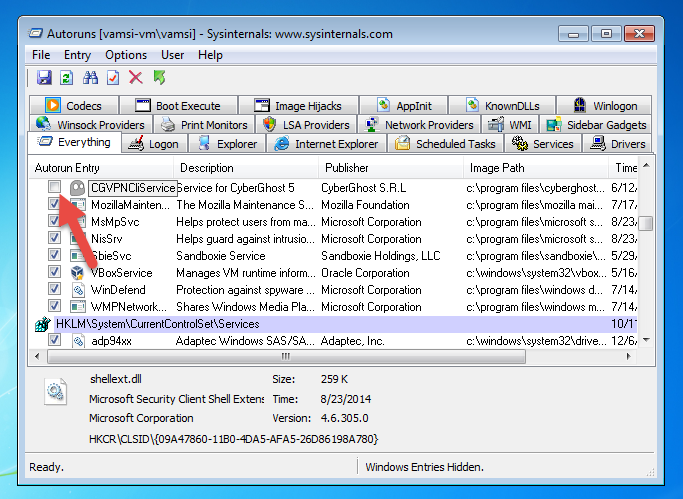
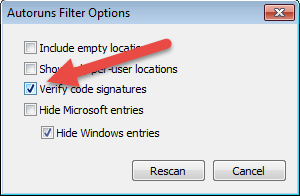
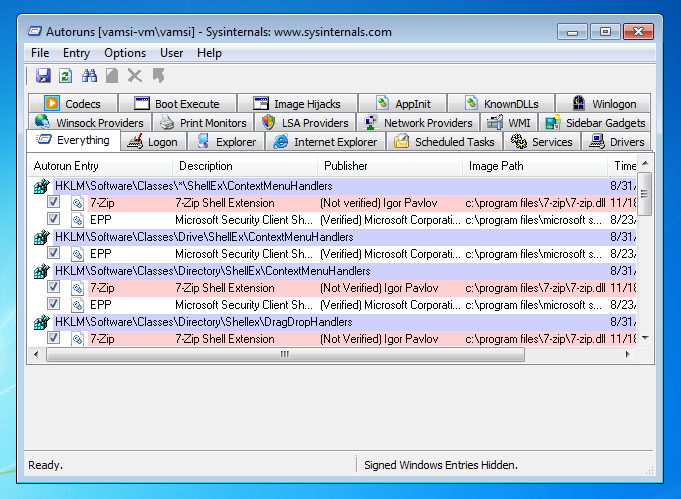
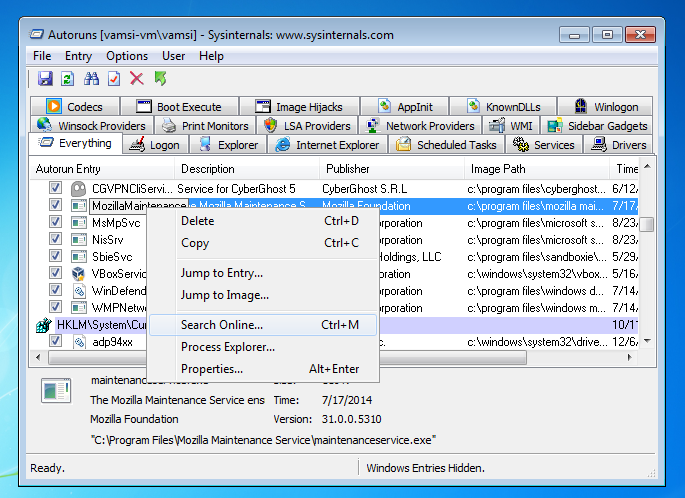
When your Windows take a long time to boot up and reach the Desktop, you will know that there are plenty of (useless) processes and startup applications running in the background. To deal with this, we tend to use the built-in Windows start-up manager or other third party tools like CCleaner. But these tools are usually fairly limited. In this article, we will show you how to use a powerful application like Autoruns to manage your Windows start up programs, processes and other entries. [size=5]What is Autoruns[/size] Autorun is an advanced start up manager which is a part of SysInternals package. It allows you to delve deep into the startup programs and shows almost all the programs that are loaded automatically at every startup. Due to the increased efficiency of the programs, developers are using different methods to load their programs at start up. These methods include, hooking their programs to services, scheduled tasks, system DLLs, helper objects, etc. Autoruns can display almost all the startup programs and processes, and because of this, it can also be used to clean infected PCs by removing the malicious startup items. [size=5]Using Autoruns in Windows[/size] Autoruns is a powerful tool, yet it is very simple to use. It is also a portable application, and you can start working with it without any need for installation. Just download and launch the application. To disable a startup item, all you have to do is to uncheck the check box next to the entry. For instance, here I have disabled a startup item related to CyberGhost as it is not needed at every startup. https://www.maketecheasier.com/wp-content/uploads/2014/09/autoruns-disable-startup-item.png One thing though, don’t get overwhelmed by all those tabs displayed in the Autoruns. Here is a basic rundown of some of the important tabs. Everything: The Everything tab in Autoruns lists all the programs and processes at one place regardless of their categories. [b]Logon: [/b]This tab displays all the programs and processes that are launched during login and log off. Usually, this is where you will find most of the startup programs. [b]Explorer: [/b]This tab displays all the Windows Explorer-related and add-on objects like shell extensions, explorer toolbars, active setup executions, shell execute hooks, etc. [b]Internet Explorer: [/b]The Internet Explorer tab contains all the add-on objects like IE toolbars, browser helper objects, etc. [b]Scheduled Tasks: [/b]If there are any programs that are scheduled to start up in Windows, then they are listed here. [b]Services: [/b]Any windows and third party services (like Chrome update, etc.) that are configured to load at boot time are listed here. [b]Drivers: [/b]All the Windows and kernel-mode drivers are listed here. You have to be very careful here. If you disable a necessary driver, your PC may not work as it should. [b]Boot Execute: [/b]Any programs (like chkdsk) that are configured to load at boot time are listed here. [b]Image Hijacks: [/b]Simply put, image hijacking is nothing but swapping one program for another. Generally, you shouldn’t see any entries in this tab. But if you see any suspicious entries then it is good to disable them. [b]AppInit: [/b]Here you will find all the digitally signed Application Initialization DLLs that are automatically loaded at the time of startup. KnownDLLs: [/b]This tab shows all the DLLs that are loaded into applications. Usually, you don’t have to worry about this unless you fear that your PC is infected. Apart from disabling the startup entries and browsing through the tabs, you can also verify the code signatures of all the entries. To verify code signatures, navigate to “Options” and then select “Filter Options.” This will open another window; select the radio button “Verify code signatures” and click on the “Rescan” button. https://www.maketecheasier.com/wp-content/uploads/2014/09/autoruns-verify-code-signatures.png Once you have done that, Autoruns will rescan all the startup entries to verify code signatures and will display them in colored entries. https://www.maketecheasier.com/wp-content/uploads/2014/09/autoruns-code-signatures.png Here is the what each color means: [b]Green: Green color is generally used to identify a startup item which isn’t there according to the previous known scan. Yellow: Yellow color is generally used to identify a start up item which no longer exists. Pink: Pink is used to identify the start up item with no code signatures or the publisher information. If you are not so sure about a particular startup item, you can just right click on it and select the option “Search Online” to get more details from the Internet. Also, by using the options like “Jump to Entry” and “Jump to Image,” you can know more about the registry entries and the program that is responsible for that startup item. https://www.maketecheasier.com/wp-content/uploads/2014/09/autoruns-right-click-options.png [size=5]Conclusion[/size] Autoruns is a powerful and feature-rich start up manager. Using the details provided by the Autoruns tool, you can effectively manage all the startup programs and it can also be used to find and clean any unwanted malware and junkware in your PC. In fact, it is a must have tool for any Windows power user. Source: www.naijaclux.ml/threads/how-to-use-autoruns-to-manage-startup-applications-in-windows.281/ |
| Computers › Re: (help) WINXP Black Screen Of Death/booting Loop by Vicotex(op): 10:48pm On Nov 17, 2014 |
kiddie:i'm thinking of porting from windows to linux (ubuntu) . Will it be possible for me to install the OS hence the desktop ain't booting winxp |
| Gaming › Re: PES 15 Fan Thread by Vicotex(m): 5:56pm On Nov 17, 2014 |
dmcdad:That means psp version is on the way. Plus i don't feel like to repair my xbox cos of pes15 |
| Gaming › Re: PES 15 Fan Thread by Vicotex(m): 4:47pm On Nov 17, 2014 |
kendrick93:i no know how much dem dey sell am 4 naija, cos my uncle by my own from Dubai |
| Gaming › Re: PES 15 Fan Thread by Vicotex(m): 3:46pm On Nov 17, 2014 |
Is it available on PSP/PSVITA? |
| Celebrities › Re: I Wish All My Children Came From One Woman – 2face Idibia by Vicotex(m): 9:34am On Nov 17, 2014 |
Na person say make you go Bleep different women?? 4 Likes |
| Family › Re: My Father Hates Me! by Vicotex(m): 9:33pm On Nov 15, 2014 |
My guy @ OP, those people ain't your true parents. During my Teenage years my dad use to hate me cos i don't get close to him as my sisters do. Beats me brutaly, left my head soak with blood, just cos i beat my younger for insulting me. But as time goes on things started changing when his friends started advicing him, tellin him that i'm his only son, he shouldn't be treating me like a rat that one day, imma make it big in the family and he too will benefit from it. Anyway go seek help from ur uncles/aunties, tell 'em to advice your parents |
| Business › Re: Trader Kills Customer During Pricing by Vicotex(m): 9:31am On Nov 14, 2014 |
In Nigeria you get owned when your are pricing out of your league
|
| Business › Re: Trader Kills Customer During Pricing by Vicotex(m): 9:29am On Nov 14, 2014 |
All in the name of MONEY 1 Like |
| Romance › Re: Some Facts About Men by Vicotex(m): 10:44pm On Nov 12, 2014 |
Teempakguy:Men also hate to be in the Friendzone |
| Politics › Re: Nigerian Ambassador Blasts US Refusal To Sell Arms by Vicotex(m): 6:33am On Nov 12, 2014 |
egift:na dsame rop tie u and these BH boys, no different #supporter of APC 1 Like |
| Politics › Re: Nigerian Ambassador Blasts US Refusal To Sell Arms by Vicotex(m): 6:23am On Nov 12, 2014 |
I know b4, those ppl no want our progress, na Ebolla cum dem deny our request not knowing that their own ebola case dey wait 4 front. Must we buy militrary Hardwares from them? Russian no dey sell again? Anyway Gej till 2K19 9 Likes 1 Share |
| TV/Movies › Re: Naruto Information by Vicotex(m): 11:27pm On Nov 11, 2014 |
Baddestguyp:that level of power doesnt last long for ichigo, thar can go jesus mode |
| TV/Movies › Re: Naruto Information by Vicotex(m): 1:32pm On Nov 11, 2014 |
pickabeau1:i read the whole shit, you were talk 'bout madara been bodied by the shinobi, when the 3 Top dogs (Gai, Nado and Sauce) couldn't terminate him |
| Politics › Re: 2015: CNN Rejects Political Adverts From Nigeria by Vicotex(m): 1:28pm On Nov 11, 2014 |
ttmacoy:mumu, na CNN kill them? |
| Politics › Re: 2015: CNN Rejects Political Adverts From Nigeria by Vicotex(m): 1:26pm On Nov 11, 2014 |
Weda CNN like am or not, GEJ till 2019 2 Likes |
| Politics › Re: Northern Governors To Collaborate With FG To Defeat Boko Haram [waking Up] by Vicotex(m): 12:54pm On Nov 11, 2014 |
Ahmeduana:oga who tell you dis one? |
| Politics › Re: Northern Governors To Collaborate With FG To Defeat Boko Haram [waking Up] by Vicotex(m): 12:52pm On Nov 11, 2014 |
Where is BARCANISTA  I no tell una say this guy na suspect b4
|
| TV/Movies › Re: Naruto Information by Vicotex(m): 12:44pm On Nov 11, 2014 |
pickabeau1:when did the shinobi defeated madara? Madara that was running the game after he attained his 2nd eye and absorbed shinju tree was been defeated by shinobi? Tbh you don't even understand what you read, madara was on a different level from naruto and co till he got backstabed by Black zetsu |
| TV/Movies › Re: Naruto Information by Vicotex(m): 12:40pm On Nov 11, 2014 |
Baddestguyp:ichigo can't use that form fo 30 mins, but he can use mugetsu up to 10mins. TBH he can't even kill that lil fucker called aizen |
| TV/Movies › Re: Naruto Information by Vicotex(m): 12:38pm On Nov 11, 2014 |
GRIMMJOE:i never said ichigo is dead, what i said was, grimjow is dead |
| TV/Movies › Re: Naruto Information by Vicotex(m): 7:18pm On Nov 10, 2014 |
nani667:my favourite character in blaech are Ichigo and Ulquora, after they died i started drifting away from the series. Have your read "bastard"? That manga is too advance. What 'bout "Mercenary Maruhan"? This is another great manga. Try and read any of them you will love it |
| TV/Movies › Re: Naruto Information by Vicotex(m): 5:45pm On Nov 09, 2014 |
kimco:I've ended the manga |


1 2 3 4 5 6 7 8 ... 78 79 80 81 82 83 84 85 86 (of 95 pages)