Yinksdavid's Posts
Nairaland Forum › Yinksdavid's Profile › Yinksdavid's Posts
1 2 3 4 5 6 7 8 9 10 11 12 (of 19 pages)
 Education › Re: The Onion Patch – Best Dark Web Websites You Shouldn’t Miss by Yinksdavid(op): 10:24pm On Nov 01, 2021 Education › Re: The Onion Patch – Best Dark Web Websites You Shouldn’t Miss by Yinksdavid(op): 10:24pm On Nov 01, 2021 |
ogkrakkid:Alright oooo, you can waybill it if we are far apart. 1 Like |
| Education › Re: The Onion Patch – Best Dark Web Websites You Shouldn’t Miss by Yinksdavid(op): 10:24pm On Nov 01, 2021 |
ifex370:Thanks, I will be expecting my beer |
| Romance › Re: Make A Wish For The Month Of November by Yinksdavid(m): 12:47pm On Nov 01, 2021 |
Mood11:I wish for more booming business, financial breakthrough and career elevation. |
| Nairaland General › Re: This Is How Nigerian Entrepreneurs Can Increase Sales In This Harsh Economy by Yinksdavid(m): 12:10pm On Nov 01, 2021 |
akthedream2020:Yes any kind of business can survive even within the harshest economies. Depends on the services and solutions you are offering. 1 Like |
| Romance › Re: Make A Wish For The Month Of November by Yinksdavid(m): 12:09pm On Nov 01, 2021 |
Enddy50ty:Sure you can with commitment, determination, positive mindset and Hardwork. I will also chip in the spiritual part because its very important due to the nature of our environment. You must be spiritually strong in your faith. 1 Like |
| Education › The Onion Patch – Best Dark Web Websites You Shouldn’t Miss by Yinksdavid(op): 9:19pm On Oct 31, 2021 |
In this sequel, I’m going to show you some of the not-so-clear-web’s hidden Easter eggs and how to get there. So, without delay, let’s step into the onion patch aka the best 14 dark web websites. About Onion(s) and the Dark Web In case you overlooked this aspect, dark web websites can’t be accessed through ‘regular’ URLs. Skipping the technical aspects, dark web navigation leverages onion links instead of geolocational TLDs (Top-Level Domains). This serves two purposes: website IP concealment and maintaining the user’s anonymity. So, your typical onion link should look something like this: https://daves-caves.onion, whereas a ‘clear web’ link would look more like this: https://youtube.com. If you fancy a read about the differences between clear-, deep-, and dark web(s), you should check my article on " What is Dark Web" A little refresher on the dark web – it’s like a gathering house, where all sorts of people congregate. Some are looking for whitepapers that would otherwise be inaccessible through the clear web (i.e. behind a very tall and expensive paywall), others for a chat with complete strangers, and yes, some would even peddle their ill-gotten booty or plotting world domination. Hackers, both white- and black-hat, can also be found scouring the depths of the dark web for things like malicious code, special hacking tools, victims, and more. Need to know: the web of darkness is a smorgasbord of info and people. Besides, if you’re having trouble finding something on the clear, you’ll definitely find it in the…shadows. With these in mind, let’s take a closer look at the dark web websites rundown. Best Dark Web Websites 1. Sci-Hub Don’t let the name fool you. Sci-Hub has nothing to do with science-fiction literature, but with science itself. The first website on our list is, allegedly, the largest repositories of scientific papers on the dark web. In other words, it’s the dark web’s version of ScienceDirect. Careful though, because many ‘users’ reported malicious links and redirects while perusing Sci-Hub. Sci-Hub (last working) link: http://scihub22266oqcxt.onion/ 2. ZeroBin Want to feel just like a secret agent? Try ZeroBin, a covert, dark web-based, communication platform that allows you to send media and text messages to your confederate. Why the secret agent vibe? ZeroBin has a cool autodestruct feature that makes the message go kaboom (not literally) after the recipient reads it. ZeroBin (last working) link: http://zerobinqmdqd236y.onion/ 3. Impreza Hosting If you’re the industrious type, you should consider launching your very own dark web website; tons of opportunities out there and, if you play by the book, no one’s going to come and break your front door. As the name suggests, Impreza Hosting is a (dark) web hosting service that provides all sorts of goodies such as domain names, host email services, and even servers for rent. Impreza Hosting (last working) link: http://v7avmdv2l6dio3cg.onion/ 4. Dark Lair From Flickr to Facebook posthaste – that would be an accurate description of Dark Lair, an image hosting platform turned social media. Dark Lair allows you to post comments, share music, upload photos, message your dark web ‘friends’, and everything in between. Dark Lair (last working) link: http://vrimutd6so6a565x.onion/index.php/Board 5. Comic Book Lib When was the last time you enjoyed a good comic book? Doesn’t matter whether you’re team Marvel or DC, you’ll certainly enjoy the dark web Comic Book Library, a database containing thousands of downloadable funny almanacs. Enjoy! Comic Book Library (last working) link: http://r6rfy5zlifbsiiym.onion/ 6. Deep Web Radio Music streaming on the dark web – what could go wrong? Absolutely nothing; Deep Web Radio is all about tunes and enriching your dark web experience. So, hook up those headphones to your laptop, choose a radio station, and browse away. Deep Web Radio (last working) link: http://76qugh5bey5gum7l.onion/ 7. Hidden Answers Hidden Answers is the dark web version of Reddit or Quora and, in essence, works just like its clear web peers. What can you find while exploring Hidden Answers? Depends very much on the topic: marriage advice, trauma Q&As, hacking, literature, and much more. Have a question in mind? Hop on Hidden Answers and ask away. Hidden Answers (last working) link: http://answerszuvs3gg2l64e6hmnryudl5zgrmwm3vh65hzszdghblddvfiqd.onion/ 8.Daniel Before Hidden Wiki is Daniel, a ‘dark web websites’ aggregator that can help you navigate the onion maze. Daniel regularly crawls the dark web searching for new websites or checking the status(es) of other websites. Should one choose Daniel over the Hidden Wiki? Definitely yes, especially if this is your first time on the dark web. Hidden Wiki, although comprehensive, contains some very disturbing and very illegal info. Daniel (last working) link: http://danielas3rtn54uwmofdo3x2bsdifr47huasnmbgqzfrec5ubupvtpid.onion/ 9. Numbers Station It’s hard to say what exactly is Numbers Station. I can tell you what it’s not – a digestible dark web website. The site is eerily empty: pitch black background, no buttons, menus, or text; just a floating seek bar, with a play button. Once you hit ‘Play’, your ears will be flooded with whispering, shrieks, words muttered in unrecognizable dialects, and garbled voices. Nightmare fuel, yes, but nothing supernatural about them. It’s alleged that the strange noises and voices are actually coded messages, probably sent by secret operatives. Whether that statement is actually true, remains to be seen; the proverbial grain of salt. Numbers Station kind of reminds me of “Just Scream, Baby”, a clear web website where you can record your own scream or listen to other people’s screams. Numbers Station (last working) link: http://tutdwuh7mlji5we3.onion 10. Tunnels I have to admit to having a soft spot for Tunnels, an onion website about underground “urban” exploration. Apart from having that “As above, so below” vibe, Tunnels is a great source of info for users who are into dark urban history. The website contains pictures and videos of various cavern-like structures, shafts, and possibly escape tunnels. The anonymous group behind Tunnels alleged that the materials were produced while exploring the forbidden tunnels, built underneath some of the most prestigious American Universities. No info is available on the explored institutions or how these sections can be accessed. I think it’s safe to say that these are unsanctioned exploits, all the more reason to boast them on the dark web. Tunnels (last working) links: http://62gs2n5ydnyffzfy.onion or http://74ypjqjwf6oejmax.onion 11.Imperial Library There’s a reason why this onion’s called the Imperial Library; with over downloadable 500,000 books and articles, this may be one of the largest digital libraries, period. Just be careful about the copyright infringement aspect. Imperial Library (last working) link: http://xfmro77i3lixucja.onion 12. Archive.today A time capsule for the entire Internet. Yes, you read that right – a dark web website that aims to preserve the Internet’s cultural and scientific heritage. Some things you can find here: snapshots dating back to the first version of Google, websites taken offline over the past decade, books, movies, Google anniversary animations, and more. Archive. today (last working) link: http://archivecaslytosk.onion/ 13. Hack-Rent-A-Hacker It takes time to master the fine art of (white-hat) hacking. Still, if you hear the call of the dark side and have neither the drive nor the expertise to hack your way into a computer, you can hire a professional hacker from this little website. Hack-Rent-A-Hacker boasts affordable prices, discretion, professionalism, and everything you may want to hear when doing business with an individual. Apparently, Hack-Rent-A-Hacker’s most popular ‘service’ is Facebook account hacking – figures! Anyway, if you’re in this sort of thing, someone can help you get inside a Facebook account for 250 euros. It goes without saying that I do not advise you to seek this sort of service. Hack-Rent-A-Hacker (last working) link: http://2ogmrlfzdthnwkez.onion/ 14. The Campfire No marshmallows, logs, tents or mulled wine here – just a virtual, IRC-based, gathering place where you can chat with anyone in the world. All you need to do is select a room, say “hi!” and enjoy yourself. The Campfire (last working) link: http://campfireagz2uf22.onion/ Additional Dark Web Tips Here are some things to keep in mind while browsing your favorite dark web websites. Use a VPN and dedicated onion browser. See my previous article if you need help on setting up Tor and a VPN. Use common sense. I advise you to stick to these websites while browsing the dark web. Venturing further down the rabbit hole may land you in a heap of trouble. Endpoint protection. Safeguard your endpoint against the endless host of dark web malware. I would recommend Heimdal™ Next-Gen Antivirus for ‘boots on the ground’ protection and Heimdal™ Threat Prevention – Network for DNS filtering. A combo that will save your endpoint and skin. Wrap-up Here are the best 14 best dark web websites you should check out. Of course, if you have any more suggestions, drop a line in the comments section, and I’ll add them to the article. Stay safe out there and don’t forget to subscribe! 11 Likes 2 Shares |
| Education › Re: How To Get On The Dark Web: A Step-by-step Guide by Yinksdavid(op): 7:02pm On Oct 31, 2021 |
ozome15:Some of the main advantages of using a Dark web are User anonymity. Virtually untraceable services and sites. Ability to take illegal actions for both users and providers. 3 Likes |
| Career › Re: Learn Microsoft Azure by Yinksdavid(op): 7:00pm On Oct 31, 2021 |
folash:Yes it is still on. |
| Computers › Re: Post Your Computer (PC) Troubles Here. by Yinksdavid(m): 6:46pm On Oct 31, 2021 |
Gwg002:it’s likely that you have turned on the NumLock feature that many laptops have. The NumLock feature is used to convert part of the main keyboard to act as a (slightly skewed) numeric keypad rather than letters. NumLock is rarely used for its original purpose, and ends up confusing the user if it has for some reason been activated without the user being aware of this. This can be more of an issue on most laptop computers, since activating the NumLock function typically requires use of the Fn key and if a user accidentally switches it on they may have no idea how to switch it off. How to Turn Off NumLock Feature? Find the NumLock key and press it to reverse things and set it back to normal. On my Dell it’s Fn + F4, on my Compaq it’s Fn + ScrLk. It’s different on every make and model. Based on your keyboard you can get original settings of your keyboard in following ways. Fn + F11 Shift + Num Lock Fn + Num Lock Fn + F11 + Scroll lock Fn + F8 (on HP laptop) Ctrl + F11 Fn + Shift + Num Lock Some keyboards have and don’t have the Num Lock key. If there is then just press the Num Lock or NmLk key. Sometimes you have to hold the Fn button with the Num Lock key. If there is no Num Lock key on your keyboard then just follow these steps: START -> ALL PROGRAMS -> ACCESSORIES -> ACCESSIBILITY -> ON-SCREEN KEYBOARD -> NLK. Find the correct key combination on your laptop and your problem should be solved. If you still can’t log in to Windows, you can use the Reset Windows Password utility to remove your administrator/user password so you can then log on your computer without typing a password. After getting into Windows, you can turn off NumLock feature easier. 1 Like |
| Education › How To Get On The Dark Web: A Step-by-step Guide by Yinksdavid(op): 6:30pm On Oct 31, 2021 |
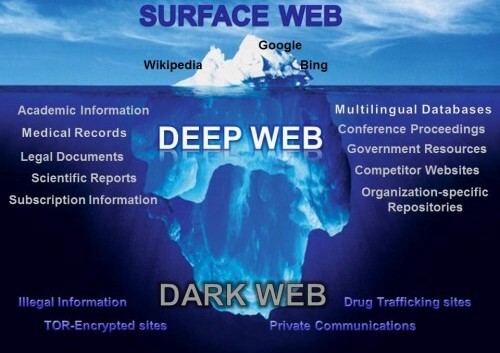
The dark web is the hidden collective of internet sites only accessible by a specialized web browser. It is used for keeping internet activity anonymous and private, which can be helpful in both legal and illegal applications. While some use it to evade government censorship, it has also been known to be utilized for highly illegal activity. What is the dark web, deep web, and surface web? The Internet is sizable with millions of web pages, databases, and servers all run 24 hours a day. But the so-called "visible" Internet (aka surface web or open web) — sites that can be found using search engines like Google and Yahoo — is just the tip of the iceberg. There are several terms surrounding the non-visible Web, but it's worth knowing how they differ if you're planning to browse off the beaten path. THE SURFACE WEB OR OPEN WEB: is the “visible” surface layer. All commonly public-facing websites accessed via traditional browsers like Google Chrome, Internet Explorer, and Firefox are contained here. Websites are usually labeled with registry operators like “.com” and “.org” and can be easily located with popular search engines. Locating surface web websites is possible because search engines can index the web via visible links (a process called “crawling” due to the search engine traveling the web like a spider). THE DEEP WEB : rests below the surface and accounts for approximately 90% of all websites. Carrying on with the analogy, big search engines could be considered like fishing boats that can only "catch" websites close to the surface. Everything else, from academic journals to private databases and more illicit content, is out of reach. This deep web also includes the portion that we know as the dark web. Some of the largest parts of the deep web include: Databases: both public and privately protected file collections that are not connected to other areas of the web, only to be searched within the database itself. Intranet : internal networks for enterprises, governments, and educational facilities used to communicate and control aspects privately within their organizations. In case you’re wondering how to access the deep web, chances are you already use it daily. The term "deep web" refers to all web pages that that are unidentifiable by search engines. Deep web sites may be concealed behind passwords or other security walls, while others simply tell search engines to not “crawl” them. Without visible links, these pages are more hidden for various reasons. THE DARK WEB : refers to sites that are not indexed and only accessible via specialized web browsers. The dark web, however, is a very concealed portion of the deep web that few will ever interact with or even see. In other words, the deep web covers everything under the surface that's still accessible with the right software, including the dark web. Breaking down the construction of the dark web reveals a few key layers that make it an anonymous haven: No webpage indexing by surface web search engines. Google and other popular search tools cannot discover or display results for pages within the dark web. “Virtual traffic tunnels” via a randomized network infrastructure. Inaccessible by traditional browsers due to its unique registry operator. Also, it's further hidden by various network security measures like firewalls and encryption. https://heimdalsecurity.com/blog/wp-content/uploads/final-version.jpeg How to access the dark web The dark web was once the province of hackers, law enforcement officers, and cybercriminals. However, new technology like encryption and the anonymization browser software, Tor, now makes it possible for anyone to dive dark if they're interested. Tor (“The Onion Routing” project) network browser provides users access to visit websites with the “. onion” registry operator. This browser is a service originally developed in the latter part of the 1990s by the United States Naval Research Laboratory. Understanding that the nature of the internet meant a lack of privacy, an early version of Tor was created to hide spy communications. Eventually, the framework was repurposed and has since been made public in the form of the browser we know today. Anyone can download it free of charge. Think of Tor as a web browser like Google Chrome or Firefox. Notably, instead of taking the most direct route between your computer and the deep parts of the web, the Tor browser uses a random path of encrypted servers known as "nodes." This allows users to connect to the deep web without fear of their actions being tracked or their browser history being exposed. Sites on the deep web also use Tor (or similar software such as I2P, the “Invisible Internet Project”) to remain anonymous, meaning you won't be able to find out who's running them or where they're being hosted. Is it illegal to go on the dark web? Simply put, no it is not illegal to access the dark web. In fact, some uses are perfectly legal and support the value of the “dark web.” On the dark web, users can seek out three clear benefits from its use: User anonymity Virtually untraceable services and sites Ability to take illegal actions for both users and providers As such, the dark web has attracted many parties who would otherwise be endangered by revealing their identities online. Abuse and persecution victims, whistleblowers, and political dissidents have been frequent users of these hidden sites. But of course, these benefits can be easily extended to those that want to act outside of the constraints of laws in other explicitly illegal ways. When viewed through this lens, the dark web’s legality is based on how you as a user engage with it. You might fall to the wayside of legal lines for many reasons that are important for the protection of freedom. Others may act in ways that are illegal for the protection and safety of others. Let’s unpack both of these concepts in terms of the “dark web browser” and the websites themselves. Is It Illegal to Access the Deep Web or the Dark Web? In short, no, it is not illegal to go browsing on a non-indexed page. Or to use a high-privacy like Tor, traditionally associated with browsing the deep web and dark web.In fact, part of the deep web might include your old blog from 10 years ago which search engines fail to index because it’s very old and devoid of content. Seems pretty harmless, right? The privacy offered by the Tor browser is important in the current digital age. Corporations and governing bodies alike currently participate in unauthorized surveillance of online activity. Some simply don't want government agencies or even Internet Service Providers (ISPs) to know what they're looking at online, while others have little choice. Users in countries with strict access and user laws are often prevented from accessing even public sites unless they use Tor clients and virtual private networks (VPNs). However, you can still take illegal actions within Tor that could incriminate you regardless of the browser’s legality i.e what is illegal is not just to access and browse the overlay networks called the deep web or dark web, but to look into illegal services sold on these networks. Or to attempt to hack things without permission. . You could easily use Tor in an attempt to pirate copyrighted content from the deep web, share illegal pornography, or engage in cyber terrorism. Using a legal browser will not make your actions fall to the right side of the law. Still, you should note that accessing the dark web without plenty of cybersecurity precautions can be dangerous for a layman. It can expose you to various dangers, which I’ll elaborate on below. If you absolutely must satisfy your curiosity on this, I will follow up with a guide on how to access the deep/dark web soon. Are sites on the dark web illegal to use and visit? On the network end, the dark web is a bit more of a grey area. The use of the dark web usually means that you are attempting to engage in activity that you could not otherwise carry out in the public eye. For government critics and other outspoken advocates, they may fear backlash if their real identities were discovered. For those who have endured harm at the hands of others, they may not want their attackers to discover their conversations about the event. If an activity is deemed illegal by the governing bodies you fall under, then it would be illegal. That said, anonymity comes with a dark side since criminals and malicious hackers also prefer to operate in the shadows. For example, cyberattacks and trafficking are activities that the participants know will be incriminating. They take these actions to the dark web to hide for this reason. Ultimately, simply browsing these spaces is not illegal but can be an issue for you. While it is not illegal as a whole, unsavory activity does live in many parts of the dark web. It can expose you to unnecessary risks if you are not careful or an advanced, computer savvy user aware of its threats. So, what is the dark web used for when it’s used for illegal activity? What Are the Main Dangers of the Dark Web? Returning to cybersecurity issues, I need to stress that the dark web is a dangerous place, especially if you’re a non-technical person just looking to satisfy a curiosity. Don’t go snooping around there, or at least not without preparing. In the meantime, you should know that the dark web can pose dangers to your safety even if you don’t meddle in it. You know why? Because one of the most often transactioned goods on the dark web marketplaces is your data. There are tons and tons of gigabytes of leaked credentials and personal information for sale for hackers. That’s where hackers get their data for credential stuffing attacks, identity theft, and other shady business. 7 Tips for safe access to the dark web 1. Trust your intuition. To avoid being scammed, you’ll want to protect yourself with smart behavior on the web. Not everyone is who they seem. Staying safe requires that you watch who you talk to and where you visit. You should always take action to remove yourself from a situation if something doesn’t feel right. 2. Detach your online persona from real life. Your username, email address, “real name,” password, and even your credit card should never be used anywhere else in your life. Create brand-new throwaway accounts and identifiers for yourself if necessary. Acquire prepaid, unidentifiable debit cards before making any purchases. Do not use anything that could be used to identify you — whether online or in real life. 3. Employ active monitoring of identify and financial theft. Many online security services now offer identity protection for your safety. Be sure to take advantage of these tools if they are made available to you. 4. Explicitly avoid dark web file downloads. Fear of malware infection is significantly higher in the lawless territory that is the dark web. Real-time file scanning from an antivirus program can help you check any incoming files in case you do opt to download. 5. Disable ActiveX and Java in any available network settings. These frameworks are notorious for being probed and exploited by malicious parties. Since you are traveling through a network filled with said threats, you’ll want to avoid this risk. 6. Use a secondary non-admin local user account for all daily activities. The native account on most computers will have full administrative permissions by default. Most malware must take advantage of this to execute its functions. As such, you can slow or halt the progress of exploitation by limiting the account in-use to strict privileges. 7. Always restrict access to your Tor-enabled device. Protect your children or other family members so they aren't at risk of stumbling across something no one should ever see. Visit the Deep Web if you're interested, but don't let kids anywhere near it. I will put together a list of best websites on the dark web in my next write up. 13 Likes 4 Shares |
| Education › 10 Reasons Your CV Is Hindering You From Getting A Job by Yinksdavid(op): 7:39pm On Oct 28, 2021 |
• Personal information - Often, a professional resume does not include race or ethnicity, religion, gender, sexual orientation, disability, age, marital status, or children. • Poor formatting- A HR manager pays attention to the format before reading a single word on your resume. With many resumes, the problem is that there is no format to look at. • Objective statement at the top The objective should always come first after the personal information, it is the summary of why you want the job and will trigger the HR manager to read your CV. • Irrelevant skills or core competencies- Always tailor the skills you include on your resume to those that were included in the initial job posting as simple as this seems, a lot of people tend to miss out on this. • Not tailored information- To increase your chances to get noticed and stand out for an interview, you should specifically modify a professional resume according to the job description respectively. For those that have worked in many different job roles, you can consider minimizing certain parts of your work history that are not relevant to the role you're applying for. • Employment gaps- Bridge in employment like Additional education, health reasons, and other personal reasons should be properly explained in your resume and expanded in your cover letter to satisfy the curiosity of the HR manager. • Absence of keywords- There are certain keywords HR manager and recruitment bot tend to spot out that highlights your strength and value once it's missing, the message won't be passed across. Be sure to review the initial job posting for specific keywords you can add to your resume. • Using too many clichés like result-driven, motivated, ability to work under pressure e.t.c has been overused and tends to serve as a turnoff to HRs. • Spelling mistakes Modern applicant tracking systems are trained to shortlist such candidates grammatical errors and other similar issues likewise it does not prove your expertise and professionalism. Your resume or cover letter is your reflection as a professional. • References upon request- This phrase often serves as a whole red flag for many HR managers. |
| Computers › Re: Windows 10 Problems And Solutions (official Microsoft Windows 10 links added) by Yinksdavid(m): 4:32pm On Oct 27, 2021 |
shogsman:You will get some steps via google but the below should help as well. https://www.makeuseof.com/tag/4-tips-fix-blue-screen-error/ |
| Computers › Re: Post Your Computer (PC) Troubles Here. by Yinksdavid(m): 4:26pm On Oct 27, 2021 |
adibo:What Windows OS are you using. Below is the link to resolve the issue for windows 10 https://www.laptopmag.com/uk/articles/fix-0xc0000034-error-windows-10 |
| Programming › Re: I Want To Learn Programming. Which Language Should I Start With? by Yinksdavid(m): 4:24pm On Oct 27, 2021 |
Idamond:Sent. |
| Education › The Easy Way To Install Windows 11 On Unsupported Cpus by Yinksdavid(op): 3:42pm On Oct 24, 2021 |
It turns out there’s a dramatically easier way to install Windows 11 on computers with older CPUs — with no need to reformat your drive, erase your files, or even burn the ISO to an external USB drive. If you’re currently seeing “This PC doesn’t currently meet Windows 11 system requirements” or “The processor isn’t currently supported for Windows 11,” there’s a Microsoft-approved registry hack that should instantly make it better. ( I have tested this method working on a Dell XPS 15 with Core i7-7700HQ and a Microsoft Surface Go with Pentium Gold 4415Y, neither of which are on Microsoft’s compatibility list.) 1. DOWNLOAD THE WINDOWS 11 ISO You’ll need to download the ISO. First of all, go to the Microsoft website to officially download the Windows 11. Scroll down to Download Windows 11 Disk Image (ISO). Open the Select Download dropdown, pick Windows 11, hit the Download button, select your product language from the Choose one dropdown that appears below, hit Confirm, then click 64-bit Download. 2. EDIT THE WINDOWS REGISTRY TO BYPASS THE CPU CHECK In Windows, hit Start and type regedit, then hit enter to launch the Registry Editor. Navigate to Computer\HKEY_LOCAL_MACHINE\SYSTEM\Setup\MoSetup, either by pasting that whole address into the box just beneath “File, Edit, View, Favorites, Help” or by drilling down through the HKEY_LOCAL_MACHINE and System and Setup [/b]and [b]MoSetup folders one at a time. n the right pane, right-click and pick New > DWORD (32-bit) Value. Name the value “AllowUpgradesWithUnsupportedTPMOrCPU” minus the quotes. Double-click on the new value you created, and enter 1 into the Value data field. Hit OK and close the registry editor. 3. OPEN THE ISO IN WINDOWS EXPLORER AND LAUNCH SETUP Did the ISO finish downloading? Just right-click on it and pick Open with > Windows Explorer to mount the virtual disc, then double-click the setup file to begin installation.
|
| Computers › Re: Post Your Computer (PC) Troubles Here. by Yinksdavid(m): 11:50pm On Oct 22, 2021 |
Smartlight:Below are the steps required 1. Back up all of your important documents, apps, and data 2. Head over to Microsoft’s Windows 10 download site 3. In the Create Windows 10 installation media section, select “Download tool now,” and run the app 4. When prompted, choose “Upgrade this PC now.” 5. You’ll then be asked whether you want to keep your personal files or start fresh. Remember: starting fresh or keeping your files still means that all apps and settings will be deleted for the Windows 10 upgrade. 6. Once the upgrade is complete, you should receive a digital license for Windows 10, which can be found under Settings > Update & Security > Activation. 2 Likes
|
| Computers › Re: Windows 11 Features And Everything You Need To Know Part 1 by Yinksdavid(op): 3:36pm On Oct 22, 2021 |
Do you want your OS environment and apps to respond quicker and run faster? Do you want to always get the newest security updates, patches to restrict easy access of viruses, malwares, spywares affecting your OS environment? Do you want to get critical updates to improve all app functions on your environment Do you want to have personalization settings unblocked? Do you want to have free support from MS Agent? Kindly check if your Windows OS is activated and if not, ensure you get a valid activation/license key as this will save you the stress of resolving issues on your system by paying technicians all the time for OS related issues. Genuine and Legitimate Activation/License retail keys directly from Microsoft available at a very low cost. kindly reach out via my signature for more details. Microsoft Exchange Server 2016 (Standard and Enterprise Edition) Microsoft Exchange Server 2019 (Standard and Enterprise Edition) Office 2013 Office 2016 Office 2019 Professional Plus Office 2021 Professional Plus Microsoft 365 - Project Professional 2019 - Office Home and Business 2019 - Visio Professional 2019 - Office Professional Plus 2019 Office Home and Business 2016 for Mac Office Home and Business 2019 for Mac Office Professional Plus 2016 Office Professional Plus 2019 SharePoint Server 2019 (Standard and Enterprise) Visual Studio Enterprise 2017 Visual Studio Enterprise 2019 Visual Studio 2017 for Mac Visual Studio 2019 for Mac Windows 10 Pro Plus Windows 10 Enterprise Windows 10 Pron N Windows 10 Education Windows 11 Pro Windows Server 2019 (Datacenter, Remote Desktop Services user connection(50) and Standard) |
| Education › Re: How To Recover Deleted Files In Windows 10 – Free by Yinksdavid(op): 3:35pm On Oct 22, 2021 |
Do you want your OS environment and apps to respond quicker and run faster? Do you want to always get the newest security updates, patches to restrict easy access of viruses, malwares, spywares affecting your OS environment? Do you want to get critical updates to improve all app functions on your environment Do you want to have personalization settings unblocked? Do you want to have free support from MS Agent? Kindly check if your Windows OS is activated and if not, ensure you get a valid activation/license key as this will save you the stress of resolving issues on your system by paying technicians all the time for OS related issues. Genuine and Legitimate Activation/License retail keys directly from Microsoft available at a very low cost. kindly reach out via my signature for more details. Microsoft Exchange Server 2016 (Standard and Enterprise Edition) Microsoft Exchange Server 2019 (Standard and Enterprise Edition) Office 2013 Office 2016 Office 2019 Professional Plus Office 2021 Professional Plus Microsoft 365 - Project Professional 2019 - Office Home and Business 2019 - Visio Professional 2019 - Office Professional Plus 2019 Office Home and Business 2016 for Mac Office Home and Business 2019 for Mac Office Professional Plus 2016 Office Professional Plus 2019 SharePoint Server 2019 (Standard and Enterprise) Visual Studio Enterprise 2017 Visual Studio Enterprise 2019 Visual Studio 2017 for Mac Visual Studio 2019 for Mac Windows 10 Pro Plus Windows 10 Enterprise Windows 10 Pron N Windows 10 Education Windows 11 Pro Windows Server 2019 (Datacenter, Remote Desktop Services user connection(50) and Standard) |
| Computers › Re: Ways To Reduce How Much Data Your Windows 10 PC Uses by Yinksdavid(op): 3:34pm On Oct 22, 2021 |
Do you want your OS environment and apps to respond quicker and run faster? Do you want to always get the newest security updates, patches to restrict easy access of viruses, malwares, spywares affecting your OS environment? Do you want to get critical updates to improve all app functions on your environment Do you want to have personalization settings unblocked? Do you want to have free support from MS Agent? Kindly check if your Windows OS is activated and if not, ensure you get a valid activation/license key as this will save you the stress of resolving issues on your system by paying technicians all the time for OS related issues. Genuine and Legitimate Activation/License retail keys directly from Microsoft available at a very low cost. kindly reach out via my signature for more details. Microsoft Exchange Server 2016 (Standard and Enterprise Edition) Microsoft Exchange Server 2019 (Standard and Enterprise Edition) Office 2013 Office 2016 Office 2019 Professional Plus Office 2021 Professional Plus Microsoft 365 - Project Professional 2019 - Office Home and Business 2019 - Visio Professional 2019 - Office Professional Plus 2019 Office Home and Business 2016 for Mac Office Home and Business 2019 for Mac Office Professional Plus 2016 Office Professional Plus 2019 SharePoint Server 2019 (Standard and Enterprise) Visual Studio Enterprise 2017 Visual Studio Enterprise 2019 Visual Studio 2017 for Mac Visual Studio 2019 for Mac Windows 10 Pro Plus Windows 10 Enterprise Windows 10 Pron N Windows 10 Education Windows 11 Pro Windows Server 2019 (Datacenter, Remote Desktop Services user connection(50) and Standard) |
| Education › Re: How To Restore Files From File History In Windows 10 by Yinksdavid(op): 3:32pm On Oct 22, 2021 |
Do you want your OS environment and apps to respond quicker and run faster? Do you want to always get the newest security updates, patches to restrict easy access of viruses, malwares, spywares affecting your OS environment? Do you want to get critical updates to improve all app functions on your environment Do you want to have personalization settings unblocked? Do you want to have free support from MS Agent? Kindly check if your Windows OS is activated and if not, ensure you get a valid activation/license key as this will save you the stress of resolving issues on your system by paying technicians all the time for OS related issues. Genuine and Legitimate Activation/License retail keys directly from Microsoft available at a very low cost. kindly reach out via my signature for more details. Microsoft Exchange Server 2016 (Standard and Enterprise Edition) Microsoft Exchange Server 2019 (Standard and Enterprise Edition) Office 2013 Office 2016 Office 2019 Professional Plus Office 2021 Professional Plus Microsoft 365 - Project Professional 2019 - Office Home and Business 2019 - Visio Professional 2019 - Office Professional Plus 2019 Office Home and Business 2016 for Mac Office Home and Business 2019 for Mac Office Professional Plus 2016 Office Professional Plus 2019 SharePoint Server 2019 (Standard and Enterprise) Visual Studio Enterprise 2017 Visual Studio Enterprise 2019 Visual Studio 2017 for Mac Visual Studio 2019 for Mac Windows 10 Pro Plus Windows 10 Enterprise Windows 10 Pron N Windows 10 Education Windows 11 Pro Windows Server 2019 (Datacenter, Remote Desktop Services user connection(50) and Standard) |
| Tech Jobs › Re: How To Get Free Support From Microsoft On Issues With Windows 10 OS by Yinksdavid(m): 3:31pm On Oct 22, 2021 |
Do you want your OS environment and apps to respond quicker and run faster? Do you want to always get the newest security updates, patches to restrict easy access of viruses, malwares, spywares affecting your OS environment? Do you want to get critical updates to improve all app functions on your environment Do you want to have personalization settings unblocked? Do you want to have free support from MS Agent? Kindly check if your Windows OS is activated and if not, ensure you get a valid activation/license key as this will save you the stress of resolving issues on your system by paying technicians all the time for OS related issues. Genuine and Legitimate Activation/License retail keys directly from Microsoft available at a very low cost. kindly reach out via my signature for more details. Microsoft Exchange Server 2016 (Standard and Enterprise Edition) Microsoft Exchange Server 2019 (Standard and Enterprise Edition) Office 2013 Office 2016 Office 2019 Professional Plus Office 2021 Professional Plus Microsoft 365 - Project Professional 2019 - Office Home and Business 2019 - Visio Professional 2019 - Office Professional Plus 2019 Office Home and Business 2016 for Mac Office Home and Business 2019 for Mac Office Professional Plus 2016 Office Professional Plus 2019 SharePoint Server 2019 (Standard and Enterprise) Visual Studio Enterprise 2017 Visual Studio Enterprise 2019 Visual Studio 2017 for Mac Visual Studio 2019 for Mac Windows 10 Pro Plus Windows 10 Enterprise Windows 10 Pron N Windows 10 Education Windows 11 Pro Windows Server 2019 (Datacenter, Remote Desktop Services user connection(50) and Standard) |
| Education › How To Restore Files From File History In Windows 10 by Yinksdavid(op): 1:58pm On Oct 21, 2021 |
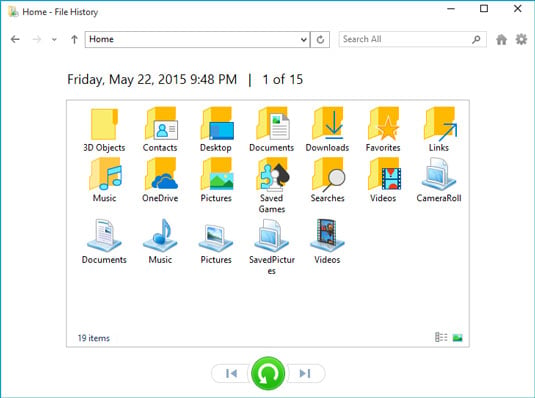
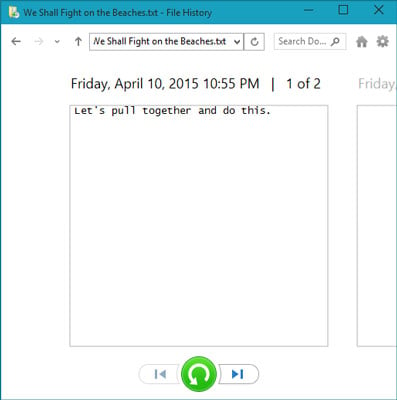
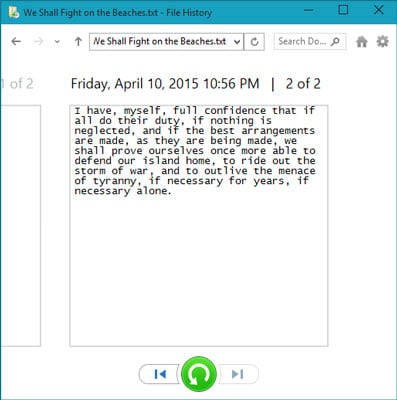
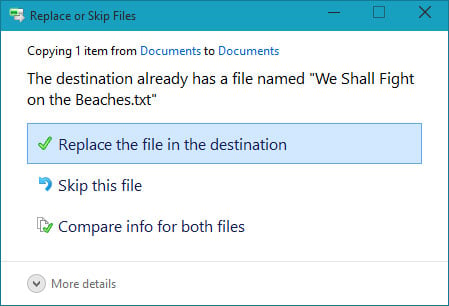
The Windows 10 backup program, File History, saves the files that you‘ve created. It doesn’t back up your apps and programs. After all, apps and programs can always be reinstalled. But many of the moments that inspired so many of your photos, videos, and documents can never be re-created. To keep your files safe, File History automatically makes a copy of every file in your Documents, Music, Photos, and Videos folders. It copies all the files on your desktop, as well. And File History automatically makes those copies every hour. File History makes your backups easy to see and restore, letting you flip through different versions of your files and folders, comparing them with your current versions. Should you find a better version, a press of a button brings that older version back to life. REMEMBER : File History doesn’t work until you turn it on, If you have not yet done that flip back a few chapters and turn it on now. The earlier you turn it on, the more backups you’ll have to choose from when you need them. To browse through your backed-up files and folders, restoring the ones you want, follow these steps: 1. Click the taskbar’s File Explorer icon (shown below) and then open the folder containing the items you’d like to retrieve. https://www.dummies.com/wp-content/uploads/484575.image0.jpg For example, click This PC in the folder’s left pane to see your most commonly used folders, Desktop, Downloads, Documents, Music, Pictures, and Videos. Open any folder by double-clicking its name. 2. Click the Home tab on the Ribbon atop your folder; then click the History button. https://www.dummies.com/wp-content/uploads/484577.image1.jpg Clicking the History button, shown here, fetches the File History program, shown in the following figure. The program looks much like a plain old folder. For example, the figure shows what happens if you click the History button in any folder and then click File History’s Home button: That button lets you see all of your backed up folders https://www.dummies.com/wp-content/uploads/484578.image2.jpg The File History program shows you what it has backed up: your main folders, your desktop, your contacts, and your favorite websites. Feel free to open the folders inside the File History window. You can also peek inside the files you find there to see their contents. 3. Choose what you’d like to restore. Point and click your way through the libraries, folders, and files until you spot the item or items you’d like to restore: Folder: To restore an entire folder, open it so you’re viewing its contents. Files: To restore a group of files, open the folder containing them, so the files’ icons are onscreen. One file: To restore an earlier version of a file, open that file from inside the File History window. File History displays that file’s contents. When you’ve found the file or folder you want to restore, move to the next step. 4. Move forward or backward in time to find the version you’d like to restore. To browse through different versions of what you’re currently viewing, choose the left-pointing arrow along the bottom, as shown here. To see a newer version, choose the right-pointing arrow. https://www.dummies.com/wp-content/uploads/484579.image3.jpg When looking at a particular file’s contents, click the left or right arrow along the bottom to see newer and older versions of the file. https://www.dummies.com/wp-content/uploads/484580.image4.jpg As you move forward and backward through time, feel free to click open folders or individual files, peeking inside them until you’re looking at the version that you want to retrieve. Not sure whether a folder contains your sought-after item? Type it into the Search box in File History’s top-right corner. 5. Click the Restore button to restore your desired version. Whether you’re looking at an individual file, a folder, or an entire library’s contents, clicking the Restore button places that item back in the place where it used to live. That brings up a potential problem, however: What happens if you try to restore an older file named Notes into a place that already contains a file named Notes? Windows warns you of the problem with the window shown, which brings you to Step 6. https://www.dummies.com/wp-content/uploads/484581.image5.jpg 6. Choose how to handle the conflict. If Windows notices a naming conflict with the item you’re trying to restore, File History offers you three ways to handle the situation. a. Replace the File in the Destination Folder. Click this option only when you’re sure that the older file is better than your current file. b. Skip This File. Click this if you don’t want to restore the file or folder. This option returns you to File History, where you can browse other files. c. Compare Info for Both Files. Often the best choice, this option lets you compare the files’ sizes and dates before choosing which one to keep, the incoming file or the currently existing file. Or, if you want, this choice also lets you keep both files: Windows simply adds a number after the name of the incoming file, naming it Notes (1), for example. 7. Exit File History by closing the window. You close the File History window just as you close any other window: Click the X in its top-right corner. |
| Computers › Re: Windows 10 Problems And Solutions (official Microsoft Windows 10 links added) by Yinksdavid(m): 9:27am On Oct 21, 2021 |
Do you want your OS environment and apps to respond quicker and run faster? Do you want to always get the newest security updates, patches to restrict easy access of viruses, malwares, spywares affecting your OS environment? Do you want to get critical updates to improve all app functions on your environment Do you want to have personalization settings unblocked? Do you want to have free support from MS Agent? Kindly check if your Windows OS is activated and if not, ensure you get a valid activation/license key as this will save you the stress of resolving issues on your system by paying technicians all the time for OS related issues. Genuine and Legitimate Activation/License retail keys directly from Microsoft available at a very low cost. kindly reach out via my signature for more details. Microsoft Exchange Server 2016 (Standard and Enterprise Edition) Microsoft Exchange Server 2019 (Standard and Enterprise Edition) Office 2013 Office 2016 Office 2019 Professional Plus Office 2021 Professional Plus Microsoft 365 - Project Professional 2019 - Office Home and Business 2019 - Visio Professional 2019 - Office Professional Plus 2019 Office Home and Business 2016 for Mac Office Home and Business 2019 for Mac Office Professional Plus 2016 Office Professional Plus 2019 SharePoint Server 2019 (Standard and Enterprise) Visual Studio Enterprise 2017 Visual Studio Enterprise 2019 Visual Studio 2017 for Mac Visual Studio 2019 for Mac Windows 10 Pro Plus Windows 10 Enterprise Windows 10 Pron N Windows 10 Education Windows 11 Pro Windows Server 2019 (Datacenter, Remote Desktop Services user connection(50) and Standard) |
| Education › Re: How To Work Remotely With Windows 10 by Yinksdavid(op): 9:22am On Oct 21, 2021*. Modified: 5:13pm On Oct 23, 2021 |
Guru9ja:Thanks. |
| Education › Re: How To Unlock Windows 10's Secret Modes by Yinksdavid(op): 9:21am On Oct 21, 2021 |
Do you want your OS environment and apps to respond quicker and run faster? Do you want to always get the newest security updates, patches to restrict easy access of viruses, malwares, spywares affecting your OS environment? Do you want to get critical updates to improve all app functions on your environment Do you want to have personalization settings unblocked? Do you want to have free support from MS Agent? Kindly check if your Windows OS is activated and if not, ensure you get a valid activation/license key as this will save you the stress of resolving issues on your system by paying technicians all the time for OS related issues. Genuine and Legitimate Activation/License retail keys directly from Microsoft available at a very low cost. kindly reach out via my signature for more details. Microsoft Exchange Server 2016 (Standard and Enterprise Edition) Microsoft Exchange Server 2019 (Standard and Enterprise Edition) Office 2013 Office 2016 Office 2019 Professional Plus Office 2021 Professional Plus Microsoft 365 - Project Professional 2019 - Office Home and Business 2019 - Visio Professional 2019 - Office Professional Plus 2019 Office Home and Business 2016 for Mac Office Home and Business 2019 for Mac Office Professional Plus 2016 Office Professional Plus 2019 SharePoint Server 2019 (Standard and Enterprise) Visual Studio Enterprise 2017 Visual Studio Enterprise 2019 Visual Studio 2017 for Mac Visual Studio 2019 for Mac Windows 10 Pro Plus Windows 10 Enterprise Windows 10 Pron N Windows 10 Education Windows 11 Pro Windows Server 2019 (Datacenter, Remote Desktop Services user connection(50) and Standard) |
| Education › Re: How To Work Remotely With Windows 10 by Yinksdavid(op): 9:19am On Oct 21, 2021*. Modified: 3:31pm On Oct 22, 2021 |
Do you want your OS environment and apps to respond quicker and run faster? Do you want to always get the newest security updates, patches to restrict easy access of viruses, malwares, spywares affecting your OS environment? Do you want to get critical updates to improve all app functions on your environment Do you want to have personalization settings unblocked? Do you want to have free support from MS Agent? Kindly check if your Windows OS is activated and if not, ensure you get a valid activation/license key as this will save you the stress of resolving issues on your system by paying technicians all the time for OS related issues. Genuine and Legitimate Activation/License retail keys directly from Microsoft available at a very low cost. kindly reach out via my signature for more details. Microsoft Exchange Server 2016 (Standard and Enterprise Edition) Microsoft Exchange Server 2019 (Standard and Enterprise Edition) Office 2013 Office 2016 Office 2019 Professional Plus Office 2021 Professional Plus Microsoft 365 - Project Professional 2019 - Office Home and Business 2019 - Visio Professional 2019 - Office Professional Plus 2019 Office Home and Business 2016 for Mac Office Home and Business 2019 for Mac Office Professional Plus 2016 Office Professional Plus 2019 SharePoint Server 2019 (Standard and Enterprise) Visual Studio Enterprise 2017 Visual Studio Enterprise 2019 Visual Studio 2017 for Mac Visual Studio 2019 for Mac Windows 10 Pro Plus Windows 10 Enterprise Windows 10 Pron N Windows 10 Education Windows 11 Pro Windows Server 2019 (Datacenter, Remote Desktop Services user connection(50) and Standard) |
| Education › Re: What Is Onedrive? by Yinksdavid(op): 9:13am On Oct 21, 2021 |
Do you want your OS environment and apps to respond quicker and run faster? Do you want to always get the newest security updates, patches to restrict easy access of viruses, malwares, spywares affecting your OS environment? Do you want to get critical updates to improve all app functions on your environment Do you want to have personalization settings unblocked? Do you want to have free support from MS Agent? Kindly check if your Windows OS is activated and if not, ensure you get a valid activation/license key as this will save you the stress of resolving issues on your system by paying technicians all the time for OS related issues. Genuine and Legitimate Activation/License retail keys directly from Microsoft available at a very low cost. kindly reach out via my signature for more details. Exchange Server 2016 (Standard and Enterprise Edition) Exchange Server 2019 (Standard and Enterprise Edition) Office 2013 (Professional, Standard and Ultimate version) Office 2016 (Professional, Standard and Ultimate version) Office 2019 (Professional, Standard and Ultimate version) Office 365 - Project Professional 2019 - Office Home and Business 2019 - Visio Professional 2019 - Office Professional Plus 2019 Office Home and Business 2016 for Mac Office Home and Business 2019 for Mac Office Professional Plus 2016 Office Professional Plus 2019 SharePoint Server 2016 (Standard and Enterprise) SharePoint Server 2019 (Standard and Enterprise) Visual Studio Enterprise 2017 Visual Studio Enterprise 2019 Visual Studio 2017 for Mac Visual Studio 2019 for Mac Windows 10 Pro Plus Windows 10 Enterprise Windows 10 Pron N Windows 10 Education Windows Server 2016 (Datacenter, Remote Desktop Services user connection(50) and Standard) Windows Server 2019 (Datacenter, Remote Desktop Services user connection(50) and Standard) |
| Computers › Re: Some Common Windows 10 Problems - And How To Fix Them by Yinksdavid(op): 10:13pm On Oct 20, 2021 |
Do you want your OS environment and apps to respond quicker and run faster? Do you want to always get the newest security updates, patches to restrict easy access of viruses, malwares, spywares affecting your OS environment? Do you want to get critical updates to improve all app functions on your environment Do you want to have personalization settings unblocked? Do you want to have free support from MS Agent? Kindly check if your Windows OS is activated and if not, ensure you get a valid activation/license key as this will save you the stress of resolving issues on your system by paying technicians all the time for OS related issues. Genuine and Legitimate Activation/License retail keys directly from Microsoft available at a very low cost. kindly reach out via my signature for more details. Exchange Server 2016 (Standard and Enterprise Edition) Exchange Server 2019 (Standard and Enterprise Edition) Office 2013 (Professional, Standard and Ultimate version) Office 2016 (Professional, Standard and Ultimate version) Office 2019 (Professional, Standard and Ultimate version) Office 365 - Project Professional 2019 - Office Home and Business 2019 - Visio Professional 2019 - Office Professional Plus 2019 Office Home and Business 2016 for Mac Office Home and Business 2019 for Mac Office Professional Plus 2016 Office Professional Plus 2019 SharePoint Server 2016 (Standard and Enterprise) SharePoint Server 2019 (Standard and Enterprise) Visual Studio Enterprise 2017 Visual Studio Enterprise 2019 Visual Studio 2017 for Mac Visual Studio 2019 for Mac Windows 10 Pro Plus Windows 10 Enterprise Windows 10 Pron N Windows 10 Education Windows Server 2016 (Datacenter, Remote Desktop Services user connection(50) and Standard) Windows Server 2019 (Datacenter, Remote Desktop Services user connection(50) and Standard) |
| Politics › Re: DSS Charges Nnamdi Kanu For Calling Buhari ‘An Idiot, A Paedophile, A Terrorist' by Yinksdavid(m): 10:10pm On Oct 20, 2021*. Modified: 9:13am On Oct 21, 2021 |
Do you want your OS environment and apps to respond quicker and run faster? Do you want to always get the newest security updates, patches to restrict easy access of viruses, malwares, spywares affecting your OS environment? Do you want to get critical updates to improve all app functions on your environment Do you want to have personalization settings unblocked? Do you want to have free support from MS Agent? Kindly check if your Windows OS is activated and if not, ensure you get a valid activation/license key as this will save you the stress of resolving issues on your system by paying technicians all the time for OS related issues. Genuine and Legitimate Activation/License retail keys directly from Microsoft available at a very low cost. kindly reach out via my signature for more details. Exchange Server 2016 (Standard and Enterprise Edition) Exchange Server 2019 (Standard and Enterprise Edition) Office 2013 (Professional, Standard and Ultimate version) Office 2016 (Professional, Standard and Ultimate version) Office 2019 (Professional, Standard and Ultimate version) Office 365 - Project Professional 2019 - Office Home and Business 2019 - Visio Professional 2019 - Office Professional Plus 2019 Office Home and Business 2016 for Mac Office Home and Business 2019 for Mac Office Professional Plus 2016 Office Professional Plus 2019 SharePoint Server 2016 (Standard and Enterprise) SharePoint Server 2019 (Standard and Enterprise) Visual Studio Enterprise 2017 Visual Studio Enterprise 2019 Visual Studio 2017 for Mac Visual Studio 2019 for Mac Windows 10 Pro Plus Windows 10 Enterprise Windows 10 Pron N Windows 10 Education Windows Server 2016 (Datacenter, Remote Desktop Services user connection(50) and Standard) Windows Server 2019 (Datacenter, Remote Desktop Services user connection(50) and Standard) 1 Like 1 Share |
| Education › What Is Onedrive? by Yinksdavid(op): 7:15pm On Oct 20, 2021 |
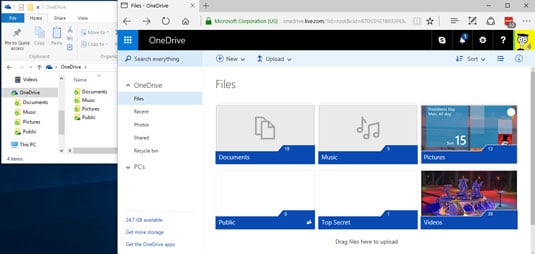
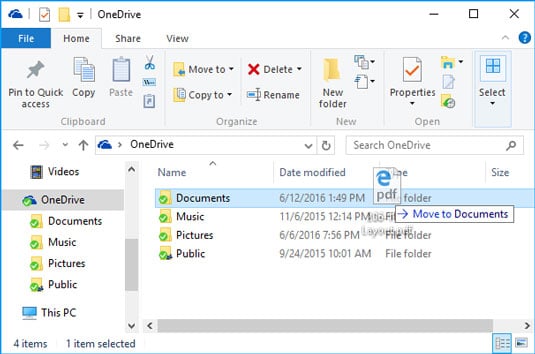
OneDrive is an internet-based storage platform with a significant chunk of space offered for free by Microsoft to anyone with a Microsoft account. OneDrive allows users to store files and personal data like Windows settings or BitLocker recovery keys in the cloud, share files, and sync files across Android, Windows Phone, and iOS mobile devices, Windows and macOS computers, and the Xbox 360, Xbox One, and Xbox Series X and S consoles. Users can upload Microsoft Office documents to OneDrive and Think of it as a hard drive in the cloud, which you can share, with a few extra benefits thrown in. One of the primary benefits: OneDrive hooks into Windows 10, at least in fits and starts. How much storage can you get? As of this writing, OneDrive gives everyone with a Microsoft account 5GB of free storage, with 50GB for $2/month. Many Office 365 subscription levels provide 1TB (1,024GB) of OneDrive storage, free, for as long as you’re an Office 365 subscriber. Microsoft’s offers change from time to time, but the general trend is down — prices are going down, fast, and it won’t be too long before most online storage approaches free. The free storage is there, regardless of whether you use your Microsoft account to log in to Windows, and even if you never use OneDrive. In fact, if you have a Microsoft account, you’re all signed up for OneDrive. OneDrive can be confusing Many people find OneDrive — at least the Windows 7, 8, and 10 versions of OneDrive — very confusing because, in essence, OneDrive keeps two sets of books. (Windows 8.1 OneDrive, by contrast is quite upfront about the whole process.) In Windows 10’s OneDrive, there’s the whole OneDrive enchilada stored on the web. But there’s a second, shadow, subset of OneDrive folders that are stored on your computer. Some OneDrive users have all their web-based files and folders stored on their computers, and OneDrive syncs the folders quite quickly — what you see in File Explorer is what’s stored in the cloud, and vice versa. But other OneDrive users have only some of their OneDrive folders on their computers. File Explorer shows them only this subset of folders and hides all the others that are sitting in the cloud. What OneDrive does for you OneDrive does what all the other cloud storage services do — it gives you a place to put your files on the internet. You need to log in to OneDrive with your Microsoft account (or, equivalently, log in to Windows with your Microsoft account) to access your data. If you log in to a different Windows 10 computer using the same Microsoft account, you have access to all your OneDrive data through the web but, surprisingly, not necessarily through File Explorer. In fact, if you look only at Windows File Explorer, you might not even know what data is sitting in your OneDrive storage. This is one of the most confusing and dangerous parts of Windows 10. Realize that Windows File Explorer, when looking at OneDrive, is lying to you. https://www.dummies.com/wp-content/uploads/win10aio-onedrive.jpg File Explorer offers a very simple process for copying files from your computer into OneDrive, as long as you want to put the file in a folder that’s visible to File Explorer. File Explorer lets you move files in the other direction, from OneDrive storage on to your local hard drive, but again you must be able to see the file or folder in File Explorer before you can move it. https://www.dummies.com/wp-content/uploads/win10aio-onedrive-fe.jpg You can share files or folders that are stored in OneDrive by sending or posting a link to the file or folder to whomever you want. So, for example, if you want Aunt Martha to be able to see the folder full of pictures of Little Billy, OneDrive creates a link for you that you can email to Aunt Martha. You can also specify that a file or folder is Public, so anyone can see it. To work with the OneDrive platform on a mobile device, you can download and install one of the OneDrive programs — OneDrive for Mac, OneDrive for iPhone, iPad, or Android. The mobile apps have many of the same problems that you find in File Explorer in Windows 10. In Windows 10, you don’t need to download or install a special program for OneDrive — it’s already baked into Windows. If you have the program installed, OneDrive syncs data among computers, phones, and/or tablets that are set up using the same Microsoft account, as soon as you connect to a network. If you change a OneDrive file on your iPad, for example, when you save it, the modified file is put in your OneDrive storage area on the Internet. From there, the new version of the file is available to all other computers with access to the file. Ditto for Android devices. 1 Like |
| Education › How To Work Remotely With Windows 10 by Yinksdavid(op): 6:04pm On Oct 20, 2021 |
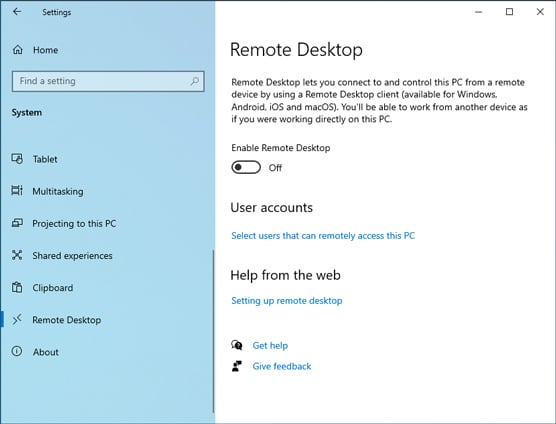
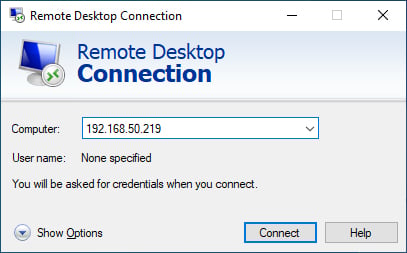
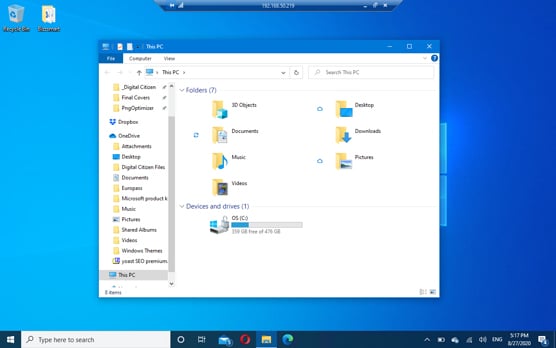
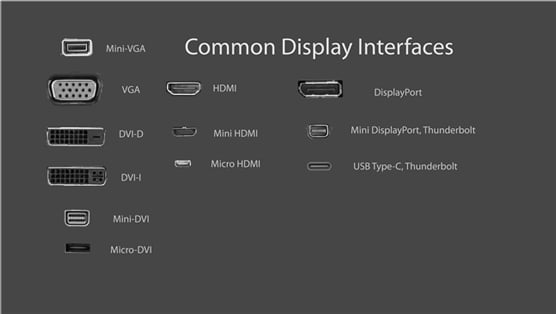
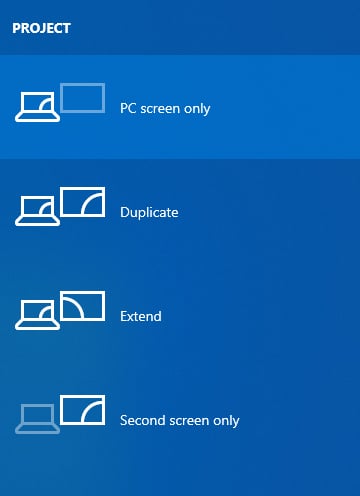
It’s more important than ever to learn how to work from any location or other offsite locations at anytime you want and without where you are been open to anyone. How to enable Remote Desktop connections Remote Desktop connections allow Windows devices to connect to one another through the internet or your local network. When you are connecting remotely to another Windows PC, you see that computer’s desktop. You can also access its apps, files, and folders as if you were sitting in front of its screen. This is useful for IT professionals and business users who must work remotely. If you want to connect remotely to the Windows 10 PC you are on from another PC, or you want to let others connect to it, you must enable Remote Desktop. Here’s how: 1. Click or tap the Start button, and then the Settings icon. The Settings app opens. 2. Open the System category of settings, and on the left, click or tap Remote Desktop. On the right, you see the Remote Desktop settings, shown in the figure below. 3. Click the switch to Enable Remote Desktop and confirm your choice. You may also want to dwell and click Advanced Settings, to see how Remote Desktop is configured to work in Windows 10. 4. Close Settings. https://www.dummies.com/wp-content/uploads/windows10-enable-remote-desktop.jpg Warning: This procedure works only on Windows 10 Pro or Enterprise. If you run another edition, such as Windows 10 Home, you can’t enable this feature. In Windows 10 Home, if you open the Remote Desktop section in the Settings app, you see a message stating that Your Home edition of Windows 10 doesn’t support Remote Desktop. Remember: Don’t forget that you turn on Remote Desktop to let other computers connect remotely to yours. You do not need to enable Remote Desktop if you want to connect from your computer to another. However, the computer to which you want to connect must have Remote Desktop enabled for the remote connection to work. How to connect with Remote Desktop Connection If Remote Desktop is enabled on the PC that you want to connect to and you know the IP address and details of a user account that exists on that computer, you can connect to it from your Windows 10 PC by using the built-in Remote Desktop Connection app. Here’s how to establish a remote desktop connection from Windows 10: 1. In the search box next to the Start button, type remote, and click or tap the Remote Desktop Connection result. The Remote Desktop Connection app opens, asking you to enter the address of the computer that you want to connect to, as shown. https://www.dummies.com/wp-content/uploads/windows10-remote-desktop.jpg 2. Enter the IP address of the computer you want to connect to, and click or tap Connect. Remote Desktop Connection may take some time to establish the connection, after which it asks for the username and password to use to connect to that PC. 3. Enter the details of the user account to use to connect to the remote PC, and then tap or click OK. 4. If you see a warning message that problems exist with the security certificate of the PC you want to connect to, tap or click Yes to continue. 5. When the connection is established, you’ll see the desktop of the remote PC as if it were your own. A toolbar at the top displays connection information, as shown. 6. When you’ve finished working on the remote PC, click or tap the X button in the toolbar on the top of the screen. https://www.dummies.com/wp-content/uploads/windows10-connection-information.jpg How to connect a second monitor Working on two screens at the same time can increase productivity, especially in times of lockdown, when you have to be working from home. To connect a second display to your Windows 10 laptop or PC, first check out the ports on the display and on your Windows device. The figure shows you how all the video ports look. https://www.dummies.com/wp-content/uploads/windows10-video-ports.jpg There are two possible situations: Your monitor and your laptop or PC share the same video port. Buy a cable that has the same video port on both ends (HDMI, DisplayPort, USB Type-C, and so on). Your monitor and your laptop or PC do not share a common video port. Buy an adapter to convert the video signal from your laptop or PC to the external monitor. Depending on what video ports you have on your laptop or PC and monitor, you might need a DisplayPort-to-VGA, HDMI-to-DisplayPort, USB-C-to-HDMI, VGA-to-HDMI, DVI-to-HDMI, or Mini DisplayPort-to-DisplayPort adapter. You can find inexpensive adapters in electronics shops for almost any type of video connection. 1. Using the appropriate cable, connect the monitor to your Windows 10 laptop or PC. 2. Turn on the second monitor by plugging it into a power outlet and pressing its power button. Windows 10 takes a few seconds to detect the external monitor. Note that the external monitor may not display anything after it’s detected. 3. Press Windows+P to display the Project options. You can view the desktop only on your PC screen (the main display) or only on your second screen, view the same desktop on both screens, or extend the desktop and have two different desktops side by side. After you have the necessary cable, do the following to connect the second monitor: https://www.dummies.com/wp-content/uploads/windows10-project-options.jpg 4. Press Windows+P to cycle through the Project options and view the results. You can also click to select an option. The image changes with each selection. 2 Likes |


 pls , thanks in advance!