Sainttobs's Posts
Nairaland Forum › Sainttobs's Profile › Sainttobs's Posts
1 2 3 4 5 6 7 8 9 10 (of 20 pages)
 Phones › Official Tor Browser For Android Finally Launched by sainttobs(op): 10:39am On Sep 11, 2018*. Modified: 10:56am On Sep 11, 2018 Phones › Official Tor Browser For Android Finally Launched by sainttobs(op): 10:39am On Sep 11, 2018*. Modified: 10:56am On Sep 11, 2018 |
https://9jatechguru.com.ng/wp-content/uploads/2018/09/Official-Tor-Browser-For-Android-Finally-Launched-660x330.png More and more users are worried about their privacy and more Internet users need privacy when using the internet. Hence, Tor has finally launched the Tor Browser For Andorid, it gives anonymous browsing in a similar way to its desktop service. It is a good opportunity to anonymize our walks on the network from our mobile. Official Tor Browser For Android Finally Launched More and more users are worried about their privacy and more Internet users need it when using the internet. In this new scenario, more than ever, networks like Tor have become a real necessity. It is for this reason their managers have never stopped working to ensure greater doses of privacy and security. In particular, during the last four years, Tor Project has focused on creating a new generation of Onion Services more robust than the previous one. After more than a decade in operation, age began to manifest and that was not desirable. The measures that have taken from this network, one of the three largest hidden networks in the world, comprise several aspects. They have implemented new encryption algorithms, authentication has been improved, a redesigned directory is available to prevent information leaks and most importantly: the new generation will keep the .onion addresses completely private; That is the promise. Tor launched a new application for Android that allows anonymous browsing in a similar way to its desktop service. It is a goodway to anonymize our walks on the network from our mobile. Yes, I am talking about the new Tor browser for Android which is actually based on Firefox that allows replacing the system so that all direct traffic to the web passes through the Tor gateway. As usual in the service, the application is completely free although it is available as an alpha version and it is still developing and improving its core, but it is an interesting opportunity to see how this layer system works on the mobile and, above all, check the speed of web page loads, which is usually irremediably slower than when using a normal browser. On the specifications, Tor Browser for Android is based on Firefox v60, and the interesting thing is that, when its development is completely finished, it will combine in a single application both the browser and the proxy that allows to connect to the Tor network, that until now it was necessary to use a separate application, Orfox, to connect us to its proxy network and thus avoid being spied on. However, as we said at the beginning it is an application at an early stage of its development, so it still has things to polish, and it needs the Orbot proxy application to connect to the Tor network (like Orfox), while the rest of the browser works independently, in addition to having some problems with the rendering of websites and the acquisition of proprietary sources. If you want to download the Tor browser for your Android device then simply click here to download it from Google Play Store. So, what do you think about this? Simply share all your views and thoughts in the comment section below. cc: lalasticlala Source: https://9jatechguru.com.ng/2018/09/official-tor-browser-for-android-finally-launched-2.html |
| Phones › RAZER Phone 2 – Meet The New Ultimate Gaming Smartphone by sainttobs(op): 12:46am On Sep 11, 2018 |
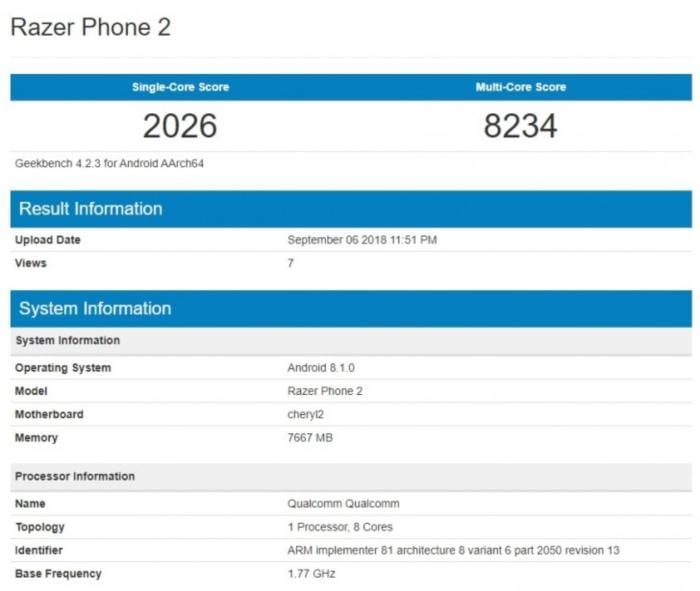
https://9jatechguru.com.ng/wp-content/uploads/2018/09/RAZER-Phone-2-Meet-The-New-Ultimate-Gaming-Smartphone-660x330.png We all know very well that Razer carries a respectable history in the world of PC Gaming, after being the first to launch a mouse for gaming, high-end, in 1998. They are now manufacturers of hardware and peripherals in the PC environment, both Desktop and laptop. Now after launching the first smartphone for gaming, Razer Phone, it seems that now Razer wants to launch the Razer Phone 2. RAZER Phone 2 – Meet The New Ultimate Gaming Smartphone Razer carries a respectable history in the world of PC Gaming, after being the first to launch a mouse for gaming, high-end, in 1998. They are now manufacturers of hardware and peripherals in the PC environment, both Desktop and laptop. Now after launching the first smartphone for gaming, Razer Phone, it seems that now Razer wants to launch the Razer Phone 2. As we all know very well that Razer has already launched its gaming smartphone for gamers that managed to acquire its place among high rank smartphones. Earlier this year 2017, Razer announced the purchase of Nexbit , the maker of Nexbit Robin, a mobile phone that made its appearance in late 2015 on Kickstarter and surprised users by offering 32GB of internal storage and 100GB more Of free space in the cloud. After completing the acquisition, Razer promised that Nexbit would operate as an independent division focused on the design of mobile experiences. Everything points to the new version of Razer Phone, Razer 2 for video games. As we said earlier that the Razer Phone was made its official debut in November of last year, with some powerful specifications. For the first version of Razer Phone, the Qualcomm Snapdragon 835 and the 8 GB of RAM is not the most interesting thing. It was its 120 Hz screen and its double front speaker that made it a unique device. A few days ago the company claimed that soon a new version of Razer Phone, of course, the Razer Phone 2, would arrive before the end of the year, and today we have been able to learn new information due to a leak. This will be Razer’s new smartphone https://techviral.net/wp-content/uploads/2018/09/IMG-1-3.jpg Thanks to the popular Geekbench benchmark, we have been able to know much more about the Razer Phone 2. The future device of Razer Phone 2 will mount the Qualcomm Snapdragon 845 and will have 8 GB of RAM. Some Asian media had declared that the device could arrive with a new processor from Qualcomm, a rumor that is denied with this leak. However, it will not be missing anything, it is a device for gamers and it is necessary to have all the power possible. We hope that this Razer Phone 2 will arrive with a renewed design, perhaps more current. If they want to keep one of their identity signs, the double front speaker, the frames will not be as useful as in other smartphones. We do not care, in fact, it is what it has to be, better sound and grip to make the user experience more immersive. Do not forget its screen, which had a totally different factor (120 Hz screen) as we told earlier. Thanks to them everything moves much faster, more fluid, giving rise to an experience like no other. Moreover, it is expected that the new Razer Phone 2 could arrive in December, so we will soon have some more new information. So, what do you think about this? Simply share all your views and thoughts in the comment section below. cc:lalasticlala Source: https://9jatechguru.com.ng/2018/09/razer-phone-2-ultimate-gaming-smartphone.html 1 Like |
| Computers › How To Remove Shortcut Virus From USB Drives & PC by sainttobs(op): 1:27am On Sep 10, 2018 |
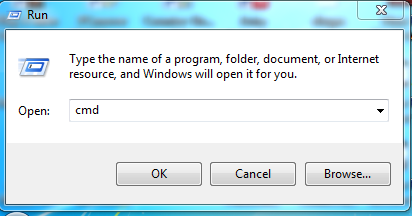
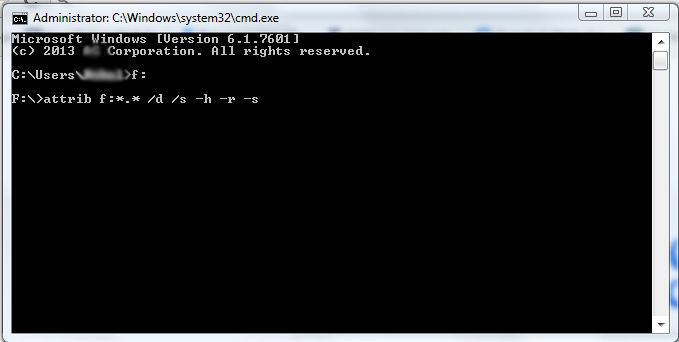
https://9jatechguru.com.ng/wp-content/uploads/2018/09/Shortcut-virus-660x330.png Here I am going to share easy methods on how to remove shortcut virus from your USB Drive & PC. We are going to share four simple tricks to remove the shortcut virus from your computer or Pen drive automatically. USB Drives, especially those which we used on public computers such as in schools, Internet cafes, hotels etc, are very susceptible to contamination by viruses present on other users of the mechanical devices. One of the most common is the “shortcut virus” that creates many unwanted icons on your USB device while hiding files that really matter; hindering or even preventing, the access to them. The first thing to notice if you had installed the shortcut virus in your system is that it will be not get removed by your normal antivirus scanning it’s somehow stubborn. Shortcut virus usually creates the shortcut files, for example, Notepad.shortcut etc. So if you see such shortcut files in your Computer or Pendrive then this are the sure signs that your computer or pen drive contains the stubborn Shortcut virus. This is a kind of virus which will not get detected by a normal antivirus. How to Remove Shortcut Virus from USB Drives & PC Today I am going to share four simple tricks to remove the shortcut virus from your computer or Pen drive automatically. You can remove Shortcut virus by using your command prompt or by installing a software. #1 Method: Using CMD To Remove Shortcut Virus Step 1. To remove your shortcut virus with the help of your command prompt system, you need to follow the steps ahead. Step 2. Open Command Prompt by pressing Windows + R and Enter “CMD” in the box and hit enter. https://techviral.net/wp-content/uploads/2015/12/Screenshot_2.png How to Remove Shortcut Virus from USB Drives & PC Step 3. Now enter the following in your Command Prompt “attrib <Your USB drive>:*.* /d /s -h -r -s” without quotes ‘Your USB drive letter‘ must be replaced with your own drive letter. Suppose your flash drive is on Drive F so you must imply the following command “attrib f:*.* /d /s -h -r -s” without quotes and hit enter. https://techviral.net/wp-content/uploads/2015/12/how-to-remove-shortcut-virus.jpg How to Remove Shortcut Virus from USB Drives & PC Step 4. Now, wait for some time until CMD finishes the command, once it’s completed successfully the shortcut virus will be removed from your PC. #2 Method: Using Software To Remove Shortcut Virus If you decided to remove your shortcut virus from your Pendrive or Harddisk with the help of a Software, then you need to Download the software Named UsbFix on your computer. For more methods visit https://9jatechguru.com.ng/2018/09/remove-shortcut-virus-from-usb-drives-pc.html 1 Like |
| Science/Technology › Facebook Sues Blackberry by sainttobs(op): 2:55pm On Sep 08, 2018*. Modified: 3:45pm On Sep 08, 2018 |
https://9jatechguru.com.ng/wp-content/uploads/2018/09/OMG-Facebook-Sues-BlackBerry-660x330.png We all know very well that the technological world is a real battleground for patents. Whenever they can, companies take their opponents to court to simply prevent them from using their ideas and patents for their own use. However, now according to the latest reports, Facebook sues BlackBerry. Facebook Sues BlackBerry The technological world is a real battleground for patents. Whenever they can, companies take their opponents to court to simply prevent them from using their ideas and patents for their own use. The latest action is now starting and puts the world’s largest social network, Facebook and the well-known Canadian smartphone manufacturer, BlackBerry head to head. Facebook is complaining that BlackBerry has used their ideas in their products. The lawsuit bringing these two companies to court began a few days ago and was initiated by Facebook. Facebook complains that BlackBerry has inadvertently used some of its patents. In all, there are 6 patents that Facebook claims BlackBerry used without authorization, including one associated with the voice messages that BlackBerry uses in BBM Enterprise. Also Read: How To Scan and Fix Corrupted Windows Files Facebook has asked a federal court in San Francisco to resolve this issue between the companies and is demanding a monetary amount to offset its losses. However, this value has not yet been revealed. Moreover, Facebook also claims that BlackBerry has also violated a patent regarding how mobile devices deliver images and audio. There are also references to patents related to GPS and security data management. This case follows another, which began earlier this year with the same companies, and in which BlackBerry accused the social network giant Facebook of violating patents associated with messages on mobile operating systems, Messenger, WhatsApp, and Instagram. This seems to be another case where the charges will be constant and it will take several years to be resolved, as it has been normal in these situations. Probably, as it has also been normal, it will end with an agreement between the companies and the sharing of the patents in exchange for a symbolic value. So, what do you think about this? Simply share all your views and thoughts in the comment section below. cc: lalasticlala Source: https://9jatechguru.com.ng/2018/09/facebook-sues-blackberry.html |
| Phones › How To Fix Unfortunately Settings Has Stopped Error On Android by sainttobs(op): 4:25pm On Sep 06, 2018 |
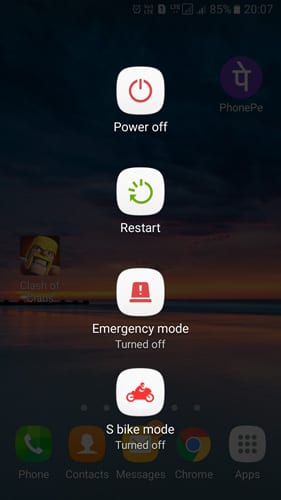
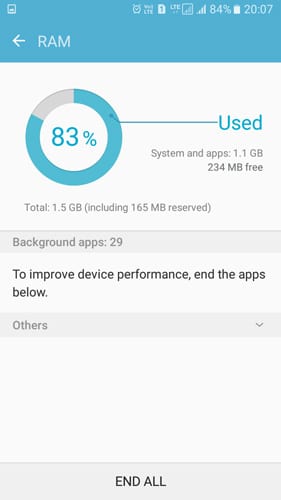
Unfortunately settings has stopped is one of the most common and most irritating errors that the Android operating system is plagued by. The error is only found on Android smartphones, and it could happen anytime while opening the Settings panel. How To Fix Unfortunately Settings Has Stopped Error On Android If we look around, we will discover that the use of an Android operating system is growing day by day. In fact, most of us are entirely dependant on our Android device. With the help of our Android smartphone, we perform lots of stuff including making calls, sending messages, visiting the web, play games, and much more things. Since Android is based on Linux and its completely open source by nature, we can expect a few bugs on the platform. Developers are trying really hard to make the operating system bug-free, but still, there are some bugs left. If you are an Android user, then you might have already experienced the following error: ‘unfortunately settings has stopped’. This is one of the most common and most irritating error that the Android operating system is plagued by. Here in this article, we will be discussing everything about the unfortunately settings has stopped error on Android. What is Unfortunately Settings Has Stopped Error? As we have already mentioned above, “unfortunately settings has stopped” is one of the most common and most irritating errors that the Android operating system is plagued by. The error is only found on Android smartphones, and it could happen anytime while opening the Settings panel. Well, in different cases, its also found that the unfortunately settings has stopped error occurs while using apps. Sometimes the error also occurs because of installing a new firmware update. However, this is a not a very common issue now, but it created a havoc when KitKat update was released. The error is not always related to the software update, sometimes corrupted apps also trigger the error. However, since its a very common issue, a simple restart could fix the problem. However, if you are frequently getting the error message, then there are few other things which you need to do. How To Solve Unfortunately Settings Has Stopped Error? In most of the cases, restarting the smartphone can fix out the ‘Unfortunately, Settings has stopped” error from your Android device. However, if you are frequently getting the error code even after the restart, then here are the few best methods that would help to fix out the problem. Method 1: Restart Your Device As we have already discussed above, in most of the cases, its seen that a simple restart can do the trick to fix the ‘Unfortunately, Settings has stopped” error from your Android smartphone. So, simply restart your device. https://techviral.net/wp-content/uploads/2018/09/Restart.jpg Restart Your Device Press and Hold your device’s Power Button It will show you a pop-up where you need to tap on Restart/Reboot Now, wait until your phone restarts. After the restart, just use the smartphone normally, you won’t get the Unfortunately Settings has stopped error anymore. If you are still getting the error after the restart, then follow the next methods. Method 2: Clear Your Phone’s RAM Sometimes its seen that lack of RAM also triggers the Unfortunately Settings has stopped error on Android. However, clearing phone’s RAM is an easy process, and you can use it without using any third party app. Normally, smartphones now come with a default RAM manager app which helps to clear RAM in just one-tap. https://techviral.net/wp-content/uploads/2018/09/Clear-Your-Phone-1.jpg Clear Your Phone’s RAM First of all, locate to the device’s built-in RAM Manager. On Samsung, the RAM manager is located in ‘Smart Manager’ On the RAM Manager, you will see how much RAM your device is using right now. Now just tap on ‘Clear RAM’ to free up some RAM. That’s it, you are done! Now start using the smartphone as usual and see whether the Unfortunately Settings has stopped is fixed or not. If the problem still exists, then follow the next method. cc: lalasticlala Fore more info on how to solve this problem visit => https://9jatechguru.com.ng/2018/09/fix-unfortunately-settings-has-stopped-error-on-android.html |
| Computers › How To Scan And Fix Corrupted Windows Files by sainttobs(op): 2:35am On Sep 06, 2018 |
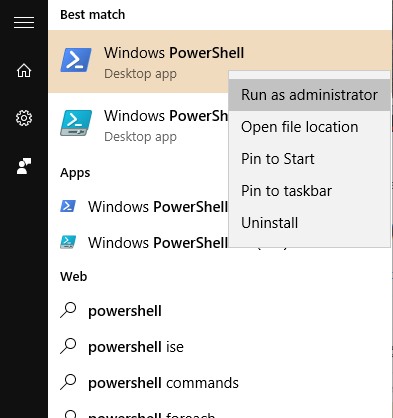
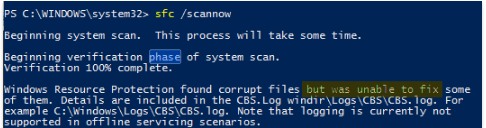
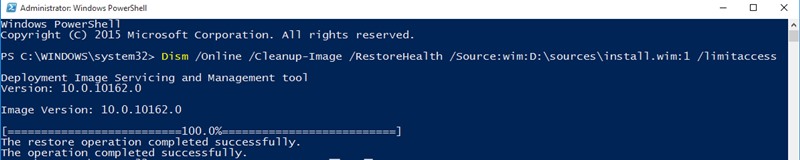
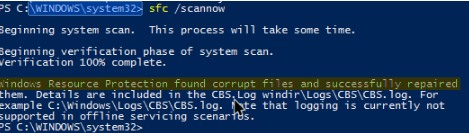
https://9jatechguru.com.ng/wp-content/uploads/2018/09/Corrupted-660x330.png Manually scan out all the corrupted files in your Windows OS and easily fix them with some simple commands. Follow the guide below to learn How To Scan and Fix Corrupted Windows Files. Today most of the PC users are working on Windows Operating System, one of the best and user-friendly OS that provides numerous features. In this article, we will be guiding you on how to scan and fix the corrupted files in your Windows OS. Yes, it’s possible and can be easily done. Due to certain viruses or any other reasons, Windows system files can get corrupted, and your PC starts lagging and shows unknown behavior. Rather then using antiviruses or reinstalling OS what if you can directly scan and fix the corrupted file. So have a look at complete discussed below to proceed with this. How to Scan and Fix Corrupted Windows Files The method is quite straightforward and easy, and you just need to enter some system commands to get the files scanned and then fix all the corrupted files and for that follow some simple steps below. Steps To Scan and Fix Corrupted Windows Files: Step 1. First of all, press windows button and then type Powershell, and now it will display the Windows Powershell option, right-click on it and select Run as Administrator. https://techviral.net/wp-content/uploads/2016/08/Scan-And-Fix-Corrupted-Files-In-Windows1.jpg Scan and Fix Corrupted Windows Files Step 2. Now in PowerShell, enter the below command to scan all the corrupted files in your OS. sfc /scannow https://techviral.net/wp-content/uploads/2016/08/Scan-And-Fix-Corrupted-Files-In-Windows2.jpg Scan and Fix Corrupted Windows Files Step 3. Now you need to fix the files and for that, you need to enter the below command in Powershell. Dism /Online /Cleanup-Image /RestoreHealth https://techviral.net/wp-content/uploads/2016/08/Scan-And-Fix-Corrupted-Files-In-Windows3.jpg Scan and Fix Corrupted Windows Files Step 4. Now windows will start fixing the files, and you should be patient in this process as it will take quite a time to complete. Step 5. Now you need the actual ISO file to get the file recovered, and for that you need to download the Windows ISO file of your particular version. Step 6. Now when the file is downloaded simply right-click on it and choose the option mount. Step 7. Now came back to power shell and enter the below command. Dism /Online /Cleanup-Image /RestoreHealth /Source:wim:X:\sources\install.wim:1 Note: Replace the letter “X” with the actual drive letter of your Windows installation media. https://techviral.net/wp-content/uploads/2016/08/Scan-And-Fix-Corrupted-Files-In-Windows4.jpg Scan and Fix Corrupted Windows Files Step 8. Now simply execute the below command in PowerShell sfc /scannow https://techviral.net/wp-content/uploads/2016/08/Scan-And-Fix-Corrupted-Files-In-Windows5.jpg Scan and Fix Corrupted Windows Files That’s it! you are done, now you will see the message there that the windows file has been recovered successfully. cc: lalasticlala For more recovery methods visit -> https://9jatechguru.com.ng/2018/09/scan-and-fix-corrupted-windows-files.html |
| Webmasters › Re: How To Get Your Profile Verified On Instagram (yes, Anyone Can Apply Now) by sainttobs(op): 7:23am On Sep 03, 2018 |
grevotech:For now, android will be added later. |
| Webmasters › How To Get Your Profile Verified On Instagram (yes, Anyone Can Apply Now) by sainttobs(op): 2:30am On Sep 03, 2018 |
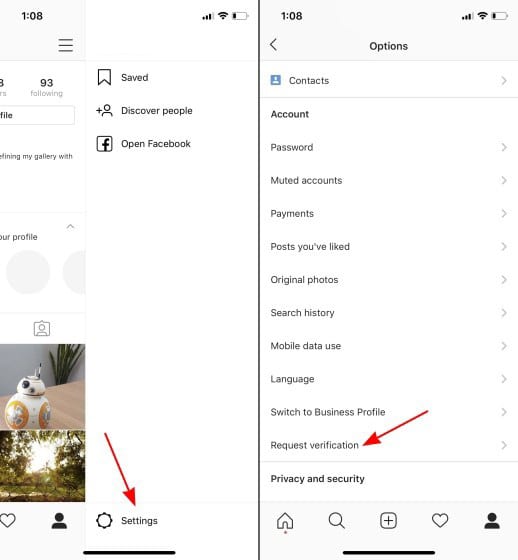
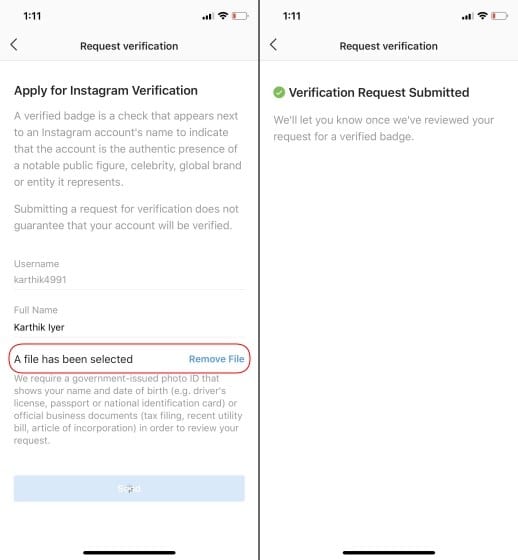
https://9jatechguru.com.ng/wp-content/uploads/2018/09/Verified-Instagram-Account-660x330.jpg You no longer need to buy verified profile or provoke Instagram for that blue tick. The popular image-sharing platform is now giving everyone an opportunity to prove their authenticity and apply for getting their profile verified. Here’s How to Get Your Profile Verified on Instagram. How to Get Your Profile Verified on Instagram (Yes, Anyone Can Apply Now) Popular social networking sites like Facebook, Twitter already got an option to get your profile verified. The same feature has been available on Instagram, but it was limited to the public figures, brands and other popular profiles. However, the great thing is, Instagram has finally decided to give you the opportunity to get your profile verified. Yes, you read that right! You can now earn that most valuable blue tick on Instagram. Users no longer need to buy verified profile or provoke Instagram for that blue tick. The popular image-sharing platform is now giving everyone an opportunity to prove their authenticity and apply for getting their profile verified. So, if you also want that iconic blue tick on your Instagram account, here’s what you need to do. How To Verify Instagram Account? Applying for verification in Instagram is rather straightforward, and if you have been waiting for long to get your account verified, then this steps might give you great relief. Here’s how you can apply for verification in Instagram. Step 1. First of all, open your Instagram account and then tap on the three vertical lines located at the top right corner. This will open the Settings Panel. Under the settings, you need to select ‘Request Verification’ option. https://techviral.net/wp-content/uploads/2018/09/Get-Your-Profile-Verified-on-Instagram-1.jpg How To Verify Instagram Account? Step 2. Now, in the next window, you need to enter your full name and attach an ID Proof. ID proof could be anything, but it must be a government issued ID that clearly states your name, DOB. Important: You can also attach your driving license, national ID card, Voters ID Card, Passport. Make sure that you have attached a government-issued photo ID. If you want to verify a brand, Instagram will accept utility bills, tax filings, article of incorporation. Step 3. Once attached, click on the ‘Send’ button. Now Instagram will notify you once they have reviewed your request for a verified badge. https://techviral.net/wp-content/uploads/2018/09/Get-Your-Profile-Verified-on-Instagram-2.jpg How To Verify Instagram Account? The process to get your account verified is rather easy, but the platform doesn’t guarantee that everyone will get the blue tick. On the official blog post, Instagram said that they would review every request you send to check whether the profile is authentic and belongs to a notable figure, global brand, entity or celebrity. So, Instagram has made the verification process much more accessible by adding a “Request Verification” option. However, if you are a regular user like me, then we have got some hope to bag that blue tick and be on the path to fame. If you have already applied for the verification, then you will receive a notification as soon as your account gets approved. However, if you didn’t get any notification, then you need to wait for 30 days to re-apply for the verification. The new “Request Verification” feature is right now live on iOS, and Android users need to wait for few more days to get the features on Instagram for Android. So, what’s your opinion on this? Share your views in the comment box below. cc: lalasticlala Source: https://9jatechguru.com.ng/2018/09/how-to-get-your-profile-verified-on-instagram.html |
| Phones › Apple To Launch Three New Iphones, Watch With Larger Screen, Updated Ipad Pros by sainttobs(op): 11:58pm On Aug 28, 2018 |
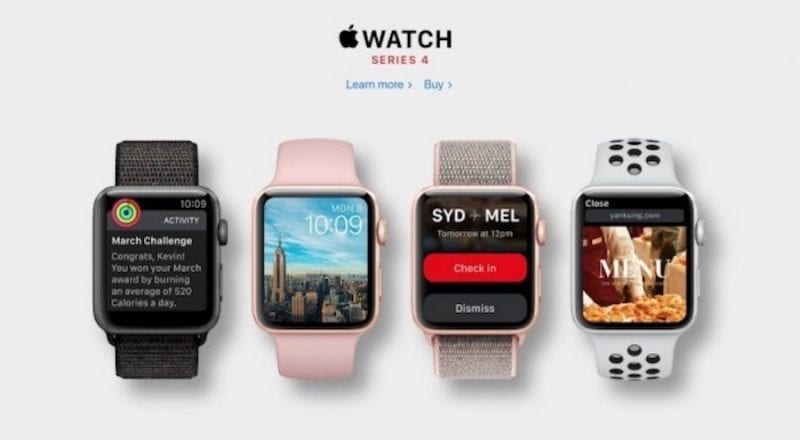
https://9jatechguru.com.ng/wp-content/uploads/2018/08/Apple-To-Launch-Three-New-iPhones-Watch-With-Larger-Screen-Updated-iPad-Pros-660x330.png We are almost in September and, every year, history repeats itself: as Apple launches new iPhones. At this time of the year, the eyes of the whole world are focused on Cupertino company, Apple simply for news. This year will be no different. According to the latest reports, Apple is to launch three new iPhones, Apple watch with the larger screen, updated iPad Pros and much more. Apple To Launch Three New iPhones, Watch With Larger Screen, Updated iPad Pros We are almost in September and, every year, history repeats itself: as Apple launches new iPhones. At this time of the year, the eyes of the whole world are focused on Cupertino company, Apple simply for news. This year will be no different. Come and let’s find out what the tech giant Apple should be preparing for its great annual launch event. When will this event take place? No one yet knows for sure when Apple is going to hold this big event but when the rumors do not go away it’s because they must be true. Although the date is still unknown, given the dates are chosen by the Apple brand, we can make some predictions. Apple has been running its events for the last couple of years in September, between the 7th and 12th. iPhone 5 Launch Event: September 12, 2012 iPhone 5s Launch Event: September 10, 2013 iPhone 6 Release Event: September 9, 2014 iPhone 6s Release Event: September 9, 2015 iPhone 7 Launch Event: September 7, 2016 iPhone 8/X Launch Event: September 12, 2017 By carefully analyzing the pattern of recent events, and assuming that the dates of the past events serve as an indication of future events, it is most likely that the tech giant Apple will hold its iPhones launch event on September 12. In addition, given certain rumors that have already reached us regarding the pre-sale date of the 2018 iPhones, and which we will discuss in the next paragraphs, September 12 seems to be the one that will appear in the invitations that the Cupertino company still have to ship. Where will the event take place? The tech giant Apple’s latest event was a debut for several reasons. It was the first the tech giant Apple event to be held in the new home, Apple Park, for the first time we saw the design that should accompany the iPhone in the coming years and was also the first event to premiere the Steve Jobs Theater. The auditorium is named after Apple co-founder Steve Jobs because of the enormous contribution made to the company. In addition, Steve Jobs loved the launch day of new products. In recent years, the tech giant Apple has launched new iPhones in various auditoriums and this year in March, it was in Chicago that it held its Education-oriented event. But, we must assume that this year we will return to the auditorium with the name of Steve Jobs for the revelation of another iPhone. Over the last couple of years, it has become common to see rumors and discoveries quite revealing about new iPhones yet to come. So we have been following them closely and informing them whenever something new comes up. The iPhone X launched last year and was the best-selling smartphone in the early months of 2018. This year Apple is expected to introduce three new iPhones with different screen sizes, different technologies and, above all, different entry prices. Apparently, two of the models will have an OLED screen and the third model should include an LCD screen, but with improvements in color. The latter will be the cheapest iPhone. According to rumors, the iPhone with LCD screen should have an A10 Fusion processor, the same processor found on the iPhone 7. In addition, Apple should exclude features such as 3D Touch to be able to put the Face ID and maintain the price of this smartphone near $700. What will be the name of the next iPhone? iPhone XI iPhone XS iPhone X iPhone 11 iPhone 9 or something else? On the other hand, for iPhones with OLED screen, there is information that confirms Apple Pencil support. In recent weeks, this rumor has generated some controversy because Apple has always been against the use of the stylus. The truth is that Apple’s well-known Apple Pencil is not a stylus nor is it critical to operate it with the iPhone. This is something that many people do not understand. The Apple Pencil is an accessory that is only purchased by the users who actually wants it, and that helps to awaken the creative side of the user. Other features worth mentioning are the 512GB storage that should be available on OLED models and the new Bionic A12 processor will be even more faster. In terms of pricing, the tech giant Apple usually increases them slightly. Thus, we can anticipate that the new model Plus with OLED screen should be around $1400. On the other hand, the smaller model, also with OLED screen, should be around $1000. According to rumors, launched by a German network, the new iPhones will be available for pre-sale on September 14. Apple Watch with the new design Apple Watch remains the best smartwatch available on the market and the ideal device to keep up with the iPhone. The two are a perfect team and, next month, we expect to see a new model with improvements compared to the previous generation. The great news should be in design. The new Apple Watch Series 4 should have a screen up to 15% higher compared to the Series 3 model, resulting from the decrease of the edges of the device. This results in a more immersive user experience. Moreover, new health and exercise sensors are also expected. On the other hand, a new processor and WatchOS 5 should guarantee better performance to the new Apple Watch Series 4. https://techviral.net/wp-content/uploads/2018/08/IMG-2.jpeg As far as price is concerned, we expect everything to remain the same. iPad Pro with Face ID In March of this year, Apple brought to market a new iPad of 9.7 inches, cheaper and also supports the Apple Pencil as well. But according to the information that has been circulating over the last few months, Apple will also have to update the Pro line as early as next month. The iPad Pro is expected to undergo quite a few design changes. The Home Button should disappear, which means the Touch ID will be discarded. So the apple brand should start using Face ID as a new authentication system in the iPad Pro. However, the new model should not have the cut-out similar to the iPhone, where the front camera and the True Depth sensor are. There are other rumors that confirm the disappearance of the headphone jack in the next model of the iPad Pro. Are we finally going to see a waterproof iPad? In addition, it is expected that the new iPad Pro will bring a new processor, probably called AionX Bionic, and more RAM. New upgraded Macs In July of this year, the tech giant Apple updated its MacBook Pro computers with the Intel Coffee-Lake processors. However, neither the iMac, Mac mini, MacBook or MacBook Air received the new processors. Will Apple update these models next month? Rumors suggest that the tech giant Apple will finally upgrade the MacBook Air model and Mac mini. The Apple Mac line is not really making much profit to the company and this is due in part to the price of computers and the fact that some models have not been updated for some time. A MacBook Air with better specifications and, in general, more current hardware, can quickly change the Apple Mac line. AirPower It will now be exactly one year since Apple introduced AirPower, a wireless charging carpet, and the ideal solution for simultaneously charging multiple devices that support wireless charging. The tech giant Apple is known to have encountered some difficulties with which it was not counting on and has therefore postponed the arrival of this device to the market. But it is expected to be available in September and the announcement is to be made at the Cupertino company’s event in a few weeks. New software? In September of this year, at WWDC 2018, Apple introduced new versions of the operating systems for all its devices. At this time, all operating systems are still in beta. Although they have already reached a high maturation stage, they have not yet been released to all users. Apple is expected to release the final version, moments after the introduction of the new iPhones for users who have joined the Apple Beta program. The final versions of iOS 12, macOS 10.14 Mojave, WatchOS 5 and tvOS 12 should be available for download for everyone a few days after the event. However, the date is still unknown. Conclusion The launch of the next iPhone is closeby and there are lots of new things to look forward to at Apple’s launch event. The technological community is, at the moment, in expectation and quite enthusiastic. Let’s wait and see what the tech giant Apple has prepared to introduce to us next month. cc: lalasticlala Source: https://9jatechguru.com.ng/2018/08/apple-to-launch-three-new-iphones.html 1 Like |
| Phones › Xiaomi Redmi Note 5 Pro Vs Poco F1: Which One Is Best? by sainttobs(op): 10:29pm On Aug 28, 2018 |
https://9jatechguru.com.ng/wp-content/uploads/2018/08/POCO-660x330.jpg As we all know, recently, Xiaomi launched a new smartphone known as Poco F1. Poco F1 is by far the best budget smartphone which is available under N100,000. If you are looking to buy Redmi Note 5 pro instead of Poco F1, then let me tell you the almost N20,000 difference will impact a lot. Xiaomi Redmi Note 5 Pro vs Poco F1: Which One Is Best? As we all know, recently, Xiaomi launched a new smartphone known as Poco F1. Poco F1 is by far the best budget smartphone which is available under N100,000. The smartphone features some great specification, and it arrives with a premium design. However, there’s another smartphone from Xiaomi which is expected to compete with Poco F1. We are talking about Redmi Note 5 Pro. Look, Poco F1 features the current best processor, but that doesn’t mean we should underestimate Redmi Note 5 Pro. Image Credit: The Indian Express Image Credit: The Indian Express Talking about Xiaomi Redmi Note 5 Pro, that smartphone is still known for its performance and build quality. In fact, Redmi Note 5 pro is by far one of the best affordable smartphones currently. Xiaomi Redmi Note 5 Pro vs Poco F1 The same company made both of the smartphones and there’s only a slight difference in the prices of the two. However, Poco F1 is the phone to get, even though Xiaomi’s Redmi Note 5 Pro offers everything at a slightly cheaper price. https://techviral.net/wp-content/uploads/2018/08/Redmi-Note-5-Pro.jpg Image Credit: Tech Advisor Poco F1 actually offers better hardware and software. The unique thing about Poco F1 is its Snapdragon 845 processor which is right now the powerful processor in the marketplace. Moreover, you will get 6GB of RAM and 64GB of internal storage. Another thing which users should consider is that the Poco F1 offers a notch display, which is currently in vogue, whereas Xiaomi Redmi Note 5 Pro retains with the old-fashioned look. Also, the Redmi Note 5 Pro lacks USB-Type C port, powerful processor and AI capabilities. Poco F1 is a gaming smartphone which is most suitable for gamers who loves spending time playing high-end games. Since the smartphone also offers liquid cooling technology, the gaming experience is unquestionable. The camera of Poco F1 even arrives with AI capabilities which can distinguish across 206 scenes to automatically adjust the exposure and saturation. Another feature which gives an edge to Poco F1 is the IR-based face unlock which can work even on no-light condition. Redmi Note 5 Pro also offers face unlock, but it can’t work in the dark and under harsh light. So, without any doubt, Poco F1 is the best phone to get if you are willing to invest N100,000. No other smartphones at the given price tag come close to the Poco F1 regarding performance and features. You can purchase both smartphones on Gearbest and get it shipped to your house. So, what’s your opinion on this? Share your views in the comment box below. cc: lalasticlala Source: https://9jatechguru.com.ng/2018/08/xiaomi-redmi-5-pro-vs-poco-f1.html |
| Webmasters › Re: How To Move Your Blogger Blog To Wordpress – My Personal Experience by sainttobs(op): 7:17pm On Aug 28, 2018 |
megareal:Message me on whatsapp 07053842846 |
| Webmasters › Re: How To Move Your Blogger Blog To Wordpress – My Personal Experience by sainttobs(op): 11:08pm On Aug 27, 2018 |
megareal:If you need any help feel free to ask me |
| Webmasters › Re: How To Move Your Blogger Blog To Wordpress – My Personal Experience by sainttobs(op): 4:26pm On Aug 27, 2018 |
megareal:Also WordPress is better for seo because with plugin like Yoast you can easily set up meta keywords and stuffs but it is difficult to do that in blogger. |
| Webmasters › Re: How To Move Your Blogger Blog To Wordpress – My Personal Experience by sainttobs(op): 4:24pm On Aug 27, 2018 |
megareal:I used blogger for over a year and it was OK. One thing is that on blogger your site never goes offline except you violated one of Google's rules and they suspend it. Some customizations are not easily done on blogger, you will need to edit lots of HTML code to add some features. So if you are just starting out, blogger is good for you to learn the ropes but once you start earning some cash and you want to add more features to your site easily it is time to move to WordPress. Although if you have money for paid hosting now you can use WordPress straight up. |
| Programming › Re: I Need Of A Wordpress Blog by sainttobs(m): 2:54pm On Aug 27, 2018 |
thoth:I can do that for you, contact me on WhatsApp 07053842846. Let's get started. |
| Webmasters › Re: How To Move Your Blogger Blog To Wordpress – My Personal Experience by sainttobs(op): 2:52pm On Aug 27, 2018 |
Not yet but if you visit the link at the end of the post, the article is properly formatted their with screenshots. Its hard to format and arrange long articles on Niaraland. |
| Webmasters › How To Move Your Blogger Blog To Wordpress – My Personal Experience by sainttobs(op): 12:34am On Aug 27, 2018 |
Google’s Blogger is a very good tool for new bloggers to get started for free. Blogger enables you to start your blog for free and learn some basic things about blogging. But with time you will realize that to customize your blog and have total control of it you will need to move to a self hosted platform. There are a lot of articles online outlining the steps in moving your blogger blog to WordPress. Today I am going to take you through my experience moving to WordPress and the problems I encountered. So sit tight and let’s go on a merry ride. First thing you need when you decide to move your blog to WordPress is Hosting. A good web host is very important to your blogs success. Blogger blogs are hosted free by google but when you are moving to WordPress you need to buy your own hosting. I am using QServers for this blog and I recommend it for Nigerians but if you want a foreign host I recommend Bluehost and HostGator, both are very good. Moving Your Blogger Blog To WordPress – Step By Step Sign up with a WordPress Hosting company. Export your Blogger blog by visiting Settings » Other Import Blogger to WordPress by visiting Tools » Import page in WordPress admin area. Setting up permalinks on your new WordPress blog. Setting up redirects for Blogger visitors to WordPress posts Set up redirects for RSS feeds I will be taking it step by step and outlining the difficulties I faced in each step. So if you are intending to move your Blogger blog to WordPress anytime soon you will know what to expect. Sign up with a WordPress Hosting company – To get started you first need to signup with with a WordPress hosting company. I recommend Bluehost, you get a free custom domain and 50% off their hosting plan. If you want a Bluehost alternative check out HostGator, you can also use our coupon code “9JATECHGURU60” to get to 60% discount on your hosting with HostGator or “9JAONECENT” to get your first month of hosting at just $0.01 on HostGator. When trying to move a custom domain name from blogger to WordPress you will need to change the nameservers on your domain.Your hosting company will give you new name servers, this is very important. If you got the domain name and hosting from the same company it will be done for you automatically else you will have to do it your self. It sometimes take up to 24hours for it to propagate, mine only took about an hour. Export your Blogger blog – Next thing you need to do is export your blogger blog’s content. Simply log into your blogger dashboard and go to Settings » Other page. Under the ‘Import & back up’ section, you need to ‘Back up Content’ button.Export your Blogger blog backupThis will bring up a popup where you need to click on the ‘Save to your computer’ button.Download your Blogger blog's backup file to your computer Your Blogger blog’s content will be downloaded to your computer in an XML file. Once the download is complete, it is time to import it into your WordPress site. Import Blogger Content to WordPress – To start importing your Blogger site into WordPress, you need to go to your WordPress admin and visit Tools » Import. On the Import page, click on Blogger.Blogger importer under WordPress import toolsThis will bring up a popup asking you to install the Blogger to WordPress importer. You need to click on the Insall button. WordPress will now download and install the Blogger Importer plugin for you. Once it is finished installing, you would need to click on the Activate Plugin and Run Importer link to continue. Activate and run blogger importer On the Import Blogger screen, WordPress will ask you to upload the XML file. This is the file that you downloaded earlier. Simply click on the choose file button and upload the XML file you downloaded earlier. Next, click on the Upload file and import button to continue. Upload Blogger export file to WordPress Now if you didn’t select one of our recommended hosts or your site is really large, you may get an error that your file size is too large. WordPress will now import your blogger posts one by one. When it is finished, you will be asked to assign an author to the imported posts. You can assign your blogger posts to an existing author (you) or create a new author account. Congratulations! you have successfully imported your Blogger content into WordPress. However, you still need to make sure that you don’t loose any search rankings and that visitors from your old blog easily land to the same content on your new WordPress website. This is one of the places I faced a lot of challenges. It seems the official blogger importer on WordPress isn’t functioning. I tried severally still it didn’t work. I then tried installing another Blogger installer from the plugin store which you will find in the side bar. The plugin is called “Blogger Importer Extended” but still it didn’t work. It isn’t compatible with the latest version of WordPress. So I had to install another plugin to downgrade my WordPress version to 4.3. Then i used the Blogger Importer Extended plugin, it worked this time. This took me a couple of hours to figure out but now that you know it shouldn’t take you more than a couple of minutes. The official plugin might work for you, but incase it doesn’t work you can try my method. Setting up Permalinks – Next, go to Settings > Permalinks in your WordPress dashboard, and make sure your links are set up the same way they were in Blogger. Chances are your links were set up like this: /%year%/%monthnum%/%postname%.html Choose the custom permalink option and insert this code into the box. permalink structure Setting Up Redirection – One thing that worries a lot of people is what type of impact migrating their blog will have on the links and search engine ranking they’ve already established. Also Read: Should You Choose A Free or Self Hosted Blogging PlatformThe good news is that you don’t have to give all this up. All you have to do is redirect your Blogger posts to your new site. That means that each time someone clicks on an existing link that points to your Blogger blog, they’ll be taken to your WordPress site and the corresponding pages/posts instead. Your links will still be live, but all your traffic will go to your WordPress site.This also lets search engines know that your blog has moved.If you know nothing about HTML, getting the code to redirect your Blogger blog is actually quite simple. Start by downloading the Blogger to WordPress Redirection plugin. 1. Go to Plugins > Add New. add new plugin 2. At the top of the page, search Blogger to WordPress Redirection. blogger to wordpress 3. Install the Blogger to WordPress plugin (it works perfectly). install blogger to wordpress plugin 4. On the next page, activate the plugin. activate plugin 5. Navigate to the plugin’s settings by going to Tools > Blogger to WordPress Redirection. blogger to wordpress 6. On this page, click Start Configuration. start configuration 7. Next, click Get the Code. This will give you the code you need to paste into Blogger to implement the redirection. Highlight and copy the code. 8. Navigate to your Blogger account and click Template from your sidebar menu. Scroll to the bottom of the page, and click Revert to Classic Template. revert to classic template 9. Scroll until you find the Edit Template HTML code box. Paste the code you copied in step 7 into the box to replace the rest of the code. Click Save Template to implement your changes. edit template 10. Check that everything worked by entering one of your Blogger posts URL into your Internet address bar. Even though you’re entering your Blogger domain, it should take you to your WordPress site. Redirecting Your Feeds– Your RSS subscribers on the old Blogger site will not be able to notice the switch. That’s why you will need to redirect your Blogger feed to your new WordPress site’s feed.You can do this by logging in to your Blogger account and then visit Settings » Other page under your blog dashboard.Under the Site Feed section, click on Add link next to Post Feed Redirect URL. Here you can enter your new WordPress site’s feed address. Usually it is http://your-awesome-site.com/feed/ (don’t forget to replace your-awesome-site with your own domain name). Redirect blogger feed readers to your WordPress feed That’s it. Hurray!! Your blog is now on WordPress. But before I conclude let me just talk about one other problem I faced. After installing WordPress on my host I had difficulties signing in. The page kept refreshing whenever I submitted. I had to do some editing with FTP(File Transfer Protocol). If you face the same problem, read on how to solve problem logging into WordPress admin dashboard . That is all on moving your blogger blog to WordPress. If you have any questions or opinions share them in the comment section and I will get back to you as soon as possible. Remember to share this post with others,someone might need it right now. cc: lalasticlala For detailed Process with Screenshots visit --> https://9jatechguru.com.ng/2018/08/how-to-move-your-blogger-blog-to-wordpress.html |
| Phones › Google Pixel 3 XL Already Available On Black Market For $2,000 by sainttobs(op): 1:19pm On Aug 26, 2018 |
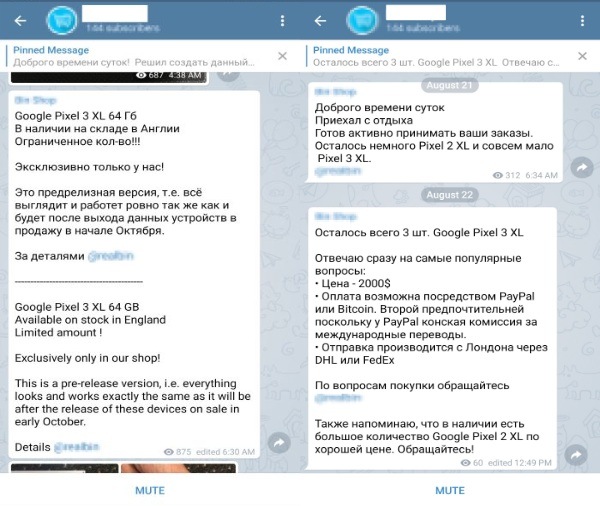
https://9jatechguru.com.ng/wp-content/uploads/2018/08/Google-Pixel-3-XL-Already-Available-On-Black-Market-For-2000.png There was something off about the recent flooding of Google Pixel 3 XL leaks, all over the Internet. Like all the close-up shots and box images seemed too good to be true. It appears our suspicions were not entirely baseless. According to 9to5Google, a batch of stolen Google Pixel 3 XL “near production” devices are being sold on the black market for $2,000 each. Google Pixel 3 XL Already Available On Black Market For $2,000 Behind all this is a Ukranian gentleman, previously responsible for releasing the hands-on Pixel 3 XL video. According to his Telegram bio, Luchkov is part of Wyslacom Media that apparently leaked out high-resolution images of Pixel 3XL. To buy the earlier version of the phone, Luchkov directs you to another Telegram users who allegedly possess these Pixel 3 Xl 64 GB devices in England. https://fossbytes.com/wp-content/uploads/2018/08/Google-Pixel-3-XL-Selling-for-2000.jpg Courtesy – 9to5Google According to the last one-on-one conversation between the 9to5Google reporter, the seller has only three pieces of Google Pixel 3 XL and asks to pay only via PayPal or Bitcoin. As of now, there is no information on how many Pixel 3 XL devices have been stolen or whether these sellers are genuinely selling Pixel 3 XL. But since all the leaks have been uniformly coming from Russia, it appears that many alleged Pixel devices have already been sold. In any case, it is advisable not to follow these trails since there is no assurance whether these people will ship you any of device or not. Even if they do, the delivered product might be something else entirely. It goes without saying that it’s illegal as well. The teams responsible for security at the tech giant Google and Foxconn -the plant where the device is assembled- are already having conversations regarding the leaks, presumably in order to clarify the trigger of this situation. The reality, is that the damage is already done for a launch that will be made on October 4. So, what do you think about this? Simply share all your views and thoughts in the comment section below. cc: lalasticlala Source: https://9jatechguru.com.ng/2018/08/google-pixel-3-xl-already-available-on-black-market.html |
| Webmasters › How To Reduce Data Usage In Google Chrome by sainttobs(op): 1:15pm On Aug 25, 2018 |
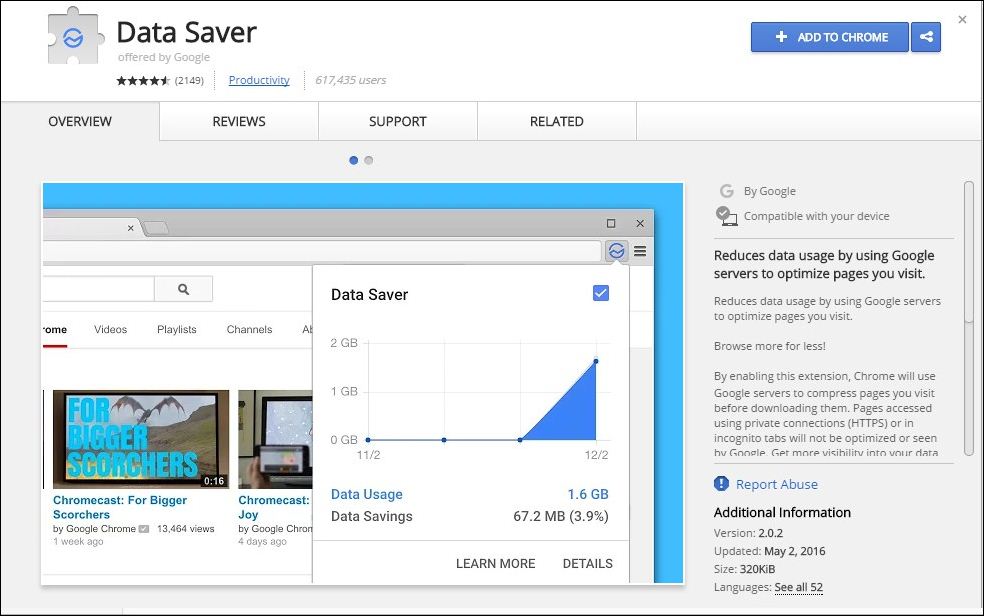
https://9jatechguru.com.ng/wp-content/uploads/2018/08/Reduce-Internet-Data-Usage-In-Google-Chrome-Browser-1.jpg Learn How To Reduce Data Usage in Google Chrome: If you have limited internet data plan, then you will know the pain of running short of MB’s. We are going to share three easy methods that will help you reduce your internet data usage in Google Chrome. Browsing on a computer consumes much data compared to the mobile browsing this is because while we browse through computer/laptop our browser loads pages that are not compressed and contains some bandwidth hogging plugins, add-ons, extensions that eat up lots of precious data. Hence, it is very important to know how to reduce this data consumption in your browser. Therefore, we are going to share three methods that will help you save your data usage and you can save lots of data by just following the method discussed below. How To Reduce Data Usage in Google Chrome The methods are very simple as you just need to do some settings in your Google Chrome and have to install a very useful Google Chrome extension that will help you save lots of your internet data. Surprisingly, by following the tutorial below, you would also experience a boost in your internet speed. Just follow up simple steps to proceed. Using Chrome’s Data Saver Extension Step 1. First of all, you need the latest version of Google Chrome Browser on your computer. Step 2. Now in your Chrome Browser download and install extension Data Saver (Beta). https://techviral.net/wp-content/uploads/2015/07/Data-Saver-1.jpg Chrome’s Data Saver Extension Step 3. Now after adding this extension in your chrome browser, there will be a pop up message displaying Data Saver has been added to your browser. Step 4. Now you just need to simply click on it as it will get activated and start monitoring your data usage and stop extra data usage in your chrome browser. That’s it you will now be able to save your data usage every time you browse the internet with Chrome browser. Disable images and Plugins You may not know it, but images can consume up lots of your bandwidth. Because nowadays in websites images are getting larger and more detailed, hence making slower to load and consuming up lots of precious data. Therefore, you can simply disable images in Google Chrome browser to reduce data usage in Google Chrome. Open Google Chrome, click on Settings> Show Advanced settings> Privacy and under content settings you need to enable “Do not show any images” Disable images Disable images For Plugins you need to browse Settings> Show Advanced settings> privacy and under content settings find “Plugins” and enable the option “Let me choose when to run plugin content” Using Ad Block Blocking Ads by using extension can turn out to be handy if you are looking for data saving extension. Ads are something that we don’t want in our browser as they consume bandwidths and sometimes they are annoying too. cc: lalasticlala For more detailed tutorial visit --> https://9jatechguru.com.ng/2018/08/reduce-data-usage-in-google-chrome.html |
| Science/Technology › Google, Apple, IBM Ditch College Degree Requirements by sainttobs(op): 2:53pm On Aug 23, 2018 |
https://9jatechguru.com.ng/wp-content/uploads/2018/08/Google-Apple-And-These-13-Companies-Ditch-College-Degree-Requirements-660x330.png All the major technology companies have highly skilled employees. Many of them graduate from the best teaching institutions in the world. But that does not mean that college education is mandatory. Companies like Apple,Google, and IBM no longer hesitate to prioritize specific experiences or skills in place of diplomas. Google, Apple, IBM Ditch College Degree Requirements All major technology companies have highly skilled employees. Many of them graduate from the best teaching institutions in the world. But that does not mean that college education is mandatory: companies like the tech giant Apple, the tech giant Google, and the tech giant IBM no longer hesitate to prioritize specific experiences or skills in place of diplomas. The finding comes from a survey by Glassdoor, an online job search service. The site listed 15 major US companies – including the three cited here (Google, Apple, and IBM) – that have opened advanced positions that do not necessarily require university training or any degree. However, this is also doesn’t mean that these companies give up the qualification. What the Glassdoor survey shows is that if the candidate has a set of skills that fit the job, he can be hired even if he does not have a college degree. Apple, for example, places a high value on the candidate’s experience, regardless of whether he got it in an academic setting or in other companies. Joanna Daly, IBM’s vice president of talent, told CNBC in an interview last year that the company takes into account skills built on boot camps, other jobs, or even on its own. About 15 percent of IBM employees in the United States do not have college degrees. The case of the tech giant Google is quite interesting. Sergey Brin and Larry Page met at Stanford University when they were studying for a doctorate in computer science. They practically created the tech giant Google within the walls of the institution. In the early years, they tried to make the company remember university, both in the inner culture and in the physical spaces. This approach has helped Google attract young talents who envisioned the chance to make a career in a company with a nontraditional internal culture. But the level of demand was high: it is said that for a long time the tech giant Google made a point of only hiring employees who came from top universities and who, in addition, had high grades. It’s not like this anymore. Academic education remains important to Google – indeed, to Alphabet as a whole – but is no longer a requirement for hiring. In 2014, Laszlo Bock, then vice president of human resources, explained that the tech giant Google prioritizes the overall cognitive ability of the candidate, not his/her intelligence outcome. “It’s the ability to learn. It is the ability to process on time. It’s the ability to bring together different types of information,” Bock added. Not only considering diplomas in hiring have been a practice of most large US companies, but it seems to be more important for technology giants. Many of them find it difficult to fill vacancies, and in the quest for the talent they have realized that perfect academic curriculum is synonymous with good professional performance. cc: lalasticlala So, what do you think about this? Simply share all your views and thoughts in the comment section below. Source: https://9jatechguru.com.ng/2018/08/google-apple-ibm-ditch-college-degree-requirements.html |
| Phones › Google Just Announced The New Android 9 Pie Go Edition by sainttobs(op): 2:07pm On Aug 23, 2018 |
https://9jatechguru.com.ng/wp-content/uploads/2018/08/Google-Just-Announced-The-New-Android-9-Pie-Go-Edition.png Google’s most used and well-known mobile operating system, Android has always been a more demanding operating system than its competitors, requiring more features and more capable hardware to provide a good user experience. However, now to overcome those limitations Google just announced the new Android 9 Pie Go Edition. Google Just Announced The New Android 9 Pie Go Edition Google, in order to try to counter this reality, has launched Android (Go edition) that brings various enhancements and optimizations in various parameters. After its debut in Android 8 Oreo, Google announced the Android 9 Pie with even more news. Emerging markets, typically with more modest device hardware and specs, are the big target of this Go edition of Android. Standard Android versions are often too cumbersome and demanding for entry-level devices. Also Read: How To Secure Your PC from Hackers Google introduced Android Go edition last year, already being present in two hundred smartphone models in over one hundred and twenty countries. Currently, it is possible to find smartphones with this operating system in smartphones, such as the Nokia 1, Alcatel 1X, LAVA Z50 and much more. Following what would be expected, Google has announced that it will continue the development of Android Go edition. In addition, the new features that will be present in the Android 9 Pie (Go edition), to be released during the fall of this year were it will be presented. What does the Android 9 Pie (Go edition) reserve for us? One of the measures implemented in Android (Go edition) is the amount of space that the operating system itself occupies in the internal storage of the device. While a standard version of Android takes up about 5.5GB, Android 8 Oreo (Go edition) takes only 3GB and the future Android 9 Pie (Go edition) will occupy only 2.5GB. Yes, We are facing a cut of more than 50% without compromising the integrity and basic functioning of the operating system. On modest devices with little internal storage, 8GB is the example given by the tech giant Google, these savings will have a considerable influence on the versatility of the equipment. With Android (Go edition) you will have plenty of room for your files and to install applications. In addition to the measures applied in the core of the operating system, Android (Go edition) has a set of applications from Google specially developed for this version. The Google Go app lets you read web pages aloud, highlighting text that is read in the process. Something more interesting is present in YouTube Go that allows you to download videos for later viewing, even while offline. The Go Maps will support navigation with turn-by-turn directions, that put it closer to the standard version available on other Android smartphones. The Files Go app will be able to transfer data in a peer-to-peer mode without requiring an Internet connection and speeds up to 490Mbps. Even the Google Assistant Go is present in this version of Android 9 Pie (Go edition) and will support several languages as well. In addition, the functionality level will now have commands to control the camera, flashlight, reminders, and Bluetooth. Google’s bid to “attack” the emerging markets is thus reinforced, which could be the entry of many users in the world of smartphones and the consequent abandonment of traditional mobile phones. So, what do you think about this? Simply share all your views and thoughts in the comment section below. cc: lalasticlala Source: https://9jatechguru.com.ng/2018/08/google-announced-android-9-pie-go-edition.html 1 Like |
| Science/Technology › Elon Musk – ‘the Worst Is Yet To Come’ by sainttobs(op): 11:54pm On Aug 21, 2018 |
https://9jatechguru.com.ng/wp-content/uploads/2018/08/Elon-Musk-The-Worst-Is-Yet-To-Come-660x330.png We all know very well that being CEO of one of the most promising companies in the world is not exactly an easy task. In an interview with the New York Times, Tesla founder, Elon Musk revealed that he feels distressed and tired of so much pressure. And not only that the Tesla founder also revealed that ‘The worst is yet to come’. Elon Musk – ‘The Worst Is Yet To Come’ Being CEO of one of the most promising companies in the world is not exactly an easy task, let’s take the example of Elon Musk. In an interview with the New York Times, Tesla founder revealed that he feels distressed and tired of so much pressure. After the interview, Tesla ended up dropping 8% on the stock exchange. “This past year has been the most difficult and painful year of my career,” said the founder and the CEO of Tesla. “It was excruciating.” Despite all the innovation and being considered one of the key mentors of this century, life does not seem to go very well with Elon Musk. In an interview with the New York Times (NYT), the founder of Tesla says he is tired and distressed and has had very painful times, as we told earlier. After the interview, Tesla ended up losing 8% which means a loss of approx 3.7 billion dollars of stock exchange capital. According to what has been revealed, Elon Musk seems to be looking for a new CEO, with the aim of freeing him from such pressure. Am considering taking Tesla private at $420. Funding secured. — Elon Musk (@elonmusk) August 7, 2018 The founder and the CEO of Tesla, Elon Musk has been one of the Silicon Valley’s most bold and aspiring entrepreneurs, who helped the technology industry a lot simply to found several influential technology companies. Also Read: Most Interesting and Devastating Bugs In The Computer World Despite not having the best period of his life, Elon Musk confessed that he has no plans to leave Tesla. On the other hand, the management of the company is worried about the state of the founder of the company. In the interview with New York Times, the CEO and the founder of Tesla, SpaceX, stated that he did not regret his Twitter posts and here is what he commented “Why would I?” and said that he has no such plans to stop using the social media platform. However, some board members have recently told Elon Musk that temporarily he should stop using Twitter and focus only on making cars and launching rockets. As we hinted earlier,Tesla executives have been trying hard for years to recruit a chief operating officer (COO) or other No. 2 executive simply to assume some of Elon Musk’s day-to-day responsibilities. As a couple of years ago, Elon Musk said the company approached Sheryl Sandberg, who is the social network giant Facebook’s second-highest executive, about the job. The CEO of Tesla, of course, Elon Musk also revealed that the year 2017 was “the most difficult of his life”! This summer he almost missed his brother’s wedding and spent his birthday at the company’s offices, where he has closely followed the production of Model 3. So, what do you think about this? Simply share all your views and thoughts in the comment section below. Also remember to share this article with your friends using the buttons below. cc: lalasticlala Source: https://9jatechguru.com.ng/2018/08/elon-musk-the-worst-yet-to-come.html 1 Like 1 Share |
| Phones › Oneplus 6T: Leaks, Release Date, Price & Specs by sainttobs(op): 11:31pm On Aug 21, 2018 |
https://9jatechguru.com.ng/wp-content/uploads/2018/08/OnePlus-6T-660x330.png OnePlus 6 is one of the biggest sales successes in the history of the Chinese brand, much due to the quality and the price ratio it offers. However, now according to the latest reports, the well-known Chinese smartphone manufacturer, OnePlus to launch OnePlus 6T in October as ‘T-Mobile exclusive’ in the US. OnePlus 6T: Leaks, Release Date, Price & Specs The OnePlus 6 is one of the biggest sales successes in the history of the Chinese brand, much due to the quality and the price ratio it offers. As usual, the well-known Chinese smartphone manufacturers OnePlus is already preparing its successor, and the OnePlus 6T should arrive in October with a slight increase in price. OnePlus has struggled in recent years to win its position in the market.The start was very promising, the course was made with ups and downs, however with great success in the latest releases. After a major success on OnePlus 5 and OnePlus 5T, the well-known Chinese smartphone manufacturers recently introduced OnePlus 6 which has beaten the company’s sales records and captured the market’s attention, both for its price and the features it offers. As usual, OnePlus will launch this year a new version of its flagship, OnePlus 6T, which will bring some new features and improvements to the current model. Also Read: How To Secure Your PC from Hackers The latest rumors also indicate that the new OnePlus 6T, would come from the hands of T-Mobile. The alliance does not imply exclusivity since the brand will also offer OnePlus 6T in its standard global version, although this will possibly imply a higher price. The OnePlus 6T will come all the way to the United States, with a fairly competitive price against rivals such as the Galaxy Note 9 that almost cost twice as much. Although it maintains the same processor, everything points to the design being changed, the reduced notch, and many more features could arrive. According to the latest rumors, the OnePlus 6T will arrive in October, making other smartphone manufacturers to work fast and present something robust, as is the case of Google’s Pixel 3. Regarding the price, as it happened with OnePlus 6, there should be a slight increase in price. The base model is expected to start at $550, compared to $530 for the current model. Also Read: How To Create Android Apps Without Coding Although not everyone agrees with the semiannual update policy of its flagship, it should soon be announcing the news of the new top of the range of the well-known Chinese smartphone manufacturer OnePlus. The OnePlus 6T itself will be a phone that will land directly in the high-end segment.t. It will have a 6.4-inch AMOLED display with 19:9 aspect ratio and a Snapdragon 845 processor with 6GB or 8GB of RAM. So, what do you think about this? Simply share all your views and thoughts in the comment section below. Source: https://9jatechguru.com.ng/2018/08/oneplus-6t-leaks.html |