Khalhokage's Posts
Nairaland Forum › Khalhokage's Profile › Khalhokage's Posts
1 2 3 4 5 6 7 8 ... 76 77 78 79 80 81 82 83 84 (of 98 pages)
 Science/Technology › Re: KOGI Born Scholar Solves 156-year-old Problem In Maths by khalhokage(m): 1:30pm On Nov 15, 2015 Science/Technology › Re: KOGI Born Scholar Solves 156-year-old Problem In Maths by khalhokage(m): 1:30pm On Nov 15, 2015 |
Please o, source and proof. |
| Science/Technology › Re: Have You Downloaded This Incredible Nigerian App That Everyone Is Talking About? by khalhokage(m): 5:22am On Nov 15, 2015 |
Seems really useful, I hope it won't disappoint and the codes should be updated regularly. |
| Phone/Internet Market › Re: What Are You Going To Buy On Black Friday? By Wisdomkosi by khalhokage(m): 7:33pm On Nov 14, 2015 |
When did Nigeria start observing black friday? SMH for una. 3 Likes |
| Computers › Re: Best Laptop One Can Get With 20k by khalhokage(m): 7:26pm On Nov 14, 2015 |
ediko5:I did, but it's no longer available. |
| Phones › Re: "Google Talkback" Aid To The Vision Impaired. by khalhokage(op): 2:19pm On Nov 14, 2015 |
Lalasticlala |
| Phones › Re: In Need Of A Phone For Blind People by khalhokage(m): 1:46pm On Nov 14, 2015 |
1 Like |
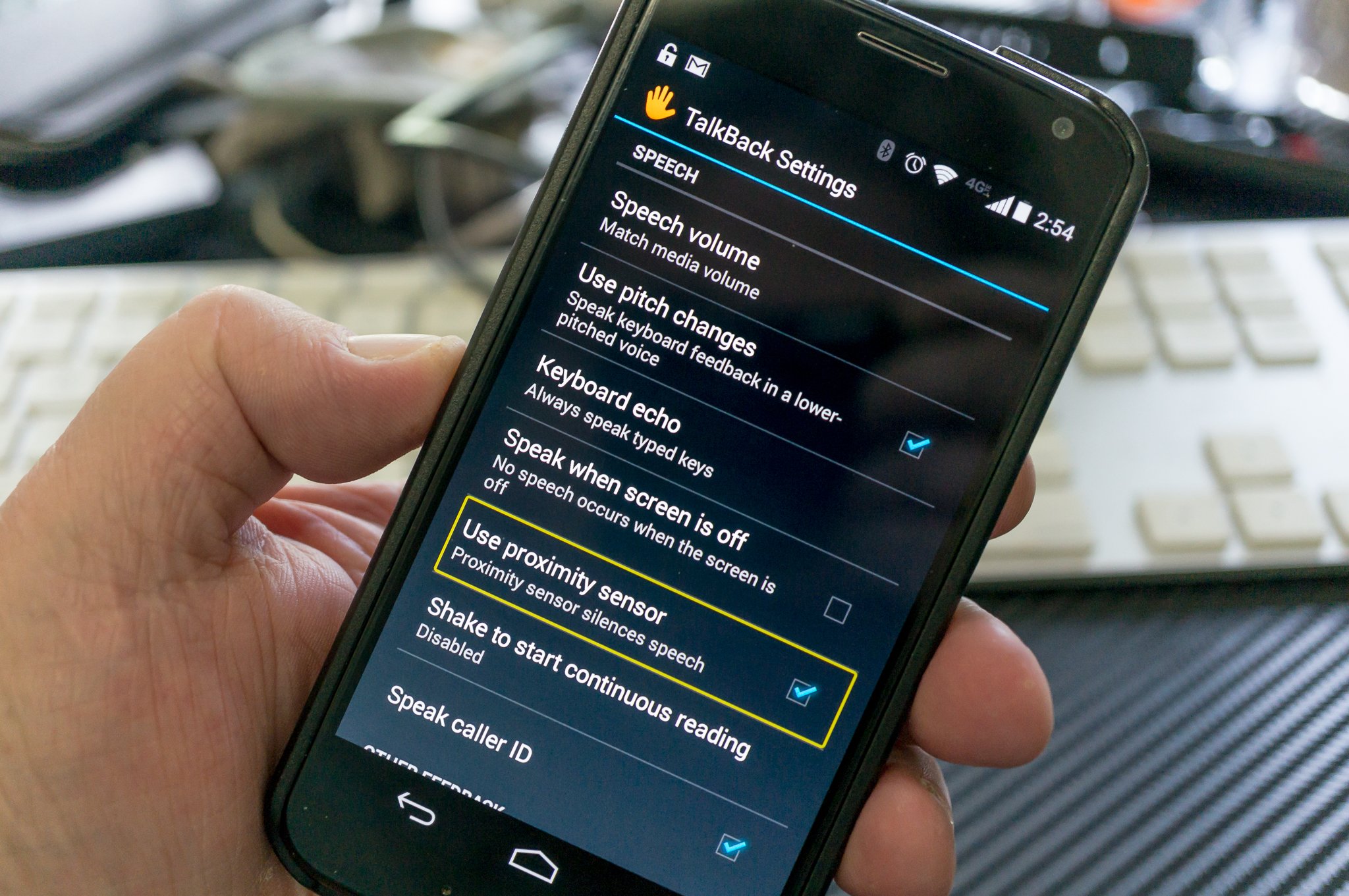
| Phones › "Google Talkback" Aid To The Vision Impaired. by khalhokage(op): 1:06pm On Nov 14, 2015 |
https://www.androidcentral.com/sites/androidcentral.com/files/styles/large_wm_brw/public/article_images/2014/09/talk-back-1.jpg Google's TalkBack service is a great way for the vision-impaired to use all of Android's features Most of us take being able to see everything on our high-resolution Androids for granted. We peep at pixels, discuss the merits of display technology to death, and even tend to turn our nose up at devices that don't have the ultra-high-res "true" HD screens some of today's flagships offer. But that's not the case for the large segment of us who have impaired vision. Folks who have a hard time seeing the overload of information that a modern smartphone has to offer will need some assistance, and Google provides a really comprehensive set of tools in TalkBack. TalkBack is an Accessibility Service that helps vision-impaired users interact with, and enjoy, their devices. It uses spoken word, vibration and other audible feedback to let you know what's on your screen, what you're touching, and what you can do with it. https://www.androidcentral.com/sites/androidcentral.com/files/styles/large_wm_brw/public/article_images/2014/09/talk-back-3.jpg TalkBack was installed on your device when you bought it as part of Google's Android application suite, and it is routinely updated with improvements and new features through Google Play. If you don't need assistance because you're not able to see everything on the screen clearly, you've probably never looked at it. That's not necessarily a bad thing, because it wasn't designed for those of us who can see everything and the setup and options can be confusing when you see what you want to do and hear how it all works at the same time. How it works is that you use your finger to "explore" what is on the screen, and when you come across any element that can be acted on, or any block of text that can be read back to you, TalkBack kicks in. For text (including things like the time and notifications) the screen reader service tells you exactly what it written — including things like "colon p" for emoticons, and all the characters in a web address for example. For elements that you act on, TalkBack tells you what you've touched, and lets you act with a double tap or move to the next element without triggering anything. It's pretty well thought out, and if you can follow the audible prompts you can do anything on an Android — even if you can't see the screen. All you need to do is set it up. Having said that, the whole setup routine and setting the various options is covered very well in the tutorial the first time you initiate the service. You'll find it under "Accessibility" in your device settings , and on recent versions of Android all you need to do to enable it is slide a toggle to the on position. You're then walked through all the ways TalkBack can help, as well as how to use gestures and dive into the settings of the service itself. https://www.androidcentral.com/sites/androidcentral.com/files/styles/large_wm_brw/public/article_images/2014/09/talk-back-2.jpg And there are settings galore. The settings for spoken feedback — reading what you see on your screen — include options you would expect like speech volume and reading out caller ID information, as well as settings for using a different pitch when telling you what you're typing, and a setting to allow shaking the phone start and stop screen reading. Google has really done a fine job figuring out what we might need here, and has thrown it all in. When something is this important — some of us couldn't use a phone or tablet without some assistive technology — we're glad to see all the options. When it comes to other feedback, you can turn vibration on and off, set things so you're given an audible tone when you've highlighted a selectable item, and control the volume of other audio — like a call or music — so you're better able to hear TalkBack when it needs to tell you something. You're also able to completely customize the exploration by touch features. You can enable custom labels (which are read aloud) and gestures, change from the default double tap to activate and double finger scroll for lists and other screen items, and most importantly, activate the tutorial at any time. https://www.androidcentral.com/sites/androidcentral.com/files/styles/large_wm_brw/public/article_images/2014/09/talk-back-4.jpg TalkBack isn't something you'll want to use unless you need it. Frankly, it's darn near impossible to use when you can see what it is telling you you're seeing, and you can't help but tap and try to do things before it is ready. But folks who need to rely on this sort of tech will be more attuned to following audible cues, and this is a great way to help those of us who need some help to get that help. If you have the need, or know someone who does, be sure to give Talk Back a look and see if it can make someone's Android experience a little better. Source: [url=m.androidcentral.com/what-google-talk-back]Androidcentral[/url] 1 Like |
| Phones › Re: In Need Of A Phone For Blind People by khalhokage(m): 12:43pm On Nov 14, 2015 |
Almost every android device has that capability with Talkback built in, google it, also there are other apps on the play store that perform the same function. If you have an android device go to accessibility through the settings and activate "talkback" to check it out for yourself. 2 Likes |
| Family › Re: Mum Forcefully Brushing Her Son's Teeth ( Hilarious Photo ) by khalhokage(m): 11:11am On Nov 12, 2015 |
oluseyiforjesus:Water enter brain, through mouth? nawa for you o!  2 Likes |
| Education › Re: Help! How Do I Solve This Problem? by khalhokage(m): 12:13pm On Nov 11, 2015 |
Zeedarh:How would she be able to find someone willing to pay one years rent in full? because that's what it means. 1 Like |
| Phones › Re: How I Updated My Phone With Unknown WIFI by khalhokage(m): 5:26am On Nov 10, 2015 |
And you're obviously proud that you stole from someone. 2 Likes |
| Computers › Re: Windows 7 To 10 by khalhokage(m): 2:01pm On Nov 07, 2015 |
skyhighweb:You're compelling people to stick with an older and inferior product based solely on your own experience, create a more relevant topic if you can't take criticism. 2 Likes |
| Computers › Re: Windows 7 To 10 by khalhokage(m): 7:41am On Nov 07, 2015 |
What a pointless rant. I upgraded without any issues and I've been using it for over a month now, still no issues. Whether you like it or not Windows 10 is miles ahead of 7 both in It's UI and performance. |
| Science/Technology › Re: Nigerian Teenager Create Superfast Crocodile Android Browser by khalhokage(m): 4:06am On Nov 07, 2015 |
Really old gist, it has been on front-page of this Nairaland in the past sef. |
| Health › Re: ....... by khalhokage(op): 9:46pm On Nov 04, 2015 |
Caracta:Thanks, I'll scrap this. |
| Health › ....... by khalhokage(op): 9:32pm On Nov 04, 2015 |
......... |
| NYSC › Re: Corps Member Dies At Enugu Orientation Camp by khalhokage(m): 10:27am On Nov 04, 2015 |
In before our resident NL keyboard detectives start spouting nonsense, the fact that drugs were found on her doesn't mean they were the cause of her death, wait for the autopsy. 1 Like |
| Phones › Re: Infinix Hot Note Or Note Pro Needed by khalhokage(m): 9:29am On Nov 04, 2015 |
There's 2gb ram Hot Note available in Uyo at 23k. |
| Gaming › Re: Xbox2 Vs Ps5 by khalhokage(m): 4:54am On Nov 04, 2015 |
lol, funny things are happening, make I siddon look.  |
| Science/Technology › Re: MTN NG Uses This Means To Pay For Their Fine..dont Fall For It. by khalhokage(m): 1:03pm On Nov 03, 2015 |
Looks fake, go edit am well |
| Computers › Re: Best Laptop One Can Get With 20k by khalhokage(m): 9:48pm On Nov 02, 2015 |
OKUCHI11:ok, there's something available but it's in Uyo. |
| Computers › Re: Best Laptop One Can Get With 20k by khalhokage(m): 4:09pm On Nov 02, 2015 |
Do you stay around Uyo? |
| TV/Movies › Re: What Movie Are You Watching Now? by khalhokage(m): 3:36pm On Nov 02, 2015 |
The Thing |
| Phones › Re: Which 2gb Ram Phone Should I Buy by khalhokage(m): 9:39am On Nov 02, 2015 |
Infinix Hot Note has a 2gb variant, about 27k new. |
| Politics › Re: I Want To Be Remembered For Fighting Corruption To A Standstill – Buhari by khalhokage(m): 5:54pm On Nov 01, 2015 |
Buhari, campaigns are over, stop talking, start walking, or even crawl sef we go manage . 1 Like |
| Celebrities › Re: Singer Jodie Weds by khalhokage(m): 5:14pm On Nov 01, 2015 |
cc ishilove |
| Computers › Re: Some Keys On My Laptop Just Stopped Working by khalhokage(m): 5:06pm On Nov 01, 2015 |
prettytasha:yes definitely. |
| Computers › Re: Some Keys On My Laptop Just Stopped Working by khalhokage(m): 4:47pm On Nov 01, 2015 |
prettytasha:No idea, you'll have to go check for your laptop specific keyboard. |
| Computers › Re: Some Keys On My Laptop Just Stopped Working by khalhokage(m): 4:43pm On Nov 01, 2015 |
Welcome to the club, time to replace keyboard. |
| Phones › Re: Fake Nairaland Apps Floods Google Playstore (screenshot) by khalhokage(m): 4:41pm On Nov 01, 2015 |
grayht:Na so, time don come and suddenly GF don disappear, na the problem of this country be this. 1 Like |
| Phones › Re: Fake Nairaland Apps Floods Google Playstore (screenshot) by khalhokage(m): 2:52pm On Nov 01, 2015 |
grayht:lol,  oya na, give me your GF's number. oya na, give me your GF's number. 2 Likes |
| Science/Technology › Researchers See Evolution Working Faster Than Expected (in Chickens) by khalhokage(op): 8:06am On Nov 01, 2015 |
https://o.aolcdn.com/hss/storage/midas/dda3264e4a220f090678971a58c3a2ef/202898253/chickens.jpg The word "evolution" tends to conjure up images of early hominids dodging predators on the veldt as they inch — agonizingly slowly — toward modern humanity. Most of those popular images of evolution are steeped in antiquity because, well, evolution takes ages, right? Well, a study conducted by researchers at the University of Oxford involving the humble chicken suggests evolution doesn't always take as long as you might think. "Our observations reveal that evolution is always moving quickly," Oxford's Professor Greger Larson said. "But we tend not to see it because we typically measure it over longer time periods." In this case, the team peered closely at the mitochondrial DNA of White Plymouth rock chickens (members of a carefully cultivated lineage , no less). As far as current scientific knowledge is concerned, the makeup of an individual's mitochondrial DNA changes about 2 percent every million years. Since this line of chickens has only been pecking away for about 50 years, there shouldn't have been any mutations in their mitochondrial DNA — instead, the researchers found two. As it happens, these chickens' DNA was really full of surprises. See, that sort of genetic material is usually only passed from mother to offspring. In very rare cases, that DNA will sometimes be inherited from the chicken's dad, an event called "paternal leakage". Scientists long thought that such leakage was a once-in-a-blue-moon sort of thing, but the fact that researchers spotted it within a single group of these chickens it's a just a little more commonplace than expected. Source: University of Oxford |





1 2 3 4 5 6 7 8 ... 76 77 78 79 80 81 82 83 84 (of 98 pages)