Yinksdavid's Posts
Nairaland Forum › Yinksdavid's Profile › Yinksdavid's Posts
1 2 3 4 5 6 7 8 ... 10 11 12 13 14 15 16 17 18 (of 19 pages)
 Technology Market › Re: How To Fix “operating System Not Found” Error On Windows 10? by Yinksdavid(op): 10:05am On Sep 12, 2021 Technology Market › Re: How To Fix “operating System Not Found” Error On Windows 10? by Yinksdavid(op): 10:05am On Sep 12, 2021 |
Onyeka90210:Thanks. Kindly check my profile and Stay tuned as there is so much more knowledge to share. |
| Computers › Re: Post Your Laptop Problems Here And Get Solution To Fix It Yourself by Yinksdavid(m): 9:54am On Sep 12, 2021 |
Mallamai:Suspecting OS related issue. Can you reach out to me as I would like to see the screenshots of the issue so i can provide a probable fix. |
| Computers › Re: Error In Loading Window by Yinksdavid(m): 9:42am On Sep 12, 2021 |
errigdee:This is an OS issue and the most reliable fix is to repair and restore the Windows OS. I will be sharing the steps on how to achieve it in my write up later today specifically for Windows 10 OS. If you are using another OS version such as 8 or 7, then you need to reach out privately to send the steps to you. |
| Computers › Benefits Of Using A Valid/genuine Activation Keys For Your Windows 10 OS by Yinksdavid(op): 9:39am On Sep 12, 2021 |
The Benefits Of of Using genuine MS Windows 10 Professional License/Activation Key Code Microsoft (MS) Windows is an operating system (OS) found in many desktop and laptop computers. Businesspeople, professionals, students, and many other types of consumers use the 10th major iteration of Windows to accomplish different tasks. But, using this OS needs a product key for users to make full use of its features. The key code might be a little pricey, but know that you can buy an MS Windows 10 Professional key code at a low price from me. Here are some of the benefits of purchasing a genuine Activation code: 1. Saves You Money: Quite a massive number of work stations(Laptops, desktops, palmtops, tablets) all come with either trial, pirated, cracked versions of the Windows 10 OS and although it always seems to be fine when using such work stations but along the line(mostly few months), you are likely to start encountering some irritating and frustrating actions on your work station such as misbehaving icons, apps taking so long to open or sometimes not responding, blue screen, cursor misbehaving and so many more. The next thing we do is to take it for repairs but as we all know from experiences that it also seems to start working well after the repairs but trust me, you will likely experience similar or different issues(Not necessarily re-occurrence of the first issue) so we are left to keep managing the situation by taking it for repairs when we face such issues which we have to keep paying for. Note: I will give a clue why such happens. Every software always get upgraded/updated(Automatic) at certain periods so whenever there is a new update(security patches, more functions, etc), it wont properly sync with pirated versions of the OS hence the reason we encounter such annoying issues if a genuine Windows OS activation was not done. 2. Gives You Access To All Windows 10 Professional Features: Without the product code, you can still use Windows 10. But, the OS will restrict you from taking specific actions. For instance, you can’t replace the default MS Windows wallpaper to your preferred background. Also, you can’t access other customization options when you want to personalize the OS. Attempting to customize particular display features will meet you with grayed out options. Buying the Windows 10 Professional key code lets you gain access to all the features of the OS, letting you do so much more than change the desktop wallpaper or the color of window borders. Below are a few features you can unlock with the help of a genuine key code: Unlimited Reinstallations There might come a time when you need to install the Windows OS on a new computer. But, you don’t have to buy a new product key to be able to do that. Buying a Windows 10 code will bind that product key to your account. Hence, no one can use the same product key. It also means you can install your key on an unlimited number of devices. It’s an ideal choice for people who frequently upgrade their systems without having to worry about spending extra cash on another code. MS Customer Support Using a locked Windows 10 doesn’t give you access to the MS Customer Support network. So, if the OS encounters errors like the Blue Screen of Death (BSOD), you might not have access to a human representative to help you with the necessary troubleshooting and repairs. However, you may still access other sources to help repair the system when bugs, glitches, and errors occur. For instance, you can visit blogs and the Frequently Asked Questions (FAQs) section on Microsoft’s official website. But, the repairs might take longer than expected without the extra support from a Microsoft IT professional. 3. Removes Limitation: Aside from gaining full access to the OS, unlocking the system with a discounted key code eliminates several of its limitations. The restrictions you might encounter from using a locked Windows 10 Professional system may include: A. Persisting Watermark An MS Windows watermark will persist on the lower right corner of the system. Also, this image will remain on the screen regardless of the app you’re using. So, if you find the watermark to be an annoyance, the only way to remove it is to unlock the system using a legitimate product key. B. Frequent Activation Reminders A message will pop up, reminding you to activate your version of Windows. This notification may disturb apps, and it can be a hindrance to accomplishing tasks efficiently. Again, you can get rid of such reminders by activating the system with a genuine license key. C. Limited Updates The professionals at Microsoft are continuously searching for solutions to fix bugs and errors on the Windows OS. Windows might still release patch fixes to specific glitches and errors, but you may not acquire full support from the company. So, you might be exposing your valuable data to hacking and security breaches. D. Specific Apps Stop Working After A While You may use apps like MS Office even if you’re using a non-activated version of Windows 10 Professional. But, chances are it may cease functioning after a specific period of time. You might gain unlimited access to officially-licensed software by activating The MS Pro version. Unlocking the Windows 10 Professional edition on your device needs a product key. Use the benefits listed in this post to help you decide whether or not to upgrade to the fully unlocked version of the OS. Also, consider buying the key code from a reliable retailer(Myself) to avoid future complications. |
| Technology Market › Re: How To Fix “operating System Not Found” Error On Windows 10? by Yinksdavid(op): 9:02am On Sep 12, 2021 |
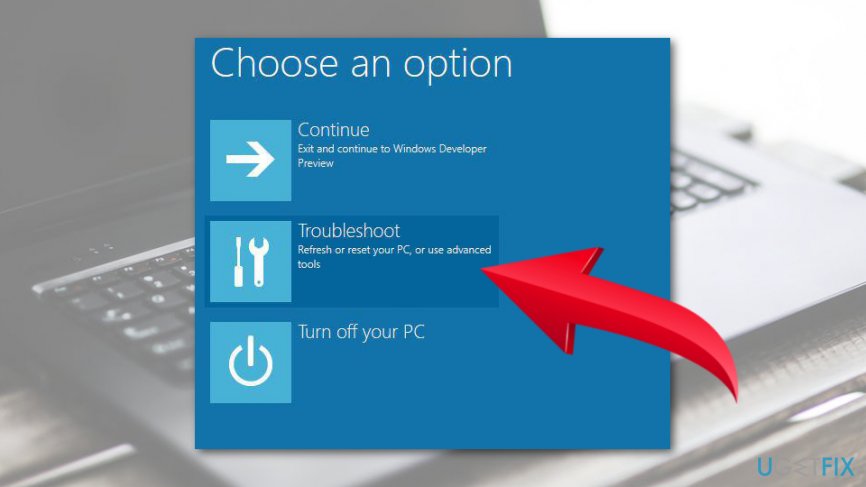
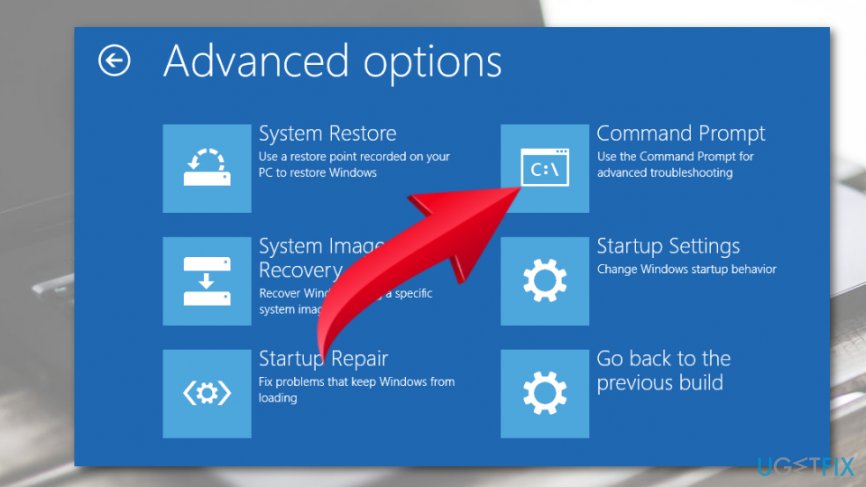
Method 3. Activate Windows Partition If the previous methods did not help, then the last thing that you can try is related to the Windows Partition. If it has been disabled, now it’s time to enable it. For this purpose, do the following: NOTE: you will need a bootable Windows OS installation drive, such as DVD or USB. 1. Boot up the PC that is having an Operating system not found error and then insert the DVD/USB. 2. Then press any key to boot from the external drive. 3. When Windows Setup shows up, set keyboard, language, and other required settings, and press Next. 4. Then select Repair your PC. 5. On the Choose an option screen, click Troubleshoot. https://ugetfix.com/wp-content/uploads/articles/askit/choose-troubleshoot-1_en.jpg 6. Select Advanced options and open Command Prompt. https://ugetfix.com/wp-content/uploads/articles/askit/open-command-prompt-2_en.jpg 7. Type diskpart in the Command Prompt window and press Enter. 8. After that, type list disk and disk n (the n stands for disk number) and press Enter after each of them. 9. Type list volume and don’t forget to hit Enter. 10. Locate the partition in which Windows OS is stored and type volume n (n stands for the number of Windows partition). 11. To activate the selected partition, type active in the Command Prompt window and press Enter. 12. Close everything and reboot the PC. 1 Like |
| Technology Market › Re: How To Fix “operating System Not Found” Error On Windows 10? by Yinksdavid(op): 8:57am On Sep 12, 2021 |
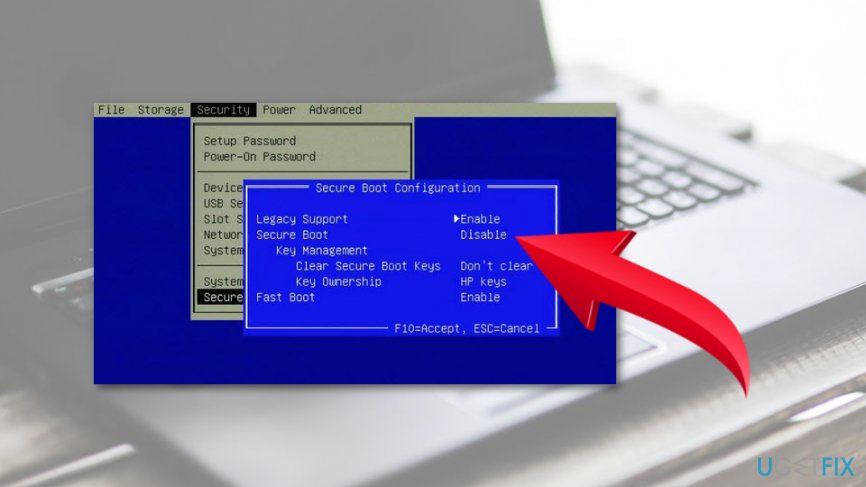
Method 2. Enable/Disable UEFI Secure Boot You may receive an error reporting about missing OS if you have configured a UEFI system[3] to boot in Legacy mode. That’s because the majority of Windows 10 PC comes with enabled firmware and Secure Boot, and the OS installed on GPT partition can be booted in UEFI mode only. In this case, you should change the boot mode from Legacy to UEFI or disable UEFI and Secure Boot. For this purpose, you have to: 1. Click the Power button before the logo shows up. 2. Then press F2 to open BIOS Setup Menu. 3. Select Security tab and disable Secure Boot. https://ugetfix.com/wp-content/uploads/articles/askit/disable-secure-boot_en.jpg 4. After that, select Advanced and navigate to System Configuration. 5. Set Boot Mode to CSM Boot. 6. After that, press F10 to save the changes. 7. Finally, press F12 and then select the source you want the system to boot from. |
| Technology Market › How To Fix “operating System Not Found” Error On Windows 10? by Yinksdavid(op): 8:51am On Sep 12, 2021 |
Operating System Not Found is an error message that occurs during system startup. The message is shown in the black windows and prevents from accessing the desktop. Therefore, the situation is scary and quite complicated. However, just like many other Windows errors, this one can be fixed. When a PC is booting, the BIOS tries to find a operating system on a hard drive to boot from. However, if it is unable to find one, then an “Operating system not found” error is displayed. The issue may be triggered by various issues, including: Corruption of Master Boot Record (MBR) DOS Boot Record (DBR), Boot Configuration Database (BCD), Deactivation of system’s partition, Faulty Hard drive Methods to fix “Operating system not found” Error on Windows 10 NOTE: This method requires to have a bootable Windows installation media, such as DVD or USB. 1. Boot up the PC that is having an Operating system not found error and then insert the DVD/USB. 2. Then press any key to boot from the external drive. 3. When Windows Setup shows up, set keyboard, language, and other required settings, and press Next. 4. Then select Repair your PC. 5. On the Choose an option screen, click Troubleshoot. https://ugetfix.com/wp-content/uploads/articles/askit/choose-troubleshoot-1_en.jpg 6. Select Advanced options and open Command Prompt. https://ugetfix.com/wp-content/uploads/articles/askit/open-command-prompt-2_en.jpg 7. In the Command Prompt window, type the following commands pressing Enter after each of them: bootrec.exe /fixmbr bootrec.exe /fixboot bootrec.exe /rebuildbcd 8. Finally, restart your PC. |
| Programming › Re: I Want To Learn Programming. Which Language Should I Start With? by Yinksdavid(m): 11:07pm On Sep 11, 2021 |
Johnnyessence:I am glad you do. Enjoy your learning and take care. |
| Career › Re: Learn Microsoft Azure by Yinksdavid(op): 10:00pm On Sep 11, 2021 |
The Benefits Of of Using genuine MS Windows 10 Professional License/Activation Key Code Microsoft (MS) Windows is an operating system (OS) found in many desktop and laptop computers. Businesspeople, professionals, students, and many other types of consumers use the 10th major iteration of Windows to accomplish different tasks. But, using this OS needs a product key for users to make full use of its features. The key code might be a little pricey, but know that you can buy an MS Windows 10 Professional key code at a low price. Here are some of the benefits of purchasing a genuine Activation code: 1. Saves You Money: Quite a massive number of work stations(Laptops, desktops, palmtops, tablets) all come with either trial, pirated, cracked versions of the Windows 10 OS and although it always seems to be fine when using such work stations but along the line(mostly few months), you are likely start encountering some irritating and bit frustrating actions on your work station such as misbehaving icons, apps taking so long to open or sometimes not responding, blue screen, cursor misbehaving and so many more. The next thing is to take it for repairs but as we all know from experiences that it also seems to start working well after repairs but trust me, you will likely experience same or another issue(Not necessarily re-occurrence of the first issue) so we are left to keep managing the situation by taking it for repairs when we face such issues. Note: I will give a clue why such happens. Every software always get upgraded/updated at certain periods so whenever there is a new update(security patches, more functions, etc), it wont properly sync with pirated versions of the OS hence the reason we encounter such annoying issues if a genuine Windows OS activation was not done. 2. Gives You Access To All Windows 10 Professional Features: Without the product code, you can still use Windows 10. But, the OS will restrict you from taking specific actions. For instance, you can’t replace the default MS Windows wallpaper to your preferred background. Also, you can’t access other customization options when you want to personalize the OS. Attempting to customize particular display features will meet you with grayed out options. Buying the Windows 10 Professional key code lets you gain access to all the features of the OS, letting you do so much more than change the desktop wallpaper or the color of window borders. Below are a few features you can unlock with the help of a genuine key code: Unlimited Reinstallations There might come a time when you need to install the Windows OS on a new computer. But, you don’t have to buy a new product key to be able to do that. Buying a Windows 10 code will bind that product key to your account. Hence, no one can use the same product key. It also means you can install your key on an unlimited number of devices. It’s an ideal choice for people who frequently upgrade their systems without having to worry about spending extra cash on another code. MS Customer Support Using a locked Windows 10 doesn’t give you access to the MS Customer Support network. So, if the OS encounters errors like the Blue Screen of Death (BSOD), you might not have access to a human representative to help you with the necessary troubleshooting and repairs. However, you may still access other sources to help repair the system when bugs, glitches, and errors occur. For instance, you can visit blogs and the Frequently Asked Questions (FAQs) section on Microsoft’s official website. But, the repairs might take longer than expected without the extra support from a Microsoft IT professional. 3. Removes Limitation: Aside from gaining full access to the OS, unlocking the system with a discounted key code eliminates several of its limitations. The restrictions you might encounter from using a locked Windows 10 Professional system may include: A. Persisting Watermark[i][/i] An MS Windows watermark will persist on the lower right corner of the system. Also, this image will remain on the screen regardless of the app you’re using. So, if you find the watermark to be an annoyance, the only way to remove it is to unlock the system using a legitimate product key. B. Frequent Activation Reminders[i] A message will pop up, reminding you to activate your version of Windows. This notification may disturb apps, and it can be a hindrance to accomplishing tasks efficiently. Again, you can get rid of such reminders by activating the system with a genuine license key. C. Limited Updates[i] The professionals at Microsoft are continuously searching for solutions to fix bugs and errors on the Windows OS. Windows might still release patch fixes to specific glitches and errors, but you may not acquire full support from the company. So, you might be exposing your valuable data to hacking and security breaches. D. Specific Apps Stop Working After A While[i] You may use apps like MS Office even if you’re using a non-activated version of Windows 10 Professional. But, chances are it may cease functioning after a specific period of time. You might gain unlimited access to officially-licensed software by activating The MS Pro version. Unlocking the Windows 10 Professional edition on your device needs a product key. Use the benefits listed in this post to help you decide whether or not to upgrade to the fully unlocked version of the OS. Also, consider buying the key code from a reliable retailer(Myself) to avoid future complications.[/quote] |
| Programming › Re: I Want To Learn Programming. Which Language Should I Start With? by Yinksdavid(m): 9:57pm On Sep 11, 2021 |
Johnnyessence:I have just seen your email which you sent tonight. Will respond and share a very simplified reading material including video tutorial. |
| Career › Re: Learn Microsoft Azure by Yinksdavid(op): 9:54pm On Sep 11, 2021 |
uchaymart:No it does not. |
| Programming › Re: I Want To Learn Programming. Which Language Should I Start With? by Yinksdavid(m): 5:04pm On Sep 11, 2021 |
Ambasado4lyf:Sent. 1 Like |
| Programming › Re: I Want To Learn Programming. Which Language Should I Start With? by Yinksdavid(m): 2:24pm On Sep 11, 2021 |
nduprincekc:The email is not correct. |
| Programming › Re: I Want To Learn Programming. Which Language Should I Start With? by Yinksdavid(m): 2:18pm On Sep 11, 2021 |
nduprincekc:Sent to your email. Kindly check |
| Computers › Re: Windows 10 Problems And Solutions (official Microsoft Windows 10 links added) by Yinksdavid(m): 2:15pm On Sep 11, 2021 |
macskillzy:I can do that. Reach out via my signature below or yinks.azure@gmail.com |
| Computers › Re: Post Your Computer (PC) Troubles Here. by Yinksdavid(m): 1:59pm On Sep 11, 2021 |
Beress:The below will help you to resolve the issues. https://appuals.com/fix-no-bootable-device-insert-boot-disk-and-press-any-key/ |
| Technology Market › Re: Genuine Microsoft Windows/office/exchange Activation/license Keys Available by Yinksdavid(op): 1:09pm On Sep 11, 2021 |
The Benefits Of of Using genuine MS Windows 10 Professional License/Activation Key Code Microsoft (MS) Windows is an operating system (OS) found in many desktop and laptop computers. Businesspeople, professionals, students, and many other types of consumers use the 10th major iteration of Windows to accomplish different tasks. But, using this OS needs a product key for users to make full use of its features. The key code might be a little pricey, but know that you can buy an MS Windows 10 Professional key code at a low price. Here are some of the benefits of purchasing a genuine Activation code: 1. Saves You Money: Quite a massive number of work stations(Laptops, desktops, palmtops, tablets) all come with either trial, pirated, cracked versions of the Windows 10 OS and although it always seems to be fine when using such work stations but along the line(mostly few months), you are likely start encountering some irritating and bit frustrating actions on your work station such as misbehaving icons, apps taking so long to open or sometimes not responding, blue screen, cursor misbehaving and so many more. The next thing is to take it for repairs but as we all know from experiences that it also seems to start working well after repairs but trust me, you will likely experience same or another issue(Not necessarily re-occurrence of the first issue) so we are left to keep managing the situation by taking it for repairs when we face such issues. Note: I will give a clue why such happens. Every software always get upgraded/updated at certain periods so whenever there is a new update(security patches, more functions, etc), it wont properly sync with pirated versions of the OS hence the reason we encounter such annoying issues if a genuine Windows OS activation was not done. 2. Gives You Access To All Windows 10 Professional Features: Without the product code, you can still use Windows 10. But, the OS will restrict you from taking specific actions. For instance, you can’t replace the default MS Windows wallpaper to your preferred background. Also, you can’t access other customization options when you want to personalize the OS. Attempting to customize particular display features will meet you with grayed out options. Buying the Windows 10 Professional key code lets you gain access to all the features of the OS, letting you do so much more than change the desktop wallpaper or the color of window borders. Below are a few features you can unlock with the help of a genuine key code: Unlimited Reinstallations There might come a time when you need to install the Windows OS on a new computer. But, you don’t have to buy a new product key to be able to do that. Buying a Windows 10 code will bind that product key to your account. Hence, no one can use the same product key. It also means you can install your key on an unlimited number of devices. It’s an ideal choice for people who frequently upgrade their systems without having to worry about spending extra cash on another code. MS Customer Support Using a locked Windows 10 doesn’t give you access to the MS Customer Support network. So, if the OS encounters errors like the Blue Screen of Death (BSOD), you might not have access to a human representative to help you with the necessary troubleshooting and repairs. However, you may still access other sources to help repair the system when bugs, glitches, and errors occur. For instance, you can visit blogs and the Frequently Asked Questions (FAQs) section on Microsoft’s official website. But, the repairs might take longer than expected without the extra support from a Microsoft IT professional. 3. Removes Limitation: Aside from gaining full access to the OS, unlocking the system with a discounted key code eliminates several of its limitations. The restrictions you might encounter from using a locked Windows 10 Professional system may include: A. Persisting Watermark[/i] An MS Windows watermark will persist on the lower right corner of the system. Also, this image will remain on the screen regardless of the app you’re using. So, if you find the watermark to be an annoyance, the only way to remove it is to unlock the system using a legitimate product key. B. Frequent Activation Reminders[i] A message will pop up, reminding you to activate your version of Windows. This notification may disturb apps, and it can be a hindrance to accomplishing tasks efficiently. Again, you can get rid of such reminders by activating the system with a genuine license key. C. Limited Updates[/i] The professionals at Microsoft are continuously searching for solutions to fix bugs and errors on the Windows OS. Windows might still release patch fixes to specific glitches and errors, but you may not acquire full support from the company. So, you might be exposing your valuable data to hacking and security breaches. D. Specific Apps Stop Working After A While[i] You may use apps like MS Office even if you’re using a non-activated version of Windows 10 Professional. But, chances are it may cease functioning after a specific period of time. You might gain unlimited access to officially-licensed software by activating The MS Pro version. Unlocking the Windows 10 Professional edition on your device needs a product key. Use the benefits listed in this post to help you decide whether or not to upgrade to the fully unlocked version of the OS. Also, consider buying the key code from a reliable retailer(Myself) to avoid future complications.[/quote] |
| Programming › Re: I Want To Learn Programming. Which Language Should I Start With? by Yinksdavid(m): 1:05pm On Sep 11, 2021 |
vibratingpenis:You are welcome. Kindly check your email |
| Technology Market › Re: Genuine Microsoft Windows/office/exchange Activation Keys by Yinksdavid(op): 12:50pm On Sep 11, 2021 |
The Benefits Of of Using genuine MS Windows 10 Professional License/Activation Key Code Microsoft (MS) Windows is an operating system (OS) found in many desktop and laptop computers. Businesspeople, professionals, students, and many other types of consumers use the 10th major iteration of Windows to accomplish different tasks. But, using this OS needs a product key for users to make full use of its features. The key code might be a little pricey, but know that you can buy an MS Windows 10 Professional key code at a low price. Here are some of the benefits of purchasing a genuine Activation code: 1. Saves You Money: Quite a massive number of work stations(Laptops, desktops, palmtops, tablets) all come with either trial, pirated, cracked versions of the Windows 10 OS and although it always seems to be fine when using such work stations but along the line(mostly few months), you are likely start encountering some irritating and bit frustrating actions on your work station such as misbehaving icons, apps taking so long to open or sometimes not responding, blue screen, cursor misbehaving and so many more. The next thing is to take it for repairs but as we all know from experiences that it also seems to start working well after repairs but trust me, you will likely experience same or another issue(Not necessarily re-occurrence of the first issue) so we are left to keep managing the situation by taking it for repairs when we face such issues. Note: I will give a clue why such happens. Every software always get upgraded/updated at certain periods so whenever there is a new update(security patches, more functions, etc), it wont properly sync with pirated versions of the OS hence the reason we encounter such annoying issues if a genuine Windows OS activation was not done. 2. Gives You Access To All Windows 10 Professional Features: Without the product code, you can still use Windows 10. But, the OS will restrict you from taking specific actions. For instance, you can’t replace the default MS Windows wallpaper to your preferred background. Also, you can’t access other customization options when you want to personalize the OS. Attempting to customize particular display features will meet you with grayed out options. Buying the Windows 10 Professional key code lets you gain access to all the features of the OS, letting you do so much more than change the desktop wallpaper or the color of window borders. Below are a few features you can unlock with the help of a genuine key code: Unlimited Reinstallations There might come a time when you need to install the Windows OS on a new computer. But, you don’t have to buy a new product key to be able to do that. Buying a Windows 10 code will bind that product key to your account. Hence, no one can use the same product key. It also means you can install your key on an unlimited number of devices. It’s an ideal choice for people who frequently upgrade their systems without having to worry about spending extra cash on another code. MS Customer Support Using a locked Windows 10 doesn’t give you access to the MS Customer Support network. So, if the OS encounters errors like the Blue Screen of Death (BSOD), you might not have access to a human representative to help you with the necessary troubleshooting and repairs. However, you may still access other sources to help repair the system when bugs, glitches, and errors occur. For instance, you can visit blogs and the Frequently Asked Questions (FAQs) section on Microsoft’s official website. But, the repairs might take longer than expected without the extra support from a Microsoft IT professional. 3. Removes Limitation: Aside from gaining full access to the OS, unlocking the system with a discounted key code eliminates several of its limitations. The restrictions you might encounter from using a locked Windows 10 Professional system may include: A. Persisting Watermark[/i] An MS Windows watermark will persist on the lower right corner of the system. Also, this image will remain on the screen regardless of the app you’re using. So, if you find the watermark to be an annoyance, the only way to remove it is to unlock the system using a legitimate product key. B. Frequent Activation Reminders[i] A message will pop up, reminding you to activate your version of Windows. This notification may disturb apps, and it can be a hindrance to accomplishing tasks efficiently. Again, you can get rid of such reminders by activating the system with a genuine license key. C. Limited Updates[/i] The professionals at Microsoft are continuously searching for solutions to fix bugs and errors on the Windows OS. Windows might still release patch fixes to specific glitches and errors, but you may not acquire full support from the company. So, you might be exposing your valuable data to hacking and security breaches. D. Specific Apps Stop Working After A While[i] You may use apps like MS Office even if you’re using a non-activated version of Windows 10 Professional. But, chances are it may cease functioning after a specific period of time. You might gain unlimited access to officially-licensed software by activating The MS Pro version. Unlocking the Windows 10 Professional edition on your device needs a product key. Use the benefits listed in this post to help you decide whether or not to upgrade to the fully unlocked version of the OS. Also, consider buying the key code from a reliable retailer(Myself) to avoid future complications. |
| Programming › Re: I Want To Learn Programming. Which Language Should I Start With? by Yinksdavid(m): 12:16pm On Sep 11, 2021 |
vibratingpenis:Oh okay, i got you now. I know of a group on telegram where python learners and developers discuss and share knowledge on projects. Due to the strict restrictions on this platform, i might have to send the link to your email if you can provide it. |
| Science/Technology › Re: How To Move Your Data From An Android Phone To An Iphone by Yinksdavid(op): 9:51am On Sep 11, 2021 |
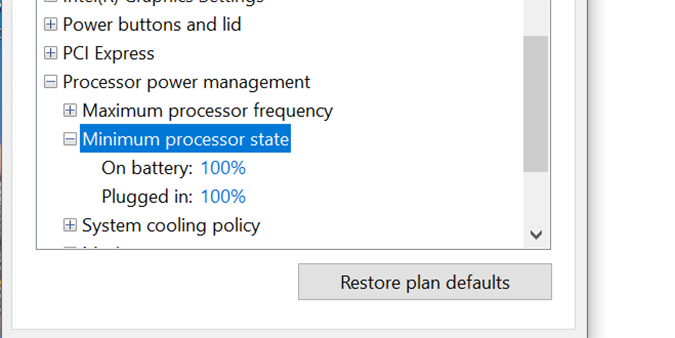
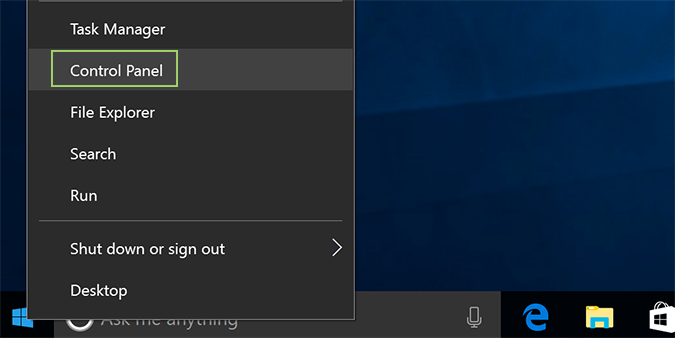
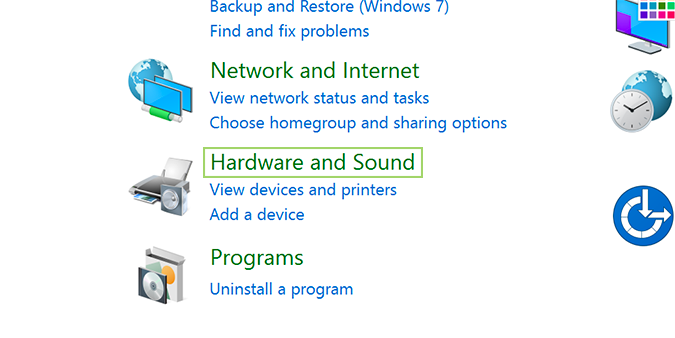
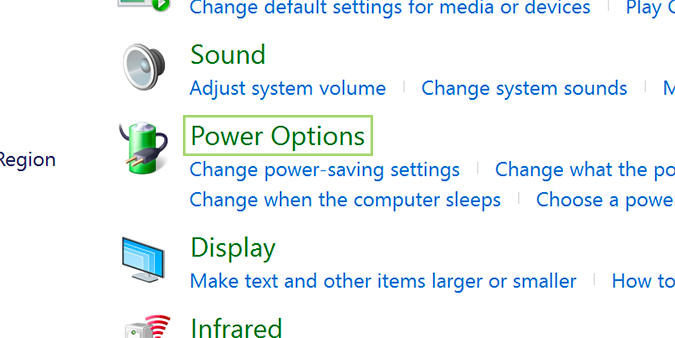
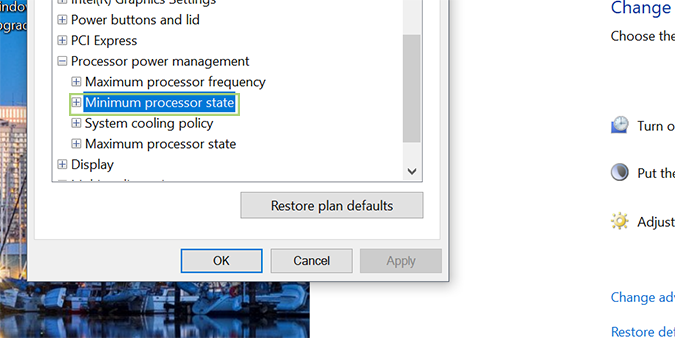
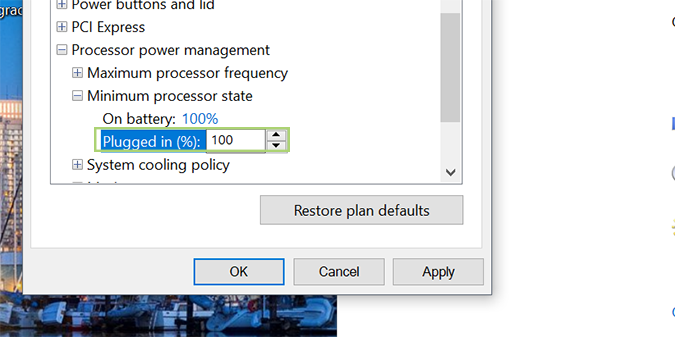
How to Use Maximum CPU Power in Windows 10 For power-hungry applications, Windows 10 has an option to max out your CPU. It’s not the ideal way to run your computer (it produces extra heat), but it should cover your needs for brief periods of high demand usage. https://cdn.mos.cms.futurecdn.net/n3rAQWrfrAewTv5gRbnDLZ-970-80.png Here’s how it’s done. 1. Right click the Start menu and select Control Panel. https://cdn.mos.cms.futurecdn.net/ovC46UHah34DsxGncpb4sc-970-80.png 2. Click Hardware and Sound. https://cdn.mos.cms.futurecdn.net/XdX2KNZsXoNSswwYwmVZQA-970-80.png 3. Select Power Options. https://cdn.mos.cms.futurecdn.net/rsbe3mHVWeua7swwUjZKEK-970-80.png 4. Find Processor power management and open the menu for Minimum processor state. https://cdn.mos.cms.futurecdn.net/p9uL7B4cUvcb6XaMUEMpuF-970-80.png 5. Change the setting for on battery to 100%. https://cdn.mos.cms.futurecdn.net/BVTvfVYUkMCiNzbvRzPUuU-970-80.png 6. Change the setting for plugged in to 100%. https://cdn.mos.cms.futurecdn.net/BVTvfVYUkMCiNzbvRzPUuU-970-80.png[/quote] |
| Technology Market › Re: How To Restart Windows 10 Without Rebooting by Yinksdavid(op): 9:32am On Sep 11, 2021 |
How to Use Maximum CPU Power in Windows 10 For power-hungry applications, Windows 10 has an option to max out your CPU. It’s not the ideal way to run your computer (it produces extra heat), but it should cover your needs for brief periods of high demand usage. https://cdn.mos.cms.futurecdn.net/n3rAQWrfrAewTv5gRbnDLZ-970-80.png Here’s how it’s done. 1. Right click the Start menu and select Control Panel. https://cdn.mos.cms.futurecdn.net/ovC46UHah34DsxGncpb4sc-970-80.png 2. Click Hardware and Sound. https://cdn.mos.cms.futurecdn.net/XdX2KNZsXoNSswwYwmVZQA-970-80.png 3. Select Power Options. https://cdn.mos.cms.futurecdn.net/rsbe3mHVWeua7swwUjZKEK-970-80.png 4. Find Processor power management and open the menu for Minimum processor state. https://cdn.mos.cms.futurecdn.net/p9uL7B4cUvcb6XaMUEMpuF-970-80.png 5. Change the setting for on battery to 100%. https://cdn.mos.cms.futurecdn.net/BVTvfVYUkMCiNzbvRzPUuU-970-80.png 6. Change the setting for plugged in to 100%. https://cdn.mos.cms.futurecdn.net/BVTvfVYUkMCiNzbvRzPUuU-970-80.png[/quote] |
| Career › Re: Learn Microsoft Azure by Yinksdavid(op): 9:25am On Sep 11, 2021 |
How to Use Maximum CPU Power in Windows 10 For power-hungry applications, Windows 10 has an option to max out your CPU. It’s not the ideal way to run your computer (it produces extra heat), but it should cover your needs for brief periods of high demand usage. https://cdn.mos.cms.futurecdn.net/n3rAQWrfrAewTv5gRbnDLZ-970-80.png Here’s how it’s done. 1. Right click the Start menu and select Control Panel. https://cdn.mos.cms.futurecdn.net/ovC46UHah34DsxGncpb4sc-970-80.png 2. Click Hardware and Sound. https://cdn.mos.cms.futurecdn.net/XdX2KNZsXoNSswwYwmVZQA-970-80.png 3. Select Power Options. https://cdn.mos.cms.futurecdn.net/rsbe3mHVWeua7swwUjZKEK-970-80.png 4. Find Processor power management and open the menu for Minimum processor state. https://cdn.mos.cms.futurecdn.net/p9uL7B4cUvcb6XaMUEMpuF-970-80.png 5. Change the setting for on battery to 100%. https://cdn.mos.cms.futurecdn.net/BVTvfVYUkMCiNzbvRzPUuU-970-80.png 6. Change the setting for plugged in to 100%. https://cdn.mos.cms.futurecdn.net/BVTvfVYUkMCiNzbvRzPUuU-970-80.png[/quote] |
| Technology Market › Re: Windows 10 Settings You Should Change Right Away by Yinksdavid(op): 9:23am On Sep 11, 2021 |
How to Use Maximum CPU Power in Windows 10 For power-hungry applications, Windows 10 has an option to max out your CPU. It’s not the ideal way to run your computer (it produces extra heat), but it should cover your needs for brief periods of high demand usage. https://cdn.mos.cms.futurecdn.net/n3rAQWrfrAewTv5gRbnDLZ-970-80.png Here’s how it’s done. 1. Right click the Start menu and select Control Panel. https://cdn.mos.cms.futurecdn.net/ovC46UHah34DsxGncpb4sc-970-80.png 2. Click Hardware and Sound. https://cdn.mos.cms.futurecdn.net/XdX2KNZsXoNSswwYwmVZQA-970-80.png 3. Select Power Options. https://cdn.mos.cms.futurecdn.net/rsbe3mHVWeua7swwUjZKEK-970-80.png 4. Find Processor power management and open the menu for Minimum processor state. https://cdn.mos.cms.futurecdn.net/p9uL7B4cUvcb6XaMUEMpuF-970-80.png 5. Change the setting for on battery to 100%. https://cdn.mos.cms.futurecdn.net/BVTvfVYUkMCiNzbvRzPUuU-970-80.png 6. Change the setting for plugged in to 100%. https://cdn.mos.cms.futurecdn.net/BVTvfVYUkMCiNzbvRzPUuU-970-80.png[/quote] |
| Programming › Re: I Want To Learn Programming. Which Language Should I Start With? by Yinksdavid(m): 9:18am On Sep 11, 2021 |
Johnnyessence:I am unable to attach the file as its giving an error page once i submit. Also for whatever reason, I am restricted by Nairaland for sharing knowledgeable information on here via creating new topics. All i aim for is to enlighten, guide and provide support to anyone who is interested in getting a career in cloud computing or just interested in it but seems Nairaland is against that. Are you aware there are ways to get free certification vouchers from Microsoft and Oracle (I am sure much more but those are the ones I know of). Even free certifications of Sigma courses. There is so much out there we can take advantage of to build our career and achieve our goals. Please hit me up on yinks.azure@gmail.com so i can send the material to you and anyone who might be interested in learning python. I have always been on hardware side of IT until I started learning cloud computing and working an organization that manage cloud resources(Microsoft Azure). Just recently i started learning python as well so as to gradually understand devops. |
| Technology Market › Re: How To Lock A Folder With A Password In Windows 10 by Yinksdavid(op): 9:06am On Sep 11, 2021 |
How to Use Maximum CPU Power in Windows 10 For power-hungry applications, Windows 10 has an option to max out your CPU. It’s not the ideal way to run your computer (it produces extra heat), but it should cover your needs for brief periods of high demand usage. https://cdn.mos.cms.futurecdn.net/n3rAQWrfrAewTv5gRbnDLZ-970-80.png Here’s how it’s done. 1. Right click the Start menu and select Control Panel. https://cdn.mos.cms.futurecdn.net/ovC46UHah34DsxGncpb4sc-970-80.png 2. Click Hardware and Sound. https://cdn.mos.cms.futurecdn.net/XdX2KNZsXoNSswwYwmVZQA-970-80.png 3. Select Power Options. https://cdn.mos.cms.futurecdn.net/rsbe3mHVWeua7swwUjZKEK-970-80.png 4. Find Processor power management and open the menu for Minimum processor state. https://cdn.mos.cms.futurecdn.net/p9uL7B4cUvcb6XaMUEMpuF-970-80.png 5. Change the setting for on battery to 100%. https://cdn.mos.cms.futurecdn.net/BVTvfVYUkMCiNzbvRzPUuU-970-80.png 6. Change the setting for plugged in to 100%. https://cdn.mos.cms.futurecdn.net/BVTvfVYUkMCiNzbvRzPUuU-970-80.png |
| Technology Market › Re: Genuine Microsoft Windows/office/exchange Activation Keys by Yinksdavid(op): 9:05am On Sep 11, 2021 |
How to Use Maximum CPU Power in Windows 10 For power-hungry applications, Windows 10 has an option to max out your CPU. It’s not the ideal way to run your computer (it produces extra heat), but it should cover your needs for brief periods of high demand usage. https://cdn.mos.cms.futurecdn.net/n3rAQWrfrAewTv5gRbnDLZ-970-80.png Here’s how it’s done. 1. Right click the Start menu and select Control Panel. https://cdn.mos.cms.futurecdn.net/ovC46UHah34DsxGncpb4sc-970-80.png 2. Click Hardware and Sound. https://cdn.mos.cms.futurecdn.net/XdX2KNZsXoNSswwYwmVZQA-970-80.png 3. Select Power Options. https://cdn.mos.cms.futurecdn.net/rsbe3mHVWeua7swwUjZKEK-970-80.png 4. Find Processor power management and open the menu for Minimum processor state. https://cdn.mos.cms.futurecdn.net/p9uL7B4cUvcb6XaMUEMpuF-970-80.png 5. Change the setting for on battery to 100%. https://cdn.mos.cms.futurecdn.net/BVTvfVYUkMCiNzbvRzPUuU-970-80.png 6. Change the setting for plugged in to 100%. https://cdn.mos.cms.futurecdn.net/BVTvfVYUkMCiNzbvRzPUuU-970-80.png |
| Computers › Re: Post Your Computer (PC) Troubles Here. by Yinksdavid(m): 8:53am On Sep 11, 2021 |
Hello Guys in the House, If you are having issues with installing or updating your Windows 10 OS, experiencing any issue after installation/upgrade of Windows 10 OS, need to know how best to utilize your Windows 10 environment or you just curious for knowledge purposes about Windows 10 OS, Kindly reach out to me via yinks.azure@gmail.com or the whatsapp number below on my signature and I would be glad to assist. Thanks This also applies to other Microsoft Applications such as Office, Office365, Outlook2019, Sharepoint2019, Dynamics CRM, Exchange Server, Windows Server. |
| Computers › Re: Post Your Computer (PC) Troubles Here. by Yinksdavid(m): 8:53am On Sep 11, 2021 |
Genuine License/Activation Keys for the following Microsoft products are available at a very low cost and will appreciate if you can reshare to your contacts if there are people who might be interested. Thanks Exchange Server 2016 (Standard and Enterprise Edition) Exchange Server 2019 (Standard and Enterprise Edition) Office 2013 (Professional, Standard and Ultimate version) Office 2016 (Professional, Standard and Ultimate version) Office 2019 (Professional, Standard and Ultimate version) Office 365 - Project Professional 2019 - Office Home and Business 2019 - Visio Professional 2019 - Office Professional Plus 2019 Office Home and Business 2016 for Mac Office Home and Business 2019 for Mac Office Professional Plus 2016 Office Professional Plus 2019 SharePoint Server 2016 (Standard and Enterprise) SharePoint Server 2019 (Standard and Enterprise) Visual Studio Enterprise 2017 Visual Studio Enterprise 2019 Visual Studio 2017 for Mac Visual Studio 2019 for Mac Windows 10 Pro Windows 10 Enterprise Windows 10 Pron N Windows 10 Education Windows Server 2016 (Datacenter, Remote Desktop Services user connection(50) and Standard) Windows Server 2019 (Datacenter, Remote Desktop Services user connection(50) and Standard). The product will be sent via ESD (Electronic software Distribution). Multiple activation key according to a number of Pcs to be used is also available. kindly reach out for more details. |
| Programming › Re: I Want To Learn Programming. Which Language Should I Start With? by Yinksdavid(m): 8:42am On Sep 11, 2021 |
vibratingpenis:You can subscribe to Python for beginners by Nana ( https://www.youtube.com/watch?v=t8pPdKYpowI). There are also forums you can join to post issues you encounter on python. I also have a well detailed and simplified soft copy of material to learn python |
| Technology Market › Re: Genuine Microsoft Windows/office/exchange Activation Keys by Yinksdavid(op): 6:08pm On Sep 10, 2021 |
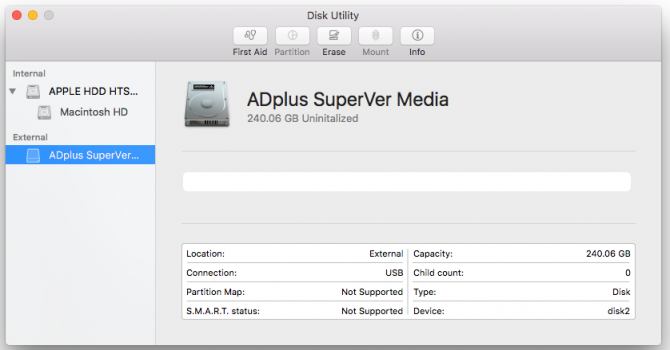
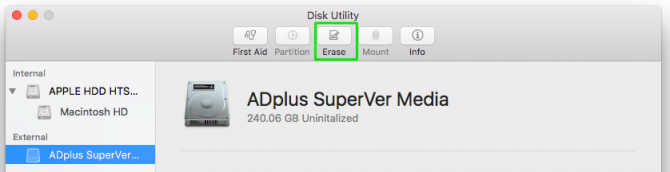
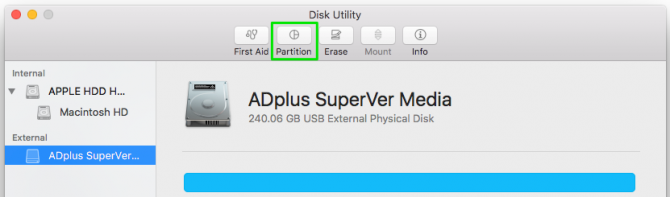
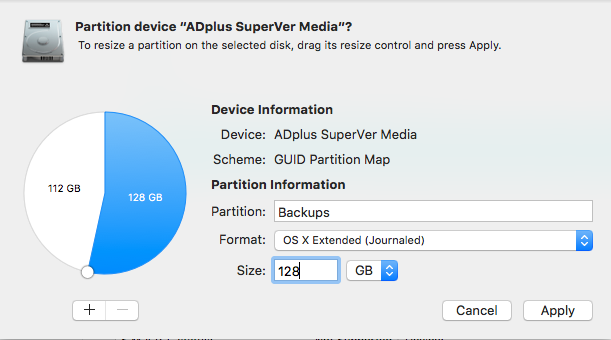
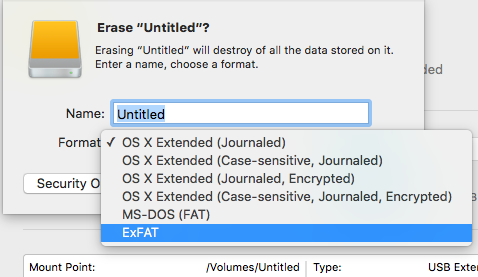
How to format an external drive in OS X 1. Connect the drive to the Mac. 2. Open Disk Utility. The easiest way to do that is hit CMD and the spacebar at the same time and type in "Disk Utility" to find the program. 3. Select the drive you want to format. https://cdn.mos.cms.futurecdn.net/AN5LTboMTcJEfMoHTUjHzL-970-80.png 4. Click Erase. https://cdn.mos.cms.futurecdn.net/torwtNM27wx4byUtqYxcWC-970-80.png If you don't plan on using the drive for Time Machine, skip steps 5 through 11 below and continue with step 12. 5. Give the drive a descriptive name and leave the default settings: OS X Extended format and GUID partition map. These will format the drive in OS X's HFS+ filetype so it will be compatible with Time Machine. 6. Click Erase and OS X will format the drive. 7. With the drive selected in Disk Utility, click Partition. https://cdn.mos.cms.futurecdn.net/o2vrbuLTvSvYJS6oHFvUCU-970-80.png 8. Enter the amount of space you want to set aside for Time Machine. In this example, we're shrinking the Time Machine partition to 128GB instead of allowing Time Machine to take up the whole drive. https://cdn.mos.cms.futurecdn.net/ners4sVsWMSBMzgHLFiYLm-970-80.png 9. Click Apply. 10. Select the new untitled partition so we can format it as exFAT for use with both Mac and Windows. https://cdn.mos.cms.futurecdn.net/GDMsijxTeuqrakfNGbZvhJ-970-80.png 11. Click Erase. 12. Give the partition a name and select exFAT for the format. https://cdn.mos.cms.futurecdn.net/y7aFpVV2mgAqm2chQRkyz6-970-80.png 13. Click Erase to finish. Your exFAT-formatted drive or partition can now be used for both Windows and Mac. Note that using a drive frequently between Windows and Mac could increase the chances of file corruption, so make sure you have backups of the files on the shared drive and be extra careful about safely ejecting the drive before disconnecting it from your computer. |
| Technology Market › Re: How To Lock A Folder With A Password In Windows 10 by Yinksdavid(op): 5:59pm On Sep 10, 2021 |
How to format an external drive in OS X 1. Connect the drive to the Mac. 2. Open Disk Utility. The easiest way to do that is hit CMD and the spacebar at the same time and type in "Disk Utility" to find the program. 3. Select the drive you want to format. https://cdn.mos.cms.futurecdn.net/AN5LTboMTcJEfMoHTUjHzL-970-80.png 4. Click Erase. https://cdn.mos.cms.futurecdn.net/torwtNM27wx4byUtqYxcWC-970-80.png If you don't plan on using the drive for Time Machine, skip steps 5 through 11 below and continue with step 12. 5. Give the drive a descriptive name and leave the default settings: OS X Extended format and GUID partition map. These will format the drive in OS X's HFS+ filetype so it will be compatible with Time Machine. 6. Click Erase and OS X will format the drive. 7. With the drive selected in Disk Utility, click Partition. https://cdn.mos.cms.futurecdn.net/o2vrbuLTvSvYJS6oHFvUCU-970-80.png 8. Enter the amount of space you want to set aside for Time Machine. In this example, we're shrinking the Time Machine partition to 128GB instead of allowing Time Machine to take up the whole drive. https://cdn.mos.cms.futurecdn.net/ners4sVsWMSBMzgHLFiYLm-970-80.png 9. Click Apply. 10. Select the new untitled partition so we can format it as exFAT for use with both Mac and Windows. https://cdn.mos.cms.futurecdn.net/GDMsijxTeuqrakfNGbZvhJ-970-80.png 11. Click Erase. 12. Give the partition a name and select exFAT for the format. https://cdn.mos.cms.futurecdn.net/y7aFpVV2mgAqm2chQRkyz6-970-80.png 13. Click Erase to finish. Your exFAT-formatted drive or partition can now be used for both Windows and Mac. Note that using a drive frequently between Windows and Mac could increase the chances of file corruption, so make sure you have backups of the files on the shared drive and be extra careful about safely ejecting the drive before disconnecting it from your computer. |



1 2 3 4 5 6 7 8 ... 10 11 12 13 14 15 16 17 18 (of 19 pages)