Yinksdavid's Posts
Nairaland Forum › Yinksdavid's Profile › Yinksdavid's Posts
1 2 3 4 5 6 7 8 9 10 11 12 13 14 15 16 17 (of 19 pages)
 Technology Market › How To Fix Taskbar Disappeared In Windows 10 by Yinksdavid(op): 7:06am On Sep 15, 2021 Technology Market › How To Fix Taskbar Disappeared In Windows 10 by Yinksdavid(op): 7:06am On Sep 15, 2021 |
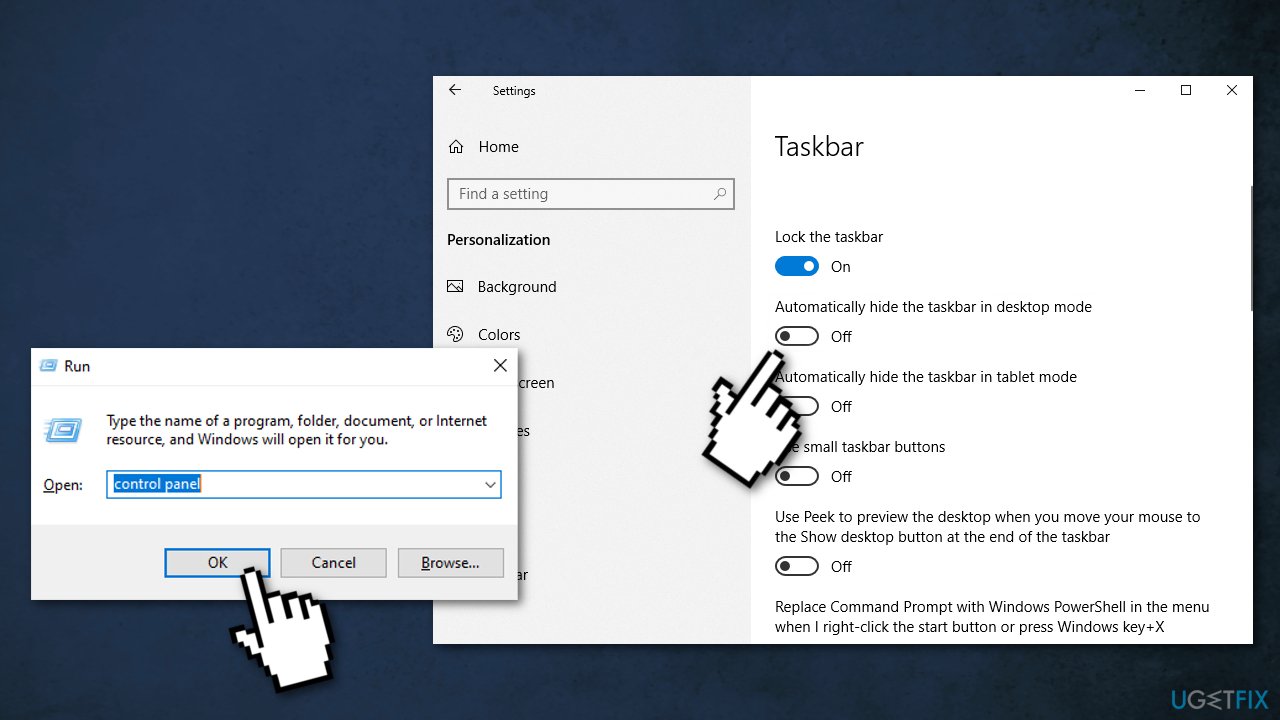
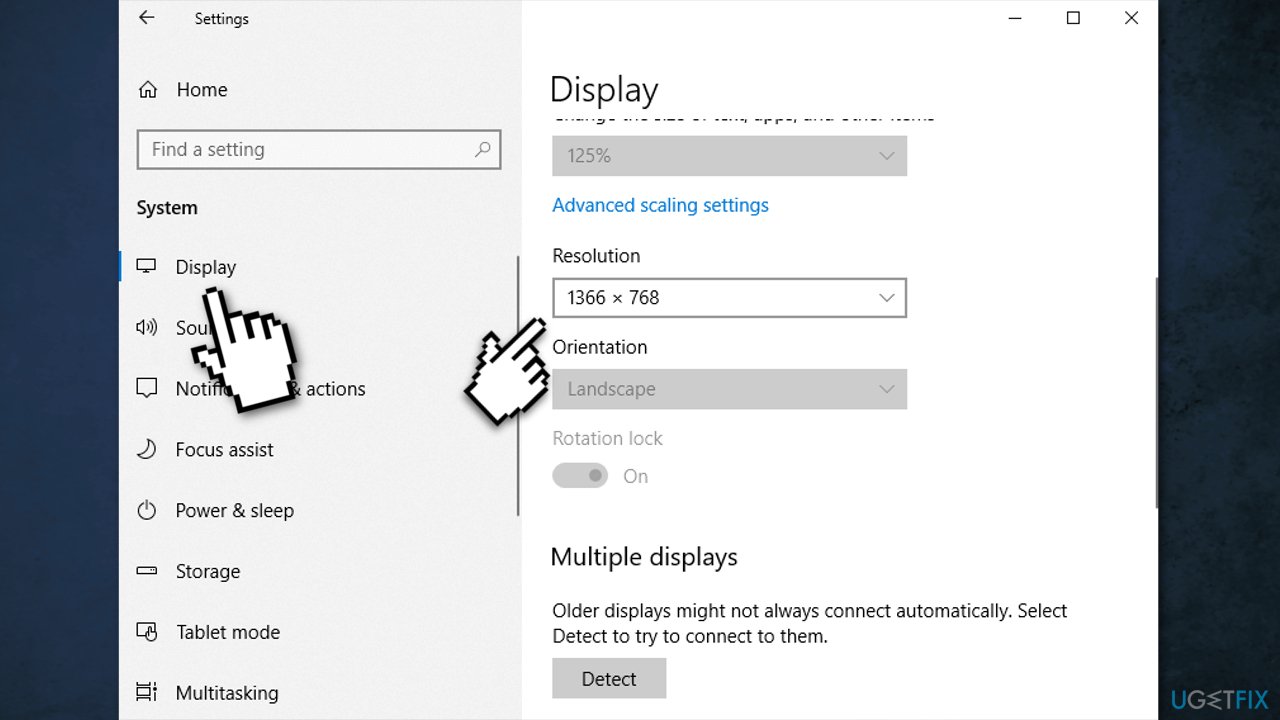
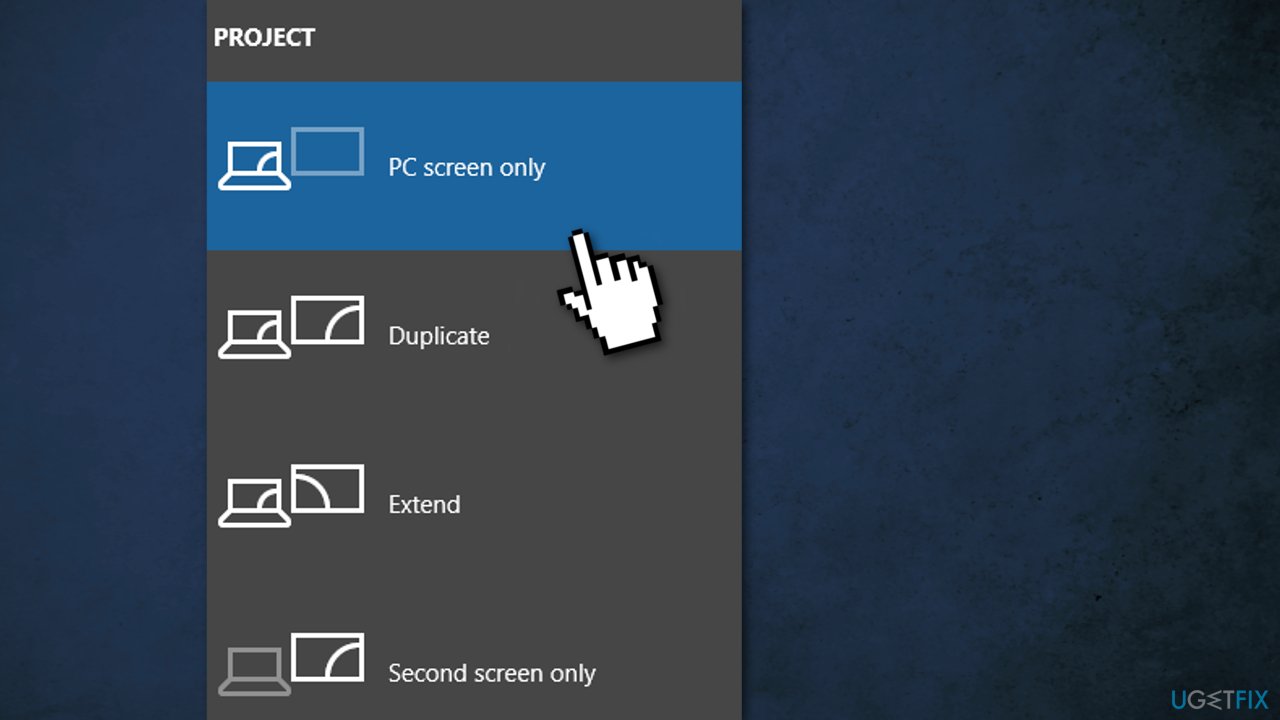
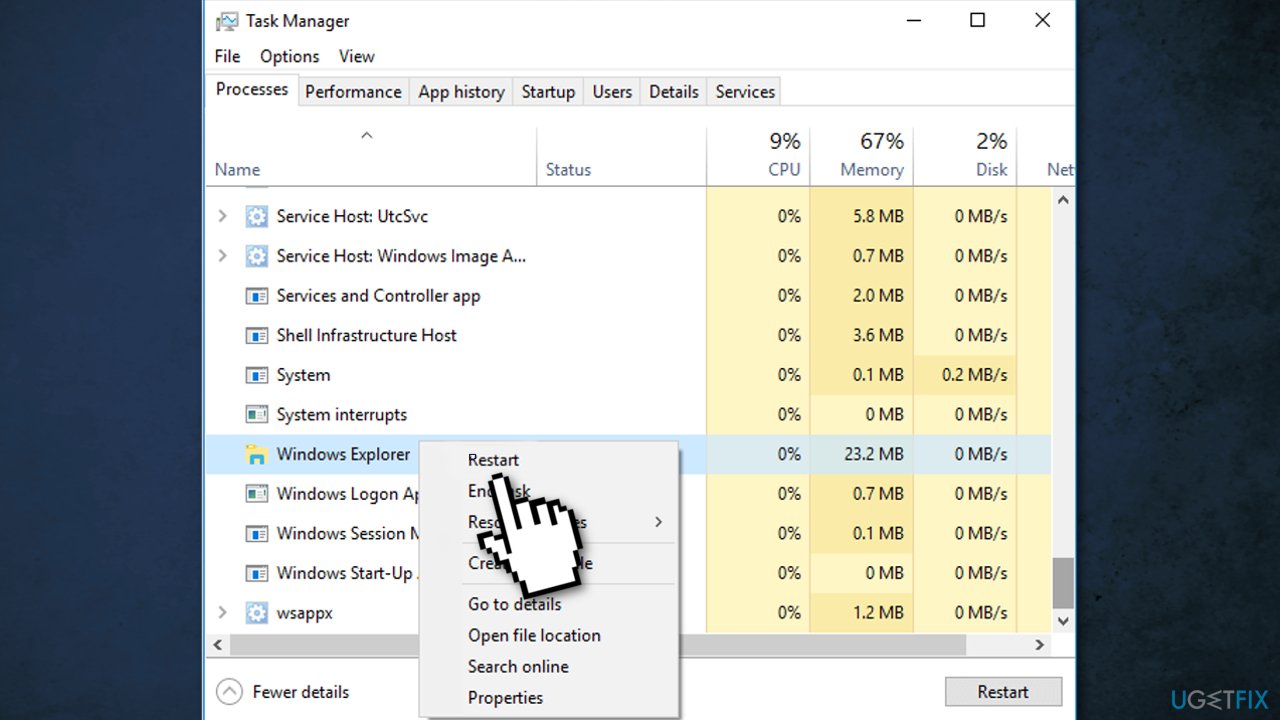
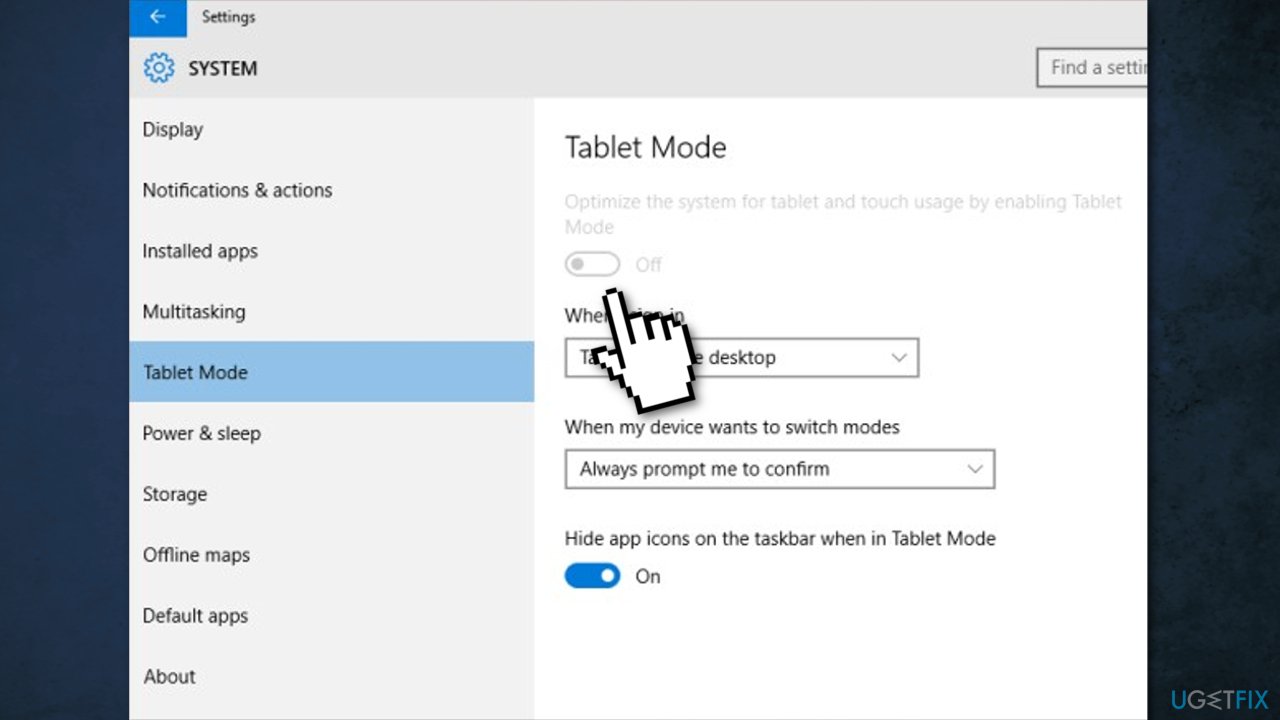
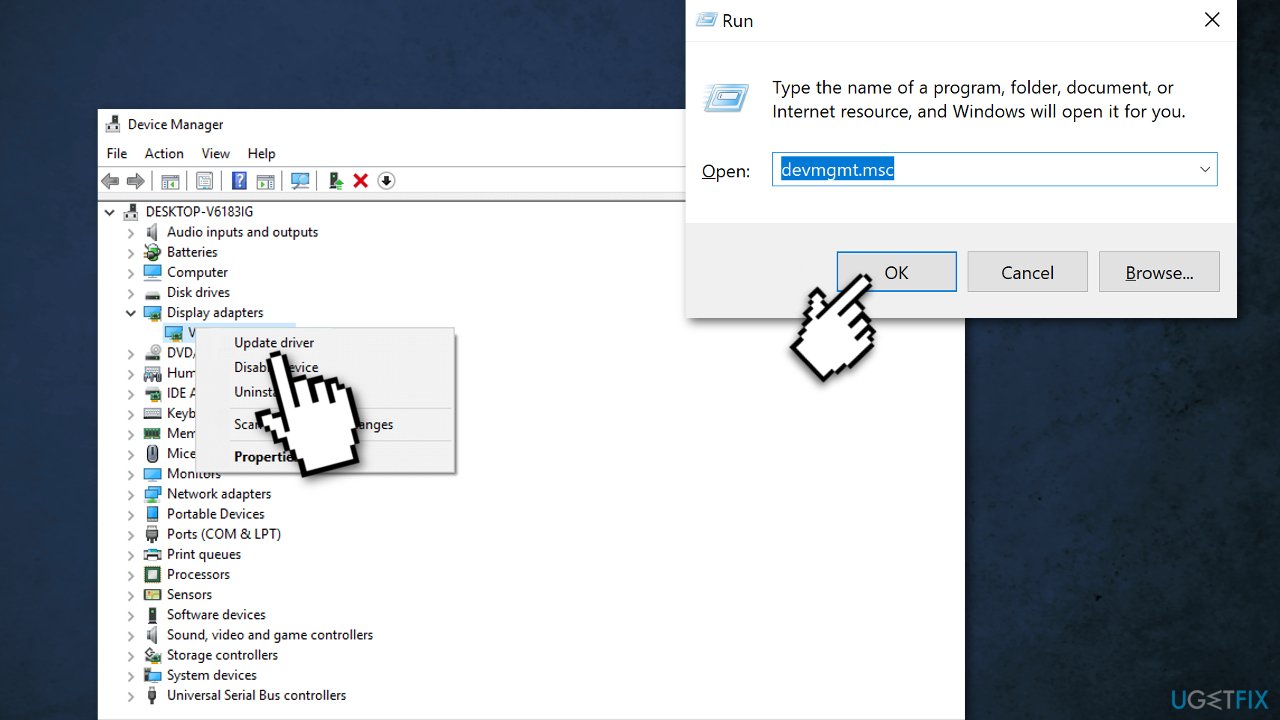
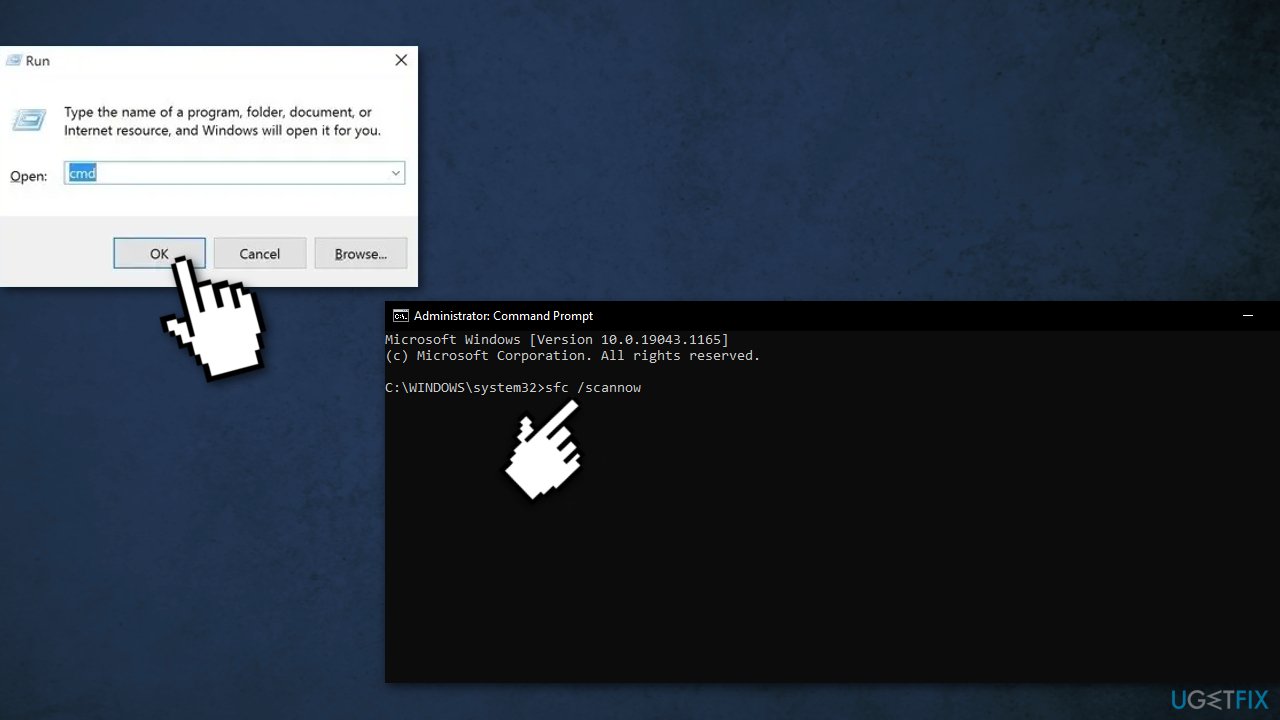
The taskbar is a multi-purpose graphical user interface element. It sits at the bottom of the screen, giving the user access to the Start Menu and the icons of frequently used applications. It is also used to check the time, internet connection, and battery status. As you already probably know, it is a very useful element in Windows, so it is a problem when a lot of users have their taskbars disappear. There are many possibilities why this might have happened. Most times, this occurs because of settings issues or accidental clicks. Users have noticed these changes when using Google Chrome or other applications in full-screen mode. After exiting this mode, the taskbar did not reappear like supposed to. For others, it seemed to be gone randomly, and hovering the mouse over it did not help. Not having a taskbar makes it difficult to perform basic tasks. First, You can try clicking the Windows key, which should open the Start Menu. If that did not make it appear, you should check if you did not bring your display to a full-screen mode yourself by accidentally clicking the F11 button on your keyboard. Below you will find 7 possible solutions for a missing taskbar in Windows operating system. Be sure to go through them step-by-step and not miss anything: Method 1. Unhide the Taskbar 1. Press Windows + R to open the Run window 2. Type in Control Panel [/b]and hit [b]Enter 3. Choose Appearance and Personalization 4. Click Taskbar and Navigation https://ugetfix.com/wp-content/uploads/articles/askit/unhide-taskbar_en.jpg Uncheck the Automatically hide the taskbar in desktop mode box Method 2. Change display resolution If your screen resolution is larger or smaller than the monitor size, it can cause the taskbar to be hidden. You can change the display resolution to see if it gets back: 1. Press Windows + I to open Windows Settings 2. Click System 3. Press Display 4. Scroll down to find Resolution https://ugetfix.com/wp-content/uploads/articles/askit/display-resolution_en.jpg Choose an appropriate screen resolution for your display Method 3. Change to PC screen only If you have ever connected the computer to an external display, it may be causing the taskbar disappearance: 1. Press Windows + P to open Windows Project settings 2. Select PC screen only option https://ugetfix.com/wp-content/uploads/articles/askit/pc-screen-only_en.jpg Method 4. Restart Explorer.exe 1. Press Ctrl + Shift + Esc to open Task Manager 2. Click on the Process tab https://ugetfix.com/wp-content/uploads/articles/askit/restart-windows-explorer-2_en.jpg 3. Find Windows Explorer in the list 4. Right-click and choose[b] Restart[/b] Method 5. Disable Tablet mode Press Windows + I to open Windows Settings Click System https://ugetfix.com/wp-content/uploads/articles/askit/disable-tablet-mode_en.jpg 3. Turn Tablet Mode off Method 6. Update drivers Hardware driver incompatibility may cause the Windows taskbar to disappear. You can manually update graphics card, video card drivers on your computer: 1. Press Windows + R to open the Run dialog 2. Type in devmgmt.msc, and hit Enter 3. Right-click and choose Update driver https://ugetfix.com/wp-content/uploads/articles/askit/update-drivers-12_en.jpg Method 7. Repair corrupted system files You can use Windows built-in System File Checker to repair corrupted system files: 1. Press Windows + R to open the Run box 2. Type cmd and click OK to open a regular Command Prompt 3. Type cmd and then press Ctrl+Shift+Enter to open an Administrator Command Prompt 4. Use the following command and press Enter: sfc /scannow https://ugetfix.com/wp-content/uploads/articles/askit/corrupted-files_en.jpg |
| Technology Market › Re: Genuine Microsoft Windows/office/exchange Activation/license Keys Available by Yinksdavid(op): 7:04am On Sep 15, 2021 |
Yinksdavid:For enquiries, concerns and feedback, kindly contact via my details on my signature. |
| Technology Market › Re: Genuine Microsoft Windows/office/exchange Activation/license Keys Available by Yinksdavid(op): 7:01am On Sep 15, 2021 |
Genuine License/Activation Keys for the following Microsoft products are available at a very low cost . kindly reach out via whatsapp details on my signature for more details.[/b] Exchange Server 2016 (Standard and Enterprise Edition) Exchange Server 2019 (Standard and Enterprise Edition) Office 2013 (Professional, Standard and Ultimate version) Office 2016 (Professional, Standard and Ultimate version) Office 2019 (Professional, Standard and Ultimate version) Office 365 - Project Professional 2019 - Office Home and Business 2019 - Visio Professional 2019 - Office Professional Plus 2019 Office Home and Business 2016 for Mac Office Home and Business 2019 for Mac Office Professional Plus 2016 Office Professional Plus 2019 SharePoint Server 2016 (Standard and Enterprise) SharePoint Server 2019 (Standard and Enterprise) Visual Studio Enterprise 2017 Visual Studio Enterprise 2019 Visual Studio 2017 for Mac Visual Studio 2019 for Mac Windows 10 Pro Windows 10 Enterprise Windows 10 Pron N Windows 10 Education Windows Server 2016 (Datacenter, Remote Desktop Services user connection(50) and Standard) Windows Server 2019 (Datacenter, Remote Desktop Services user connection(50) and Standard). Note: Do you know when you use a Microsoft product with genuine activation key, you have unlimited free support from Microsoft should you encounter any issue associated directly or indirectly by the product. Are you aware that with a genuinely activated MS Product, you have no worries of having sync and compatibility issues as full updates will be pulled anytime there is an upgrade on the f=software which limits chances of having any issues with the products. Lets be penny wise and not pound foolish as you will definitely keep spending more without a genuine activation. |
| Computers › Re: Error In Loading Window by Yinksdavid(m): 1:14pm On Sep 14, 2021 |
errigdee:Kindly follow the different steps on the document link sent to you and if none works, you can reach me via whatsapp. |
| Education › How To Use VLOOKUP In Excel by Yinksdavid(op): 12:14pm On Sep 14, 2021 |
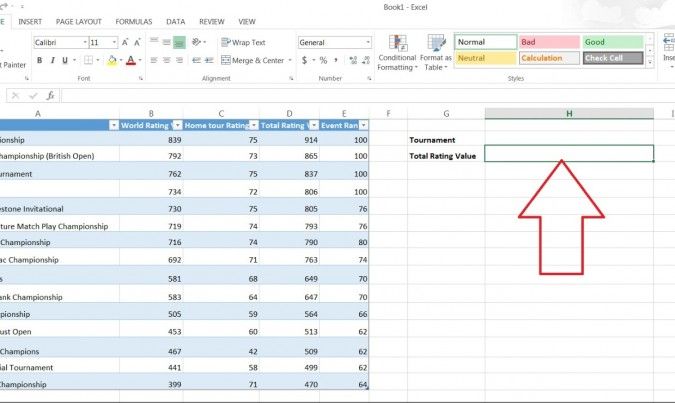
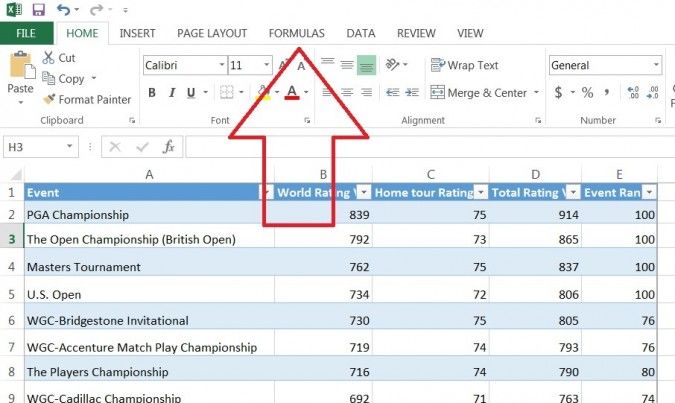
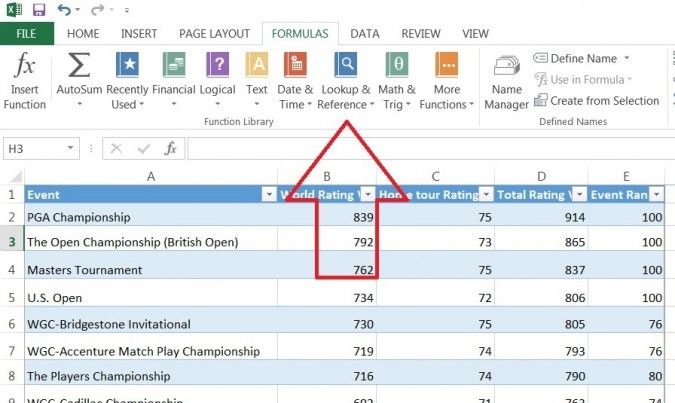
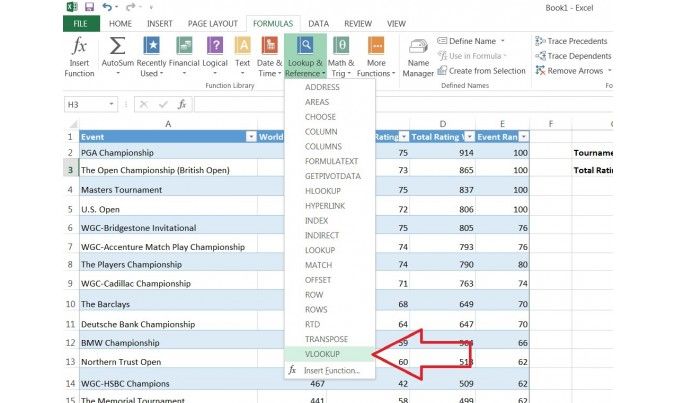
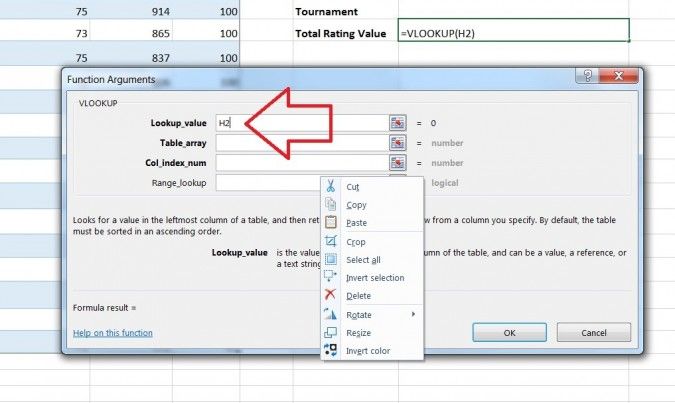
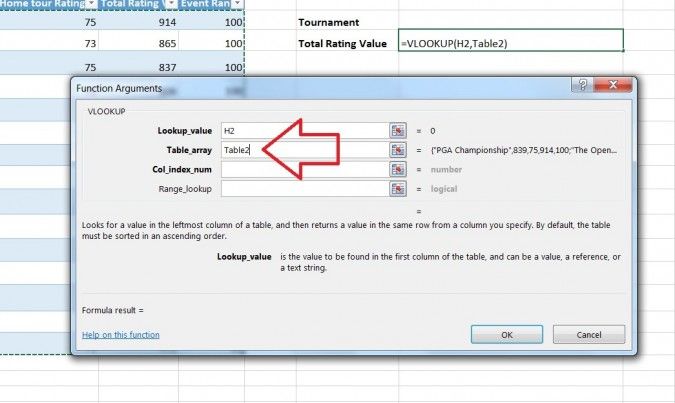
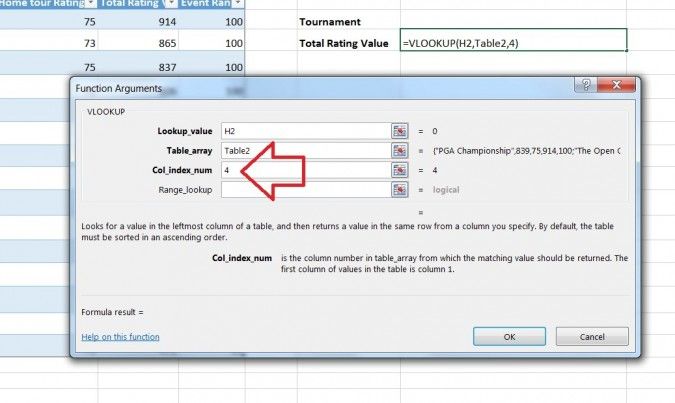
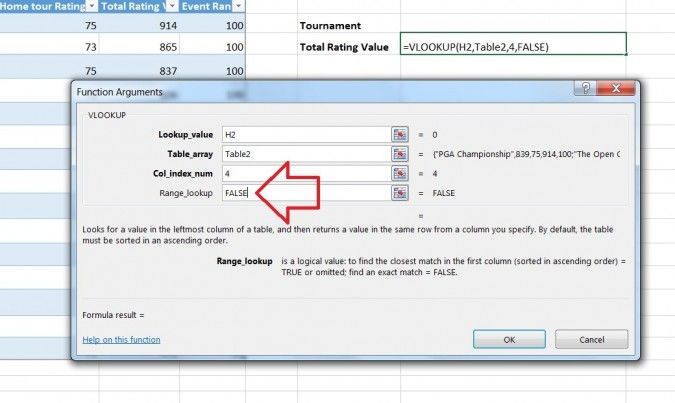
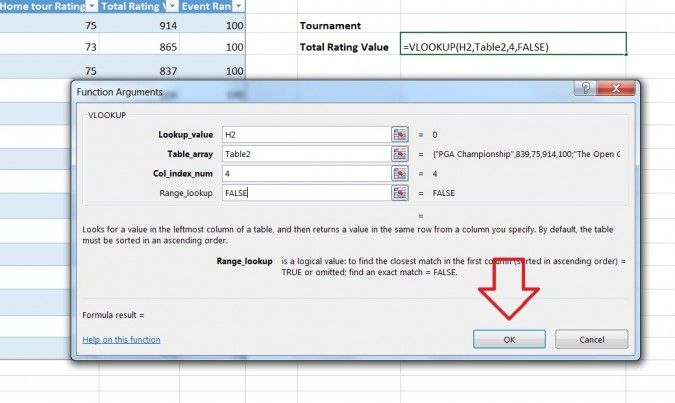
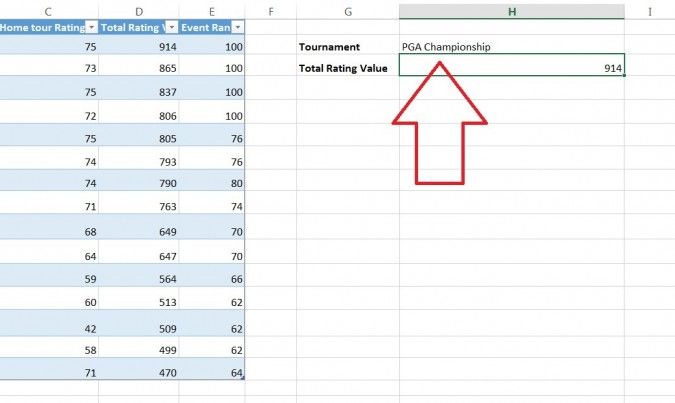
VLOOKUP stands for 'Vertical Lookup'. It is a function that makes Excel search for a certain value in a column (the so called 'table array'), in order to return a value from a different column in the same row. Its is a very important function in Excel for everyone to know especially for those that need to find information in a large spreadsheet, or you are always looking for the same kind of information, use the VLOOKUP function.If you find yourself repeatedly consulting the same table to find data, however, have a gander at VLOOKUP. Short for "vertical lookup," VLOOKUP takes advantage of vertically-aligned tables to quickly locate data associated with a given value. How to use VLOOKUP in Excel 1. Click the cell where you want the VLOOKUP formula to be calculated. https://cdn.mos.cms.futurecdn.net/NAbCU6eG2LM2VE33aT4CBT-970-80.jpg 2. Click[b] Formulas[/b] at the top of the screen. https://cdn.mos.cms.futurecdn.net/N9RwW9qFqaGN3LscghfUZF-970-80.jpg 3. Click Lookup & Reference on the Ribbon. https://cdn.mos.cms.futurecdn.net/ntKTUvLTAYj4fVaVj2DAuf-970-80.jpg 4. Click VLOOKUP at the bottom of the drop-down menu. https://cdn.mos.cms.futurecdn.net/uS7HVJbBmLLbCiT6d5czjK-970-80.jpg 5. Specify the cell in which you will enter the value whose data you're looking for. In this case, our lookup value is H2, since this is where we will input the name of a tournament such as "PGA Championship," so we input "H2" in the lookup_value box of the popup window. Once we've set up VLOOKUP properly, Excel will return the tournament's Total Rating Value in cell H3 when we type the tournament name in cell H2. https://cdn.mos.cms.futurecdn.net/HGfPC9YiqKMBMcEoWFPb8F-970-80.jpg 6. Specify the data that you want VLOOKUP to use for its search in the table_array box. In this case, we've selected the entire table (excluding the headers). https://cdn.mos.cms.futurecdn.net/pbo4utFFnzpNS8xcF5vSXP-970-80.jpg 7. Specify the column number which VLOOKUP will use to find the relevant data in the col_index_num box. Somewhat confusingly, VLOOKUP requires you to use the numerical value of the column rather than its letter value. In this case, we want VLOOKUP to use the Total Rating Value column — column D — so we enter the number 4. https://cdn.mos.cms.futurecdn.net/FqbKaTAXKov6KgM9UPQgze-970-80.jpg 8. Specify whether you need an exact match by entering either FALSE (exact match) or TRUE (approximate match) in the range_lookup box. In this case, we want an exact match so we enter FALSE. https://cdn.mos.cms.futurecdn.net/bchkRq5NK7M7rxgG7q3zzJ-970-80.jpg 9. Click OK at the bottom of the popup window. https://cdn.mos.cms.futurecdn.net/9PnzoYGAtpT7zGKBkcVLzc-970-80.jpg 10. Enter the value whose data you're searching for. In our example, we want to find the Total Value Rating of the PGA Championship, so we type "PGA Championship" into cell H2 and VLOOKUP automatically produces the Total Value Rating (in this case, 914) in cell H3. https://cdn.mos.cms.futurecdn.net/mbkww6SCcfW7Q8NdXFAm2h-970-80.jpg Using VLOOKUP, you can not only search for individual values, but also combine two worksheets into one. For example, if you have one worksheet with names and phone numbers and another sheet with names and email addresses, you can put the email addresses next to the names and phone numbers by using VLOOKUP. 1 Like |
| Computers › Re: Error In Loading Window by Yinksdavid(m): 10:11am On Sep 14, 2021 |
errigdee:Morning, You are not remove any device if you did not replace any hardware component recently. The first step to try is only telling you to remove the battery and adapter after shutting down the system should you have to remove and put back any hardware component you changed e.g RAM . |
| Computers › Re: Error In Loading Window by Yinksdavid(m): 9:56pm On Sep 13, 2021 |
errigdee:You can upgrade and activate the new version. |
| Computers › Re: Error In Loading Window by Yinksdavid(m): 9:47pm On Sep 13, 2021 |
errigdee:Please check now, Was multi tasking so forgot to include the link. Are you aware that Support for Windows 7 ended on January 14, 2020. If you are still using Windows 7, your PC may become more vulnerable to security risks. |
| Computers › Re: Error In Loading Window by Yinksdavid(m): 8:18pm On Sep 13, 2021 |
errigdee:Yes, Just did. |
| Computers › Re: Error In Loading Window by Yinksdavid(m): 8:02pm On Sep 13, 2021 |
errigdee:Alright, will do. |
| Computers › Re: Error In Loading Window by Yinksdavid(m): 8:01pm On Sep 13, 2021 |
errigdee:I got a notification in my personal registered email and i replied to it. |
| Computers › Re: Error In Loading Window by Yinksdavid(m): 7:51pm On Sep 13, 2021 |
errigdee:I did respond. Don't know why you didn't receive my response. Will check again and respond. |
| Computers › Re: Post Your Laptop Problems Here And Get Solution To Fix It Yourself by Yinksdavid(m): 7:49pm On Sep 13, 2021 |
wucanfixumiA7pr:The below will guide you on all specs and requirements for windows 11 https://www.microsoft.com/en-us/windows/windows-11-specifications |
| Computers › Re: How To Repair And Restore Windows 10 by Yinksdavid(op): 1:31pm On Sep 13, 2021 |
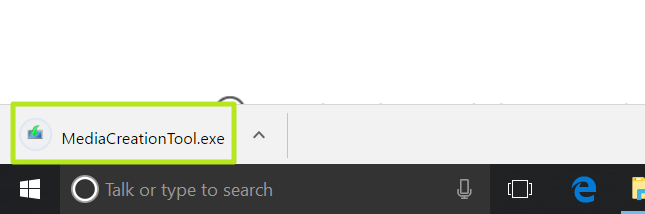
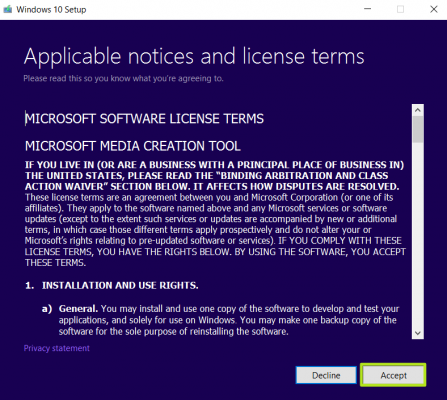
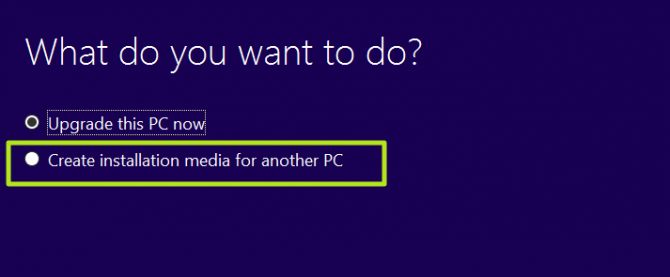
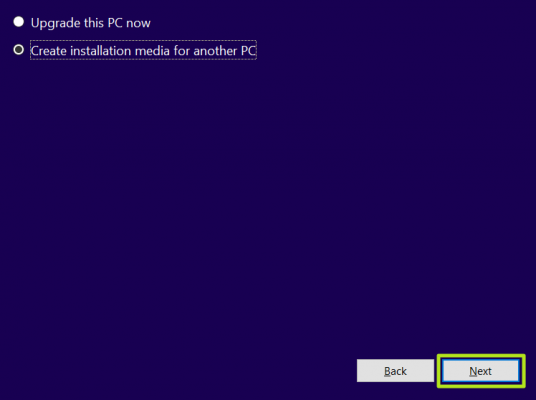
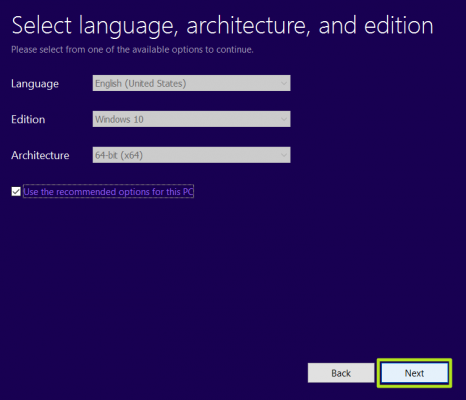
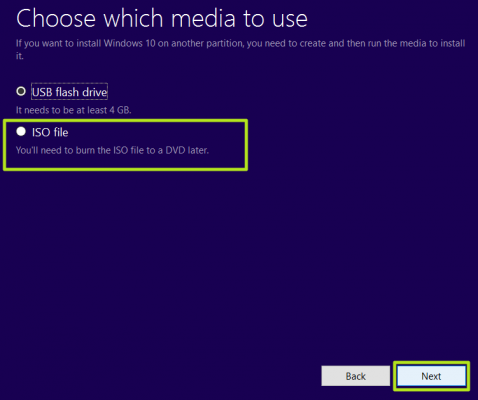
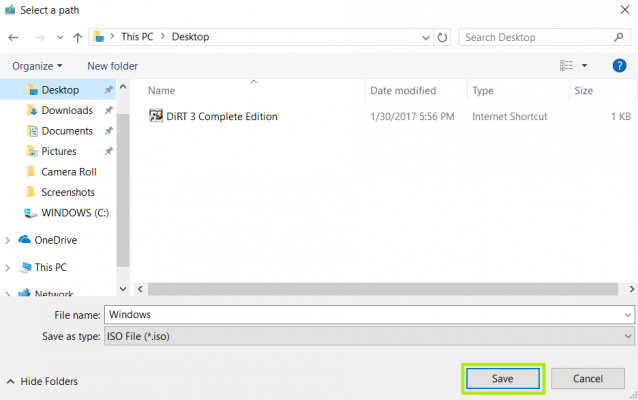
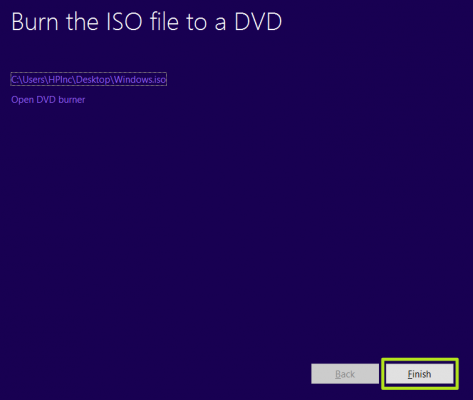
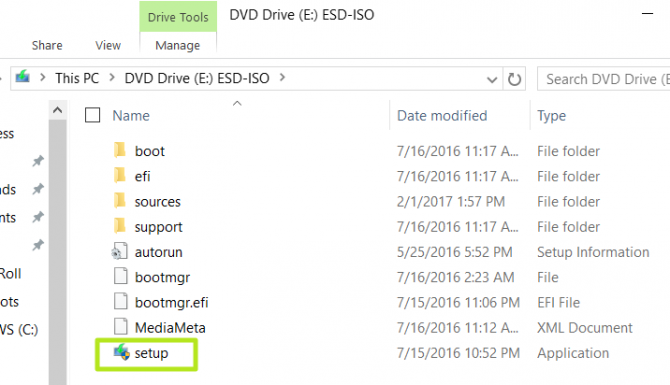
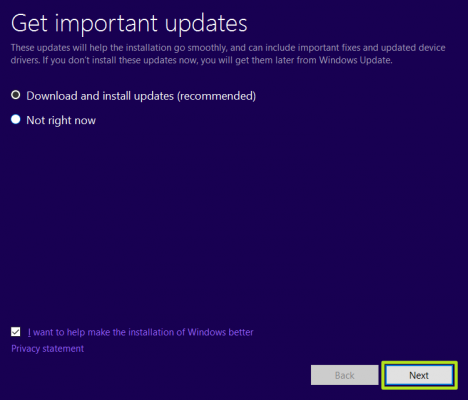
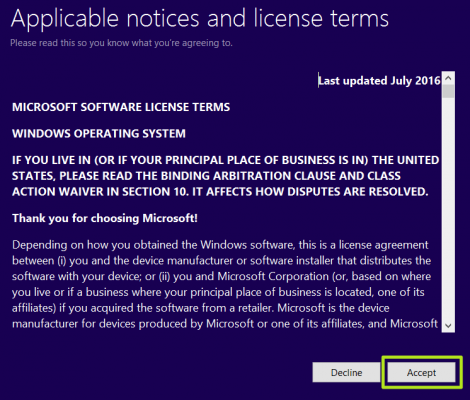
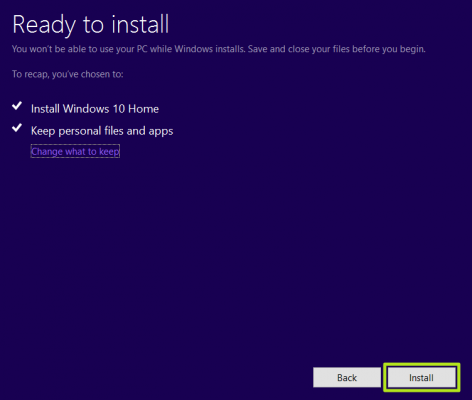
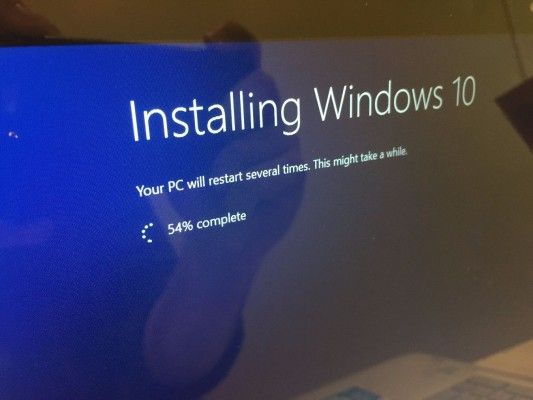
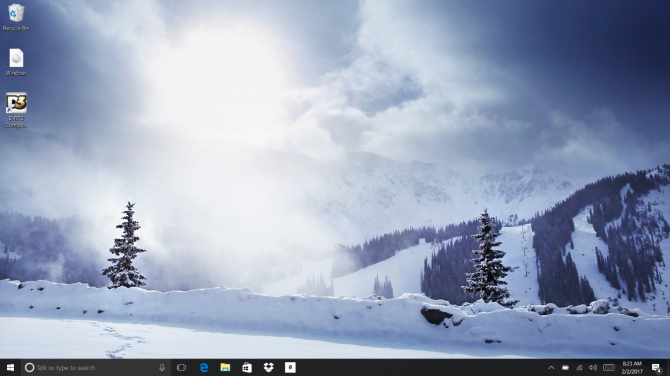
Method 5: Reinstall Windows 10 from scratch If all else fails and you can't even reset your Windows computer, you can reinstall the OS entirely. You won't any proof of purchase, Just make sure you have more than 4GB of space available, as that's how much space the file you'll download takes up. Here's how to reinstall Windows 10: 1. Visit https://www.microsoft.com/en-us/software-download/windows10?ranMID=24542&ranEAID=kXQk6* and click Download tool now. 2. Click on the download link at the bottom of your screen. https://cdn.mos.cms.futurecdn.net/tVWGTTjAXkXfpfZSoHdmiD-970-80.png 3. Click Accept. https://cdn.mos.cms.futurecdn.net/XWSa9hEg9tz5Mvt6NkV6XD-970-80.png 4. Select Create installation media for another PC and click Next https://cdn.mos.cms.futurecdn.net/ftZZUPriLK5hLrLbp7B8L4-970-80.png https://cdn.mos.cms.futurecdn.net/aFCM7ARNbKrqVt8jSacwxT-970-80.png https://cdn.mos.cms.futurecdn.net/vSLuWLmAypGwDhwedgDXJP-970-80.png 5. Select ISO file and click Next. https://cdn.mos.cms.futurecdn.net/DV24R4JxrnbYDKbqrd74rf-970-80.png https://cdn.mos.cms.futurecdn.net/39zch9JgrwyU9kbqtFLEUQ-970-80.png 6. Click Finish. https://cdn.mos.cms.futurecdn.net/KK57BAVdmNi5RhLgYekwiD-970-80.png 7. Open the Windows ISO file you downloaded. [img]https://cdn.mos.cms.futurecdn.net/GAKbyq4bvYi4pUzf2yXvsg-970[/img] 8. O[b]pen Setup[/b]. https://cdn.mos.cms.futurecdn.net/g3hZ4nQKXscqYAp2PTUWAN-970-80.png 9. Click Next. https://cdn.mos.cms.futurecdn.net/SEg9zHr8CBsmqQK4FsH5J9-970-80.png 10. Click Accept. Be prepared to wait; this next part may take a while. https://cdn.mos.cms.futurecdn.net/s7koYHcYRdAr3JnEkpSjT8-970-80.png 11. Click Install. Again, this will take a moment while your system restarts. https://cdn.mos.cms.futurecdn.net/49FT24ii5Li4CBru6Dj9eZ-970-80.png 12. Wait for your system to restart and install Windows 10. https://cdn.mos.cms.futurecdn.net/GF7LdQiS8izFSW4LX8jPGg-970-80.jpg https://cdn.mos.cms.futurecdn.net/djwTvnfq7VHjJFyPEFS3pT-970-80.png You've reinstalled Windows 10! We hope this guide fixed your problems. Check out the table of contents below for more fixes. 1 Like |
| Computers › How To Repair And Restore Windows 10 by Yinksdavid(op): 1:01pm On Sep 13, 2021 |
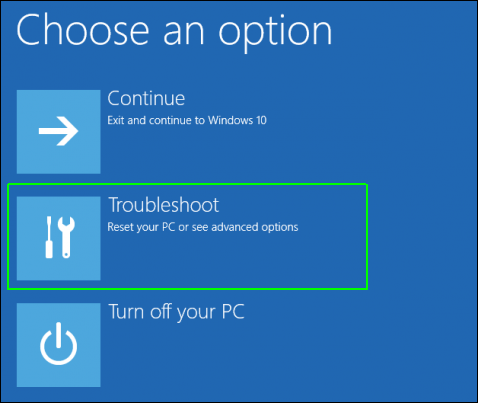
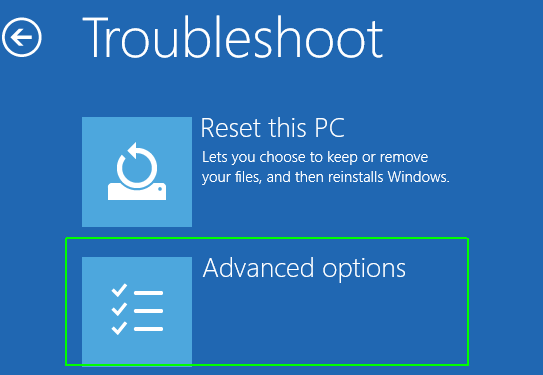
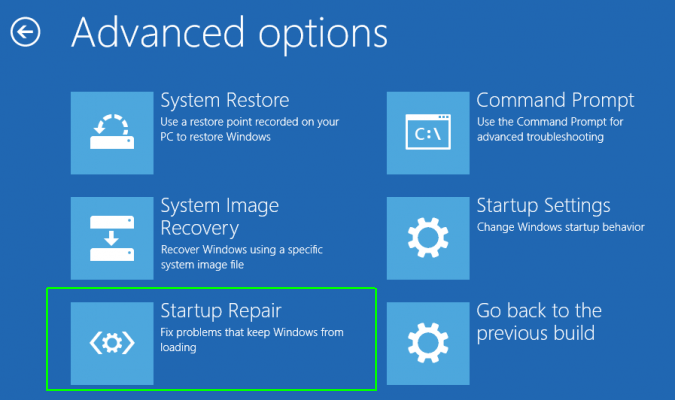
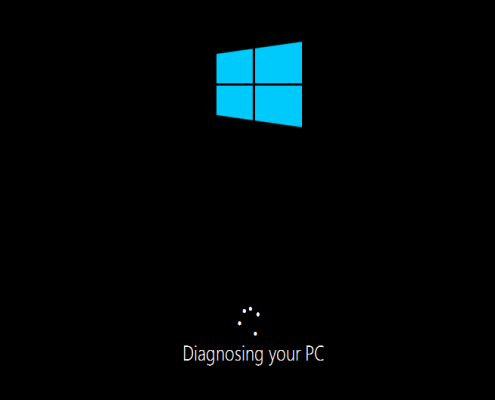
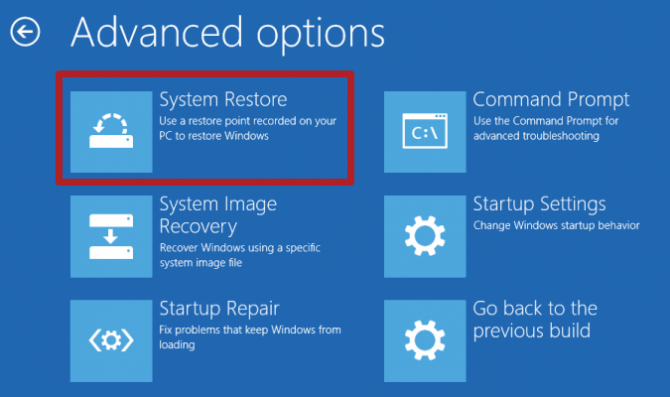
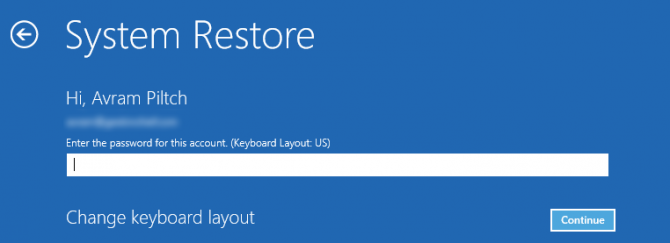
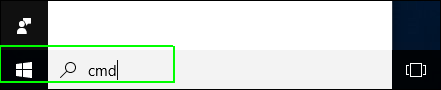
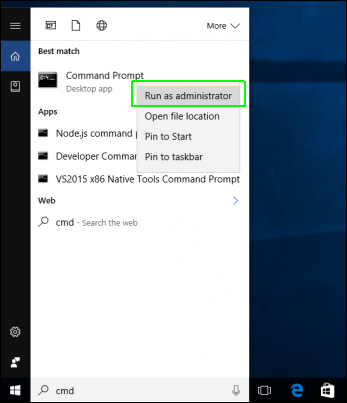
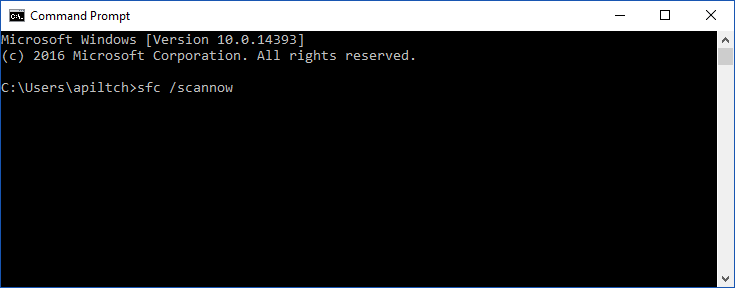
So Windows 10 won't load. Or maybe it starts up, but crashes a lot. Either way, you need to fix the problem before you can use your laptop. Method 1: Use Windows Startup Repair If Windows 10 is unable to boot up and takes you to the login screen or the desktop, your first step should be to use Startup Repair. Here's how: 1. Navigate to the Windows 10 Advanced Startup Options menu. On many laptops, hitting F11 as soon as you power on will get you to the Windows 10 Advanced Startup Options. Booting off an install disk and hitting Next then Repair offers a secondary option. Once your computer has booted, select Troubleshoot. https://cdn.mos.cms.futurecdn.net/3oQGmsq8Ldq4dGx8oazGBQ-970-80.png And then you'll need to click Advanced options. https://cdn.mos.cms.futurecdn.net/tNK3AmTXg2pHkLvj43uoub-970-80.png 2. Click Startup Repair. https://cdn.mos.cms.futurecdn.net/UfiKazHGgmSvYkNeAcHCNe-970-80.png Windows will take anywhere from a few seconds to a few minutes to attempt to fix the problem. (It may not be able to.) If you don't actually have a startup problem, it will also say it can't fix the problem. https://cdn.mos.cms.futurecdn.net/8nqK3sLzB4izbrAwCJTHFH-970-80.png Method 2: Use Windows Restore 1. Complete step 1 from the previous method to get to Windows 10's Advanced Startup Options menu. 2. Click System Restore. https://cdn.mos.cms.futurecdn.net/WYgNk9sxPHhMBn4erCbdQG-970-80.png The computer will reboot. 3. Select your username. 4. Enter your password. https://cdn.mos.cms.futurecdn.net/5bfxsYLQJYH95Y6ji4RCAn-970-80.png 5. Select a restore point from the menu and follow the prompts. (If you have no restore points, you can't use this method.) Method 3: Perform a Disk Scan Your Windows 10 problems may stem from a corrupt file. If you can boot into the operating system — even if you have to boot into safe mode — you should perform a file scan to check for problems. 1. Type "cmd" [/b]into the main search box. https://cdn.mos.cms.futurecdn.net/4cebBwk83PMYdH4eCYBPik-970-80.png [b]2. Right click on Command Prompt and select Run as Administrator. https://cdn.mos.cms.futurecdn.net/fB5ApN7HBBDdLQdRYHGPfH-970-80.png 3. Type sfc /scannow at command prompt and hit Enter. https://cdn.mos.cms.futurecdn.net/QwYNVLUUAt2JnxgR9kSkRe-970-80.png Method 4: Reset Windows 10 If you want to get a clean start, free from rogue software and drivers, you usually don't need to do a full install. Instead, Windows 10 provides a built-in reset feature which takes your computer back to the way it was before you had any software, special devices or data preloaded. (On a side note, if you're giving your computer to someone else, resetting is a good way to wipe it.) |
| Computers › Re: 5 Ways To Validate Whether Windows Is Activated And Genuine by Yinksdavid(op): 11:41am On Sep 13, 2021 |
How to check whether your Windows is genuine Activation is a process that is built into Windows. It helps to verify that your copy of Windows is genuine. When your Windows is genuine, you are eligible to receive all product updates and product support from Microsoft. If it is not genuine, you still get security updates but not much else. Also, you are regularly asked to activate your copy of Windows, by providing a genuine product key. The activation checks are regularly made by Windows. The first time it takes place is when you install Windows or when you first use a newly purchased PC or device with Windows. Another time an activation check is made is when you attempt to download optional updates from Microsoft. Significant hardware changes inside your computer can also trigger automatic activation checks. Pirated versions of Windows may initially be activated and start working without issues but, after a few weeks of use, it is likely that Microsoft's activation checks identify this problem and you are going to be asked to activate your copy of Windows by providing a valid product key. Also when there are new updates, it is likely they wont sync with a pirated version which would cause issues affecting the performance of your system. Therefore, it is safe to assume that, if your Windows is activated, most probably it is also genuine. How to find the Windows product key If your Windows is activated, everything is well and working. At this step, you may also want to know your product key, so that you can write it down somewhere and reuse it, in case you need it in the future. For this task, you can use a free third-party app like the ones recommended below. It will help you find your lost Windows product key incase its deleted or you don't know where its saved. 1. Belarc Advisor is a free program that you download and install on your PC. It doesn't just show your Windows license key, but it also builds a detailed profile of your software and hardware, network inventory, missing Microsoft hotfixes, antivirus status, and security benchmarks. 2, Magical Jelly Bean Keyfinder has a peculiar name but it is a free program, and it works well. Magical Jelly Bean Keyfinder has a simple user interface, and it displays your Windows product in just a couple of seconds 3.ProduKey is a small utility that you can use as a portable app or, if you prefer, you can install it. If you choose to use the portable version, you can get it as a ZIP archive. Extract it and run ProduKey.exe. The program launches and displays your Windows product key. This app is small, free, fast and easy to use. 4. SterJo Key Finder is another small program that's available both as a portable app or as a regular installer. 5. Free PC Audit is a free portable tool that you download and run. It is designed to extract details about the hardware components of your PC as well as the software apps installed and their product keys. This information includes the product key of your Windows installation. It is small and ad-free, but it is slow because it analyzes other things besides software licenses. If you are not searching just for your Windows license key, but also other details about your computer, this is a good app, and I recommend using it. Is your copy of Windows activated? Is it genuine? Now that you have read my guide let us know what you have found: is your Windows installation activated? Is it genuine? Use the comments section below to share your experience.
|
| Computers › 5 Ways To Validate Whether Windows Is Activated And Genuine by Yinksdavid(op): 11:15am On Sep 13, 2021 |
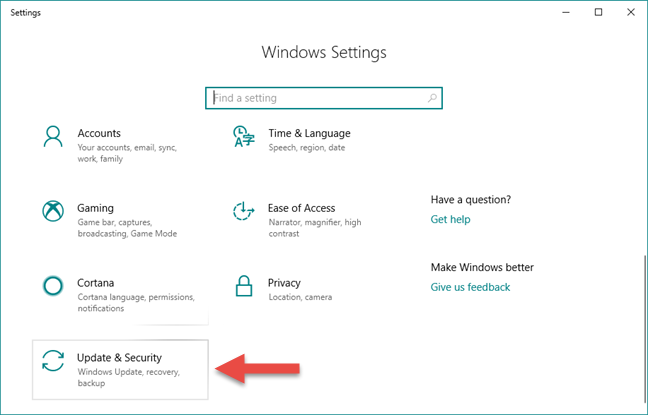
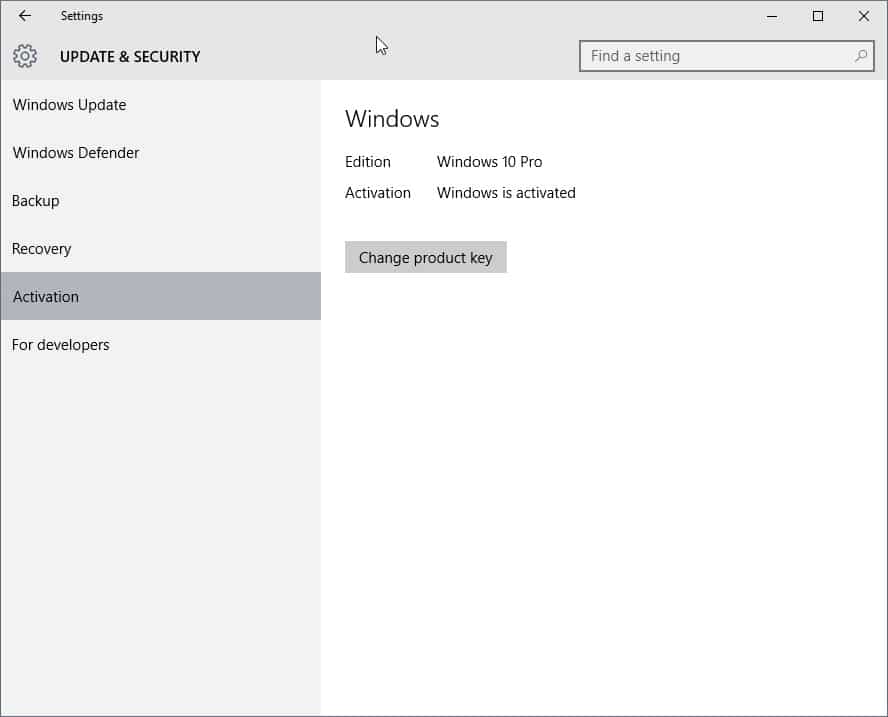
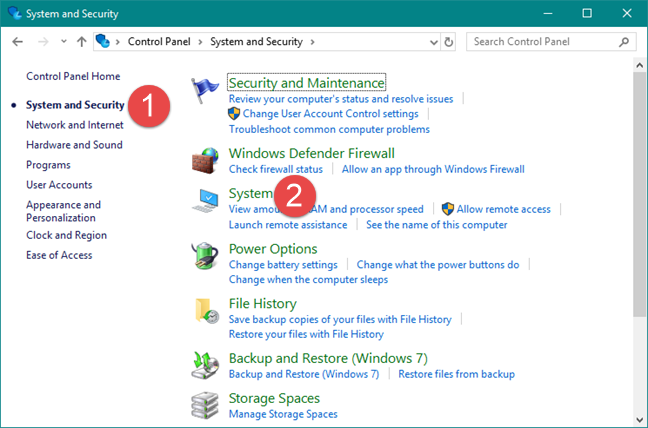
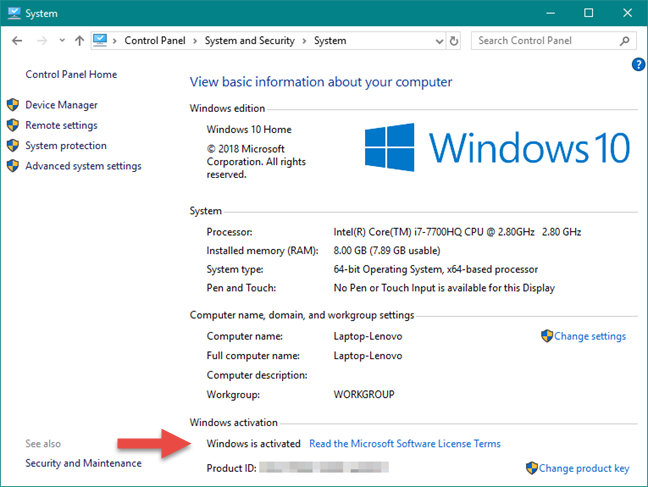
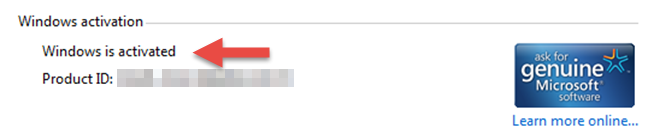
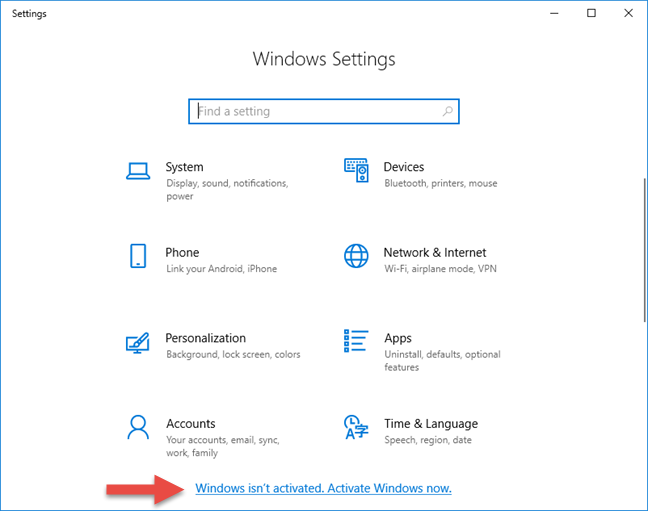
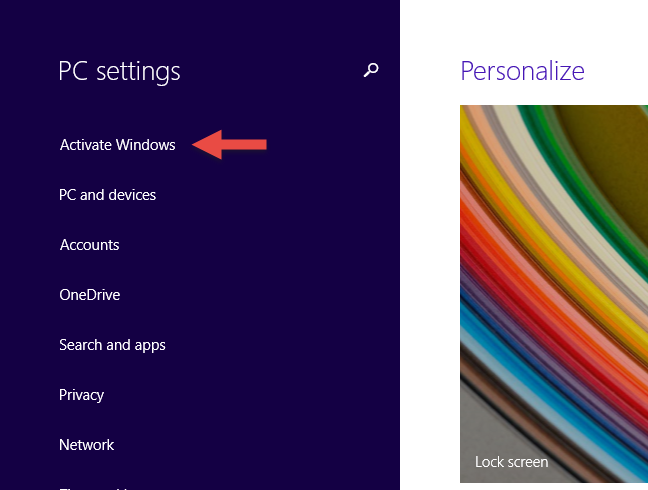
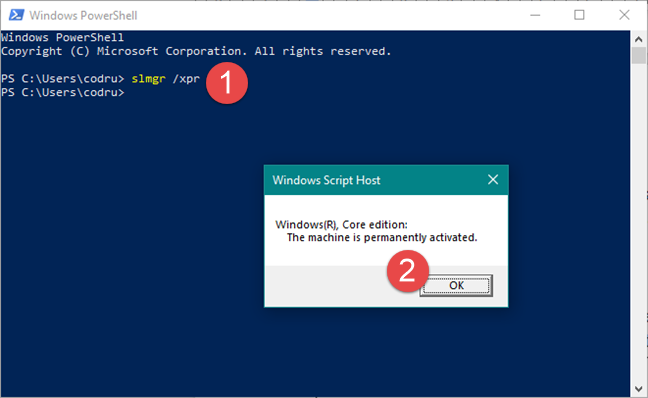
Do you use Windows 10, Windows 7 or Windows 8.1? Do you want to know whether your Windows is activated and genuine? If the answer is yes, read this article. We explain how Windows activation works, how to check if your Windows is activated, and how to find out if your copy of Windows is genuine. Let's start: NOTE: This guide works in Windows 10, Windows 7 and Windows 8.1. I have tested all the methods described, in all three versions. Some methods work only in some versions of Windows, so I will mention that in their sections titles accordingly. 1. How to check if Windows 10 is activated from the Settings app If you are using Windows 10, there is a quick and easy way for you to check its activation status. Start by opening the Settings app and then, go to Update & Security. [img]https://www.digitalcitizen.life/wp-content/uploads/2020/10/win_activation_6.png[/img] On the left side of the window, click or tap Activation. Then, look on the right side, and you should see the activation status of your Windows 10 computer or device. https://www.ghacks.net/wp-content/uploads/2015/08/windows-10-settings-activation.jpg The below is mine from one of my Virtual Machines(Notice that its the Home version unlike the above which was Pro version. Furthermore, I registered a Microsoft account(Via my personal email)) and Windows 10 is activated with a digital license linked to my Microsoft account. 2. How to check whether Windows is activated, using the Control Panel (all Windows versions) This method applies to all modern versions of Windows, and it starts by opening the Control Panel. Then, go to System and Security and click or tap System. [img]https://www.digitalcitizen.life/wp-content/uploads/2020/10/win_activation_9.png[/img] The System section opens. Here you can see information about your computer or device. Scroll down until you find the _Windows Activation section. [img]https://www.digitalcitizen.life/wp-content/uploads/2020/10/win_activation_1.png[/img] In Windows 10 and Windows 8.1, you should see a line stating whether Windows is activated or not, just like in the screenshot below. [img]https://www.digitalcitizen.life/wp-content/uploads/2020/10/win_activation_4.png[/img] In Windows 7, you should see the same line, and also a badge on the right, that says "ask for genuine Microsoft software." [img]https://www.digitalcitizen.life/wp-content/uploads/2020/10/win_activation_5.png[/img] 3. How to check if Windows is activated by simply opening the Settings app in Windows 10 An alternative way to quickly check whether your Windows 10 is activated or not is to simply open the Settings app. Open it and, if you see a text that says "Windows isn't activated. Activate Windows now." displayed on the bottom, then it is clear that your Windows 10 is not activated. [img]https://www.digitalcitizen.life/wp-content/uploads/2020/10/win_activation_11.png[/img] If you do not see the text, then your Windows is most likely activated. 4. How to check if Windows is activated by simply opening the PC Settings screen in Windows 8.1 In Windows 8.1, open the PC Settings screen. If the first thing you see on the left of the screen is an option called "Activate Windows" then it means that your Windows 8.1 is not activated. https://www.digitalcitizen.life/wp-content/uploads/2020/10/win_activation_10.png [img]5. How to check whether Windows is activated, using the Command Prompt or PowerShell (all Windows versions)[/img] Another method that works in all modern versions of Windows is to check whether your Windows is activated from the Command Prompt or PowerShell. Launch the Command Prompt or PowerShell and type the command "slmgr /xpr." Press Enter and you should see a prompt saying whether your Windows machine is activated or not. Click or tap OK, and you are done. [img]https://www.digitalcitizen.life/wp-content/uploads/2020/10/win_activation_3.png[/img]
|
| Computers › Re: Post Your Computer (PC) Troubles Here. by Yinksdavid(m): 8:06am On Sep 13, 2021 |
jackcanfield:Good Morning, If I get you, what you mean is that your charger is plugged in but not charging right? It is hard to tell, as the problem can be caused by many things, such as charger issues, firmware or hardware issues, laptop overheating issues, Windows settings, outdated or corrupt drivers, etc. Check the below write up out and let me know if any helps https://www.nairaland.com/6750175/plugged-not-charging-windows-10#105763989 |
| Computers › Re: Post Your Computer (PC) Troubles Here. by Yinksdavid(m): 8:02am On Sep 13, 2021 |
jackcanfield:You can check the write up below and see if any of the steps might help https://www.nairaland.com/6750175/plugged-not-charging-windows-10#105763989 |
| Computers › Re: Post Your Computer (PC) Troubles Here. by Yinksdavid(m): 8:01am On Sep 13, 2021 |
Foster31:You need to buy a valid activation key to activate your Windows OS to fix the issue and enjoy using your system seamlessly. I can help with that if issue is not resolved yet as i sell genuine License/Activation Keys for Microsoft products. |
| Computers › Re: Plugged In Not Charging Windows 10 In Non-removable Battery (detailed Guide) by Yinksdavid(op): 7:56am On Sep 13, 2021 |
Some more tips to fix the issue of plugged in but not charging in windows: Update your system BIOS try changing charging slots remove other connected devices from your laptop Extra help: Also, visit this Microsoft support forum for better help(It is free but you must have a valid windows OS activation). Do a Repair Install of Windows 10 with an In-place Upgrade. If none of the fix above works for you, then try getting a new battery for your laptop. 1 Like |
| Computers › Re: Plugged In Not Charging Windows 10 In Non-removable Battery (detailed Guide) by Yinksdavid(op): 7:53am On Sep 13, 2021 |
Power reset https://windowsground.com/wp-content/uploads/2021/03/fix-plugged-in-not-charging-Windows-10-in-non-removable-battery-by-power-reset-1140x769.jpg Resetting the computer can help with the battery not charging issue, so try this fix as well. Follow these steps to proper reset your computer: 1. Shut down your laptop, unplug the charger and remove the battery(if possible). 2. Press and hold the power button for 15 to 30 seconds. 3. Put the battery back in and plug in the AC adapter. 4. Now, Start your laptop to see if the problem is solved. 1 Like |
| Computers › Re: Plugged In Not Charging Windows 10 In Non-removable Battery (detailed Guide) by Yinksdavid(op): 7:51am On Sep 13, 2021 |
Clean the adapter, battery, and laptop connectors If the above two methods don’t work for you, then you should try cleaning the adapter, laptop connectors, and if possible removing and inserting the battery. It may be possible that your adapters are broken, test with Another Charger to check if your adapters are working fine. While it is rare but possible that your adapter is not connected properly, so make sure to check if Your AC Power Supply is Properly Connected or not. 1 Like |
| Computers › Re: Plugged In Not Charging Windows 10 In Non-removable Battery (detailed Guide) by Yinksdavid(op): 7:46am On Sep 13, 2021 |
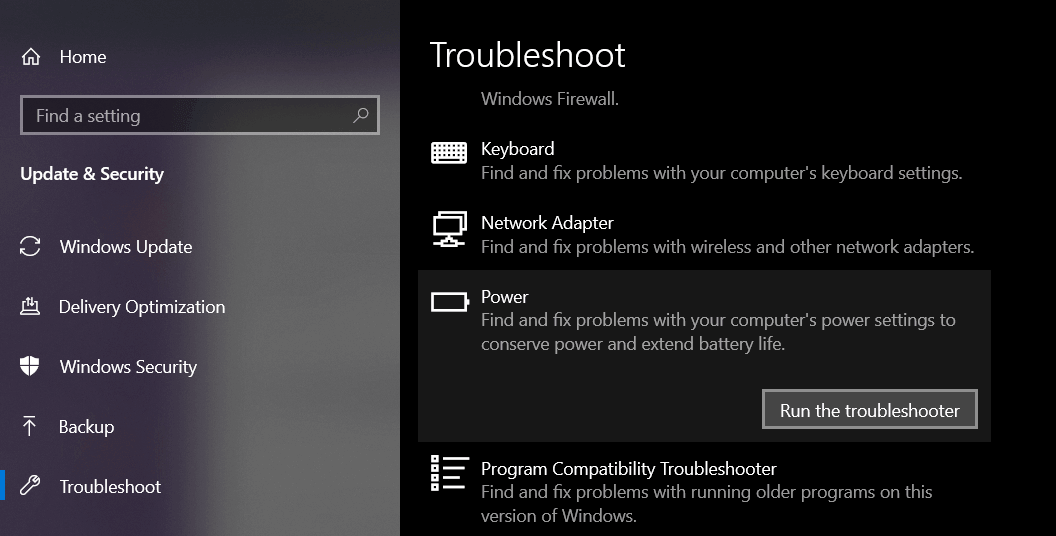
Run Power Troubleshooter https://windowsground.com/wp-content/uploads/2021/03/fix-plugged-in-not-charging-Windows-10-in-non-removable-battery-by-runing-the-power-trroubleshooter.png For such problems, Windows OS has added a troubleshooter which automatically fixes this kind of troubles in your windows computer. To use this troubleshooter, Follow these steps: 1. Either search for troubleshoot or go to Start > Settings > Update &Security > Troubleshoot. 2. Select power and then click Run the troubleshooter. It will automatically diagnose the problem. and hopefully, it should fix the problem, if not try the next method. 1 Like |
| Computers › Plugged In Not Charging Windows 10 In Non-removable Battery (detailed Guide) by Yinksdavid(op): 7:44am On Sep 13, 2021 |
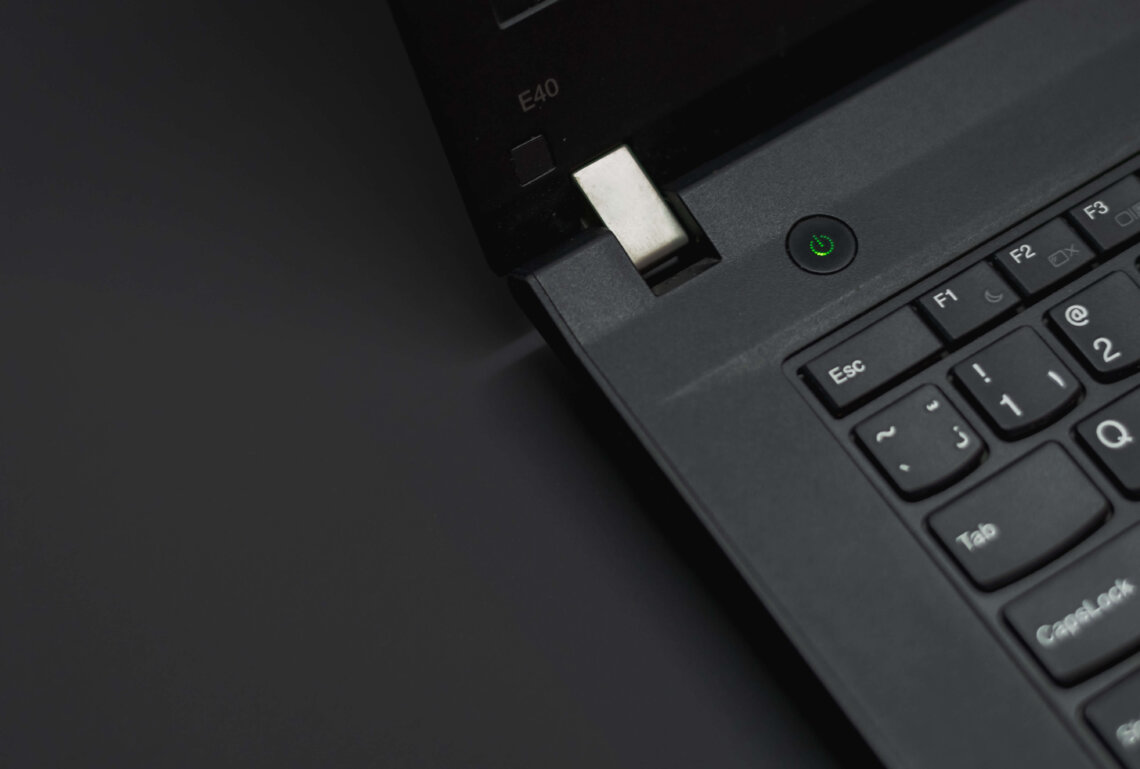
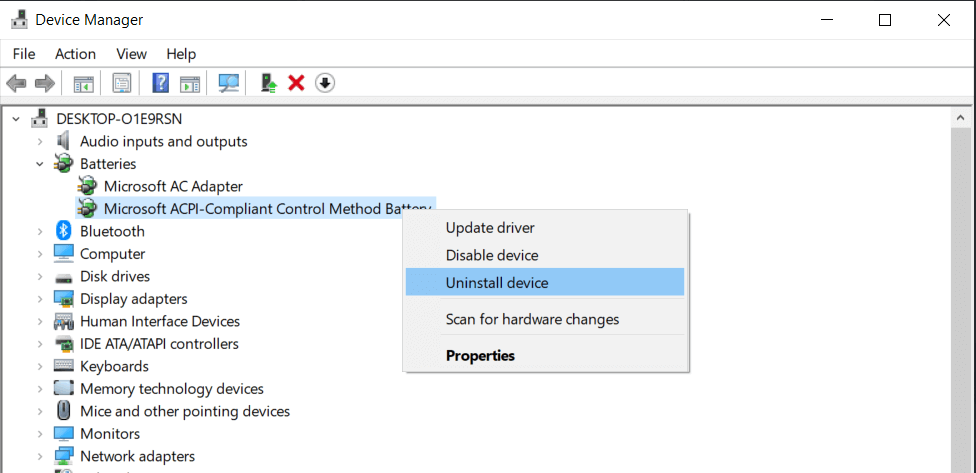
Note: This is a detailed guide on fixing your laptop having an issue “plugged in but not charging Windows 10”, if any of the solutions don’t work, don’t give up and try the next one. Lots of computer users have been facing this issue where when you plug in your windows 10 computer it shows that your device is plugged in however it’s not charging and if If you do a little research, you will get to know that many other windows user are also facing the issue just like you. It is hard to tell, as the problem can be caused by many things, such as charger issues, firmware or hardware issues, laptop overheating issues, Windows settings, outdated or corrupt drivers, etc. Since there is no direct fix for this, and windows os or any computer brand has not published any manual for fixing this error. so instead of looking for the solution to this error, you can try these common fix mentioned below, and hopefully, your problem should be resolved. How to fix plugged in not charging Windows 10 in non-removable battery 1. Update your battery drivers: Most often when you face any problem with your windows computer, the problem lies in its un-updated or wrong drivers. So If you are facing not charging in windows 10 issue try updating your battery drivers and see if it works for you or not. https://windowsground.com/wp-content/uploads/2021/03/fix-plugged-in-not-charging-Windows-10-in-non-removable-battery-by-updating-your-battery-drivers.png Steps: 1. Open the Device Manager by searching for it by pressing the start button or find device manager by right-clicking the Start button and selecting Device Manager. 2. Click on Batteries on the list to expand it and you should see two items: Microsoft AC Adapter and Microsoft ACPI-Compliant Control Method Battery. 3. Right-click on each item and choose Uninstall device. Yes, you are uninstalling your laptop’s battery drivers, but don’t worry because windows will automatically reinstall the updated driver when you will restart your laptop. 4. Shut down your laptop. 5. Unplug the power cable from your laptop. 6. If your laptop has a removable battery, remove it. else remove the bottom panel of your laptop and then remove the battery by disconnecting it from the motherboard. 7. Put the battery back inside if you removed it. 8. Plug-in your laptop and Power on your laptop. 1 Like |
| Computers › Re: Post Your Computer (PC) Troubles Here. by Yinksdavid(m): 11:20pm On Sep 12, 2021 |
okrikaboi:Okay. I wanted to share a link that should fix the issue but can't share it so i don't get restricted. |
| Computers › Re: Error In Loading Window by Yinksdavid(m): 1:38pm On Sep 12, 2021 |
errigdee:You can send me your email or you reach me via my email and i can send the actions you need to take for resolution. Also I will be sharing about it here latest by tomm as i still have one more repro(testing) to do on my VM with one of the last steps to take. |
| Computers › How To Disable Personalized Ads On Microsoft Sites And Apps by Yinksdavid(op): 12:46pm On Sep 12, 2021 |
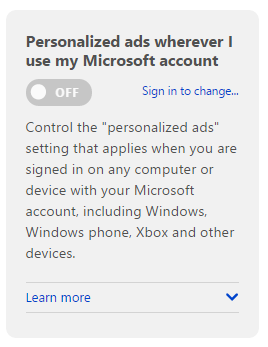
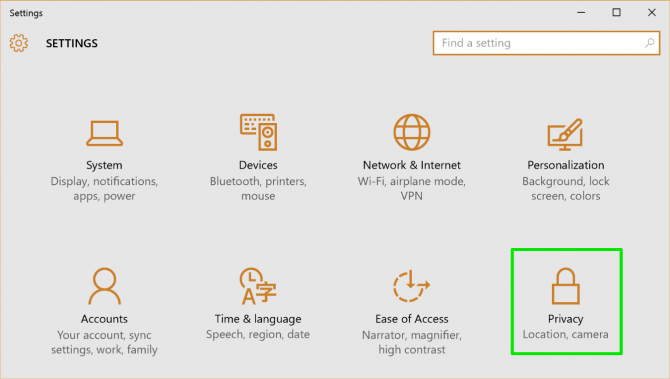
Depending on your viewpoint, personalized ads--the kind that track your activity on the web to provide more relevant ads--can be either handy or manipulative and creepy. Microsoft and other companies use cookies to track the sites you've visited, searches you've done, and other online activities. If you've recently been researching your next trip to the Caribbean, for example, you'll likely see some ads for Caribbean cruises in your Bing search results or Facebook feed. The personalized ads can be helpful by showing you deals you might be interested in, but they can also make you spend more money than you intend to. They can also share sensitive information with third parties depending on what you search for. Microsoft lets you disable personalized ads in three areas: the ads connected to your Microsoft account, ads on Microsoft sites and partner sites, and ads in Windows. Here's how to opt out of personalized ads for all three. Turn Off Personalized Ads in Your Browser and Microsoft Account 1. Navigate to https://choice.microsoft.com in your web browser. 2. Toggle off "Personalized ads in this browser". This forces Microsoft to show generic ads when you're on sites like MSN.com, Outlook.com, Bing search, and other Microsoft-related sites and partners, including those owned by AOL. https://cdn.mos.cms.futurecdn.net/XqcxJ7g2driEEvHQqNKVVW-970-80.png 3. Toggle off "Personalized ads wherever I use my Microsoft account." This disables personalized ads for any site or app you sign on with your Microsoft account, such as Xbox, Windows, and Windows phone. https://cdn.mos.cms.futurecdn.net/WqS8UdiAq65Mhbu98pnQVM-970-80.png Turn Off Personalized Ads in Windows Apps If you don't want to see personalized ads in Windows apps or Windows devices (even if you're not signed in with a Microsoft account): 1. Open Settings. You can do this from the Start menu in Windows. https://cdn.mos.cms.futurecdn.net/8EjyJMp3dYtJSqDjimYpQn-970-80.png 2. Click on Privacy. https://cdn.mos.cms.futurecdn.net/AUNK4psSJAuCRDjL2uumSc-970-80.png 3. Turn off "Let apps use my advertising ID for experiences across apps." https://cdn.mos.cms.futurecdn.net/M8FjX4jBGwYuFU2reooSN3-970-80.png |
| Computers › Re: Error In Loading Window by Yinksdavid(m): 11:59am On Sep 12, 2021 |
errigdee:Its something you can do yourself easily with the steps i can provide to you but if you are not very confident, then you might need to take it to a trusted technician. Restoring your OS should not cost you much at all but you know how things are especially when a technician knows you don't know much about an issue. I have always restored for myself and people around me at no cost though so I have no idea how much a technician will collect. |
| Computers › Re: Post Your Laptop Problems Here And Get Solution To Fix It Yourself by Yinksdavid(m): 10:32am On Sep 12, 2021 |
seankafor:Yeah you are right, Windows 11 OS is so fluid and the new design and sounds are modern, fresh, clean and beautiful, bringing you a sense of calm and ease but the release date is 5th of Oct, 2021 although the free upgrade to Windows 11 has been rolled out to eligible Windows 10 PCs and PCs that come pre-loaded with Windows 11 have started becoming available for purchase . I am currently using the private preview version for 3 weeks now but still studying on likely issues to be experienced and troubleshooting steps in fixing them. |
| Computers › Re: Post Your Laptop Problems Here And Get Solution To Fix It Yourself by Yinksdavid(m): 10:18am On Sep 12, 2021 |
udemzyudex:Bro, i got it better now but actually plugging in your charger to your laptop and showing the charging light but not charging is a peculiar issue with windows 10 OS although in this case, the work station can't be powered up. |