Cutezt's Posts
Nairaland Forum › Cutezt's Profile › Cutezt's Posts
1 2 3 4 5 6 7 8 ... 49 50 51 52 53 54 55 56 57 (of 95 pages)
 Career › Re: Apprenticeship Vs. Internship: What Makes Sense For Your Company by Cutezt(m): 7:31am On Jul 25, 2017*. Modified: 10:46am On Jul 25, 2017 Career › Re: Apprenticeship Vs. Internship: What Makes Sense For Your Company by Cutezt(m): 7:31am On Jul 25, 2017*. Modified: 10:46am On Jul 25, 2017 |
We all know the favorite of my eastern brothers na Meanwhile How Much Do You Know About Your Phone? Check out These 16 Amazing Facts About Phones |
| Computers › Re: 10 Hidden Features In Google Chrome You Didn't Know About by Cutezt(op): 7:29am On Jul 25, 2017 |
Uchwilliam:You can use a plugin to save the page as pdf |
| Romance › Re: This Nigerian Lady's Boyfriend Of 2 Years, Married Another Today by Cutezt(m): 11:27pm On Jul 24, 2017*. Modified: 10:49am On Jul 25, 2017 |
Chai gobe, modaran Meanwhile How Much Do You Know About Your Phone? Check out These 16 Amazing Facts About Phones 1 Like |
| Health › Re: 61-year-old RCCG Member Gives Birth To Triplets(photos) by Cutezt(m): 11:07pm On Jul 24, 2017 |
God is great for Meanwhile ARE YOU A GLO SUBSCRIBER? GLO ARE GIVING OUT FREE 200MB VALID FOR A WHOLE DAY, check it out |
| Politics › Re: Deaf And Dump People Protest In Imo, Say They're Treated Badly,Demand Car [pics] by Cutezt(m): 11:03pm On Jul 24, 2017*. Modified: 10:44am On Jul 25, 2017 |
300? Is Imo their headquarters? Meanwhile How Much Do You Know About Your Phone? Check out These 16 Amazing Facts About Phones 2 Likes |
| Phones › Re: 4 Extremely Useful Android Apps You Can't Find On The Playstore by Cutezt(op): 9:18pm On Jul 24, 2017 |
| Phones › Re: 4 Extremely Useful Android Apps You Can't Find On The Playstore by Cutezt(op): 9:17pm On Jul 24, 2017 |
Maro4u:Everyone of them. |
| Business › Re: Graduate Who Sells Irish Potatoes In Jos Becomes Online Sensation by Cutezt(m): 7:15pm On Jul 24, 2017*. Modified: 10:39am On Jul 25, 2017 |
Bewarang? Same state with me Shoo Meanwhile How Much Do You Know About Your Phone? Check out These 16 Amazing Facts About Phones 1 Like |
| Celebrities › Re: Davido Flaunts His 30 Billion Chain (Photos) by Cutezt(m): 2:15pm On Jul 24, 2017*. Modified: 10:40am On Jul 25, 2017 |
So make we die? Meanwhile How Much Do You Know About Your Phone? Check out These 16 Amazing Facts About Phones 1 Like |
| Politics › Re: El-rufai's Supporter, Muazu Abubakar Attacked (Graphic Photos) by Cutezt(m): 2:11pm On Jul 24, 2017*. Modified: 10:41am On Jul 25, 2017 |
Sorry for him, hope he gets well soon Meanwhile How Much Do You Know About Your Phone? Check out These 16 Amazing Facts About Phones |
| Computers › 10 Hidden Features In Google Chrome You Didn't Know About by Cutezt(op): 2:02pm On Jul 24, 2017 |
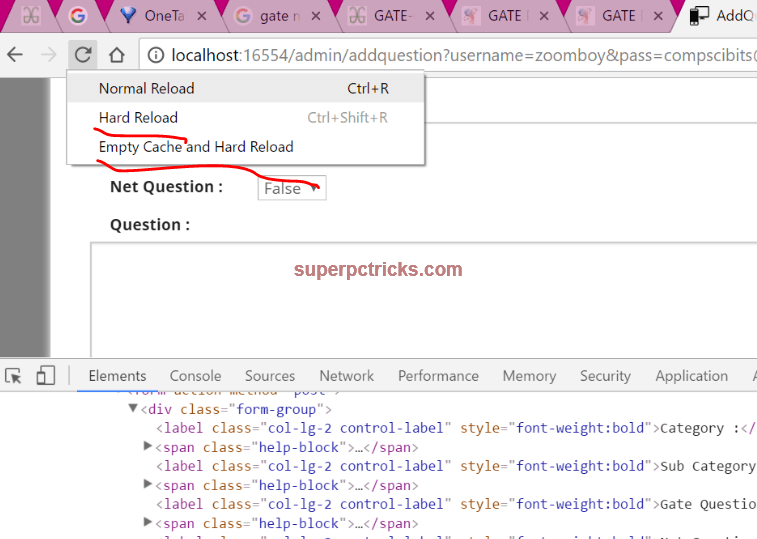
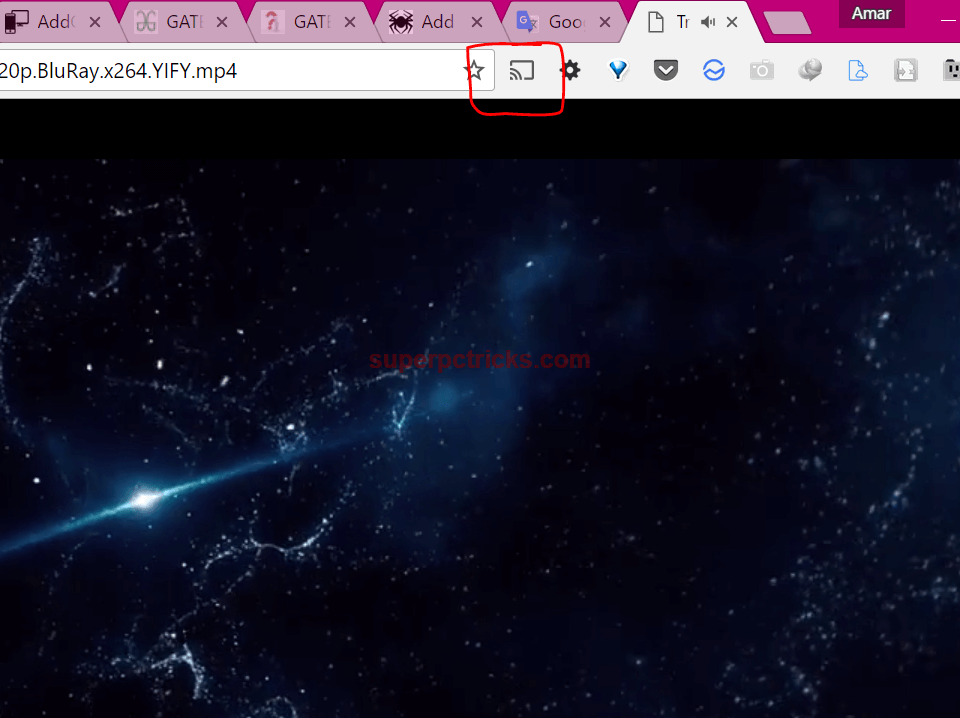
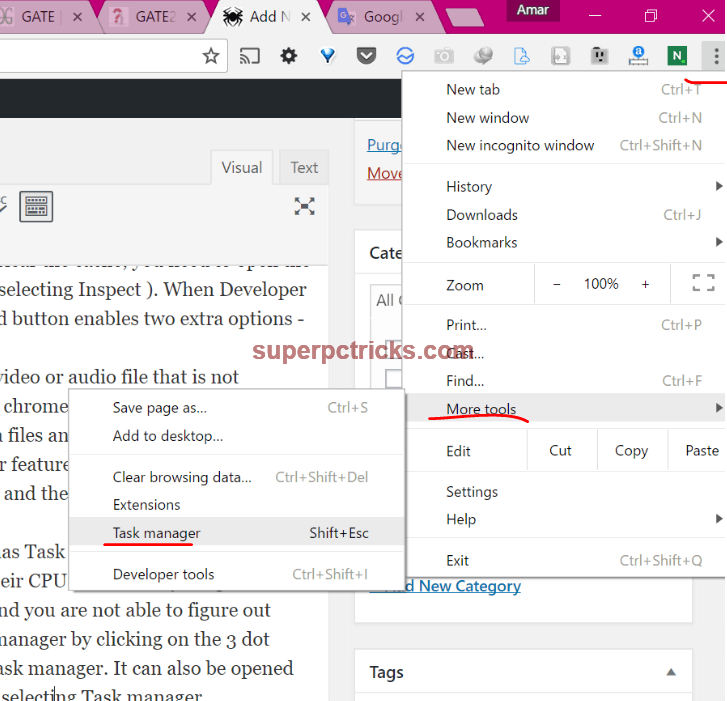
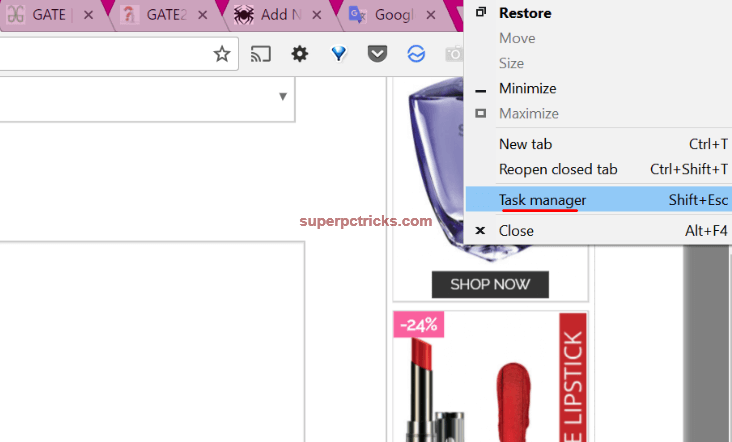
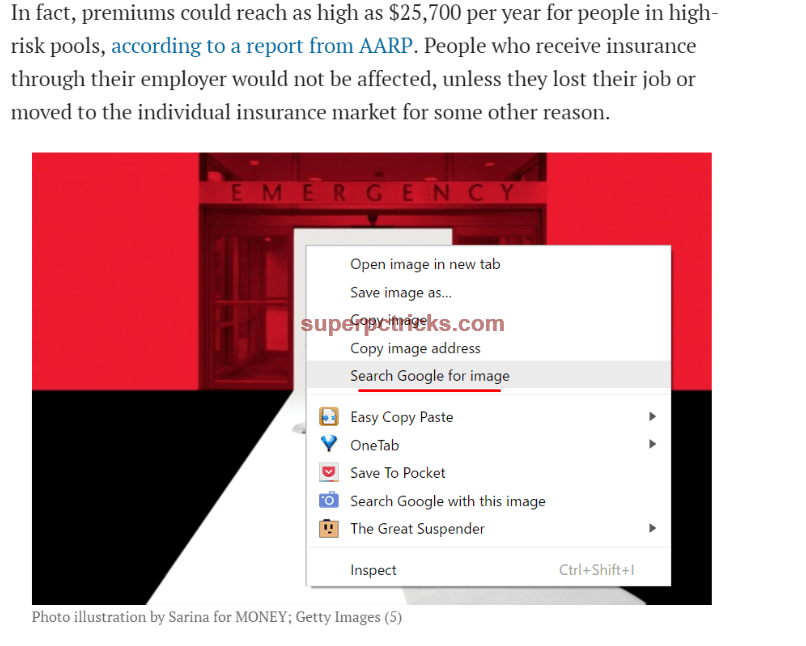
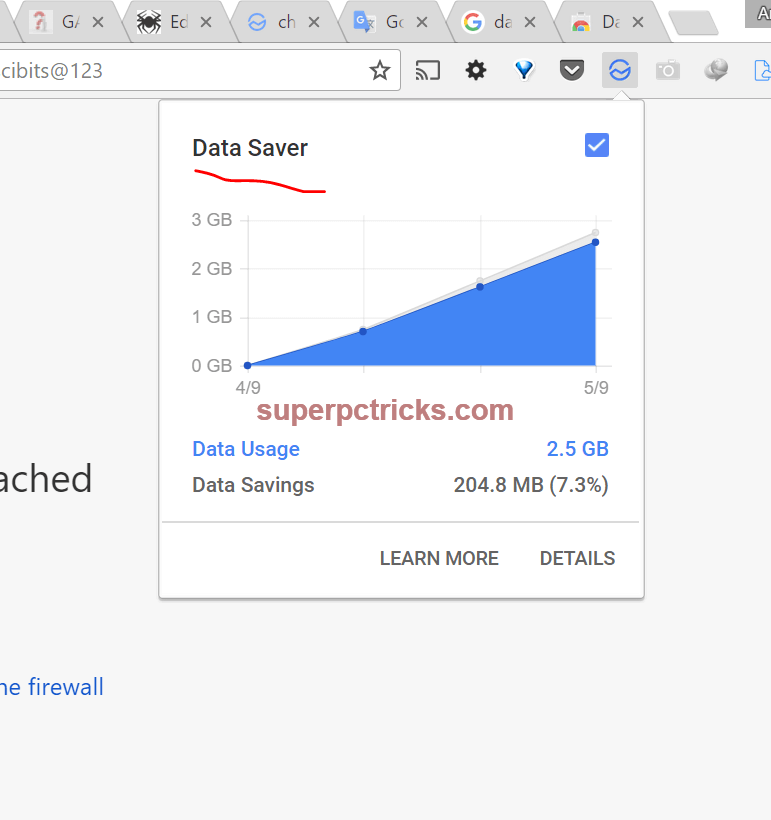
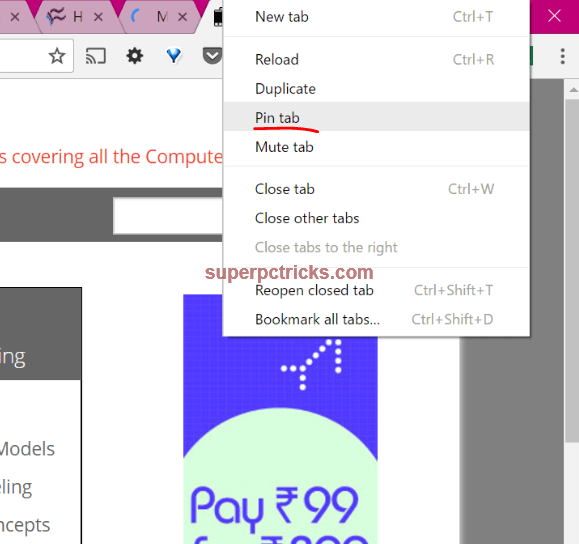
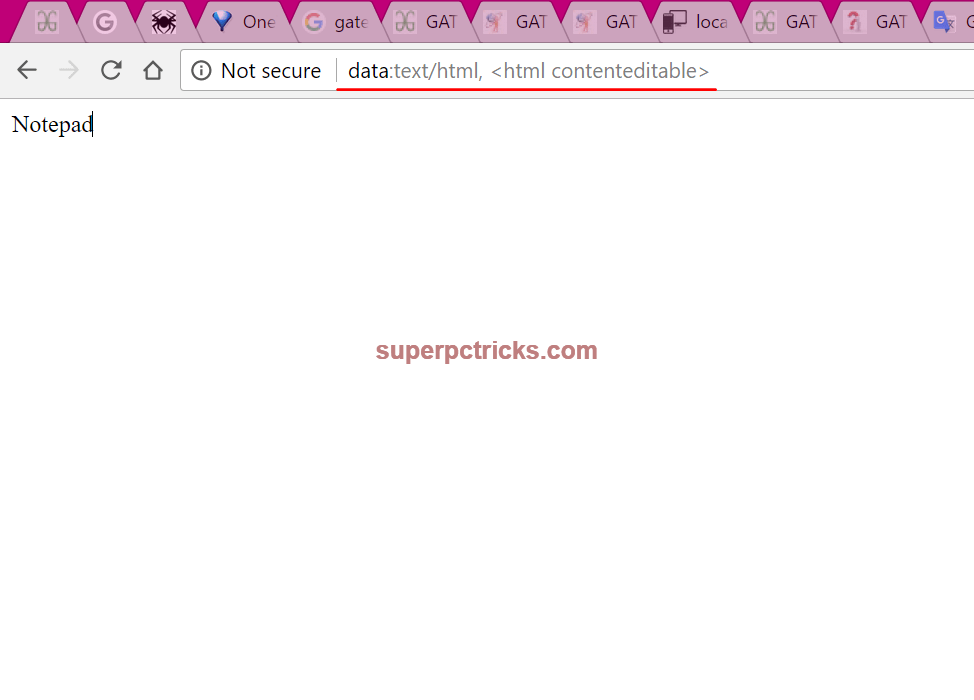
Chrome is a standout amongst the most used Internet browsers because of its speed and effortlessness. Regardless of the possibility that you are using this great browser for a long time, there are numerous little things about this browser that you may not know. In this post I will share the top 10 hidden chrome tips and tricks that will improve your profitability and makes your web perusing knowledge more user friendly. Top Chrome Tips and Tricks 1. Clear Cache and Hard Reload: Many a times, we have to clear the cache to see the updated content. Browsers save a few documents like pictures, CSS, JavaScript,etc locally to use them again and This enhances page loading speed yet the user does not get the updated content. In request to hard reload and clear the cache , you have to open the developer options(either by tapping F12 or right clicking and choosing Inspect ). At the point when Developer Options are opened in chrome, right tapping the normal reload button enables two additional options– Hard Reload , clear cache and Hard Reload . https://superpctricks.com/wp-content/uploads/2017/05/1.png?x69741 2. Use Chrome as Media player and Image viewer: If you have a video or audio record that is not good with your media player, you can attempt to open it with chrome browser. Chrome browser can play practically every video format. Simply drag your multimedia documents and drop them on chrome, it will begin playing immediately. chrome also has another extraordinary feature. On the off chance that you are using Chrome Cast to cast videos and images to your TV, you can play files with chrome and after that, cast the whole tab to your TV. You needn't bother with any extra software to do this. https://superpctricks.com/wp-content/uploads/2017/05/chrome-as-media-player.png?x69741 3. Chrome's Inbuilt Task Manager: Like Windows PC, Chrome additionally has Task manager which shows the presently opened tabs and other background exercises with their CPU and memory usage. This can help in such circumstances when chrome is gobbling up parcel of RAM and you are not aware of which program is causing the issues. You can open task manager by tapping on the three spot menu on the upper right corner, choosing More tools and after that Task manager . It can likewise be opened by right clicking anyplace on the empty area in tab menu and choosing Task manager. https://superpctricks.com/wp-content/uploads/2017/05/chrome-task-manager.png?x69741 https://superpctricks.com/wp-content/uploads/2017/05/google-chrome-tips-tricks.png?x69741 4. Re-open the inadvertently shut tabs: This is one of the most essential feature in this list. Many time we close the tabs unintentionally. Simply press[b] Ctrl +Shift + T[/b] to reestablish the shut tab. This likewise applies to numerous tabs. Continue pressing Ctrl+Shift+T[/b]to open your last shut tabs one after the other. https://popdevelop.com/wp-content/uploads/2010/06/screenshot.144edit.png [b]5. Ctrl+Enter: [/b]Pressing Ctrl +Enter will append the WWW also,.com to the text you have written in the address bar. It will additionally open the created URL automatically. https://superpctricks.com/wp-content/uploads/2017/05/google-chrome-tips-tricks.png?x69741 [b]6.Reverse Image Search: Google Reverse Image search enables you to upload a photo and afterward, it shows the pictures similar to that on the Internet. Right Click on any picture and select Search Google for picture to perform Reverse Image search. https://superpctricks.com/wp-content/uploads/2017/05/chrome-reverse-image-search.png?x69741 7. Ctrl +L : Pressing Ctrl+L will move the cursor to address bar with entire text selected. 8. Chrome Data Saver: If you are using a limited data plan, you can use Chrome's Data Saver augmentation to save some additional data. It works great and you can track how much data you are using on various sites, also the data you are saving. https://superpctricks.com/wp-content/uploads/2017/05/chrome-data-saver-1.png?x69741 9. Pin Tabs : There are a few sites that you every now and again use and need to keep them open all the time. In such cases, Chrome's Pin Tab feature can be exceptionally useful. Right Click on the tab that you need to pin and select Pin tab. When you make a tab pinned, it moves to the extreme left. Likewise the close button on the pinned tab disappears with the goal that you can't coincidentally close the tab. Pinned tabs remain opened notwithstanding when you restart your browser. https://superpctricks.com/wp-content/uploads/2017/05/pin-tabs-chrome.png?x69741 10. Use Chrome as notebook: Suppose you are researching on a subject and need to take a few brief notes. You needn't bother with opening the notebook for this reason. Simply type data:text/ html, <html contenteditable> in the address bar and the tab will transform into a notebook. When you type this a couple of times, at that point simply type the initials and chrome will show to you the full code.https://superpctricks.com/wp-content/uploads/2017/05/chrome-as-notepad.png?x69741 Source = 10 Best Features In Google Chrome You Didn't Know About Lalasticlala seun mynd44 Dominique 13 Likes 4 Shares |
| Phones › Re: 4 Extremely Useful Android Apps You Can't Find On The Playstore by Cutezt(op): 1:17pm On Jul 24, 2017 |
komonibo:I don't understand, block as in from using the same wifi with you? 1 Like |
| Politics › Re: Dismembered Body Of Dalori IDP Female Suicide Bomber (Graphic Photos) by Cutezt(m): 12:26pm On Jul 24, 2017*. Modified: 10:40am On Jul 25, 2017 |
And dem celebrate as dem born this one ọ I wish there was a way to bring her back to life, this death is too good for her, I will use candle wax to burn her till she dies again.. Go and receive your 77 Virgin d!cks in hell, see her teeth like hippopotamus own. Meanwhile How Much Do You Know About Your Phone? Check out These 16 Amazing Facts About Phones 3 Likes 2 Shares |
| Politics › Re: Your Committee On Restructuring Has No Igbo Leader – Muslim Group Blasts APC by Cutezt(m): 12:18pm On Jul 24, 2017 |
True everything for this country don tire me I am relocating to Congo Meanwhile Check out the 5 extremely important apps you can't find on Google play store |
| Education › Re: Salam Oyejide Of NANS Involved In Accident (Photos) by Cutezt(m): 12:14pm On Jul 24, 2017 |
But una say fatal accident na? Anyways, thank God for his life Meanwhile Check out the 5 extremely important apps you can't find on Google play store |
| Politics › Re: Nigerians To Pay N7.45/kwh More For Electricity (see Price List) by Cutezt(m): 12:14pm On Jul 24, 2017 |
I have nothing to say but if I serve a living God,then that man called Buhari and all his supporters will surely pay for every pain they made Nigerians go through. Meanwhile Check out the 5 extremely important apps you can't find on Google play store 8 Likes |
| Jobs/Vacancies › Re: N-power: What You Need To Know About The Device To Be Distributed by Cutezt(m): 12:07pm On Jul 24, 2017 |
Ok At least if you don't receive stipend, you have received tablets. Meanwhile Check out the 5 extremely important apps you can't find on Google play store |
| Sports › Re: Cristiano Ronaldo Advises Neymar To Quit Barcelona FC by Cutezt(m): 12:07pm On Jul 24, 2017 |
He really needs to, Messi is taking all the limelight. He needs to move if he wants to claim the ballon dor someday Meanwhile Check out the 5 extremely important apps you can't find on Google play store |
| Phones › Re: 5 Tips To Completely Secure Your Social Media Accounts by Cutezt(op): 11:41am On Jul 24, 2017 |
Myfredmon:Idiot, get your scamming ass off my thread. |
| Phones › Re: 4 Extremely Useful Android Apps You Can't Find On The Playstore by Cutezt(op): 10:30am On Jul 24, 2017 |
mikaj:Lmao |
| Webmasters › Re: Is It Advisable To Blog With A Phone? by Cutezt(m): 9:50am On Jul 24, 2017 |
jacyhelen:sorry, auto correct added an extra s to my URL, it's http://www.tutsmap..com |
| Education › Re: Little Mistakes That Kill Students' GPA In University by Cutezt(m): 9:01am On Jul 24, 2017 |
True |
| Phones › 5 Tips To Completely Secure Your Social Media Accounts by Cutezt(op): 8:53am On Jul 24, 2017 |
Social media is such an important business tool nowadays, making it critical that you keep your accounts safe. Suppose somebody accessed your accounts? It would be decimating and it could possibly have an extreme negative affect on your business. https://cdn.makeawebsitehub.com/wp-content/uploads/2016/04/social_media.jpg Things like: Taking your account and changing the handle so as to take your hard earned followers. Sending out traded off links to your followers. Endeavoring to phish individual data from your clients. Abstain from putting your social media accounts at chance by actualizing these five straightforward tips. 1. Be careful with third-party applications. When you use an outsider application, for example, a social media post scheduler, they will request access to your account. Ensure you are as it were approving only legitimate applications to get access. and , make sure to read about what precisely you are approving the specific application to access. A few applications will just need least permissions, for example, the ability to read and write content, so continuously read the fine print. It's a smart thought to login to the greater part of your social media accounts and see what applications you are as of now permitting to get to your profiles. repudiate access to anything you don't trust or any applications you presently aren't using. 2. Use solid passwords. Recalling passwords considered to be "solid" can be an agony in the back. Indeed, even Mark Zuckerberg, author of Facebook, wasn't excessively partial to difficult passwords - until the point when he was hacked. His Twitter, Instagram and Pinterest accounts were traded off and his password was later uncovered to be "Dadada." This fair goes to indicate you that the dominant part of individuals don't take their password quality too important. A great many people think, "It will never happen to me." All things considered, it can happen, so ensure you use a password that is hard to break. Tools, for example, How Secure Is My Password will enable you to rate your password quality. For instance, it says it would take a PC 552 quadrillion years to split the password key "Secure100Password3!" 3. Install antivirus Applications. Numerous internet service providers (ISPs) will give some type of security assurance - you can also install an antivirus program, for example, AVG , which offers a free protection against malicious items. On the off chance that you need to be additional wary, tools like Vibbi enable you to download and backup the greater part of your pictures and videos on Instagram - this is particularly advantageous for brands that spend additional time and cash editing customized videos to promote their business. 4. Enable two-factor confirmation. Two-factor verification affirms a user's originality by using a mix of two distinctive segments, typically the account passkey and a confirmation code, [b]which is sent to the user by means of text message or email. To be completely forthright, anybody not using this feature is requesting inconvenience. It's justified regardless of the additional bother to guarantee that your accounts remain safe. 5. Move passwords to a manager app. LastPass is program that recollects the majority of your passwords, driving you to just recollect one master secret word. With such a variety of "difficult " to recall passwords, periodically you need to end up resetting your password, giving you however another difficult to remember password to add to the blend. You can additionally sync the service over all your browsers and gadgets. With such a large number of social media accounts to deal with, it's frequently sluggishness that causes us to use powerless simple to- remember passwords. http://tutsmap..com/2017/07/5-tips-to-completely-secure-your-social.html |
| Politics › Re: Mid-Term: Buhari Passes 7, Fails 5 Promises - Centre For Democracy & Development by Cutezt(m): 8:07am On Jul 24, 2017 |
How? As far as I am concerned, the only thing he flawlessly passed is deceiving Nigerians to vote him. He is playing moji moji (hide and seek) with Nigerians. He has failed woefully, full stop. 14 Likes |
| Phones › Re: 4 Extremely Useful Android Apps You Can't Find On The Playstore by Cutezt(op): 7:31am On Jul 24, 2017 |
oz4real83: lonelydora: oz4real83:https://m.apkpure.com is one of the best alternatives to Google play store, has thousands of apps and you can even request for an app if it's not available and in some days, you will get it 9 Likes 1 Share |
| Jobs/Vacancies › Re: NECO Recruitment Scam Alert! No Recruitment Campaign Online - NECO Warns by Cutezt(m): 7:21am On Jul 24, 2017 |
Shey una don hear? It is so important that it was posted twice on the front page |
| Business › Re: Britain To Invest In Nigeria’s Oil Pipelines, Others by Cutezt(m): 7:21am On Jul 24, 2017 |
OK, it's a welcome development |
| Webmasters › Re: Is It Advisable To Blog With A Phone? by Cutezt(m): 7:19am On Jul 24, 2017*. Modified: 9:49am On Jul 24, 2017 |
Lol funny enough to I prefer using my phone to post on my blog http://www.tutsmap..com even though I have a laptop, I use color note app to write edit and add images to my post using the html feature,or I use the clipboard feature on swift ke to save my post if I don't want to be closing and opening different apps, then I use opera mini to post on my blog using Blogthis, I only use dolphin browser to get to some heavy websites which opera can't do, eg Blogger website, adsense site, etc, and to edit post mistakes... I use my pc when I need to add a code to my blog or edit something, even though I can use dolphin browser but I prefer pc for that. |
| Education › Re: LAUTECH Operates 97 Different Bank Accounts – Osun Govt by Cutezt(m): 7:18am On Jul 24, 2017 |
Chai |
| Phones › Re: Motorola Is Officially Back In Nigeria; Unveils New Range Of Smartphones by Cutezt(m): 7:18am On Jul 24, 2017*. Modified: 7:39am On Jul 24, 2017 |
Wow, they will run back again if they I still leave the prices of their products out of the common man's reach. 3 Likes |
| Phones › Re: My Phone's Torch Burnt My Finger. by Cutezt(m): 9:49pm On Jul 23, 2017 |
I just tried it on my hisense device for 1 minute and nothing happened. |




1 2 3 4 5 6 7 8 ... 49 50 51 52 53 54 55 56 57 (of 95 pages)