Cutezt's Posts
Nairaland Forum › Cutezt's Profile › Cutezt's Posts
1 2 3 4 5 6 7 8 ... 52 53 54 55 56 57 58 59 60 (of 99 pages)
 Education › Re: Female Students Of Ekiti University Recreate Korean School Mode Of Dressing.PICS by Cutezt(m): 10:50am On Jul 25, 2017 |
| Celebrities › Re: Stella Damasus: Getting Married 3 Times Was Worth It by Cutezt(m): 10:49am On Jul 25, 2017 |
Chai, e don red for this one |
| Fashion › Re: 5 Ways To Make Cheap Clothes Look Expensive by Cutezt(m): 10:47am On Jul 25, 2017 |
Cheap na cheap jor |
| Travel › Re: Vehicular Movement Through Kabba In Kogi State Is Almost Impossible Right Now. by Cutezt(m): 10:38am On Jul 25, 2017 |
Oh naija, I weep for thee Meanwhile How Much Do You Know About Your Phone? Check out These 16 Amazing Facts About Phones |
| Crime › Re: Young Cable Vandal Weeps After Being Nabbed In Ebonyi With Others. Photos by Cutezt(m): 10:36am On Jul 25, 2017 |
Lol |
| Phones › Re: How Much Do You Know About Your Phone? 16 Amazing Facts About Phones by Cutezt(op): 9:23am On Jul 25, 2017 |
Mobile phone throwing world championship video https://www.youtube.com/watch?v=Sgw99VoCssU Lalasticlala seun mynd44 Dominique |
| Phones › How Much Do You Know About Your Phone? 16 Amazing Facts About Phones by Cutezt(op): 9:21am On Jul 25, 2017*. Modified: 9:44am On Jul 25, 2017 |
In recent years, mobile phones have turn into a sort of habit. In reality, it's practically difficult to envision existence without them. However, how well do you truly know your that your closest companion in your pocket? We at Tutsmap Blog have brought you a couple of amazing certainties about that thing you whip out approximately 85 times each day. 1: The First mobile phone was Motorola Dyna TAC 8000X [img]https://tctechcrunch2011.files./2016/01/320px-dynatac8000x.jpg?w=278[/img] The first mobile phone was the Motorola Dyna TAC 8000X .concocted in 1983 by Martin Copper, a senior worker at Motorola. It could as it were store 30 contacts with a weight of around 1.1 kg and offered talk time of 30 minutes. It's retail cost? $3,999. 2: The first mobile phone call was made on April 3, 1973 [img]https://tctechcrunch2011.files./2016/01/800px-2007computex_e21forum-martincooper.jpg?w=510[/img] The first mobile phone call was made to Dr. Joel S. Engel of Bell Labs by Martin Cooper on April 3, 1973, with the first ever created mobile phone Motorola Dyna TAC. 3: The first smart phone was made by IBM [img]https://tctechcrunch2011.files./2016/01/ibm_simon_personal_communicator.png?w=366[/img] This was the first smartphone, it is in reality more than 20 years old,and was launched on August 16, 1994 by IBM. At first code named the "Angler" , the phone was given the name "Simon Personal Communicator " before its last discharge in 1994. It was the primary economically available touch screen phone which could be effectively worked with the assistance of stylus or fingertip and came pre-installed with capacities like a calendar , calculator , address book, and Note pad. 4: 90% of the mobile phones in Japan are waterproof https://cdn3.list25.com/wp-content/uploads/2016/01/12-15-610x360.jpg An intriguing thing is that almost 90% of the mobile phones in Japan are waterproof, as the individuals of Japan are exceptionally attached to mobile phones that they use it even in the shower. 5: Apple sold 37.04 million iPhones in 2012 In 2012, Apple sold 37.04 million iPhones in 14 weeks — or 262 phones for each minute and 4 phones per-second. 6: World's most expensive phone by Apple is worth $15.3 million As we are pushing forward in this century, practically everybody has a phone, however some of them have smart mobile phones and some of them don't. https://cdn.images.express.co.uk/img/dynamic/59/590x/Apple-iPhone-6-511518.jpg Everybody can't stand to enjoy the extravagances of life, yet there are a couple of fortunate ones who can. For those fortunate individuals, Apple had launched its iPhone5 completely covered with 26 carat dark precious stone. It was launched with the cost of $15.3 million and turned into the world's most costly phone. 7: Android is owned by more than 80% of users on the planet There's no doubt the "iPhone is the lord of smartphones", yet in spite of being the greatest dealer, Apple's operating system doesn't really dominate the smartphone world. As indicated by comScore, Android pulverizes the iOS piece of the pie by 82.8%. 8: The Highest Mobile bill was $201,000 We as a whole are somewhat chafed by the ever expanding charges we pay, mobile bill being one of them. All things considered, envision being Celina Aarons, who got the greatest stun of her life when she opened her phone bill and discovered she owed $201,000 . The reason? Celina had two siblings who were deaf and dumb and spoke with her by means of text over their phones. Normally it wasn't an issue because of a standard data plan. Be that as it may, on an outing to Canada one sibling sent more than 2,000 text messages and downloaded videos at a cost of around $2,000 per vid. 9: Cellphones holds more bacteria than our toilet sits: https://cdn2.list25.com/wp-content/uploads/2016/01/20-15-610x360.jpg overall, our phones have 18 times more microbes than our toilets. 10: Nomophobia is the fear of not having your mobile phone https://cdn3.list25.com/wp-content/uploads/2016/01/22-15-610x360.jpg 11: In 2012 iPhone sales (over $22 billion) were worth more than all Microsoft products combined (over $17 billion) https://cdn4.list25.com/wp-content/uploads/2016/01/13-15-610x360.jpg 13: More than 250,000 million Nokia 1100 phones were sold. That made the Nokia brand the best selling gadget in history 14: There are more individuals on Earth with mobile phones than with toilets https://thumbs.dreamstime.com/x/public-toilet-cubicles-urinals-11702816.jpg 15: Sonim XP3300 Force is the strongest phone on the planet https://www.equipmentworld.com/wp-content/uploads/sites/91/2013/01/tallbuildings-300x200.jpg as per the Guinness Book of World Records. It tumbled from 84 feet and wasn't damaged. 16: In Finland, throwing phones is a sport Yup, you read right, in Finland, they practice throwing of mobile phones as a sport. It is called Mobile Phone Throwing World Championships https://cdn4.list25.com/wp-content/uploads/2016/01/15-15-610x360.jpg https://en.m.wikipedia.org/wiki/Mobile_phone_throwing Source http://tutsmap..com/2017/07/how-much-do-you-know-about-your-phone.html |
| NYSC › Re: Slaying In Camp – This Female Corper’s Outfit Got People Talking by Cutezt(m): 7:56am On Jul 25, 2017*. Modified: 9:50am On Jul 25, 2017 |
In Buhari's voice End time coffer  Meanwhile How Much Do You Know About Your Phone? Check out These 16 Amazing Facts About Phones 4 Likes |
| Business › Re: Stock Market Hits Two-year High, Soars By N218bn by Cutezt(m): 7:47am On Jul 25, 2017*. Modified: 10:50am On Jul 25, 2017 |
| Business › Re: Militants Destroy Trans-niger Pipeline, Nigeria Loses 150,000bpd by Cutezt(m): 7:47am On Jul 25, 2017*. Modified: 10:48am On Jul 25, 2017 |
Which way my dear country? Meanwhile How Much Do You Know About Your Phone? Check out These 16 Amazing Facts About Phones |
| Jobs/Vacancies › Re: Share Your Experience - Dpr Aptitude Test 2017 by Cutezt(m): 7:45am On Jul 25, 2017*. Modified: 10:50am On Jul 25, 2017 |
Ok BRB, typing Meanwhile How Much Do You Know About Your Phone? Check out These 16 Amazing Facts About Phones |
| Jobs/Vacancies › Re: Thread For N-health Applicant, Please Read The Instructions Carefully by Cutezt(m): 7:45am On Jul 25, 2017*. Modified: 10:50am On Jul 25, 2017 |
| Computers › Re: Microsoft Paint Is Dead, But It Won't Be Forgotten by Cutezt(m): 7:38am On Jul 25, 2017*. Modified: 10:50am On Jul 25, 2017 |
| Art, Graphics & Video › Re: 5 Easy Ways To Tell If A Photo Has Been Photoshopped by Cutezt(m): 7:38am On Jul 25, 2017*. Modified: 10:47am On Jul 25, 2017 |
Ok, nice tips OP, cos photoshop is really causing trouble lately Meanwhile How Much Do You Know About Your Phone? Check out These 16 Amazing Facts About Phones 2 Likes 1 Share |
| Education › Re: How Difficult Is GCE? by Cutezt(m): 7:33am On Jul 25, 2017*. Modified: 10:46am On Jul 25, 2017 |
Not too hard, just read and you will pass Meanwhile How Much Do You Know About Your Phone? Check out These 16 Amazing Facts About Phones |
| Phones › Re: How Long Can 5000mah Last You? by Cutezt(m): 7:33am On Jul 25, 2017*. Modified: 10:49am On Jul 25, 2017 |
My 2500 mah battery lasts for like 6 hours straight usage and it's okay for me, when I was using tecno phantom pad with 4000mah battery, it didn't last 3 hours on heavy usage, I just dumped the phone. Meanwhile How Much Do You Know About Your Phone? Check out These 16 Amazing Facts About Phones 1 Like |
| Computers › Re: 10 Hidden Features In Google Chrome You Didn't Know About by Cutezt(op): 7:32am On Jul 25, 2017 |
realsammie:Phones doesn't have most of these features, except 1,2,9 |
| Career › Re: Apprenticeship Vs. Internship: What Makes Sense For Your Company by Cutezt(m): 7:31am On Jul 25, 2017*. Modified: 10:46am On Jul 25, 2017 |
We all know the favorite of my eastern brothers na Meanwhile How Much Do You Know About Your Phone? Check out These 16 Amazing Facts About Phones |
| Computers › Re: 10 Hidden Features In Google Chrome You Didn't Know About by Cutezt(op): 7:29am On Jul 25, 2017 |
Uchwilliam:You can use a plugin to save the page as pdf |
| Romance › Re: This Nigerian Lady's Boyfriend Of 2 Years, Married Another Today by Cutezt(m): 11:27pm On Jul 24, 2017*. Modified: 10:49am On Jul 25, 2017 |
Chai gobe, modaran Meanwhile How Much Do You Know About Your Phone? Check out These 16 Amazing Facts About Phones 1 Like |
| Health › Re: 61-year-old RCCG Member Gives Birth To Triplets(photos) by Cutezt(m): 11:07pm On Jul 24, 2017 |
God is great for Meanwhile ARE YOU A GLO SUBSCRIBER? GLO ARE GIVING OUT FREE 200MB VALID FOR A WHOLE DAY, check it out |
| Politics › Re: Deaf And Dump People Protest In Imo, Say They're Treated Badly,Demand Car [pics] by Cutezt(m): 11:03pm On Jul 24, 2017*. Modified: 10:44am On Jul 25, 2017 |
300? Is Imo their headquarters? Meanwhile How Much Do You Know About Your Phone? Check out These 16 Amazing Facts About Phones 2 Likes |
| Phones › Re: 4 Extremely Useful Android Apps You Can't Find On The Playstore by Cutezt(op): 9:18pm On Jul 24, 2017 |
| Phones › Re: 4 Extremely Useful Android Apps You Can't Find On The Playstore by Cutezt(op): 9:17pm On Jul 24, 2017 |
Maro4u:Everyone of them. |
| Business › Re: Graduate Who Sells Irish Potatoes In Jos Becomes Online Sensation by Cutezt(m): 7:15pm On Jul 24, 2017*. Modified: 10:39am On Jul 25, 2017 |
Bewarang? Same state with me Shoo Meanwhile How Much Do You Know About Your Phone? Check out These 16 Amazing Facts About Phones 1 Like |
| Celebrities › Re: Davido Flaunts His 30 Billion Chain (Photos) by Cutezt(m): 2:15pm On Jul 24, 2017*. Modified: 10:40am On Jul 25, 2017 |
So make we die? Meanwhile How Much Do You Know About Your Phone? Check out These 16 Amazing Facts About Phones 1 Like |
| Politics › Re: El-rufai's Supporter, Muazu Abubakar Attacked (Graphic Photos) by Cutezt(m): 2:11pm On Jul 24, 2017*. Modified: 10:41am On Jul 25, 2017 |
Sorry for him, hope he gets well soon Meanwhile How Much Do You Know About Your Phone? Check out These 16 Amazing Facts About Phones |
| Computers › 10 Hidden Features In Google Chrome You Didn't Know About by Cutezt(op): 2:02pm On Jul 24, 2017 |
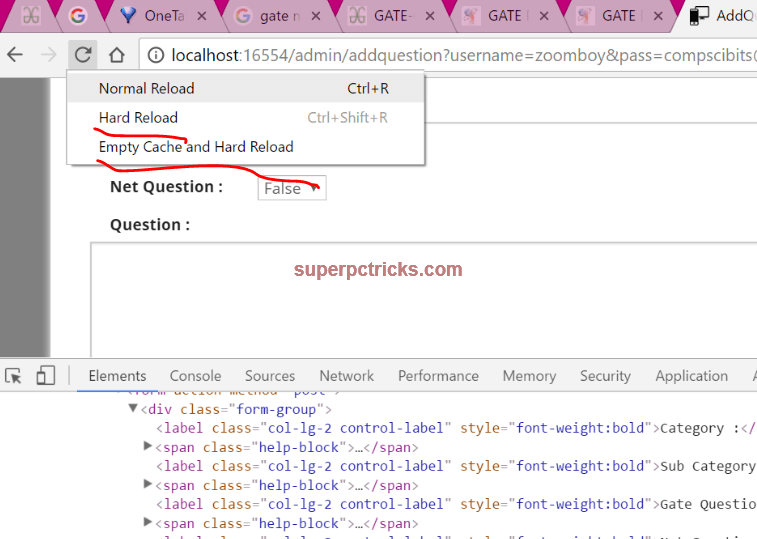
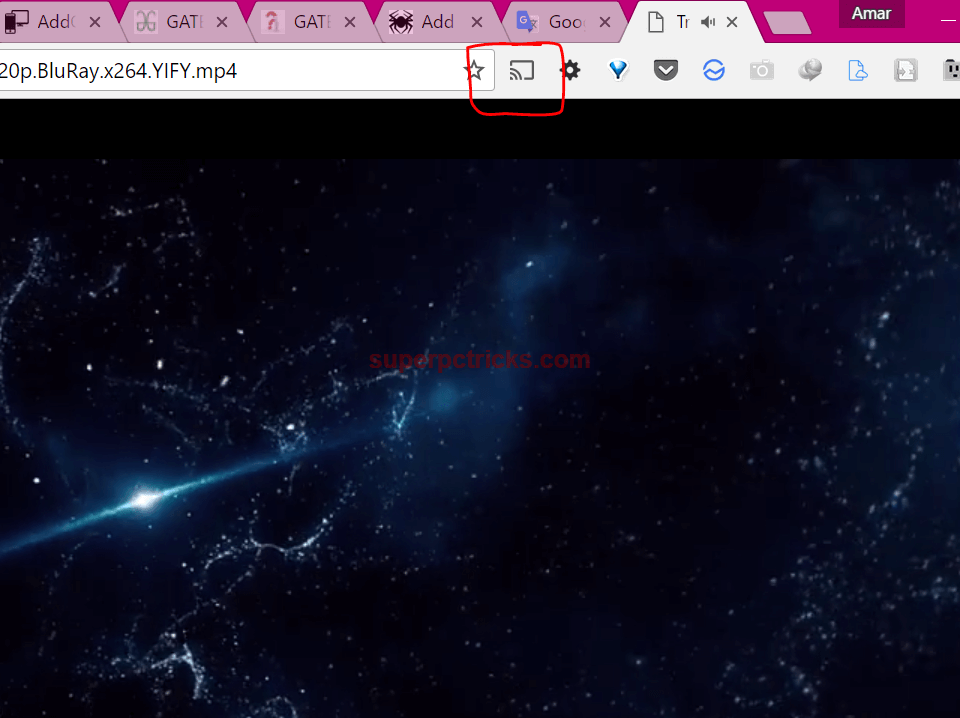
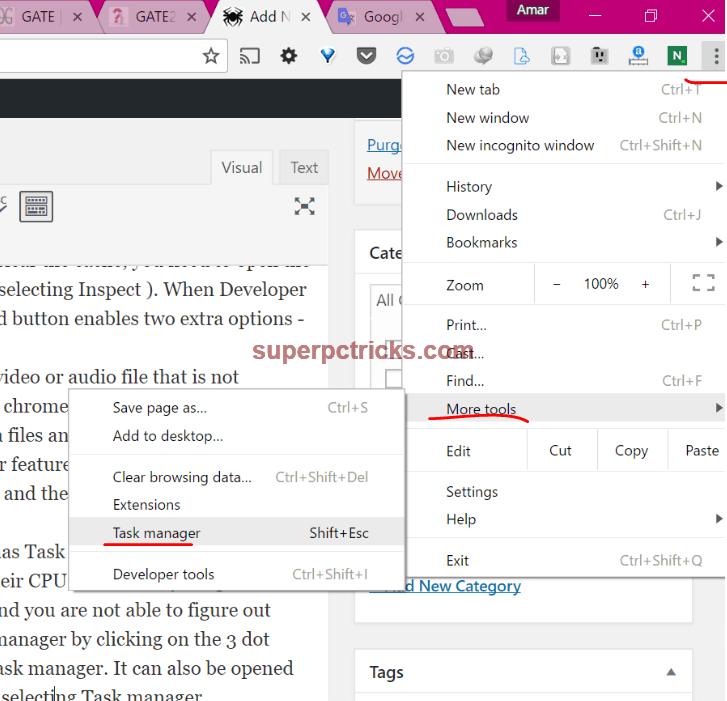
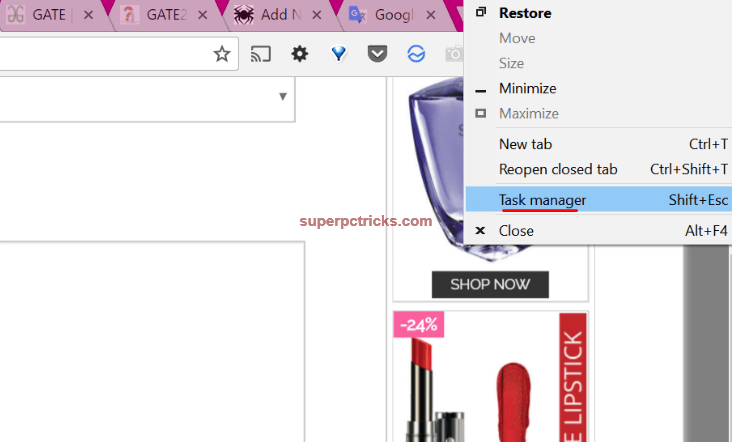
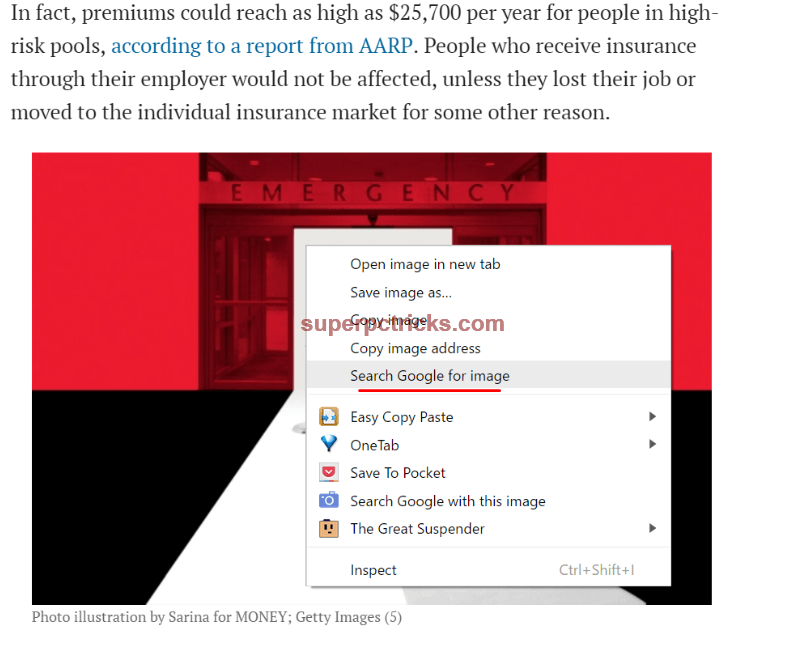
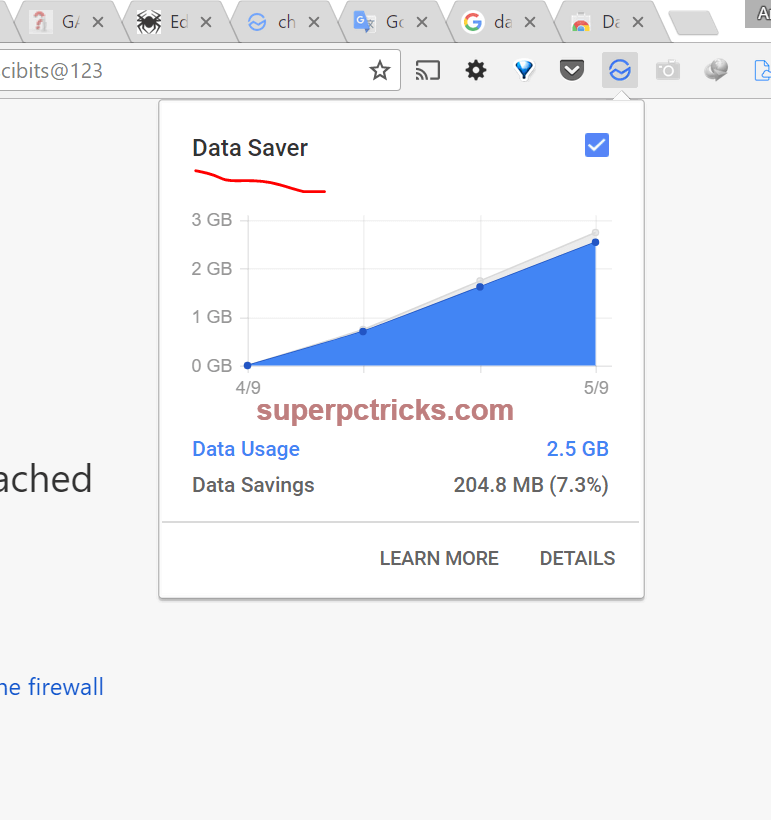
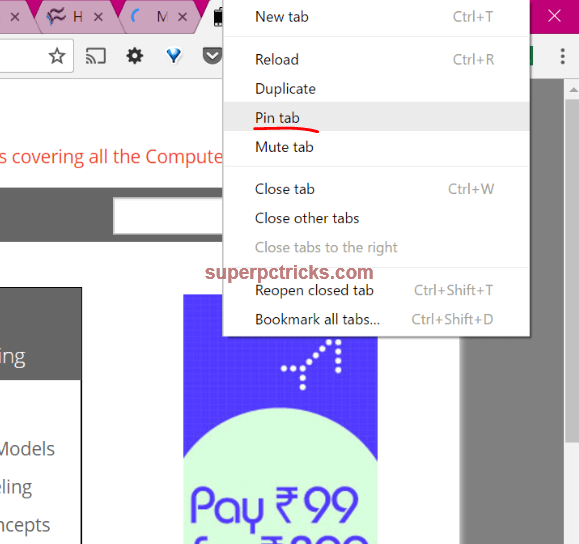
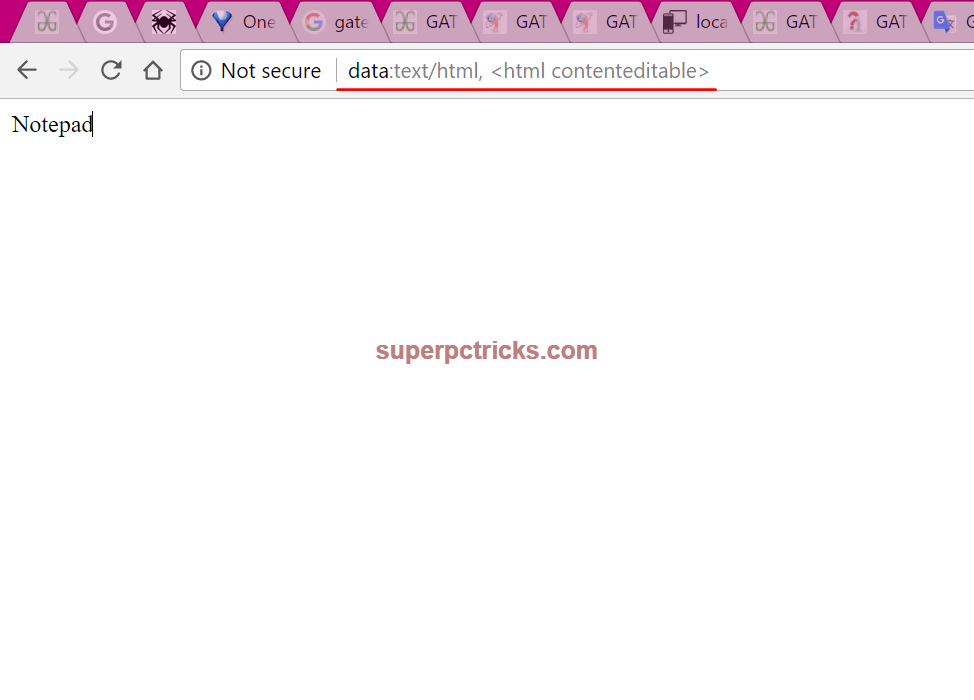
Chrome is a standout amongst the most used Internet browsers because of its speed and effortlessness. Regardless of the possibility that you are using this great browser for a long time, there are numerous little things about this browser that you may not know. In this post I will share the top 10 hidden chrome tips and tricks that will improve your profitability and makes your web perusing knowledge more user friendly. Top Chrome Tips and Tricks 1. Clear Cache and Hard Reload: Many a times, we have to clear the cache to see the updated content. Browsers save a few documents like pictures, CSS, JavaScript,etc locally to use them again and This enhances page loading speed yet the user does not get the updated content. In request to hard reload and clear the cache , you have to open the developer options(either by tapping F12 or right clicking and choosing Inspect ). At the point when Developer Options are opened in chrome, right tapping the normal reload button enables two additional options– Hard Reload , clear cache and Hard Reload . https://superpctricks.com/wp-content/uploads/2017/05/1.png?x69741 2. Use Chrome as Media player and Image viewer: If you have a video or audio record that is not good with your media player, you can attempt to open it with chrome browser. Chrome browser can play practically every video format. Simply drag your multimedia documents and drop them on chrome, it will begin playing immediately. chrome also has another extraordinary feature. On the off chance that you are using Chrome Cast to cast videos and images to your TV, you can play files with chrome and after that, cast the whole tab to your TV. You needn't bother with any extra software to do this. https://superpctricks.com/wp-content/uploads/2017/05/chrome-as-media-player.png?x69741 3. Chrome's Inbuilt Task Manager: Like Windows PC, Chrome additionally has Task manager which shows the presently opened tabs and other background exercises with their CPU and memory usage. This can help in such circumstances when chrome is gobbling up parcel of RAM and you are not aware of which program is causing the issues. You can open task manager by tapping on the three spot menu on the upper right corner, choosing More tools and after that Task manager . It can likewise be opened by right clicking anyplace on the empty area in tab menu and choosing Task manager. https://superpctricks.com/wp-content/uploads/2017/05/chrome-task-manager.png?x69741 https://superpctricks.com/wp-content/uploads/2017/05/google-chrome-tips-tricks.png?x69741 4. Re-open the inadvertently shut tabs: This is one of the most essential feature in this list. Many time we close the tabs unintentionally. Simply press[b] Ctrl +Shift + T[/b] to reestablish the shut tab. This likewise applies to numerous tabs. Continue pressing Ctrl+Shift+T[/b]to open your last shut tabs one after the other. https://popdevelop.com/wp-content/uploads/2010/06/screenshot.144edit.png [b]5. Ctrl+Enter: [/b]Pressing Ctrl +Enter will append the WWW also,.com to the text you have written in the address bar. It will additionally open the created URL automatically. https://superpctricks.com/wp-content/uploads/2017/05/google-chrome-tips-tricks.png?x69741 [b]6.Reverse Image Search: Google Reverse Image search enables you to upload a photo and afterward, it shows the pictures similar to that on the Internet. Right Click on any picture and select Search Google for picture to perform Reverse Image search. https://superpctricks.com/wp-content/uploads/2017/05/chrome-reverse-image-search.png?x69741 7. Ctrl +L : Pressing Ctrl+L will move the cursor to address bar with entire text selected. 8. Chrome Data Saver: If you are using a limited data plan, you can use Chrome's Data Saver augmentation to save some additional data. It works great and you can track how much data you are using on various sites, also the data you are saving. https://superpctricks.com/wp-content/uploads/2017/05/chrome-data-saver-1.png?x69741 9. Pin Tabs : There are a few sites that you every now and again use and need to keep them open all the time. In such cases, Chrome's Pin Tab feature can be exceptionally useful. Right Click on the tab that you need to pin and select Pin tab. When you make a tab pinned, it moves to the extreme left. Likewise the close button on the pinned tab disappears with the goal that you can't coincidentally close the tab. Pinned tabs remain opened notwithstanding when you restart your browser. https://superpctricks.com/wp-content/uploads/2017/05/pin-tabs-chrome.png?x69741 10. Use Chrome as notebook: Suppose you are researching on a subject and need to take a few brief notes. You needn't bother with opening the notebook for this reason. Simply type data:text/ html, <html contenteditable> in the address bar and the tab will transform into a notebook. When you type this a couple of times, at that point simply type the initials and chrome will show to you the full code.https://superpctricks.com/wp-content/uploads/2017/05/chrome-as-notepad.png?x69741 Source = 10 Best Features In Google Chrome You Didn't Know About Lalasticlala seun mynd44 Dominique 13 Likes 4 Shares |
| Phones › Re: 4 Extremely Useful Android Apps You Can't Find On The Playstore by Cutezt(op): 1:17pm On Jul 24, 2017 |
komonibo:I don't understand, block as in from using the same wifi with you? 1 Like |
| Politics › Re: Dismembered Body Of Dalori IDP Female Suicide Bomber (Graphic Photos) by Cutezt(m): 12:26pm On Jul 24, 2017*. Modified: 10:40am On Jul 25, 2017 |
And dem celebrate as dem born this one ọ I wish there was a way to bring her back to life, this death is too good for her, I will use candle wax to burn her till she dies again.. Go and receive your 77 Virgin d!cks in hell, see her teeth like hippopotamus own. Meanwhile How Much Do You Know About Your Phone? Check out These 16 Amazing Facts About Phones 3 Likes 2 Shares |
| Politics › Re: Your Committee On Restructuring Has No Igbo Leader – Muslim Group Blasts APC by Cutezt(m): 12:18pm On Jul 24, 2017 |
True everything for this country don tire me I am relocating to Congo Meanwhile Check out the 5 extremely important apps you can't find on Google play store |



1 2 3 4 5 6 7 8 ... 52 53 54 55 56 57 58 59 60 (of 99 pages)