NaijaTechGuy's Posts
Nairaland Forum › NaijaTechGuy's Profile › NaijaTechGuy's Posts
1 2 3 4 5 6 7 8 9 10 11 12 13 14 15 (of 40 pages)
 Phones › Re: How To Protect Your Social Media Accounts From Being Hacked by NaijaTechGuy(op): 7:00am On Apr 26, 2018 Phones › Re: How To Protect Your Social Media Accounts From Being Hacked by NaijaTechGuy(op): 7:00am On Apr 26, 2018 |
MarkWayne89:Definitely |
| Phones › Re: Check Out 20 Android Smartphones That Copied The Iphone X by NaijaTechGuy(op): 6:59am On Apr 26, 2018 |
HeWrites:The phones are actually okay though I don't really like the fact that they had to steal a hardware design from Apple |
| Phones › Re: Check Out 20 Android Smartphones That Copied The Iphone X by NaijaTechGuy(op): 6:35am On Apr 26, 2018 |
| Phones › Check Out 20 Android Smartphones That Copied The Iphone X by NaijaTechGuy(op): 6:34am On Apr 26, 2018*. Modified: 6:49am On Apr 26, 2018 |
When it comes to copying Apple designs, Samsung literally wrote the book on doing that, however the authors of the book are yet to copy the iPhone X although I heard they already have plans to do that. However their humble students have already done the job of cloning the iPhone X. Android phone makers have been copying Apple for so long now that they don’t even pretend to have any shame anymore. Although I'm an Android Fan I keep asking people this question - would you ever see Apple release a smartphone with curved edges exactly like Samsung’s Galaxy S phones? No, of course not. Apple takes a couple features from Android phones as well, but it’s not exactly the same thing. In some cases Apple might steal a feature here and there, Android device makers just steal key elements of Apple’s hardware design and its flagship software features. Android vendors have also decided to steal Apple’s iPhone X design, and it’s so shameless that it's quite embarrassing. Among the culprits are Huawei, Asus, Sharp, and even LG [img]http://2.bp..com/-n911eGWVekY/Wt84Nwx77BI/AAAAAAAAMFE/4DeI5Q7KADQVJV2wrtKD5ViwrvkBwYL-wCLcBGAs/s1600/5aa76a49N49352e86.jpg[/img] You’ll notice that there are 23 phones in total pictured in the image, but I only mentioned 20 iPhone X copycats. The second phone pictured in the graphic is the iPhone X itself. The Essential PH1 is also pictured, but it has a very different type of notch and it was also unveiled before the iPhone X. Then there’s the Wiko Wave 2, which copies the Essential notch rather than Apple’s iPhone X notch. What’s left is 20 embarrassing, Android-powered iPhone rip-offs from companies large and small. � �.. We need some Innovations puh-lease.. Enough with the copying. 1 Like 1 Share |
| Phones › Re: Ntel Network Thread by NaijaTechGuy(m): 11:24pm On Apr 22, 2018 |
dustmalik:Funny you that's what I'm using and it's very fast. |
| Phones › Re: How To Protect Your Social Media Accounts From Being Hacked by NaijaTechGuy(op): 10:49pm On Apr 22, 2018 |
Tochyodiks:Hackers are not show offs.. I can clearly see that you're a noob 4 Likes |
| Phones › Re: How To Protect Your Social Media Accounts From Being Hacked by NaijaTechGuy(op): 7:37am On Apr 22, 2018 |
Tochyodiks:I doubt that 2 Likes |
| Phones › Re: How To Protect Your Social Media Accounts From Being Hacked by NaijaTechGuy(op): 8:40am On Apr 20, 2018 |
| Phones › How To Protect Your Social Media Accounts From Being Hacked by NaijaTechGuy(op): 8:39am On Apr 20, 2018*. Modified: 7:53am On Apr 23, 2018 |
I've actually been getting calls from friends and blog readers lately that their accounts and that of their friends are being hacked. This unethical trend just skyrocketed this year. It's very annoying. I've also gotten a mail from Facebook previously that said that someone requested to change my password. We all know that the perpetrators of these crimes are usually internet fraudsters (g-boys) looking for old accounts that they feel Facebook cannot block when they're carrying out their fraudulent business online. In this post, I'll be using Facebook as an example but every method below applies to all social networks One day, you may actually decide to check up on your friend on Facebook, then you'll end up seeing a white man or lady in an account that you're very certain that it was your friends account. I've come up with a couple of ways to protect your Facebook account, please don't forget to share this to friends as well. 1. Anti-Phishing Techniques Phishing is the easiest trick in any hackers arsenal or weaponry. All it needs is for the victim to click on a link and log with in their original details on a fake page. If you're still logged in to Facebook and a link requests that you type in your Facebook details again, do not do that. There's a high chance your details will be stolen once you type in your details on the page. This is quite different from the pages that ask you to log in with Facebook and requests access to your account. 2. Verify and Update Your Account Details Most people feel this is not necessary but It's very important. I woke up this morning and tried to log in to my account via a browser and I was asked to verify my identity with my number. I'm like okay that shouldn't be a problem until I saw the number I was asked to verify. A number I hadn't used in years. I remembered that I was still logged in on the main Facebook app on my device so I quickly went to my profile > about me and deleted the old number entirely from the account. I'm still wondering why Facebook will actually tell me to verify my identity with a number that isn't active. The only logical explanation is that someone was messing with my account and Facebook had to lock it down till my identity was verified. If you have an email address, make sure to add it to your account and also update your phone number as well. Use Your Real Name On Your Account Let's assume that the damage done to your account was extremely bad. Facebook might decide to ask you to upload an ID. If your name on Facebook is Mhiz Slay Donkey, which kind of ID do you think will unlock the account. Using your real name on Facebook has numerous advantages. 2FA Protection Two Factor Authentication. This is the last resort but pretty much secure though. In this case, Facebook sends you a link or pin anytime you log in to your account to verify your identity. You can then click the link or input the pin on the log in page. The only downside of this is that you may not be able to log in to your account anytime you lose your phone number or 2FA Device. So that's pretty much everything I think you need to know. Stay Safe. Cc mynd44 4 Likes 2 Shares |
| Webmasters › Re: See How Facebook Makes Money From Everything We Do by NaijaTechGuy(op): 7:07am On Apr 12, 2018 |
Someone was arguing with me that na from in data Facebook dey chop money  lwkmd lwkmd |
| Phones › Re: How To See Missed Notifications On Any Android Smartphone - Naijatechguy by NaijaTechGuy(op): 7:05am On Apr 12, 2018 |
NaijaTechGuy:Cc mynd44 |
| Phones › Re: 10 Reasons Why Your Smartphone Battery Drains Quickly by NaijaTechGuy(op): 3:37am On Apr 10, 2018*. Modified: 7:29am On Apr 10, 2018 |
| Phones › 10 Reasons Why Your Smartphone Battery Drains Quickly by NaijaTechGuy(op): 3:36am On Apr 10, 2018 |
@NaijaTechGuy Battery life is definitely one of the factors all of us consider before buying any smartphone. I can't imagine using a device with 2000mah or less...(in 2018).. Heaven forbids it. Depending on how you use your phone, an average smartphone battery usually lasts 8-9 hours but a lot of things can actually drain your battery very quickly. 1.Bright Screen This is the number one reason why smartphone’s battery nowadays doesn’t last long. If you set your screen brightness too high, then you are actually killing your smartphone’s battery unknowingly. Turn your screen brightness to the minimum or set it to automatic mode. This will probably help you save some precious battery power and save your poor eyes from strain. 2.Wi-Fi If your phone is constantly searching for available WiFi networks then it can use up a lot of power. If you don’t need a WiFi network then simply turn it off. 3.Background Apps Apps running in the background can drain your battery in no time. Make you check the settings menu and disable all the running apps. 4.Battery Management Apps There are many applications available on Play Store that claim to increase the battery life of Android Phones. However, these apps will not do any good to your battery because it increases the load on the smartphone and forces the device to use more battery power. 5.Outdated Operating System Every new OS released by smartphone manufacturers usually bring new fixes to the smartphone. Sometimes, updates bring bug fixes that can resolve the battery drain issue. For example, if you are running Android Lollipop, then there are high chances that your Android battery will drain much faster compared to Marshmallow or Nougat. So, if you are running an older version of an Operating system, make sure to update it as soon as possible. 6.Notifications Notifications aren't bad but if your phone constantly vibrates during notifications this can drain your battery.You can simply turn off vibrations and save your battery. . 7.Overusing GPS apps If you're constantly looking things up in Google Maps, then you ought to know that you’re actually giving an app permission to track your location. We all need the GPS service on our smartphone, but make sure that you aren’t overusing them. Make sure you close the GPS service when you don’t need them 8.Heavy Gaming If you choose to play all these resource hogging games all the time, you may end up draining your phone’s battery life a lot more quickly. The best option is to avoid playing games for long periods of time. 9.Hardware problem If you have already checked all the other steps and you're still struggling to fix the battery drain problem. Then your phone might have a hardware issue. You can take the phone to a professional technician to fix the phone. 10.Damaged Battery If your device is a couple of years old or more, then the most obvious reason behind battery draining is a damaged battery. It's the sad truth that your phone’s battery might be simply dying a natural death. Smartphone manufacturers often say that a battery should perform well for up to 1000 charges, however, it depends on many factors. So, the best option is to visit the nearest service center for physical inspection of the battery. 4 Likes |
| Phones › Re: Cambridge Analytica : Here's How To Find Out Everything Facebook Knows About You by NaijaTechGuy(op): 6:20pm On Apr 06, 2018 |
chuks34:I doubt that... |
| Phones › Re: Cambridge Analytica : Here's How To Find Out Everything Facebook Knows About You by NaijaTechGuy(op): 7:01am On Apr 06, 2018 |
okachie1:Thanks  3 Likes |
| Phones › Re: Cambridge Analytica : Here's How To Find Out Everything Facebook Knows About You by NaijaTechGuy(op): 1:43am On Apr 06, 2018 |
| Phones › Cambridge Analytica : Here's How To Find Out Everything Facebook Knows About You by NaijaTechGuy(op): 1:39am On Apr 06, 2018 |
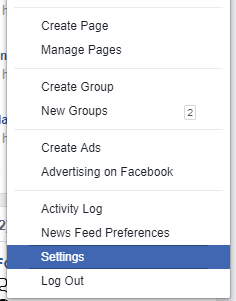
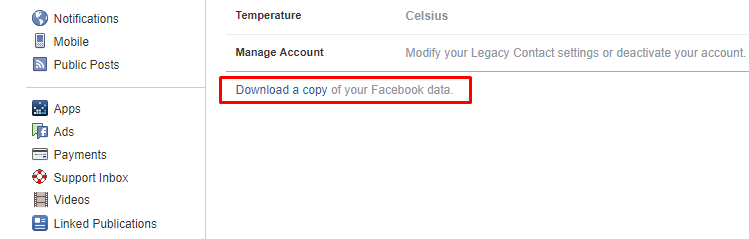
I know you've been wondering whether to join Elon Musk and Brian Acton in the #deletefacebook squad or keep using Facebook, either ways I think you should have a look at the data Facebook has about you first. I'll be honest quitting Facebook isn’t that easy! Especially, when you have different reasons to stick to the blue network - groups, old friends, and more.There's one easy method to get hold of the data Facebook has stored over the years you been on the platform. So, let’s have a look at what the company knows about you. Here’s what you need to do to download all the data Facebook has stored Step 1. First of all, sign-in to your Facebook account from your desktop or activate desktop view on your mobile browser and then go to your Facebook Settings page. https://techviral.net/wp-content/uploads/2018/03/Facebook-1.png Step 2. You need to look carefully at the General Section, there you need to click on “Download a copy of your Facebook data” https://techviral.net/wp-content/uploads/2018/03/Facebook-2.png Step 3. Now you will be redirected to another web page, where you need to click on the “Download Archive” button. https://techviral.net/wp-content/uploads/2018/03/Facebook-3.png Step 4. You will be asked to enter your Facebook password and the download will start automatically. Or the download link will be sent to your email. Once you got the Facebook data, you need to open the ZIP file and then run the HTML file called index. This will open up in your web browser where you can view all your Facebook data. Well, the Facebook data file contains your profile information, messages, videos, photos, timeline posts, friends list and much more. Not only these, it also shows your Facebook sessions, connected apps, advertisement topics that are related to you. Nevertheless, I am definitely not quitting Facebook. 36 Likes 9 Shares |
| Phones › Re: Nigerians And Kenyans: Who Pays More For Data Services? by NaijaTechGuy(op): 2:18am On Mar 25, 2018 |
Spygadgets19:Okay... It's all good though. |
| Phones › Re: Oukitel C8 (4G) - An Affordable 2GB Low End Smartphone -full Review And Unboxing by NaijaTechGuy(op): 2:17am On Mar 25, 2018 |
Dam5reey:Jumia excluded the shipping costs. Gearbest on the other hand can ship the phone to you within 7-14 days for free. And there's also a 7% off coupon code for the device sha.. I think Gearbest shipping is a little bit more reliable. |
| Phones › Re: Oukitel C8 (4G) - An Affordable 2GB Low End Smartphone -full Review And Unboxing by NaijaTechGuy(op): 2:13am On Mar 25, 2018 |
Tochyodiks:Check the review video.. or check my blog |
| Phones › Re: Oukitel C8 (4G) - An Affordable 2GB Low End Smartphone -full Review And Unboxing by NaijaTechGuy(op): 2:12am On Mar 25, 2018 |
MrBONE2:Nope |
| Phones › Re: Oukitel C8 (4G) - An Affordable 2GB Low End Smartphone -full Review And Unboxing by NaijaTechGuy(op): 9:21pm On Mar 24, 2018 |
Dam5reey:For the 3G variant not the 4G |
| Phones › Re: Nigerians And Kenyans: Who Pays More For Data Services? by NaijaTechGuy(op): 10:40am On Mar 24, 2018 |
Spygadgets19:If you have a 4G enabled phone. They have unlimited plans N500 night plan for 2 days, N1500 plan for 3days, N3500 for one week. For their normal data plan they have is 1000 - 2GB but with the current WaWu promo, you'll get 10GB of data for registration and 500% Bonus on all regular data plans for a year, So you'll get 12Gb for N1000 |
| Phones › Re: Oukitel C8 (4G) - An Affordable 2GB Low End Smartphone -full Review And Unboxing by NaijaTechGuy(op): 3:33am On Mar 24, 2018 |
Source - http://www.naijatechguy.com/2018/03/oukitelc8-4g-full-review.html Link to get the device - https://www.gearbest.com/cell-phones/pp_1124585.html?wid=11&lkid=13372835 cc mynd44 |
| Phones › Oukitel C8 (4G) - An Affordable 2GB Low End Smartphone -full Review And Unboxing by NaijaTechGuy(op): 3:24am On Mar 24, 2018 |
I got the Oukitel C8 review unit a couple of weeks ago and I must say that during my use of the device in the past couple of weeks I've been very impressed. Oukitel really made the C8 a solid phone. https://i.imgur.com/3eS3FJN.jpg So, without further ado let's unbox this amazing device together. WHAT'S IN THE BOX? OUKITEL C8 4G Instruction Manual Clear Transparent Pack Power Cable https://i.imgur.com/wDRkgpe.jpg OS,DESIGN AND DISPLAY The C8 runs on Android 7.0 Nougat and comes in 5 color variants ; I'll certainly pick the gold one in a blink of an eye. Although the C8 also has a 3G variant, this 4G variant keeps the same 18:9 ratio display but comes with improved graphics and performance. The Oukitel C8 weighs just 155g making it a very light device however it doesn't trim down the bezels. They look a bit chunky to me. Looking at the display , the colors are quite vibrant and the white balance is even, the display panel comes with a rather strange 1280 x 640 resolution giving the phone a low ppi of 260. Although 260 ppi is a bit low, we can forgive Oukitel because of the cost of the device. I know a couple of brands that the cost of their logo being on a product is higher than the cost of this phone . I would have preferred having a higher resolution on this phone though. Like most devices it has a protective glass and strange enough it's not the popular Gorilla Glass we all know. Oukitel decided to go with Dragontail Glass. It's not something Merlin conjured from a magic spell. Dragontail glass is actually the Japanese equivalent of gorilla glass. I won't bore you with the technical details but you and I know that a Dragon will definitely whoop a Gorilla's ass any day. Probably when we exempt King Kong. However, one little thing that I really don't like about the device is the fact that the charging point is placed on top of the device so if you are a fan of charging docks, your phone is going to be upside down when charging PERFOMANCE The C8 's performance like most devices in it's price range can be rated as average. I didn't experience any lags while using the phone and multi tasking is very smooth. The phone runs on a MediaTek 6737 CPU. It also comes with 2GB of RAM and 16GB of onboard storage. The storage can be expanded up to 64GB. Coming to graphics, It has an ARM made Mali-T720 GPU which is a low-end GPU (graphics processing unit) that can play almost all the graphically intensive Android games. The C8's low resolution helps with this since there are less pixels that need pushing around. However, if you are a heavy gamer, the C8 may struggle to keep up but if you're a just an average smartphone user , the C8 will serve you well. Keeping the lights on is a removable 3000mAh battery. So here's a quick recap of the specs in the performance department - 2GB RAM 16GB Internal Storage (expandable to 64GB via micro SD) Mali-T720 GPU 3000mAh Battery CAMERA The C8 comes with a 13MP rear camera and a 5MP front camera . There's an LED Camera to support both cameras. I'll rate the C8's camera 5/10 because it doesn't perform very well in low light situations but it's quite okay during daytime shots. Although some of the day time shots tend to look a bit grainy when zoomed in but it's quite okay. Here are a couple of shots I took on the C8. (P.S - If you want to see the video quality , you'll have to watch the Review Video at the end of the post) https://i.imgur.com/LZHSqPx.jpg https://i.imgur.com/Os5uyjX.jpg https://i.imgur.com/ELRH6yv.jpg https://i.imgur.com/uVq5ewu.jpg https://i.imgur.com/lJSMODn.jpg The camera also supports Geotagging, Multiple Shots, Autofocus and more. NETWORK AND CONNECTIVITY The phone has a dual SIM slot - One Micro Sim and One Nano SIM. There's support for LTe,WCDMA,HSPDA and GSM. Here are the supported LTe Bands - 800,1800,2100,2600Mhz. This means that it supports 4G on MTN,9mobile, Airtel , Smile and Ntel. It also supports VoLTe( Voice Over Long Term Evolution). This means that you can make calls on networks with Volte support like Ntel. The advantage of VolTe here is this - Normally on phones without Volte support , your device has to switch to 3G to make calls then switches back to 4G when you need to use data services. The constant switching between 3G and 4G will run down your battery faster. Also having VolTe means you get to make calls faster and hear the person on the other side in HD. SECURITY When it comes to security the C8 is definitely no slouch. It has a finger print scanner that unlocks within 0.1 seconds and it's accuracy is top notch. You can add up to five finger prints, so if you wish to add all of your fingers you can do that easily. The fingerprint is combined with the standard security as a secondary layer of security .(PIN, Password, Pattern). SPECS SHEET Brand – Oukitel Model – C8 4G Device Type – Android 4G Smartphone CPU – Quad-Core 1.3GHz ARM Cortex-A53 Chipset – MediaTek MT6737 GPU – ARM Mali-T720 MP2, 600MHz, 2-Cores Camera – 13 Megapixels with Single-LED Flash and AF Rear Camera | 5 Megapixel Front camera with LED Flash Memory – RAM- 2GB LPDDR3 | ROM 16GB External Memory Support up to 64GB Display – Screen size 5.5 inches IPS Display (1280 x 640 Pixels) Battery – Removable 3,000mAh Lithium-Ion SIM – Dual SIM (Micro + Nano), Dual Standby Sensors – Proximity Sensor, Accelerometer, Ambient Light, Fingerprint Color – Gold, Black, Rose-Gold, Blue, Purple Operating System – Android 7.0 Nougat I/O Interface – 1x Micro SIM Card Slot, 1x Nano SIM Card Slot or microSD/TF Card Slot, Micro USB Port, 3.5mm Audio Out Port, Power Button, Volume Button, Microphone, Speaker Dimensions – 70.6 mm x 147.0 mm x 10.2 mm Weight – 155 Grams (With Battery) Versions – 2GB/16GB More Feature – Metal+Polycarbonate Body Design, LTE 50 Mbps, HSPA plus, LTE CAT4 150 Mbps Download, Computer Sync, OTA Sync, Tethering, FM Radio, Bluetooth, Rounded Edges, 2.5D Curved Glass Screen, 5V/1A Charger Output Power, Infinity Display, 18:9 Aspect Ratio. MY VERDICT The Oukitel C8 offers us so much for less and although it packs some bezels, Its plastic finish and shape makes it a phone that is easy to handle and the best for watching movies. The sound quality is also super .and believe me any device that offers you all that for less than $100 is definitely the device you ought to go for. Here's the review video below - https://www.youtube.com/watch?v=z8mGd1_MVbQ https://www.youtube.com/watch?v=N-CT2arTrZI PRICING The Oukitel C8 costs N39,000 / KSH 11,000 but Gearbest is offering you 7 percent off this device if you purchase it from them. It comes with free shipping as well and you'll get a tracking number as well. Use this coupon to get 7 percent off discount - GB7%OFF (Valid Till March 30 , 2018) |
| Phones › Re: Nigerians And Kenyans: Who Pays More For Data Services? by NaijaTechGuy(op): 12:26am On Mar 24, 2018 |
Spygadgets19:Use Ntel |
| Phones › Re: Nigerians And Kenyans: Who Pays More For Data Services? by NaijaTechGuy(op): 12:06am On Mar 24, 2018 |
Brygsn1122:Thanks. I'll check this out. |
| Phones › Re: Nigerians And Kenyans: Who Pays More For Data Services? by NaijaTechGuy(op): 12:04am On Mar 24, 2018 |
Mariangeles:It's fast but I had to switch to NTel for better services. |
| Phones › Re: Nigerians And Kenyans: Who Pays More For Data Services? by NaijaTechGuy(op): 12:02am On Mar 24, 2018 |
pokipoki:Hehe.. I forgot to add that.. You're very correct on that |
| Phones › Re: Under ₦40000 Mobiles With Infinity Display And 4G Connectivity by NaijaTechGuy(m): 10:35am On Mar 23, 2018 |
Lilywang:The device arrived in good condition. You can definitely depend on Gearbest. It took about two weeks. 1 Like |
| Phones › Re: Nigerians And Kenyans: Who Pays More For Data Services? by NaijaTechGuy(op): 10:19am On Mar 23, 2018 |
SenR:At least it's faster 10 Likes |