Cutezt's Posts
Nairaland Forum › Cutezt's Profile › Cutezt's Posts
1 2 3 4 5 6 7 8 ... 58 59 60 61 62 63 64 65 66 (of 99 pages)
 Politics › Re: Mechanics , Touts, Hotels Tops Beneficiaries Of Lagos Island Flood by Cutezt(m): 3:11pm On Jul 10, 2017 |
NwaAmaikpe:Somebody cover his mouth, I repeat cove...... 23 Likes
|
| Computers › Re: How To Turn Your Windows Pc Into A Tethering Hotspot by Cutezt(op): 10:52am On Jul 10, 2017 |
smartty68:Easy, all you have to do is go to your network connections again, select the virtual network ie the local network connection (not the connection with Internet o) , click the sharing tab and check allow other devices connect to this device.. This time, it will work, I had similar issues until I did the above.. 2 Likes |
| Computers › How To Turn Your Windows Pc Into A Tethering Hotspot by Cutezt(op): 10:06am On Jul 10, 2017 |
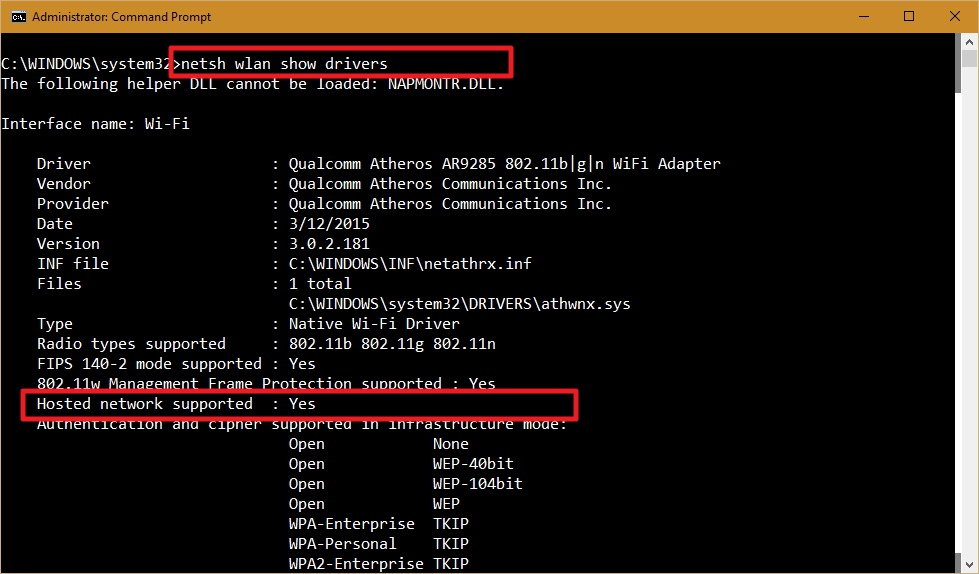
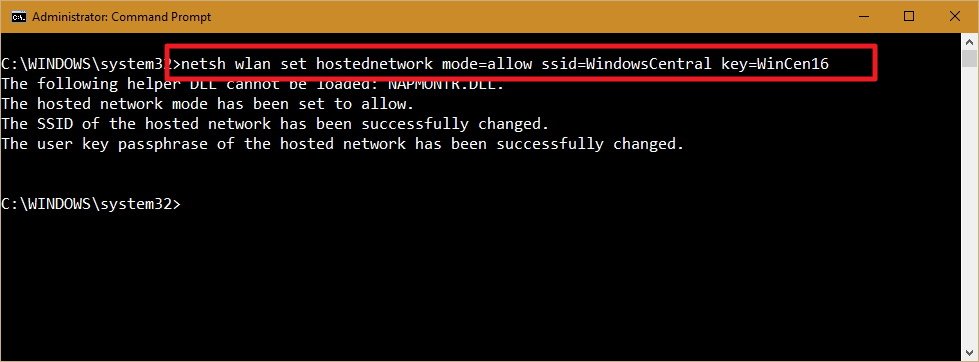
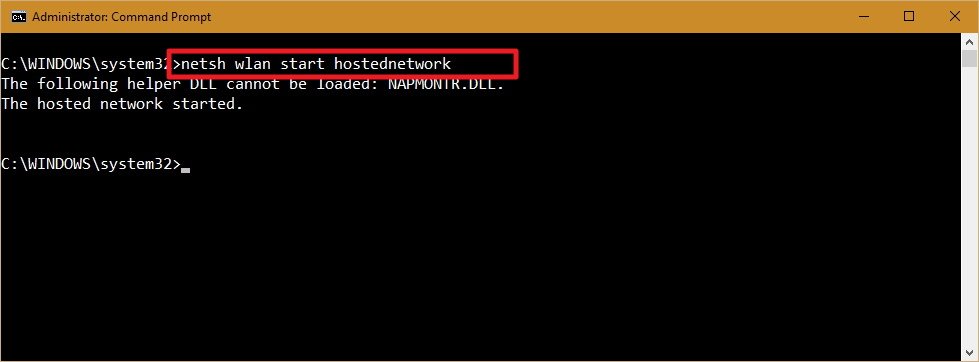
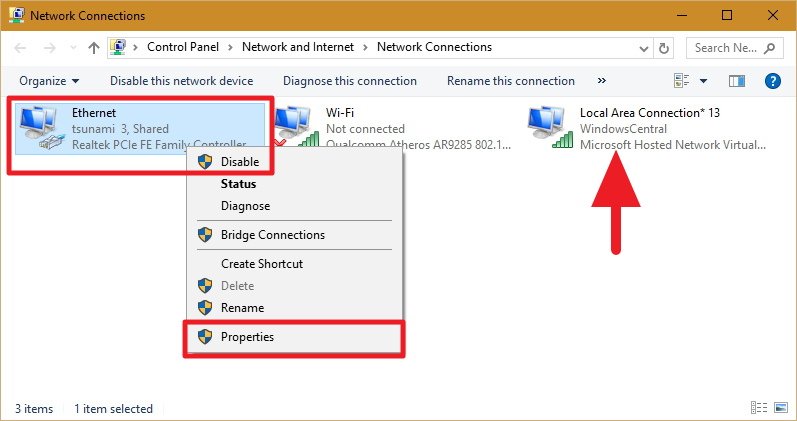
Windows 10 incorporates an element called "Hosted Network" that enables you to transform your PC into a wireless hotspot, and this guide we'll demonstrate to you generally accepted methods to do it. Regardless of whether you're connecting to the Internet using a wireless or wired connector, like in the old days, Windows 10 permits you to impart an internet connection to different gadgets with a component called "Hosted Network". Hosted Network is an element that comes included with the Netsh (Network Shell) charge line utility. It's was beforehand presented in Windows 7 , and it enables you to use the operating system to make a virtual wireless connector – something that Microsoft calls "Virtual Wi-Fi" — what's more, make a SoftAP, which is a product based wireless access point. Through the mix of these two components, your PC can take its Internet connection (be it an ethernet connection or hookup through a cellular adapter) and offers it with different wireless gadgets — basically going about as a wireless hotspot. In this Windows 10 tutorial, we'll walk you through the steps to check if your network connector supports the element,and how to arrange and activate a wireless Hosted Network. Take after this guide you'll have to open the Command Prompt with administrator rights. To do this, use the Windows key + X shortcut key, and select Command Prompt (Admin) . How to check if your wireless connector supports Hosted Networks in Windows 10 While a few connectors incorporate support for Hosted Network, you will initially need to confirm your PC's physical wireless connector supports this element using the following command: NETSH WLAN show drivers https://www.windowscentral.com/sites/wpcentral.com/files/styles/large/public/field/image/2016/02/netsh-show-drviers-hosted.jpg?itok=hCMhm6Uo On the off chance that the results yield says Hosted network supported: Yes at that point you can proceed with the guide. On the off chance that your wireless connector isn't supported, you could attempt using a USB wireless connector that supports the feature. Step by step instructions to make a wireless Hosted Network in Windows 10 Making a wireless hotspot in Windows 10 is moderately direct — don't give the long story a chance to panic you. Basically take after the steps underneath to design a wireless Hosted Network: Enter the PC command prompt with administrator privileges, in the Command Prompt (Admin) type in the following command: NETSH WLAN set hostednetwork mode=allow ssid=TutsMap Blog key=tutsmapblog https://www.windowscentral.com/sites/wpcentral.com/files/styles/large/public/field/image/2016/02/set-hostednetwork-windows-10.jpg?itok=u34yAGd7 Where the SSID would be the name you want to see your your wireless network have when trying to share its connection with another device, and the passphrase is the security key or password you want to use to connect to your network. (please note that the passphrase has to be at least 8 characters long.) By entering the above command, you have successfully created a Hosted Network, now all you need to do is to enter the following command to make it active: NETSH WLAN start hostednetwork https://www.windowscentral.com/sites/wpcentral.com/files/styles/large/public/field/image/2016/02/start-hostednetwork-windows-10.jpg?itok=cXlIaH9C At this point, you have successfully activated your hosted network but any WiFi enabled device can not see or connect to it just yet, finally, the last thing you need to do is to share an Internet connection using the "Internet Connection Sharing" feature from a physical network adapter. Enter the Windows key + X keyboard shortcut to open the Power User menu, and select Network Connections. right-click the NETWORK Adapter with an internet connection – this can be a Ethernet, modem, or WiFi network — select Properties . https://www.windowscentral.com/sites/wpcentral.com/files/styles/large/public/field/image/2016/02/network-connections-ethernet-properties.jpg?itok=KhG_ObaG Note: In the rundown of Network Connections, you should now see a new our newly created Microsoft Hosted Virtual Adapter which is labeled as Local Area Connection, and with the SSID name underneath. Now Click the Sharing tab and Check the Allow other network users to connect through this computer's Internet connection option. Next, from the Home networking connection drop-down menu choose the Microsoft Hosted Virtual Adapter. https://www.windowscentral.com/sites/wpcentral.com/files/styles/medium/public/field/image/2016/02/internet-connection-sharing-windows-10.jpg?itok=59GJr5U0 Now click OK to complete your setup. At this point in time, you should be able to see and connect with any wireless enabled device to the newly created virtual network, and with it, you will be able to access to the internet. I used this method to connect other devices to my pc at work, since my boss has decided not to give me the password for our router,if you are running an earlier version of Windows, sorry, this may not work for you, I will write that of Windows 8 on this blog in days to come, please stay with us. http://tutsmap..com/2017/07/how-to-turn-your-windows-pc-into.html Drop your questions below. 14 Likes 7 Shares |
| Travel › Re: Jos: A Land Of Magnificent Beauty by Cutezt(m): 9:59am On Jul 10, 2017 |
rengsho:Sorry it was a case of misunderstanding, the above was what you wrote after quoting that guy, so it seemed like you were saying the guy doesn't know what he is saying. 1 Like |
| Phones › How To Get Free 750 MB For Every N200 Recharge On Etisalat by Cutezt(op): 10:54pm On Jul 09, 2017 |
Nigerian telecommunication companies are slowly feeling the heat of the recession, everything is dropping, from the rate of data subscriptions, to the amount of recharge cards bought daily, to even the abandonment of Sim cards by people who own multiple Sim cards, who will blame us really? The recession is not smiling at anyone, even the rich are feeling the heat. It started with Glo, and now, Etisalat has joined the bandwagon, It appears Etisalat has joined Glo in the Welcome back reward promo notwithstanding the difficult experiencing difficult circumstances they are facing at the moment with the takeover by some Nigerian banks. Some weeks ago, Etisalat introduced a plan which gives you unlimited downloads at a given time according to the plan you choose, it is absolutely cheap with the costliest bring N200,which I wrote about on this blog, and now, they have introduced the welcome back plan. https://aimtoget.com/uploads/thumbnails/How-to-get-750-MB-of-Data-with-Just-N200-on-Etisalat-_1.jpg HOW DO I GET FREE 750 MBA FOR MY RECHARGE? Those qualified are just subscribers that haven't used their Etisalat SIM card for no less than one month. They'll get 750MB from Etisalat when they recharge N200 air time or more. This offer is open till Etisalat chooses to close it. There's no select in code for this. So on the off chance that you have an Etisalat SIM card simply clean it and insert it back in your phone, Or, on the other hand you could just abandon your sim till one month from now. http://tutsmap..com/2017/07/how-to-get-free-750-mb-for-every-n200.html Lalasticlala seun mynd44 Dominique |
| Travel › Re: Jos: A Land Of Magnificent Beauty by Cutezt(m): 10:47pm On Jul 09, 2017 |
rengsho:How will you say they are the majority? Where are the Beroms, anaguta, afizere etc, do you know that aside bauchi road, angwan rukuba, angwan rogo, angwan rimi, and a few other places, there is no Hausa again, so you mean the Hausas are more than the Christians in Jos? I am shocked. |
| Travel › Re: Jos: A Land Of Magnificent Beauty by Cutezt(m): 10:34am On Jul 09, 2017 |
rengsho:have you been to Jos before? I spent 21 years of my life in Jos, I am from Plateau state, and still live there but work in Lagos, Hausas have never, will never, and shall never be the majority. |
| Travel › Re: Jos: A Land Of Magnificent Beauty by Cutezt(m): 10:31am On Jul 09, 2017 |
sonofjos:What are you saying? Everyone knows Berom are the true natives and the largest tribe in Plateau state, stop letting bigotry blind you, 5 per what? You must be the biggest joker on earth, afize what? Even both tribes can't outnumber the Beroms. |
| Phones › The Best Call And Text Blocker Apps For Android by Cutezt(op): 8:57pm On Jul 08, 2017 |
While phones are intended to Foster communication, they may likewise be cause for a cerebral pain if used wrongly. One such route is through undesirable calls and texts, the Nigerian Communications Commission (NCC) introduced a unique code to block unwanted SMS and calls from our beloved service providers, soon enough, complaints began to arise as the code seemingly blocks all bulk SMS's too which is one of the major tools that employers and many others use to pass across information, well, instead of using the code and facing the downsides, we decided to provide you with an alternative,In the event that you are confronting this aggravation, at that point you require one of the following call blocking apps on your gadget,these apps don't delete texts messages, but saves them in the in app inbox where you can access them at anytime, these texts will not be seen in your phone inbox, your phone won't even notify you of a text, we'll, let's get to business. Best Call Blocking Apps Truecaller https://todaytechinfo.com/wp-content/uploads/2015/03/Truecaller-mobile-applicatio-logo.jpg Try getting some information about a call blocking app and the first to strike a chord will be Truecaller. In spite of the fact that it started as an app to identify callers that are not in your phone, it has developed to Should I Answer? https://img3.downloadapk.net/3/fc/0032fa_150.png While it is the strangest of names on our rundown, it is too the least complex up until this point. As opposed to depending totally on online phone number databases to present to you the list of the known spamming numbers, it likewise relies on the services of group individuals who update their records frequently. Once a number has been flagged a few times, you will be informed of its rating to choose the reply to Should I reply? Call Blocker https://img0.downloadapk.net/0/62/34041d_150.png Call Blocker does precisely what its name states, and it does it extremely well. It has a straightforward interface which has three boards named, Blacklist, Whitelist and Log. In the Blacklist are every one of the numbers one has blocked from calling them. The Whitelist has the rundown of the good or familiar contacts while the log has every one of the calls that came to your phone. Extreme Call Blocker [img]http://4.bp..com/-aDuesjWp4fY/VWRe6vdGOFI/AAAAAAAAAXk/lQbRig7OEOY/s320/Extreme%2BCall%2BBlocker.png[/img] This one is made for anybody serious about blocking undesirable calls from their gadgets. Despite the fact that it costs a little expense, it uses the extreme spam robocall and telemarketing call list given by the FCC (Federal Communications Commission). The FCC updates this list each week for the best genuine feelings of serenity. Other than that, one can make their own particular blacklist easily. Mr. Number Mr. Number is another strong app for those needing call blocking services. Other than the typical features of blocking calls and texts, it likewise offers automatic blacklisting of known scam numbers from contacting you. This will give you the tranquility of mind you have to use your gadget without irritating calls and texts. Hiya Hiya was at first called Whitepages Caller ID. The app had numerous useful features that users will love. To start with, it has a major database of numbers which are known to spam users. Additionally, it updates the list each now and again to give the user the most recent security from spammers. You can even add messages to particular numbers to help you to remember the peril they posture in the event that you press that call button or receive calls from them. These are the best call blocker apps you can have as at this time. Actually, you will just need any of these apps to remain trouble less given that they all work as expressed,all the apps can be downloaded from the Google play Store and are mostly free. Lalasticlala seun mynd44 Dominique http://tutsmap..co.ke/2017/07/the-best-call-and-text-blocker-apps-for.html |
| Phones › Re: How To Install Any Version Of Windows On Your Android Phone by Cutezt(op): 5:37am On Jul 08, 2017 |
directonpc: Mhizterauto: directonpc:He has answered the question, all you have to do is Uninstall the emulator and you are back on Android. |
| Music/Radio › Re: Fast Rising Nairaland Artist, Bungees, Sets To Shoot Tonight Video by Cutezt(m): 8:18pm On Jul 07, 2017 |
DRISKLEF:Nice jam bro.. |
| Webmasters › Re: Offer For Bloggers/webmasters: Easy Money From Me by Cutezt(m): 9:19am On Jul 07, 2017 |
great664:Oh, I am just starting, wanted to see how it will be before getting a domain name, getting one soon tho 1 Like |
| Webmasters › Re: Offer For Bloggers/webmasters: Easy Money From Me by Cutezt(m): 2:27am On Jul 07, 2017 |
| Webmasters › Re: Offer For Bloggers/webmasters: Easy Money From Me by Cutezt(m): 10:08pm On Jul 06, 2017 |
great664:Www.Tutsmap..com |
| Culture › Re: IRIGWE People, Come In Here. Irigwe Zulu Zulu. by Cutezt(m): 9:16pm On Jul 06, 2017 |
heskeyw:Woah, you took gote? Interesting, that is my native food, I love the modern version, the one garnished with ground nut, palm oil, Maggi, salt and biscuit bones, oh my, you are making me remember home, I don't know where I can get such in Lagos. |
| Crime › Re: Yahoo Boys Who Operate Fake Flight Booking Website Arrested In Ibadan by Cutezt(m): 10:12am On Jul 06, 2017 |
Waiting for ncan 1 Like 1 Share |
| Phones › Enjoy Cheap Unlimited Time Based Data With Blaze On App From Etisalat by Cutezt(op): 8:47am On Jul 06, 2017 |
In a world where data is one of the most in demand items, it is only right to have various forms of competition from the providers, Airtel previously introduced the time based unlimited Internet bundle plan, all was going well until they decided to shoot the price up, this discouraged so many users and I can tell that Airtel felt the impact by how many users they loosed, mtn followed with a more disappointing time based plan that is hugely capped, and now, it is the turn of Nigeria's fastest Internet provider "Etisalat", which have recently been the subject of a takeover by some Nigerian banks, the network provider have introduced their own version of the unlimited time based plan and they called it Blaze On . https://i.imgur.com/ylQmHJk.jpg Blaze on is an unlimited time based data plan introduced by Etisalat ng to all its new and existing subscribers, with this plan, you have the chance to buy time to download, surf or send whatever you want to send without being capped, the Blaze On service allows you to connect to the web for 10 mins to 1 hour for a fee of within N50.00 to N200. You can get 10 minutes for N50 , 15 minutes for N70 , 30 minutes for N120 or 1 Hour for N200. [img]https://3.bp..com/-_sN84XUeQH0/WVz5xcRkVbI/AAAAAAAAMso/y5rlNWmNAtMkirK_c9KCCGtRXBqKXOTVwCLcBGAs/s1600/Blazeon1.png[/img] HOW CAN I ACTIVATE THIS SERVICE? To Activate the blaze on service, you need to download the blaze on app here https://play.google.com/store/apps/details?id=ng.com.etisalat.fwd Setting up the application is quite easy, your Etisalat ng phone number is automatically detected by the app, but if it fails, you can also input your Etisalat mobile number in the mobile number field after which a unique registration code is sent to your mobile line, input the unique code sent to you in the application and that's it, you are done with the setup. NOTE- The application needs Internet access in order for it to work, WiFi, 2g,3g, 4g or any connection is acceptable. After setting up the application, you will be greeted by a screen with your mobile number and the account balance of your line. To connect to the web, simply select a plan of your choice and the plan charge will be deducted from your airtime balance, and you will be granted access to the Internet for the duration of the plan you purchased, once connected, a countdown begins and you will be able to connect to the web. However, as always with Nigerian network providers, fair usage policy applies. This plan is good for those who wants to download a large file online, considering how fast Etisalat network is, backed up by a good download manager like ADM, there is no stopping you, you can also send E mails watch movies and do more with this plan. http://tutsmap..com/2017/07/enjoy-unlimited-time-based-data-with.htmlLalasticlala seun mynd44 Dominique |
| Phones › Re: Say Goodbye To Unnecessary Data Usage With Triangle From Google by Cutezt(op): 8:42am On Jul 06, 2017 |
Olalekanbanky1:I downloaded it from apk mirror earlier but found out it was available on the playstore that was why I included the playstore link since people are more familiar with it, I have updated the link for 2 other download options above. |
| Phones › Re: Say Goodbye To Unnecessary Data Usage With Triangle From Google by Cutezt(op): 7:51am On Jul 06, 2017 |
Lalasticlala with this app, you can give any application a set time to use your data, eg 10 mins. |
| Phones › Say Goodbye To Unnecessary Data Usage With Triangle From Google by Cutezt(op): 7:49am On Jul 06, 2017*. Modified: 8:41am On Jul 06, 2017 |
Android is taking over, Apps are gradually and increasingly switching to the cloud age. Online streaming Applications like Netflix, YouTube and Spotify are quite large. Furthermore, pretty much each one of us is dependent on social networking. There's only one thing hindering you: and that is data. Unlimited plans are steadily on the decrease, generally smartphone users are struck, thanks to layered alternatives that some of the time make data usage more unpleasant than fun,have you ever had that feeling? While watching videos on YouTube, all your mind is preoccupied with is the thought of your data? If you have, then you know what I am talking about. As I will always say, Data is life, you will find it extremely hard to believe that some people are still struggling to control the amount of data their android gadgets gulps in a day, yes, it may seem weird with most already in the know of how to control their data usage on their devices, but some still don't. Android is a unique framework that is unique, In certain situations, some of its apps needs to be online in order to function well, data usage on Android may be classified into 2- Foreground Data - This is the data used while you are using the application or while the app is open, this in most cases is used by you. Background Data - "Background" reflects the data used when the app is running in the background. The later is what so many people have been struggling with, some will be wondering, how in earth did my data balance dwarf so fast? Some may even go as far as calling their network providers, but the background data feature is the silent perpetrator of the crime. Well, enough of the long stories, Google recently released an Android app that intends to control mobile data usage per application. This app is called Triangle and it is just at present, available in the Philippines. [img]https://tctechcrunch2011.files./2017/06/triangle.jpg?w=753[/img] This app is focused on the prepaid customers in the said nation who can normally just buy a specific sum of prepaid data. While the network providers additionally offer unlimited prepaid data offers, these plans are frequently throttled once the user surpasses a specific every day edge. Along these lines, controlling the mobile data usage of background applications could be a decent begin to guarantee that users will benefit as much as possible from their prepaid data. Amid the setup procedure, users are asked to present their mobile number to Google's service. After your mobile number has been verified by the world's no 1 company, the user will then get a reward of free mobile data as an registration bonus. Under the said remunerate, users could get up to 100MB of free mobile data from their bearer. Once the setup handle is proficient, users will be welcomed by a screen itemizing how much data is used and what rewards have been earned. The app too gives a breakdown of which applications used data and additionally those that did not. Also, Google incorporated a feature inside the app that enables the user to track how much data can in any case be used by the user. Triangle has a different tab committed to tracking, what's more, asserting reward data. In this tab, users will see the measure of reward data they were ready to procure in the day and what applications they ought to install keeping in mind the end goal to assert extra rewards. https://www.digitbin.com/content/uploads/Triangle-UI.jpg Likewise, Google is putting forth extra data rewards for using Google on either the Google app or on the Chrome browser. While this application presently just available in the Philippines, however, it can be downloaded into any Android gadget. Be that as it may, a portion of the application's key features, similar to the data rewards, are unavailable outside the said nation (Phillipines). it not just aides in giving the user a comprehension of which app used the most data, additionally an option to save data, thanks to its in-built data saver feature. This data saver helps in gathering info about which app uses the most data and gives an extra option to control how much data ought to be used. For example, an app can be set to use data for ten minutes, thirty minutes or, always. Features of Triangle Data Saver App by Google - You can see your current data usage - Use “Data Saver” to block unwanted data usage. - It helps you in an easy way to check your data balance and understand what apps are feasting, and barbecuing on your usage. - Data Saver helps you to allow few specific apps to use data for 10 or 30 minutes at a time, or always. With this app, huge and unnecessary data usage has no option but to go extinct. You can download the Triangle app on playstore or via http://www.apkmirror.com/apk/google-inc/triangle-more-mobile-data/triangle-more-mobile-data-0-7-1-release/triangle-more-mobile-data-0-7-1-android-apk-download/ http://www.apkmonk.com/app/com.google.android.apps.freighter/ https://play.google.com/store/apps/details?id=com.google.android.apps.freighter&hl=en Video review here https://www.youtube.com/watch?v=hlNVn8VLo0k Source http://tutsmap..com/2017/07/say-goodbye-to-unnecessary-data-usage.htmlLalasticlala seun mynd44 Dominique |
| Phones › Re: How To Install Any Version Of Windows On Your Android Phone by Cutezt(op): 6:42am On Jul 06, 2017 |
khalhokage:I installed Windows 8.1 on my device some weeks back before writing this tutorial, however, I went back to my android OS because I am not a fan of Windows, there are endless things I can do with my android so why should I lock myself up in the windows world? After all I have a windows pc, I don't think I need additional windows. The images above should be convincing enough.
|
| Phones › How To Install Any Version Of Windows On Your Android Phone by Cutezt(op): 12:08am On Jul 06, 2017*. Modified: 7:22am On Jul 06, 2017 |
Ever needed to run Windows XP on your Android Gadget? Ever thought of running desktop OS on your mobile? A large number of people don't have any acquaintance with this but it is really conceivable to run the Windows XP on your Android gadget. Indeed in spite of the fact that it runs slowly, it is an amazing and impressive feature, so read this tutorial carefully to gain some new useful knowledge you never knew your Android can to do. https://cdn.instructables.com/ORIG/FJX/6AZA/I8FQX02J/FJX6AZAI8FQX02J.jpg By following this article and using couple a of basic systems techniques, you can run XP on your gadget, and this will surely and clearly impress your friends. REQUIREMENTS NEEDED TO RUN WINDOWS OS ON MY MOBILE Before you begin this venture, you require certain things to be done which are given beneath and the other thing is that if your phone is rooted then this is not going to work Also, make sure the below listed requirements are checked At least 512MB of random access memory (RAM) is needed, but 1GB ram is recommended for it to run smoothly. At least 2GB memory card space. Limbo Pc Emulator, Limbo Windows emulator for android is a software or a program for android. It is used to Run the Windows operating system in an Android gadget. Henceforth, you can get to every one of the features of a window like Windows XP, Windows 7, windows 8 and so on in your Android gadget. https://play.google.com/store/apps/details?id=fr.energycube.android.app.com.limbo.emu.main&hl=en Download Limbo PC Emulator QEMU x86 Here or from playstore. The image file for the specific windows OS needed (For now, we are only able to get the ones provided below as Microsoft are making it difficult by removing it from Google Drive) https://yadi.sk/d/20xpNPLyiYzTL Download Windows 7 Img file Here https://drive.google.com/uc?id=0BwOfbMzsiBVdcm9EY2RaNzZZVnc&export=download Download Windows XP Img file Here https://mega.nz/#F!HkxUgIoB!rdW3MbmQwkTcsFaebrwYtA https://www.mediafire.com/folder/1328glrs31jdj/Documents Download Windows 8.1 Img file Here When you have checked the list of requirements, then we may begin the tutorial. Make sure you have downloaded the Limbo pc emulator app on your phone, if you have, then Run the limbo app and close immediately, it is required you do this in order for the Limbo app to create a Limbo Folder on your gadget. 2.open your file manager, scroll to your internal memory, search for the folder created by limbo on your device, and afterward open the limbo folder and paste the image (img) file you downloaded earlier to the folder. 3. Open limbo app , tap on load machine and select new, at that point enter the name you wish to shoulder on your os. 4. Tap on user interface and select SDL 5. Tap on architecture and select x86 6. Tap on cpu model and select quemu 32 7. Tap on cpu cores and select as either 1,2,3 or 4 depending on your device capability. 8. Tap on RAM and select 512MB (depending on you) 9. Tap on storage and select harddisk A, open and scroll to were you pasted your image file (limbo folder) and afterward, select it. 10. Tap on VGA Display and select STD 11. Tap on orientation and select landscape then, under the Advanced options, check mark the Fullscreen option and leave the rest as it is. 12. Presently, scroll up and tap play. Wohaaaaa, your windows has successfully been installed on your Android phone https://i.imgur.com/86XkWpN.png https://i.imgur.com/j2EGHKI.png [img]https://1.bp..com/-qAFk8HuGGaA/WPCBwsNRNGI/AAAAAAAABYg/rfyX4W1XCKAffvEePEnoPryGEkILf78egCLcB/s320/hfhhghgkkifruufhjfjjfllksdop.jpg[/img] Now you can install softwares and use them as you want, surely, when it comes to operating systems, android is miles ahead of others You can watch the video tutorial here https://www.youtube.com/watch?v=lSoPR8HZBRY&itct=CCwQpDAYCSITCPLJopue89QCFVmGVQodHHwB-zILYzQtdmlkZW9zLXVaGFVDRzk0R00xU3l1dTYtU0Rha09zcDcyQQ%3D%3D&client=mv-google&gl=NG&hl=en http://tutsmap..com/2017/07/how-to-install-any-version-of-windows.html Lalasticlala seun mynd44 Dominique 5 Likes |
| Celebrities › Re: Patrick Elis Poses With His Range Rover by Cutezt(m): 3:35pm On Jul 05, 2017 |
After Clarence, I look up to this guy, Lord, help me to make history in this field of cinematography in Jesus name, that has always been my prayer. |
| Music/Radio › Re: Nigerian Musicians Who Are ‘jos’tified by Cutezt(op): 3:26pm On Jul 05, 2017 |
Emjay1310:Jos is surely the home of talents in Nigeria. Lalasticlala |
| Phones › Re: Easiest Way To Rename And Sort All Your Downloaded Images in bulk by Cutezt(op): 3:19pm On Jul 05, 2017 |
paragon40:You are welcome bro, Lalasticlala seun mynd44 Dominique 1 Like |
| Phones › Easiest Way To Rename And Sort All Your Downloaded Images in bulk by Cutezt(op): 2:37pm On Jul 05, 2017 |
There are certain times where you have loads of files to rename, either you want them to have a unique name, or the files are probably in the wrong format, eg, any downloaded file from websites like Nairaland.com does come in ".0" format which was probably made so for security reasons, when you download such files, it is usually not found in your gallery, you might be wondering, where on earth is the picture I just downloaded from Nairaland? You may never see it bit it is there lying in your phone,just in the wrong format so you can't see it, some people have resorted to screenshoting which is good but in most cases, you are not getting just the image, but some parts of Nairaland which might not be cool. Let's look at another instance where you know how to rename your pictures to the right format, renaming them one after the other can be one hell of a stressful task, you will probably get tired and stop on the way, I once downloaded more than a hundred images from Nairaland and was renaming one after the other but got tired on the way, so today, I will be introducing you to this unique app for every Nairalander that is addicted to downloading those extremely funny memes, write ups, odunlade olukola pix and more. Bulk Rename Wizard is a free renaming utility app for Android that gives better approach to rename many files and folders with quick, simple and lesser operations. It helps you rename those thousands of files in a less stressful manner. Features: Rename various files and folders with numerous adaptable criteria. Unleash your creativity, the effective criteria developer permits you construct rename tasks and preview results in a split second. Save, load and edit rename tasks. Export and import rename tasks. Process in background, please check notification bar for progress. Receive and rename shared files from different apps (e.g. Gallery). Etc How do I bulk rename my files? Use the strategy beneath to rename bulk photos on your Android tablet or phone. 1. Install Bulk Rename Wizard app (from Klangapp- Dev or playstore). 2. Begin Bulk Rename Wizard https://www.johnantell.co.uk/_/rsrc/1461616511711/renaming-digital-photos-using-bulk-rename-wizard/Bulk%20Rename%20Wizard%201.jpg 3. Tap Create Rename Task , then Add rename criterion, then click Add rename criterion , the next menu opens a lot of options for you, you can go through them, but for this tutorial, we will be using the Edit filename Extension option and click New filename extension ,a textbox will appear below, insert your extension there, it might be ".Jpeg, .Png, .Gif etc depending on your file . In the next screen, tick Edit filename extension and click next. In the next screen, input your task name to save the rename task Now you can bulk rename any files you want by simple opening your Bulk rename app, click Rename, select Rename Files- Add Files select your files by marking /checking them (Note : it will be easier if you move all the files you intend renaming, into a new folder) then after marking them, select Load Rename Task, You will see your saved task name there, click it, go through the other options click Rename then wait for the renaming to be complete, it can rename upto a 100 files in 30 seconds. If you have issues understanding this tutorial, watch the video https://www.youtube.com/watch?v=dB152SDrG2g&itct=CBkQpDAYACITCKikgcj78NQCFRGWVQod9mcAO1ISYnVsayByZW5hbWUgV2l6YXJk&hl=en&gl=NG&client=mv-google You may also drop your questions below. http://tutsmap..co.ke/2017/07/how-to-rename-many-files-in-minutes.html Lalasticlala 13 Likes 3 Shares
|
| Culture › Re: IRIGWE People, Come In Here. Irigwe Zulu Zulu. by Cutezt(m): 8:30pm On Jul 04, 2017 |
heskeyw:Well I am from Plateau state, Berom by tribe but my mum is irigwe, I hear and speak irigwe well, hope I can represent? |
| Music/Radio › Re: Nigerian Musicians Who Are ‘jos’tified by Cutezt(op): 6:03pm On Jul 03, 2017 |
Cobhams Emmanuel Asuquo was born on the 6th of January, 1981 in Jos, Plateau state, Nigeria. He is a born blind Nigerian musician, producer and songwriter. He was signed on with Sony ATV London as a songwriter in 2005. In 2006, he set up his record label after working with Questionmark Entertainment as Head of Audio Productions. He is the head of productions and CEO of Cobhams Asuquo Music Productions (CAMP). He has worked with Bez Ikakula, Stan Iyke, Timi Dakolo, omawumi and Banky W amongst others. Lalasticlala let the world know that J Town is the place for talents in Africa. |
| Music/Radio › Re: Nigerian Musicians Who Are ‘jos’tified by Cutezt(op): 5:59pm On Jul 03, 2017 |
Asa Born Olubukola Elemide on 1 of September 1982 in Paris, France is a Nigerian-French singer and song writer. She was born to father, Akin Elemide who was a telecoms engineer at the time. Asa grew up as the only girl child with 3 brothers. Her family moved back to Nigeria when she was 2 years old and she grew up in FESTAC. Asa spent her formative years in the city of Jos, Plateau State, in northern Nigeria before returning to Lagos at the age of 18. Asa’s mother enrolled her in the prestigious Corona High school Lagos and went further to federal government college in Jos and moved back to Lagos to attend Lagos State University and was enrolled in the department of Theatre Arts and Music. Lalasticlala |
| Music/Radio › Re: Nigerian Musicians Who Are ‘jos’tified by Cutezt(op): 5:45pm On Jul 03, 2017 |
Mista Seth: Mista Seth born Real name Retyit Seth Maxwell Dayok is a skilled sound engineer from the prestigious SAE, a Jos based musician unique producer, prolific song writer and a gifted vocalist who has brought out the best in many- Rugged Man, Solomon Lange, Mode 9, Six foot plus, Samsong,Terry Da Rap Man (TR), Steve Williams among many. His work speaks for itself as many say that he is a master of producing hits, some say he is the next big thing; others call him a blessing, a great leader, a force that is taking over the entertainment industry in Africa; he is all those and more, and also sees himself as a messenger ready and willing to do the master's wish. |
| Music/Radio › Re: Nigerian Musicians Who Are ‘jos’tified by Cutezt(op): 5:40pm On Jul 03, 2017 |
Magnito is a Lagos based rapper, who has released two singles, Kaka and Medicine girl. The upcoming star recently penned a N20 million brand ambassador contract with Tingo Mobile. Magnito, whose real name is Mohammed Adamu, was born in Abuja but moved to Lagos to pursue his dream of being a rapper. A Business Management graduate from the University of Jos, he discovered his talent for rap at school. He is signed to Big E Music, owned by Eddie Winebar in Port- Harcourt. He raps in Hausa and English and pidgin, some of his hits include If I get money ehnnnn, as I get money ehnnnn ft Patoranking, Kaka ft timaya, etc |
| Music/Radio › Re: Nigerian Musicians Who Are ‘jos’tified by Cutezt(op): 5:35pm On Jul 03, 2017 |
P-Square Twin brothers, Peter and Paul Okoye were born in Plateau state capital city, Jos. The story of P square began in St. Murumba secondary school, a small Catholic school in Jos, Nigeria. Twins Peter and Paul joined their school music and drama club where they began singing, dancing, and mimicking songs by MC Hammer, Bobby Brown and Michael Jackson. P Square is one of the most decorated music artiste in Africa Bez Real name Emmanuel Bez Idakula was born in 1983, in Jos in central Nigeria. He grew up in a musically inclined family, listening to gospel and country. Bez lost his father, who was a politician and Gubernatorial Candidate for Nasarawa State in Nigeria, at the age of twelve. His family’s finances crashed as a result and he could hardly afford to pay the rest of his tuition for high school. An anonymous person paid for his High School education. In College, he received help paying his fees, as well. Bez graduated from upscale university Covenant University. Bez married BolatitoLadoja, daughter of former Oyo State Governor Rasheed Ladoja, in January 2014. EFe Born on February 25 1993, Michael EfeEjeba hails from Delta State, Nigeria but grew up in Jos, Plateau where he attended Federal Government College, Jos. He is a graduate of Economics from the University of Jos. Efe is a Nigerian recording artiste who prefers to rap in pidgin. In 2010, he went to a studio with his friend and producer Duktor Sett, who was also a starter like himself to record and from there his career as a professional artiste started. He later left Jos for Lagos where he followed up his ambition with an extended play titled Lagos shortly before the Big Brother Nigeria show. Efe was known for his realness and that made him the most popular out of all housemates who participated in the reality show, having over 60% of fans compared to the other housemates. He was awarded the Grand price of N25 million and a SUV which was presented to him by the host and one of the Housemates of Big Brother Nigeria first season Ebuka Obi- Uchendu. He always attributes his success to his humble beginning in Jos which makes him ‘JOSt’ified. Lalasticlala seun mynd44 Dominique |


 ?


1 2 3 4 5 6 7 8 ... 58 59 60 61 62 63 64 65 66 (of 99 pages)